The best student laptops Google Chromebooks are the ones that make schoolwork simple: they start fast, they last a school day, and they keep notes, homework, and video calls in one place. A Chromebook runs ChromeOS, which is Google system for laptops, and it is built around the browser, Google Docs, and the cloud, which is where most student work lives. The six Chromebooks in this guide were picked because their listing titles state the exact brand and model, the processor, the memory, and the storage, and every listing was checked in full before it was linked.
A Chromebook is different from a Windows laptop, and the difference is the point. A Windows laptop runs Windows software, while a Chromebook runs ChromeOS and web apps, and it starts in seconds, updates itself, and needs no antivirus to install. A student who writes essays in Google Docs, watches lessons on video, and takes notes in a browser will find a Chromebook faster and simpler than a Windows laptop, while a student who needs Windows-only software will not.
This guide covers six student Chromebooks: a touchscreen model for note-taking, a convertible model for tablet work, a long-battery model for a full school day, a powerful Chromebook Plus model with large storage, a secure convertible with a fingerprint reader, and a big-screen model for desk work. All six are sold as new listings, with the model and the specifications stated in the title, so the comparison is honest.
A Chromebook is also a laptop that must match the student who uses it, and the buying decision is only half the job. The other half is the Google account, the offline work, and the care that keeps it working for years. This guide covers the buying choice first, then the setup, the use, and the mistakes that leave a student with a laptop that does not fit the schoolwork.

In this guide
Quick picks: best student laptops google
| # | Product | Where to buy |
|---|---|---|
| 1 | Lenovo Flagship Chromebook 14 touchscreen | Check on Amazon |
| 2 | Acer Chromebook Spin 314 convertible | Check on Amazon |
| 3 | HP 14 HD Chromebook laptop for students | Check on Amazon |
| 4 | Acer Chromebook Plus 514 laptop | Check on Amazon |
| 5 | Lenovo Chromebook Plus 2-in-1 laptop | Check on Amazon |
| 6 | Acer Chromebook Plus 516 16-inch laptop | Check on Amazon |
How the picks were chosen for the best student laptops Google
Every laptop below started as a listing returned by the reviewstook.com product lookup, and every listing was checked the same way. First, the title had to name the exact brand and the exact model, including every number and letter, because an Acer Chromebook Spin 314 CP314-2HN-30V1 is not an Acer Chromebook Spin 314 of another model, and a Lenovo Chromebook Plus 2-in-1 is not a Lenovo Chromebook m 14. Second, the title had to state that the laptop is a Chromebook running ChromeOS, because a Windows laptop is a different product, and they were left out. Third, the listing had to be a new product, not a used or renewed one, since a used laptop can arrive with a worn battery or a tired screen.
The laptops were also checked for the numbers that decide student use. The processor matters most: the Intel Core i3-N305, i3-N355, and i3-1315U in this guide are real Intel chips that handle many tabs, while the MediaTek Kompanio 520 and 540 and the Intel N4120 and N4500 suit lighter work. Memory matters next: 8GB of RAM handles many tabs and apps, while 4GB suits lighter schoolwork. Storage matters for offline work: the Acer Chromebook Plus 514 has 512GB, which is four times the usual Chromebook storage, while the others have 64GB, 128GB, or 256GB.
One more check shaped the list: the laptop must be a laptop, not an accessory. Listings for sleeves, chargers, and cases were left out, because a buyer needs the laptop itself. The six laptops below are all complete Chromebooks, sold as new listings, with the model and the specifications stated in the title.
What a Google Chromebook is, and who should buy one
A Google Chromebook is a laptop that runs ChromeOS, which is Google operating system for laptops, and it is built around the browser, Google Docs, and the cloud. It starts in seconds, updates itself, and needs no antivirus to install, because its software comes from the web. A student signs in with a Google account, and the documents, the bookmarks, and the settings follow the student from one Chromebook to another.
A Chromebook suits a student who writes essays in Google Docs, watches lessons on video, takes notes in a browser, and joins video calls for class. It is the right choice for schoolwork that lives in the cloud, for a student who wants a laptop that starts fast and lasts a school day, and for a buyer who wants a simple machine with no Windows chores. It is not the right choice for a student who needs Windows-only software, such as some engineering or design programs, because ChromeOS cannot run them.
The six Chromebooks in this guide cover the main needs. The Lenovo Flagship Chromebook 14 is the touchscreen pick. The Acer Chromebook Spin 314 is the convertible pick. The HP 14 is the battery pick, with 14 hours of battery life. The Acer Chromebook Plus 514 is the power pick, with 512GB of storage. The Lenovo Chromebook Plus 2-in-1 is the security pick, with a fingerprint reader. The Acer Chromebook Plus 516 is the big-screen pick, with a 16 inch display.
What makes a good student Chromebook
Battery life is the first test, and it is the number that decides whether the laptop lasts a school day. The HP 14 in this guide states 14 hours of battery life, which means it lasts a full school day and an evening of homework without a charger. A Chromebook that dies at midday is a Chromebook that fails its job, so check the battery figure in the listing, and buy the laptop that lasts the day.
The processor and the memory are the second test. A Core i3 processor with 8GB of RAM, like the Acer Chromebook Spin 314, the Acer Chromebook Plus 514, the Lenovo Chromebook Plus 2-in-1, and the Acer Chromebook Plus 516, handles many tabs and apps at once, which is what a student does when researching an essay. A Kompanio or Celeron processor with 4GB of RAM, like the Lenovo Flagship Chromebook 14 and the HP 14, suits lighter work, and it costs less.
The third test is the screen and the keyboard. A touchscreen, like the ones on the Lenovo Flagship Chromebook 14, the Acer Chromebook Spin 314, the Acer Chromebook Plus 514, and the Lenovo Chromebook Plus 2-in-1, suits note-taking by hand, while a convertible screen, like the ones on the Spin 314 and the Lenovo Chromebook Plus 2-in-1, folds into a tablet. A backlit keyboard, like the one on the Acer Chromebook Plus 514, works in a dark room. Match the screen to the student, not to the highest number of features.
Quick picks at a glance
| Chromebook | Screen and processor | Memory and storage | Best for |
|---|---|---|---|
| Lenovo Flagship Chromebook 14 | 14 inch FHD touch | Kompanio 520, 4GB/64GB | Touchscreen pick |
| Acer Chromebook Spin 314 | 14 inch WUXGA touch | i3-N305, 8GB/128GB | Convertible pick |
| HP 14 Chromebook | 14 inch HD | N4120, 4GB/64GB | Battery pick |
| Acer Chromebook Plus 514 | 14 inch touch, FHD+ | i3-N355, 8GB/512GB | Power pick |
| Lenovo Chromebook Plus 2-in-1 | 14 inch WUXGA touch | N355, 8GB/256GB | Security pick |
| Acer Chromebook Plus 516 | 16 inch WUXGA | i3-1315U, 8GB/128GB | Big-screen pick |
The best student laptops Google
Lenovo Flagship Chromebook 14 with Touchscreen
The Lenovo Flagship Chromebook 14 is the touchscreen Chromebook in this guide, and it is the laptop for a student who wants to tap as well as type. It is a 14 inch FHD touchscreen slim thin light laptop computer, with an 8-core MediaTek Kompanio 520 processor, 4GB RAM, 64GB eMMC, WiFi 6, and ChromeOS. A touchscreen suits a student who takes notes by hand, sketches diagrams, and taps through slides, and the Kompanio 520 is the chip that runs ChromeOS smoothly for schoolwork.
The Lenovo Flagship Chromebook suits a student who carries a laptop all day, and a buyer who wants a light machine with a touchscreen. Its 14 inch FHD screen is large enough for documents and video, and its slim, thin, light design fits a backpack. It is the pick for a student who wants touch.
Key specs:
- Lenovo Flagship Chromebook 14
- 14 inch FHD touchscreen
- 8-core MediaTek Kompanio 520
- 4GB RAM, 64GB eMMC
- WiFi 6, ChromeOS
Strengths:
- Touchscreen suits note-taking and sketching
- 8-core Kompanio 520 runs ChromeOS smoothly
- Slim, thin, and light for carrying all day
Trade-offs:
- 4GB RAM and 64GB storage suit schoolwork, not heavy multitasking
- No exact model code stated in the short title
- ChromeOS needs a Google account and a network for some work
The Lenovo Flagship Chromebook fits a student who carries a laptop all day, and a buyer who wants a light machine with a touchscreen. It is the pick for a student who wants touch.
Best for: students who want a light touchscreen Chromebook. Not suited for: a buyer who needs Windows software, or a student who edits large video files.
Check price on Amazon: Lenovo Flagship Chromebook 14 touchscreen

Acer Chromebook Spin 314 CP314-2HN-30V1 Convertible
The Acer Chromebook Spin 314 is the convertible Chromebook in this guide, and it is the laptop for a student who wants one machine for typing and for tablet work. It is a convertible laptop, model CP314-2HN-30V1, with an Intel Core i3-N305 processor, a 14 inch WUXGA IPS Corning Gorilla Glass touch matte display, 8GB LPDDR5 RAM, 128GB eMMC, Wi-Fi 6E, and an FHD webcam. The screen folds back into a tablet, so the same machine types essays, takes notes by hand, and plays video flat on a desk.
The Spin 314 suits a student who wants a 2-in-1, and a buyer who wants a stronger processor than the usual Chromebook. Its Core i3-N305 is a real Intel chip, its 8GB of RAM handles many tabs, and its Gorilla Glass touch display resists scratches in a backpack. It is the pick for a student who wants one machine that does both jobs.
Key specs:
- Acer Chromebook Spin 314 CP314-2HN-30V1
- Intel Core i3-N305
- 14 inch WUXGA IPS touch, Gorilla Glass
- 8GB LPDDR5, 128GB eMMC
- Wi-Fi 6E, FHD webcam, ChromeOS
Strengths:
- Convertible screen folds into a tablet for notes
- Core i3-N305 and 8GB RAM handle many tabs
- Gorilla Glass touch display resists scratches
Trade-offs:
- 128GB eMMC storage fills fast with large files
- A convertible hinge adds weight and complexity
- ChromeOS needs a Google account and a network for some work
The Spin 314 fits a student who wants a 2-in-1, and a buyer who wants a stronger processor than the usual Chromebook. It is the pick for a student who wants one machine that does both jobs.
Best for: students who want a convertible Chromebook with a strong chip. Not suited for: a buyer who needs Windows software, or a student who needs a large local drive.
Check price on Amazon: Acer Chromebook Spin 314 convertible

HP 14 HD Chromebook Laptop for Students
The HP 14 Chromebook is the long-battery student laptop in this guide. It is a 14 inch HD Chromebook laptop for students, with an Intel Quad-Core N4120 processor, 4GB RAM, 64GB eMMC, WiFi, a webcam, HDMI, USB-A and USB-C, and 14 hours of battery life. Fourteen hours is the number to watch: it means the laptop lasts a full school day and an evening of homework without a charger, and a student who forgets the charger still finishes the day.
The HP 14 suits a student on a budget, and a buyer who wants the longest battery in this guide. Its 14 inch HD screen is large enough for documents and video, and its HDMI and USB ports connect a monitor, a mouse, and a drive. It is the pick for a student who wants battery life above all.
Key specs:
- HP 14 Chromebook
- Intel Quad-Core N4120
- 14 inch HD display
- 4GB RAM, 64GB eMMC
- 14 hours battery life, ChromeOS
Strengths:
- 14 hours of battery lasts a full school day
- HDMI and USB-A and USB-C connect a monitor and a drive
- Made for students, at a student size
Trade-offs:
- HD display, not Full HD
- 4GB RAM and 64GB storage suit schoolwork, not heavy multitasking
- ChromeOS needs a Google account and a network for some work
The HP 14 fits a student on a budget, and a buyer who wants the longest battery in this guide. It is the pick for a student who wants battery life above all.
Best for: students who want the longest battery life. Not suited for: a buyer who needs a Full HD screen, or a student who edits large video files.
Check price on Amazon: HP 14 HD Chromebook laptop for students
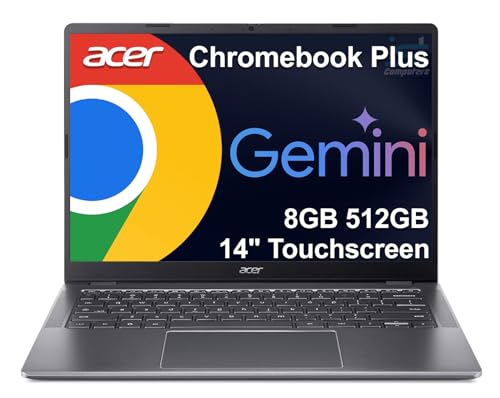
Acer Chromebook Plus 514 with Google AI
The Acer Chromebook Plus 514 is the powerful student Chromebook in this guide, and it is the laptop for a student who wants a Chromebook that keeps up. It is a Chromebook Plus 514 laptop with a 14 inch touchscreen, an Intel i3-N355 processor, 8GB of RAM and 512GB of storage, an FHD+ display, 8 cores, a 1080p webcam, a backlit keyboard, and Gemini AI, made for education, K12, students, and business. The 512GB of storage is the number to watch: it is four times the storage of the usual Chromebook, and it holds large files, offline work, and a photo library without a cloud.
The Chromebook Plus 514 suits a student who multitasks, and a buyer who wants a Chromebook with room to grow. Its 8-core i3-N355 runs many tabs and apps, its backlit keyboard works in a dark room, and its Gemini AI helps with writing and study. It is the pick for a student who wants power.
Key specs:
- Acer Chromebook Plus 514
- Intel i3-N355, 8-core
- 14 inch touchscreen, FHD+
- 8GB RAM, 512GB storage
- 1080p webcam, backlit keyboard, Gemini AI
Strengths:
- 512GB storage holds large files and offline work
- 8-core i3-N355 and 8GB RAM handle many tabs
- Backlit keyboard and 1080p webcam suit late study and video calls
Trade-offs:
- A powerful Chromebook costs more than a basic one
- ChromeOS needs a Google account and a network for some work
- A 14 inch touchscreen adds weight over a non-touch model
The Chromebook Plus 514 fits a student who multitasks, and a buyer who wants a Chromebook with room to grow. It is the pick for a student who wants power.
Best for: students who multitask and need large storage. Not suited for: a buyer who needs Windows software, or a student on the tightest budget.
Check price on Amazon: Acer Chromebook Plus 514 laptop


Lenovo Chromebook Plus 2-in-1 with Fingerprint Reader
The Lenovo Chromebook Plus 2-in-1 is the secure convertible in this guide. It is a lightweight Chromebook Plus 2-in-1 laptop with Google Gemini, an Intel N355 CPU, a 14 inch WUXGA IPS touchscreen display, 8GB RAM, 256GB UFS storage, integrated graphics, and a fingerprint reader. The fingerprint reader is the feature to watch: it unlocks the laptop with a touch, and a student who shares a house or a classroom can lock the machine fast without typing a password where others can see it.
The Lenovo Chromebook Plus 2-in-1 suits a student who wants a convertible and a fingerprint lock, and a buyer who wants Gemini AI for study. Its 14 inch WUXGA IPS touchscreen is sharp for documents and video, and its 256GB of UFS storage holds files and offline work. It is the pick for a student who wants security and flexibility.
Key specs:
- Lenovo Chromebook Plus 2-in-1
- Intel N355 CPU
- 14 inch WUXGA IPS touchscreen
- 8GB RAM, 256GB UFS storage
- Fingerprint reader, Google Gemini
Strengths:
- Fingerprint reader unlocks the laptop with a touch
- Convertible screen folds into a tablet for notes
- Gemini AI helps with writing and study
Trade-offs:
- 256GB storage is less than the 512GB Acer
- ChromeOS needs a Google account and a network for some work
- A convertible hinge adds weight and complexity
The Lenovo Chromebook Plus 2-in-1 fits a student who wants a convertible and a fingerprint lock, and a buyer who wants Gemini AI for study. It is the pick for a student who wants security and flexibility.
Best for: students who want a convertible with fingerprint security. Not suited for: a buyer who needs Windows software, or a student who needs the largest storage.
Check price on Amazon: Lenovo Chromebook Plus 2-in-1 laptop

Acer Chromebook Plus 516 16-inch Laptop
The Acer Chromebook Plus 516 is the big-screen Chromebook in this guide, and it is the laptop for a student who wants room to work. It is a Chromebook Plus 516 with a 16 inch IPS display at 1920 by 1200 WUXGA, an Intel i3-1315U processor, 8GB LPDDR5 RAM, 128GB UFS storage, a webcam, ChromeOS, and Wi-Fi 6E, and it includes a protective sleeve. Sixteen inches is the number to watch: it is the largest screen in this guide, and it fits two documents side by side, which is what a student writing an essay with sources open needs.
The Chromebook Plus 516 suits a student who works at a desk, and a buyer who wants the biggest screen for the money. Its 16 inch display is large enough for split-screen work, and its i3-1315U is a real Intel chip. It is the pick for a student who wants screen space.
Key specs:
- Acer Chromebook Plus 516
- 16 inch IPS WUXGA display
- Intel i3-1315U
- 8GB LPDDR5, 128GB UFS
- Wi-Fi 6E, webcam, ChromeOS
Strengths:
- 16 inch screen fits two documents side by side
- Intel i3-1315U and 8GB RAM handle many tabs
- Protective sleeve included for carrying
Trade-offs:
- 16 inches is heavy to carry all day
- 128GB storage fills fast with large files
- ChromeOS needs a Google account and a network for some work
The Chromebook Plus 516 fits a student who works at a desk, and a buyer who wants the biggest screen for the money. It is the pick for a student who wants screen space.
Best for: students who work at a desk with split-screen documents. Not suited for: a student who carries a laptop all day, or a buyer who needs a large local drive.
Check price on Amazon: Acer Chromebook Plus 516 16-inch laptop
Buying guide for the best student laptops Google
Chromebook or Windows: decide by the software needed
A Chromebook runs ChromeOS and web apps, while a Windows laptop runs Windows software, and the buyer should check what the school needs before ordering. A student who writes in Google Docs, watches lessons on video, and takes notes in a browser will find a Chromebook faster and simpler. A student who needs Windows-only software, such as some engineering, design, or accounting programs, needs a Windows laptop instead, because ChromeOS cannot run them.
Also check the school. Some schools use Google Classroom and Google Docs, and a Chromebook fits them perfectly, while other schools use Windows software, and a Chromebook will not do. Ask the school what it uses, and buy the laptop that matches it, because the wrong system is a return.
Memory: 4GB or 8GB decides the tabs
A Chromebook with 8GB of RAM handles many tabs and apps at once, which is what a student does when researching an essay with sources open. The Acer Chromebook Spin 314, the Acer Chromebook Plus 514, the Lenovo Chromebook Plus 2-in-1, and the Acer Chromebook Plus 516 all have 8GB, and they are the right buy for a student who multitasks. A Chromebook with 4GB of RAM, like the Lenovo Flagship Chromebook 14 and the HP 14, suits lighter work, and it costs less.
Do not buy 4GB for a student who keeps twenty tabs open. A Chromebook with too little memory slows down and reloads tabs, and the student loses work. Buy 8GB if the budget allows, and buy 4GB only for a student who works with a few tabs at a time.
Storage: 64GB is enough for the cloud, 512GB for offline work
A Chromebook with 64GB of storage, like the Lenovo Flagship Chromebook 14 and the HP 14, is enough for a student whose work lives in Google Drive, because the files are in the cloud, not on the laptop. A Chromebook with 512GB of storage, like the Acer Chromebook Plus 514, is the right buy for a student who keeps large files offline, works without a network, or stores photos and video locally.
Also check the storage type. The Acer Chromebook Plus 514 has 512GB, the Lenovo Chromebook Plus 2-in-1 has 256GB of UFS storage, and the others have 64GB or 128GB of eMMC or UFS. A larger drive holds more, and a buyer who works offline should buy the largest drive the budget allows.
Screen: touchscreen, convertible, or big
A touchscreen suits a student who takes notes by hand and sketches diagrams, and the Lenovo Flagship Chromebook 14, the Acer Chromebook Spin 314, the Acer Chromebook Plus 514, and the Lenovo Chromebook Plus 2-in-1 all have one. A convertible screen, like the ones on the Spin 314 and the Lenovo Chromebook Plus 2-in-1, folds into a tablet, which suits reading and note-taking. A big screen, like the 16 inch display on the Acer Chromebook Plus 516, fits two documents side by side, which suits essay writing with sources open.
A 14 inch screen is the sensible size for carrying, and it is the size of most of the laptops here. A 16 inch screen is better for desk work, and worse for carrying, because it is heavier. Match the screen to the student: a student who carries the laptop all day needs 14 inches, while a student who works at a desk needs the biggest screen the budget allows.
Battery: buy the day, not the hour
A Chromebook should last a full school day, and the HP 14 in this guide states 14 hours of battery life, which is the longest here. A laptop that dies at midday is a laptop that fails its job, so check the battery figure in the listing, and buy the laptop that lasts the day. A charger in the bag is a backup, not a plan.
Also check the charger. A Chromebook that charges over USB-C can use the same charger as a phone, which is convenient, while a Chromebook with a barrel charger needs its own. Check the listing for the charger type, and buy a spare if the student forgets chargers.
Using and caring for a student Chromebook
Set up the Google account first
Sign in with the student Google account when the Chromebook first starts, because the documents, the bookmarks, and the settings follow the account. A Chromebook without a Google account cannot do its job, and a student who signs in with the wrong account will find the schoolwork missing. Use the school account if the school gave one, because the schoolwork lives there.
Turn on offline access for Google Docs, because a student without a network still needs to write. Google Docs can work offline when it is set up, and the work syncs when the network returns. Set it up before the first offline day, not during it.
Keep it charged, and keep it updated
Charge the Chromebook every night, because a laptop that starts the day full lasts the day. A student who forgets to charge will find the battery dying at midday, and the schoolwork with it. Make charging a nightly routine, like packing the bag.
Let the Chromebook update itself, because ChromeOS updates in the background and needs a restart to finish. Restart the laptop when it asks, and do not put it off for weeks, because an update left undone is a security fix left undone.
Carry it well, and clean it gently
Carry the Chromebook in a padded sleeve or a laptop compartment, because a laptop in a bag with books gets scratched and dented. The Acer Chromebook Plus 516 includes a protective sleeve, and the other laptops here should be bought one. A sleeve is cheaper than a screen.
Clean the screen with a soft microfibre cloth, and do not use paper towels or harsh cleaners on it. A touchscreen collects fingerprints, and a gentle wipe keeps it clear. Keep drinks away from the keyboard, because a spill can end a laptop, and a student with a drink on the desk should keep it away from the machine.
Common mistakes when buying a student Chromebook
Buying a Chromebook for Windows software
The most common mistake is buying a Chromebook for a student who needs Windows-only software. A Chromebook runs ChromeOS and web apps, and it cannot run Windows programs, so a student who needs them will find the laptop useless. Check what the school needs before ordering, and buy a Windows laptop if the software demands it.
A related mistake is buying a Chromebook without checking the school. Some schools use Google Classroom and Google Docs, and a Chromebook fits them, while other schools use Windows software. Ask the school, and buy the laptop that matches it.
Buying too little memory
A Chromebook with 4GB of RAM suits light work, and it slows down when a student opens many tabs. A student who researches an essay with sources open needs 8GB, and the Acer Chromebook Spin 314, the Acer Chromebook Plus 514, the Lenovo Chromebook Plus 2-in-1, and the Acer Chromebook Plus 516 all have it. Buy 8GB if the budget allows.
A related mistake is buying too little storage for offline work. A Chromebook with 64GB suits a student whose work lives in the cloud, while a student who works offline needs more. The Acer Chromebook Plus 514 has 512GB for that reason.
Forgetting the network
A Chromebook needs a network for much of its work, because its apps live on the web. A student without a network at home will find the laptop limited, unless offline access is set up. Set up offline access for Google Docs before the first offline day, and check that the school has a network the laptop can use.
Also check the WiFi. The laptops here have WiFi 6 or Wi-Fi 6E, which is fast and modern, and a student on an old network may not feel the difference. A good network matters as much as a good laptop.
Buying a used or renewed Chromebook
Chromebooks are sometimes sold used or renewed, and a used laptop can arrive with a worn battery, a tired screen, or a missing charger. Read the full listing title before buying, and do not buy a listing that describes the laptop as used or renewed. Every laptop in this guide is a new listing, with the exact model in the title.
Check the battery when the laptop arrives, because a new laptop should last its stated battery life. Test the laptop with a school day of work before the return window closes, and return it if the battery does not last.
Final recommendation
For most students, the Acer Chromebook Spin 314 is the laptop to buy: it is a convertible with an Intel Core i3-N305, 8GB of RAM, 128GB of storage, a 14 inch WUXGA IPS Gorilla Glass touchscreen, and Wi-Fi 6E, and it types essays, takes notes by hand, and plays video in one machine. It is the balanced choice for schoolwork.
For battery life, the HP 14 is the strongest choice, with 14 hours of battery and a student size. For power and storage, the Acer Chromebook Plus 514 is the pick, with an 8-core i3-N355, 8GB of RAM, and 512GB of storage. For security, the Lenovo Chromebook Plus 2-in-1 is the pick, with a fingerprint reader and Gemini AI. For touch on a budget, the Lenovo Flagship Chromebook 14 is the pick. For screen space, the Acer Chromebook Plus 516 is the pick, with a 16 inch display. Any of the six Chromebooks in this guide is a sound buy for a student, as long as the schoolwork lives in Google and the laptop fits the student.
Before ordering, check the school once more: what software it uses, what account it gave, and whether the work lives in Google Drive. Those three checks decide more than any feature list, and they are the reason the same Chromebook can be perfect for one student and wrong for another. Buy the memory for the tabs opened, the storage for the files kept, and the laptop whose listing title states the exact brand and model, and the school year will start with a machine that works.
Related reading on Reviewstook: see our guides to the best Chromebook for students under 100, the best Chromebook under 100, the best Chromebook with long battery life under 100 for more on this topic.
Frequently asked questions about the best student laptops Google
Is a Chromebook good for a student?
Yes, for a student whose schoolwork lives in Google Docs, the browser, and the cloud. A Chromebook starts in seconds, lasts a school day, updates itself, and needs no antivirus to install. A student who needs Windows-only software should buy a Windows laptop instead.
What is the difference between a Chromebook and a Windows laptop?
A Chromebook runs ChromeOS and web apps, while a Windows laptop runs Windows software. A Chromebook is simpler and faster for schoolwork that lives on the web, while a Windows laptop runs programs that ChromeOS cannot, such as some engineering and design software.
How much RAM does a student Chromebook need?
A Chromebook with 8GB of RAM handles many tabs and apps at once, which is what a student does when researching an essay. A Chromebook with 4GB suits lighter work. The Acer Chromebook Spin 314, the Acer Chromebook Plus 514, the Lenovo Chromebook Plus 2-in-1, and the Acer Chromebook Plus 516 in this guide all have 8GB.
Can a Chromebook work without the internet?
Yes, for some work, when offline access is set up. Google Docs can work offline, and the work syncs when the network returns. A Chromebook needs a network for much of its work, because its apps live on the web, so set up offline access before the first offline day.
How long does a Chromebook battery last?
It depends on the model. The HP 14 in this guide states 14 hours of battery life, which lasts a full school day and an evening of homework. Check the battery figure in the listing, and buy the laptop that lasts the day, because a laptop that dies at midday fails its job.
What is Chromebook Plus?
Chromebook Plus is a standard for stronger Chromebooks, with a faster processor, more memory and storage, and Google AI features such as Gemini. The Acer Chromebook Plus 514, the Lenovo Chromebook Plus 2-in-1, and the Acer Chromebook Plus 516 in this guide are Chromebook Plus models, and they suit students who multitask and need more power.


