The best Intel Z370 motherboards are the boards that still make an 8th generation Intel build work properly: the right socket, the right chipset, and the right layout for the parts already owned. The Z370 chipset launched with the 8th generation Core processors, and it remains the natural home for a Coffee Lake CPU, because it supports overclocking on the K-series chips, it takes DDR4 memory at useful speeds, and it offers the M.2 slots and USB 3.1 ports that a modern build needs. A builder with an 8th generation chip does not need a new platform; a good Z370 board is the upgrade that matters.
Choosing a Z370 board today is mostly about condition and fit. These boards are no longer in mass production, so the listing title is the proof: it must name the exact brand and the exact model, including every letter and number, because a Z370 board is not a Z390 board, and a Prime Z370-A is not a Prime Z370-P. Every board in this guide was checked the same way, starting from the reviewstook.com product lookup, and every listing title was read in full to confirm the model and to confirm the listing is a new product, not a used or renewed one.
This guide covers six Z370 motherboards: three from Gigabyte, two from ASUS, and one from MSI. Between them they cover a compact Micro ATX build, a budget ATX build, a gaming build with strong audio, and a full ATX board with three M.2 slots. All six use the LGA1151 socket, all six take DDR4 memory, and all six are boards a builder can buy with confidence for an 8th generation Intel system.
In this guide
Quick picks: best intel z370 motherboards
| # | Product | Where to buy |
|---|---|---|
| 1 | Gigabyte Z370M DS3H motherboard | Check on Amazon |
| 2 | MSI Z370-A PRO motherboard | Check on Amazon |
| 3 | Gigabyte Z370 HD3 motherboard | Check on Amazon |
| 4 | ASUS TUF Z370 Plus Gaming motherboard | Check on Amazon |
| 5 | ASUS Prime Z370-A motherboard | Check on Amazon |
| 6 | Gigabyte Z370 AORUS Gaming 7 motherboard | Check on Amazon |
How the picks were chosen for the best Intel Z370 motherboards
Every board below started as a listing returned by the reviewstook.com product lookup, and every listing was checked the same way. First, the title had to name the exact brand and the exact model, including every number and suffix, because a Z370 AORUS Gaming 7 is not a Z370 AORUS Gaming 3, and a Z370-A PRO is not a Z370 Gaming Pro Carbon. Second, the title had to state the chipset as Z370 and the socket as LGA1151, because the neighbouring Z390 and H370 boards look similar and use the same socket but are different chipsets. Third, the listing had to be a new product, not a used or renewed one, since a used board can arrive with bent pins or a tired CMOS battery.
The boards were also checked for the features that decide a build. A board needs at least one M.2 slot for a fast solid-state drive, USB 3.1 for modern peripherals, and enough memory slots for the planned DDR4 kit. The layout matters as well: a Micro ATX board suits a compact case, while a full ATX board suits a gaming build with a large graphics card and extra cards. The six boards below were picked because they cover those layouts, they come from the three brands with the strongest Z370 lineups, and their listing titles state the model exactly.
One more check shaped the list: the board must be a motherboard, not an accessory. Listings for I/O shields, boards described as fitting another model, and industrial packaged parts were left out, because a builder needs the board itself. The six boards below are all complete motherboards, sold as new listings, with the model stated in the title.
What a Z370 motherboard is, and which builders still need one
The Intel Z370 chipset is the performance chipset for the 8th generation Core processors, known as Coffee Lake. It uses the LGA1151 socket, it supports DDR4 memory, and it allows overclocking of K-series processors such as the Core i7-8700K and the Core i5-8600K. It also supports multiple graphics cards, fast M.2 storage, and USB 3.1. For a builder who already owns an 8th generation chip, Z370 is the chipset that unlocks the full speed of that chip.
Z370 is not the newest chipset, and it is not the right choice for a new build from scratch. A builder buying a new processor today should look at a current platform instead. But Z370 is the right choice in three situations: replacing a failed board in an existing 8th generation system, building a second system from a spare 8th generation chip, and upgrading a prebuilt Coffee Lake machine with a better board. In those cases a Z370 board is cheaper than a new platform, and it reuses the processor, memory, and cooler already owned.
The boards in this guide are all ATX or Micro ATX, and all take DDR4 memory. None of them needs DDR5, and none of them needs a new cooler, because the LGA1151 mounting is the same as the board being replaced. That is the practical advantage of Z370: it is a drop-in upgrade for a system that already exists.
What makes a good Z370 motherboard
A good Z370 board starts with power delivery. The voltage regulator modules feed the processor, and a board with more phases and better cooling runs a K-series chip at full speed without throttling. The AORUS Gaming 7 in this guide is the strongest here, with its 3x M.2 layout and premium audio, while the Prime Z370-A and the TUF Z370 Plus Gaming are the solid mid-range choices. A budget board such as the Z370M DS3H is fine for a locked processor, but it is not the board for heavy overclocking.
Memory support is the second test. All six boards take DDR4, and most take up to 64GB, which is more than enough for gaming and for work. Four memory slots are better than two, because they allow a later upgrade without throwing memory away. The boards below all have four slots except the compact Micro ATX model, which trades slots for size, and that trade is worth it only in a small case.
Storage and expansion decide the rest. An M.2 slot is essential, because a SATA drive is the slowest part of a modern build, and a second M.2 slot is useful for a second drive. USB 3.1 ports matter for fast external drives, and a board with HDMI and DVI or DisplayPort outputs matters for a build that uses the processor graphics before a graphics card is added. The boards below were picked because they cover these needs at different sizes and budgets.
Quick picks at a glance
| Board | Chipset and socket | Form factor and memory | Best for |
|---|---|---|---|
| Gigabyte Z370M DS3H | Z370, LGA1151 | Micro ATX, DDR4, M.2 | Compact builds |
| MSI Z370-A PRO | Z370, LGA1151 | ATX, up to 64GB DDR4 | Budget ATX builds |
| Gigabyte Z370 HD3 | Z370, LGA1151 | ATX, M.2, Intel LAN | Reliable all-rounder |
| ASUS TUF Z370 Plus Gaming | Z370, LGA1151 | ATX, M.2, Gigabit LAN | Durable gaming |
| ASUS Prime Z370-A | Z370, LGA1151 | ATX, M.2, DP/HDMI/DVI | Balanced all-rounder |
| Gigabyte Z370 AORUS Gaming 7 | Z370, LGA1151 | ATX, 3x M.2, ESS DAC | Flagship gaming |
The best Intel Z370 motherboards

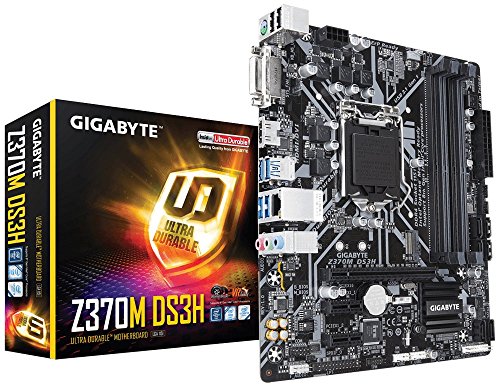
Gigabyte Z370M DS3H Micro ATX Motherboard
The Gigabyte Z370M DS3H is the compact board in this guide, and it is the board for a builder who wants a Z370 system in a small case. It is a Micro ATX board with the LGA1151 socket, the Intel Z370 chipset, USB 3.1 Gen1, an M.2 slot, DDR4 memory support, and an HDMI output. It has the essentials for an 8th generation build, and it fits cases where a full ATX board does not.
The Z370M DS3H suits a compact gaming build, a second system built from a spare 8th generation chip, and a living room PC that needs to stay small. Its Micro ATX size leaves room in a compact case, its M.2 slot holds a fast drive, and its HDMI output covers a monitor connected to the processor graphics. It is the board for a small build that still wants Z370 performance.
Key specs:
- Gigabyte Z370M DS3H
- LGA1151 socket, Intel Z370 chipset
- Micro ATX form factor
- USB 3.1 Gen1, M.2 slot
- DDR4 memory, HDMI output
Strengths:
- Micro ATX size fits compact cases
- M.2 slot for a fast solid-state drive
- HDMI output for processor graphics
Trade-offs:
- Fewer expansion slots than a full ATX board
- Two memory slots limit later upgrades
- Not the board for heavy overclocking
The Z370M DS3H fits a compact build, a second system from a spare chip, and a living room PC that needs to stay small. It is the board for a small Z370 system.
Best for: a compact Micro ATX build with an 8th generation Intel processor. Not suited for: a large gaming build that needs many expansion cards, or heavy overclocking.
Check price on Amazon: Gigabyte Z370M DS3H motherboard

MSI Z370-A PRO ATX Motherboard
The MSI Z370-A PRO is the budget ATX board in this guide, and it is the board for a builder who wants a full-size Z370 system without paying for gaming extras. It is an ATX board for Intel Coffee Lake processors, with the LGA1151 socket, support for up to 64GB of DDR4 memory, and VR Ready branding for virtual reality. It covers the essentials: a full-size layout, four memory slots, and the ports a standard build needs.
The Z370-A PRO suits a first build, a work system, and a gaming system that uses a single graphics card. Its ATX size gives room for a large card, its 64GB memory support leaves room to grow, and its VR Ready design means it handles a virtual reality headset. It is the board for a builder who wants the basics done well.
Key specs:
- MSI Z370-A PRO
- Intel Coffee Lake, LGA1151 socket
- ATX form factor
- Up to 64GB DDR4 memory
- VR Ready for virtual reality
Strengths:
- Full ATX layout with room for a large graphics card
- Supports up to 64GB of DDR4 memory
- VR Ready for virtual reality headsets
Trade-offs:
- Fewer premium features than the gaming boards here
- No M.2 thermal guard
- Audio is basic compared with the AORUS Gaming 7
The Z370-A PRO fits a first build, a work system, and a gaming system with one graphics card. It is the board for the essentials at a fair size.
Best for: a budget full-size ATX build with room to grow. Not suited for: a builder who wants premium audio, or three M.2 slots.
Check price on Amazon: MSI Z370-A PRO motherboard

Gigabyte Z370 HD3 ATX Motherboard
The Gigabyte Z370 HD3 is the solid middle board in this guide, and it is the board for a builder who wants a full ATX layout with reliable networking and audio. It is an ATX board with the LGA1151 socket, the Intel Z370 chipset, an M.2 slot, Intel LAN, an ALC892 audio codec, and an HDMI output. It is a straightforward board that does the standard jobs well, without extras that raise the cost.
The Z370 HD3 suits a gaming build, a home office system, and a general purpose PC that needs to last. Its Intel LAN is reliable for wired networking, its ALC892 audio is solid for everyday use and gaming, and its ATX size leaves room for a large graphics card. It is the board for a builder who wants a dependable Z370 system.
Key specs:
- Gigabyte Z370 HD3
- Intel LGA1151, Z370 chipset
- ATX form factor, M.2 slot
- Intel LAN, ALC892 audio
- HDMI output
Strengths:
- Reliable Intel LAN for wired networking
- Solid ALC892 audio for everyday use
- Full ATX layout with room to grow
Trade-offs:
- No M.2 thermal guard
- Fewer gaming extras than the AORUS boards
- No built-in Wi-Fi
The Z370 HD3 fits a gaming build, a home office system, and a general purpose PC. It is the board for a dependable Z370 system.
Best for: a reliable full-size build with good networking and audio. Not suited for: a compact case, or a builder who needs built-in Wi-Fi.
Check price on Amazon: Gigabyte Z370 HD3 motherboard

ASUS TUF Z370 Plus Gaming ATX Motherboard
The ASUS TUF Z370 Plus Gaming is the tough gaming board in this guide, and it is the board for a builder who wants a gaming system built to last. It is an ATX board with the LGA1151 socket, DDR4 memory, HDMI and DVI outputs, an M.2 slot, Gigabit LAN, and USB 3.1, made for 8th generation Intel Core processors. The TUF line is built for durability, with components chosen for long life under load.
The TUF Z370 Plus Gaming suits a gaming build that runs for long sessions, a system that will be moved or upgraded often, and a builder who values a tough board over flashy extras. Its Gigabit LAN is fast and stable for online play, its M.2 slot holds a fast drive for game loading, and its HDMI and DVI outputs cover monitors connected to the processor graphics. It is the board for gaming that keeps going.
Key specs:
- ASUS TUF Z370 Plus Gaming
- LGA1151 socket, DDR4 memory
- ATX form factor, M.2 slot
- HDMI and DVI outputs
- Gigabit LAN, USB 3.1, 8th Gen Intel
Strengths:
- TUF build for long gaming sessions
- Gigabit LAN for stable online play
- HDMI and DVI outputs for flexible monitors
Trade-offs:
- No DisplayPort output
- Fewer M.2 slots than the AORUS Gaming 7
- No built-in Wi-Fi
The TUF Z370 Plus Gaming fits a gaming build that runs for long sessions, and a builder who values durability. It is the board for tough gaming.
Best for: a durable gaming build with stable networking. Not suited for: a builder who needs DisplayPort, or three M.2 slots.
Check price on Amazon: ASUS TUF Z370 Plus Gaming motherboard

ASUS Prime Z370-A ATX Motherboard
The ASUS Prime Z370-A is the balanced board in this guide, and it is the board for a builder who wants one board that does everything well. It is an ATX board with the LGA1151 socket, DDR4 memory, DisplayPort, HDMI, and DVI outputs, an M.2 slot, and USB 3.1, made for 8th generation Intel Core processors. It has the widest video output choice in this guide, which makes it the easiest board to connect to any monitor.
The Prime Z370-A suits a gaming build, a work build, and a general purpose system alike. Its three video outputs cover any monitor setup, its M.2 slot holds a fast drive, and its USB 3.1 ports handle fast external storage. It is the board for a builder who wants a single, sensible choice without a weakness.
Key specs:
- ASUS Prime Z370-A
- LGA1151 socket, DDR4 memory
- ATX form factor, M.2 slot
- DisplayPort, HDMI, and DVI outputs
- USB 3.1, 8th Gen Intel
Strengths:
- Three video outputs cover any monitor
- Balanced features for work and gaming
- USB 3.1 for fast external drives
Trade-offs:
- No M.2 thermal guard
- Audio is standard, not premium
- No built-in Wi-Fi
The Prime Z370-A fits a gaming build, a work build, and a general purpose system. It is the board for one sensible choice.
Best for: a balanced build that needs flexible monitor outputs. Not suited for: a builder who wants premium audio, or a compact case.
Check price on Amazon: ASUS Prime Z370-A motherboard

Gigabyte Z370 AORUS Gaming 7 ATX Motherboard
The Gigabyte Z370 AORUS Gaming 7 is the flagship board in this guide, and it is the board for a builder who wants the strongest Z370 system possible. It is an ATX board with the LGA1151 socket, the Intel Z370 chipset, three M.2 slots with a thermal guard, an ESS Sabre DAC for audio, Fan Stop cooling, and SLI support for two graphics cards. It is the board with the most features here, and the one for a serious gaming or work build.
The AORUS Gaming 7 suits a high-end gaming build, a creator who edits video and audio, and a builder who wants the best onboard sound available on Z370. Its three M.2 slots hold a fast system drive and extra fast storage, its ESS Sabre DAC makes music and game audio sound better, and its SLI support allows two graphics cards. It is the board for a Z370 build with no compromises.
Key specs:
- Gigabyte Z370 AORUS Gaming 7
- Intel LGA1151, Z370 chipset
- ATX form factor, 3x M.2 slots
- M.2 Thermal Guard, ESS Sabre DAC
- Fan Stop cooling, SLI support
Strengths:
- Three M.2 slots with a thermal guard
- ESS Sabre DAC, the best audio here
- SLI support for two graphics cards
Trade-offs:
- The most feature-heavy board here, so check the case fit
- More features than a basic build needs
- No built-in Wi-Fi
The AORUS Gaming 7 fits a high-end gaming build, a creator who edits video and audio, and a builder who wants the strongest Z370 board. It is the board for no compromises.
Best for: a flagship gaming or creator build with premium audio. Not suited for: a budget build, or a compact case.
Check price on Amazon: Gigabyte Z370 AORUS Gaming 7 motherboard
Buying guide for the best Intel Z370 motherboards
Match the board to the processor first
The processor decides the board. An 8th generation Core processor needs a 300-series board, and Z370 is the performance choice among them. A K-series chip such as the i7-8700K needs Z370 for overclocking, while a locked chip such as the i5-8400 works on Z370 as well but does not need its overclocking features. Check the processor model before buying, and check that the board socket is LGA1151, because the later LGA1200 and LGA1700 sockets look similar but do not fit.
The model name must match exactly. A Z370 board and a Z390 board share the socket and look alike, but they are different chipsets with different features, and a Z370 AORUS Gaming 7 is a different board from a Z390 AORUS Elite. Read the full listing title, including every letter and number, and do not buy a board whose title is vague about the model.
Choose the form factor for the case
ATX is the standard size, and it fits most mid-tower cases with room for a large graphics card and extra cards. Micro ATX is smaller, and it suits a compact case, but it has fewer slots and less room around the processor socket. Measure the case before buying, and check the board dimensions in the listing, because a board that does not fit the case is a return, not a build.
The layout also matters for cooling. A board with the M.2 slot under a thermal guard runs a fast drive cooler, and a board with fan headers in the right places makes cable routing easier. The AORUS Gaming 7 has a thermal guard on its M.2 slots, and the ASUS boards have well placed fan headers. These are small details, but they decide whether a build is tidy or a tangle.
Memory, storage, and ports
Buy a board with four memory slots when possible, and plan for 16GB of DDR4 as the minimum for gaming, with 32GB for work that uses large files. The boards in this guide take DDR4, and the MSI Z370-A PRO states support for up to 64GB, which is plenty for any 8th generation build. Check the memory speed the board supports, because faster DDR4 helps in some games and in work.
Storage should be an M.2 NVMe drive in the board M.2 slot, with a SATA drive for extra space if needed. Every board in this guide has at least one M.2 slot, and the AORUS Gaming 7 has three. For ports, USB 3.1 is the minimum for a fast external drive, and a board with HDMI and DVI outputs covers a monitor connected to the processor graphics.
Audio, networking, and gaming features
Onboard audio matters for a gaming build without a separate sound card. The AORUS Gaming 7 has an ESS Sabre DAC, which is the best audio in this guide, and the Gigabyte HD3 has an ALC892 codec, which is solid for everyday use. The ASUS TUF board is built for durability, with gaming features and a tough design, while the Prime Z370-A is the balanced choice for work and play.
Networking should be at least Gigabit Ethernet, which all six boards have. The ASUS ROG Strix Z370-I Gaming, a related model, adds Wi-Fi, but the boards in this guide are wired, so a builder who needs wireless should add a Wi-Fi card or choose a board with it built in. Check the rear panel in the listing images before buying.
Buying a board from an older generation
Z370 boards are older stock, so buy from a listing that states the exact model and sells the board as new. A listing that says the board fits another model, or that the board is industrial packaged, is not the same as a new retail board, and it should be avoided. Check the listing title for the words that show a used or renewed sale, and do not buy those listings.
Check the BIOS as well. A Z370 board should already support the 8th generation processors, because that is the generation it launched with, so no update is needed for a Coffee Lake chip. If the board is bought for a 9th generation chip, check that the BIOS supports it, because some Z370 boards need an update for 9th generation processors, and that update needs an 8th generation chip to install.
Using and caring for a Z370 motherboard
Install it with care, and ground yourself first
A motherboard is the most fragile part of a build, so install it on a clean, flat surface, and touch a grounded metal object before handling it. Align the board with the case standoffs, and do not force it, because a bent pin in the LGA1151 socket is difficult to repair. Install the processor, the memory, and the M.2 drive before the board goes into the case, because it is easier to work on a flat surface.
Connect the power cables fully: the 24-pin main connector and the 8-pin processor connector both need to click into place. A loose processor power cable is the most common reason a new build does not start. Check the front panel connectors against the board manual, because the power and reset pins are small and easy to swap.
Keep it cool and keep it clean
A Z370 board runs a hot processor, so airflow matters. Set the case fans to pull cool air in from the front and push warm air out of the back, and check the temperatures after the first week of use. The M.2 drive under a thermal guard runs cooler than a bare drive, and the AORUS Gaming 7 thermal guard is worth using.
Clean the board every few months with compressed air, holding the fans still while blowing dust out. Dust on the voltage regulator heatsinks makes the board run hotter and can cause throttling under load. Do not use a vacuum cleaner inside the case, because static can damage the board.
Update the BIOS only when needed
A Z370 board that works with its processor does not need a BIOS update, and an update that fails can brick the board. Update only when the new BIOS adds support for a processor being installed, or fixes a problem that is actually happening. Download the BIOS from the board maker site, follow the instructions exactly, and do not turn the power off during the update.
Keep the board manual and the driver disc or download page. The manual shows the fan headers, the front panel pins, and the M.2 slot locations, and it is the fastest way to answer a question during a build. Store it with the build paperwork.
Common mistakes when buying a Z370 motherboard
Buying the wrong chipset
The most common mistake is buying a Z390 or H370 board when a Z370 was wanted, or the reverse. The boards look alike and share the socket, but the chipset decides overclocking and some features. Read the model name in full, and check the chipset in the listing title, before buying. A Z370 AORUS Gaming 7 and a Z390 AORUS Elite are not interchangeable.
A related mistake is buying a board for the wrong socket. The LGA1151 socket is shared by the 6th, 7th, 8th, and 9th generation boards, but the 100-series and 200-series boards do not support 8th generation processors. A Z370 board is the safe choice for Coffee Lake, and it is the board to buy for an 8th generation chip.
Ignoring the form factor
A full ATX board does not fit a Micro ATX case, and a Micro ATX board in a large case wastes space that could hold more drives or cards. Measure the case and check the board size before ordering. The Z370M DS3H in this guide is Micro ATX, and it is the right board for a compact build, while the other five are full ATX.
Also check the graphics card length against the case, because a long card can block the drive bays or the front panel connectors. The board is only one part of the fit, and the case, the card, and the cooler must all fit together.
Buying a used board by accident
Z370 boards are older stock, so used and renewed listings are common, and some of them hide the condition in the middle of a long title. Read the full title before buying, and do not buy a listing that describes the board as used, renewed, or fitting another model. A used board can have bent socket pins, and that damage is often not visible in the listing images.
Buy the board as a new listing, and check the seller and the returns policy. A new board with a return option is worth more than a cheap used board with no returns, because a board problem only shows up after the build is finished.
Forgetting the memory and storage plan
A board with two memory slots limits the upgrade path, and a board with one M.2 slot limits fast storage. Plan the memory and the drives before buying the board, and choose a board with room to grow. The boards in this guide all have at least one M.2 slot, and most have four memory slots, so they grow with the build.
Do not buy DDR5 memory for a Z370 board, because Z370 takes DDR4 only. The memory type is fixed by the chipset, and the wrong type will not fit the slots. Check the memory type in the listing and in the board manual.
Final recommendation
For most builders, the ASUS Prime Z370-A is the board to buy: it is a balanced ATX board with DisplayPort, HDMI, and DVI outputs, M.2 storage, USB 3.1, and the features an 8th generation build needs, without the cost of a flagship gaming board. It suits a gaming build, a work build, and a general purpose system alike, and its layout is easy to work with.
For a gaming build, the Gigabyte Z370 AORUS Gaming 7 is the strongest choice, with three M.2 slots, a thermal guard, an ESS Sabre DAC for audio, and SLI support. For a compact build, the Gigabyte Z370M DS3H is the Micro ATX pick, and for a budget ATX build, the MSI Z370-A PRO covers the essentials with 64GB of DDR4 support. Any of the six boards in this guide is a sound buy for an 8th generation Intel system, as long as the model in the listing title matches the board being bought.
Related reading on Reviewstook: see our guides to the best AMD AM4 motherboards, the best Intel 10th Gen motherboards, the best non-gaming motherboards for more on this topic.
Frequently asked questions about the best Intel Z370 motherboards
Does a Z370 motherboard support 8th generation Intel processors?
Yes. The Z370 chipset launched with the 8th generation Core processors, known as Coffee Lake, and every Z370 board supports them. The LGA1151 socket fits the 8th generation chips, and Z370 is the performance chipset for that generation, with overclocking support for K-series processors.
Can a Z370 motherboard run a 9th generation Intel processor?
Many Z370 boards can run 9th generation processors, but some need a BIOS update first, and that update needs an 8th generation processor to install. Check the board maker support page for the exact model before buying a 9th generation chip for a Z370 board.
What is the difference between Z370 and Z390?
Z390 is the later chipset, with built-in USB 3.1 Gen 2 and built-in Wi-Fi on some boards, while Z370 needs separate chips for those features. Both use the LGA1151 socket and support 8th and 9th generation processors. For an 8th generation build, Z370 is the cheaper choice and does the same job for most builders.
How much DDR4 memory does a Z370 board take?
Most Z370 boards take up to 64GB of DDR4 memory in four slots, and the MSI Z370-A PRO in this guide states 64GB support. A compact Micro ATX board may have fewer slots, so check the listing. Sixteen gigabytes is the minimum for gaming, and 32GB is the comfortable size for work.
Is a used Z370 motherboard worth buying?
A used board can be cheaper, but it can arrive with bent socket pins or a tired battery, and those problems are hard to see in listing images. A new listing with the exact model in the title and a return option is the safer buy, and every board in this guide is a new listing.
Does every Z370 board have an M.2 slot?
Every board in this guide has at least one M.2 slot for a fast NVMe drive, and the Gigabyte Z370 AORUS Gaming 7 has three. An M.2 slot is the feature that matters most for storage speed, so check that the board has one before buying.