This site is reader-supported, and when you buy through links on our pages we may earn an affiliate commission. That support keeps our cooler research and long-term build notes independent, and it never changes which models earn a place in this guide.
The LGA1151 socket had an unusually long life. It carried Intel’s desktop line from the sixth-generation Skylake chips through the ninth-generation Coffee Lake Refresh parts, which means an enormous number of machines built between 2015 and 2020 are still working for a living today. Many of them are still running the cooler they were assembled with, and many of those coolers were the thin aluminium puck Intel bundled in the box, or a budget tower chosen in a hurry when the build budget ran out. A decade on, the symptoms are familiar: fans that howl under loads they once handled quietly, thermal paste that has dried to chalk, and K-series processors that surrender their boost clocks minutes into a game or a render because the cooler simply cannot move heat away fast enough.
Replacing the cooler is the single most satisfying upgrade left on this platform. It asks for no new motherboard, no new memory, and no reinstall of anything. A good tower cooler drops load temperatures by margins that feel disproportionate to its price, restores the boost behaviour the processor was designed to deliver, and usually cuts noise more dramatically than any other single change you can make. The six coolers in this guide span the whole sensible range for LGA1151: a premium single tower built to outlive the platform itself, the budget classic that defined its category, a silence-first dual tower from the company that named itself after the idea, an offset tower that solves the memory clearance problem properly, a compact option for cases that full-height towers cannot close on, and a value pick that costs less than the game you are cooling the PC to play.
One reassurance before the details. LGA1151 shares its cooler mounting geometry with the whole 115x family that came before it — LGA1156, LGA1155, and LGA1150 all use the same hole spacing — and, usefully, LGA1200 kept the same mounting pattern when it arrived. That means the coolers reviewed here are not dead-end purchases. Most of them will follow you to a newer Intel board if you upgrade later, and a quality mounting kit bought once tends to serve two or three builds. Buy well on this socket and you are very likely buying for the next socket too.
Quick comparison
| Cooler | Type | Character | Best suited to |
|---|---|---|---|
| Noctua NH-U12S | Single tower, 120mm fan | Premium all-rounder, near-silent, superb mounting | Long-term 1151 builds and future platform upgrades |
| Cooler Master Hyper 212 Black Edition | Single tower, 120mm fan | The budget classic, refined and blacked out | First upgrades from the Intel stock cooler |
| be quiet! Pure Rock Pro 3 Silver | Dual tower, two 120mm fans | Silence-first dual tower with serious headroom | Quiet rooms and hotter K-series chips |
| Scythe Mugen 5 | Single tower, 120mm fan, offset | Memory clearance solved by design, very quiet | Builds with tall RGB memory kits |
| Thermalright Assassin X 120 Refined SE | Compact single tower, 120mm fan | Shorter than the class standard, four AGHP heatpipes | Compact ATX and micro-ATX cases |
| Thermalright Peerless Assassin 120 SE | Dual tower, two 120mm fans | Flagship-class cooling, attainable positioning | K-series chips and hot builds on a budget |
The table flattens differences that matter in a real case, so treat it as a map rather than a verdict. All six are air coolers, deliberately: for the processors this socket hosts, a good tower is quieter per unit of money than a small liquid loop, has no pump to age, and will never leak into a machine you may hand down to a family member. Where liquid cooling genuinely makes sense on 1151 — principally small-form-factor cases with no tower clearance — the buying advice section below covers it honestly.
In this guide
What to look for in an LGA1151 CPU cooler
Mounting: the 115x pattern and the LGA1200 bonus
Every cooler in this guide mounts to LGA1151 through four holes arranged in a square around the socket, and that square is identical across LGA1156, LGA1155, LGA1150, LGA1151, and LGA1200. If you are pulling a cooler from an older Sandy Bridge or Haswell machine, there is a fair chance it fits your Coffee Lake board with the hardware already in the box. The reverse is equally useful: a cooler bought today for a 1151 system remains compatible if you later move to a tenth or eleventh generation Intel platform on LGA1200. Only LGA1700 changed the pattern and the socket height, and the better manufacturers — Noctua most famously — supply mounting kits for newer sockets to existing owners for free or for the cost of postage.
Mounting quality varies more than mounting compatibility, and it matters. A good system applies even pressure across the processor’s heat spreader, holds it through years of heat cycles, and can be installed by one person without a third hand appearing from nowhere. A poor one uses push-pins that never quite feel seated, or a backplate that flexes. The Intel stock cooler on many 1151 chips used plastic push-pins, and a surprising number of overheating 1151 machines turn out to have one pin that popped loose years ago. Every pick here uses a proper screwed mounting system with a backplate, which is reason enough to upgrade before temperatures even enter the argument.
Heat load: locked chips are easy, K chips are not
The 1151 processor range spans a wide thermal range. Locked i5 and i7 parts such as the i5-8400, i7-8700, and i5-9400 are officially modest parts, and in practice any tower in this guide cools them with room to spare and at low fan speeds. The unlocked chips are a different conversation. The i7-8700K and especially the i9-9900K can draw far beyond their nominal power figures when a motherboard’s multicore enhancement is left enabled, and they concentrate that heat in a small die. For those processors, fin-stack size, heatpipe count, and fan quality stop being spec-sheet decoration and become the difference between holding boost and throttling in the third minute of a workload.
Be honest about which chip you own and how it is configured. A cooler chosen for a locked i5 is being asked to do a fundamentally easier job than one bolted to a 9900K with limits removed, and overspending in the first case buys silence rather than survival. Equally, underspending in the second case buys a cooler that will live at maximum fan speed, which defeats the purpose. The individual reviews below are explicit about where each cooler’s ceiling sits.
Height: the measurement that decides everything
Tower coolers are tall, and case specifications are the law. The class standard for a 120mm single tower is roughly 155 to 160 millimetres from the processor surface to the top of the heatpipes, and a great many mid-tower cases allow exactly that and not a millimetre more. Measure your case’s stated CPU cooler clearance before ordering, and treat the figure as a hard limit, because the side panel does not negotiate. Builders working in compact ATX or older cases should look hard at the Thermalright Assassin X 120 Refined SE in this guide, which stands meaningfully shorter than the standard at 148 millimetres and exists precisely for the builds the taller towers exclude.
Height interacts with the motherboard as well as the case. On some boards the first expansion slot sits close enough to the socket that a very wide tower can crowd a graphics card’s backplate, and on ITX boards a full-size tower may overhang the top edge or block the only M.2 slot. The Pure Rock Pro 3 in this guide is a dual tower, albeit a compact one, so its width deserves the same check before ordering, especially in the small and ageing cases this socket often lives in.
Memory clearance: the quiet deal-breaker
The most common reason a well-reviewed tower disappoints is not cooling at all. It is the front fan hanging over the memory slots, colliding with tall RGB heat spreaders and forcing an ugly choice between the cooler and the memory kit. Designs solve this three ways. Some narrow the fin stack so nothing overhangs. Some offset the whole tower away from the slots, which is the Scythe Mugen 5’s approach and the most elegant of the three. And some simply accept the overhang and let you slide the front fan upward, which works but adds height you may not have. If your memory has tall spreaders or lighting you actually want to see, clearance is a first-order specification, and the reviews below state each cooler’s behaviour plainly.
Noise: fan size, tuning, and the low-speed test
Every cooler here uses a 120mm fan, but they do not sound alike. What you live with is not the maximum speed on the box; it is the tone at the low and middle speeds where the fan spends its working life. Good fans start reliably at low voltage, spin without bearing tick or electrical whine, and ramp smoothly. Manufacturers tune for different priorities: be quiet! and Noctua voice their fans for the bottom of the range, while budget fans tend to be tuned for headline airflow and can sound busy doing it. On a platform whose owners often keep machines in bedrooms, studies, and living rooms, fan character is worth as much as two degrees of temperature, and this guide weights it accordingly.
Air or liquid on LGA1151?
A 240mm all-in-one liquid cooler will match or slightly beat the best tower here on a 9900K, and it moves the cooling mass away from the socket entirely. But on this platform the honest default is air. The chips are old enough that a pump’s lifespan becomes a real consideration against the machine’s remaining years, an AIO costs more than any tower in this guide, and its advantage only materialises on the hottest unlocked parts. Liquid earns its place in one scenario above all: the small-form-factor build, where a mini-ITX case offers 60 or 70 millimetres of cooler height and a low-profile air cooler would throttle a K chip, while a 240mm radiator mounts neatly in the case’s designed location. For a standard ATX or micro-ATX tower, buy the fin stack and keep the change.
One liquid format deserves an explicit warning, because it tempts upgraders with its tidy packaging: the single-fan 120mm AIO. Its radiator has less surface area than the fin stacks in this guide, its fan must spin faster to compensate, and it adds a pump’s noise and finite lifespan to the bargain. In test after test across the industry, a good tower beats a 120mm liquid loop on temperature, noise, and price simultaneously. Liquid on this platform starts at 240mm or it does not start at all, and even then it is a solution for a specific case problem rather than a general upgrade. If a seller’s bundle or a prebuilt’s configuration saddles you with a 120mm loop on a K-series chip, replacing it with the NH-U12S or Mugen 5 from this guide is one of the most effective downgrades in PC building.
Heatpipes and bases: reading a spec sheet like an engineer
Marketing counts heatpipes; physics counts contact and continuity. A heatpipe moves heat along the fin stack, and beyond four well-implemented pipes the returns diminish quickly on processors of this size, which is why the six-pipe Mugen 5 and the four-pipe Hyper 212 are closer in practice than the numbers suggest. More important is how the pipes meet the processor. Direct-contact bases mill the pipes flat and press them against the heat spreader, which works well and cheaply but leaves seams that a careful paste application should fill. Nickel-plated copper base plates spread heat to all pipes more evenly and resist corrosion for a decade, at a cost premium. Neither approach is automatically superior; execution decides, and the reviews below judge each cooler on its results rather than its recipe.
Weight and transport: the forgotten specification
A full-size tower with its fan aboard weighs somewhere between half a kilogram and a kilogram, and all of it hangs off four mounting points on a vertical motherboard. In a machine that lives under a desk this is a non-issue — the screwed backplate systems in this guide spread the load exactly as designed, and a decade of hanging harms nothing. It becomes a specification worth reading when the machine travels: to LAN events, between home and university, or in a house move. A heavy tower in a case laid on its side in a car boot experiences lever forces the mounting was never asked about, and the cautious routine is to transport the case with the motherboard horizontal and the cooler pointing up, or to remove the cooler for the journey and remount it at the destination. Builders who know the machine will move regularly have one more reason to favour the lighter single towers here over the one dual tower in this guide, which carries the extra mass its second fin stack implies.
Case airflow: the cooler’s silent partner
A tower cooler does not destroy heat; it hands the heat to the air inside the case, and what happens next decides your temperatures as surely as the fin stack does. A case with one lazy exhaust fan and a solid front panel will recirculate warm air until even the best cooler in this guide is breathing its own exhaust. Before blaming a new cooler for disappointing numbers, check the basics: a clear intake path at the front or bottom, an exhaust at the rear near the cooler, and cables routed out of the corridor between them. On the ageing cases that house many 1151 systems, replacing a dead intake fan or cleaning a dust-clogged filter restores more performance than a cooler tier ever could. Orientation matters as well — mount the tower to blow toward the rear exhaust rather than up into a power supply shroud or down onto the graphics card, unless your case layout clearly favours the vertical path.
Fan control: headers, PWM, and the curve that makes it quiet
Every fan in this guide is a four-pin PWM model, which means the motherboard can govern its speed precisely — provided it sits on the right header and the BIOS is told to use PWM rather than voltage control. That distinction is the most common cause of a new cooler running at full speed forever: a fan left in DC mode on a header defaulting to full voltage. Set the CPU fan header to PWM, hold the curve near the fan’s floor until the processor passes roughly 60 degrees, and let it rise steeply only above 75. Most boards also offer a tuning routine that measures each fan’s true minimum speed; run it once, and the curve you set afterwards rests on real numbers instead of guesses. Two minutes in the BIOS is the difference between a cooler that is merely capable of quiet and one that actually delivers it.
The six best LGA1151 CPU coolers, reviewed
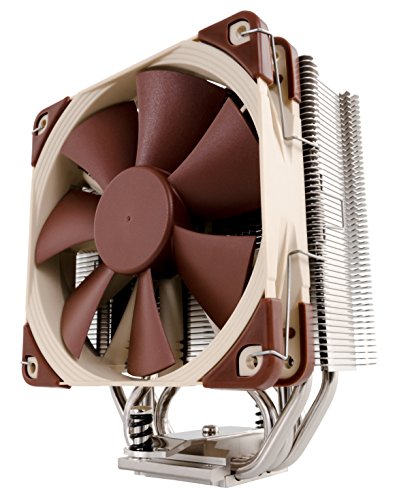
Noctua NH-U12S: the cooler you mount once and forget
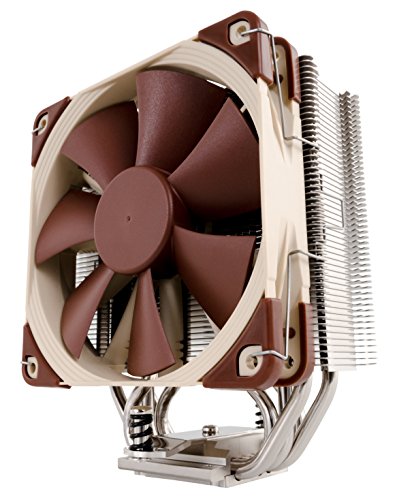
The NH-U12S is the cooler this guide would hand to someone who never wants to think about processor cooling again. It is a slim single tower with five heatpipes and one of Noctua’s NF-F12 fans, and its party trick is not any single specification but the absence of weaknesses. It cools an i9-9900K at stock settings without drama, it cools everything below that chip in near-silence, its mounting system is the best engineered in the business, and its slim fin stack leaves the memory slots completely alone. On a platform full of machines entering their second decade, that completeness is exactly the point.
In daily use its character is defined by restraint. The fin stack does its work at low airflow, so the fan curve can be left conservative, and the included low-noise adapter drops the ceiling further for builders who value silence over the last degree. Installation deserves its own mention: the SecuFirm2 system secures the backplate first, then the cooler body screws down onto fixed posts with spring-loaded stops that make overtightening nearly impossible, so contact pressure is right by construction rather than by feel. Noctua also includes a full tube of its NT-H1 compound and clips for a second fan, which owners can add later if a future platform runs hotter than this one. It is the rare cooler whose accessories box feels considered rather than padded, and whose support reputation — mounting kits supplied free for new sockets — has been earned across several platform generations now.
Strengths
- SecuFirm2 mounting applies perfectly even pressure and installs without stress or guesswork
- Slim 120mm-class fin stack leaves all four memory slots fully accessible
- The NF-F12 fan is quiet at working speeds and includes a low-noise adapter for near-silent builds
- Six-year warranty, and Noctua supplies free mounting kits for future sockets to existing owners
- Excellent documentation and a tube of quality thermal paste in the box
Trade-offs
- Costs more than the budget picks in this guide combined-adjacent territory; it is a premium product and priced like one
- The standard colour scheme divides opinion, though a black chromax version exists for builders who care
- A single fan means overclocked 9900K builds chasing every last megahertz will eventually want a dual-tower or liquid
Who it suits: the owner of a 1151 machine that is staying in service — a workstation, a family PC, a home server, a gaming rig with years left in it — and anyone who suspects this cooler will outlast the socket and move to the next build. If your 1151 build is a keeper and you want to mount a cooler once and forget it for the life of the machine, check price on Amazon.

Cooler Master Hyper 212 Black Edition: the classic, grown up
The Hyper 212 is the best-selling aftermarket cooler in history for a reason, and the Black Edition is the version to buy on 1151 today. The formula is unchanged — four direct-contact heatpipes, a straightforward fin stack, a 120mm fan — but the execution has matured: the fan is a proper PWM Silencio model that behaves at low speeds, the top plate and nickel-black finish remove the industrial look of the original, and the mounting hardware is a real screwed system rather than the fiddly arrangement early owners wrestled with. Against the Intel stock puck it replaces, the improvement is not incremental. It is the difference between a machine that throttles and shouts and one that simply works.
Living with it day to day, the Black Edition’s virtues are practical ones. The four heatpipes meet the heat spreader directly, so the base rewards a thin, even paste application, and the fan is tuned to keep its tone low and broadband rather than whiny at working speeds. On an i7-8700, or a stock-clocked 8700K in a case with decent airflow, it holds temperatures in a range where the fan rarely needs its upper register, which is where most owners will spend their time. Cooler Master’s long production run also means the knowledge base around this cooler is unmatched: whatever case, board, or clearance puzzle you are facing, someone has already solved it with a Hyper 212 and written down how. For a part that may be a first-time builder’s first installation, that depth of shared experience is a genuine feature rather than a footnote.
Strengths
- Transforms temperatures and noise on locked and mainstream K chips for a budget-tier spend
- Direct-contact heatpipes and a proven fin design that has been refined for over a decade
- Narrow profile keeps the first memory slot usable on most boards
- Mounting hardware covers the entire 115x family and LGA1200, so it moves between builds freely
Trade-offs
- At roughly 159 millimetres tall it is the height limit in many compact cases; measure before ordering
- On an i9-9900K with power limits removed it will run out of headroom and fan speed climbs accordingly
- The fan is good rather than great, and silence obsessives will hear it before they hear the Noctua or be quiet! options
Who it suits: the first-time upgrader, the builder rescuing a prebuilt with a screaming stock cooler, and anyone whose 1151 chip is a locked or mildly tuned part that deserves better than Intel’s puck. For a first upgrade away from the stock Intel cooler that transforms noise and temperatures at a budget position, check price on Amazon.

be quiet! Pure Rock Pro 3 Silver: dual-tower cooling, kept quiet
The Pure Rock Pro 3 Silver is what happens when a silence-first manufacturer stops asking a single tower to do everything. It is a compact dual-tower design: two fin stacks fed by six 6mm heatpipes, with two silent 120mm PWM fans moving air through them, and a manufacturer-rated 250W TDP that puts clear headroom between it and every LGA1151 processor ever made. Crucially for this guide, be quiet! lists LGA1151 directly in the official socket compatibility for the model, alongside LGA1150, LGA1155, LGA1200, LGA1700 and LGA1851, so it mounts to a Skylake or Coffee Lake board with the hardware in the box rather than by hopeful improvisation.
That headroom changes how the cooler behaves in daily use. Because the heat is spread across two stacks instead of one, neither fan needs to work hard to hold a locked i7 or an i7-8700K at sensible temperatures, and fan speeds can stay in the low, broadband part of the range where a PC stops being something you hear. On an i9-9900K at stock settings it has more reserve than any single tower in this guide, which is precisely the margin that keeps a long gaming session or render from turning into a rising fan curve. be quiet! also designs this model for high RAM and VRM cooling compatibility, so the front stack is shaped to respect the components crowded around a 1151 socket, and the silver finish gives a windowed build a clean, deliberate look.
Strengths
- Dual-tower design with six heatpipes and a 250W TDP figure gives the most cooling headroom of any pick here
- Two silent 120mm PWM fans share the work, so working speeds stay low and the sound stays soft
- Official manufacturer socket list includes LGA1151, plus LGA1200, LGA1700 and LGA1851 for later platforms
- Designed for high RAM and VRM cooling compatibility around crowded 1151 sockets
Trade-offs
- Wider and heavier than the single towers here, so check case width, first-slot clearance and side-panel room before ordering
- Costs more than the budget and mid-range single towers, which is the honest price of the second fin stack and second fan
- Locked i3 and i5 chips will never trouble it; owners of those processors are paying for headroom they will not use
Who it suits: the owner of a hot-running K-series 1151 chip who wants flagship-class air cooling without flagship noise, and the quiet-room builder whose processor outgrew what a single tower could silence. Owners of an 8700K or 9900K who want dual-tower headroom delivered at a whisper should check price on Amazon.
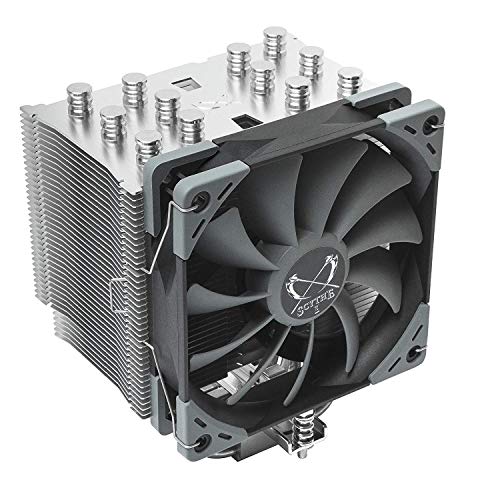
Scythe Mugen 5: the memory clearance problem, solved properly
The Mugen 5’s defining decision is visible the moment you hold it: the entire fin stack is offset away from the memory slots, so the fan sits over the board’s empty space rather than over your RAM. That single choice makes it the easiest full-performance tower to recommend for modern builds with tall, illuminated memory kits — the kits that turn most tower installations into a negotiation. It helps that the cooler underneath the trick is genuinely strong: six heatpipes, a dense fin stack, and Scythe’s Kaze Flex fan, which has earned a quiet reputation rivalling the famous names in this guide at a lower price. For an 8700K or a stock 9900K in a case with RGB memory, this is arguably the most sensible cooler on the page.
The engineering behind the offset deserves a closer look, because it is not a cosmetic shift. By moving the fin stack sideways and keeping the front face narrow, Scythe preserves a properly centred pressure footprint over the socket while the fan clears the memory slots entirely, so no mounting quality is traded away to buy the clearance. The Kaze Flex fan contributes more than airflow: its sealed bearing is rated for very long service, and its rubberised mounting corners kill the case-borne vibration that turns some towers into sounding boards at particular speeds. Scythe’s mounting hardware is a conventional, confidence-inspiring screw-and-backplate arrangement, and the included long screwdriver — a small thing owners consistently mention — reaches the screws through the fin stack without drama. Taken together, it behaves like a cooler from a price tier above its own.
Strengths
- Asymmetric offset design gives effectively unrestricted memory clearance on the slot side
- Six heatpipes and strong fin density deliver near-flagship cooling for K-series chips
- Kaze Flex 120mm fan is quiet, smooth, and widely praised as an equal of fans on dearer coolers
- At about 154 millimetres tall it fits where the tallest towers cannot
Trade-offs
- The offset shifts mass toward the graphics card side, so check first-slot clearance on tightly packed boards
- Availability fluctuates by region and revision; confirm the exact revision’s socket list before ordering
- The utilitarian finish will not win beauty contests against the blacked-out competition
Who it suits: the builder with tall RGB memory who refuses to choose between the kit they bought and the cooler they want, and K-chip owners who want real headroom without dual-tower width or liquid. If tall RGB memory and a full-size tower have been fighting for the same space in your case, check price on Amazon.

Thermalright Assassin X 120 Refined SE: the compact tower that fits where others cannot
The Assassin X 120 Refined SE exists for the builds the rest of this guide cannot serve. At 148 millimetres tall it stands below the class standard, which opens the door to compact ATX cases, older micro-ATX towers, and slim enclosures whose cooler clearance excludes every taller pick here. Thermalright achieved the fit honestly rather than by shrinking the fan: it is still a 120mm design with four heatpipes and an aluminium heatsink cover that gives the stack a finished top, and its AGHP heatpipes are designed to perform consistently whether the cooler ends up mounted vertically or horizontally. Cooling capacity is sized for the platform’s mainstream — locked chips and the 8700 class run cool and quiet — rather than for flagship overclocking, and judged on that brief it is excellent.
Thermalright’s design details reward a close look. The TL-C12C PWM fan is a plain, honest unit that ramps smoothly and stays free of bearing chatter, and the closed sides of the fin stack give the cooler a tidier profile than most compact towers manage. The mounting hardware covers the whole 115x family and reaches forward to LGA1200 and LGA1700 as well, so this is a cooler that can follow a processor upgrade instead of being retired with the socket. In a prebuilt or a small tower where the realistic alternative was a low-profile downdraft cooler spinning at full speed, the Assassin X’s combination of a real 120mm fan and genuine fin depth changes the machine’s whole acoustic character, not just its temperature readout.
Strengths
- 148 millimetre height fits compact cases that exclude standard towers entirely
- Four AGHP heatpipes keep performance consistent in either mounting orientation
- Quiet, well-behaved TL-C12C PWM fan and a tidy aluminium top cover
- Socket support runs from the 115x family through LGA1700, so it survives platform upgrades
Trade-offs
- Four heatpipes set a real ceiling; a 9900K under sustained all-core load is beyond its brief
- The plain finish will not win beauty contests against the blacked-out competition
- Cooling per unit of noise trails the larger towers when pushed hard
Who it suits: the small-case owner, the prebuilt upgrader working inside a cramped proprietary chassis, and anyone who measured their clearance, read 150 millimetres, and watched the standard recommendations evaporate. Owners of compact cases that full-height towers simply will not close on will want to check price on Amazon.

Thermalright Peerless Assassin 120 SE: dual-tower muscle at the attainable end
Every guide needs its ceiling-breaker, and the Peerless Assassin 120 SE is a genuinely startling one. Six heatpipes with AGHP technology, two fin stacks, and a pair of 120mm PWM fans spinning to 1550RPM — that is a specification sheet that reads like a flagship’s, attached to a cooler positioned at the attainable end of this guide. For the enormous population of locked 1151 processors it is more than sufficient, and for the unlocked K chips it is something better: real headroom. An i7-9700K or i9-9900K under this cooler holds boost clocks that the stock Intel unit could not approach, at noise levels that stop being a topic of conversation. It is not pretending to be a budget single tower, and that ambition, at this position in the range, is its whole appeal.
Set expectations correctly and it rarely disappoints. The dual fans spin up audibly under a full gaming load — this is not the cooler for a recording room — but their note is a plain rush of air rather than a bearing whine, and a sensible BIOS fan curve keeps them out of earshot during desktop work entirely. The front fan sits over the memory slots, so very tall RAM kits can push it a few millimetres up the stack, a detail worth checking against your case clearance before ordering. Thermalright’s mounting brackets are unglamorous, yet they seat firmly across the whole 115x family, and the whole installation is a fifteen-minute job. Judged against its true competition — dual towers positioned far above it, and the stock cooler it replaces — it delivers the essential upgrade: a machine that stays cool under any load this socket can produce, and stops dominating the room’s soundscape.
Strengths
- Six heatpipes and dual towers deliver flagship-class cooling for K-series chips
- Two 120mm PWM fans included in the box, spinning to 1550RPM
- AGHP heatpipes keep performance consistent in either mounting orientation
- Positioned with the budget towers while competing with the premium dual towers
Trade-offs
- The front fan overhangs the memory slots; very tall RAM may force it upward and add height
- Fan tuning favours performance over silence; the quiet-first picks are calmer at moderate loads
- Dual-tower width and weight demand a case with real clearance
Who it suits: the K-chip owner watching the budget, the builder who wants dual-tower headroom without dual-tower positioning, and any 1151 machine whose cooler is the last thing standing between it and its full boost clocks. When the goal is flagship cooling at the attainable end of the range, check price on Amazon.
Reusing an old cooler, and installing the new one well
Because the 115x mounting pattern survived for a decade, the second-hand and spares-box market for 1151 cooling is unusually friendly. A quality tower from a Haswell or Skylake build — an earlier Hyper 212, a first-generation Mugen, any Noctua with its SecuFirm2 hardware — will bolt straight onto a Coffee Lake board, provided the mounting hardware survived the drawer it lived in. Two cautions apply. First, inspect the cold plate and heatpipes for corrosion or bent fins, and replace the fan if its bearing rattles, because a tired fan on a good tower is the usual failure point. Second, never reuse thermal paste. Clean both surfaces with isopropyl alcohol and apply fresh compound; the pea-sized dot in the centre remains the reliable method for these square heat spreaders.
Installation order matters more than installation force. Fit the backplate and standoffs before the motherboard goes into a cramped case whenever you can, tighten the cooler screws in a cross pattern a few turns at a time so pressure builds evenly, and connect the fan to the CPU_FAN header rather than a case header so the board’s own thermal control governs it. Afterwards, spend two minutes in the BIOS setting a fan curve that keeps the fan slow below 60 degrees and lets it climb only when the processor is genuinely working. That curve, more than any hardware choice, is what makes a good cooler feel silent in daily use — and it is free.
Then keep it that way with the least glamorous maintenance in computing. Fin stacks are dust traps by design, and a cooler that has filtered a room for three years wears a felt blanket between its fins that no fan curve can compensate for. Twice a year, with the machine off and unplugged, brush the fins downward with a soft paintbrush and blow the loosened dust out of the case with short bursts of compressed air, holding the fan blades still with a finger so they cannot spin up and generate voltage back into the board. Check the intake filters on the same schedule, and wipe the fan blades while you are there. Ten minutes twice a year is the entire servicing contract of an air cooler, and it is why so many decade-old towers still perform within a degree or two of their first-week numbers.
Matching the cooler to your 1151 processor
The socket covers an enormous spread of intent, from 35-watt office chips to the hottest mainstream processor Intel had ever released at the time. A short tour of the range prevents both overspending and undercooling.
For the locked i3 and i5 families — the i3-8100, i5-8400, i5-9400 and their relatives — cooling is a solved problem wearing a disguise. These chips cannot be overclocked and draw modest power even under synthetic loads, so every cooler in this guide is thermally more than sufficient. Choose on noise and fit alone: the Assassin X 120 Refined SE or the Hyper 212 turns a shouting office machine into a quiet one, and the dearer picks buy silence refinement rather than survival. The same applies to the locked i7-8700 and i7-9700, which run warmer but stay well inside the mid-tier towers’ comfort, and to the Xeon E-series workstation chips that share this socket, where the Noctua’s support and warranty often matter more than its last degree.
A large share of these locked chips live in prebuilt towers from the big manufacturers, and they deserve a sentence of their own. Most such machines use standard LGA1151 mounting and accept the coolers in this guide directly, transforming their noise character in the process, because the stock coolers in prebuilts are chosen for cost and assembly speed rather than acoustics. A minority use proprietary mounting or non-standard board layouts, so the ten minutes spent opening the case and photographing the socket area before ordering is the cheapest insurance in this entire guide. Where the mount is standard, the upgrade is the same ten-minute job as in any home-built machine.
The unlocked chips redraw the map. An i7-8700K at stock is a warm but manageable load that the Pure Rock Pro 3 handles comfortably, and even overclocked it stays in the same conversation as the NH-U12S and Mugen 5. The i9-9900K and 9900KS sit at the platform’s thermal summit. With a motherboard that respects Intel’s power limits, the strongest picks here cool them properly and quietly. With multicore enhancement enabled — a default on many boards of the era — sustained draw climbs far beyond the nominal figure, and the honest options become the NH-U12S or the Pure Rock Pro 3 run with its fan curve set assertively, or a step outside this guide to 240mm liquid. Check your board’s behaviour before blaming any cooler for a 9900K’s temperatures; on this platform, settings are half the cooling system.
Small-form-factor 1151 builds: when the tower cannot come
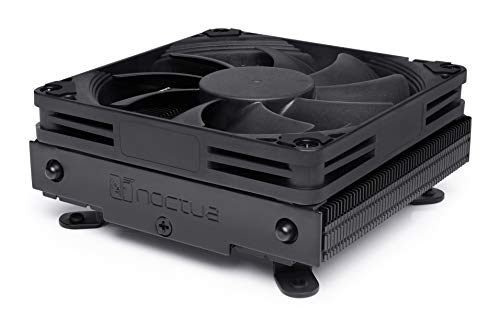
Mini-ITX boards for this socket — the Z370, Z390, H370 and B360 ITX models — power a thriving small-case scene, and cooling is where those builds are won or lost. The first law is unchanged: measure the case’s stated clearance and obey it. Larger ITX enclosures in the NR200 class accept genuine towers around the 155 millimetre mark, which puts most of this guide back on the table and makes for the quietest small builds of all. Slim cases are a different world. At clearances under 70 millimetres no tower fits, and the realistic choices are a quality low-profile cooler for locked chips, accepting that a K processor will be power-limited, or a liquid loop in a case designed around a radiator from the start.
Socket-area clearance is the ITX builder’s second trap. ITX boards pack the memory slots, the PCIe slot, and often an M.2 socket into the cooler’s shadow, so a tower that fits the case may still lean on a graphics card backplate or swallow the only memory slot pair. The offset and narrow designs in this guide — the Mugen 5 and the NH-U12S in particular — were effectively designed for this problem, and test-fitting with the board outside the case is time well spent. Finally, small cases exhaust heat slowly, so the case-airflow advice above applies with double force: in an ITX build the exhaust fan is not an accessory, it is half the cooler.
Frequently asked questions
Will a cooler listed for LGA1200 fit my LGA1151 board?
Yes. LGA1200 kept the same mounting hole spacing and a compatible socket height, so coolers list the two sockets interchangeably and the same hardware serves both. The reverse is also true: any pick in this guide can move forward to a tenth or eleventh generation board later. Only LGA1700 broke the pattern, and for that platform you would need the manufacturer’s updated mounting kit.
Is the Intel stock cooler really that bad?
For a locked i3 or a lightly used office i5, it is adequate, and honesty requires saying so. Its failures appear with sustained loads, K-series chips, and age: the thin aluminium core saturates, the small fan spins to speeds where it becomes the loudest part of the machine, and the push-pin mounting loosens over years of heat cycles. If your 1151 machine is quiet and cool under the work you actually do, keep your money. If it howls, throttles, or has started shutting down in summer, any tower here is a transformation rather than an upgrade.
How much temperature improvement should I expect?
On a chip that was throttling, the change can be dramatic — sustained clocks return, and load temperatures commonly fall by margins measured in tens of degrees compared with a failing or stock cooler. On a healthy locked chip that was never throttling, expect modest temperature drops and a large noise drop instead. Judge the upgrade by behaviour under your real workload sustained for twenty minutes, not by an idle desktop reading, which tells you almost nothing about a cooler.
Do I need a dual-tower cooler or liquid for an i9-9900K?
At stock settings with sensible motherboard defaults, no — the stronger towers here, including the dual-tower Pure Rock Pro 3 alongside the NH-U12S and the Mugen 5, hold a 9900K properly. The picture changes if your board enables multicore enhancement by default or you overclock, because power draw climbs steeply and stays there. In that configuration a dual tower such as the Pure Rock Pro 3, run assertively, or a 240mm or larger liquid loop becomes the honest recommendation. The practical first step is checking what your board is actually asking the chip to draw, because many 9900K cooling problems are really motherboard settings problems.
My old 115x tower still works. Should I just replace its fan?
Often, yes — and it is the most economical move on this whole page. If the fin stack is straight, the heatpipes show no corrosion, and the mounting hardware is complete, then the only component with a wear life is the fan, and a quality replacement 120mm fan restores the cooler to something very close to its original behaviour for a fraction of a new cooler’s cost. The exceptions are coolers whose mounting relied on ageing plastic push-pins, whose cold plates have warped or corroded, or whose original fans were proprietary shapes that standard fans cannot replace. Inspect honestly, and where the bones are good, spend on the fan and keep the change for the next upgrade.
How long should a tower cooler last?
Longer than the platform, in most cases. The fin stack, heatpipes, and mounting hardware have no wear mechanism short of corrosion or physical damage, and a decade of service is unremarkable. The fan is the wear part: its bearing has a finite life measured in tens of thousands of hours, and when it eventually grows noisy it unclips and can be replaced with any quality 120mm fan, restoring the cooler to full health. This is the structural advantage of air cooling on an ageing platform — the part that wears out costs the least and takes two minutes to change, with no pump, seals, or coolant anywhere in the machine’s future.
Can I keep using my cooler when I upgrade the rest of the PC?
Very likely, and this is the quiet economic argument for buying a good one now. The mounting carries to LGA1200 directly, and the leading manufacturers supply LGA1700 and AMD AM5 kits for their existing coolers — Noctua provides them free on proof of purchase. A quality tower with a healthy fan has no wear parts except the fan itself, which is replaceable, so a cooler bought for a 1151 machine in its second decade can reasonably expect to cool a third platform before it retires.
Mistakes that undo a good cooler
A short catalogue of self-inflicted wounds, gathered from years of forum threads that began with a cooler being blamed. The most famous is the protective plastic film some manufacturers ship on the cold plate: leave it in place and you have insulated your processor with the packaging. Next is thermal paste misuse in both directions — a grain-of-rice dot that covers half the spreader, a frosting layer thick enough to act as a blanket, or yesterday’s dried compound reused because it looked fine. Then comes the single-screw error: running one mounting screw fully home before starting the others, which tilts the base and leaves one edge of the processor barely touched. Tighten in a cross pattern, a little at a time.
The electrical mistakes are quieter. A fan plugged into a chassis header follows the motherboard’s temperature rather than the processor’s, so it idles while the chip cooks and spins up for the graphics card’s sake instead. A fan installed backwards fights the case’s airflow instead of joining it; the arrows moulded into the fan frame exist for this reason. And the most common verdict error of all is judging the result by idle temperature, a number dominated by room temperature and fan curves, rather than by a twenty-minute sustained load. Avoid these six and the cooler you bought is the cooler you actually get.
The bottom line
Match the cooler to the chip and the case, in that order. Locked processors and tight budgets are served completely by the Hyper 212 Black Edition and the Assassin X 120 Refined SE. Quiet rooms belong to the Pure Rock Pro 3, hotter K chips to the Peerless Assassin 120 SE, tall memory to the Mugen 5, and small cases to the Assassin X, which exists for exactly the builds the others cannot enter. The NH-U12S stands above the group not by winning any single measurement but by having no weakness to route around, and for a machine you intend to keep, that completeness is worth its premium. Measure your clearance, be honest about your processor, and set a thoughtful fan curve once the screws are tight. An LGA1151 chip cooled properly holds its boost to the end of the longest job you give it, and that, in the end, is what you were buying all along.