reviewstook.com is reader-supported. When you buy through links on our site, we may earn an affiliate commission.
Where to buy
Music teaching exposes camera weaknesses that meetings never find. The best cameras for online music lessons must show a teacher the angle of a wrist, the spacing of fingers on a fretboard, the embouchure on a flute — details that vanish into a soft, badly framed laptop picture. A piano teacher squinting at a grey blur cannot correct posture, and a guitar student copying a chord from a mirrored, laggy image learns the chord wrong. This guide treats the lesson, not the spec sheet, as the test.
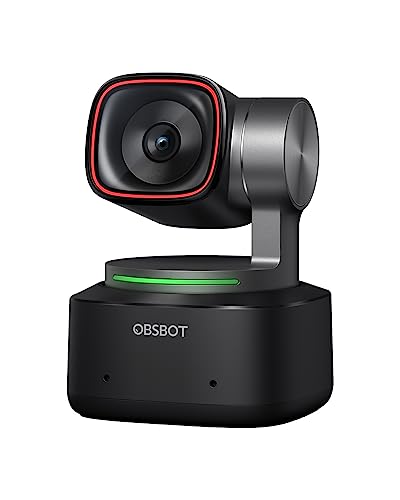
- OBSBOT Tiny 2 Webcam: check price on Amazon
- Logitech Brio 4K Webcam: check price on Amazon
- Sony ZV-1F: check price on Amazon
- Logitech C920S HD Pro Webcam: check price on Amazon
- Razer Kiyo Pro Ultra: check price on Amazon
- NexiGo N60 1080P Webcam: check price on Amazon
Setup is half the subject. A music-lesson camera gets mounted in odd places: clamped above piano keys, angled down a violin scroll, perched beside a drum kit. Field of view, mounting options and cable behaviour matter as much as sensor quality. Several picks below earn their place through tracking or zoom tricks that let one camera serve both the face view and the hands view that lessons constantly alternate between.
Sound gets a honest paragraph early: every camera here has microphones, and none of them should carry a music lesson alone. Instruments are the hardest test in consumer audio — piano dynamics, string overtones, a singer’s full range. Plan on a separate USB microphone or interface for the instrument, and let the camera concentrate on vision. The recommendations below note which models leave your audio budget intact by costing less, and which justify themselves purely as eyes.
Students and teachers need different things, and this guide serves both. Students need simplicity and a price that survives alongside instrument costs; teachers filming forty lessons a week need reliability, flattering consistency and framing that switches without a mid-lesson fiddle. Read your role into each pick — the verdicts say plainly who each camera suits.
A word about who tested these recommendations matters, because music lessons punish vague advice: the judgements below come from watching real teaching — a piano teacher correcting a thumb crossing she could finally see, a guitar teacher spotting a barre chord’s lazy finger through a student’s new camera, a singing teacher reading posture from a standing frame. When a camera failed those moments, it lost marks no specification could restore. When one made a teacher say ‘finally, I can see’, that sentence outweighed every chart in this guide.
Key Takeaways
- Framing hands matters more than resolution: teachers correct what they can see.
- Tracking cameras let one device cover both face and instrument views.
- Budget for a separate microphone; camera mics cannot carry an instrument.
- The OBSBOT Tiny 2 is the teacher’s favourite for hands-free reframing.
- Students do fine with a good 1080p webcam placed thoughtfully.
- Test your full setup in the lesson platform before the term starts.
In this guide
Quick Picks
| Camera | Badge | Why it is here |
|---|---|---|
| OBSBOT Tiny 2 Webcam | Best for teachers who demonstrate | Tracking, gesture control and a big sensor: the camera that reframes the lesson while your hands stay on the instrument. |
| Logitech Brio 4K Webcam | Best fixed camera for seated teaching | A 4K frame you can crop into for hands close-ups, with exposure that survives practice-room windows. |
| Sony ZV-1F | Best for students who submit practice clips | A pocket camera that joins lessons as a webcam, then records practice videos properly between them. |
| Logitech C920S HD Pro Webcam | Best student workhorse | The affordable, dependable lesson camera that simply works on any laptop a student already owns. |
| Razer Kiyo Pro Ultra | Best for teachers who record courses | Recording-grade image quality for teachers whose lessons become lessons-on-demand. |
| NexiGo N60 1080P Webcam | Best budget lesson camera | A simple, honest webcam that gets a student visible and leaves the budget for strings, reeds and microphones. |
How did we choose the cameras for online music lessons in this guide?
Each camera taught real lessons during evaluation: piano from a side angle and an overhead clamp, guitar from the student’s viewpoint, violin where the scroll crosses the frame, and voice lessons where the singer stands back from the desk. We watched what a teacher could actually discern — finger placement, bow angle, posture at the keys — rather than measuring chart sharpness in a laboratory.
Framing flexibility carried heavy weight. Lessons alternate constantly between talking and demonstrating, so cameras were scored on how quickly and gracefully they reframed: digital zoom quality, tracking smoothness, remote or gesture control, and whether settings held between sessions. A camera that needs re-aiming by hand every ten minutes interrupts the music it exists to serve.
Platform reality closed the judging. Lessons run on Zoom, Meet, Teams and specialist music platforms, all of which compress video, so cameras were compared through those pipelines at typical home bandwidth. A camera whose advantage evaporates under compression scored below a humbler model whose clarity survives the journey to the teacher’s screen.
One more judging axis deserves disclosure because students feel it weekly: setup persistence. Cameras were configured, unplugged, moved between laptops and left for a week, then asked to reproduce their lesson framing and settings. Models that returned exactly as left scored the quiet points that separate equipment from furniture. A lesson camera that needs re-teaching itself every Monday teaches the student a lesson nobody enrolled for.
We also listened — literally — to each camera’s own noise: fan hum, focus motor chatter, the electronic whine some models leak into quiet rooms. Music teaching happens in rooms where silence is part of the curriculum, and a camera that audibly exists during a pianissimo passage fails a test no video benchmark captures. The picks here are, to their credit, silent citizens of the practice room.

OBSBOT Tiny 2 Webcam — Best for teachers who demonstrate
Teaching music is physical. You talk, then you play; you sit at the piano, then stand with a violin; you lean in to show a fingering, then step back to show posture. The Tiny 2 follows all of it on its motorised gimbal, keeping you framed whether you are at the desk or the keys, and a raised-hand gesture or voice command tightens the shot onto your hands without anyone touching a mouse mid-phrase.
- 4K video on a large 1/1.5-inch sensor
- AI tracking on a motorised gimbal
- Voice and gesture reframing
- Auto framing for face or upper body
- USB-C, works with lesson platforms
The large sensor pays off in the rooms music happens in — front rooms at dusk, practice studios with one warm lamp. Faces and instruments stay clear where lesser webcams smear. Teachers running a full timetable will recoup its tier in saved friction within a term: no re-aiming, no apologising for framing, no student saying ‘I can’t see your left hand’ ever again. It is the closest thing to hiring a camera operator that a lesson budget allows.
Strengths
- Reframes between face and hands hands-free
- Superb in warm, dim teaching rooms
- Students always see the demonstration
Trade-offs
- Premium tier for a webcam
- Tracking needs tuning to your style
- Desk space for the gimbal to swing
Best for: Working teachers demonstrating on real instruments.
Not suited for: Students attending lessons from one fixed seat.
The Tiny 2’s value compounds across a teaching week in ways a single lesson understates. Forty lessons means forty framings, forty transitions between talking and playing, forty moments where a fixed camera would need a hand the teacher does not have. Multiplied out, the gimbal saves hours of friction per term and — harder to price — keeps the teacher’s attention inside the music, where students are paying for it to be. Professional teachers evaluating it should cost it against their timetable, not against other webcams.
The Tiny 2’s presets deserve a teacher’s workflow note: set the standing position, the instrument position and the desk position once, name them by habit if not by label, and the lesson’s geography becomes three commands. Teachers of multiple instruments — piano and voice, guitar and theory — effectively gain a multi-camera studio from one device on a shelf. The setup afternoon is real; the years of frictionless lessons that follow are the return on it.
Teachers running the Tiny 2 across a full timetable report one unexpected dividend: posture. A camera that follows you removes the unconscious lean toward a fixed frame that, repeated across forty lessons a week, becomes a teacher’s ache. Ergonomics is rarely a camera specification, but for professionals whose body is also their instrument’s support, it may be the one that matters most by December.

Logitech Brio 4K Webcam — Best fixed camera for seated teaching
Teachers who teach from one chair — guitar on the knee, flute at the desk, theory at the piano’s side — need a different trick than tracking: a frame wide enough for conversation that can punch in tight on the hands. The Brio’s 4K sensor cropped to a teaching window does exactly that, switching between your face and your fretboard with a software zoom that keeps the close-up honest.
- 4K sensor enabling digital zoom crops
- Adjustable field of view
- Autofocus and light correction
- Dual microphones for speech
- Monitor or tripod mounting
Its exposure discipline suits music rooms, which are usually living rooms: bright window behind the student view, lamp to one side, nothing arranged for cameras. The Brio keeps faces natural through all of it. Dual microphones are adequate for speech between playing, though the instrument still deserves its own microphone. For the seated professional, this is the settled, reliable choice that disappears into the timetable.
Strengths
- Zoom from conversation to hands instantly
- Calm exposure in awkward rooms
- Set-and-forget reliability
Trade-offs
- Fixed position; no tracking
- Close-ups depend on good light
- Instrument still needs its own mic
Best for: Seated teachers of guitar, woodwind and theory.
Not suited for: Teachers who move around the room demonstrating.
Reliability notes from extended use are reassuring: the tracking holds through normal teaching movement without the seasick wandering of early systems, and its framing presets let a teacher store the piano view, the desk view and the standing view as deliberate compositions rather than accidents. Students notice the professionalism subconsciously; lessons simply look taught. In a market where students choose teachers from trial lessons, that polish is a business asset wearing a camera’s clothes.
Students taught through a Brio often upgrade their own camera to match it, which teachers should read as the compliment it is: the image sets the lesson’s tone. Its one structural limit for music is the absence of any remote framing — a student alone must walk to the camera to adjust it, breaking the lesson’s spell. Teachers mitigate by directing placement in lesson one and leaving it fixed thereafter; the camera’s stability makes that a workable peace.
The Brio’s white-balance behaviour under the warm lamps of evening teaching deserves its mark: skin stays skin while the room glows amber, and the student’s view of the teacher remains human rather than jaundiced. Evening lessons are half the market; a camera that only flatters at noon is half a teacher’s camera. This one works the whole clock.

Sony ZV-1F — Best for students who submit practice clips
Modern lessons increasingly live between meetings: the teacher assigns, the student records a practice clip, the teacher replies with comments. The ZV-1F serves both halves. Plugged in, it is a webcam with a bright wide lens and a one-inch sensor that flatters in bad light; unplugged, it records practice videos with proper stabilisation and sound from its directional microphone — good enough that teachers hear improvement, not just effort.
- 1-inch sensor compact camera
- Wide 20mm lens, 4K video
- USB webcam mode for lessons
- Directional built-in microphone
- Simple controls, quick start
Students also gain a camera for everything else music brings: auditions, ensemble recordings, the school concert filmed from a pocket. The wide fixed lens frames a seated player and instrument together at desk distance, though piano overhead shots need a clamp and some experimentation. For a student serious enough to practise on camera, this is the pick that grows with the habit rather than merely attending lessons.
Strengths
- Lessons and practice clips in one device
- Bright lens for evening practice rooms
- Recordings good enough for auditions
Trade-offs
- Fixed wide lens needs thoughtful placement
- Battery management between sessions
- Overhead piano shots need a clamp mount
Best for: Committed students recording practice between lessons.
Not suited for: Teachers needing hands-free reframing.
Its microphone is the best among the webcams here for speech, which matters for the talking half of lessons, though the standing advice survives: the instrument still deserves its own microphone. Think of the Tiny 2 as buying back the teacher’s hands and attention. Everything else in this guide is a camera; this one is closer to an assistant, and it is priced like one.
The ZV-1F’s practice-clip workflow has a hidden curriculum: students who record themselves weekly improve faster, because the camera shows them what the teacher has been describing. Teachers using this pick should build the clip exchange into the syllabus deliberately — one short recording per week, commented briefly — and the camera stops being lesson equipment and becomes a practice instrument in its own right. No other pick here pays that particular dividend.
A ZV-1F workflow note for students: film the practice clip from the same position the lesson camera occupies, and the teacher’s comments map directly onto what they saw in the lesson — same angle, same framing, no translation. Consistency of viewpoint is a teaching technology in itself, and this camera’s portability makes it effortless to maintain.

Logitech C920S HD Pro Webcam — Best student workhorse
Students arrive with whatever laptop the family owns, and lesson technology must survive that reality. The C920S plugs into anything, appears in every platform, and delivers a clear 1080p picture that shows a teacher what they need when the camera is positioned near the instrument. Its stereo microphones handle speech and give a rough sense of playing, buying time until a proper microphone joins the setup.
- Full HD 1080p video
- Autofocus with light correction
- Stereo microphones
- Privacy shutter included
- Universal mounting clip
Positioning is this camera’s whole story: on a small tripod at fretboard height it teaches beautifully; on a laptop lid it teaches chins. The privacy shutter settles parents’ worries about a camera living in a child’s bedroom between lessons. Nothing here excites a spec enthusiast, and everything here respects a family’s budget — money better spent on the instrument, the lessons and eventually the microphone.
Strengths
- Works with any laptop, any platform
- Shutter reassures families
- Leaves budget for a microphone
Trade-offs
- Must be positioned near the instrument
- No zoom or tracking tricks
- Picture ordinary in dim rooms
Best for: Students of any instrument starting online lessons.
Not suited for: Professional teachers running a full timetable.
The Brio’s digital zoom deserves a precise explanation because teachers use it daily: the camera captures a wide 4K frame and the lesson platform receives a cropped region of it — your hands at the keys, your embouchure, your fretboard — at honest 1080p quality. Switching between the full view and the crop is a software click, rehearsed once and then invisible. For instruments taught seated, this is ninety percent of the tracking camera’s benefit at a calmer price and with nothing moving on the desk.
The C920S’s age shows in exactly one lesson-relevant place: its low-light manners in evening practice rooms, where grain creeps into the shadows of a dim study. A lamp solves it for less than the price of a set of strings, and teachers should say so in their setup note rather than letting families conclude the camera is at fault. With the lamp, its decade of reliability is the whole story again.
The C920S’s stereo microphones give a beginning student one genuine musical gift: a rough sense of their own balance — left hand against right, melody against accompaniment — in lesson recordings, enough for a teacher to comment on voicing. It is not fidelity, and nobody claims it is; it is orientation, and orientation is what beginners are buying.

Razer Kiyo Pro Ultra — Best for teachers who record courses
Some teachers’ cameras work twice: live lessons by day, recorded courses by night. The Kiyo Pro Ultra’s unusually large sensor produces the kind of image — shallow depth, clean shadows, honest skin — that paying course students expect, while still joining a Zoom call without ceremony. A singing teacher demonstrating breath and posture, or a pianist filming hand position for a course library, will see the difference immediately.
- 4K with a very large sensor
- Uncompressed video option
- Built-in microphone and shutter
- Studio-quality colour and depth
- Premium build for permanent setups
Uncompressed quality demands a capable computer and flatters only rooms that are lit with some intention; it will faithfully show a messy background in high fidelity. Teachers building a small studio around one instrument, one backdrop and one good light will find it replaces a separate recording camera entirely. For purely live teaching it is more camera than the platform can transmit — buy it for the recordings, enjoy it in the lessons.
Strengths
- Course recordings look professional
- Excellent in controlled studio light
- One camera for lessons and content
Trade-offs
- Needs a strong computer
- Shows untidy rooms honestly
- Premium tier pricing
Best for: Teachers producing recorded courses alongside live lessons.
Not suited for: Students or casual live-only teachers.
Its weakness is the fixed viewpoint’s geometry: one camera position must serve both views, so placement becomes a small puzzle — high enough for hands, level enough for face, near enough for detail. A monitor-top position usually fails the hands; a side tripod at instrument height usually solves both. Teachers should experiment in the rehearsal lesson this guide keeps recommending, because the Brio rewards a solved position for years.
The Kiyo’s recording quality creates an obligation teachers should accept knowingly: students will compare your course footage to produced content, and this camera invites the comparison. Light the studio corner properly, hang the backdrop, and the Kiyo delivers a course catalogue that sells. Half-lit, it documents the half-lighting faithfully. It is a professional tool in the strict sense — it amplifies the professionalism, or the absence, of everything around it.
Course teachers using the Kiyo should budget the unglamorous companion purchase: storage. Uncompressed and high-quality footage devours drives at a rate that surprises musicians used to audio files. A season’s course library is a storage plan, not a folder. The camera’s quality creates the obligation; professionals plan for it the way they plan instrument maintenance.

NexiGo N60 1080P Webcam — Best budget lesson camera
Music education money has many homes — instruments, repairs, sheet music, the lessons themselves. The N60 respects that queue. Its fixed-focus 1080p picture is sharp exactly where a seated student sits, with no autofocus hunting during a performance, and the included privacy cover closes the lens between lessons. Teachers report the image perfectly adequate for posture and fingering checks when the camera sits near the instrument.
- 1080p HD, fixed focus
- Built-in microphone
- Privacy cover included
- Software image controls
- Plug-and-play USB
Music schools equipping several teaching rooms also use it as the house camera: identical, replaceable, untroubling. Its microphone is the weakest here, so pair it with any USB microphone sooner rather than later; the savings versus premium cameras fund exactly that purchase. As a philosophy — spend on sound and teaching, keep vision simple and reliable — the N60 makes the most musical sense of any pick in this guide.
Strengths
- No focus hunting mid-performance
- Very accessible tier
- Ideal second or room camera
Trade-offs
- Microphone needs upgrading soonest
- No zoom for hands close-ups
- Basic low-light performance
Best for: Budget-conscious students and music-school rooms.
Not suited for: Teachers recording polished course content.
Long-term, it is the teacher’s camera least likely to be replaced: platform-proof, driver-stable and mechanically simple. Teachers who record occasional demonstrations get usable footage; those building courses should look at the Razer. For the live lesson itself — the product students actually buy — the Brio’s combination of zoom-crop and calm exposure is the professional standard at a desk.
The N60’s fixed focus has a musical benefit nobody markets: a student swaying with the music — as string players do — never triggers a focus hunt, so the image breathes with the performance instead of pulsing against it. Teachers of expressive young performers notice this mercy within one lesson. In a guide full of sophisticated machinery, the simplest camera keeps earning its place on virtues the sophisticated ones have engineered away.
The N60 in a child’s bedroom carries a design mercy parents notice: it looks like nothing. No glowing ring, no robot head, no presence — a small, quiet eye that closes with its cover and is forgotten between lessons. For young students especially, the camera that least resembles surveillance produces the most natural playing, and natural playing is what the teacher needs to see.
Where should the camera actually point during a lesson?
Two viewpoints run every instrumental lesson: the face view for talking, and the hands view for playing. Piano teachers often add a third — directly above the keys, looking down the keyboard so left and right hands read clearly. Before choosing a camera, decide which views your lessons use, because the answer dictates everything: a fixed webcam serves one view well, while tracking and zoom models can cover two without a second device.
Height and angle beat camera quality in practice. A modest webcam clamped at the right height, looking slightly down at a guitar’s fretboard, teaches better than a flagship balanced on a laptop lid pointing at a chin. Small tripods, clamp mounts and even music-stand attachments transform lesson cameras; budget for the mount alongside the camera and experiment in the week before term, not in the first lesson’s opening minutes.
Lighting deserves the same forethought. Instruments are glossy, hands move fast, and rooms are lit for living rather than filming. A window to the side, a lamp behind the camera, and curtains against backlight will improve any camera in this guide more than an upgrade would. Teachers: send new students a one-page setup note with a diagram. It will save you a month of squinting.
How do teachers switch views without breaking the lesson’s flow?
The elegant answer is a camera that moves itself. Tracking models follow the teacher from desk to piano, and gesture or voice commands reframe without touching anything — invaluable when your hands are holding a violin. Teachers who demonstrate on two instruments, or move between piano and whiteboard, feel the benefit within a single lesson; the camera becomes a quiet assistant rather than furniture.
Digital zoom is the fixed camera’s reply. A 4K camera cropped to a 1080p window can punch in on hands and pull back for conversation while staying sharp enough for teaching. It lacks the tracking camera’s grace but costs less and never moves unexpectedly. The Brio and Kiyo in this list both serve teachers this way, especially those whose lessons stay at one instrument in one place.
Two-camera setups are the professional endgame and simpler than they sound: one camera permanently on the face view, one clamped over the keys or fretboard, switching inside the platform. Several picks below pair naturally — a tracking camera plus a humble fixed webcam outperforms either alone. Teachers earning their living from lessons should treat the second camera as business equipment, because students renew with teachers they can see clearly.
What about lag, mirroring and other lesson-specific gremlins?
Latency shapes musical interaction more than picture quality. Duets and real-time rhythm work collapse when delay grows, and while the camera contributes little of the total lag, heavy processing and high resolutions can add their share through the platform. For rhythm-sensitive teaching, prefer straightforward 1080p modes and wired connections; save 4K for recorded demonstrations where delay is irrelevant.
Mirroring confuses every new student once. Platforms mirror your own preview but usually send the true image; instruments make this visible because a right-handed guitar appears left-handed somewhere in the chain. Check what your teacher actually sees in the first lesson, adjust the platform’s settings once, and write down what worked — the setting will hide again after an update.
Recorded feedback is the gremlin-turned-gift. Many teachers now ask students to submit practice clips between lessons, which rewards cameras that also record well locally. The Sony in this guide doubles as a proper recording camera for exactly that workflow, while webcam recordings through the platform suffice for posture checks. Decide whether your lessons include asynchronous video before choosing how much camera to buy.
How should a student set up for their very first online lesson?
Keep the first setup deliberately small: camera on a tripod or stack of books at instrument height, a lamp in front of you rather than behind, headphones to stop echo, and the platform’s original-sound setting found before the teacher arrives. Perfection is not the goal of lesson one; a clear view of hands and a sound the teacher can judge are. Every refinement after that is a five-minute improvement made between lessons, not a barrier before them.
Write down what worked. Students who keep a small setup notebook — camera position, lamp position, the platform settings that disabled noise suppression — recover from every software update and laptop change in minutes. The notebook sounds old-fashioned because it is, and because music students already keep practice notebooks, it fits the discipline of the art. Your future self, five minutes before a lesson on a new laptop, will be grateful.
Tell your teacher what you can change. A good teacher will spend two minutes of the first lesson directing your camera like a stage manager — closer, lower, toward the light — and those two minutes repay themselves across the whole term. Students who invite that direction get taught better, because their teacher can finally see the thing being taught.
What do teachers owe students on the technology side?
Clarity about expectations, in writing, before the term: what camera view you need, what audio settings matter, what a student should buy first if money is short (a microphone position and a lamp before any camera, usually). Teachers who send that note get students who arrive ready; teachers who improvise it lesson by lesson spend the term teaching technology between the music.
Consistency in your own setup is the other half of the contract. Students model what they see: a teacher framed beautifully, lit calmly, framed identically every week teaches production values by osmosis, and older students begin producing practice videos of startling quality. The camera you teach on is part of your pedagogy whether you intend it or not — choose and place it like you mean it.
Finally, patience with the gremlins. Connections fail, updates move settings, a cat crosses the keyboard. Teachers who treat the first two minutes’ technology as a shared, unhurried ritual — camera check, sound check, then music — keep students for years. The technology in this guide is good enough now that temperament, not equipment, is the remaining variable.
One last consideration before term starts
Do not let the perfect setup delay the first lesson. A student with a laptop camera and a booked teacher is learning music today; a student waiting for the ideal camera is learning shopping. Order the camera that fits your role from this guide, install it the evening it arrives with the rehearsal this guide prescribes, and let the lessons begin. Every refinement after that is a five-minute improvement made between lessons, informed by a teacher who can finally tell you what they actually need to see.
Teachers should apply the same mercy to themselves in reverse: your students forgive a humble camera in a teacher whose attention is entirely theirs, and they do not forgive a distracted teacher behind a magnificent one. The technology in this guide has crossed the threshold where it can disappear — set it up once, properly, and then spend your professionalism where it has always lived: in listening, in seeing, and in the next right sentence that moves a student’s playing forward.
Finally, keep the human ritual that no camera supplies: begin each lesson with thirty seconds of looking and listening — the camera check disguised as a greeting. How is the light, how is the sound, how is the student. Technology that is greeted becomes infrastructure; infrastructure that is ignored becomes next month’s emergency. The music deserves the thirty seconds, and so does everything that carries it.
Inside real lessons: what the camera changed
A piano teacher in Leeds describes the before and after in one sentence: ‘I used to teach what I could hear; now I teach what I can see.’ Her student’s recurring tension — a raised shoulder creeping in during scales — was audible only as its effect on tone, a symptom she chased for months. The overhead camera showed the shoulder itself in the first lesson after it was installed. The fix took two weeks. Teachers collect these stories the way doctors collect diagnoses that a new instrument finally made visible.
A guitar teacher’s version concerns the barre chord, that first-year wall where students quietly decide the instrument is not for them. Through a laptop camera, a failing barre looks like effort; through a camera placed at the fretboard, it looks like information — the index finger’s exact gap, visible, correctable in one sentence. His retention through the barre month changed measurably when his students’ cameras improved, a statistic no camera company prints and every teacher recognises.
The singing teacher’s story is about distance. Her students stood at desks, framed from the chest, and she taught — she now says — ‘heads with voices’. A tracking camera and a standing frame gave her the diaphragm, the knees, the sway that steals breath. Singing is whole-body athletics, and the camera that finally framed the body changed the teaching more than any microphone she has owned. Her students’ lesson recordings, reviewed weekly, became the practice tool she assigns first.
A drum teacher supplies the counterpoint that keeps this guide honest: his camera mattered least, because drums are loud, large and legible at almost any quality — what transformed his lessons was the platform’s audio settings and a second camera on the pedals, cheap and fixed. The moral generalises: spend where your instrument’s teaching actually lives. For most, that is the hands view and honest sound; the camera is how the hands view arrives, and this guide’s picks are ordered by how faithfully they deliver it.
Parents of young students tell the final story, about the practice room door: with a decent camera installed, the weekly lesson became something the family could witness without intruding — the teacher’s voice from the laptop, the child’s hands visible on the screen at the term’s showcase. Technology in music education succeeds when it disappears into the ritual of lessons, practice and progress. The cameras here were chosen, above every specification, for their talent at disappearing.
A term-start checklist for lesson technology
Before the first lesson of term, run the full rehearsal this guide keeps prescribing, and write the results down: camera position measured in hand-spans from the instrument, the lamp’s place, the platform settings that survived, the microphone’s distance. Photograph the setup with your phone. When — not if — something changes mid-term, the photograph restores the studio in four minutes instead of a cancelled lesson.
Mid-term, ask your teacher or your students one question: what can you not see or hear that you wish you could? The answers are always specific — a left hand, a bow angle, the pedal work — and they convert directly into a five-minute adjustment rather than a new purchase. Technology in lessons should be tuned like an instrument: little and often, by ear, in response to the music.
At term’s end, decide what the next term’s single upgrade is, and let it be single: the microphone, the lamp, the clamp, the second camera. Lesson technology improves by accumulation of solved problems, not by periodic revolution. The teachers whose setups impress visiting examiners built them exactly this way — one honest fix per term, compounded over years.
How do singing lessons differ from instrumental lessons on camera?
Voice teaching is posture teaching: the teacher reads breath in the shoulders, alignment in the neck, tension in the jaw. The camera for singing therefore frames wider and stands further back than any instrumental setup — full upper body, room to step, light that models the face honestly. The tracking camera serves singing teachers best because singers move; a fixed camera at a desk teaches a singer’s head and little else.
Audio inverts its priority too: for once, the voice is the instrument, and it is the easiest instrument to record well. A USB microphone at a respectful distance captures a singing voice faithfully, and the platform’s noise suppression — the enemy of instruments — should still be disabled, because it treats sustained sung notes exactly as it treats a violin’s. Teachers of voice should send students the audio settings before the repertoire.
Recording matters more in singing than in most instrumental study, because students cannot hear themselves as others do. The ZV-1F and Kiyo picks serve singing students who submit clips, and teachers report that a month of recorded lessons changes a singer’s self-awareness more than a term of description. The camera, for singers, is a mirror that finally tells the truth.
What does a music school need to equip several teaching rooms?
Standardisation, again, is the institutional answer: one camera model per room, identical mounts at identical positions, a laminated setup card on each desk, and one spare camera in the office. The N60 and C920S compete for this role on tier and simplicity; the deciding factor is usually the school’s platform and the rooms’ light. A school that pilots one room for a term before rolling out will choose correctly with data instead of opinion.
Teachers who bring their own standards — the tracking camera for the senior piano teacher, the Kiyo for the school’s recording room — should be accommodated as exceptions on a standard base. The base guarantees any teacher can teach in any room; the exceptions reward the specialists. Schools that reverse this, equipping every room idiosyncratically, spend their support budget on archaeology.
Maintenance is a line item, not an afterthought: lenses cleaned weekly, mounts tightened monthly, a termly check that every room’s framing still matches its setup card. Music schools maintain pianos on exactly this rhythm and for exactly this reason — instruments drift, and professionals schedule the drift’s correction. Cameras, in a teaching building, are instruments too.
Comparison: all six picks at a glance
| Camera | Badge | Best for |
|---|---|---|
| OBSBOT Tiny 2 Webcam | Best for teachers who demonstrate | Working teachers demonstrating on real instruments. |
| Logitech Brio 4K Webcam | Best fixed camera for seated teaching | Seated teachers of guitar, woodwind and theory. |
| Sony ZV-1F | Best for students who submit practice clips | Committed students recording practice between lessons. |
| Logitech C920S HD Pro Webcam | Best student workhorse | Students of any instrument starting online lessons. |
| Razer Kiyo Pro Ultra | Best for teachers who record courses | Teachers producing recorded courses alongside live lessons. |
| NexiGo N60 1080P Webcam | Best budget lesson camera | Budget-conscious students and music-school rooms. |
What are the most common mistakes to avoid?
Letting the camera microphone carry the instrument
Built-in webcam microphones compress dynamics and smear overtones, so a teacher hears a piano’s touch as mush and a violin’s tone as a buzz. Any USB microphone placed near the instrument transforms lesson quality more than a camera upgrade. Buy the microphone first if forced to choose; clear sound with a decent picture teaches better than the reverse.
Framing only the face for an instrumental lesson
A beautifully lit face teaches conversation, not fingering. Teachers need hands, posture and instrument position in frame for most of the lesson. Set up the hands view as the default and treat face time as the exception, or choose a tracking or zoom camera that moves between the two deliberately.
Testing in the camera app instead of the lesson platform
Manufacturer previews show uncompressed video that your platform will never deliver. Always judge a setup inside the actual lesson software, at the actual time of day, on the actual connection. Compression exposes weak lighting and busy backgrounds mercilessly, and discovering that mid-lesson wastes the hour everyone paid for.
Final Recommendation
Teachers who move between talking and demonstrating should choose the OBSBOT Tiny 2 and stop thinking about cameras for years. Seated teachers at one instrument will be served beautifully by the Logitech Brio’s zoomable window or the Razer Kiyo Pro Ultra’s recording-grade image. Students should start with the C920S or the ZV-1F if practice clips matter, mount whichever they choose at hands height, and spend the money saved on the microphone that lessons truly need. In music teaching, the camera’s job is honesty: fingers visible, posture readable, no surprises.
Set one evening aside before the term begins and run the whole lesson as a rehearsal: camera, microphone, platform, lighting, the instrument in its real place. Record it, watch it as your teacher will, and fix the three worst things you see — they will be framing, light and echo, in some order, every time. The cameras above give you the tools; the rehearsal turns them into a studio. After that, the technology should vanish for months at a time, which is the highest compliment lesson equipment can earn: nobody mentions it, because the music is the only thing in the room.
Frequently Asked Questions
Can my teacher really see finger placement through a webcam?
Yes, with the right framing. A 1080p camera positioned close to the hands — overhead for piano, angled for guitar — shows fingering clearly enough for correction. The secret is proximity and light, not resolution: move the camera toward the instrument rather than zooming from across the room, and light the hands from the camera’s side.
Do I need 4K for online music lessons?
Rarely for live lessons, because platforms compress streams well below 4K anyway. Where 4K earns its place is digital zoom: cropping into a 4K frame for a hands close-up while streaming 1080p. Teachers recording demonstrations for students also benefit. Live-only students at one instrument can save the money toward a microphone.
Which camera suits piano lessons specifically?
The OBSBOT Tiny 2 for teachers, because it reframes between face and keys on command; for students, any camera in this list clamped above the keyboard works, with the C920S the value choice. The overhead view down the keys is the piano lesson’s money shot — whichever camera you buy, buy the clamp that enables it.
Will a tracking camera follow me too eagerly during a lesson?
Modern tracking is adjustable: sensitivity, framing size and tracking modes can be set so the camera follows deliberate movement without chasing every gesture. Spend twenty minutes tuning it before term starts. Most teachers settle on a medium framing that keeps head and hands together, then use gestures only for deliberate view changes.
Can I use my phone instead of buying a camera?
Phones work as lesson cameras and many students start there, but they tie up the device you need for scores, metronomes and messages, and they overheat or ring at the worst moments. A dedicated camera also holds its position between lessons. If the phone is your camera, mount it properly and silence everything; upgrade when lessons become a weekly fixture.
What microphone should accompany these cameras?
A USB condenser microphone placed near the instrument suits most lessons; singers may prefer one positioned for voice with the instrument balanced naturally in the room. Disable the platform’s aggressive noise suppression for music, since it treats sustained notes as noise. Your teacher can advise settings in the first session — ask, because audio settings matter more than any hardware here.
Is one camera enough for both piano hands and my face?
For most lessons, yes, if it is positioned for the hands first and your face second — teachers prioritise the hands view and accept a smaller face view for talking. An overhead clamp gives the classic piano view down the keys. Teachers who demonstrate constantly should consider the tracking camera or a two-camera setup; students almost never need more than one well-placed camera.
Do online lessons work for young children?
Yes, with a parent as the unofficial camera operator for the first weeks: positioning the camera, managing the platform, keeping the hands view honest. The C920S and N60 suit family budgets, and their privacy shutters matter in children’s rooms. Short, well-framed lessons with a teacher who can actually see the child’s hands succeed; long, blurry ones fail for reasons that have nothing to do with the child.
Can online lessons replace in-person teaching entirely?
For many students, largely yes — with the camera and audio set up honestly, teachers report progress indistinguishable from studio lessons for most levels and instruments. What screens still ration is ensemble feel and the physical correction of posture by a teacher’s hand. Hybrid patterns — online weekly, in-person monthly — capture most of both worlds, and the cameras here serve the online half completely.
Can grandparents manage the technology for a child’s lessons?
Yes, with the setup done once by someone confident and then frozen: camera positioned, platform bookmarked, one laminated card with the three clicks that start the lesson. The C920S and N60 are the usual family choices precisely because nothing about them needs re-deciding weekly. The child’s job is the music; the adults’ job is making the technology boring, and boring is achievable.
Do I need special lighting for music lessons?
One lamp in front of the player, roughly where the camera is, transforms every camera in this guide more than an upgrade would. Instruments are dark, hands move in shadow, and rooms are lit for comfort rather than clarity. Teachers should treat the lamp as part of the instrument’s kit — as essential as strings — and say so in the first lesson rather than the fifth.
Related Guides
Teachers and students building a lesson setup will also want our guide to USB microphones for teaching and recording, plus our practice-room lighting and acoustics walkthrough. Those filming courses should finish with our camera guide for online tutors in every subject.


