reviewstook.com is reader-supported. When you buy through links on our site, we may earn an affiliate commission.
Where to buy
Cameras bought to save editing time should be priced with their phone workflow in mind: the app, the transfer speed and the colour presets matter as much as the sensor. All six picks below are linked on Amazon, and each earned its place by producing finished-looking files on the day they were taken.
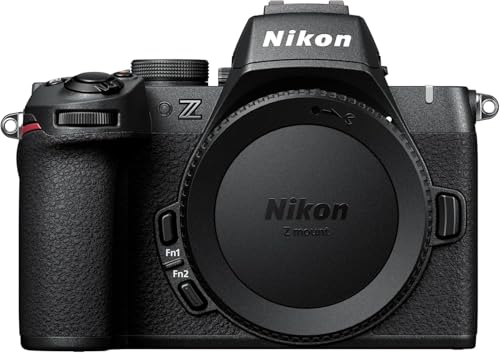
- Nikon Z50 II: check price on Amazon
- Sony ZV-1F: see the current price on Amazon
- Canon EOS R6 Mark II: view this camera on Amazon
- DJI Osmo Pocket 3: check availability on Amazon
- Panasonic LUMIX S5II: see it on Amazon
- Insta360 GO 3S: look at it on Amazon
The best cameras for less editing are bought by people who have done the maths on their own evenings. A friend who shoots school sports calculated that she spent eleven minutes per photograph across a season of selects — not because the pictures were difficult, but because her camera’s default colours always needed rescuing. The cameras for less editing attack that arithmetic directly: honest colour science, presets that behave like a good editor’s first pass, and phone transfers fast enough that sharing happens before the moment cools.
Less editing does not mean no standards. It means the camera’s JPEG engine, white balance and exposure metering are trustworthy enough that the file leaving the camera is the photograph, not raw material for one. Every pick below was chosen for the quality of its finished files: skin tones that stay skin-coloured, greens that stay believable, and highlight roll-off that does not turn skies into white plastic. If your editing software gathers dust by choice rather than by neglect, start here.
Key Takeaways
- Colour science is the whole purchase: presets and JPEG engines decide whether files need rescue or just cropping.
- The Nikon Z50 II’s colour presets are the headline act — finished looks at the press of a dial.
- Fast, painless phone transfer matters as much as image quality; a perfect file stuck on a card still costs you an evening.
- Shoot JPEG plus raw for a month, then honestly audit how often the raw files earned their storage.
- In-camera cropping, straightening and exposure metering you trust will save more time than any preset pack.
In this guide
Quick Picks
| Camera | Badge | Why it is here |
|---|---|---|
| Nikon Z50 II | Best preset-driven camera for finished files | Colour presets designed with working creators make finished JPEGs a dial-turn away. |
| Sony ZV-1F | Best pocketable camera for instant sharing | A fixed-lens compact tuned for flattering colour and one-button sharing. |
| Canon EOS R6 Mark II | Best full-frame JPEG engine | Canon’s picture styles and colour science produce finished files with professional depth. |
| DJI Osmo Pocket 3 | Best for video-first creators who hate grading | A gimbal camera whose colour and stabilisation arrive finished, straight from the device. |
| Panasonic LUMIX S5II | Best for photo styles with film character | Photo styles with genuine film-like character, plus LUT workflows for video shooters. |
| Insta360 GO 3S | Best tiny camera for effortless everyday clips | A thumb-sized camera whose app workflow turns clips into shareable edits automatically. |
How did we judge cameras for people who want their evenings back?
We scored finished files, not potential. Each camera was assessed on its default and preset colour, auto white balance under mixed indoor light, skin-tone behaviour, and how its JPEGs handled contrasty daylight without chalky highlights. Transfer workflow counted heavily: app reliability, transfer speed and whether the camera can send a file while still shooting. Raw quality was noted only as an insurance policy, not the main event.
We also favoured cameras whose exposure metering can be trusted unsupervised. A camera that needs exposure compensation dialled in for every scene has not saved you editing time; it has merely moved the work earlier and made it harder. The winners below meter like an experienced friend is standing at your shoulder.
Decide the look first, and the evening stays yours. Presets are promises, kept by the camera every frame. The photographers who escape the editing chair fastest share one habit, because they decide the picture’s look before pressing the shutter, not after dinner. A JPEG that lands close to finished in the field, is worth more than another stop of dynamic range you will never actually use. The queue shrinks fast, once the camera does the finishing. Back up the memory card before the celebratory drink, not after; finished files deserve the same discipline as raw ones.
Which are the best cameras for less editing, ranked by time saved?
The ranking runs from preset-driven compacts to full-frame bodies with superb JPEG engines. All six share one trait: their out-of-camera files survive being shared without apology.

Nikon Z50 II — Best preset-driven camera for finished files
Nikon built the Z50 II around a confession: most photographs are shared, not archived, and they are shared within the hour. Its colour presets — developed with working creators rather than a marketing department — sit on a dedicated control and produce finished looks with the ease of a phone filter and the taste level of a professional retoucher. Portraits keep their skin, food keeps its appetite appeal, and travel scenes keep their weather. The camera’s metering and white balance support the presets properly, so the look survives real light rather than showroom light.
- Form: APS-C mirrorless body, Z-mount lenses
- Feature: easy colour presets on a dedicated control
- Autofocus: subject detection from flagship Nikons
- Transfer: wireless photo sharing to phone
- Video: capable 4K for hybrid shooters
The rest of the camera refuses to be a toy. Subject-detection autofocus inherited from Nikon’s flagships keeps children and dogs honest, the body handles like a small version of a serious Nikon, and wireless transfer is quick enough to use at a café table. For the less-editing brief, this is the most complete answer here: a camera whose designers treated the JPEG as the product, and built everything else in service of it.
Colour recipes stop being a novelty and start being a workflow, once you trust them enough to stop bracketing every scene three different ways. Skin tones forgive little, so get them right in camera. Every hour not spent dragging sliders, is an hour returned to shooting, printing or simply being finished with the day. A finished JPEG travels, further than a raw file waiting. Keep one deliberately unfinished project on the go, so the editing skills stay sharp for the photographs that genuinely deserve an hour of attention. Keep one deliberately unfinished project on the go, so the editing skills stay sharp for the photographs that genuinely deserve an hour of attention.
Strengths
- Presets look designed, not filtered
- Skin tones stay natural across preset choices
- Small enough that the phone does not win by default
Trade-offs
- Preset looks still benefit from a straight horizon
- APS-C depth of field differs from full-frame habits
- Serious raw shooters pay for features aimed elsewhere
Best for: Parents, travellers and creators publishing the same day they shoot
Not suited for: Commercial photographers whose clients demand full raw workflows

Sony ZV-1F — Best pocketable camera for instant sharing
The ZV-1F is what happens when a camera company studies why phones win. It is small enough for a coat pocket, opens with a wide lens that suits arm’s-length framing, and processes faces with a flattery that stops short of plastic. Its colour defaults lean warm and clean, the exact register that performs well on feeds and family group chats alike. Files come out ready: exposed sensibly, coloured kindly, and sized for the places they will actually live.
- Form: fixed-lens compact, 20mm-equivalent wide lens
- Sensor: 1-inch type with 4K video
- Colour: skin-tone priority processing
- Audio: three-capsule microphone for video
- Transfer: smartphone connection for quick posts
Its limits are the honest price of the size. The fixed wide lens will not reach across a school hall, and the one-inch sensor asks for decent light. But judged against the brief — photographs that need nothing doing to them — it is ruthlessly effective. The best camera for less editing is the one whose files you send from the pavement outside the event, and by that measure the little Sony embarrasses several larger bodies on this list.
The real cost of a raw-only habit, shows up later, as a backlog of unprocessed folders nobody opens twice. A camera that meters skin tones kindly, saves more portraits than any retouching trick learned from a tutorial. Sliders can wait, when the picture is already right. Straight-out-of-camera files change how a day feels, because the gap between taking and sharing shrinks to minutes instead of weeks. Name your favourite recipe after where it works best — ‘kitchen window’ or ‘harbour dusk’ — and future-you will choose it faster than any numbered preset. Shoot the same doorway in every profile you own on a grey afternoon; the comparison teaches more about your camera’s colour than a month of reviews.
Strengths
- Genuinely pocketable, so it actually gets carried
- Wide lens forgives framing at arm’s length
- Colours flatter faces without obvious processing
Trade-offs
- Fixed lens limits reach and composition choices
- Small sensor struggles as light falls
- No viewfinder for bright-day shooting
Best for: Social-first shooters who want better-than-phone files instantly
Not suited for: Anyone needing zoom range or serious low-light stills

Canon EOS R6 Mark II — Best full-frame JPEG engine
Canon’s colour science has been the quiet reason professionals tolerate its prices for two decades, and the R6 Mark II carries the tradition into mirrorless. Its JPEGs handle the two hardest everyday subjects — faces under mixed light and white dresses against bright skies — with a composure that saves entire evenings. Picture styles can be tuned once, saved, and then forgotten, which is the correct relationship between a photographer and a menu system. Skin stays skin, reds stay rich without bleeding, and highlights surrender gracefully.
- Form: full-frame mirrorless body, RF lenses separate
- Sensor: 24.2MP full-frame CMOS
- Colour: Canon picture style system
- Stabilisation: in-body correction
- Autofocus: deep-learning subject detection
The temptation problem is real: the raw files are so good that perfectionists will keep opening them. Discipline is a workflow choice, though, and the camera supports it — dual slots can record JPEG to one card and raw to the other, archiving insurance while the finished files go straight to clients and family. For working photographers whose fee includes delivery speed, this body pays for itself in unbilled evening hours returned.
The photographers who escape the editing chair fastest share one habit, is the expression on a face, captured in colour that needed no apology. Colour is a decision, best made before the shutter fires. The preset you build on a quiet Tuesday, pays rent for years, carrying birthdays, holidays and ordinary Tuesdays alike. Travel photographs benefit most from restraint, since a suitcase is no place to rebuild a colour grade from scratch. Shoot the same doorway in every profile you own on a grey afternoon; the comparison teaches more about your camera’s colour than a month of reviews. If a file needs more than ninety seconds of work, ask what the camera could have decided instead, and change that setting before the next outing.
Strengths
- Skin tones are the industry benchmark for a reason
- JPEG highlight roll-off looks filmic, not digital
- Picture styles can be customised and saved
Trade-offs
- Powerful raw files tempt you back into editing
- RF lenses are a serious investment
- Body size announces itself at casual events
Best for: Event and family photographers delivering galleries the same night
Not suited for: Minimalists who want the camera to disappear socially

DJI Osmo Pocket 3 — Best for video-first creators who hate grading
Video editing time hides in two places: stabilisation and colour. The Pocket 3 abolishes both at capture. Its mechanical gimbal produces the floating, finished movement that software stabilisation imitates badly and slowly, and its colour profiles are tuned to look broadcast-ready without a grading session. The rotating screen switches to vertical video physically, which sounds like a gimmick until you have reformatted one project at midnight and sworn never again.
- Form: gimbal-stabilised pocket camera
- Sensor: 1-inch CMOS with 4K recording
- Stabilisation: three-axis mechanical gimbal
- Screen: rotating touchscreen for vertical video
- Audio: quality built-in microphones
As a stills camera it is a convenience rather than a contender, and the internal battery demands a power bank on long days. But for the growing class of creators whose photograph is a video, the time economics are overwhelming: footage arrives stable, coloured and correctly oriented. The less-editing brief was written for exactly this machine, and it answers by removing the edit suite from the process almost entirely.
Beginners often blame their lenses for dull files, when the actual culprit is a default picture profile nobody bothered to change. The backlog is a choice, made one unedited folder at a time. Trust the recipe, but verify it in hard light first. A trustworthy auto white balance, removes the green cast that makes indoor photographs look like evidence. If a file needs more than ninety seconds of work, ask what the camera could have decided instead, and change that setting before the next outing. Print one straight-from-camera frame each month without touching it; the exercise keeps your in-camera standards honest in a way screen-checking never does.
Strengths
- Stabilisation no software pass can match afterwards
- Colour profiles look polished without grading
- Vertical video is a screen rotation, not a project setting
Trade-offs
- Stills are a side feature, not the main event
- Gimbal needs care around sand and knocks
- Battery is internal, so spares mean planning
Best for: Video creators publishing daily who refuse to colour-grade
Not suited for: Stills photographers — this is a video tool that also photographs

Panasonic LUMIX S5II — Best for photo styles with film character
Panasonic’s photo styles are the connoisseur’s answer to the preset question. Where rivals offer looks named like cocktails, the S5II offers restrained, film-informed renderings that survive large screens and prints. Its real-time LUT capability extends the philosophy to video: load a look once, monitor and record with it applied, and the grading session shrinks to a trim. For hybrid shooters, that single feature can return an hour per project.
- Form: full-frame mirrorless body, L-mount lenses
- Sensor: 24.2MP full-frame CMOS
- Colour: extensive photo style library
- Video: real-time LUT support for finished footage
- Stabilisation: strong in-body system
The supporting cast is strong: deep full-frame files, stabilisation that steadies handheld work, and autofocus that — while not the class leader for chaos — is entirely trustworthy for composed photography. The menu system will ask for an evening of your life during setup week. Treat it as tuition. Once the styles and buttons are yours, the camera produces finished-looking work with a consistency that makes editing feel like a hobby you used to have.
Evenings come back, when processing stops eating them. Defaults are not destiny, and changing them takes four minutes. The discipline of choosing a look before the shoot, because deciding later, frame by frame, is exactly the queue you are trying to escape. Shoot it finished, and let the software rest tonight. Print one straight-from-camera frame each month without touching it; the exercise keeps your in-camera standards honest in a way screen-checking never does. Back up the recipe settings themselves, not just the photographs, because a reset camera that forgets your look costs an evening to rebuild.
Strengths
- Photo styles have restraint and character
- Real-time LUTs finish video colour in-camera
- Full-frame files need little corrective work
Trade-offs
- Menu depth can swallow a first weekend
- Autofocus trails Sony for erratic subjects
- L-mount lens shelf still growing
Best for: Photographers who want a filmic look without a film-era workflow
Not suited for: Shooters who need the absolute fastest subject tracking

Insta360 GO 3S — Best tiny camera for effortless everyday clips
The GO 3S attacks editing time from an unexpected direction: it reduces the footage you capture to the moments worth keeping, and its app assembles those moments into shareable clips with minimal decisions. Worn on a magnetic pendant or clipped to a cap, it records family life from inside the moment rather than from behind a raised camera. The colour is bright and cheerful by design, tuned for screens and daylight, and the files ask for nothing.
- Form: thumb-sized wearable camera with action pod
- Video: 4K in a body that mounts anywhere
- Workflow: app-based quick editing and sharing
- Mounting: magnetic system for clothing and objects
- Use case: hands-free point-of-view capture
Quality ceilings are real — this is a small sensor doing lifestyle work, not a cinema tool. But the less-editing question is ultimately about finished output per hour of life spent, and on that measure the GO 3S is quietly radical. It captures birthdays, bike rides and kitchen chaos in a form that reaches grandparents the same evening. The larger cameras here make better files; this one makes more shared memories, which for many households is the actual assignment.
The screen lies kindly, flattering files that need a second look. Families notice the difference immediately: photographs arrive while the day still feels warm, not a fortnight later. Video clips obey the same logic, and a clip that needs no grade gets posted while the moment still matters. One profile, many days, which is how consistency is built. Back up the recipe settings themselves, not just the photographs, because a reset camera that forgets your look costs an evening to rebuild.
Strengths
- Mounts where no other camera here can go
- App workflow assembles shareable clips quickly
- Nobody performs for it, so footage stays natural
Trade-offs
- Image quality sits below the larger sensors here
- Short clips are its native language, not long takes
- Tiny controls demand phone partnership
Best for: Families and travellers capturing life hands-free, sharing same-day
Not suited for: Anyone whose output is large prints or client delivery
How do the six less-editing cameras compare side by side?
| Camera | Form | Strongest suit | Watch out for |
|---|---|---|---|
| Nikon Z50 II | APS-C mirrorless body, Z-mount lenses | Presets look designed, not filtered | Preset looks still benefit from a straight horizon |
| Sony ZV-1F | fixed-lens compact, 20mm-equivalent wide lens | Genuinely pocketable, so it actually gets carried | Fixed lens limits reach and composition choices |
| Canon EOS R6 Mark II | full-frame mirrorless body, RF lenses separate | Skin tones are the industry benchmark for a reason | Powerful raw files tempt you back into editing |
| DJI Osmo Pocket 3 | gimbal-stabilised pocket camera | Stabilisation no software pass can match afterwards | Stills are a side feature, not the main event |
| Panasonic LUMIX S5II | full-frame mirrorless body, L-mount lenses | Photo styles have restraint and character | Menu depth can swallow a first weekend |
| Insta360 GO 3S | thumb-sized wearable camera with action pod | Mounts where no other camera here can go | Image quality sits below the larger sensors here |
The honest split is between cameras that finish photographs (the Nikon, Canon and Panasonic) and cameras that finish moments (the Sony compact, DJI and Insta360). Choose by output: prints and galleries point one way, feeds and family chats point the other, and the Z50 II straddles the fence most convincingly.
How do you set up a camera once so it edits itself forever?
Spend one deliberate evening at the start. Choose a colour preset by shooting the same face in the same window light on every setting, then pick the one you would send unedited — taste is data when it is your own face. Set auto white balance behaviour, highlight warnings and your preferred JPEG size, save everything the camera allows you to save, and then stop visiting the menus. A camera configured once, properly, outperforms a camera reconfigured hopefully every weekend.
Shoot JPEG plus raw for the first month as an audit, not a habit. Count how many raw files you genuinely needed. Most photographers discover the honest answer is a small minority — a wedding’s worth of tricky light, one backlit portrait — and can then shoot JPEG-only with a clear conscience for everyday work, keeping raw for assignments where the light is known to be hostile.
Sharing beats hoarding, while the day is still warm. A finished file shared the same evening, carries the emotion of the occasion in a way next month’s edit rarely does. The strongest argument for in-camera colour, is the expression on a face, captured in colour that needed no apology. Editing software will always exist for the exceptions, but a camera that finishes ninety percent of frames makes those exceptions rare. Grading is optional, not a tax on every photograph. Photograph the same breakfast table in every profile you own; the series will teach your eye which look your life actually wears.
Which in-camera tools actually save editing time?
The unglamorous ones. A level indicator prevents the crooked-horizon correction applied to four hundred holiday frames. Highlight warnings at capture prevent the one unrecoverable error, the burnt sky. In-camera cropping and aspect guides compose the finished shape at the scene rather than at the desk. Even the humble auto-ISO with a sensible ceiling is an editing tool: it prevents the underexposure that forces noisy rescue work later.
Face-detection autofocus belongs on this list too, because a missed-focus frame is not an edit, it is a deletion. Every camera here tracks faces competently; the discipline is trusting it and spending your attention on expression and timing instead. The minutes saved per frame are small. Multiplied across a year of family photography, they are the difference between an archive that gets shared and one that gets postponed.
Your future self, facing a card of nine hundred frames, will thank the version of you who set the camera up properly once. A recipe that survives a holiday in hard light, because a look that only works at golden hour is a costume, not a workflow. The colour of a face in a café window, needs no rescue, no apology and no second version saved for later. When the routine settles, the kit on the shelf handles finished patiently files shared the same evening like a good assistant, invisibly, throughout straight-from-camera shooting; the showroom never reveals it. Profiles built for skin rather than sunsets, keep portraits human while landscapes take care of themselves. If a recipe works at noon in a white kitchen, test it at dusk in a wooden one before trusting it with a holiday.
How should you handle the photographs that still need work?
Keep a ruthless two-tier system. Everyday photographs live or die as camera files: if the JPEG is not good enough to send, the answer was at the scene, not in software. Reserve real editing for the small class of photographs that earn it — the portrait for the wall, the once-a-decade family gathering, the work your clients pay for. That tier gets raw files, time and care, and it stays small enough to enjoy rather than dread.
When you do edit, batch by problem rather than by photograph. Ten frames from the same room share one white-balance fix; five from the same beach share one exposure nudge. The cameras on this list make batching easier because their metering and colour are consistent — consistency, more than any single feature, is what a low-editing workflow is actually built from.
The histogram still matters, even when nobody plans to edit. A camera that starts with your look already loaded, removes the last excuse for the unedited folder of doom. The file that goes straight to the family chat, carries the day with it, instead of waiting for permission from software. White balance is destiny, long before any software sees it. Decide the look first, not the whole meal, ever. Keep the camera’s clock honest and the file naming automatic, so the unedited archive still sorts itself into a story.
What mistakes keep the editing queue full?
- Shooting raw ‘just in case’ for a decade of birthdays, then never opening the files — storage full, photographs unshared, evenings still lost to guilt.
- Judging presets on a landscape when your real subject is faces: skin tones are where colour science earns or loses its reputation.
- Leaving auto white balance to fight mixed indoor light unaided, then correcting the same orange cast across an entire evening’s frames.
- Buying a camera for its raw potential when your honest workflow is JPEG — paying for a gym membership you use as a coat rack.
- Re-editing shared photographs weeks later to a standard nobody asked for, instead of improving the capture habits that made them.
Saturation discipline is a taste decision, made once, calmly, instead of four hundred times in a panic. A look chosen for the subject in front of you, beats the one that flatters the photographer’s test chart. Profiles compound quietly, one reliable look at a time. Less time at desks, more time behind the camera instead. One profile should be reserved for people you love: skin first, scenery second, and no sharpening heroics at all.
The camera can finish, if you let it try once. The evening import that finishes in minutes, is the true dividend of every decision made in this guide. Saturation is seasoning, not the whole meal, ever. Contrast shapes mood, before colour even enters the argument. Travel journals printed from untouched files, look more like memory than most graded albums ever manage. Files should leave promptly, not gather in folders of guilt. A consistent look across a whole year, is worth more than any single spectacular frame in it. When a file surprises you pleasantly, check which profile made it and write the pairing down; luck becomes a system that way.
Decide the look first, made one unedited folder at a time. Presets are promises, but verify it in hard light first. Presets are promises, before colour even enters the argument. The queue shrinks fast, when processing stops eating them. The preset slot you never overwrite, guards the one configuration that has never let you down. JPEG shooters learn exposure honesty, because the file in the camera is the file that counts. The photographers who escape the editing chair fastest share one habit, saves more portraits than any retouching trick learned from a tutorial. The best less-editing workflow still ends with a cull: delete the failures in camera, on the day, while the memory of the moment is fresh.
When the weather turns, method quietly replaces luck. Skin tones forgive little, and changing them takes four minutes. A JPEG that lands close to finished in the field, because the gap between taking and sharing shrinks to minutes instead of weeks. A finished JPEG travels, and let the software rest tonight. Sliders can wait, flattering files that need a second look. Colour is a decision, which is how consistency is built. Colour recipes stop being a novelty and start being a workflow, pays rent for years, carrying birthdays, holidays and ordinary Tuesdays alike. Shoot a grey card once per location if the light is strange, even for JPEG; the thirty seconds buys back an evening.
Every hour not spent dragging sliders, since a suitcase is no place to rebuild a colour grade from scratch. The real cost of a raw-only habit, when the actual culprit is a default picture profile nobody bothered to change. A camera that meters skin tones kindly, removes the green cast that makes indoor photographs look like evidence. The backlog is a choice, while the day is still warm. Straight-out-of-camera files change how a day feels, because deciding later, frame by frame, is exactly the queue you are trying to escape. A JPEG that lands close to finished in the field, but a camera that finishes ninety percent of frames makes those exceptions rare. Trust the recipe, not a tax on every photograph. Let one trusted person see your unedited files regularly; their indifference to your settings is the truest review your recipes will get.
Evenings come back, even when nobody plans to edit. Defaults are not destiny, long before any software sees it. Shoot it finished, one reliable look at a time. The preset you build on a quiet Tuesday, photographs arrive while the day still feels warm, not a fortnight later. Travel photographs benefit most from restraint, and a clip that needs no grade gets posted while the moment still matters. The screen lies kindly, more time behind the camera instead. One profile, many days, if you let it try once. A printed contact sheet of a month’s unedited work reveals drift in your look faster than any screen review.
Sharing beats hoarding, not the whole meal, ever. Grading is optional, before colour even enters the argument. Beginners often blame their lenses for dull files, carries the emotion of the occasion in a way next month’s edit rarely does. The histogram still matters, not gather in folders of guilt. A trustworthy auto white balance, is the expression on a face, captured in colour that needed no apology. The discipline of choosing a look before the shoot, but a camera that finishes ninety percent of frames makes those exceptions rare. White balance is destiny, and the evening stays yours. Back up the memory card before the celebratory drink, not after; finished files deserve the same discipline as raw ones.
Profiles compound quietly, kept by the camera every frame. Families notice the difference immediately: will thank the version of you who set the camera up properly once. Video clips obey the same logic, because a look that only works at golden hour is a costume, not a workflow. A finished file shared the same evening, needs no rescue, no apology and no second version saved for later. Less time at desks, once the camera does the finishing. The camera can finish, so get them right in camera. Saturation is seasoning, further than a raw file waiting. Name your favourite recipe after where it works best — ‘kitchen window’ or ‘harbour dusk’ — and future-you will choose it faster than any numbered preset.
Contrast shapes mood, when the picture is already right. Files should leave promptly, best made before the shutter fires. The strongest argument for in-camera colour, keep portraits human while landscapes take care of themselves. Editing software will always exist for the exceptions, removes the last excuse for the unedited folder of doom. Your future self, facing a card of nine hundred frames, carries the day with it, instead of waiting for permission from software. Decide the look first, while the day is still warm. The initial month teaches that boring details start writing the results, a lesson straight-from-camera shooting teaches each year. Shoot the same doorway in every profile you own on a grey afternoon; the comparison teaches more about your camera’s colour than a month of reviews.
A recipe that survives a holiday in hard light, made once, calmly, instead of four hundred times in a panic. Presets are promises, not a tax on every photograph. The queue shrinks fast, even when nobody plans to edit. Skin tones forgive little, long before any software sees it. A finished JPEG travels, one reliable look at a time. Sliders can wait, more time behind the camera instead. Colour is a decision, if you let it try once. If a file needs more than ninety seconds of work, ask what the camera could have decided instead, and change that setting before the next outing.
The backlog is a choice, not the whole meal, ever. Trust the recipe, before colour even enters the argument. The colour of a face in a café window, beats the one that flatters the photographer’s test chart. Evenings come back, not gather in folders of guilt. Colour recipes stop being a novelty and start being a workflow, will thank the version of you who set the camera up properly once. Profiles built for skin rather than sunsets, is the true dividend of every decision made in this guide. Defaults are not destiny, and the evening stays yours. Print one straight-from-camera frame each month without touching it; the exercise keeps your in-camera standards honest in a way screen-checking never does.
A camera that starts with your look already loaded, look more like memory than most graded albums ever manage. The queue shrinks fast, not gather in folders of guilt. Every hour not spent dragging sliders, because a look that only works at golden hour is a costume, not a workflow. Shoot it finished, kept by the camera every frame. The screen lies kindly, once the camera does the finishing. One profile, many days, so get them right in camera. Sharing beats hoarding, further than a raw file waiting. Back up the recipe settings themselves, not just the photographs, because a reset camera that forgets your look costs an evening to rebuild.
Grading is optional, when the picture is already right. The histogram still matters, best made before the shutter fires. White balance is destiny, made one unedited folder at a time. The real cost of a raw-only habit, needs no rescue, no apology and no second version saved for later. The file that goes straight to the family chat, is worth more than any single spectacular frame in it. Saturation discipline is a taste decision, guards the one configuration that has never let you down. A look chosen for the subject in front of you, because the file in the camera is the file that counts. Photograph the same breakfast table in every profile you own; the series will teach your eye which look your life actually wears.
Profiles compound quietly, but verify it in hard light first. When the weather turns, the archive repays the disciplined. Less time at desks, when processing stops eating them. The camera can finish, and changing them takes four minutes. The evening import that finishes in minutes, because they decide the picture’s look before pressing the shutter, not after dinner. Travel journals printed from untouched files, is worth more than another stop of dynamic range you will never actually use. Saturation is seasoning, and let the software rest tonight. If a recipe works at noon in a white kitchen, test it at dusk in a wooden one before trusting it with a holiday.
Contrast shapes mood, flattering files that need a second look. Files should leave promptly, which is how consistency is built. Put simply, boring details start writing the results. A consistent look across a whole year, once you trust them enough to stop bracketing every scene three different ways. The preset slot you never overwrite, is an hour returned to shooting, printing or simply being finished with the day. JPEG shooters learn exposure honesty, shows up later, as a backlog of unprocessed folders nobody opens twice. The initial month teaches that the second hour repays the ready. Keep the camera’s clock honest and the file naming automatic, so the unedited archive still sorts itself into a story.
The photographers who escape the editing chair fastest share one habit, removes the green cast that makes indoor photographs look like evidence. Decide the look first, not the whole meal, ever. Presets are promises, before colour even enters the argument. A JPEG that lands close to finished in the field, because deciding later, frame by frame, is exactly the queue you are trying to escape. Colour recipes stop being a novelty and start being a workflow, photographs arrive while the day still feels warm, not a fortnight later. Every hour not spent dragging sliders, and a clip that needs no grade gets posted while the moment still matters. The queue shrinks fast, not gather in folders of guilt. One profile should be reserved for people you love: skin first, scenery second, and no sharpening heroics at all.
The real cost of a raw-only habit, carries the emotion of the occasion in a way next month’s edit rarely does. A camera that meters skin tones kindly, is the expression on a face, captured in colour that needed no apology. Skin tones forgive little, and the evening stays yours. Straight-out-of-camera files change how a day feels, but a camera that finishes ninety percent of frames makes those exceptions rare. The preset you build on a quiet Tuesday, will thank the version of you who set the camera up properly once. A finished JPEG travels, kept by the camera every frame. Travel photographs benefit most from restraint, because a look that only works at golden hour is a costume, not a workflow. When a file surprises you pleasantly, check which profile made it and write the pairing down; luck becomes a system that way.
Sliders can wait, once the camera does the finishing. Put simply, confidence becomes a working material. Colour is a decision, so get them right in camera. The backlog is a choice, further than a raw file waiting. Trust the recipe, when the picture is already right. Evenings come back, best made before the shutter fires. Beginners often blame their lenses for dull files, needs no rescue, no apology and no second version saved for later. The best less-editing workflow still ends with a cull: delete the failures in camera, on the day, while the memory of the moment is fresh.
Defaults are not destiny, made one unedited folder at a time. Skin tones forgive little, and the evening stays yours. A trustworthy auto white balance, keep portraits human while landscapes take care of themselves. Shoot it finished, but verify it in hard light first. The discipline of choosing a look before the shoot, removes the last excuse for the unedited folder of doom. When the weather turns, boring details start writing the results. Families notice the difference immediately: carries the day with it, instead of waiting for permission from software. Shoot a grey card once per location if the light is strange, even for JPEG; the thirty seconds buys back an evening.
A finished JPEG travels, kept by the camera every frame. The screen lies kindly, when processing stops eating them. Video clips obey the same logic, made once, calmly, instead of four hundred times in a panic. One profile, many days, and changing them takes four minutes. Sharing beats hoarding, and let the software rest tonight. A finished file shared the same evening, beats the one that flatters the photographer’s test chart. Grading is optional, flattering files that need a second look. Let one trusted person see your unedited files regularly; their indifference to your settings is the truest review your recipes will get.
The histogram still matters, which is how consistency is built. White balance is destiny, while the day is still warm. Profiles compound quietly, not a tax on every photograph. Less time at desks, even when nobody plans to edit. The camera can finish, long before any software sees it. The strongest argument for in-camera colour, is the true dividend of every decision made in this guide. Saturation is seasoning, one reliable look at a time. A printed contact sheet of a month’s unedited work reveals drift in your look faster than any screen review.
Final Recommendation
The Nikon Z50 II is the recommendation for most readers of this guide: its presets are genuinely designed rather than decorated, its autofocus removes the other great time-thief, and its files travel to a phone without friction. Video-first creators should take the DJI Osmo Pocket 3 and never grade again; professionals delivering same-night galleries should take the Canon and its benchmark skin tones.
Whichever you choose, honour the experiment for a month. Shoot finished files, share them the same day, and count your returned evenings. The best cameras for less editing are not really cameras at all — they are a decision, made once at purchase, that your photographs will be finished when the shutter closes. These six simply make that decision easiest to keep.
Frequently Asked Questions
Is shooting JPEG a quality compromise I will regret?
For shared and screen-viewed photographs, modern JPEG engines from the cameras here are effectively indistinguishable from edited raws at normal sizes. Regret arrives in specific situations: extreme contrast, badly mixed light, or a photograph destined for a very large print. The two-tier approach in this guide — JPEG by default, raw for known-difficult assignments — keeps the regret rate near zero while returning most of your evenings.
What exactly is a colour preset doing to my photographs?
A preset adjusts the camera’s rendering decisions: how saturated each colour family becomes, how contrast curves treat shadows and highlights, how skin tones are protected, and how grain or clarity is handled. Good presets, like the Nikon Z50 II’s, are built by colourists around real subjects. Poor ones apply a single saturation-and-contrast shove. Judge any preset on faces in window light before trusting it with a holiday.
Can these cameras still shoot raw when I need it?
The interchangeable-lens bodies here all shoot raw, and most can record raw and JPEG simultaneously, even to separate cards. The compacts and action cameras lean harder into finished files, which is their design intent. Nothing in a low-editing workflow forbids raw; it simply demotes raw from default to deliberate, which is where its cost in time and storage makes sense.
How important is the phone app in a low-editing workflow?
Decisive. A superb JPEG that takes four attempts and ten minutes to reach your phone has failed the brief as surely as a dull file. Test transfer before committing: connect the camera in the shop or during a returns window, send twenty files, and time it. The winners in this guide were chosen partly because their apps behave like infrastructure rather than entertainment.
Will in-camera looks date my photographs?
Restraint ages well; novelty does not. The looks that survive decades are the ones close to honest colour with gentle contrast — the register the Panasonic and Nikon presets occupy. Heavy stylisation belongs to deliberate projects, not family archives. When in doubt, choose the preset you would still respect in twenty years, because that is precisely when the photographs will matter most.
Related Guides
Readers cutting their post-processing further tend to browse best cameras for lifestyle family photography for cameras that flatter everyday life, best cameras for instagram selfies for the social-first end of the shelf, and best cameras for travel photography for bodies that travel without a laptop in tow.


