reviewstook.com is reader-supported. When you buy through links on our site, we may earn an affiliate commission.
Where to buy
You can find five of these six at Amazon or any large camera shop, sometimes as a bare body and sometimes as a kit whose name differs from its sibling’s by one easily missed word, so check exactly what the box contains before the order goes in. The sixth, a traditional camcorder, gets prose coverage rather than a link since it is not part of the pool verified for this article; video specialists carry it everywhere. Churches buying with a treasurer’s approval should also confirm who holds the receipt and the warranty paperwork, since volunteer-run kit has a way of outliving everyone’s memory of where it came from.
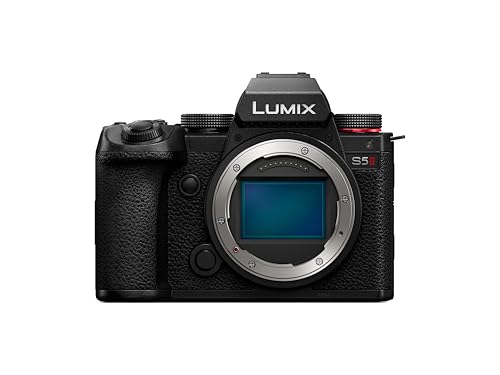
- Panasonic LUMIX S5II: check price on Amazon
- Nikon Z50 II with two lenses: check price on Amazon
- Sony ZV-1F: check price on Amazon
- DJI Osmo Pocket 3: check price on Amazon
- GoPro HERO13 Black: check price on Amazon
- Canon XA-series camcorder: available from video retailers (prose-only pick in this guide)
Not every church streams, and plenty have decided, quite sensibly, that recording the service and posting the video later is the better ministry: no live pressure, no chat to moderate, a chance to trim the announcements and tighten the sermon before anyone sees it. The best cameras for church videos serve that workflow, and it is a different job from broadcasting. A recording camera works alone rather than in a switched rig. It is carried in by one volunteer, set on a tripod in the aisle, started before the first hymn and stopped after the blessing, and its footage has to survive an edit on a laptop on Monday. Everything in this guide was judged against that reality: one operator, one camera, a whole service on one card, and an upload deadline that does not care how beautiful the footage was if the file is a nightmare to work with.
The failure stories are different here, too. A recording that stops at a file limit nobody knew about, twenty minutes into the sermon. A camera that focused faithfully on the pulpit flowers while the speaker stood soft behind them. Footage of a carol service so noisy and orange that the editor gave up and posted the audio with a photograph. And the classic: a wonderful service, perfectly filmed, on a card that was then formatted for the church picnic before anyone copied it. The six cameras below were chosen to make those stories unlikely, with long-recording confidence, autofocus a single volunteer can trust, and files that behave in ordinary editing software.
Churches that do move on to live broadcasting later will find most of these bodies graduate with them, which is why the companion broadcast guide exists as a separate piece: the live, multi-camera, switcher-driven discipline is genuinely different, and this recording-first shortlist does not pretend otherwise. Here, simplicity and trustworthiness outrank production gloss every time.
Key Takeaways
- Recording a service for later upload rewards one dependable camera far more than a complicated rig.
- The Panasonic LUMIX S5II is the strongest recorder here, built for long, uninterrupted video sessions.
- A two-lens starter kit such as the Nikon Z50 II bundle covers wide platform shots and sermon close-ups from day one.
- Fixed-lens cameras like the Sony ZV-1F and DJI Pocket 3 remove lens decisions entirely for nervous volunteers.
- Copy the card before anything else happens to it; more church videos are lost to housekeeping than to camera failure.
- A traditional camcorder remains the lowest-stress option when the operator changes every week.
In this guide
Quick Picks
| Camera | Badge | Why it is here |
|---|---|---|
| Panasonic LUMIX S5II | Best Overall Recorder | Long-session video design with cooling and profiles that make Monday’s edit easy. |
| Nikon Z50 II with Two Lenses | Best Complete Starter Kit | Body plus wide and telephoto zooms in one box, ready for a first filming Sunday. |
| Sony ZV-1F | Best Volunteer-Proof Compact | Fixed wide lens, simple controls and flattering video with almost nothing to set wrong. |
| DJI Osmo Pocket 3 | Best for Moving Segments | Gimbal-smooth footage for youth items, interviews and walk-through announcements. |
| GoPro HERO13 Black | Best Wide Safety Angle | A tiny second camera that captures the whole platform when the main camera cannot. |
| Canon XA-Series Camcorder | Best Traditional Camcorder | Built to record services all day with proper audio inputs and no lens swapping. |
How did we pick cameras for recording services?
The first filter was session length. A Sunday service with music, readings and a full sermon runs well past the half-hour marks where lesser cameras stop, split files awkwardly or grow hot and bothered, so every pick here was assessed on its ability to record a complete service in one confident take, ideally with cooling or a design that treats long video as its main job rather than a party trick. Churches record funerals, weddings and school concerts with the same camera, and those events are even less forgiving of a mid-ceremony stop.
The second filter was the single-operator problem. The person filming is often also the person who set up the chairs. Autofocus had to be trustworthy enough to leave alone, because an operator who must constantly tend focus will eventually be distracted at the one moment that mattered. Exposure behaviour mattered for the same reason: sanctuaries mix dim seating with a lit platform and bright windows, and a camera that can be set once at rehearsal and then forgotten is worth more than a marginally sharper one that needs riding all service long.
Third came the edit. Recorded church video lives or dies on Monday, in consumer editing software, on a laptop that may not be new. Files needed to be ordinary, colour needed to look good with minimal grading, and audio needed a sane path, whether through the camera’s microphone input or a recorder synced later. Cameras that demanded specialist workflows were marked down, however lovely their footage, because a video that never gets edited never gets watched.
The picks in detail

Panasonic LUMIX S5II — Best Overall Recorder
If a church can stretch to one serious recording camera, this is the one to build around. The S5II was designed with long-form video as a headline feature rather than an afterthought, including active cooling that lets it record extended sessions without the thermal anxiety that haunts other mirrorless bodies during a two-hour combined service or a summer wedding. For a recording workflow that distinction is everything: the volunteer presses record during the pre-service music and simply stops worrying, which is the correct emotional relationship between a church and its camera.
The picture it makes is editor-friendly in ways that compound across a year of Sundays. Its colour profiles include options that look finished straight from the card, for the weeks when the upload happens with no grading at all, and flatter options for the volunteer editor who does enjoy shaping the sermon video. Phase-hybrid autofocus, new to this generation of the line, keeps a speaker locked as they move between pulpit, lectern and the front row during a children’s talk, and it does so without the visible hunting that makes congregations feel seasick. In-body stabilisation covers the handheld moments too: the processional at a wedding, the walk down the aisle with the offering, the youth drama that refused to stay on the platform.
Practical ownership details suit church life. The body runs from USB-C power, so a fixed recording position near a socket removes battery management from the Sunday routine entirely. Dual card slots allow a relay or backup recording pattern that protects the one unrepeatable event every church films, the funeral or wedding that cannot be restaged. L-mount lenses give the church a growth path from a single all-purpose zoom toward a brighter lens for candlelit services. Nothing about the S5II is the cheapest option in this guide, and its menus ask for one careful setup afternoon, but as the camera a church buys once and uses for a decade of recorded services, it has no real rival here.
- Format: full-frame mirrorless
- Recording character: long-session design with active cooling
- Power: battery or USB-C continuous power
- Cards: dual slots for backup or relay recording
- Stabilisation: in-body, for handheld segments
Strengths
- Records whole services and weddings without thermal worry.
- Footage looks finished straight from the card when time is short.
- Dual cards protect unrepeatable events like funerals.
Trade-offs
- The setup menus repay one patient afternoon, not five rushed minutes.
- Full-frame lenses make the complete kit the priciest route here.
- More camera than a tiny chapel with one monthly upload needs.
Best for: churches recording every service for upload, with one committed media volunteer. Not suited for: congregations wanting the absolute simplest box a stranger can operate.

Nikon Z50 II with Two Lenses — Best Complete Starter Kit
Most first church cameras are bought as kits, and most kit decisions go wrong at the lens: a single standard zoom that is neither wide enough for the platform nor long enough for the sermon. This two-lens Z50 II bundle solves the problem in the box. The wide zoom covers the whole platform, choir and congregation from the back of a modest sanctuary; the telephoto zoom reaches from that same seat to a sermon framing where the speaker’s expressions carry the video. A church can film its first service the weekend the box arrives, with no second purchase and no lens research project.
The body itself is a friendly size for volunteers, light enough to live on a mid-priced tripod without sagging, and its video autofocus tracks faces and eyes with the calm reliability that single-operator filming depends on. Nikon’s colour presets are pitched at pleasing people rather than impressing technicians, which is exactly right for footage that goes from card to upload with a trim at each end. The controls place video functions where a newcomer can find them, and the vari-angle screen lets the operator frame from the side of the tripod or check the shot from the front of the platform during rehearsal.
Its limits are honest ones. The smaller APS-C sensor asks a little more of the platform lighting at candlelit services than the full-frame Panasonic does, though modern platform lighting makes this a smaller gap than forum arguments suggest. There is a single card slot, so the copy-the-card discipline in this guide matters doubly. And the kit zooms are versatile rather than bright; a church that falls in love with filming will eventually add one fast prime for evening work. As a starting point that needs nothing else on day one, though, this bundle is the most complete answer in the guide.
- Format: APS-C mirrorless, two-lens kit
- Kit coverage: wide zoom plus telephoto zoom
- Power: battery, USB charging supported
- Screen: vari-angle for flexible framing
- Autofocus: face and eye detection for video
Strengths
- Two lenses cover platform wides and sermon close-ups immediately.
- Friendly size and controls for first-time volunteers.
- Pleasing colour that needs little work before upload.
Trade-offs
- Single card slot means backup discipline is on you.
- Kit zooms are not the brightest for candlelit services.
- Smaller sensor trails the full-frame picks in deep gloom.
Best for: a church buying its first real recording camera as one complete purchase. Not suited for: teams who already own lenses and want a body-only upgrade path.

Sony ZV-1F — Best Volunteer-Proof Compact
Some churches do not have a camera volunteer; they have a rota of the willing, and the camera must survive being operated by whoever drew the short straw. The ZV-1F is built for exactly that world. Its lens is fixed and wide, which removes the two most common beginner disasters, the wrong lens and the forgotten lens, and frames a platform generously from a mid-sanctuary tripod. Its controls are deliberately few. Its video looks bright and flattering with the settings it chooses itself. A nervous operator can genuinely be taught this camera in the time it takes the choir to robe.
The wide fixed lens shapes how it should be used: this is a whole-room camera, happiest capturing the platform, the worship band and the congregation’s participation as one scene, rather than a tight sermon close-up from the back wall. Position it closer, perhaps at the front of the seating to one side, and the framing becomes intimate enough for talks and testimonies. Its microphone arrangements favour voices in the near field, and for service recording the wise pattern is to pair it with a separate audio recorder at the sound desk or a microphone near the lectern, syncing in the edit, a technique the FAQ below explains.
What you give up is reach and ultimate low-light polish; what you gain is a camera that actually gets used. Churches regularly discover that the simple camera filming every week produces more ministry than the sophisticated camera that stays in its bag because only one person understands it. The ZV-1F also travels beautifully to the events around the service: the baptism class, the food-bank interview, the youth group’s chaotic announcements, where its small size and instant readiness matter more than any specification. For a small church starting from nothing, this may be the most honest first purchase in the entire guide.
- Format: compact with fixed wide lens
- Recording character: simple, bright, automatic-friendly video
- Power: battery with USB charging
- Audio: built-in microphone, external recorder pairing recommended
- Size: pocketable, lives in the media cupboard happily
Strengths
- Almost impossible to set up wrongly on a Sunday morning.
- Wide lens captures the whole platform scene generously.
- Small and unintimidating for rotating volunteers.
Trade-offs
- No zoom reach for tight sermon shots from the rear.
- Low-light polish sits below the mirrorless bodies.
- Fixed lens means position does all the framing work.
Best for: small churches with rotating operators and simple weekly uploads. Not suited for: large sanctuaries needing a close speaker shot from the balcony.

DJI Osmo Pocket 3 — Best for Moving Segments
Every recorded service contains two kinds of footage: the static sermon, which any tripod camera handles, and everything else, which is where recordings usually look amateur. The notices filmed in the foyer, the youth item that roams the platform, the interview with the mission partner in the hall, the walk-through of the building project for the giving update. The Pocket 3 exists for that second category. Its camera rides on a three-axis gimbal in a body the size of a chocolate bar, so walking footage comes out smooth rather than queasy, and its face tracking keeps a moving speaker framed while the operator simply walks and points.
The large one-inch-class sensor gives its footage a quality that embarrasses many bigger cameras, with low-light behaviour strong enough for evening youth services and a look that cuts acceptably beside the main camera’s sermon footage in the same upload. Churches use it in patterns that quickly become habits: the same volunteer films the welcome and notices on the Pocket while the main camera stays locked on the platform, and the edit gains the variety that keeps online viewers watching past the first song. Its wireless microphone ecosystem, bought separately, suits testimonies and interviews particularly well, giving clear voices without a cable across the platform.
It is not a main service camera, and pretending otherwise wastes its gifts. Battery life covers segments, not whole services, unless it is plugged into power on a tripod, at which point its fixed wide view still serves the wide-angle role rather than the sermon close-up. The screen is small, the body invites being borrowed for everything, and it will spend as much time filming the church weekend away as the Sunday service. Accept it as the ministry’s roving reporter rather than its anchor, and it earns its place in the kit bag every single week.
- Format: gimbal compact camera
- Sensor class: one-inch type
- Stabilisation: three-axis mechanical gimbal
- Tracking: face and subject tracking for moving pieces
- Power: internal battery, USB-C charging
Strengths
- Walking and moving footage comes out smooth and watchable.
- Face tracking frees the operator to host the segment.
- Image quality cuts in well beside bigger cameras.
Trade-offs
- Segment battery life, not whole-service endurance, unless powered.
- Fixed wide view cannot do the sermon close-up.
- So useful elsewhere that it may not be in the building on Sunday.
Best for: notices, interviews, youth items and all the moving parts of church life. Not suited for: being the only camera recording a full service.

GoPro HERO13 Black — Best Wide Safety Angle
The HERO13 is in this guide as insurance. Mounted high at the back, on a balcony rail or a lighting bar, it records the entire platform in one very wide, very sharp frame for the entire service, asking nothing of anybody. When the main camera’s card fills, its battery dies, its operator zooms at the wrong moment or its autofocus falls in love with a flower arrangement, the edit can fall back on the GoPro’s safety shot, crop into it, and save the upload. Professional videographers call this the get-out-of-jail angle, and churches, whose events cannot be restaged, need it more than most.
As a deliberate creative angle it also earns its keep. The wide view from the choir or the organ loft shows the scale of congregational singing in a way the sermon camera never does, and its footage of baptisms from a position near the pool has an immediacy that families treasure. Modern GoPro stabilisation and colour make the footage easy to include, and its tolerance for being mounted in warm, awkward, dusty places, on a clamp that has not moved since Easter, suits the reality of church buildings. Run it from USB power where possible, set it before the service, and let it be the most boring, reliable member of the team.
Its weaknesses are the familiar action-camera ones: a fixed very wide view that distorts at the edges, no meaningful zoom, and audio that should never be the recording’s main sound. It is also a camera that rewards one careful setup session, because its field-of-view and colour settings need choosing once, deliberately, to match the main camera rather than left in an action-sports default. Deployed as the safety and scale angle, though, it converts the main camera’s worst Sunday from a disaster into a footnote in the edit.
- Format: waterproof action camera
- View: very wide fixed lens, high-resolution video
- Mounting: clamps and rails anywhere in the building
- Power: battery or USB for fixed positions
- Role: safety wide shot and scale angle
Strengths
- Records the whole platform unattended as edit insurance.
- Tough, small and happy in awkward mounting positions.
- Wide shots give uploads a sense of occasion and scale.
Trade-offs
- Fixed ultra-wide view distorts faces near the edges.
- Built-in audio is reference quality only.
- Settings need one deliberate session to match the main camera.
Best for: a permanent safety angle behind any main recording camera. Not suited for: carrying a service alone where faces need to be recognisable.
Canon XA-Series Camcorder — Best Traditional Camcorder
There remains a class of church for whom the correct camera has a handle on top, a lens that zooms from wide to tight without being changed, proper audio inputs for the desk feed, and a record button a new volunteer can find by touch. The XA-series camcorders are that class’s standard bearers, and this guide covers them in prose only because they sit outside its verified pool. A camcorder records services the way a kettle boils water: without opinion, indefinitely, in heat and cold, with dual card slots and power arrangements designed for exactly the long, unglamorous sessions churches run.
The working experience is what devotees are really buying. The powered zoom glides at a speed set by pressure, so a volunteer can push in slowly during the sermon without the steps and jerks of a photo lens. The built-in neutral-density options tame bright sanctuaries. The audio section accepts the sound desk’s output properly, with meters a human can read, which makes a camcorder the only camera type here that can sensibly be the entire recording system, picture and sound, in one box. Its image has the deep, everything-in-focus character of a smaller sensor, which congregations read as clear and honest even if filmmakers find it less romantic than full-frame blur.
Choose it when the operator rota is wide and the priority is that every service, without exception, gets recorded well. Pass it by if your church wants its videos to double as cinematic wedding footage or its camera to double as the photography body. It is a specialist, and like most specialists it is unbothered by fashion. Churches that bought camcorders a decade ago are, in many cases, still recording with them every week, which tells you most of what you need to know about the total cost of ownership.
- Format: professional camcorder
- Lens: integrated powered zoom, wide to telephoto
- Audio: proper XLR-class inputs for desk feeds
- Cards: dual slots for long or backup recording
- Power: battery and mains options for all-day work
Strengths
- Designed from the ground up for long event recording.
- One box can handle picture and desk-fed sound together.
- Powered zoom and controls suit rotating volunteers.
Trade-offs
- Smaller-sensor look is clear rather than cinematic.
- Not a stills camera for the rest of church life.
- Bought through video retailers rather than general listings.
Best for: churches prioritising never missing a service over filmic style. Not suited for: teams wanting one device for photography, video and travel.
Comparison table
| Camera | Recording style | Lens situation | Operator skill needed | Watch out for |
|---|---|---|---|---|
| Panasonic LUMIX S5II | Main service recorder | Interchangeable, one good zoom to start | Moderate | Setup afternoon required |
| Nikon Z50 II Two-Lens Kit | Starter main recorder | Wide and telephoto zooms included | Low to moderate | Single card slot |
| Sony ZV-1F | Whole-room recorder | Fixed wide | Very low | No reach from the back |
| DJI Osmo Pocket 3 | Moving segments | Fixed wide, gimbal | Low | Segment battery life |
| GoPro HERO13 Black | Safety wide angle | Fixed ultra-wide | Very low once set | Edge distortion on faces |
| Canon XA-Series | All-day camcorder | Integrated powered zoom | Low | Clear, not cinematic, look |
How do you set up a recording position that works every week?
Choose the seat before you choose the settings
The recording position decides the video more than any menu does. You want the centre line or just off it, far enough back that the whole platform fits the wide end of the lens, close enough that the telephoto end frames the speaker’s head and shoulders, and high enough to see over the congregation when they stand for singing. In most sanctuaries that is the back row centre aisle, a sound-desk position, or a small platform built for the purpose. Film one full service from the candidate spot before committing, and watch the recording at home: the position that felt fine live often reveals a pillar, a bright window or a music stand eating the frame.
Set it once, write it down, tape it down
At rehearsal, set white balance from the platform lighting, choose an exposure that protects faces, confirm autofocus is in its face-tracking mode, and format the card in the camera. Then write every one of those choices on the setup card that lives with the tripod. Mark the tripod’s position on the floor with tape. The goal is a rig that any volunteer can reproduce exactly, so the uploaded videos look like one ministry’s work rather than a different production each week.
Sound deserves its own plan
A camera at the back of a reverberant building records the room as much as the speaker, so plan the audio separately: a feed from the sound desk into the camera or a recorder, or a small recorder near the lectern, synced to the video in the edit by the clap of the first hymn’s opening chord. Viewers forgive a modest picture for a long time; they abandon echoing, distant sound within a minute. Test the whole chain with a spoken reading, not just music, because speech intelligibility is what the sermon stands or falls on.
How do you film a service, step by step?
Arrive with the chairs, not with the congregation. Set the tripod on its tape marks, level it, mount the camera, connect power if your position allows it, and frame the wide shot of the platform. Run a thirty-second test recording of the rehearsal or the organist practising, play it back with headphones, and check the three things that ruin uploads: focus sitting on the speaker rather than the scenery, exposure holding faces steady, and sound arriving clean. Then format the card again so the service starts on an empty, healthy card, and set the camera recording a few minutes before the service begins. Early footage is free; a missed opening hymn is forever.
During the service, operate less than you want to. Hold the wide shot for music, push in gently before the sermon begins, and let the speaker’s movement happen inside a frame that breathes rather than chasing every step. If something fails, keep calm and keep the camera rolling if it rolls at all; a flawed recording of the whole service serves the congregation better than a perfect recording of the first half. Afterwards, resist every social instinct until the card is copied: card into the laptop, footage onto two drives or one drive and a cloud folder, and only then does the card go back into the camera. That single habit, repeated weekly, is the difference between an archive a church treasures and a drawer of regrets.
What mistakes lose church videos?
Formatting the card before copying it
More service videos are destroyed by tidiness than by technology. The card gets reused for the picnic, the holiday club, the building survey, and the one unrepeatable funeral recording vanishes. The rule that prevents it costs nothing: no card is formatted until its contents exist in two other places, and the person who filmed is the person who copies.
Trusting the back-of-room microphone
A camera’s built-in microphone at the rear of a stone building records a sermon the way a seashell records the ocean. Congregations will watch soft focus; they will not strain through echo for forty minutes. A desk feed or a recorder near the speaker is not an upgrade, it is the minimum viable sound for spoken content.
Filming the whole service in one anxious zoom
New operators zoom constantly because the screen feels static, and the resulting video is unwatchable by the second song. Lock the wide shot for music, move once, deliberately, for the sermon, and let stillness do its work. A calm frame reads as confidence to everyone watching at home.
Never watching the upload
Teams that never watch their own posted videos repeat the same framing, exposure and sound mistakes for years. Watch ten minutes of every upload on a television, note one improvement, and make that improvement next week. That loop, more than any purchase, is how church video ministries actually get good.
Final Recommendation
Buy for the workflow you actually have. A church with one committed volunteer and a weekly upload should put its money into the Panasonic LUMIX S5II, a good all-purpose zoom, continuous power and a desk-fed audio solution, in that order, and expect a decade of calm Sundays. A church starting from zero with a modest budget should take the Nikon two-lens kit and film its first service this weekend rather than saving another year for perfection. Small congregations with rotating helpers should be honest enough to choose the ZV-1F or the camcorder route, add the Pocket 3 when the youth work demands it, and mount a GoPro as insurance once the main camera is settled. The best camera for your church’s videos is the one that records every service, without drama, in the hands of the people you actually have.
More detail: building a simple archive that lasts
A recording ministry quietly creates one of the most valuable things a church owns: its own history. Sermons by a minister who has since retired, the last carol service in the old building, a founding member’s testimony filmed almost by accident. Treat the footage accordingly from the first month. Name files by date and service rather than by the camera’s numbering, keep a simple spreadsheet of what was filmed and where the files live, and store the archive in two places, one of them outside the building. Hard drives fail and cupboards flood; the churches that still have their centenary footage are the ones that copied it as a habit rather than as a project.
The archive also disciplines the present. Knowing the recording will be kept makes volunteers frame carefully, makes speakers thoughtful about the stray remark, and gives the church a library for the weeks when the minister is ill and a past sermon, re-posted with a short new introduction, serves the congregation better than a gap. None of this requires new equipment. It requires the copy-first habit, consistent naming, and one person who regards the archive as part of the ministry rather than as the media team’s housekeeping.
How does recording differ from broadcasting, practically?
The distinction runs through every decision in this guide, so it is worth stating plainly. Broadcasting optimises for the moment: multiple cameras, a switcher, continuous feeds, and problems solved live or not at all. Recording optimises for the edit: one excellent camera, footage that is easy to trim and correct, and problems that can often be rescued on Monday with the safety angle or a caption. A church should choose consciously, because the gear lists diverge. Money spent on a switcher does nothing for a recording church, and money spent on dual card slots does nothing for a streaming one. Many churches record first, build the archive and the volunteer confidence, and add broadcasting later when the team and the congregation’s online habits are ready; the cameras in this guide were chosen partly because the serious ones survive that graduation.
Frequently Asked Questions
How long a recording should our camera manage in one take?
A full service with margin: ninety minutes to two hours covers almost everything, including the overrunning anniversary service. Check any camera’s behaviour across that span in rehearsal conditions, at summer temperatures, rather than trusting a specification, and prefer models designed for long video sessions when the camera will live this life weekly.
Can we just use a phone on a tripod?
A recent phone films a respectable wide shot and many churches start there, but phones interrupt recordings with calls and storage limits, struggle with sermon-distance zoom, and tie up someone’s personal device every week. Treat the phone as the trial that proves the ministry, then buy a dedicated camera from this list with the confidence the trial gave you.
How do we sync separate audio with the video?
Record the desk feed or a recorder near the lectern alongside the camera’s own sound, then line the two waveforms up in any basic editor using a sharp sound near the start, a chord, a clap or the first spoken word. Mute the camera track once synced. It takes minutes and transforms how professional the upload feels.
What lens should a first mirrorless church camera have?
One zoom that covers wide platform shots and a sermon close-up from your actual recording position. Stand in that position, measure the distance to the pulpit, and choose the range that frames both ends of the job. A second, brighter lens for evening services is the natural later addition, not the starting point.
Should we record in 4K if we upload in 1080p?
Often, yes, for a sneaky reason: a 4K master gives a one-camera church a second shot for free, because the editor can punch into the wide frame for the sermon and return to the full view for the music while the upload itself stays at 1080p. The trade is storage and a slower edit on ageing hardware, so run a month each way and keep whichever routine your editor will still be smiling about at Christmas.
What about weddings, funerals and school concerts?
The same camera that records Sundays will be borrowed for the rest of the church’s life, and each occasion bends the requirements slightly. Weddings want the long, unbroken ceremony take and flattering skin in mixed light, which is where the full-frame Panasonic pulls ahead, plus a second angle for the vows because there is no second chance at them; the GoPro safety shot has saved more wedding edits than any other piece of kit in this guide. Funerals want discretion and certainty above all: the camera small, silent, positioned before the family arrives, recording started early and stopped late, with the file treated gently afterwards, because that recording will be watched by relatives for years and handled by the family like a possession rather than a video.
School concerts and nativity plays, which many churches host or film for their own children, want reach and low-light tolerance in a hall that was never designed for either. This is the Nikon kit’s home ground, the telephoto zoom earning its place in the box, and the evening when the operator learns to expose for the stage rather than the room. Carol services combine every difficulty at once: candlelight, movement, a packed building and a congregation that will absolutely notice if the recording fails. Whatever camera your church chooses, give it one full rehearsal under carol-service conditions before December, because that single test predicts the whole year.
Notice that none of these occasions requires a different camera, only a slightly different plan for the same one. That is the economic heart of this guide: a church camera is a decade-long servant of unrepeatable moments, and versatility across the building’s whole calendar outranks brilliance at any single event. Buy the body that covers the calendar, learn it properly, and keep it long enough that its quirks become the team’s shared knowledge.
Which settings should a church standardise?
Frame rate and resolution, chosen once
Pick the combination your editor’s laptop handles happily and your upload platform presents well, then leave it alone for a season. Consistency matters more than the theoretical optimum, because mixed settings across weeks complicate every edit and make the archive feel restless. Churches filming movement-heavy youth work may prefer a smoother frame rate; churches filming mostly spoken services often prefer the more traditional cadence. Either is defensible. Changing monthly is not.
A colour look the congregation recognises
Choose one standard picture profile, the one that makes your platform’s wood, robes and skin tones look like themselves, and record everything in it. The temptation to experiment weekly produces an archive that looks like several churches. If a volunteer editor enjoys grading, adopt a flatter profile as the house standard instead, but adopt it wholly, including for the second angle, whose settings should be matched to the main camera during the same setup session.
Audio levels with headroom
Set recording levels for the loudest hymn, not the spoken prayer, and keep peaks comfortably below clipping, because a distorted recording cannot be repaired while a quiet one can always be raised in the edit. Check levels on headphones during the rehearsal’s loudest item, and write the setting on the setup card next to the focus and white-balance notes. Sound discipline, like the copy-first rule, is a habit rather than a purchase.
How do you hand the camera to a brand-new volunteer?
Sooner or later the regular operator is away, and the service still needs filming. Churches that handle that morning well have reduced the job to a card, a position and a phone number. The card lists the setup in order: tripod on the tape marks, camera on, card formatted, white balance and exposure as written, test recording checked on headphones, record pressed before the first hymn. The position is the marked one, not a fresh experiment. The phone number belongs to the regular operator, who would rather answer one question at 9:40 than reconstruct a lost service on Monday. Shadowing matters too: every regular operator should bring a deputy to two services a term, letting them run the rehearsal and the setup while the experienced hand watches, because the deputy who has only watched a service being filmed has learned the appearance of the job rather than the job.
Keep the deputy’s first solo service an ordinary one. Not the carol service, not the bishop’s visit, not the wedding of the minister’s daughter: an ordinary Sunday, with the regular operator sitting in the congregation, available but silent. Debrief afterwards over coffee with the footage on a laptop, and praise the framing decisions that worked before correcting the ones that did not. Media ministries are built out of these small apprenticeships, and the churches with deep volunteer benches are simply the ones that treated training as part of the ministry rather than as an interruption to it. Your camera choice supports all of this when it is a camera a newcomer can be taught in one rehearsal, which is why this guide keeps returning to simplicity as a serious, respectable criterion rather than a compromise.
What does a sensible first-year budget look like?
However the camera is chosen, the first year of a recording ministry spends money in a predictable shape, and planning for it prevents the common pattern where an impressive body arrives with no tripod worthy of it. Expect the support to matter as much as the sensor: a tripod with a smooth video head is the difference between a sermon pan that glides and one that judders, and it will outlive two camera bodies. Expect a media budget that never ends, cards and drives arriving like communion wine on a schedule, because recording every week consumes storage the way a growing congregation consumes chairs. Expect small, unglamorous purchases to accumulate: longer cables, a proper camera bag, a spare battery, a cleaning kit, gaffer tape in quantities that surprise everyone.
The churches that plan this shape in advance make calm decisions; the ones that do not end up filming on a wobbling photo tripod with a full card and a borrowed cable, wondering why the expensive camera produces cheap-looking video. If the total budget is fixed, it is usually wiser to step one rung down this guide’s camera ladder and fund the support, media and audio properly than to buy the finest body and starve everything around it. The congregation watching at home sees the whole system, never the camera alone, and a well-supported mid-range body will outperform a neglected flagship in their living rooms every single Sunday of the year.
How do you improve a recording ministry across one year?
Improvement in this ministry is a calendar, not a purchase. In the first month, the goal is simply a complete recording of every service, however plain, with the copy-first habit established and the archive started. By the third month, the sound plan should be solved, because audio is where viewers feel quality most and where the fix, a desk feed or a well-placed recorder, is cheapest relative to its effect. By the sixth month, the framing should be boring in the best way: the same calm wide for music, the same sermon framing, the congregation recognising their church’s visual voice the way they recognise its organ. Somewhere in the second half of the year, the second angle, the safety GoPro or the roving Pocket, arrives to give the edit its variety, and by the year’s end the team should watch a recording from month one beside the latest upload and see, concretely, how far method carried them.
Notice that the camera bought in month one is still the camera in month twelve, in every healthy version of this story. The year’s budget went to sound, support, media and training, the unglamorous categories that this guide has preached throughout, and the ministry’s reputation in the congregation, the thing that recruits next year’s volunteers and next year’s budget, was built by reliability rather than by novelty. That is the deepest sense in which the recommendations above are ordered: not by which camera is most impressive, but by which recording life each camera makes sustainable for the people who will actually live it.
What should the upload itself look like?
The ministry’s last craft is presentation. A plain, honest title with the date and the service, a description that names the reading and the sermon theme so a searching member can find it in six months, chapters or timestamps for the sermon where the platform allows them, and a thumbnail that is a real frame of your own platform rather than a stock image of somebody else’s cathedral. Upload in the best quality your connection tolerates, schedule the release at the hour your congregation actually watches, and pin a comment with the service sheet’s details. None of this requires equipment, and all of it multiplies the value of the recording the equipment made, which is the recurring arithmetic of this entire guide: the camera starts the work, and everything around the camera finishes it.
How do you choose between the simple cameras and the serious ones?
The honest test is the operator rota, not the budget. Count the people who will actually film in the next twelve months and ask how many Sundays each will serve. A camera one expert uses forty times a year can be as complex as that expert enjoys, and the Panasonic’s depth becomes a pleasure. A camera six willing helpers use eight times each must be teachable in a rehearsal and forgiving in their hands, and the simple picks in this guide stop being compromises and become the correct professional choice. Churches get this decision wrong in both directions, buying the intimidating body that films rarely and the toy that films badly, and both errors come from choosing for the purchaser’s pride rather than the rota’s reality. Name the rota, and the shortlist names itself.
Related Guides
When your church is ready to go live, our broadcast guide covers the multi-camera streaming side of this work, and our audio roundup explains desk feeds in more depth. See also the church broadcast camera guide, our guide to recording long events without overheating and the beginner’s guide to syncing audio in edits for the next steps.


