Disclosure: As an Amazon Associate, reviewstook.com earns from qualifying purchases. Links on this page are affiliate links; they cost you nothing extra. Prices and availability change often, so check the current Amazon listing before you buy.
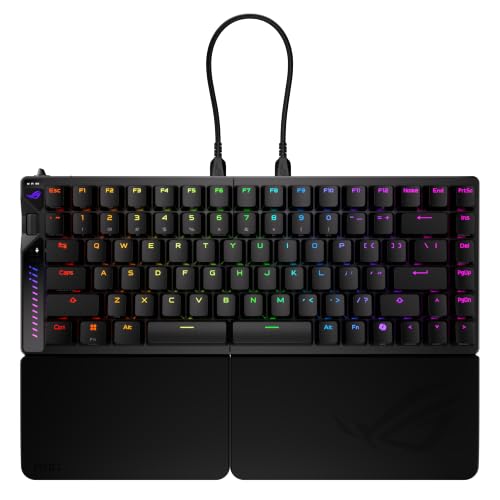
The rog falcata is what happens when a gaming brand stops asking how a keyboard can be faster and starts asking how it can fit a human body: a 75 percent keyboard that splits in two, so the halves can sit where your shoulders — not a rectangle — say they should, running magnetic Hall-effect switches with the rapid-trigger feature set competitive players now expect. It is simultaneously an ergonomic experiment and a flagship gaming board, and that double identity is what this guide exists to examine. Split keyboards have lived for decades in the ergonomic niche, beloved by a devoted minority and ignored by everyone else. The Falcata is ASUS ROG’s attempt to drag the split layout into the gaming mainstream, with wireless tri-mode ambitions, HFX V2 magnetic switches, and the full modern feature set — and the attempt deserves a serious reading, because the question it asks is a real one: whether the rectangle itself was ever a good shape for two hands.
The short answer, before the detail: the split is not a gimmick, and it is not for everyone. For players and typists whose shoulders, wrists, or existing aches argue with a straight board, the Falcata’s adjustable geometry is the most meaningful ergonomic advance a gaming keyboard has offered in years, and its gaming credentials — magnetic switches, rapid trigger, low-latency wireless — are flagship-grade rather than ergonomic-tax. For buyers whose bodies are perfectly content on a rectangle, the same board is an expensive answer to a question they never asked, and the ROG Azoth X in this guide — a superb conventional 75 percent board — is the honest alternative. Everything below exists to tell you which of those readers you are.
Key takeaways
- The ROG Falcata is a split 75 percent wireless gaming keyboard: the two halves separate and angle to match your shoulders and wrists.
- Its HFX V2 magnetic switches bring adjustable actuation and rapid trigger, so the ergonomic design carries no competitive discount.
- Split typing has a real adaptation period — days to weeks — and this guide treats that honestly rather than as a footnote.
- Used joined, it behaves as a premium conventional 75 percent board; the split is an option you grow into, not a life sentence.
- The ROG Azoth X is the conventional alternative in this guide: same brand family, 75 percent, hot-swappable mechanical switches, no split.
- Buy the Falcata for your body’s geometry; buy the Azoth X for a classic board perfected.
What problem is a split keyboard actually solving?
Hold your hands out in front of you, relaxed, as if resting on an invisible keyboard, and look at the angle your forearms make: they converge. Your hands approach a desk from the shoulders, angled inward, wrists happiest when the forearm’s line continues unbent into the hand. A straight keyboard ignores that geometry completely. It forces the wrists to bend outward — ulnar deviation, in the clinical phrase — and the shoulders to roll inward so the hands can meet a rectangle’s terms. Most people tolerate this for decades without complaint, because bodies are adaptable and keyboards are familiar. Some people — a growing number, as typing hours lengthen — stop tolerating it, in the currency of aching wrists, tired shoulders, and a end-of-day stiffness they eventually trace to the rectangle.
A split keyboard attacks the geometry directly. Separate the halves, place each under its own hand at the hand’s natural angle, add a shoulder-width gap, and the wrists straighten, the shoulders open, and the chest stops folding around the keyboard. Tenting — raising the inner edges so the hands rest at a slight slope rather than flat — completes the argument for many users, echoing the angle at which hands rest most neutrally. None of this is new; ergonomic boards have offered it for a generation. What is new is a flagship gaming brand offering it without asking the buyer to leave gaming’s feature set, wireless convenience, or aesthetic behind — which was always the split niche’s tax, and the tax the Falcata exists to abolish.
The honest counterweight belongs in the same section. A split board is a commitment of desk and habit: it occupies more width, it asks your touch-typing to be real — hunt-and-peck typists lose their visual map when the halves separate — and it will feel wrong for days before it feels inevitable. Buyers should also hold the ergonomic claims at the right strength: a better geometry can remove a source of strain, and that is a meaningful, modest good; it is not a medical treatment, and anyone with persistent pain owes themselves professional advice rather than a product page, this one included.
How the picks in this guide were chosen
The subject is the ASUS ROG Falcata in its verified listing — the M703 model with HFX V2 magnetic switches and PBT keycaps, in black. The single alternative is the ROG Azoth X, chosen because it is the same brand’s conventional answer to the same desk: a 75 percent wireless board with hot-swappable ROG NX V2 Snow linear mechanical switches, included so a reader who loves everything about the Falcata except the split can see exactly what the rectangle version of the idea looks like. Both products were confirmed against catalogue data and appear under their exact listing names. No other keyboards are linked.
In this guide
Quick picks at a glance
| Keyboard | Layout | Switch | Choose it if |
|---|---|---|---|
| ASUS ROG Falcata | 75 percent, split | HFX V2 magnetic Hall-effect | Your shoulders and wrists want geometry, not a rectangle |
| ASUS ROG Azoth X | 75 percent, conventional | ROG NX V2 Snow mechanical, hot-swappable | You want a flagship 75 percent board in the classic shape |

ASUS ROG Falcata — the subject: the split flagship
Badge: The body-first flagship. The Falcata’s halves separate completely, connect to each other and to your machines with the modern wireless toolkit, and carry magnetic switches whose actuation you can tune and whose rapid trigger keeps competitive movement crisp. In its joined configuration it is a handsome, dense 75 percent board that no visitor would identify as an ergonomic experiment; separated, angled, and tented to your frame, it becomes the first gaming keyboard that fits its owner rather than the other way round. The PBT keycaps in the verified listing promise legends and surfaces that age slowly, and the whole object has the flagship density ROG’s best boards share. It is, in short, the split idea with no apologies left in it.
- Layout: 75 percent, split into two halves
- Switch: HFX V2 magnetic Hall-effect, per the listing
- Connection: Wireless, per the listing
- Keycaps: PBT, per the listing
- Model: M703, per the listing
- Finish of verified listing: Black
Strengths
- Adjustable split geometry that straightens wrists and opens shoulders — a real ergonomic capability no rectangle can imitate.
- Flagship gaming internals: magnetic switches, adjustable actuation, and rapid trigger, with no ergonomic tax on performance.
- Works joined as a conventional premium board, so the split can be adopted gradually rather than on day one.
Trade-offs
- Flagship pricing for a layout whose main benefit only some bodies will ever feel.
- A genuine adaptation period, and a real requirement for touch-typing once the halves separate.
- A wider desk footprint in split mode, and one more set of halves, cables, and positions to manage.
Best for: Gamers and heavy typists whose wrists or shoulders argue with straight boards, and ergonomic-curious players ready to adapt. / Not suited for: Hunt-and-peck typists, small desks, or buyers whose bodies are perfectly happy on a rectangle.

ASUS ROG Azoth X — the conventional alternative
Badge: The rectangle, perfected. The Azoth X is ROG’s flagship 75 percent board in the classic shape: tri-mode connectivity, hot-swappable pre-lubed NX V2 Snow linear switches on a south-facing PCB, PBT keycaps, and support across PC and Mac per its listing, in white. It represents everything the conventional market has learned — gasket-era smoothness, switch swapping, wireless freedom — in one polished object. Set beside the Falcata it clarifies the choice beautifully, because the two boards share a brand, a size class, and a flagship tier, and differ essentially in one question: whether your next keyboard should fit your hands’ rectangle or your shoulders’ angle. Neither answer is the sophisticated one. They are answers for different bodies.
- Layout: 75 percent, conventional
- Switch: ROG NX V2 Snow linear mechanical, hot-swappable, per the listing
- Connection: Tri-mode wireless, per the listing
- Keycaps: PBT, per the listing
- Platforms: PC and Mac support per the listing
- Finish of verified listing: White
Strengths
- A flagship conventional board with hot-swappable switches, so its feel can evolve with your taste.
- Tri-mode wireless and cross-platform support make it a one-board answer for mixed desks.
- Zero adaptation: every habit you own works on it from the first minute.
Trade-offs
- A rectangle’s geometry, with a rectangle’s ergonomic limits, however excellent the execution.
- Mechanical switches, however smooth, lack the magnetic pair’s actuation tuning and rapid trigger.
- Flagship pricing of its own — the conventional choice is not the cheap one here.
Best for: Players who want a flagship 75 percent board with no learning curve and switch-swapping freedom. / Not suited for: Buyers whose wrists and shoulders are the reason for the purchase.
How do the HFX V2 magnetic switches change the game?
Magnetic Hall-effect switches sense the key’s position continuously rather than at a single contact point, and the Falcata’s HFX V2 set turns that sensing into the modern competitive toolkit. Actuation can be tuned per key, so movement keys can be set hair-trigger shallow while a destructive command sits deep enough to survive a nervous finger. Rapid trigger lets a key reset the instant it begins to rise rather than at a fixed point, which competitive movement — counter-strafing in shooters above all — has converted from a curiosity into a standard expectation at this tier. The honest appraisal from this series’ other magnetic reviews applies unchanged: these are real capabilities for players whose games and technique use them, and menu decorations for everyone else. What is distinctive about the Falcata is the company they keep. Rapid trigger used to mean accepting a gaming rectangle; here it arrives inside the most body-conscious layout a major brand sells, and that combination — performance without the postural tax — is the product’s actual headline.
How do you actually adapt to a split layout?
Gradually, and the Falcata’s joined mode is the adaptation ramp. Week one: use the board joined or barely separated, at a slight angle, and let your hands learn the 75 percent key geography — the compressed function row and navigation cluster that any board this size imposes. Week two: widen the gap toward shoulder width and increase the angle until your wrists, checked honestly in a mirror or a phone photograph, run straight from forearm to fingertip. Add tenting in small increments if your model setup allows, because large tenting angles feel stranger than they look. Expect your speed to dip, especially on the boundary keys — the letters near the split that each hand must now unambiguously own — and expect the dip to resolve as ownership becomes automatic. Touch-typing is the entry requirement: if you currently look at the keys, spend a fortnight with a typing tutor on any board first, because the split will otherwise be blamed for a skill gap it merely exposed.
Two adaptation errors are worth naming. The first is separating the halves dramatically on day one out of ergonomic enthusiasm, producing a miserable week and a returned keyboard that never had its fair trial. The second is subtler: keeping a conventional board in rotation throughout the adaptation, so the hands never commit and the split never stops feeling foreign. Commit for working hours, forgive the first week’s numbers, and judge at the end of week three — by comfort first and speed second, since speed returns on its own schedule while comfort is the purchase’s actual purpose.
What should you check before buying a split or 75 percent keyboard?
Start with the body audit this guide keeps recommending: a week of noticing where your current setup leaves you sore, stiff, or entirely fine, because that diary is the only honest market research for an ergonomic purchase. Confirm your typing is touch-typing, or budget the fortnight to make it so. Measure the desk: a split board at shoulder width plus a mouse needs real estate a tray or a small desk may not have. Decide your switch philosophy — magnetic tuning or mechanical swapping — since the two picks in this guide embody it cleanly. And interrogate the 75 percent layout itself: the function row survives, the number pad does not, and navigation lives in a compressed cluster whose exact arrangement varies by board and rewards a close look at photographs before money moves.
What are the common mistakes buyers make with the Falcata?
Buying it as a medical device is the first: it is an ergonomic gaming keyboard, and persistent pain deserves professional assessment, not a flagship purchase with therapeutic expectations. Buying it for a hunt-and-peck typist — oneself, honestly assessed, or a gift recipient — is the second. The third is judging it in joined mode alone and concluding the split is a gimmick, when joined mode is the training configuration rather than the destination. The fourth is the opposite zeal, splitting to the desk’s far corners on day one. And the fifth is ignoring the halves’ practicalities: the connecting arrangement, the charging or cable routine for two pieces of keyboard, and the simple question of where the right half lives when the desk hosts a drawing tablet, a laptop, or lunch. None of these mistakes is fatal. All of them are cheaper in this paragraph than at a returns desk.
How do you set up the rest of the desk around a split board?
The split changes the desk’s whole geometry, mostly for the better. The mouse gains a natural home in the centre gap for some users — a genuinely different mousing posture worth experimenting with — or keeps its right-side territory with more room than a full-width board ever allowed. A number pad, if your work needs one, becomes a separate citizen that can live in the centre, on the left, or in a drawer until accounts season, which many split owners describe as an unexpected liberation. Monitor height and chair arms matter more, not less, once the keyboard stops being the posture problem: the split removes one bend from the chain, and the chain’s remaining links — screen at eye level, elbows supported at a height that keeps shoulders down — deserve the audit the keyboard purchase usually triggers. Ergonomics is a system, and the Falcata is best bought as its centrepiece rather than its entirety.
Final recommendation
The ROG Falcata is the rare flagship that argues with the category’s basic shape and wins the argument for the bodies it was built for. If your wrists bend and your shoulders roll at your current board — if you finish long sessions aware of your own skeleton — it is the most interesting keyboard a gaming brand sells, with competitive internals that ask no performance sacrifice for the comfort. If your body is silent on the subject, the ROG Azoth X gives you the same brand’s flagship polish in the shape your habits already speak, and you should buy it without a whisper of ergonomic guilt. Bodies differ. Keyboards, finally, do too.
Falcata or Azoth X — criterion by criterion
Ergonomics. The Falcata’s entire reason to exist, and a one-sided row: split placement, angling, and tenting give it postural options the Azoth X cannot imitate at any setting. Verdict: Falcata, by design and by daylight.
Gaming features. The Falcata’s magnetic switches bring adjustable actuation and rapid trigger; the Azoth X’s mechanical switches bring hot-swappability and a superb pre-lubed linear feel but neither magnetic trick. In titles where rapid trigger is table stakes, the Falcata is the competitive pick of this pair. Verdict: Falcata for the feature set, Azoth X for switch-swapping freedom.
Typing feel. Subjective and closer than the spec sheets suggest. The Azoth X’s gasket-era mechanical polish is the more immediately luxurious stroke; the Falcata’s magnetic switches are smooth and precise with a character that grows as the split geometry removes the day’s accumulated strain from the equation. Verdict: Azoth X in the first hour, Falcata by the fourth — for the bodies it suits.
Adaptation and sharing. The Azoth X asks nothing and suits every hand that sits down, including visitors and colleagues. The Falcata asks weeks and, in split mode, is personal equipment in the way a fitted chair is personal. Verdict: Azoth X for shared and impatient contexts.
Desk and ecosystem. The Azoth X occupies a conventional footprint and speaks to PC and Mac per its listing. The Falcata claims more width and returns a centre gap with its own uses. Verdict: Azoth X for small and mixed desks, Falcata for a dedicated station arranged around it.
The ergonomics, examined without the brochure
Because ergonomic claims attract exaggeration the way flagship prices attract scepticism, this section separates the Falcata’s geometry into what is mechanically true, what is commonly reported, and what nobody should promise. Mechanically true: separating and angling the halves lets the wrists hold a straighter line from forearm to hand, lets the shoulders sit at their natural width rather than rolled toward a rectangle’s centre, and — with tenting — lets the hands rest at a slope closer to their unloaded posture. Those are geometry, not opinion, and a mirror confirms them in a minute. Commonly reported: owners with desk-related aches frequently describe end-of-day relief in shoulders and forearms, and touch-typists describe the split, once learned, as the first layout that feels designed rather than inherited. Not promised, by this guide or honestly by anyone: the prevention or treatment of any condition, relief for every body, or benefits for a user whose strain actually originates in chair height, screen position, workload, or a medical matter wearing a keyboard’s clothes. Buy the geometry for the geometry’s sake, audit the whole workstation while you are at it, and let any relief arrive as the welcome side effect it usually is.
Gaming on a split board: the sceptic’s questions, answered
The gaming audience’s scepticism about split boards reduces to three questions, and each deserves a straight answer. Will it slow me down? After adaptation, no — the switches are flagship magnetic units with rapid trigger, and the hands’ positions, once learned, are as automatic as any layout’s; during adaptation, yes, temporarily, which is why ranked seasons and new keyboards should not start in the same week. Will it break my movement? WASD lives entirely under the left hand, which keeps its whole cluster on one half, so the movement hand’s world is intact; the keys that migrate are the right hand’s, and shooters ask comparatively little of it beyond what a mouse carries. Does it work for other genres? Strategy and simulation players gain the centre gap for a mouse or a number pad and lose nothing; rhythm players should note the adaptation honestly, since their patterns are the most deeply memorised in gaming; and fighting-game and controller-first players will treat the keyboard as a menu device either way, split or joined. The scepticism, examined, is mostly about the adaptation fortnight — a real cost, paid once — rather than about any permanent gaming compromise, because on the specifications that decide matches the Falcata is a flagship first and an ergonomic board second.
Wireless life with two halves
A split wireless keyboard is two devices wearing one name, and ownership has a texture worth describing before purchase. The halves must both be charged or cabled according to the design’s arrangement, both must be within their link’s good graces, and both must be present for the keyboard to exist — a right half left in a bag is a left half’s monologue. None of this is burdensome in a settled desk routine, where the halves live in their places and the charging habit is a single weekly motion. It is genuinely burdensome for the travelling player, who should count the Falcata as a destination keyboard rather than a companion, and for the chaotic desk, where two objects wander twice as far as one. The Azoth X’s single-object life is the control condition here: one board, one charge, one place. Choose the Falcata’s doubled logistics with open eyes and they will feel like the modest rent on a better posture; discover them by surprise and they will feel like the product’s personality flaw, which is unfair to a product that announced them in its silhouette.
Who should skip the Falcata?
Skip it if you hunt and peck, and be honest — a self-test with a paragraph of prose and no looking down will tell you in ninety seconds whether the split has a student in you. Skip it if your desk is a tray, a lap, or a narrow shelf, because the split’s geometry needs the width your shoulders imply and will not negotiate down to a rectangle’s footprint without surrendering its point. Skip it if you travel with your keyboard weekly; two halves are a destination, not a companion. Skip it if your body’s silence on ergonomics is total and your curiosity is mild, because flagship money spent on an unasked question buys resentment at a premium. And skip it — this one matters — if what you actually have is pain that worries you, because that purchase belongs after a professional conversation, not instead of one. The Falcata’s ideal buyer is narrower than the Azoth X’s and knows it: a touch-typist, a settled desk, a body with an opinion, and the patience for a three-week conversation with a new layout. For that buyer, there is nothing else like it in a gaming catalogue.
Writers, programmers, and the split’s second career
The Falcata will spend half its life outside games in most homes, and its second career is arguably its stronger one. Programmers are the split layout’s oldest constituency for a reason: their hands live on the keyboard for entire days, their shortcuts cluster near the home row, and the centre gap hosts the mouse exactly where a keyboard-centric workflow wants it. Writers gain the posture across manuscript-length sessions, where the difference between a good and a bad geometry is measured in chapters rather than matches. Both tribes should note the 75 percent layout’s one tax — navigation and function keys in compressed arrangements — and weigh it against their shortcut dialects honestly: an editor user whose life is chorded commands will feel at home within days, while a spreadsheet modeller will want the separate number pad this guide has already prescribed. The board’s wireless, multi-device character suits the modern two-machine desk, and its joined mode covers the colleague, the partner, and the visitor without a word of explanation. A gaming flagship that moonlights as an ergonomic work board this competently is not a compromise product; it is the rare peripheral whose two jobs reinforce each other’s purchase.
Troubleshooting the split life
One half feels like it lags or drops. Treat the halves as two wireless citizens: bring both within comfortable range of the receiver, charge both rather than the one you remembered, and re-seat the connecting arrangement before blaming the switches. The boundary keys keep betraying you. That is week one’s tuition, not a defect — the letters nearest the split are reassigning ownership between your hands, and drills on those specific keys repay themselves faster than general typing. Your shoulders feel worse, not better. Audit the geometry rather than the concept: halves too close together recreate the rectangle’s roll, halves too far apart invent a reach, and chair-arm height can silently undo everything the split fixed. A phone photograph of your own posture, taken by a friend or a timer, is the diagnostic that ends the guessing. The desk feels crowded. The centre gap is territory, not waste — move the mouse or the number pad into it, or narrow the separation a finger’s width at a time until the map and the furniture agree. You miss the old board at hour six. Normal, in week one, and specifically predicted by this guide; the commitment is three weeks, and hour six of day four is not evidence, it is weather.
Value, and the honest shape of the experiment
The Falcata costs flagship money, and this guide prints no figure because flagship tiers move; the value question is better asked in the currency of the experiment it funds. What the money buys, beyond a superb magnetic 75 percent board, is a three-week trial of a different physical relationship with your desk — one that a meaningful minority of buyers describe, afterwards, as the purchase that changed their working comfort more than any chair or monitor arm ever did, and that the rest describe as an interesting keyboard they eventually used joined. Both outcomes leave you owning a flagship ROG board, which caps the experiment’s downside in a way few ergonomic gambles manage. That asymmetry — bounded downside, genuinely open upside — is the Falcata’s value case, and it is a strong one for the buyer profile this guide has drawn. For everyone else, the Azoth X spends the same tier on certainty, and certainty is also a value. The market rarely offers the choice this cleanly; take the side your shoulders vote for.
Frequently asked questions
How long does it take to get used to the split?
Most touch-typists report one to three weeks of daily use, following the gradual separation this guide describes: joined or nearly joined at first, widening toward shoulder width as the boundary keys become automatic. Speed dips in the first week and recovers; comfort, the actual point, usually improves within days once the halves match your shoulders. Judging the layout on day two is the classic error — give it the three weeks, in working hours, with no conventional board in rotation to undermine the lesson.
Can the Falcata be used as a normal joined keyboard?
Yes, and that dual life is central to its design sense. Joined, it is a premium 75 percent board that any typist can use immediately, which makes it safe for shared desks and gentle as an adaptation ramp. The split is an option exercised by placement, not a permanent transformation. Owners commonly report a joined board for visitors and casual use, and a separated, angled arrangement for their own long sessions — the keyboard equivalent of a chair with your settings saved.
Do you need rapid trigger and adjustable actuation?
Competitive shooter players at a serious level increasingly treat rapid trigger as standard equipment, because instant key resets sharpen movement techniques those games reward. Everyone else — story gamers, strategy players, typists, the merely curious — will find the magnetic switches excellent without ever opening the tuning page, and should not let the feature list bully them into a tier. The Falcata’s distinction is that the features ride along with the ergonomics; whether you use them is your own affair, and the board does not sulk either way.
Is a split keyboard a fix for wrist pain?
It can remove a source of strain — the wrist bend a straight board imposes — and many users find that meaningful. It is not a diagnosis or a treatment, and this guide will not pretend a product page can substitute for one. Persistent, worsening, or numbness-type symptoms deserve a professional’s assessment first. Buy the Falcata as an ergonomic gaming keyboard whose geometry suits your body, with expectations set at comfort rather than cure, and it will be judged — and will perform — fairly.
What desk space does the split actually need?
More width than any conventional board, less depth than most. At a natural shoulder-width separation with a mouse in its usual place, plan on the full span your shoulders imply plus the mouse’s territory, which rules out narrow trays and rewards real desks. The centre gap is not wasted space in practice: owners park number pads, phones, notebooks, and occasionally the mouse itself there. Measure your desk against your own shoulders before ordering; the tape measure is the cheapest ergonomic consultant you will ever hire.
Falcata or Azoth X — which should most buyers choose?
Most buyers, honestly counted, should choose the Azoth X: a flagship board with no adaptation, no desk demands, and switch-swapping freedom, because most bodies have not filed a complaint against the rectangle. The Falcata is for the substantial minority whose bodies have filed that complaint — or whose curiosity about better geometry is genuine enough to fund a three-week experiment at flagship prices. Neither choice is the advanced one. They are fitted to different evidence, and the evidence is your own shoulders at the end of a long day.
A brief history of the split, and why a gaming brand finally adopted it
Split keyboards spent decades as the category’s earnest fringe: ergonomic pioneers sold them to the already-converted, custom builders assembled them for each other, and the mainstream market admired the logic and bought rectangles. Three things changed. Typing hours lengthened until posture became a mass-market topic rather than a clinical one. Wireless and magnetic-switch technology matured until a split board no longer had to surrender the modern feature set to exist. And gaming — the industry segment with the money, the marketing, and the youngest, longest-serving hands — began competing on everything, including the shape of the product itself. The Falcata is the visible result: not the first split keyboard, not the most radical, but the first one a flagship gaming brand has staked its name on, with the distribution and support that implies. Its significance for a buyer is practical rather than historical. Split layouts used to mean niche vendors and forum knowledge; the Falcata means a mainstream product with mainstream retail, and that changes who can responsibly try the geometry — which is to say, it changes the experiment from a hobbyist’s project into a purchase with a returns policy, and that is no small thing.
What should you verify at checkout?
Read the listing title in full and confirm it names the ROG Falcata — the M703 with HFX V2 switches and PBT keycaps in the verified listing — because ROG’s 75 percent family includes the Azoth line, and the two boards are one hurried click apart with entirely different geometries. Confirm the finish, black in the verified listing, matches your intent. Then run the two physical checks this guide has prescribed: measure your desk’s usable width against your own shoulder span with the mouse included, and confirm your touch-typing with one honest paragraph. If either check fails, the Azoth X is not a consolation prize but the correct purchase, and making that call at checkout rather than at a returns desk is the entire purpose of this section. Keep the packaging through the adaptation fortnight, whichever board you choose; a fair trial deserves an open exit, and exits are easier to keep than to rebuild.
Reading the object: what the Falcata’s design tells you in the hand
Flagship keyboards announce their tier in the hand before the screen wakes, and the Falcata’s announcement is density with intent: halves that feel machined rather than moulded, keycaps with the dry, durable texture PBT promises, and a joined configuration with no flex, no rattle, and no sense that the board’s party trick cost it any rigidity. That last point matters more than it might appear, because a split board that felt compromised when joined would poison the adaptation ramp this guide prescribes — you would be training on a lesser keyboard toward a greater one. Instead the joined Falcata is simply a flagship 75 percent board, full stop, and the separation, when it comes, reads as a capability unfolding rather than a transformation endured. The aesthetic is ROG’s gaming dialect spoken fluently — assertive without fancy dress — and on a desk it reads as equipment, which suits a product whose whole argument is that it takes the body’s work seriously. Objects that will be touched ten thousand times a day owe their owners this quality of manufacture; the Falcata pays the debt in full, in both of its configurations.
A closing word on rectangles
Every keyboard you have ever used was a rectangle because typewriters were rectangles, and typewriters were rectangles because of machinery that has not existed in an office for half a century. That is not an argument that the rectangle is wrong — it is an argument that its authority is inherited rather than earned, and that a buyer is allowed to examine it. The Falcata is the examination, productised: a flagship board that keeps everything the modern category values and questions only the shape. Most examinations end with the incumbent vindicated, and the Azoth X waits in this guide for exactly those readers, excellent and unbothered. But some end with the discovery that a small, daily discomfort had a shape, and that the shape could change. If you finish long days aware of your shoulders, the Falcata is the most worthwhile experiment a gaming catalogue currently sells — and experiments, unlike rectangles, do not have to be inherited. They just have to be tried, honestly, for three weeks.
Integrating the Falcata into a full gaming setup
A keyboard this deliberate tends to reorganise the setup around it, and planning the reorganisation is part of the purchase. The monitor’s position becomes the anchor: with the hands now at shoulder width, the screen should centre on the body’s midline rather than on the keyboard’s old centre, a shift of a few centimetres that players notice in their necks within a week. The chair’s armrests should meet the elbows at the height the split assumes — forearms level, shoulders down — because arms set too high will shrug the shoulders the split just opened, and arms too low will hang the weight the geometry just relieved. Lighting and camera, for those who stream, frame a wider keyboard than a rectangle; the split’s silhouette on camera is distinctive enough that some streamers treat it as part of the set’s identity, and its centre gap conveniently hosts the microphone arm’s base in many desk layouts. None of this is required shopping. It is the natural second pass of an owner who has changed the desk’s central object and is letting the rest of the furniture catch up — and it is, in this review’s experience of ergonomic purchases generally, where the lasting comfort is actually banked.
One integration note is purely practical: give the two halves a home position marked by habit — the same separation, the same angle, replaced by muscle memory each morning — rather than re-deriving your geometry daily. A fitted layout is a setting, and settings you must rediscover are settings you will eventually stop bothering with, at which point the Falcata becomes an expensive joined board and the experiment quietly ends. Owners who thrive with split boards are, without exception, owners whose halves wake up in the same place every day.
And a final reassurance for the buyer whose hesitation is really about resale and reversibility: flagship ROG boards hold an audience, ergonomic experiments that do not suit their first owner tend to find their second quickly, and a board that can live joined is a board almost any buyer can use. The experiment’s exit is therefore as civilised as its entrance. Few purchases in the flagship tier can say as much, and it completes the Falcata’s case: a bounded trial, a genuine possible transformation, and a superb keyboard underneath either outcome. That is the whole review, and the rest — as the board itself would insist — is up to your shoulders.
The daily feel: sound, speed, and the fourth hour
Set the geometry aside for one section and judge the Falcata as a keyboard among keyboards, because its owners must. The HFX V2 switches deliver the magnetic school at its current polish: a smooth, precise travel whose actuation point you can place where your technique wants it, and whose rapid trigger makes repeated and reversed inputs feel telepathic in the titles that reward them. The sound is the modern flagship register — solid, contained, more thock than clack in the board’s dense chassis — and it survives the fourth hour of a session without the fatigue that brighter boards accumulate. That fourth hour is where the Falcata’s two identities stop being separable: the switches are still crisp because they are magnetic and well housed, and the hands are still fresh because they are resting at their own angles, and the compound effect is a session that ends because the game ended rather than because the body filed its resignation. Reviewers reach for the word synergy too easily; here it is simply arithmetic, two good decisions adding. A buyer who came for the ergonomics will stay for the keyboard, and a buyer who came for the keyboard may be surprised to stay for the ergonomics — and a product that can recruit from both directions has earned its flagship tier the honest way.
One more constituency should hear its name before the questions below: the player returning from injury or managing a condition under professional guidance, whose clinician has suggested they examine their workstation. For that reader the Falcata belongs on the shortlist to discuss with the professional involved, because its adjustability lets a guided setup be implemented precisely — a half here, an angle there — rather than approximated. Bring this guide’s geometry sections to that conversation if they help; leave the purchasing until the conversation has happened. Tools serve plans. They are not substitutes for them, and a review that remembers the difference is worth more than one that sells you a keyboard as a cure.
Consider, finally, the household test — the partner, the flatmate, the visiting friend who sits at the desk and types. A joined Falcata passes that test without a word of briefing, which is more than most ergonomic equipment can claim, and it means the board’s experiment never becomes the household’s inconvenience. Split boards of the older school failed exactly there: they were personal medical-looking apparatus that colonised a shared desk and dared anyone else to use them. The Falcata’s dual citizenship — flagship rectangle by day for everyone, fitted instrument in split mode for its owner — dissolves that old objection entirely. It is a small design decision with large domestic consequences, and it may be the one that finally lets the split layout live in ordinary houses rather than in the studies of the committed. If your desk is shared and your shoulders are not, that paragraph, more than any specification in this review, is your buying argument.
It is worth recording, too, what the Falcata does for the hours nobody buys a keyboard for: the ordinary Tuesday of email, documents, and a hundred small tasks, typed at a desk that no longer asks the body to fold itself around a rectangle. Flagship purchases are usually justified by their peaks — the ranked match, the tournament, the showcase game — and judged, in the end, by their Tuesdays. A keyboard that improves the Tuesday has done something no benchmark measures and every owner feels, and that is the ground on which the split experiment should ultimately be judged. Peaks are for specifications. Tuesdays are for geometry.
And if, after all of this, you remain genuinely undecided, there is a tiebreaker with a long record of being right: borrow the geometry before you buy it. Angle two halves of any makeshift arrangement — two small boards, or one board angled with your hands placed at shoulder width on an imaginary split — and work an honest hour. The body votes quickly when the question is physical, and its vote, unlike a specification, cannot be argued with by either side of this guide. Then buy what the vote elected, at the tier your desk deserves, and give the adaptation its three weeks without relitigating. Decisions made by the body, about the body, age better than decisions made by a feature list.
Keep the halves’ connecting arrangement and charging leads in one known place if the board ever travels between desks in the same house; a split keyboard’s only true enemy is the small, separated accessory, and a single pouch or tray defeats it permanently. Owners who adopt that one habit report the two-piece life as no more eventful than the one-piece life it replaced — which, given everything the two pieces buy, is a remarkable exchange rate.
Photograph your final split arrangement once you have settled it — separation, angle, tenting — and keep the photograph with the board’s records. If the desk is ever dismantled, by a move or a deep clean, the photograph restores your fitted geometry in a minute instead of a week of re-derivation, and a fitted geometry restored is an adaptation that never has to be repeated.
Related reading
the Roccat Vulcan TKL Pro reviewed Realforce versus HHKB compared wireless gaming keyboards for FPS play external keyboards for remote work keyboard and mouse combos for office work wireless gaming keyboards at the value end


