Disclosure: As an Amazon Associate, reviewstook.com earns from qualifying purchases. Links on this page are affiliate links; they cost you nothing extra. Prices and availability change often, so check the current Amazon listing before you buy.
The realforce vs hhkb question looks like a brand comparison and is actually a layout argument. Both families use Topre electrostatic capacitive switches, both are built in Japan to a standard that makes ordinary mechanical boards feel loosely assembled, and both cost enough that buying the wrong one is an expensive way to learn what your hands prefer. The difference is philosophy. Realforce puts the Topre feel into a conventional keyboard shape, with a normal bottom row, a function row, and dedicated arrow keys where your muscle memory already expects them. HHKB — the Happy Hacking Keyboard — treats the layout itself as the feature: a compact sixty percent board that moves Control next to the A key, deletes the function row, and asks you to rebuild your habits around a Unix-inspired arrangement its devotees refuse to give up.
That framing decides everything that follows. If you want the smooth, cushioned Topre keystroke without relearning where anything lives, the Realforce side of this comparison is your answer and the only remaining question is wired or wireless. If you spend your days in a terminal, an editor with modal keybindings, or any workflow where your fingers rarely leave the home row, the HHKB layout stops being a compromise after a few weeks and starts feeling like the point. Neither board is the better Topre keyboard in the abstract. Each is the better expression of a different idea about what a keyboard is for, and this guide works through both ideas in enough detail that you can tell which one matches the way you already work.
Key takeaways
- Both brands use Topre electrostatic capacitive switches; the switch feel is closely related, while the layouts could hardly be more different.
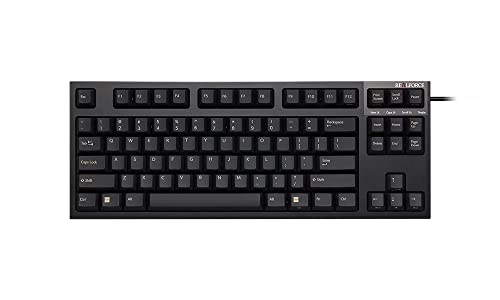
- Realforce keeps a conventional tenkeyless layout with a function row and dedicated arrows, so there is almost nothing new to learn.
- HHKB is a sixty percent board with Control beside the A key, a split-friendly Unix layout, DIP switch options, and deep remapping support.
- The Realforce R3S TKL is the wired reference point; the newer R4 TKL Wireless adds cable-free use on the Realforce side.
- The HHKB Professional Hybrid adds Bluetooth and USB-C to the classic layout, and the Type-S version adds factory silencing.
- Choose by layout first and switch weighting second, because you can adapt to a key weight in days but a layout lives in your fingers for years.
What is actually being compared in Realforce Vs Hhkb?
Strip away the branding and this is a comparison between two answers to the same question: once you have decided you want Topre switches, how much of your existing typing life are you willing to rearrange around them? Realforce is the keyboard line made by Topre itself, the company behind the switch, and it shows in the priorities. The boards are conservative in shape, heavy, plainly styled, and engineered around consistency from key to key. An R3S tenkeyless board looks like the keyboard a careful office would have bought in any decade, and that plainness is deliberate. Everything about it says the switch is the product and the furniture around it should stay out of the way.
HHKB comes from a different lineage. The layout was shaped with input from computer scientist Eiiti Wada, who wanted a keyboard that stayed constant across the Unix machines he moved between, with the keys a programmer touches most placed where strong fingers rest. The result deletes the number pad, the function row, the dedicated arrow cluster, and the Caps Lock key in its usual home, and in exchange puts Control at the left of the A key, moves Backspace down a row within easy reach, and layers navigation onto a function key beside the spacebar. PFU, the Fujitsu subsidiary that makes the HHKB line, has kept this arrangement essentially intact across generations, which is why a twenty-year-old description of the layout still reads accurately today.
Because both lines share Topre switch technology, comparisons that fixate on key feel alone miss the decision. The honest summary is that the feel is family resemblance rather than identity — domes, housings, plate behaviour, and keycap profiles differ enough that the two boards do not type identically — but the gap in feel is small next to the gap in layout. Nobody keeps a Realforce and returns an HHKB because the dome weighting disappointed them. People return one of these boards because the layout either disappeared under their hands or never stopped arguing with them.
The quick verdict, before the detail
Buy the Realforce if you type on a conventional layout all day, use the function row and arrow keys constantly, share your desk with colleagues who occasionally type on your machine, or simply want Topre switches without a learning curve. Buy the HHKB if your work lives in a terminal or a modal editor, if your hands are small or your desk is crowded, if you travel with your keyboard, or if the idea of Control sitting under your pinky on the home row sounds like relief rather than vandalism. Buy the Type-S variant of the HHKB if the board will live in a shared or quiet space. Consider the Realforce R4 TKL Wireless if you like the Realforce layout but your desk setup has moved past cables.
There is also a legitimate answer that experienced Topre owners give and newcomers resist: own the question for a fortnight before spending anything. Borrow either board if you can, or at minimum remap a board you already own — put Control where Caps Lock lives, hide your arrow keys behind a function layer for a week — and notice whether the experiment feels like friction or relief. That single test predicts satisfaction with the HHKB layout better than any review, including this one, because the layout is a habit, and habits are personal in a way switch specifications are not.
How the picks in this comparison were chosen
The linked boards below are the current, verifiable listings for each side of the comparison: the Realforce R3S TKL as the wired reference, the Realforce R4 TKL Wireless as the newer cable-free option, the HHKB Professional Hybrid Type-S as the silenced flagship of the HHKB line, and the HHKB Professional Hybrid as the standard version of the same layout. Each listing was confirmed against the manufacturer’s own catalogue data before inclusion, and each is presented under its exact listing name so there is no ambiguity about which board a link leads to. Boards that could not be verified cleanly were left out rather than guessed at, which is why older discontinued variants are discussed in prose where they matter historically but never linked.
Within each pick you will find a mini specification box limited to facts the listing itself supports or that are definitional for the model line, three strengths, three trade-offs, and a plain verdict about who the board suits. No board here is described with a price, because prices on these imported lines move with stock and currency in ways that make any printed figure stale quickly; each pick instead carries a Check price on Amazon link so the figure you act on is the live one.
In this guide
Quick picks at a glance
| Board | Layout | Connection | Choose it if |
|---|---|---|---|
| Realforce R3S TKL | Tenkeyless, conventional | Wired | You want Topre feel with zero relearning |
| Realforce R4 TKL Wireless | Tenkeyless, conventional | Wireless and wired | You want the Realforce layout without a cable |
| HHKB Professional Hybrid Type-S | Sixty percent, Unix layout | Bluetooth and USB-C | You want the HHKB layout, silenced |
| HHKB Professional Hybrid | Sixty percent, Unix layout | Bluetooth and USB-C | You want the classic HHKB layout, standard sound |
The table compresses the comparison to its deciding axes: layout, connection, and the buyer each board serves. Everything after this point exists to help you locate yourself honestly in that last column, because the most common buying mistake with either brand is choosing the board that suits the typist you imagine being rather than the one whose habits you actually have at four in the afternoon on a deadline.

Realforce R3S TKL — the wired reference point
Badge: The safe pair of hands. The R3S is the board to picture when someone says Realforce: a tenkeyless deck with a full function row, a standard bottom row, and Topre switches weighted at a uniform 45 grams in the listing verified for this guide. It connects by cable, asks for no software to behave itself, and presents the same face to a Windows machine today as it will in a decade. For buyers whose entire question is whether Topre switches are worth their reputation, the R3S is the cleanest possible test, because nothing about its layout will interfere with the answer. Your hands already know this keyboard. Only the keystrokes are new.
- Switch: Topre electrostatic capacitive, 45g uniform in this listing
- Layout: Tenkeyless with function row and dedicated arrow keys
- Connection: Wired
- Keycaps: PBT, in keeping with the Realforce line
Strengths
- Zero learning curve: every key sits where a lifetime of conventional boards put it, so the Topre feel is the only new variable.
- Uniform, consistent key feel across the whole deck, the quality the Realforce name is actually built on.
- A heavy, settled build that stays planted on the desk and shrugs off years of daily use.
Trade-offs
- Wired only, which feels increasingly old-fashioned on a desk built around a laptop and a dock.
- Plain styling that some buyers read as dignified and others read as dated, with no lighting to argue otherwise.
- A premium price for a board that offers no remapping theatre, no hot-swap sockets, and no novelty beyond the switch itself.
Best for: Writers, administrators, programmers on conventional layouts, and anyone buying their first Topre board as a long-term desk fixture. / Not suited for: Travellers, minimal-desk enthusiasts, or buyers who want wireless freedom and programmable layers as part of the deal.

Realforce R4 TKL Wireless — the layout, minus the cable
Badge: The modernised classic. The R4 generation answers the most common objection to the R3S without touching the layout that made people buy it. The verified listing is the white R4 TKL Wireless with silent 45 gram Topre switches, which pairs the familiar tenkeyless arrangement with wireless connection for desks that have gone cable-free. The silencing matters more than it might appear: Topre boards are already among the quieter serious keyboards, and a silenced variant in a shared office or a home with thin walls removes the last social objection to typing on one all day. Think of the R4 as the Realforce idea maintained rather than reinvented — same furniture, same feel, fewer wires and less noise.
- Switch: Topre electrostatic capacitive, silent 45g in this listing
- Layout: Tenkeyless, conventional arrangement
- Connection: Wireless, with wired use in keeping with the R4 line
- Colour of verified listing: White
Strengths
- Keeps the full conventional layout while removing the cable, which is exactly the upgrade R3 owners ask for.
- Silent switches suit shared offices, call-heavy work, and households where a keyboard is heard through a wall.
- The newer generation keeps the Realforce consistency while feeling current rather than archival.
Trade-offs
- Costs more than the wired board it evolves from, and the premium buys convenience rather than a different typing feel.
- Wireless introduces charging or battery habits that the plug-and-forget R3S never asks of you.
- Availability of specific colour and weighting combinations can be patchier than the long-running wired models.
Best for: Realforce-curious buyers with a wireless desk, and R3S owners who want the same layout with less noise and no cable. / Not suited for: Purists who prefer the absolute simplicity of a wired board, or buyers watching the tightest version of the budget.

HHKB Professional Hybrid Type-S — the layout, silenced
Badge: The flagship of the small board. The Type-S is the HHKB in its most considered form: the sixty percent Unix layout, Topre switches with factory silencing, Bluetooth pairing for multiple hosts alongside USB-C, and printed legends in the charcoal finish verified here. Silencing changes the HHKB’s character in a way owners describe with unusual affection. The standard board has a soft, deep sound that fans love and call thock; the Type-S trades some of that voice for near-silence, keeping the smooth travel while removing the bottom-out and upstroke noise that carries across a room. If the HHKB layout is the experiment you want to run, the Type-S is the version least likely to be vetoed by the people who share your space.
- Switch: Topre electrostatic capacitive, silenced Type-S variant
- Layout: Sixty percent HHKB arrangement, Control beside the A key
- Connection: Bluetooth and USB-C wired
- Legends: Printed, charcoal finish in this listing
Strengths
- The full HHKB layout philosophy with the quietest switches the line offers, ideal for shared and late-night work.
- Bluetooth multi-host pairing plus a wired fallback makes it a genuine one-keyboard-for-every-machine device.
- Small footprint frees desk space for a mouse, a notebook, or a pointing device kept close to the home row.
Trade-offs
- The layout demands weeks of honest adaptation, and some experienced typists never forgive the missing arrow cluster.
- Silencing slightly softens the signature Topre sound and feel that some buyers are specifically paying to hear.
- It is the most expensive way in this comparison to buy sixty percent of a keyboard, however good that sixty percent is.
Best for: Terminal and editor devotees, quiet-office workers, and travellers who want one small board for every machine they own. / Not suited for: Spreadsheet-heavy work, buyers who live on function keys and arrows, or anyone unwilling to relearn Control’s position.

HHKB Professional Hybrid — the classic, unsilenced
Badge: The original argument. The standard Professional Hybrid keeps the same layout, the same Bluetooth and USB-C pairing, and the same remapping depth as the Type-S, but leaves the switches in their natural voice. That voice is a large part of why people fall for this board: a rounded, muted percussion quite unlike the clack of a mechanical switch, produced by the dome collapse that defines the Topre stroke. Buyers who work alone, or among people who do not mind a gentle keyboard soundtrack, often prefer this version precisely because nothing has been damped out of the experience. It is also the slightly less expensive door into the same layout, which matters when the layout itself is the gamble.
- Switch: Topre electrostatic capacitive, standard unsilenced
- Layout: Sixty percent HHKB arrangement, Control beside the A key
- Connection: Bluetooth and USB-C wired, Mac and Windows support in the listing
- Legends: Printed, charcoal finish in this listing
Strengths
- The unfiltered Topre sound and stroke that built the HHKB following, in the current hybrid-connected generation.
- Identical layout, DIP switch options, and remapping support to the Type-S, so nothing functional is given up.
- Works across Mac and Windows hosts, which suits the mixed-device desks the layout was designed for.
Trade-offs
- Audible enough, especially the upstroke, that a quiet shared office may push you back toward the Type-S.
- The same adaptation period as any HHKB: the first fortnight involves reaching for keys that are not where your hands left them.
- No dedicated arrows, function row, or number pad, and no configuration of the board changes that arithmetic.
Best for: Solo workers and home offices where the classic HHKB sound is welcome, and programmers sold on the layout. / Not suited for: Open-plan offices with close neighbours, or buyers whose work is navigation-heavy rather than text-heavy.
How does the Topre switch actually feel, and is it the same on both?
A Topre switch is not a mechanical switch with better marketing. Inside each key sits a rubber dome over a conical spring, resting above a capacitive sensor on the circuit board. Pressing the key collapses the dome, which supplies nearly all of the resistance and the tactile event, and compresses the spring, which changes the capacitance the sensor reads until it registers the press. There are no metal contacts to chatter, bounce, or oxidise, which is one reason these boards are famous for consistency over very long service lives. The stroke reads to the fingers as a smooth build of resistance, a soft collapse, and a cushioned landing — closer to pressing a well-made piano key into felt than to tripping a mechanical trigger.
On a Realforce, that stroke is presented in its most even-handed form. The weighting in the verified listings is a uniform 45 grams, the plate and case give the board a settled, almost inert quality, and the experience across a long document is one of unbroken sameness, which is a compliment of the highest order for a tool you use eight hours a day. Realforce boards have also historically offered variable weighting and actuation-point adjustment on various models, ideas that treat the switch as something to tune to the typist rather than merely admire.
On the HHKB, the same switch family lives in a lighter, more resonant case with a different keycap profile and a plate arrangement that lets more of the dome’s character through. Owners consistently describe the HHKB stroke as slightly springier and more vocal, the Realforce stroke as slightly calmer and more damped, and both descriptions can be true of the same underlying technology because housings and cases are instruments as much as enclosures. The Type-S then removes much of the HHKB’s voice with silencing rings, which also shave a whisper of travel. None of these differences is large enough to choose a board over. They are the seasoning. The layout is the meal.
Why does the HHKB move the Control key, and does it matter?
It matters more than any other single fact in this comparison. On the HHKB, the key immediately left of A is Control, the position Caps Lock occupies on a conventional board, and Caps Lock itself is demoted to a function-layer combination. The reasoning is ergonomic and historical at once: the original Unix terminals Wada worked on placed Control there, and Control is a key programmers and editor users press constantly — for shortcuts, for terminal commands, for the chorded vocabulary of Emacs and Vim-adjacent workflows. Reaching it on a conventional board means curling the pinky down and outward, hundreds of times a day. On the HHKB it sits on the home row, under the strongest resting position of that same finger, and after adaptation the conventional position starts to feel like a prank.
The rest of the layout follows the same logic. Backspace sits one row lower than usual, directly within reach. The function key beside the spacebar turns the number row into function keys and the right-hand letter cluster into arrow keys arranged in a diamond, so navigation happens without the hand leaving its station. DIP switches on the underside let you swap or disable certain keys and adapt the board to Mac or Windows conventions, and the remapping software on the Hybrid generation lets you redraw the layout in software as well. Realforce buyers sometimes dismiss all of this as eccentricity. HHKB buyers reply, correctly, that the conventional layout is also a set of decisions — just older ones, made for typewriter mechanics rather than for the work the keyboard now does.
The honest cost accounting runs the other way too. Spreadsheet work leans on arrows and function keys in a way prose never does. Games assume WASD plus a surrounding continent of reachable keys. Colleagues sitting down at your desk will be lost for the first minute, every time. And the adaptation tax is real: most people report one to three weeks of slower, error-prone typing before the layout pays its dividend. Whether that tax buys anything depends entirely on whether your daily work is the kind the layout was designed around.
Which board suits which kind of work?
Long-form writing belongs to whichever board you stop noticing, and for most writers that is the Realforce, because punctuation, capitals, and the occasional function-key shortcut all live where a lifetime of typing put them. Programming splits by tribe. Developers who live in a shell, a modal editor, or a tiling window manager are the HHKB’s natural constituency, and they are disproportionately represented among its loudest defenders. Developers in large integrated environments, who lean on function keys for debugging and on arrows for navigating dense panes, often find the Realforce’s completeness more valuable than the HHKB’s cleverness, and neither tribe is wrong about its own day.
Office and administrative work — documents, email, forms, data entry — favours the Realforce for the same reason it favours any conventional tool: zero training, zero surprise, and a function row that matches the instructions in every software manual ever printed. Creative work splits by application rather than by brand loyalty. Audio and video editors use jog controls and dedicated panels more than keyboard navigation layers. Photographers culling thousands of frames with arrow keys will feel the HHKB’s missing cluster within the hour. Students and travellers are the HHKB’s easiest converts, because a board that fits in a tote bag and pairs with a laptop, a tablet, and a phone is a genuinely different product category from a tenkeyless desk anchor, and comparing the two purely as keyboards understates what the small one is for.
How do you set up and adapt to either board?
For the Realforce, setup is deliberately boring: place it, plug it in or pair it, and give your hands a day to calibrate to the dome’s collapse point, which arrives earlier in the stroke than many mechanical typists expect. Bottoming out hard is the beginner’s error on any Topre board; the switch registers before the key lands, and learning to type with a lighter final press is where the famous smoothness actually comes from. For the R4, add the ordinary wireless disciplines: pair it to the machine you use most, keep the cable somewhere known for the day the battery fades mid-deadline, and update your desk habits rather than your typing.
For the HHKB, plan the adaptation like a project. Set the DIP switches before you start, not during: choose the Mac or Windows mode honestly, decide whether Delete and Backspace behaviour matches your habits, and then leave the switches alone for a fortnight so your hands learn one board rather than a rotating series of experiments. Keep a conventional keyboard within reach for deadline emergencies in week one, and expect your speed to dip before it recovers; that dip is the layout being learned, not evidence it failed. Use the remapping software only after the stock layout has had its fair trial, because most people who remap on day one are really just rebuilding their old keyboard at higher cost. By the end of week three, the test is simple: sit at a conventional board and notice whether your pinky now reaches for Control beside the A key. If it does, the layout has moved in.
What are the common mistakes buyers make here?
The first mistake is buying either board as a trophy. Both are expensive, both photograph well in desk setups, and both are miserable purchases if the underlying reason was acquisition rather than a typing problem you actually have. The second is judging the HHKB in a shop or a single afternoon; its layout is a fortnight-scale decision being tested at minute scale, and nearly everyone hates it on day two. The third is the mirror error: assuming the Realforce is the boring choice and therefore the wrong one, when for most working typists boring is the highest praise a keyboard can earn. A fourth mistake is ignoring weighting and variant details at order time — these lines sell in multiple configurations, and the board that arrives should be the configuration you meant, so read the listing title as carefully as this guide read it for you. Finally, buyers forget the desk around the keyboard: the HHKB’s small footprint only pays if you actually use the reclaimed space, and the Realforce’s tenkeyless width only helps if your mouse hand was the cramped one.
What about comfort over a full working day?
Comfort claims around premium keyboards are usually inflated, so let us keep this one modest and mechanical. Neither board will fix a bad desk, a wrong chair height, or a monitor at the wrong distance, and any guide promising that a switch can do those jobs is selling something. What the Topre stroke genuinely offers over a long day is a cushioned landing: the dome’s collapse absorbs the end of the keystroke in a way that hard mechanical bottom-outs do not, and many long-form typists describe less fingertip fatigue at hour six than they experienced on crisper switches. That is a plausible, modest effect, and it applies equally to both brands in this comparison.
Where the boards differ in daily comfort is geometry, not cushioning. The HHKB’s narrow shape lets the mouse sit closer to the body’s centreline, which many right-handed users feel in the shoulder rather than the fingers, and its home-row Control removes a repeated pinky stretch that chord-heavy workers perform hundreds of times daily. The Realforce tenkeyless shape shares most of the mouse-proximity benefit compared with a full-size board, while keeping dedicated keys that prevent the wrist-and-layer gymnastics navigation requires on the HHKB. Judge comfort by your own pain map, if you have one: finger fatigue argues for Topre generally, shoulder reach argues for the narrower board, and navigation strain argues for dedicated keys. No board wins all three maps at once, which is why this comparison keeps returning to the same instruction — know your day, then choose.
Final recommendation
If this comparison must end with one name for the median reader, it is the Realforce — specifically the R3S TKL for a wired desk and the R4 TKL Wireless for a modern one — because most people’s typing lives are conventional, and a conventional layout wrapped around Topre switches is the surest satisfaction this category sells. The HHKB is not the runner-up in that sentence. It is the answer to a different question, and for the reader whose work is chords, shells, and home-row discipline, the Professional Hybrid — Type-S if your space is shared, standard if it is yours alone — is not a compromise at all but the most deliberately designed keyboard in this entire comparison. Decide which question is yours, and the boards stop competing.
Criterion by criterion: where does each board actually win?
Sound. In a quiet room the standard HHKB is the more audible board, with a rounded percussion on the downstroke and a lighter tick as the keys return, while the Realforce presents a lower, more contained version of the same family sound. The Type-S removes most of the HHKB’s contribution to a room, and the silent R4 does similar work on the Realforce side, so the silenced variants of both lines end up closer to each other than the standard models are. Verdict: a draw at the silenced tier, Realforce calmer at the standard tier, and HHKB more characterful if character is what you are buying.
Build and desk presence. The Realforce is the heavier, denser object and behaves like furniture: it does not slide, flex, or announce itself. The HHKB is a precision instrument by contrast — rigid for its size, but light enough to lift with two fingers and clearly designed to be moved. Neither feels cheap in any dimension your hands can reach, and the difference is intent rather than quality. Verdict: Realforce for a permanent desk, HHKB for a keyboard with a life beyond one surface.
Keycaps and legends. Both lines use durable PBT keycaps with legends that will not shine or fade the way printed plastic does, and both favour restraint over decoration. The HHKB also sells in blank-legend variants for the committed, which tells you something about its audience. Replacement keycap options are narrower than in the mechanical world because Topre stems are their own standard, so buyers who enjoy cosmetic customisation should know they are entering a smaller, more expensive aftermarket on either side of this comparison. Verdict: even, with the aftermarket caveat applying to both.
Software and customisation. Here the HHKB Hybrid generation pulls ahead in spirit: DIP switches for hardware-level choices, remapping software for redrawing the layout, and multi-host Bluetooth pairing all serve its philosophy of one personal keyboard across many machines. Realforce’s customisation tradition is narrower and more physical — weighting choices at purchase, actuation adjustment on models that offer it — reflecting a philosophy that the board should be right as built rather than endlessly reconfigurable. Verdict: HHKB for tinkerers and multi-device users, Realforce for buyers who want decisions made well once, by the manufacturer.
Portability and desk economy. This is the HHKB’s home turf and it is not close. The small board leaves room for a mouse directly beside the home row, fits the centre of a tray or the space in front of a laptop, and travels in bags that a tenkeyless board makes awkward. The Realforce tenkeyless shape is compact by full-size standards and genuinely helps mouse ergonomics compared with a number-pad board, but it is a desk resident, not a companion. Verdict: HHKB, decisively, whenever the keyboard moves or the desk is small.
Value, stated carefully. Neither board is inexpensive, and this guide prints no prices because both lines move with stock and import conditions. In tier terms, the standard HHKB Hybrid and the R3S occupy the premium tier their build justifies, while the Type-S and the R4 sit a step above as the silenced, modernised variants. The value question is really a utilisation question: a board typed on for six hours daily amortises its price into pennies per hour within a couple of years, while the same board bought as a desk ornament is expensive at any figure. Verdict: value follows hours of use, and both boards reward heavy users while punishing collectors.
What changes after the first year of ownership?
Owners of both boards tend to report the same arc with different props. The first month is calibration. The first year is where the boards separate themselves from ordinary keyboards in a quieter way: the key feel on a Topre board at month twelve is recognisably the key feel from month one, because there are no contacts to degrade and the dome ages slowly and evenly. Mechanical boards often develop one or two keys that feel or sound slightly off; the Topre reputation rests on that not happening, and it is the least glamorous and most durable argument in this entire comparison.
The HHKB adds a second arc: the layout either becomes invisible or it does not, and owners who pass the three-month mark rarely go back, because the layout’s benefits are habit-shaped and habits, once installed, feel like facts about the world rather than choices. Realforce owners describe a different satisfaction — the absence of an arc. The board never asked them to change, never became a project, and simply kept being the best-feeling conventional keyboard they had used. Which arc appeals to you is, once again, the whole decision wearing a new coat: do you want a keyboard that improves you, or one that never interrupts you?
Practical ownership notes apply to both. Keep liquids further away than feels necessary; the contactless switch is robust, but the boards are not sealed instruments. A can of compressed air and a keycap puller handle most maintenance, and PBT caps can be washed, dried thoroughly, and refitted on a free afternoon. Cables on the wired models are standard enough to replace without drama. And keep the box: these boards hold a resale audience like few peripherals do, largely because the buyer pool trusts the switch’s longevity enough to purchase used with confidence.
How did two keyboards sharing one switch end up as rivals?
The rivalry makes sense once you know the biographies. Topre developed its switch for professional and industrial use first — banking terminals, broadcast and medical environments, places where a keyboard is infrastructure and failure is an event — and the Realforce line carries that DNA openly. It is the switch manufacturer’s own showcase: conservative, overbuilt, and uninterested in fashion cycles. When enthusiasts discovered the feel, they were adopting equipment designed for institutions, which explains both its virtues and its indifference to gaming-era features like lighting and rapid actuation marketing.
The HHKB began as an academic’s answer to a personal frustration. Wada worked across many different Unix machines, each with its own keyboard layout, and wanted one small, consistent keyboard he could carry between them, arranged around the keys his work actually used. PFU turned that idea into a product in the nineteen nineties, and its survival, essentially unaltered in layout, through every keyboard fashion since — through the mechanical revival, the sixty percent wave it predated, and the wireless era it eventually joined with the Hybrid generation — is the strongest evidence that the layout solves a real problem rather than a marketed one. The two boards are rivals only because the same switch sits inside both; underneath, one is infrastructure and the other is an argument, and they were never really competing for the same desk.
How do you read the variants without buying the wrong board?
Variant literacy matters more with these lines than with most keyboards, because the names encode configuration rather than trim. On the Realforce side, the letter and number designations mark the generation and form: the R3 generation is the wired reference line, the R4 the newer generation that adds wireless models, and the suffix letters describe the layout size, with TKL denoting the tenkeyless shape used by both linked picks here. Weighting appears in the listing title — 45 grams, uniform across the board in the verified listings — and the word silent in a title is a functional difference, not a colour, since it denotes the damped switch variant.
On the HHKB side, the generation word is Hybrid, denoting the Bluetooth and USB-C models, and Type-S is the silenced variant of that generation rather than a separate layout. Legends come printed or blank, and the colour names describe the case and cap finish. The single most common ordering error across both brands is a buyer reading quickly and receiving a different weighting, a silenced board when they wanted the voice, or a blank-legend board as a surprise. Every one of those errors is avoidable by reading the full listing title slowly — the titles are long precisely because they carry the configuration — and by matching it against the pick headings in this guide, which reproduce the verified configurations.
One more literacy point protects buyers on both sides: regional layout. These are Japanese lines sold worldwide, and listings can describe different legends or regional arrangements. The verified listings in this guide are the configurations named in their headings; if you shop beyond them, confirm the layout language in the title before anything else, because a beautiful board in the wrong legend set is a daily irritation disguised as a bargain.
A decision guide you can run in five minutes
Answer four questions honestly. First, where does your left pinky go for Control today, and does the journey annoy you weekly? If yes, the HHKB layout is solving a problem you actually have. Second, count your function-key and arrow-key use in a normal hour of your real work, not your imagined work. High counts favour the Realforce with its dedicated hardware. Third, picture the room: shared, quiet, or on calls? Silencing — Type-S or the silent R4 — moves from luxury to courtesy. Fourth, does the keyboard travel or serve several machines? Travel and multiplicity are the HHKB Hybrid’s design brief, while a single fixed desk is the Realforce’s.
Score yourself as you go. Two or more answers pointing the same way settle the purchase for most readers, and the remaining questions in this guide exist to refine variant choice rather than reopen the brand question. If your answers split evenly, default to the Realforce: the conventional layout is the lower-regret error, because a board your whole household and every colleague can use retains its value in your life even if Topre feel turns out to be a preference rather than a revelation. The HHKB, by contrast, is a high-conviction purchase. Make it when the conviction is real, and it will feel less like a keyboard you bought and more like one you joined.
Frequently asked questions
Are Realforce and HHKB switches really the same technology?
Yes, at the level that matters: both use Topre electrostatic capacitive switches, in which a collapsing rubber dome provides the feel and a spring over a capacitive sensor registers the press without metal contacts. The implementations differ in housing, weighting, case, and plate, which is why the boards feel like close relatives rather than twins. Choosing between them on switch technology alone is therefore a dead end; the layout is where the real difference lives, and it is where your decision should be made.
How long does the HHKB layout take to learn?
Most typists report one to three weeks of daily use before the layout stops requiring conscious thought, with the Control key position usually clicking first and the function-layer arrows taking longest. Your raw speed will likely dip during the first week, which is normal and not a verdict on the board. The practical approach is to commit fully for a fortnight, keep a familiar board nearby for genuine emergencies, and judge the experiment at the end of week three rather than on the frustrating second day.
Is the Type-S worth choosing over the standard HHKB Hybrid?
It is worth it when the board will be heard by other people: the factory silencing removes most of the bottom-out and upstroke noise, making the Type-S the polite choice for shared offices, calls, and late-night work in a quiet house. Working alone, many owners prefer the standard Hybrid’s fuller sound and fractionally longer-feeling stroke, and save the difference. Neither is more durable or better built; the choice is acoustic and social, not mechanical, so let your room decide it.
Can either board be used for gaming?
Both can, with honest caveats. The Realforce’s conventional layout and tenkeyless width suit games exactly as any good tenkeyless board does, though neither line chases the rapid-trigger features gaming brands advertise. The HHKB works well for games that live on WASD and a modest key set, and its small footprint leaves generous mouse room, but titles that assume a function row and dedicated arrows will have you living on the function layer. Buy these boards for typing and let gaming be a pleasant secondary use, not the reason.
What about the missing number pad on both?
Both linked families are tenkeyless or smaller, so heavy numeric entry calls for a separate number pad or a different board entirely. Occasional figures in prose and code are no hardship on either layout. Sustained spreadsheet or accounting work is the one workload where this entire comparison may be the wrong shopping trip, and recognising that before ordering is cheaper than discovering it with a returns label. A standalone pad beside either board is the common compromise, placed only on the days the numbers actually arrive.
Which holds its value and lasts longer?
Both lines are built for long service, and the contactless switch design removes the contact wear that ends many mechanical boards’ lives, so longevity is rarely the deciding factor. Realforce boards are the heavier, more inert objects; HHKB boards are the ones that travel and therefore meet more of the world’s accidents. Either, kept on a desk and kept dry, should outlast several computers. Buy the layout you want to live with, because you will be living with it for a long time.
Where should you buy, and what should you check at checkout?
Buy through the linked listings after one final slow read of the title, confirming the four configuration facts this guide has repeated: generation, layout size, weighting, and whether the board is the silenced variant. Check the legend language matches the layout you type on, and confirm the connection type suits your desk — a wired board bought for a wireless desk is a self-inflicted wound. These are imported professional lines, so stock arrives in waves; if your exact configuration is unavailable, waiting a restock cycle is usually wiser than substituting a different weighting or legend set you will notice every day for years. When the board arrives, spend the first session typing something long and familiar rather than running speed tests, because the honest first impression of a Topre board is written by prose, not by a metric.
One last check protects the HHKB-curious in particular: confirm you are ordering the Hybrid generation if wireless pairing is part of your plan, since the layout has existed across several generations and older wired-only models still circulate in prose and in some marketplaces. The listings linked in this guide are the configurations named in their headings, verified for this comparison, so following them removes that entire category of doubt. And whichever board you choose, keep its packaging through the first fortnight — not from any expectation of failure, but because layout decisions deserve a fair trial with an honest exit, and a fair trial is easier to grant yourself when the exit stays open.
Related reading
wireless gaming keyboards for FPS play external keyboards for a home office desk keyboard and mouse combos for office work the Roccat Vulcan TKL Pro in detail the split ROG Falcata examined wireless gaming keyboards at the value end


