Disclosure: As an Amazon Associate, reviewstook.com earns from qualifying purchases. Links on this page are affiliate links; they cost you nothing extra. Prices and availability change often, so check the current Amazon listing before you buy.
The iris ultra is JMGO’s attempt to solve the oldest complaint about bright laser projectors: the picture is punchy, but the rainbow artefacts, the speckle on the screen, and the washed-out look in a room that is not perfectly dark keep reminding you that a machine is doing the work. JMGO’s answer is a dual-iris optical engine in a triple-laser body rated at 4,500 ISO lumens, with a 0.88–1.7:1 optical zoom, real lens shift, and a native contrast figure the company puts at 7,000:1. Those are not decorative numbers. Each one addresses a specific failure mode of the projectors that came before it, and this review works through them in the order a buyer actually meets them: placement first, then brightness, then colour behaviour, then the smart platform, then the question of whether the step-up Ultra Max or the older N1S Ultra makes more sense for your room.
A note on naming before anything else, because JMGO’s range invites confusion. The Iris Ultra sits above the N1S series and below its own Ultra Max sibling. All three machines in this article are triple-laser Google TV projectors from the same maker, which makes them unusually easy to compare honestly: the differences are brightness, contrast hardware, zoom range and price tier, not entirely different product philosophies. If you came here wondering whether the standard Ultra is the sweet spot of the three, the short answer is that for most living rooms it is — but the reasoning matters, because the wrong room can flip that verdict completely.
Key takeaways
- The dual-iris system is the headline for a reason: it trades a little peak brightness for visibly deeper blacks and calmer laser speckle, which is the trade most home viewers actually want.
- Optical zoom from 0.88 to 1.7:1 plus lens shift means the Iris Ultra fits rooms where a fixed-throw projector would force an awkward ceiling mount or a too-small image.
- 4K at up to 120Hz input support makes this a credible big-screen gaming projector, not just a film machine — provided your source and cable chain can feed it.
- Google TV with Netflix onboard removes the streaming-stick workaround that still dogs several rival laser projectors.
- The Ultra Max buys brightness and contrast headroom for very large screens or ambient-light rooms; in a controlled room, the standard Ultra’s advantage is that you stop paying for lumens you will iris down anyway.
In this guide
What the Iris Ultra actually is
Strip away the marketing and the Iris Ultra is a single-chip DLP projector lit by a triple-laser (RGB) light source. The triple-laser part matters because each primary colour gets its own laser, which is how the projector covers a very wide colour gamut without a colour wheel. The absence of a wheel removes one classic DLP artefact source, but laser DLP brings two of its own: rainbow effect (RBE), where sensitive viewers catch brief colour fringes on high-contrast edges, and speckle, a shimmering grain most visible on high-gain or textured screens. JMGO explicitly engineers against both here — the listing calls out anti-RBE work and speckle reduction — and the dual iris is part of that story as well as the contrast story.
The iris itself deserves a plain explanation. An iris in a projector lens works like the aperture in a camera: closing it down reduces light output but increases contrast and depth of field, and it can smooth some of the optical roughness that makes laser speckle obvious. Two irises — one positioned to shape the illumination, one in the imaging path — give the engine more control than a single dynamic iris that visibly pumps during dark scenes. When a projector’s blacks look grey and its dark scenes breathe up and down in brightness, you are usually watching a single, crude dynamic iris at work. The Iris Ultra’s pitch is that its hardware handles this at the optical level, so the processing has less rescuing to do.
Resolution is 4K UHD via pixel shifting, the standard approach in this class, and the refresh support runs to 120Hz at 4K according to the listing — a specification that would have been exotic in a home-theatre projector not long ago and that changes who should consider this machine. Console and PC gamers with large-screen ambitions are now legitimately in the audience.
Quick verdict and the three JMGO options
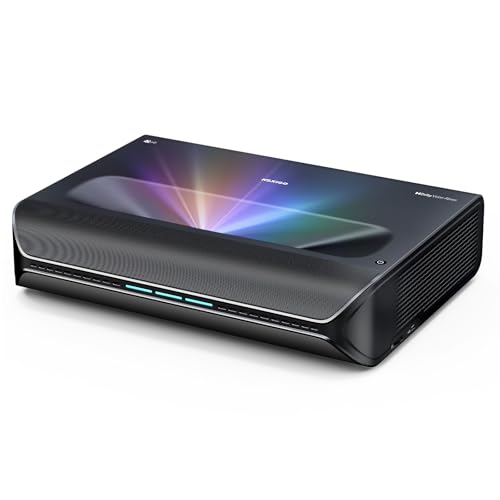
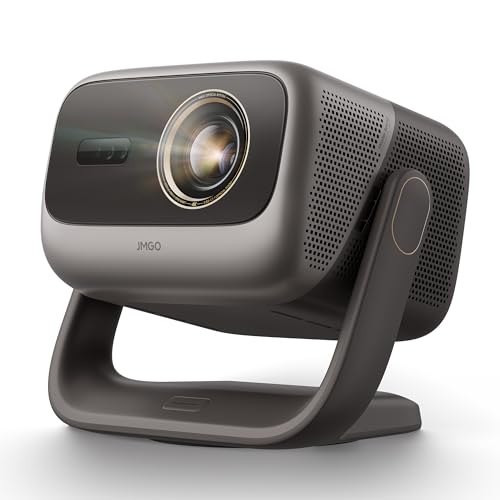
Three JMGO triple-laser machines frame the decision. The Iris Ultra is the balanced flagship: 4,500 ISO lumens, the dual iris, the wide zoom. The Iris Ultra Max raises output to 6,500 ISO lumens and native contrast to a claimed 10,000:1, adds Dolby Vision and an AI gimbal, and costs flagship money. The N1S Ultra is the previous generation’s portable take — 2,800 ISO lumens, a 360-degree gimbal stand, 20W Dolby Digital Plus audio — and it remains the pick when the projector must move between rooms or travel. The detailed reviews below take each in turn.

JMGO Iris Ultra — the balanced flagship
Badge: Best for most living rooms
- Light source: triple laser (RGB)
- Brightness: 4,500 ISO lumens (manufacturer rating)
- Resolution: 4K UHD, up to 120Hz support
- Zoom: 0.88–1.7:1 optical, with lens shift
- Claimed native contrast: 7,000:1
- Platform: Google TV with Netflix
Start with placement, because the Iris Ultra’s zoom range quietly solves the problem that kills more projector purchases than any picture-quality spec. A throw ratio spanning 0.88 to 1.7:1 means the same projector can sit relatively close to the screen for a big image in a small room, or retreat to the back wall of a long room, without digital keystone correction eating resolution and adding input lag. Lens shift compounds the freedom: you can offset the image vertically and horizontally within the lens’s range instead of tilting the projector and correcting geometry in software. In practical terms, a bookshelf, a sideboard or a low ceiling mount all become workable positions, and the image stays pixel-honest because the correction is glass, not math.
Brightness is the second strength, with a caveat about how to read it. 4,500 ISO lumens is a serious figure for a home projector — enough to hold a watchable, colourful image on a 120-inch screen in a room with some ambient light, and more than enough for a darkened room at that size. The caveat is that the iris changes the equation scene by scene: in its contrast-favouring modes you are not using all 4,500 lumens, and that is the point. Buyers cross-shopping on lumens alone miss that this projector is designed to spend brightness on contrast when the content asks for it. For sports in a bright family room you open things up; for a night-time film you let the iris work. Few rivals at this level give you both personalities in one optical system.
Colour behaviour follows from the triple-laser engine. Wide-gamut colour is the format’s party trick, and HDR material with saturated primaries — animated films, nature documentaries, games with stylised art direction — shows it clearly. The subtler win is speckle control. Laser speckle is worst on screens with gain and texture; if your screen is a grey or ALR (ambient light rejecting) model, speckle can add a crawling shimmer to bright flat areas like skies and ice rinks. JMGO’s speckle reduction does not make physics disappear, but it moves the artefact from distracting to ignorable on the screen types this projector will most often meet, and that is a genuine differentiator against first-generation triple-laser rivals.
The smart platform is Google TV with Netflix licensed onboard. That sentence sounds mundane until you have owned a projector whose onboard apps omit Netflix and force a streaming stick, an extra remote and an HDMI port consumed forever. Here the built-in platform is the whole show: voice remote, the major services, and 3D support listed for those who still maintain a 3D Blu-ray shelf. Built-in audio exists for casual use, though — as with every projector in this class — a soundbar or AVR remains the honest recommendation for film sound, and the projector’s eARC-class connectivity expectations should be checked against your audio gear before buying.
Gaming deserves its own paragraph because 4K/120 support reframes the machine. A projector that accepts a 120Hz signal at 4K can serve a current-generation console or a gaming PC at the frame rates those sources advertise, on an image size no television at this price tier approaches. Two honest cautions: the full chain must support it (cable, AVR passthrough, source settings), and pixel-shifted 4K at high refresh is a place where you should verify the current listing’s wording on exactly which resolutions and rates are supported, since manufacturers state these combinations differently.
Strengths
- Dual-iris optics deliver the contrast-and-speckle behaviour that first-generation triple-laser projectors struggled with.
- Wide optical zoom plus lens shift makes placement forgiving without keystone penalties.
- Google TV with Netflix onboard — no compulsory streaming stick.
Trade-offs
- Single-chip DLP means rainbow-sensitive viewers should still see one in person if they can; anti-RBE work reduces, not abolishes, the phenomenon.
- Built-in speakers are for convenience, not cinema; budget for external audio.
- It is a stay-in-place machine — if you need to carry a projector between rooms weekly, the N1S design philosophy suits you better.
Best for: a dedicated or semi-dedicated viewing room, 100–150 inch ambitions, mixed film and gaming use. / Not suited for: buyers who need portability, or rainbow-sensitive viewers who already know DLP bothers them.

JMGO Iris Ultra Max — the brightness-and-contrast step up
Badge: Best for very large screens and bright rooms
- Light source: triple laser (RGB)
- Brightness: 6,500 ISO lumens (manufacturer rating)
- Resolution: 4K UHD, up to 120Hz support
- Claimed native contrast: 10,000:1
- Extras: Dolby Vision, AI gimbal, 3-in-1 lens shift
- Platform: Google TV
The Ultra Max exists for the rooms where the standard Ultra runs out of headroom. Two specifications do the heavy lifting: 6,500 ISO lumens, which is roughly half again the standard model’s output, and a claimed 10,000:1 native contrast from its dual-iris implementation. In a dark theatre both numbers flatter the Max; in a bright, open-plan living space with a 150-inch screen, they are the difference between an image that holds together at midday and one that retreats to evening-only duty. Dolby Vision support adds the premium HDR format that the standard model’s listing does not claim, which matters if your streaming library and disc collection lean on it.
The AI gimbal is the Max’s lifestyle feature: motorised positioning that aims and aligns the image, aimed at households that set the projector on a table and want setup to be a button press rather than a ritual. Treat it as convenience rather than image quality — the optical fundamentals (zoom, shift, iris) are shared DNA with the standard model, and the 3-in-1 lens shift keeps the no-keystone discipline intact. Where the Max earns its premium is strictly photons and contrast hardware; where it does not is in any claim to be the smarter default. If your screen is 120 inches or under and your curtains close properly, the standard Ultra’s iris will spend most evenings throttling brightness you paid the Max extra to have.
Strengths
- Highest brightness in this comparison — big screens and ambient light stop being compromises.
- Dolby Vision onboard for premium-format libraries.
- Contrast claim leads the range for dark-scene authority.
Trade-offs
- Flagship pricing for headroom many rooms will never use.
- Gimbal convenience does not change the underlying picture fundamentals.
- Same DLP caveats apply: rainbow sensitivity is a personal, testable thing.
Best for: 150-inch-plus screens, bright multi-use rooms, Dolby Vision collections. / Not suited for: controlled dark rooms at moderate screen sizes, where the standard model matches the experience for less.

JMGO N1S Ultra — the portable previous generation
Badge: Best for moving between rooms
- Light source: triple laser
- Brightness: 2,800 ISO lumens (manufacturer rating)
- Resolution: 4K UHD
- Design: 360-degree gimbal stand, portable form
- Audio: 20W, Dolby Digital Plus
- Platform: Google TV with Netflix
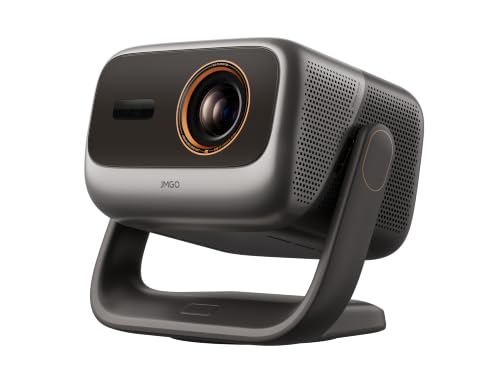
The N1S Ultra is what the Iris line grew out of, and its design centre is completely different: a gimbal-mounted projector you can tilt from wall to ceiling, carry to a bedroom, or take to a holiday rental. Its 2,800 ISO lumens are honest portable-class output — plenty for a darkened room at 100 inches, stretched in daylight. Its 20W Dolby Digital Plus speaker system is the strongest built-in audio of the three machines here, which matters precisely because a portable projector is the one you will actually use without external speakers. Sensorless picture correction handles the point-and-shoot setup that portability demands.
Choose the N1S Ultra when the projector’s home is “wherever we are tonight” and choose the Iris Ultra when the projector has a fixed address and a screen waiting for it. The two are not really rivals; they are answers to different household questions that happen to share a brand and a light source. As a second projector or a first step into triple-laser colour at a lower tier, the N1S remains easy to recommend on its own terms.
Strengths
- Gimbal portability with automatic setup — genuinely usable in any room in minutes.
- Best built-in audio of the three, fit for speaker-free viewing.
- Same Google TV and Netflix convenience as the flagships.
Trade-offs
- Brightness gives up real ground to both Iris models; bright rooms expose it.
- No dual-iris contrast hardware — dark scenes are good, not class-leading.
- Fixed placement flexibility is narrower than the Iris zoom-and-shift system.
Best for: renters, multi-room households, bedroom ceiling projection. / Not suited for: a fixed large-screen theatre build, where its portability premium buys nothing.
Iris Ultra buying guide: the five decisions that matter
Top pick
1. Screen size and gain come before lumens
Projector brightness is meaningless until it is divided by screen area. A 100-inch image and a 150-inch image differ in area by more than double, so the same projector that looks vivid at 100 inches can look tired at 150. Decide your screen size from your seating distance and wall first, then ask whether 4,500 ISO lumens — with an iris that deliberately trades some away for contrast — covers it in your room’s light. Screen gain complicates the arithmetic: a gain screen concentrates light toward the seating but can worsen laser speckle and narrow viewing angles, while a matte white screen spreads light evenly and flatters the Iris Ultra’s speckle control. ALR screens earn their keep in bright rooms but pair them thoughtfully with laser engines.
2. Throw distance and the zoom’s two ends
Measure your room before you fall in love. The 0.88 end of the zoom suits short rooms and rear-shelf placement close to the screen wall’s opposite side; the 1.7 end suits long rooms and ceiling mounts behind seating. Lens shift then fine-tunes: it lets the projector sit off the image’s exact centre axis — on a shelf that is not perfectly centred, or a mount that must avoid a ceiling beam — without keystone. Write down three numbers before ordering: screen width, projector-to-screen distance at your intended position, and how far off-centre (vertically and horizontally) that position sits. Ten minutes with the throw calculator habit saves the most common projector return reason there is.
3. Your rainbow sensitivity is a fact about you, not the projector
Single-chip DLP displays colours sequentially, and a minority of viewers perceive brief rainbow fringes, especially on subtitles and high-contrast moving edges. JMGO’s anti-RBE engineering targets exactly this, and most viewers will never notice anything. But if you already know you see rainbows on DLP — from a friend’s projector, a cinema, an older machine — no specification sheet can overrule your eyes. See a DLP projector in action before committing, or buy from a listing whose return terms you have actually read. This is the one buying-guide item that no review, including this one, can settle for you.
4. The audio plan is part of the projector budget
Every projector in this class ships speakers that are adequate for news and casual viewing and inadequate for the films the picture deserves. Decide now whether a soundbar or an AVR-and-speakers setup joins the purchase, and confirm the connection path (HDMI eARC behaviour, optical fallback) against your audio device. The projector’s job is the image; households that budget audio as an afterthought end up with a reference picture narrated by a speaker the size of a matchbox, whichever model they buy.
5. Gaming chains are only as strong as their weakest link
4K/120 support in the projector is one link. The console or PC must output it, the HDMI cable must carry it (short, certified, high-bandwidth), and any AVR in the middle must pass it through rather than cap it. If gaming matters to you, plan the chain as a system and test each link’s specifications on its own listing; the projector cannot upgrade a cable. Input lag at your chosen resolution and refresh is the other figure to verify on the current listing, because it varies by mode and processing settings.
Setting up the Iris Ultra: a placement-first walkthrough
Step 1: Fix the screen before the projector
Mount or position the screen first, because every projector adjustment assumes a target that does not move. If the screen comes later, project onto the wall temporarily and mark the image corners with painter’s tape at your intended size — then live with the tape outline for an evening of viewing from your real seats. Screen size regret is cheapest at the tape stage.
Step 2: Place within the zoom’s middle, not its extremes
Position the projector so your image size falls in the middle portion of the 0.88–1.7:1 zoom range rather than pinned at either end. Mid-zoom leaves adjustment room in both directions when furniture moves, and lenses generally behave their best away from absolute extremes. Use lens shift for the final alignment, keeping the projector level and square to the screen; tilt is what keystone correction exists to forgive, and forgiveness costs resolution.
Step 3: Focus at viewing distance, after warm-up
Let the projector run for twenty minutes before final focus — optics settle as they warm. Focus using a fine text screen (the settings menu works) viewed from your seat, not from beside the projector, because your seat is where soft focus will actually be noticed. Re-check after the first full film; a small second adjustment once everything is heat-soaked is normal, not a defect.
Step 4: Set the iris behaviour per content type
Create two habits rather than two presets you never touch: an open, bright configuration for daytime sport and general television, and a contrast-led configuration for evening films where the iris earns its money. Note which picture mode you used for each in a phone note for the first week; by the second week the right choice per content type will be reflex, and you will stop watching dark scenes in the daytime mode and wondering why the blacks look grey.
Step 5: Calibrate the chain, then the picture
Before touching colour sliders, verify the unglamorous chain: source output resolution and refresh match what you intend, HDR is actually being received (the projector’s info screen should say so), and the HDMI port in use is the one with full bandwidth if the ports differ. Most “this projector looks wrong” reports trace back to a source quietly sending 1080p or an HDR signal arriving as SDR. Only after the chain is honest does picture adjustment mean anything.
Common mistakes buyers make with flagship laser projectors
The first mistake is buying lumens for a room that needed contrast. A dark, curtain-controlled room rewards the iris and punishes nothing; shoppers who pay the Ultra Max premium for such a room have bought headroom that will spend its life dialled down. The second mistake is the opposite: expecting any projector, however bright, to defeat direct sunlight on a white wall. Projectors compete with ambient light by contrast management, not by winning a brightness war against the sun — curtains are the cheapest picture upgrade in home cinema.
The third mistake is mounting at the zoom’s extreme and discovering, a sofa-move later, that the image no longer fits the screen. The fourth is judging speckle or rainbow effect from a showroom’s screen and lighting rather than your own; both artefacts are screen-and-viewer dependent. The fifth is forgetting the throw when upgrading: owners replacing an older projector often assume the new one can occupy the same mount, and a different throw range turns that assumption into a weekend of re-drilling. Measure, then buy — the Iris Ultra’s wide zoom forgives a lot, but not everything.
Iris Ultra vs Ultra Max vs N1S Ultra: the honest summary
On brightness the order is Max, Ultra, N1S, and the gaps are meaningful rather than marginal. On contrast hardware the two Iris models share the dual-iris philosophy with the Max claiming the higher figure; the N1S plays a different, portability-first game. On placement, the Iris pair’s zoom-and-shift system is the most forgiving fixed-install package JMGO makes, while the N1S’s gimbal is the most forgiving movable one. On HDR formats, the Max’s Dolby Vision is a real separator for collections built around it. On audio, the N1S’s 20W system leads, which tells you exactly which machine expects to work alone. Price tiers follow the same order as brightness, and the value question is therefore personal: the standard Ultra is the point where the flagship technologies — dual iris, wide zoom, triple laser, 4K/120 — are all present, and the Max charges for more of two quantities (light and contrast) rather than for new capabilities, Dolby Vision aside.
Frequently asked questions
Is the Iris Ultra good in a room that is not fully dark?
It is among the better-suited home projectors for imperfect darkness, because 4,500 ISO lumens gives real headroom and the iris can be opened up for ambient-light viewing. Set expectations correctly, though: it will hold a colourful, watchable image with curtains drawn against daylight, and no projector at any price produces true blacks on a screen that room light is also hitting. Pair it with an ALR screen if your room is bright by design.
What screen size suits the Iris Ultra best?
The comfortable heartland is roughly 100 to 150 inches in typical living-room light control. At the smaller end the brightness is generous and the iris can favour contrast; at the larger end, light control matters more and the Ultra Max becomes the safer recommendation. Your seating distance should let your eyes take in the image without head movement — for most viewers that means the screen width stays well within your central field of view from the main seats.
Can the Iris Ultra replace a gaming monitor?
For big-screen console and PC play, its 4K/120 support makes it a legitimate option, with the caveats that your whole HDMI chain must support the mode and that you should confirm input-lag figures for your exact resolution and refresh on the current listing. For competitive play where every millisecond and a small screen’s focus matter, a dedicated gaming monitor remains the specialist tool; for immersive single-player and split-screen sessions, the projector’s scale wins easily.
Does the Iris Ultra need a streaming stick?
No — Google TV is built in and Netflix is licensed onboard, which covers the mainstream services through the projector’s own interface and remote. A stick remains an option if you prefer a different platform’s interface, but it is a preference, not a workaround, and that distinction is exactly what separates this generation of projectors from earlier ones.
How does the dual iris help with laser speckle?
Speckle is an interference pattern from coherent laser light scattering off screen texture; shaping the illumination path with an iris reduces the coherence artefacts the eye picks up as shimmer, particularly on gain and ALR screens. Combined with JMGO’s speckle-reduction processing, the effect on suitable screens moves from visible crawling on bright scenes to something most viewers stop noticing. It is mitigation engineered at the optical level, which is why it works better than a software filter alone.
Iris Ultra or Ultra Max — which should I buy?
Buy the Max if your screen is very large, your room is bright by architecture rather than by curtain failure, or Dolby Vision is a firm requirement. Buy the standard Ultra if your room darkens properly and your screen sits in the 100–150 inch heartland; the money saved buys the screen and soundbar that will improve your evenings more than unused lumens would.
Can I ceiling-mount the Iris Ultra, or does it belong on a shelf?
Either works, and the optical zoom plus lens shift give you useful tolerance in both positions, so the choice is practical rather than optical. A low cabinet keeps the ports, remote sensor and lens within easy reach for cleaning and cable swaps. A ceiling mount clears the room and protects the alignment you dialled in, but it needs a solid fixing, power at the mount point and a longer cable run planned before the bracket goes up.
How should I clean the lens and keep dust out of the Iris Ultra?
Let the unit cool fully, then use a dry microfibre cloth on the lens with light, circular strokes and no household cleaners, sprays or paper towels, which can mark coatings. Keep the vents unobstructed and the shelf or mount area dusted, because a projector moves a lot of air through its body. If the room is being renovated, cover the unit or move it out; fine building dust is worth treating as an enemy.
The bottom line on the Iris Ultra
The Iris Ultra is the projector JMGO’s triple-laser technology was pointing toward: the colour and brightness of RGB laser, with the two artefacts that haunted the format — speckle and mediocre contrast — addressed in the optics rather than in the brochure. Its zoom and shift make it installable in real rooms, its platform removes the stick tax, and its gaming support widens its household role beyond film night. The Ultra Max is more of the same for rooms that demand it; the N1S Ultra is the traveller. For a fixed screen in a room that can darken, the standard Iris Ultra is the one to build around.
Living with the Iris Ultra: the first month, honestly mapped
Week one with any flagship projector is dominated by placement experiments, and the Iris Ultra shortens that week. Because the zoom range is wide and the shift is real, most owners will find their final position on the first or second attempt rather than the fifth, and the remaining setup time goes where it should: screen tension, seating, and the audio chain. Expect the focus check after warm-up to become a small ritual you perform twice and then forget. Expect also to discover that your room, not the projector, is now the limiting factor — a white ceiling bouncing light back onto the screen will do more damage to perceived contrast than the difference between this projector and its Max sibling. A darker ceiling treatment or even a large dark rug between screen and seats produces a visible improvement that no menu setting can match, and owners consistently underrate these room fixes because they are not sold in the projector’s box.
By week three the iris behaviour becomes the feature you describe to visitors without realising it. Dark scenes in films hold their depth without the visible breathing that gives away lesser dynamic-contrast systems, and bright animated content uses the laser’s gamut in a way that makes older lamp and LED projectors look restrained by comparison. The honest friction points are mundane: fan noise is present in bright modes in a quiet room (position the projector away from directly above the main seat if you are sensitive), the remote’s backlight habits will either suit you or not, and Google TV’s recommendations row will try to reorganise your home screen around services you do not use until you discipline the settings. None of these are deal-breakers; all of them are the sort of thing a specification sheet never mentions and a month of evenings reveals.
HDR formats, sources and what actually reaches the screen
The Iris Ultra’s HDR story needs care because format support differs across the JMGO range: the Ultra Max lists Dolby Vision, while the standard Ultra’s listing emphasises HDR10-class performance and its 3D and gaming credentials. In practice, the standard model’s HDR presentation leans on the projector’s two structural advantages — a wide native gamut from the triple-laser engine and iris-managed contrast — rather than on a premium format badge. HDR10 content from streaming services and UHD discs is the common denominator everywhere, and it is rendered with the saturated primaries that make laser projection distinctive. If your library is heavily invested in Dolby Vision discs and you own a player that outputs it, that is a genuine, specific reason to step up to the Max; if your HDR arrives from the major streaming apps, the standard Ultra’s handling will rarely leave you feeling short-changed.
Source quality dominates format labels more than marketing admits. A well-mastered HDR10 stream will look better on this projector than a poor Dolby Vision encode looks on the Max, and a 4K disc will outclass both streaming versions. Feed the Iris Ultra the best source you have, confirm with the on-screen info display that HDR is truly arriving (a chain misconfiguration that silently converts HDR to SDR is the single most common cause of “HDR looks dull” complaints across all projectors), and set the source to output the projector’s native resolution rather than scaling twice. Gamers should similarly verify that their console’s HDR calibration screen has been run for this display specifically — the calibration you did for your television does not transfer, and the difference on a 120-inch image is not subtle.
Ceiling mount, shelf or cabinet: choosing the Iris Ultra’s home
The ceiling mount is the classic choice and suits the Iris Ultra’s zoom if your room’s length puts the mount point within the throw range for your screen size — verify this with the actual numbers, because a mount two feet too close is a renovation, not an adjustment. A rear shelf or bookcase is the friendlier option for renters and for anyone who wants easy access to ports and the occasional filter check; the lens shift exists precisely to forgive the shelf that is not at perfect screen-centre height. A cabinet or coffee-table placement works for temporary setups but fights the projector’s strengths: tables get bumped, alignment drifts, and the wide zoom’s precision is wasted on a position that changes weekly — that lifestyle belongs to the N1S Ultra’s gimbal.
Whichever home you choose, plan the cable run as part of the decision. A ceiling mount wants a long, certified high-bandwidth HDMI cable routed before the mount goes up, plus power at the mount point; discovering afterwards that your cable caps the signal at half the refresh you bought the projector for is the most expensive trivial mistake in home cinema. Leave a pull cord in any conduit you install. Future-you, upgrading a source in three years, will be grateful in a way present-you cannot fully imagine.
Maintenance and the long view
Laser light sources are the low-maintenance heart of this projector class: no lamp to dim noticeably over a season or to replace on a schedule, and brightness consistency across years is the format’s quiet advantage. What remains is housekeeping. Keep the vents unobstructed and the intake path dust-aware — a projector on a shelf above a radiator or beside a rarely cleaned bookcase will ingest more dust than its filters enjoy. Clean or check filters on the cadence the manual specifies for your environment, not the optimistic default. Keep the lens capped or covered when the projector sits unused for long stretches, and clean the lens only with proper optics cloth; the coatings that help produce that contrast figure are not improved by a shirt sleeve.
Firmware deserves one paragraph of respect. Google TV projectors improve — and occasionally rearrange themselves — via updates, and the wise owner updates deliberately: read what an update changes, apply it at a time when a factory-reset evening would be an inconvenience rather than a catastrophe, and re-check your picture settings afterwards, because updates have been known to reset a carefully set picture mode across the industry. None of this is specific to JMGO; it is the standing discipline for any smart projector, and the Iris Ultra rewards it the same way its rivals do.
Pairing a screen with the Iris Ultra: a field guide
The screen is half the optical system, and the Iris Ultra’s characteristics point to specific pairings. A matte white screen with a gain near 1.0 is the reference choice for a light-controlled room: it preserves the projector’s colour accuracy, keeps viewing angles wide for side seats, and presents the least speckle risk. A grey screen trades a little peak brightness for improved perceived contrast in rooms with some ambient light — a trade the Iris Ultra can afford, because its brightness headroom is real, and its iris already handles dark-scene contrast optically. An ALR screen is the specialist tool for bright, multi-use rooms: it rejects light arriving from above and the sides while accepting the projector’s image from the front, but it demands correct projector placement within its acceptance angles, and laser speckle is most visible on exactly these surfaces, which is where the Iris Ultra’s speckle reduction stops being a bullet point and becomes the reason the combination works.
Fixed-frame screens give the flattest surface and therefore the most honest focus across the image — worth it on a 4K projector, where a wavy retractable screen shows soft patches no lens can correct. Retractable screens buy back the wall for other uses and suit multi-purpose rooms; accept a small focus compromise at the edges and choose a tab-tensioned model if the budget allows, because tension is what keeps a retractable surface behaving like a fixed one. Screen size interacts with all of this: at 150 inches, even the Ultra’s brightness wants a cooperative screen and a darkened room, while at 100 inches almost any sane pairing succeeds. When in doubt, prioritise flatness and neutrality over gain — the projector brings the light; the screen’s job is to not distort it.
Gaming on a 120-inch canvas: what changes
Gaming is where the Iris Ultra stops being a television alternative and becomes a different category of experience. Racing games gain a sense of speed that a 65-inch panel cannot reproduce, because the road fills your peripheral vision; open-world games become places rather than pictures. The practical setup notes matter more than the poetry. Run the console or PC directly to the projector, or through an AVR you have verified passes your target resolution and refresh untouched. Use the shortest certified cable that reaches. Enable the projector’s low-latency or game mode for the input in use, accepting that some picture processing steps aside in that mode — that is the correct trade for play, and film settings remain one input-switch away. Sit at a distance where the full width of a HUD is readable without eye travel becoming tiring; for fast competitive titles many players prefer projecting a slightly smaller image, which the zoom makes a thirty-second adjustment rather than a compromise. Finally, remember that a projector this bright makes long sessions comfortable in a dim room in a way a small, intense monitor does not — but take the same eye breaks you would at a desk, because immersion is not a health plan.
Projector or a very large television?
The honest crossover sits around the sizes where televisions become furniture-moving events and their prices climb steeply. Below roughly 85 inches, a good television is simpler, brighter in daylight, and needs no light discipline. Above 100 inches, the projector’s case becomes overwhelming: the Iris Ultra plus a quality screen delivers a genuinely cinematic scale that no comparably priced television approaches, and the screen weighs a fraction of a giant panel. The middle ground — the high 80s and 90s of inches — is decided by the room: if it darkens well and hosts film nights, the projector wins the household; if it is a bright, all-day family space where the display is also the news and the kids’ cartoons at noon, the television’s indifference to sunlight wins. Many households end up with both, television for the day and projector for the evening, and the Iris Ultra’s zoom flexibility is exactly what makes that dual setup easy to place.
The value question: what the Iris tier buys over cheaper laser projectors
Cheaper triple-laser projectors exist, and the Iris Ultra’s premium needs to justify itself against them rather than against nothing. The justification has four parts, and notably none of them is raw brightness, which cheaper rivals sometimes match on paper. First, the optics: a wide-range optical zoom with lens shift is expensive glass and engineering, and it is the difference between a projector that fits your room and one your room must be rearranged around. Second, the dual iris: contrast hardware that works on every scene without visible pumping is a flagship behaviour, and dark films are where mid-tier projectors most obviously show their price. Third, artefact control: speckle and rainbow mitigation are unglamorous until you are the viewer who notices them, at which point they are the entire experience. Fourth, the platform and support: licensed Netflix on Google TV and a manufacturer with a projector range to maintain are worth real money over a product’s life.
Set against that, the honest counter-argument: if your room is small, your screen modest, and your viewing mostly streamed television, the Iris Ultra’s optical sophistication addresses problems you do not have, and a mid-tier projector plus a better soundbar would improve your evenings more per unit of money. The Iris tier is for households that have already decided the room is a cinema that sometimes does other things. Within that decision, the standard Ultra rather than the Max is where the technology-per-money curve bends — every flagship behaviour is present, and the Max’s premium buys quantity of light and contrast rather than new capability. That is the whole review in one paragraph, and it is why the standard model, not the flagship’s flagship, is the recommendation this article lands on.
Sound to match the picture: pairing audio with a 120-inch image
A picture this size exposes weak audio faster than any other upgrade, because the brain expects sound scale to match image scale. The pragmatic ladder starts with a competent soundbar placed at the screen wall — not beside the projector at the back of the room, a placement mistake that detaches voices from faces more thoroughly than any other error in home cinema. Sound must come from where the people on screen are. From there, a soundbar with a separate subwoofer adds the low-frequency foundation that projector speakers cannot attempt, and an AVR with discrete speakers adds the final layer: dialogue anchored to a centre channel at the screen, effects placed around the room, and headroom that keeps loud scenes clean rather than strained.
Connection discipline matters as much as the hardware tier. Route audio over the HDMI return channel where your equipment supports it, confirm the projector and the audio device agree on the format being passed, and test with a scene you know well rather than a test tone — a familiar film exposes sync problems and missing channels instantly. Lip-sync deserves a specific check after any change to the chain, because video processing in game modes and audio processing in soundbars pull in opposite directions; most modern equipment offers a delay adjustment, and thirty seconds spent matching a close-up dialogue scene saves a season of low-grade irritation. The Iris Ultra’s picture will make you care about these details. That is a compliment to the projector and a warning to the budget: reserve something for sound, because the households that do are the ones still delighted in month six.
A final placement scenario: three real rooms
Room one is a 4-by-5-metre living room, screen on the short wall, sofa against the opposite wall, curtains that genuinely darken. The Iris Ultra on a rear shelf at mid-zoom fills a 120-inch screen, the iris favours contrast every evening, and the Max’s extra output would be permanently surplus — the standard model is unambiguously right here. Room two is an open-plan space with kitchen light spill and a 150-inch wall the family refuses to curtain fully. Here the arithmetic flips: the Max’s brightness and an ALR screen become the working combination, and the standard Ultra is the compromise. Room three is a rented flat where the projector moves between a bedroom ceiling show on Fridays and the living room on weekends. Neither Iris model is the honest answer — the N1S Ultra’s gimbal was designed for exactly this household, and buying the fixed-install flagship for it would be paying for precision that a changing room cannot use. Naming your room honestly is the entire buying process; the specifications merely confirm the answer.
Who should skip the Iris Ultra
Skip it if your viewing is mostly daytime sport in a glass-walled room and no screen or curtain change is possible — no projector wins that fight, and a large television will serve you better. Skip it if you are severely rainbow-sensitive and cannot audition a DLP machine first. Skip it if the projector must travel, if your screen will stay under 80 inches (a television is sharper value there), or if your budget cannot also stretch to a screen and at least a competent soundbar — the Iris Ultra’s picture deserves its supporting cast, and starving the rest of the system to afford the flagship is the one purchasing pattern that reliably disappoints.