Disclosure: As an Amazon Associate, reviewstook.com earns from qualifying purchases. Links on this page are affiliate links; they cost you nothing extra. Prices and availability change often, so check the current Amazon listing before you buy.
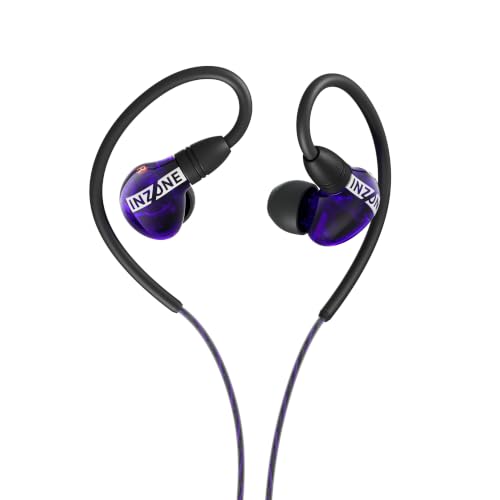
The inzone e9 is Sony’s wired in-ear monitor built specifically for gaming, and its verified listing states the brief with unusual clarity: tuned for FPS games, a comfortable low-profile in-ear fit, 360 Spatial Sound support, a carry case — and, stated just as plainly, no built-in microphone. That last detail is not an omission to apologise for; it is the design’s thesis. The E9 is for players who have separated their audio into components — earphones that do nothing but sound, and a microphone solution chosen separately — or who play in setups where voice runs through another device entirely. This guide examines what an FPS-tuned in-ear monitor actually does differently from a music IEM, who the component approach serves, how the E9 fits into Sony’s wider INZONE gaming line alongside the H9 II headset covered here as the all-in-one alternative, and what to check before you buy an earphone with no microphone on purpose.
Gaming audio has quietly split into two philosophies, and the E9 belongs firmly to the second. The first philosophy is the headset: one product, boom microphone attached, everything compromised slightly in favour of completeness. The second is the component philosophy borrowed from the stage and studio worlds: in-ear monitors for sound, chosen for fit and tuning, and a separate microphone — desk, boom arm, or a headset’s — chosen for voice. Competitive players drift toward the component approach for concrete reasons. In-ears isolate better than most headsets, weigh almost nothing across a six-hour session, never fight with glasses or a cap, and present directional cues with a precision that rewards good hearing. Sony, which builds professional stage monitors in its IER-M line and gaming headsets in its INZONE line, has effectively crossed the two catalogues here: the E9 is a gaming product built with a stage monitor’s manners, and this guide treats it with the seriousness that crossover deserves.
The FPS tuning claim needs translating before it can be judged, because every gaming product claims it and few explain it. Footsteps, reloads, ability cues, and the other sounds competitive players actually listen for occupy specific frequency regions and arrive as short, directional events. A tuning for FPS play emphasises clarity in those regions, keeps bass controlled so explosions do not mask the cue that follows them, and presents a soundstage shaped for direction rather than for grandeur. Whether that matches your games and your ears is a question this guide will keep asking in different forms, because the E9’s value is entirely in the match between its tuning and a particular kind of play — and a player whose diet is cinematic single-player adventures is shopping for a different set of virtues, several of which live in the alternative product below.
Key takeaways
- A gaming in-ear monitor, not a headset: sound only, with voice handled by your separate microphone setup
- FPS tuning means controlled bass and emphasised cue clarity, which suits competitive play and divides opinion elsewhere
- Low-profile fit and isolation are the practical superpowers — hours of wear, glasses-friendly, room noise shut out
- 360 Spatial Sound depends on your platform’s processing, so the experience is a partnership between earphone and system
- The H9 II alternative in this guide is the answer if you want one wireless product that does everything
Where to buy the Inzone E9
The linked listings in this guide go to Amazon, and each product section carries a plain link so you can check price on Amazon and confirm the listing before ordering. For the E9 the checks are specific: confirm the listing names the INZONE E9 in its Glass Purple finish, confirm the box contents include the earphones, their cable, the ear tip selection, and the carry case, and — because Sony’s INZONE line contains several similarly named products — confirm you are not looking at a listing for the H-series headsets or an earlier INZONE earbud wearing similar language. The no-microphone specification should also appear in the listing you buy from; if a listing promises a microphone, it is describing a different product or describing this one wrongly, and either way it is not the listing this guide verified. If the E9 is unavailable in your region, the alternative section explains the H9 II’s very different proposition so a substitution is a genuine decision rather than a drift.
In this guide
Quick picks at a glance
| Product | Form | Best for |
|---|---|---|
| Sony INZONE E9 | Wired in-ear monitor, no microphone | The subject of this guide: competitive players with a separate mic setup |
| Sony INZONE H9 II | Wireless noise-cancelling over-ear headset | Players who want one product for sound, voice, and wireless freedom |
How these picks were chosen
Both products were verified against Amazon’s catalogue data before this guide was written: each listing title had to name the exact model, describe the features the guide discusses, and carry an official product image. The pairing is deliberate. The E9’s real alternative in a buyer’s mind is rarely another in-ear monitor; it is the decision to stay with a complete headset instead, and Sony’s own H9 II is the strongest form of that argument — flagship drivers, wireless, noise cancelling, a proper microphone. Putting the two in one guide forces the honest question this purchase actually turns on: are you a component player or a one-product player? Anything that could not be verified to the same standard was left out rather than linked on reputation.
Fit, isolation, and the long-session argument
An in-ear monitor’s first job is to stay in your ears, sealed, for as long as you play, and the E9’s low-profile design is built around that job description. The housing sits within the ear’s bowl rather than protruding from it, which matters more than it sounds: a low profile means the earphone does not catch on a headset band worn over it for broadcast, does not press against a pillow for the handheld-in-bed players, and presents a small, stable target for the seal to hold. Isolation follows from the seal, and in gaming it does double duty. It keeps the room out — the household, the traffic, the PC’s own fans working hard in a summer firefight — and it lets the game’s quiet cues exist at safe volumes, because a footstep does not need to outshout your environment when your environment has been muted by twenty-some decibels of passive seal. Players upgrading from open headsets or leaky earbuds consistently describe this as the change they feel first, before any tuning difference: the game world gets quieter around the edges and clearer in the middle.
Comfort across a long session is where in-ears defeat headsets on physics. A headset’s comfort is a negotiation among weight, clamp, and heat conducted over hours; an in-ear’s comfort is a negotiation with a few grams and the quality of its fit in your specific ear canal. Win the fit — right tip size, proper insertion, cable routed as designed — and the E9 effectively disappears, leaving no headband line in your hair, no pressure on your glasses’ arms, no hot ears in a warm room. Lose the fit and no tuning can save the experience, which is why this guide’s how-to section treats tip selection as a technical procedure rather than a preference. Competitive players who practise for hours, streamers who broadcast whole evenings, and anyone whose headset gives them a headache by hour three are the natural converts, and their conversion is usually permanent: once your ears have spent a season unburdened, a clamp on your skull feels like the compromise it always was.

Sony INZONE E9 Wired In-Ear Monitor for Gaming
Badge: The main pick — Sony’s FPS-tuned gaming IEM
- Purpose per the verified listing: wired in-ear monitor for gaming, tuned for FPS games
- Microphone: none built in — voice is handled by your separate setup
- Fit: comfortable in-ear fit, low-profile design
- Sound: 360 Spatial Sound support through compatible platforms
- In the box direction: carry case included; finish: Glass Purple
The tuning is the product, so it deserves the closest description this guide can honestly give. In FPS play, the information hierarchy is ruthless: a footstep on the floor above you matters more than the explosion two rooms away, and a reload behind a wall matters more than the soundtrack’s swell. A tuning that serves that hierarchy keeps the low end disciplined — present enough that the game feels physical, controlled enough that it decays quickly and leaves the stage clear — and puts its energy into the clarity regions where cues live, with imaging precise enough that above, behind, and beside are distinguishable claims rather than vibes. The E9’s presentation follows that doctrine. In tactical shooters it makes vertical audio legible, which is the hardest trick in gaming sound and the one competitive players pay for. In battle royale play it keeps the near-field detail — the grass, the armour swap, the door — articulate inside a busy soundscape. Players should expect, and welcome, that cinematic bass weight is not the priority: the tuning is a working tool, and like the stage monitors it descends from, it tells the truth in the order the truth matters.
The spatial sound story is a partnership and should be bought as one. The E9 supports 360 Spatial Sound, which in practice means it is designed to work with the spatial processing on PlayStation and PC platforms that render object-based audio for earphones. Fed that processing, the in-ear’s imaging becomes genuinely three-dimensional in the way competitive players mean it: height and distance join direction as usable information. Fed plain stereo, it remains a precise, well-imaged earphone whose tuning still flatters cues. The buying implication is simple: your platform is half the product, so check what your console or PC outputs before attributing the whole spatial experience to the earphone. Sony’s ecosystem naturally presents the most integrated version of the experience, but the E9’s core virtues — fit, isolation, tuning — are platform-independent and fully present on any 3.5mm source.
The no-microphone decision, finally, should be read as respect for the buyer’s setup rather than as a missing feature. Players at the level the E9 addresses overwhelmingly already own their voice solution: a desk microphone on an arm, a mod mic, a broadcast chain. For them an inline microphone would be a compromise they pay for and never use, adding a failure point to the cable and a control pod to its run. The E9 spends its entire budget on the ears. The cost of that purity is absolute, though — if your voice solution is the headset you are replacing, the E9 alone leaves you mute, and the buying guide below treats the microphone plan as a purchase prerequisite, not an afterthought.
Strengths
- FPS-focused tuning keeps cues legible inside busy, loud game mixes
- Low-profile sealed fit delivers isolation and all-evening comfort with no clamp or heat
- Component purity: every penny of the budget serves sound and fit
Trade-offs
- No microphone at all — a separate voice solution is mandatory for team play
- Controlled bass will underwhelm players who want cinematic weight from their earphones
- Wired only, in a market drifting wireless, with the cable discipline that implies
Best for: competitive FPS players, streamers, and component-setup owners who already handle voice separately. Not suited for: players who need one product for sound and chat, or cinematic listeners chasing bass impact.

Sony INZONE H9 II Wireless Noise Cancelling Gaming Headset
Badge: The all-in-one alternative
- Design per the verified listing: wireless noise-cancelling gaming headset in black
- Drivers: WH-1000XM6 driver technology, per the listing
- Microphone: detachable cardioid microphone
- Connections: 2.4GHz wireless, Bluetooth, and 3.5mm; platforms: PC, PS5, Switch, and mobile
- Battery: up to 30 hours per the listing; soft case included
The H9 II is the strongest possible counter-argument to the E9, and including it here is an act of reviewing honesty. It takes Sony’s flagship headphone driver technology — the listing names the WH-1000XM6 lineage — and builds a complete gaming headset around it: low-latency 2.4GHz wireless for play, Bluetooth for everything else, active noise cancellation for loud homes, a detachable cardioid microphone for team voice, and a battery rated for long days. As a single purchase it answers every question the E9 deliberately leaves open. Its costs are the headset constants: weight on the head across long sessions, clamp and heat, a battery to manage, and a price that reflects doing everything. Players who want one product, who play across couch and desk, who need voice built in and wires nowhere, should buy this and feel no doubt. Players who already own their microphone and prize the in-ear’s lightness and isolation should recognise the H9 II as an excellent answer to a question they are not asking. The guide’s job is to make that self-knowledge explicit before money moves.
Strengths
- Complete wireless solution: sound, voice, noise cancelling, and multi-platform connection
- Flagship-derived drivers give it a sound pedigree few headsets can claim
- Detachable microphone keeps it presentable for music and travel
Trade-offs
- Headset weight, clamp, and heat return with the format
- Battery management joins your routine permanently
- Costs flagship money to solve problems a component player may not have
Best for: one-product players across PC and console who want wireless and voice built in. Not suited for: component-setup owners, for whom it duplicates a microphone and adds weight they escaped on purpose.
Component setup versus all-in-one headset: the real comparison
| Question | INZONE E9 route | INZONE H9 II route |
|---|---|---|
| Voice | Your separate microphone | Detachable cardioid mic included |
| Weight in a long session | A few grams in the ears | A full headset on the head |
| Isolation | Passive seal | Active noise cancelling plus pads |
| Connection | Wired 3.5mm | 2.4GHz, Bluetooth, 3.5mm |
| Upgrades | Each component separately | Replace the whole product |
The table’s last row is the one that decides for the long term. A component setup ages in pieces: a better microphone next year, a different IEM in three years, nothing thrown away that still works. An all-in-one ages as a unit, and its battery sets a clock the components do not have. Neither ageing pattern is wrong, but they suit different temperaments — the tinkerer and the settler — and most players know which one they are. Buy for your temperament as much as for your games, and the E9-versus-headset question resolves itself. Players still weighing the in-ear path may also find Sony’s professional stage monitor family instructive, since the E9’s manners come directly from that world.
Buying guide: before you commit to a microphone-free earphone
The microphone plan comes first, because it is the purchase’s only true prerequisite. Write down how your voice will reach your team: a desk microphone you already own, one you are budgeting alongside, or a platform arrangement — some players run voice through a phone app or a second device, which works and is more common than outsiders expect. If the honest answer is that your current headset’s boom is your microphone, then the E9’s true price is the E9 plus a microphone, and the comparison against the H9 II should be made at that combined figure. Many players discover this arithmetic improves the component case anyway, because a modest desk microphone outperforms every boom ever fitted to a headset — but it must be arithmetic you do before ordering, not after your first mute match.
Second, audit your platforms for their spatial audio and their sockets. The E9 is a wired 3.5mm earphone, so confirm each device you play on can feed it: controllers with jacks, PCs with front or rear outputs, handhelds in handheld mode. Then confirm what spatial processing your main platform offers for earphones, because that processing is the other half of the 360 Spatial Sound proposition. Third, consider your genre diet honestly. A season of tactical shooters, battle royale, and competitive play is the E9’s home fixture list. A season of cinematic action adventures, racing, and music-driven games rewards a warmer, weightier presentation that other products — including the H9 II with its flagship drivers — serve better. Players with a mixed diet should ask which half of the diet they care about hearing perfectly; the other half will still sound good on either product, which is a liberating realisation. Finally, if you wear glasses, stream on camera, or play in a hot room, weight the in-ear’s physical virtues properly: they are not minor conveniences but the difference between equipment you forget and equipment you endure.
How to set up the Inzone E9 for competitive play
Step 1: Earn the seal with methodical tip testing
Work through the supplied tip sizes with a familiar game’s audio test or a favourite track, checking each size for three things: bass that arrives fully without pushing the earphones deeper, a seal that survives smiling and turning your head, and comfort that does not announce itself after ten minutes. The correct tip is the one you forget. Record your size somewhere — a note in the case — because you will want the same size in spares and replacements for years.
Step 2: Route the cable for your setup
Decide the cable’s path before your first match: to a controller in your hands, to a PC’s front panel, or to an amplifier or interface on the desk. Give the run a little managed slack, keep it out of your mouse’s territory and your chair’s castors, and let the low-profile housings sit as designed rather than being tugged by a tight cable. A cable under tension is a seal waiting to break at the worst moment of a round.
Step 3: Configure your platform’s spatial audio
On your console or PC, enable the spatial or 3D audio processing intended for earphones and headphones, and select the profile or setting meant for in-ear listening where one exists. Then verify in a controlled environment — a practice range, a bot match, a familiar map — that above, behind, and beside cues land where the game puts them. Five minutes of deliberate verification beats a season of assuming.
Step 4: Balance game and voice levels at the system level
With your separate microphone in play, set the mix so your team’s voices sit clearly above the game’s quiet cues but below its loud events, using the platform’s chat mixer rather than in-game volume alone. Test with a teammate, not with a meter: intelligibility is a human judgement. Save the configuration once it is right, because this balance is the one you will otherwise rebuild after every update and every new game.
Step 5: Build the care routine into your case
Return the earphones to their carry case after sessions, keep a spare set of your tip size in the case, and check the nozzles weekly for wax before it becomes a channel imbalance. The E9 has no battery to manage and no firmware to babysit; its entire maintenance regime is tips, nozzles, and cable kindness, which is exactly the regime its stage-monitor ancestors prescribed. Players building the full component desk can continue with gaming keyboards for competitive setups and gaming headsets with surround sound, for comparison.
Common mistakes with gaming in-ear monitors
The first mistake is the purchase itself made carelessly: buying a microphone-free earphone for a setup with no other microphone, which the buying guide exists to prevent. The second is judging the tuning on music alone in the first evening and returning a tool designed for cues because it did not flatter a favourite album; give it matches, not just tracks, and judge it on the information it was built to deliver. Third, playing with a broken seal from the wrong tip size and concluding the bass is missing, when the bass was leaking past an ill-fitting tip all along. Fourth, leaving platform spatial audio off — or double-processed, with both a console setting and a game setting spatialising at once — and blaming the earphone for a confused soundstage. Fifth, treating the cable as immortal: running it under chair castors and around monitor arms until an intermittent channel appears, in a product whose ancestors treat cables as consumables to route kindly and replace eventually.
Beyond FPS: the E9 in the rest of your library and your day
A tuning built for cues does not stop working when the genre changes; it changes its emphasis. In horror games the E9 is quietly superb, because horror is cue design weaponised — the creak behind you, the whisper to the left — and an earphone that specialises in placing small sounds in space serves dread better than any amount of bass. In racing and flight simulation its clarity keeps the information layer — tyre load, wind, engine note changes — articulate under the spectacle. In story games its dialogue presentation benefits from the same midrange honesty its stage ancestors are prized for, though the controlled low end means the biggest cinematic moments land with precision rather than with physical swell. As a desk earphone for music between matches it is a focused, detailed listen that will divide taste exactly as its tuning promises. And for streamers it has a presentational virtue no headset can match: nothing crosses your face or your hair on camera, your voice comes from a proper microphone, and your audience hears the setup of a person who chose their components. The E9 is a specialist that moonlights gracefully, provided the moonlighting is judged by its own doctrine.
Vertical audio: why above and below decide rounds
Modern map design is vertical — multi-storey buildings, stairwells, rooftops, underpasses — and the audio engines of serious shooters mix height as information, not decoration. The practical problem is that height is the hardest dimension for any playback system to render, because your ears evolved to judge it from the shape of your outer ear, which headphones and earphones bypass. Platform spatial processing exists to reconstruct those cues, and the earphone’s job is to be a transparent, precise delivery mechanism for them: balanced channels, fast clean transients, and a fit stable enough that the image does not shift when you move your jaw. This is the E9’s home ground, and it explains design choices that look austere in a feature list. A tuning that smears transients with excess bass decay would blur exactly the events height cues ride on; a loose fit would move the image with every head turn. Judged against the vertical-audio problem, the E9’s doctrine — control, clarity, seal — is not a style preference. It is the engineering answer, and players on vertical maps feel it as rounds won on information their previous setup never delivered.
The streamer and creator case
Streamers deserve a section of their own because their constraints are unique and the E9 answers an unusual number of them. On camera, a headset rearranges your hair, shadows your face, and stamps a gamer silhouette on every frame; an in-ear leaves the presenter visually clean, which matters for creators whose brand is their face. In the ears, isolation protects the broadcast: the game’s audio does not leak into the microphone the way open headsets can leak, and room noise does not leak into the player’s concentration. The component chain — E9 for ears, a proper microphone for voice — is also the chain that scales: a better microphone next year, a better interface later, the earphones untouched by either upgrade. The costs are real and should be planned: chat must be monitored through the same earphones, so the streamer’s mix needs the system-level balance the setup section describes, and there is no sidetone boom trick to fall back on. Creators who make that small investment in configuration get the cleanest-looking and cleanest-sounding small-stream setup the market offers, which is why so many competitive broadcasts have quietly converged on exactly this architecture.
Hearing health in competitive play
Competitive players practise at volumes and durations that deserve the same seriousness musicians give their ears, and an isolating in-ear is a genuinely protective tool when used with discipline. The mechanism mirrors the stage case: the seal removes the room, so the game can run quieter; quiet cues remain audible because they are no longer competing with fans and household noise. The discipline is to bank that advantage as lower volume rather than spending it on louder effects, and to treat ringing or dullness after sessions as the warning it is. Players should also build breaks into long practice blocks — ears fatigue, and fatigued ears make worse judgements about both volume and direction, so the health practice and the performance practice are the same practice. An earphone cannot make those choices for you, but a sealed, clear one makes the safe choice the easy choice, which is the most equipment can ever do.
Genre notes beyond the FPS brief
Battle royale is the genre that tests an earphone like this most completely, because its audio mixes the near and the far in one continuous judgement: your own footsteps on different surfaces, a teammate’s callout, a vehicle two compounds away, a care package falling somewhere above the tree line. The E9’s clarity keeps those layers separated rather than stacked, and its controlled low end means the game’s constant ambient rumble never becomes a fog the important sounds must penetrate. Extraction shooters reward the same virtues with higher stakes, since their sound design is deliberately sparse and every cue is a decision. MOBA and strategy players, whose audio is mostly interface, music, and voice, will find the E9 excellent and slightly beside the point — its talents are wasted on games that do not spatialise, though its comfort is not. Rhythm games are an interesting edge case: the wired connection’s zero latency is a genuine competitive virtue there, and the tuning’s transient clarity flatters timing, making the E9 a better rhythm earphone than many products that would claim the niche. Sports titles sit in the middle — commentary clarity is superb, stadium atmosphere is precise rather than enveloping — and racing has been covered above. The pattern across the library is consistent: the more a game uses sound as information, the more this earphone earns; the more a game uses sound as spectacle, the more its alternatives argue back.
Durability and the tournament bag test
Equipment for competitive players lives a travelling life — LAN events, friends’ houses, university halls — and the E9’s form suits that life in ways a headset cannot. It packs into its carry case at a fraction of a headset’s volume, leaving bag room for the keyboard and mouse that players actually fuss over. It has no battery to arrive dead, no hinge to snap in transit, no headband to crack at its adjustment point, which is where travelling headsets go to die. Its vulnerabilities are the in-ear universals: a cable stressed at the same bend daily, tips lost in hotel rooms, a nozzle fouled unnoticed. All three are managed by the case discipline and spares habit this guide prescribes, and all three are cheap to remedy when they occur. For a student player carrying their whole setup in one backpack across a campus, that combination — performance at the desk, indifference in the bag — is close to the whole purchasing argument, and it is one the flagship headset in this guide, for all its virtues, cannot make.
Choosing your separate microphone: a short companion guide
Since the E9’s purchase so often includes a microphone decision, the options deserve a compact map. The desk USB microphone is the default recommendation: it sits on the desk or a small stand, sounds dramatically better than any boom, connects without an interface, and serves streaming, calls, and team chat from one purchase. Its discipline is distance — it wants to be closer to your mouth than most desks naturally place it, so a small boom arm or a stack of books is part of the real setup. The headset-style alternative is a clip-on or attachable microphone on a cable or headband, which keeps the all-in-one convenience at the cost of boom-class sound. The interface-and-XLR route is for players who are also creators, where the microphone is a long-term instrument and the interface opens every other door in audio. What all three share is that they outlive the earphone decision and upgrade independently of it, which is the component philosophy’s compounding advantage. Buy the microphone tier your voice use justifies — daily streaming justifies more than weekend squad play — and remember that your teammates will judge your setup by your voice, not by your earphones, however good the earphones are.
One configuration note completes the companion guide: sidetone, the sound of your own voice fed back into your ears, is what stops component-setup players from shouting. Headsets often provide it invisibly; a component setup may need it enabled in the interface, the microphone’s monitoring output, or the platform’s settings. Set it once, at a level where your voice feels present but not loud, and the last daily friction of the component life disappears.
A short decision framework
Three questions settle this purchase with unusual cleanliness. First: do you already own, or are you genuinely willing to buy, a separate microphone? If not, stop here and buy the headset — the H9 II in this guide if you want Sony’s best, or any complete headset that fits your budget. Second: is your play dominated by competitive titles where audio is information? If your honest answer is cinematic and casual, the E9’s tuning is a specialist tool bought for a generalist’s life, and warmer alternatives will make you happier. Third: do headsets physically bother you — heat, clamp, glasses pressure, hairstyle, long-session headaches? If yes, the in-ear route is not a preference but a relief, and the E9 is its most purposeful gaming expression in this guide. Three yeses in the right places make the E9 an obvious purchase; any no reroutes you cleanly, which is what a good framework is for.
It is worth adding the team dimension, because squads standardise more often than individuals expect. When a whole team moves to in-ears — for a LAN, for a shared practice space, for a tournament rule about headsets — a model with a consistent fit system and a known tuning becomes the team’s reference, and callouts about audio cues become transferable between players in a way mixed equipment never allows. The E9’s accessibility within Sony’s line makes it a plausible team standard in the way a flagship headset never is. Individual buyers rarely think in these terms; captains and coaches should.
Console players on PlayStation should recognise their specific good fortune in this product’s design centre: the INZONE line is built in conversation with the PlayStation ecosystem, its spatial audio expectations, and its controller’s 3.5mm reality, so the E9’s intended experience is most completely realised on the platform it was drawn for. PC players get the same earphone with a more configurable — and more personally variable — spatial landscape, which rewards the verification steps in this guide’s setup section. Neither group is buying a lesser version; they are buying the same tool in two ecosystems with different defaults.
Parents and partners of competitive players, who often fund or share space with this hobby, may appreciate the domestic summary: this earphone makes the player quieter to live with. The sealed fit keeps game audio in the player’s ears rather than in the room, the absence of shouted voice chat into a poor boom is solved by the separate microphone’s clarity at lower effort, and the whole apparatus packs away into a case the size of a glasses case when the desk must become a desk again. Few gaming purchases improve the household around the player; this one, properly set up, genuinely does.
One more practical scenario completes the case: the shared bedroom or dorm room, where one player’s evening is another person’s study session. A sealed in-ear at sensible volume is effectively silent to the roommate, in a way no headset with leakage and no speaker setup can claim, and the player’s own concentration is protected from the roommate’s calls and music by the same seal. University players in particular should weigh this social function as heavily as any tuning claim, because it decides whether gaming fits the living arrangement at all.
And a note on seasons, since competitive calendars have them: in the off-season, when the same player is watching films, listening to music, and playing casually, the E9’s specialisation softens into a generally excellent earphone, and many owners report the tuning grows on them for everyday listening precisely because it never fatigues. The specialist that survives the off-season without being swapped out has passed the hardest ownership test there is.
Coaches reviewing match recordings with players form a final niche audience: two people, one screen, a need to hear the same cues the player heard and discuss them frame by frame. A precise in-ear passed between coach and player across a review session — re-tipped, as hygiene and this guide’s spares advice suggest — becomes a shared reference instrument in a way a personal headset never quite is. It is a small use, but it illustrates the component philosophy one last time: tools that do one thing completely tend to find work everywhere.
For the buyer still hesitating at the threshold, the lowest-risk experiment is worth stating plainly: borrow the component experience before buying it, by playing a week with any decent wired in-ear you already own and your phone’s microphone or a borrowed desk mic. If the lightness and isolation convert you, the E9 is the purposeful version of that experience. If you spend the week annoyed at the arrangement, the headset route has told you something true about yourself at no cost at all.
That experiment also settles the glasses question empirically for your own face, which no review can do for you: an afternoon of play with in-ears and your frames will tell you more than a specification ever could about whether the headband’s pressure was your problem all along.
Finally, keep perspective on the whole category decision: the difference between a good headset and a good component setup is smaller than the difference either makes over the earbuds or television speakers most players start from. Whichever route this guide has steered you toward, you are making the upgrade that matters. The E9 simply makes it in its most concentrated, most deliberate form.
Players choosing their first serious audio purchase for a new console or PC build should also note where the E9 sits in a sensible spending order: after the display and the controller you actually wanted, before the decorative end of the desk. Audio is the sense competitive games speak most fluently, and an earphone of this focus returns more performance per pound at that point in a build than almost any later accessory.
And when the next generation of consoles and spatial standards arrives, a passive wired earphone’s indifference to platform churn becomes its final virtue: it will plug into whatever carries a 3.5mm output or an adapter, sounding exactly as it does today, long after wireless ecosystems have revised their pairings and their apps twice over.
That durability of relevance — one earphone, several console generations, every desk you will ever own — is the quiet closing argument for the wired component route, and the E9 makes it as well as anything in its class.
Buy it with your tip size discovered, your microphone planned, and your platform’s spatial audio switched on, and the E9 will repay the small ceremony of its setup in every round that follows.
Few gaming products state their purpose as honestly as this one’s listing states its missing microphone; the least a buyer can do is answer with the same honesty about their own setup.
Final recommendation
The INZONE E9 is an easy recommendation to a precisely described player: competitive, FPS-centred, already equipped with a microphone solution, and tired of wearing a headset’s weight and heat through long sessions. For that player it offers the component virtues in concentrated form — seal, isolation, cue-tuned clarity, and a fit that disappears — from the company that wrote much of the stage-monitor rulebook. If you need voice built in, wireless freedom, or cinematic bass, the H9 II in this guide is the better Sony answer and an excellent product in its own right. The E9 does not try to be that product. It tries to be the earphone a serious player forgets they are wearing while hearing everything that matters, and at that job it is thoroughly convincing.
Frequently asked questions
How do I talk to my team with no microphone on the Inzone E9?
Through whatever separate microphone your setup uses — a desk USB microphone, a boom-arm setup, a clip-on or mod microphone attached to a cable, or your platform’s alternative voice route. This is by design: the E9 assumes a component setup. If you currently rely on a headset boom, budget a microphone into the same purchase and set the chat balance at the system level as the setup steps describe. Players who make that one adjustment gain voice quality beyond any boom microphone’s reach.
Is the FPS tuning bad for music and films?
Not bad — opinionated. Music is presented with clarity and control rather than warmth and weight, which some listeners love and others find lean, especially in bass-led genres. Films and cinematic games keep their dialogue and detail beautifully and trade away some physical swell in explosions. The honest test is your own library: if your favourite recordings are about detail and separation, you may prefer this tuning everywhere; if they are about impact, keep a warmer alternative for the sofa.
Does 360 Spatial Sound work on PC as well as PlayStation?
The E9 is designed to work with spatial audio processing for earphones, and both modern PlayStation and Windows platforms offer such processing — the console through its 3D audio system, the PC through its spatial sound settings and individual games’ own object-audio modes. The quality of the result is a partnership between the platform’s renderer and the earphone’s imaging, so enable exactly one layer of processing at a time and verify with a familiar game, as the setup section advises, rather than stacking every spatial toggle you can find.
Will it stay in during long sessions and movement?
That is what its low-profile, seal-based design is for, and with the correct tip size the answer for most players is yes — through hours of play, head movement, and the occasional celebration. Fit is individual, so the methodical tip test matters: a seal that survives smiling and turning in your first session will survive your hundredth. Players with unusually shaped ear canals who struggle with all universal in-ears are the exception, and they will know it from the first fitting.
Can I use it with a phone or a handheld console?
Anywhere a 3.5mm connection exists, yes — handhelds in handheld mode are a particularly happy pairing, since the low profile suits playing in bed or on a sofa and the isolation suits a shared room. Phones without a jack need an adapter, at which point the experience depends on the adapter’s quality. For calls, remember there is no microphone in the cable, so a phone will use its own microphone while you listen through the E9 — workable at a desk, awkward in a street.
How does it compare with Sony’s stage monitors like the IER-M500?
They are cousins with different jobs. The IER-M500 is tuned for musical truth — a performer pitching and balancing against a band — while the E9 is tuned for game information, with cue clarity and spatial play as its priorities. The fit discipline, isolation philosophy, and wired serviceability are shared family values. A player who also performs might own both without redundancy; a listener choosing one should choose by primary use, and can read the IER-M500 stage monitor guide for the other doctrine in full.
Can I wear it under a headset or with a VR headset?
The low-profile design is unusually cooperative here. Players who must wear a broadcast headset over their monitoring earphones, and VR players whose headset straps cross exactly where over-ear headphones sit, both benefit from an earphone that lives inside the ear’s profile rather than on it. In VR especially, where a bulky headset fights the head strap and adds heat inside an already warm activity, a sealed in-ear is often the difference between a long session and a short one. Check your VR setup’s audio output route, since some route sound only to their own speakers or a specific jack.
What if I have never used in-ear monitors before?
Expect a two-week apprenticeship and plan for it kindly. The first sessions are about fit — tip size, insertion depth, cable routing — and the sound will seem to change as your fit improves, because it is changing: the seal is part of the instrument. By the end of the second week the routine is automatic and the isolation feels normal, at which point going back to a leaky earbud for a day is the experience that convinces most converts. Judge the purchase at the end of the apprenticeship, not during it.
Related guides
Continue with the best gaming headsets overall, Sony’s open-back gaming headset in this cluster, and the 480Hz OLED monitor in this cluster.