Disclosure: As an Amazon Associate, reviewstook.com earns from qualifying purchases. Links on this page are affiliate links; they cost you nothing extra. Prices and availability change often, so check the current Amazon listing before you buy.
This hyperx cloud 2 headset review exists because the Cloud II is one of the rare gaming headsets that outlived its own hype cycle. Launched into a market of fragile plastic and exaggerated bass, it won a durable following the unglamorous way: an aluminium frame that survives years of desk knocks, memory foam ear pads that stay comfortable through long sessions, a detachable microphone that made it usable as an everyday headset, and a USB sound card dongle offering virtual 7.1 surround for PC players. A decade of gaming headsets has arrived since, including HyperX’s own Cloud III and Cloud Alpha, both covered in this review as alternatives. So the questions here are practical ones. Does the Cloud II still earn its place in 2026? Who should buy the newer models instead? And what do you need to know about its connections, its surround dongle, and its fit before spending anything?
Context matters because the Cloud II’s reputation was built in a specific era of PC gaming, when a headset was expected to be wired, repairable by pad swaps, and free of software ecosystems. It has no app, no firmware, no battery, and no Bluetooth. By current fashion that reads as a list of absences; by the standards of players who keep gear for five years, it reads as a list of things that cannot break, expire, or be discontinued by a server shutdown. The headset’s sound signature — a full low end with enough treble restraint to avoid fatigue — was tuned for long sessions rather than showroom excitement, and its microphone became a quiet benchmark among streamers and team players who needed to be understood clearly without a desk microphone. This review judges it on those original terms and on modern ones, because a buyer in 2026 is choosing between it and a generation of wireless, feature-heavy rivals, not between it and the headsets of its own launch year.
One naming caution before anything else: the Cloud II name has been carried by more than one production era, and the second-hand and marketplace market contains lookalikes, later wireless namesakes, and listings whose photographs do not match their titles. The verified listing used in this review is the wired Kingston-era design described by its exact catalogue title — 7.1 surround sound, memory foam ear pads, durable aluminium frame, multi-platform, in the red finish — and the buying sections explain how to make sure the headset in a given listing is the headset this review is about. Everything that follows, from fit to microphone behaviour, refers to that wired original.
Key takeaways
- The aluminium frame and replaceable-feeling build are why this headset is still bought: it is made to be kept
- The USB dongle’s virtual 7.1 is a PC convenience, not magic — the headset is a stereo headset with good imaging
- Comfort is the headline feature: memory foam pads and modest clamp suit long sessions and glasses wearers reasonably well
- The detachable microphone remains genuinely good for team chat and calls
- Cloud III is the modern wired successor; Cloud Alpha is the battery-free alternative with a different driver design — both are compared below
Where to buy the headset this review covers
The linked listings in this review go to Amazon, and each product section carries a plain link so you can check price on Amazon and confirm the listing before ordering. Confirmation matters unusually much here. Check that the listing title describes the wired Cloud II with its USB surround dongle, memory foam pads, and aluminium frame; check the colour, because the design was sold in more than one finish; and be sceptical of listings at prices far below the field, which in this category usually means a refurbished unit, a regional variant with different accessories, or a different headset entirely wearing a famous name. The box should contain the headset, the detachable microphone, the USB control box with the surround button, and the extension and splitter cables the multi-platform design depends on. If any of those are missing from a listing’s contents, you are not buying the product this review describes, whatever the headline says.
In this guide
Quick picks at a glance
| Product | Connection | Best for |
|---|---|---|
| HyperX Cloud II | Wired 3.5mm plus USB surround dongle | The subject of this review: durable wired value for PC and console |
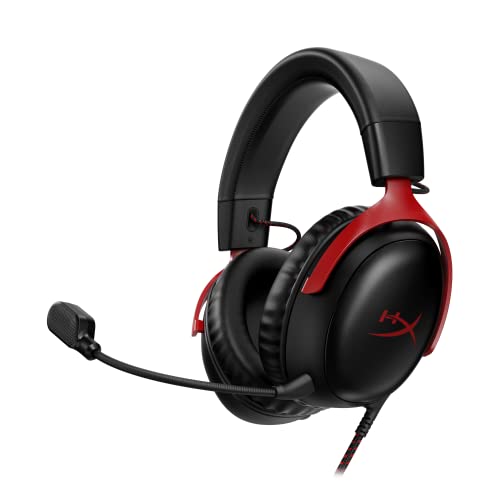
| HyperX Cloud III | Wired USB-C, USB-A, and 3.5mm | The modern successor with updated drivers and microphone |
| HyperX Cloud Alpha | Wired 3.5mm, detachable cable and mic | Dual-chamber driver sound with the same keep-it-for-years philosophy |
How these picks were chosen
All three headsets were verified against Amazon’s catalogue data before this review was written: each listing title had to name the exact model, describe the connection and design features the review discusses, and carry an official product image. The selection logic is deliberately narrow. Rather than scattering rival brands across the page, the review compares the Cloud II against the two headsets its buyers genuinely cross-shop — its own successor and its own sibling — because the interesting decision for a Cloud II shopper in 2026 is almost never brand-versus-brand. It is whether the original’s durability-and-simplicity formula still beats the refined versions of the same formula. Products that could not be verified to that standard were excluded, and no headset is linked here on the strength of reputation alone.
Design and build: the aluminium argument
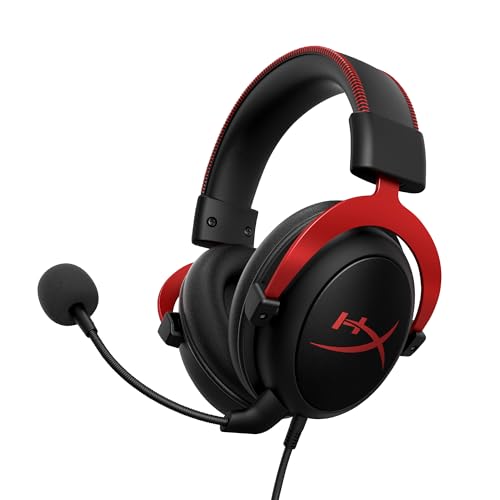
Pick the Cloud II up and the design argument makes itself in about three seconds. The headband frame is aluminium where rivals of its era used plastic, and that single material choice explains most of the headset’s survival rate. Aluminium flexes where plastic cracks, tolerates being dropped off a desk, stuffed in a bag, and sat on by accident, and it gives the whole headset a planted, deliberate feel when you put it on. The adjustment sliders move with a firm, notched action and hold their setting; the ear cups pivot enough to sit flat against most head shapes; the stitching and padding on the headband are plain, durable, and unpretentious. Nothing about the design is chasing fashion — the red finish of the verified listing is the loudest thing about it — and that plainness has aged into a kind of credibility. It looks like equipment because it was built like equipment.
The ear pads deserve their reputation. Memory foam under a leatherette cover seals well enough to give the bass its authority and to keep a reasonable amount of room noise out, while distributing pressure evenly enough that the headset disappears during long sessions in a way lighter headsets with thinner pads often do not. Two honest caveats belong here. Leatherette runs warm in summer and in heated rooms, and over years of use the covering eventually flakes — the pads are the headset’s main consumable, and replacements are the standard ownership cost to budget for. And the clamp force, while moderate, is tuned for a secure seal, so the first week can feel firmer than a worn-in pair; the aluminium frame relaxes into its owner’s head shape over time, which is another small way the headset rewards being kept rather than replaced.

HyperX Cloud II Gaming Headset
Badge: The main review subject — the durable wired original
- Design: aluminium frame, memory foam ear pads, detachable microphone
- Sound: virtual 7.1 surround via the USB control box on PC; stereo over 3.5mm
- Platforms: PC, PlayStation, and Xbox generations named in the verified listing, via 3.5mm and USB
- Cable: wired, with the USB control box providing volume, microphone, and surround controls
- Finish of the verified listing: red (KHX-HSCP-RD)
Sound first, with the surround question dealt with honestly. The Cloud II is a stereo headset. The 7.1 in its name is virtual surround processing performed by the USB control box, which takes the game’s audio and uses head-related processing to widen the soundstage and suggest directionality beyond ordinary stereo. Used with the dongle on PC, the effect is a broader, more spacious presentation that many players enjoy in films and single-player games. Used without it — straight into a controller or a phone-era 3.5mm jack — the headset is a well-tuned stereo design whose imaging comes from the drivers themselves. Competitive players are divided on virtual surround as a matter of taste: some find it adds atmosphere at the cost of precise positional cues, others swear by it. The headset lets you choose with a button, which is the correct design answer to an argument that has no universal winner.
The underlying tuning is the reason the headset kept its audience. The low end is full and confident — explosions and engines have body — but it stops short of the bloated, one-note bass that plagued gaming headsets of its generation, so footsteps and reload sounds remain audible inside the weight. The midrange carries voices clearly, which matters for both game dialogue and the calls and meetings a detachable-mic headset ends up serving. The treble is deliberately a touch restrained: gunfire and cymbals do not spike into harshness, and the trade is a slight softening of the finest detail that audiophile-leaning listeners will notice in music. For its designed purpose — hours of gaming without fatigue — that restraint is wisdom rather than weakness. This is a headset tuned by people who expected it to be worn for four hours at a stretch, and the tuning only makes sense, and only fully convinces, over that timescale.
The microphone completes the original formula. It detaches completely, so the headset becomes presentable for a train or a video call, and when attached it delivers the clear, intelligible voice that made the model a default recommendation for team players. Its noise handling favours your voice over the room, its position on a flexible boom stays where you bend it, and it avoids the two classic gaming-mic failures: the nasal telephone voice and the keyboard-symphony pickup. It will not replace a dedicated desk microphone for recording, and it was never meant to. Judged as the thing it is — a boom microphone included with a headset — it remains one of the stronger examples in its class, and a meaningful part of why this model is still recommended to players whose teammates need to understand them.
Strengths
- Aluminium construction gives it a working life most plastic rivals never approach
- Comfort over long sessions is the class benchmark its rivals are still measured against
- Detachable microphone is clear, well positioned, and removes for everyday use
Trade-offs
- Wired only: no Bluetooth or wireless freedom, which modern buyers may expect by default
- Virtual surround depends on the USB dongle and PC use; consoles get stereo
- Leatherette pads run warm and are a wear item over years of use
Best for: PC and console players who want one durable wired headset for gaming, chat, and calls, kept for years. Not suited for: buyers who want wireless freedom, app-based EQ, or a headset for commuting with modern phones that lack a 3.5mm jack and patience for adapters.

HyperX Cloud III Wired Gaming Headset
Badge: The modern successor
- Connection: USB-C, USB-A, and 3.5mm in one wired package
- Microphone: 10mm microphone, updated from the Cloud II’s design
- Comfort: memory foam padding and a durable frame, following the family formula
- Platforms per the verified listing: PC, PS5, PS4, and Xbox Series X|S
The Cloud III is what HyperX did when it finally revised its own classic, and the revision is respectful: same wired philosophy, same comfort-first design, updated where the original had genuinely aged. The connection story is the headline improvement — USB-C alongside USB-A and 3.5mm means the headset meets modern laptops, controllers, and handhelds without a drawer of adapters, which was becoming the Cloud II’s most practical weakness. The microphone grows to a 10mm design with clearer capture, the drivers are retuned for a more contemporary balance, and the whole headset feels like the answer to a decade of owner feedback rather than a reinvention. Buyers choosing between II and III are really choosing between a proven original at its mature price position and a refined successor that removes the original’s friction points. If your devices are modern and USB-C-shaped, the III is the easier headset to live with; if your setup is a desktop PC and a controller, the II’s dongle-based surround and lower-key simplicity remain entirely defensible.
Strengths
- Modern connectivity covers USB-C devices the Cloud II cannot reach cleanly
- Updated microphone and tuning refine the formula without abandoning it
- Keeps the wired, no-battery, no-app ownership model
Trade-offs
- Costs more than the mature original for refinements some owners will not notice
- No USB surround dongle story like the Cloud II’s — processing expectations differ
- Still wired only, so it does not answer the wireless question either
Best for: buyers who like the Cloud formula and own modern USB-C hardware. Not suited for: bargain hunters the original serves better, or anyone whose real requirement is wireless.

HyperX Cloud Alpha Gaming Headset
Badge: The dual-chamber sibling
- Driver design: dual chamber drivers, separating bass tones from mids and highs
- Build: aluminium frame, detachable microphone, detachable cable
- Platforms per the verified listing: PC, PS4, PS5, Xbox One, Xbox Series X|S, Nintendo Switch, and mobile
- Character: wired stereo with an emphasis on clarity within the low end
The Cloud Alpha’s party trick is inside its ear cups: a dual-chamber driver design that gives the bass its own acoustic space, aiming to keep low frequencies from muddying the midrange and treble the way single-chamber designs can when a game gets loud and busy. In practice the Alpha sounds like the Cloud family’s tidier sibling — the low end is present but better behaved, dialogue and detail stay cleaner under action, and the whole presentation suits players who found the Cloud II’s warmth slightly too generous. It keeps the family’s aluminium frame and detachable microphone, adds a detachable cable (a small feature with large lifespan implications, since cables are what headsets die of), and covers the widest platform list of the three headsets here. Choose the Alpha if your taste runs to clarity and your games are dialogue-and-detail heavy; choose the Cloud II if you want the original’s fuller low end and the USB surround option on PC.
Strengths
- Dual-chamber design keeps bass from crowding detail and dialogue
- Detachable cable and microphone maximise working life
- Broadest platform compatibility of the three headsets in this review
Trade-offs
- No virtual surround dongle; stereo only, however good the stereo is
- Its leaner low end may underwhelm players who loved the Cloud II’s weight
- Shares the family’s warm leatherette pad experience in summer
Best for: clarity-first players and multi-platform households. Not suited for: PC players specifically seeking the Cloud II’s USB surround processing.
The three headsets compared
| Headset | Surround | Connections | Signature idea |
|---|---|---|---|
| Cloud II | Virtual 7.1 via USB dongle (PC) | 3.5mm and USB | The durable original with full, warm tuning |
| Cloud III | Stereo with modern processing | USB-C, USB-A, 3.5mm | The refined successor for current hardware |
| Cloud Alpha | Stereo | 3.5mm, detachable cable | Dual-chamber clarity in the same tough frame |
The table’s honest summary is that these are three tunings of one philosophy, and the choice is about your devices and your ears rather than about quality tiers. Desktop PC players with a taste for atmosphere get the most from the Cloud II’s dongle. Owners of current laptops, handhelds, and controllers get the smoothest daily life from the Cloud III. Players who prize clean separation — and households sharing one headset across every console in the house — get the most from the Alpha. What none of the three offers is wireless, and a buyer for whom the cable is the problem should stop reading comparisons inside this family and look at the wireless category instead, accepting its batteries and its price step as the cost of the freedom.
Buying guide: what actually matters in a wired gaming headset
Fit is the first specification, and the one no chart can give you. A headset worn for three-hour sessions succeeds or fails on clamp distribution, pad depth, and weight placement, and these interact with your head shape, your hairstyle, and whether you wear glasses. The Cloud family’s design — deep memory foam pads, moderate clamp, a frame that conforms over time — suits a wide range of heads, but glasses wearers should note that any sealing pad presses spectacle arms, and the softer the pad the kinder the pressure. If you are between headsets, prioritise the one whose comfort descriptions match your sensitivity: players who abandon headsets mid-session almost always abandon them for comfort, not for sound.
Connection is the second specification, and it is a census of your devices. List everything the headset must plug into this year — desktop, laptop, each controller, a handheld — and note each socket. A 3.5mm-everywhere household can buy any of the three headsets here without a thought. A household whose laptop is USB-C-only and whose phone has no jack should let that census push them toward the Cloud III or toward carrying adapters with open eyes. Console players should remember that controller jacks deliver stereo and chat, and that platform-level spatial audio features on current consoles work through the controller with any wired headset — a point that reframes the Cloud II’s dongle as a PC-only consideration rather than a universal one.
Microphone expectations are the third specification, and honesty helps. If your voice use is team chat and work calls, any of these three microphones serves you well, with the Cloud III’s updated design the strongest of the set. If you stream to an audience or record anything, plan on a dedicated microphone eventually and treat the headset mic as the capable stand-in it is. Finally, consider the ownership horizon. A wired headset has no battery to fade, and its lifespan is set by pads, cables, and hinges — which is why detachable cables, metal frames, and available replacement pads are worth real money to a five-year owner and worth almost nothing to a one-year owner. Decide which owner you are before you decide which headset you are buying. For a broader view of the category, see gaming headsets compared across brands and headsets with surround sound.
How to set up and get the best from the Cloud II
Step 1: Choose the right connection for your platform
On PC, use the USB control box when you want the surround processing, volume and microphone controls on the cable, and the most consistent output level; use a direct 3.5mm connection if your motherboard or sound card sounds cleaner to you or if you prefer pure stereo. On console, connect to the controller’s 3.5mm jack and set the console’s audio output and chat balance in its settings menu. Either way, seat the connectors fully — a half-seated 3.5mm plug is the cause of more one-ear and no-microphone mysteries than any defect.
Step 2: Fit before you judge the sound
Extend the sliders so the headband’s padding, not the ear cups, carries the weight, and position the cups so the pads seal evenly around your ears without pressing your jaw. Play something familiar and adjust in small steps: a broken seal thins the bass dramatically, and many a headset has been wrongly judged in its first five minutes because it was sitting an inch too high. Glasses wearers should put the headset on over their frames deliberately, letting the pads settle around the arms.
Step 3: Position the microphone properly
Attach the microphone and bend the boom so the capsule sits a couple of centimetres from the corner of your mouth, not directly in front of it. Corner placement keeps plosives and breath noise out of your voice while keeping level consistent when you turn your head. Test with a recording or a patient friend, and adjust the microphone volume in your platform’s settings so your normal speaking voice — not your shout — sits comfortably in the middle of the meter.
Step 4: Decide on surround with your own games
Spend one session with the dongle’s surround on and one with it off, in the same game, before forming a permanent preference. Use a title you know well and pay attention to positional cues you rely on — footsteps behind you, a vehicle approaching off-screen. Many players settle on surround for single-player atmosphere and stereo for competitive clarity; the button makes both available, and there is no wrong answer except the one you never tested.
Step 5: Build the small maintenance habit
Wipe the pads after long sessions, store the headset on a stand or hook rather than by one ear cup on the desk edge, and coil the cable loosely instead of wrapping it tightly around the frame. Every year or so, inspect the pads for flaking and the cable for kinks near the connectors. That five-minute annual habit is most of the difference between a headset that lasts two years and one that lasts six. Players building a complete desk setup may also want the gaming keyboards worth pairing with it.
Common mistakes with this headset
The most common mistake is buying it for the 7.1 on the box and then using it exclusively through a controller, where the surround dongle never enters the chain — the headset is still good in stereo, but the purchase reason and the product never met. The second is judging fit and bass in the first ten minutes with a poor seal, as covered above. Third, owners leave the microphone volume at a platform default that is far too hot, so teammates hear distortion and blame the microphone; two minutes in the settings fixes the headset’s reputation. Fourth, treating the leatherette pads as permanent and then blaming the headset when three-year-old pads flake — pads are consumables on every headset in this class, and planning their replacement is ownership, not defect. Finally, wrapping the cable tightly around the headset for storage, which fatigues the conductors at the same bend points daily until a channel drops; loose coils and a stand prevent the most common wired-headset death entirely.
Gaming, work, and everything between
The Cloud II’s second life, in many households, is as the work-from-home headset, and it is worth understanding why it succeeds there. The detachable microphone means it joins a video call looking like a headset rather than a gaming peripheral with an antenna; the closed-back pads keep a busy household’s noise out of your ears and your meeting’s audio out of the room; the wired connection never drops, never needs charging before an early call, and never pairs with the wrong device. For music at a desk, its warm tuning flatters long background listening even if it would not be an audiophile’s first choice for critical sessions. For travel it is bulkier than earbuds but tougher than most things in a bag, and the absence of batteries removes one more charger from the packing list. None of this was the design brief in its launch year — the brief was gaming — but durability plus comfort plus a good microphone turns out to be a transferable skill set, and it explains why so many of these headsets are still in daily service long after their owners’ gaming tastes have moved on.
Virtual surround, examined without the marketing
Because the 7.1 label sells this headset, it deserves a section of plain mechanics. Your brain locates sounds using differences between your two ears — arrival time, level, and the spectral fingerprints your outer ears stamp on sounds from different directions. Virtual surround processing tries to synthesise those fingerprints for sounds that a game mixes into surround channels, folding seven channels and a subwoofer feed down into the two channels a stereo headset can play, in a way that tricks the brain into hearing width and some rearward placement. When it works, the soundstage feels larger and more cinematic. Its limits are equally mechanical: the fingerprints are generic rather than measured from your ears, so rear cues are suggestive rather than precise; the processing can smear fine detail; and in competitive play, where a footstep’s exact direction is information, many experienced players prefer the unprocessed stereo image their own ears interpret natively. The Cloud II’s implementation has the great virtue of being optional and instant — a button on the dongle — so the headset does not force a philosophy on you. Treat surround as a flavour for films and single-player games, test it in your competitive titles, and let your own results, not the box, decide your default.
The used market and the namesake problem
Few headsets this old have a used market as active as this one, and it cuts both ways. A genuine used Cloud II in good condition, with its dongle and microphone present, is one of the better bargains in gaming audio, because the design’s durability means a three-year-old example is usually a pad replacement away from full health. The hazards are completeness and identity. Listings missing the USB control box are missing the surround feature and the cable controls, and should be priced as a plain stereo headset. Listings for the later wireless namesake are a different, more expensive product wearing a nearly identical name, and the two are confused in both directions by sellers who should know better. Check the exact model designation, the presence of the cable and dongle in photographs of the actual unit, and the condition of the pads and headband stitching. And remember the consumables maths: a cheap example needing pads and a replacement microphone can cost more in total than a fair-priced complete one, so price the whole working headset, not the headline.
Comfort science: why this design disappears on your head
Long-session comfort is an engineering outcome, not an accident, and the Cloud II illustrates its components well. Weight matters less than weight distribution: a headband that spreads load across a wide padded contact area prevents the single pressure point that ends sessions early. Clamp force matters in a narrow band — too little and the seal breaks whenever you move, too much and the jaw and temples ache within the hour — and memory foam’s slow conformity is what lets a moderately firm clamp feel gentle, because the pressure arrives evenly rather than at pad edges. Pad depth matters for anyone whose ears touch driver housings in shallow designs, and pad material matters thermally: leatherette seals best and warms most, fabric breathes and leaks. The Cloud II’s particular balance — firm-ish clamp, deep conforming pads, sealed leatherette — optimises for immersion and bass at the price of summer warmth. Naming that trade precisely is more useful than any comfort score, because it tells a hot-room player to look at fabric-pad designs and tells everyone else why this headset’s comfort reputation is so consistent across a decade of owners.
Sound character by genre: an honest listening map
Different games interrogate a headset differently, and the Cloud II’s tuning reveals itself genre by genre. In competitive shooters, its restrained treble and solid imaging make footsteps and reloads legible without the fatiguing glare that exaggerated high frequencies produce over a long evening; players who rely on audio cues will find the presentation dependable, with the stereo-versus-surround choice left to their own testing as the setup section advises. In open-world and story games, the warm low end gives cities, weather, and vehicles a sense of mass, and the clear midrange keeps long dialogue scenes comfortable — this is the genre the headset seems to have been tuned during, and it shows. Racing games flatter its bass authority, though engine notes sit in exactly the region where the Alpha’s dual chambers keep things tidier at high volume. Horror games are an underrated test of dynamic control: whispers must stay intelligible and jump-scares must startle without distorting, and the Cloud II’s composed, unfatiguing balance handles both ends of that range gracefully. Strategy and simulation titles, with their hours of interface clicks and ambient music, simply benefit from a headset you forget you are wearing. No genre exposes a deal-breaking flaw; the tuning is a generalist’s, and generalism at this level is a deliberate achievement rather than a lack of character.
Durability, honestly audited
A decade of ownership reports lets this review say things about longevity that a launch review never could. The aluminium frame’s record is excellent: the classic plastic-headset failure — a cracked yoke or a snapped slider — is rare enough to be notable when it occurs. The headband padding and stitching age slowly and cosmetically. The predictable wear items are the ear pads, as discussed, and the cable, whose failure mode is almost always at a connector after years of being bent at the same angle — a failure the owner controls through storage habits, and one the Alpha’s detachable cable eliminates as a design point. The microphone’s flexible boom tolerates repositioning well but should be bent by its base rather than twisted at the capsule. The USB dongle is the one irreplaceable-feeling component: lose it and the headset still works perfectly in stereo, but the surround and cable controls go with it, so dongle-keepers develop a desk-drawer discipline around it. Overall, the headset’s lifespan is governed by consumables and care rather than by structural fate, which is the best longevity profile a product can have and the core reason this model keeps being recommended long after its launch context vanished.
Who should not buy it — the counter-case stated fairly
A review that cannot state the counter-case is an advertisement, so here it is in full. If you play on a couch across the room from a console, a wired headset tethers you to the controller and limits you to its cable logic; wireless exists for you. If your laptop and phone have both abandoned the 3.5mm jack, the Cloud II asks you to live in adapter land or use its USB dongle at a desk only, and the Cloud III answers your situation more gracefully. If you are an audio enthusiast first and a gamer second, the tuning’s warmth and restraint will read as a ceiling on detail, and a good pair of music headphones with a separate microphone will serve your ears better at higher total cost. If you need active noise cancellation for an open-plan office or frequent flights, nothing in this family offers it. And if you simply enjoy new features — app EQ, Bluetooth multipoint, wireless freedom — this headset’s proudest virtue, its refusal to change, will feel like stagnation. None of these buyers is wrong, and the Cloud II’s continued success does not require them to be. It requires only that a large class of players still values the older virtues — durability, comfort, a good microphone, no batteries, no software — and for that class this remains one of the easiest recommendations in gaming audio.
There is also a generational note worth making for younger buyers encountering this headset through its reputation. The Cloud II comes from before gaming headsets became platforms, and some of its most praised qualities — no app, no account, no updates — were simply the water every product swam in at the time. What is remarkable is not that it lacks those things but that lacking them has become a selling point as rivals’ companion apps have been abandoned, their wireless dongles orphaned by operating system changes, and their batteries swollen into e-waste. Simplicity ages better than features. That is the deepest lesson of this headset’s long life, and it is a useful lens for every gaming peripheral purchase that follows it, whatever you decide about this particular model.
A closing observation about value, since this headset’s price position is part of its story. Products that stay in production for a decade drift into a pricing maturity that new launches cannot match: the tooling is paid for, the design is debugged by millions of owners, and the market has priced in exactly what the product is. The Cloud II now sits in that enviable position, where a buyer is purchasing certainty as much as hardware. The risk profile inverts the usual one — the danger is not that the product disappoints, but that a buyer purchases it for a use it never claimed, like wireless freedom or studio neutrality, and blames a well-understood design for their own mismatch. Read the trade-off lists in this review as the contract. If the contract suits your desk, your devices, and your sessions, few purchases in gaming audio are as safe.
Parents buying for younger players form a quiet constituency for this headset, and their reasoning deserves a mention because it clarifies the design’s virtues from an unexpected angle. A wired headset cannot be lost across the house, cannot need charging before a Saturday session, cannot pair with a neighbour’s device, and survives the drop-and-tangle regime of a shared family room better than delicate wireless designs. Its microphone makes online play with friends intelligible and supervised-friendly, and its lack of an app means there is no account to manage. When a headset is bought as household infrastructure rather than as a personal gadget, the Cloud II’s old-fashioned specification reads less like a compromise and more like a specification written for the job.
LAN and tournament play, the environment this headset was born into, still suits it precisely. Event machines are strangers: unknown USB ports, no permission to install software, no time to pair anything. A wired headset with a hardware dongle walks into that environment and simply works at full capability, which is why you still see this design language at desks where reliability outranks novelty. Even if your own play never leaves your home desk, buying the tool designed for the harsher environment is rarely a mistake.
It is worth adding that the headset’s resale and hand-me-down behaviour closes the value argument neatly. Because its failure points are consumables rather than electronics, a Cloud II passed to a younger sibling or sold onward with fresh pads is functionally close to a new one in a way no battery-powered headset can claim at the same age. Purchases that retain usefulness across owners compound their value quietly, and this is one of them.
One small setup refinement belongs in the record for PC owners: if your motherboard’s front-panel audio hisses — a common interference pattern with graphics cards under load — the USB dongle is not merely a surround accessory but the cleaner audio path, since it moves conversion away from the electrically noisy front-panel wiring. Many owners discover this by accident; it is worth trying deliberately before blaming the headset for noise that was never its fault.
And a final fit note for buyers with smaller heads: run the sliders near their shortest settings and check that the cups still seal below the ear rather than resting on the jaw. The frame’s adjustment range is generous but not infinite, and petite wearers are the one group for whom trying before buying — or choosing the lighter successor — is genuinely advisable rather than merely cautious.
Streaming setups on a budget form one more audience that keeps this headset in circulation. A new creator needs to be understood clearly, needs monitoring without delay, and needs money left over for the camera and the games themselves. A wired headset with a genuinely good microphone covers the audio side of that equation in one purchase with zero latency and zero configuration, and the detachable design means the same headset serves on camera without looking like a call-centre prop. It is not the endgame setup for a professional channel, but as the first rung it is unusually hard to beat.
Desk ergonomics complete the picture: route the cable so it falls to the side of your chair’s arm rather than across your lap, and the one daily annoyance of wired headsets — catching the cable when you stand — largely disappears. A small hook or the dongle’s own weight placed deliberately turns the wire from an adversary into furniture.
Taken together, those small disciplines — a stand, a loose coil, a routed cable, a yearly pad check — are the entire operating manual of a headset with no software and no battery, and they take less time across a year than one firmware-update troubleshooting session on a modern wireless rival.
Final recommendation
The Cloud II remains an easy headset to recommend to the buyer it was always for: a wired player who values comfort and build over features, plays on PC or console, talks to teammates or colleagues daily, and intends to keep the purchase for years. Its surround dongle is a genuine PC bonus rather than a headline, its microphone is a quiet strength, and its frame will outlast several generations of rivals. Buy the Cloud III instead if your hardware is USB-C-shaped and you want the refined version of the same idea. Buy the Cloud Alpha if clarity is your taste and one headset must serve every console you own. And if the cable itself is your objection, be honest about it and shop the wireless category — no wired headset, however good, wins an argument with a buyer who hates wires.
Frequently asked questions
Does the Cloud II’s 7.1 surround work on PlayStation and Xbox?
The virtual 7.1 processing lives in the USB control box and is a PC feature. On consoles, connected through the controller, the headset works as a high-quality stereo headset, and current consoles offer their own spatial audio processing that works with any wired headset. Judge the console experience as excellent stereo rather than as a lesser version of the PC surround mode.
Is the microphone good enough for streaming?
For starting out, yes — it is clear, intelligible, and well behaved about room noise, which puts it ahead of many headset microphones. Streamers who grow an audience eventually move to a dedicated desk or USB microphone for richer capture and positioning freedom, and the Cloud II’s mic then becomes the backup. Nothing about that path makes the headset microphone a weakness; it is a strong included microphone with a known ceiling.
How long do the ear pads last, and can they be replaced?
With daily use, expect the leatherette covering to show wear after a few years — cracking and flaking are the normal end-of-life for this material on every brand that uses it. The pads can be replaced, and fresh pads restore both comfort and the seal the bass depends on, so treat pad replacement as scheduled maintenance that extends the headset’s life rather than as a repair. Storing the headset away from heat and wiping pads after long sessions stretches the interval.
Will it work with a Nintendo Switch or a phone?
Through a 3.5mm connection, yes for the Switch in handheld mode and for any phone or tablet that still offers the jack — the Cloud Alpha’s listing makes the broadest platform claims of the three, but the Cloud II’s standard wired connection is inherently widely compatible. Phones without a jack need a USB-C or Lightning adapter, and at that point many buyers prefer the Cloud III’s native USB-C path or a wireless headset altogether.
Is the Cloud II or the Cloud III the better buy now?
It hinges on your devices and the price gap on the day. The III refines connectivity, microphone, and tuning, and is the safer choice for modern hardware. The II counters with its USB surround dongle, a proven decade-long track record, and a mature price. Neither is a mistake; the mistake would be buying the II for a USB-C-only laptop, or paying the III’s premium for a desktop setup that gains nothing from it.
Does it need any software?
No, and that is one of its enduring virtues. There is no app to install, no account, no firmware to update, and no EQ ecosystem to learn. The controls are physical, the surround is a button, and the headset works identically on any machine you plug it into. Buyers who enjoy tuning audio with software should look at ecosystems built for it; buyers who have been burned by abandoned apps will recognise the value of a headset that asks for nothing.
Can I use it for music production or mixing?
It is not the right tool for decisions that need a neutral reference. The tuning is deliberately warm and forgiving, which flatters listening and misleads mixing: bass will seem under control when it is not, and treble detail will seem tamer than your audience will hear. For casual editing, podcast assembly, and checking that a recording is intelligible, it is perfectly serviceable. For mixing music, use the flattest headphones you can access for decisions and the Cloud II for enjoyment afterwards — the same division of labour its microphone section describes for streamers.
Why does one side sound quieter than the other?
Work through the boring causes first, because they account for nearly every case: a 3.5mm plug not fully seated, debris in a controller or laptop jack, a balance setting nudged in an operating system or console menu, or a cable that has begun to fail at a connector after years of bending. Test the headset in a second device to isolate whether the fault travels with it. Only after those checks should you suspect a driver, which on this design is the least likely culprit of the list.
Related guides
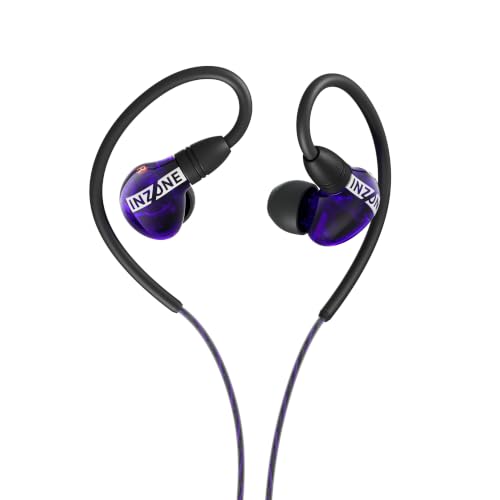
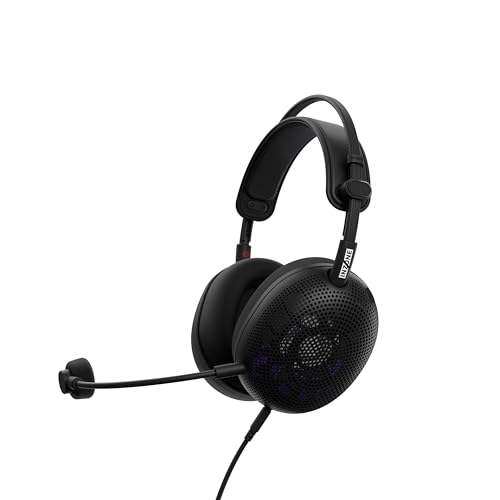
Continue with our gaming headset roundup, the wired in-ear alternative in this cluster, and Sony’s open-back wired headset in this cluster.