Disclosure: As an Amazon Associate, reviewstook.com earns from qualifying purchases. Links on this page are affiliate links; they cost you nothing extra. Prices and availability change often, so check the current Amazon listing before you buy.
An hk gaming gk61 review has to start with the confusion, because the GK61 is less a single keyboard than a family of near-identical listings that has been sold for years with different switches, different colours and one important technical split: most GK61 boards use Gateron optical switches, and optical switches are not interchangeable with the standard mechanical switches used by almost every other hot-swappable keyboard. Get that one fact right and the GK61 is what it has always been — one of the cheapest credible ways into a fast, compact 60 percent gaming keyboard, with a plastic case, basic software and a typing feel that punches above its price. Get it wrong and you will buy a box of switches that physically cannot fit your board. This review covers the two verified listings in detail, explains the optical system and its real advantages, walks through setup and remapping, and ends with the honest alternatives — including the step-up board to buy if standard switch compatibility matters more to you than the GK61’s price.
Key takeaways
- The GK61’s headline feature is its optical switch system: actuation by light beam rather than metal contacts, which removes contact debounce delay and makes the board feel genuinely quick in games.
- Optical means locked-in. The GK61’s sockets accept Gateron optical switches, not the standard MX-style switches sold for other hot-swap boards, so your switch experimentation is limited to the optical family.
- The two listings reviewed here differ in switch and colour: a tactile Gateron Optical Brown version and a white version with the smooth, linear Gateron Optical Yellow — the switch choice matters more than any other decision in this purchase.
- Expect a light plastic case, decent stock stabilisers for the price, shine-through-friendly RGB backlighting, and companion software that is functional rather than polished.
- Buyers who want to explore the wider switch hobby should look at a standard hot-swap board instead; buyers who want an inexpensive, fast 60 percent board for gaming first will find the GK61 still easy to recommend.
In this guide
What the GK61 is, and which version you are actually buying
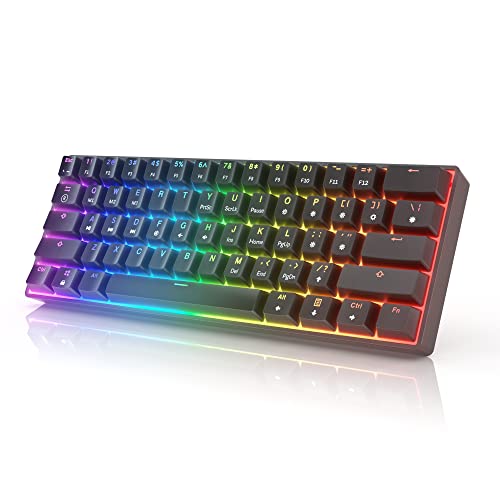
The GK61 is a 61-key, 60 percent wired keyboard: no number pad, no dedicated arrow keys, no function row, with the missing keys reached through an Fn layer. That layout is the point. A 60 percent board leaves a wide sweep of desk for the mouse, which is why the format became the default recommendation for shooter players, and the GK61 was one of the boards that made the format cheap. The case is plastic, the plate and construction are simple, the cable is detachable USB-C, and the board carries per-key RGB backlighting with the usual cycling effects onboard.
The buying complication is that “GK61” has been attached to several configurations over its long life on sale. The listings verified for this review are the optical versions, and their titles say so through the switch names: Gateron Optical Brown in the first, Gateron Optical Yellow in the second. Optical switches actuate when the switch stem interrupts an infrared beam on the keyboard’s PCB. There are no metal leaves to bounce, so there is no debounce delay, and the switches are rated for very long service because nothing electrical wears at the contact point. The trade is compatibility: an optical board’s sockets and PCB are built for optical switches, and the enormous catalogue of standard MX-style switches — the Cherry, Gateron mechanical, Akko, Kailh and boutique switches that fill the hobby — will not work in it. A smaller number of GK61 listings over the years used standard mechanical hot-swap sockets instead; if a listing does not name an optical switch, read its description twice before assuming which family you are getting, because the two families look identical in photographs.
Everything else about the board is shared between the two versions reviewed here: the same 61-key layout, the same case moulding, the same stabiliser design, the same software, the same layered keycaps approach with secondary legends for the Fn functions. So the review below treats the board once, and separates the two listings where the switch changes the experience — which, on a keyboard, is nearly everywhere that matters.
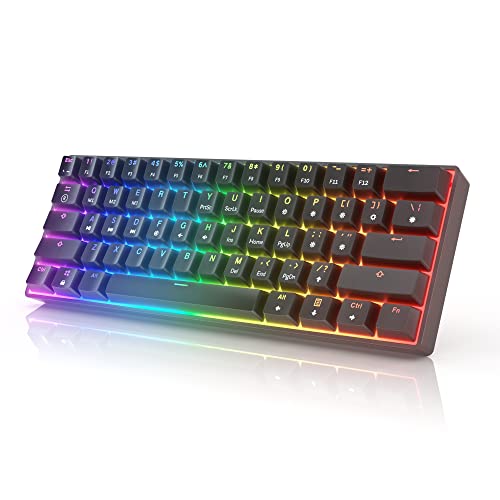
HK Gaming GK61 (Gateron Optical Brown) — the tactile version
Badge: The one to buy if you type as much as you play
- Layout: 61 keys, 60 percent, wired USB-C detachable cable
- Switches: Gateron Optical Brown — tactile bump, optical actuation
- Backlighting: multi-colour RGB, per-key, onboard effects
- Case: plastic, standard 60 percent footprint
- Compatibility: PC and Mac, per the verified listing title
The Optical Brown version is the all-rounder of the pair. Gateron’s brown design puts a tactile bump early in the keypress — a small, definite notch you feel as the key registers — without the click bar that makes blue-style switches loud. On an optical board the bump is purely mechanical, shaped by the stem, while the registration itself is handled by the light beam, so the feel and the actuation are cleanly separated: you get feedback your fingers can read while the board registers the press as early as the beam breaks. For mixed use — gaming in the evening, writing and work through the day — that feedback is worth having, because typists bottom out less and make fewer accidental presses on a switch that tells them the key has fired.
In games, the tactile version gives up a sliver of theoretical speed to its linear sibling. Rapid repeated presses on one key — the movement-key tapping that shooters demand — are marginally easier on a switch with no bump to push back through on the return. The difference is small and most players will never feel it; the difference in typing comfort across a long day is larger and felt constantly. That asymmetry is why the brown board is the default recommendation here for anyone whose keyboard earns its keep outside games as well as inside them.
Strengths
- Tactile feedback that suits typing and gaming alike, without click noise.
- Optical actuation removes debounce delay and the switches are built for long service.
- Detachable USB-C cable and a standard footprint make it easy to move, store and pair with aftermarket cases and cables.
Trade-offs
- The optical socket locks you into the Gateron optical switch family for any future switch changes.
- The plastic case sounds hollower than aluminium boards, especially on the spacebar and larger keys.
- The companion software is basic: remapping works, but the interface and macro tools lag behind the big brands.
Best for: players who want one inexpensive 60 percent board for both gaming and everyday typing. Not suited for: switch hobbyists who intend to experiment with the standard MX switch catalogue. Check the current listing before you buy: Check price on Amazon
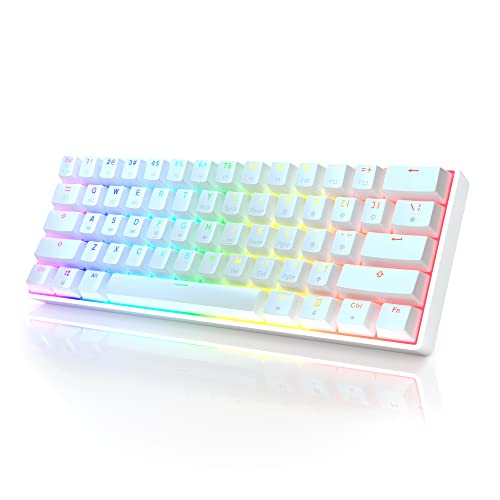
HK Gaming GK61 (Gateron Optical Yellow, White) — the linear gamer’s version
Badge: The smoother, faster-feeling pick for pure gaming
- Layout: 61 keys, 60 percent, wired USB-C detachable cable
- Switches: Gateron Optical Yellow — linear, smooth travel, optical actuation
- Colourway: white case and keycaps, per the verified listing title
- Backlighting: multi-colour RGB, per-key, onboard effects
- Compatibility: PC and Mac, per the verified listing title
Yellow switches are the linear entry in Gateron’s line: no bump, no click, just a smooth press against a spring that is a touch heavier than the red switches most players know. On the optical GK61 that smoothness is the whole experience. Keys glide, repeated presses are effortless, and the board feels fast in the way players mean when they praise linear switches for shooters — movement keys can be feathered and re-pressed without anything in the travel talking back. The slightly firmer spring than a red helps avoid accidental presses when your fingers rest on the keys between rounds, which is the classic linear-switch mishap.
The white colourway is the other half of this listing’s appeal and its compromise. It looks clean, the RGB glow reads brighter through and around pale keycaps, and it suits the white-desk setups that are now common. It also shows dust, crumbs and hand grime faster than the black board, and the shine-through effect depends on the keycap legends, which on pale caps can wash out under strong lighting. None of that affects a match. All of it affects how the desk looks in a month, so choose with your housekeeping honesty switched on.
For typing, the linear board is the weaker of the pair: without a bump, your fingers get no confirmation short of bottoming out, and most people type a little less accurately on linears until they adapt. If your writing load is heavy, that is a daily tax. If the board lives on a gaming desk and a separate keyboard handles work, the tax never arrives and the yellow board’s smoothness is pure gain.
Strengths
- Smooth linear travel that suits rapid, repeated keypresses in shooters.
- The firmer yellow spring resists accidental presses better than lighter linears.
- White colourway shows off the RGB backlighting and suits pale setups.
Trade-offs
- No tactile feedback makes it the weaker typing board of the two listings.
- White case and caps show dirt quickly and need more frequent cleaning.
- Same optical lock-in as its sibling: standard MX switches do not fit.
Best for: gaming-first players who prefer linear switches and a white setup. Not suited for: heavy typists, or anyone who wants one board to be their switch-experiment platform. See the current listing for this colourway: Check price on Amazon
Living with the 60 percent layout
Every GK61 conversation eventually becomes a layout conversation, so it deserves plain treatment. Sixty percent means the arrows, the function row, the navigation cluster and the number pad are all on a layer, reached by holding Fn and pressing keys whose secondary legends are printed on the caps. In games this is almost never a problem: shooters, MOBAs and most action titles live on WASD and the number row, both present. In desktop life it is a daily negotiation. Arrow-key navigation through documents and spreadsheets becomes a two-handed chord, F-keys in older software and BIOS screens take a beat of thought, and the missing Delete key is the one players report missing most.
The board’s software remapping softens most of this. The practical configuration used by many GK61 owners is to remap the right-hand modifier cluster — keys your right hand rarely uses in games — into dedicated arrows, and to put the most-used function keys on the layer positions your fingers learn fastest. Spend the first week with the printed legends and a light remap rather than rebuilding the whole layout at once; muscle memory forms around what you actually press, and the three keys you reach for daily matter more than a theoretically complete map. If you know in advance that your work is arrow-heavy — data entry, code navigation all day, spreadsheet modelling — the honest advice is that a 65 or 75 percent board keeps the arrows and costs you little desk space, and the GK61’s charm will not survive your third week of chords. For a wider comparison of the budget 60 percent field this board sits in, see Anne Pro 2, RK61 and GK61 compared.
Build quality, stabilisers and sound
The GK61’s case is plastic and light, and it does not pretend otherwise. There is a small amount of flex if you twist the board deliberately, none that you will find in use, and the board stays planted on rubber feet well enough for gaming. The stock keycaps are the standard fare of the price class: they carry the legends clearly, let the backlight through, and will eventually shine at the WASD cluster if you play daily — a cosmetic wear pattern common to coated caps, and the usual trigger for owners to buy a PBT keycap set, which the standard 60 percent layout happily accepts.
Stabilisers — the mechanisms under the spacebar, Shift, Enter and Backspace — are where cheap boards usually embarrass themselves, and the GK61’s are acceptable rather than good. Expect a little rattle on the spacebar out of the box. The standard owner fixes apply and are worth the twenty minutes: a small amount of lubricant on the stabiliser wires, and a strip of tape or a bandage mod where the stabiliser stem meets the cap, quietens the big keys noticeably. The switches themselves, being optical, have no pins to bend and swap in and out by simple pull and push with the included puller — one of the genuine conveniences of the design, since a switch swap on this board takes seconds and cannot damage a socket the way a bent pin can on a mechanical board.
Sound follows from the construction: a hollow plastic case gives the board a higher, clackier voice than a gasket-mounted aluminium board, and the optical switches’ lack of contact leaves does not change that. It is not an unpleasant sound, and in a gaming room with a headset on it is irrelevant, but if you share a quiet office or record with an open microphone, know that this is a keyboard the room can hear. The step-up alternatives later in this review exist largely for buyers who care about exactly this.
Setting up and remapping the GK61 properly
Setup is short and worth doing deliberately. Connect the board with its USB-C cable and confirm the layout in your operating system’s keyboard settings, since a mismatched regional layout is the cause of most “wrong character” complaints with compact boards. Download the HK Gaming software for the GK61 specifically — the company sells several boards and the utilities are not interchangeable — and use it to do four things. First, set the backlighting to a static scheme or a gentle effect; the animated defaults are a distraction tax you pay forever. Second, build your arrow remap on the right modifier cluster if you plan to. Third, record any macros you genuinely use, and resist recording ones you do not, because macro layers you cannot remember are worse than none. Fourth, save the profile to the board’s onboard memory where the software offers it, so your configuration travels with the keyboard rather than living only in one PC’s software install.
Then test the board the way you will use it. Play one familiar game and pay attention to the keys your fingers hunt for; type a page of ordinary text and note where the layout trips you; adjust the remap once, based on that evidence, and then leave it alone for a fortnight while the new map becomes habit. Owners who remap daily never finish learning any layout. Owners who remap once, thoughtfully, stop thinking about the keyboard within two weeks — which is the entire goal of a tool like this. If switch feel becomes your next curiosity after that, the honest fork in the road is the optical family this board accepts, or a different board for the standard switch world; Gateron Yellow switches compared with Cherry MX Red explains the feel difference that defines that choice.
The alternative path: standard switches and the step-up board
Some readers of this review are really shopping for their first keyboard in the custom hobby, and for them the GK61’s optical lock-in is the decisive fact. The standard switch ecosystem — hundreds of switches, all sharing the MX-style stem and pin layout — is where the experimentation lives. The two verified switch kits below illustrate what that world offers, and the Glorious board after them is the kind of platform that accepts them. None of these are upgrades for a GK61; they are the alternative purchase for a buyer who decides compatibility matters more than the GK61’s price and optical speed.
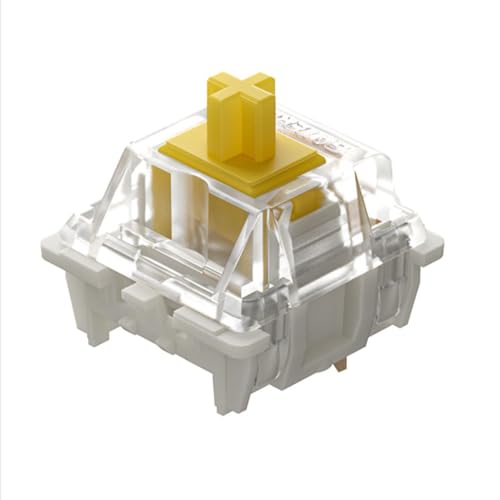
Gateron G Pro 3.0 Yellow switches — what the standard world feels like
Badge: The hobby’s default linear, for boards that take standard switches
- Format: 5-pin MX-style mechanical switches, pack of 110 per the verified listing title
- Character: linear, pre-lubricated from the factory, per the listing title
- Fitment: standard hot-swap and soldered boards — not the optical GK61
The G Pro 3.0 Yellow is the mechanical counterpart to the optical yellow in the white GK61 above: the same smooth linear idea, executed with metal contacts and a standard pin footprint. Factory lubrication makes it smooth out of the box in a way earlier switch generations were not, and the 110-count pack covers a full-size board with spares. It is included here so the comparison in this review is concrete rather than abstract: this is the sort of box you can buy for a standard board and cannot use in an optical one. If that sentence produces disappointment, you have learned which side of the fork you belong on before spending anything.
Strengths
- Smooth, factory-lubed linear feel that needs no hobbyist preparation.
- Standard 5-pin footprint fits the overwhelming majority of custom and hot-swap boards.
- Generous pack size covers large boards with switches to spare.
Trade-offs
- Physically incompatible with the optical GK61 reviewed above.
- Linear feel gives typists no feedback, the same caveat as any yellow switch.
- A switch pack is only useful with a board to put it in — a platform purchase, not a standalone one.
Best for: owners of standard hot-swap boards who want a smooth linear set. Not suited for: GK61 optical owners. Details on the current listing: Check price on Amazon

Cherry MX2A RGB Red switch kit — the original linear, refreshed
Badge: The reference linear switch, in Cherry’s updated MX2A generation
- Format: 36 mechanical switches per the verified listing title
- Character: linear, no click, smooth and direct, per the listing title
- Details: RGB variant with a housing that passes backlight through, per the listing title
- Fitment: standard MX-style boards — not the optical GK61
Cherry’s red switch defined the light linear category, and the MX2A generation is the company’s refinement of it — smoother travel and tighter tolerances in the same familiar character. A 36-switch kit suits a partial swap: the gaming cluster on a larger board, or a compact board’s main keys. Next to Gateron’s yellow, the red is the lighter press, which some players prefer for long sessions and others find too easy to trigger accidentally; the tactile-versus-linear and red-versus-yellow questions are the two feel decisions every keyboard buyer makes, and they are personal enough that a switch tester, where available, repays its small cost before a full set is ordered.
Strengths
- The reference light-linear feel, refined in the MX2A generation.
- RGB housing variant keeps backlit boards looking right.
- Kit size suits a gaming-cluster swap without buying a full board’s worth.
Trade-offs
- Not compatible with the optical GK61, like all standard switches.
- Thirty-six switches will not cover a full-size board.
- The light actuation invites accidental presses for heavy-handed typists.
Best for: standard-board owners who want a light linear gaming cluster. Not suited for: GK61 optical owners, or buyers needing a full-board set in one box. Current listing: Check price on Amazon

Glorious GMMK Pro — the step-up if you outgrow the GK61’s world
Badge: The aluminium, standard-switch alternative for hobby-bound buyers
- Layout: 75 percent with rotary knob, per the verified listing title
- Case: CNC machined aluminium body, per the listing title
- Switches: Fox Linear switches fitted, standard hot-swap platform, per the listing title
- Extras in the box: PBT keycaps, coiled cable and padded wrist rest, per the listing title
The GMMK Pro is what the GK61’s dissatisfied owners usually buy next, and the contrast is instructive. It keeps the arrows and adds a knob by moving to 75 percent, it replaces the plastic shell with a machined aluminium case that changes both the sound and the feel of every keypress, and — the decisive point — it is a standard hot-swap board, so the Gateron and Cherry kits above and hundreds of others all fit it. It costs meaningfully more, as aluminium and PBT and a wrist rest in the box will. Read it as the review’s control sample: everything the GK61 trades away for its price is visible in this one product. Buyers who find themselves wanting two or more of those things should skip the GK61 entirely rather than buying it as a stepping stone. For the wider family this board belongs to, the complete Glorious GMMK lineup explained maps the range.
Strengths
- Standard hot-swap sockets open the entire MX switch catalogue.
- Aluminium case and PBT caps deliver the solid, quiet character the GK61 lacks.
- 75 percent layout restores dedicated arrows and adds a rotary knob.
Trade-offs
- A clear price tier above the GK61 — it is an alternative, not a rival.
- Larger and heavier, giving back some of the desk space the 60 percent saved.
- Its linear stock switches still leave typists without tactile feedback.
Best for: buyers who know they want the switch hobby and a more solid board. Not suited for: anyone whose priority is the lowest price for a fast gaming board. Current listing: Check price on Amazon
How optical switches work, and what they actually buy you
A mechanical switch registers a press when two metal contacts meet. The contacts physically bounce for a few milliseconds, so the keyboard’s firmware waits — debounces — to be sure the press is real before reporting it. An optical switch replaces that mechanism with an infrared beam across the switch’s path: the stem blocks the beam as the key travels, and the interruption is the registration. There is nothing to bounce, so there is no debounce wait, and there are no contacts to oxidise or wear. The practical gains are a small, real reduction in the delay between your finger’s press and the computer hearing about it, and a switch mechanism with fewer wear parts.
Keep the size of that gain in proportion. The debounce saving is measured in single-digit milliseconds, and it sits inside a chain — switch, keyboard scanning, USB polling, the game’s own processing, the server tick — whose other links are larger. Optical actuation will not rescue a player from a slow display or a distant server, and marketing that implies otherwise should be discounted. What it does deliver, beyond the milliseconds, is consistency: every press registers at the same point in the travel, every time, for the life of the board, because the trigger is light rather than a bending contact. Players who value a board that feels identical in year three to day one are buying something real. It also makes the switches trivially swappable, as noted earlier, since there are no pins to bend — pull the old switch straight up, press the new one in, done.
The honest costs of the system are the ones this review keeps returning to: a smaller switch catalogue, all of it from the optical family, and no path into the standard hobby ecosystem. There is also a subtle feel point. Because registration happens at the beam rather than at a contact, the relationship between what your finger feels and when the press fires is set by the stem’s design; on the tactile brown, the bump and the beam are aligned well enough that the feedback feels truthful, which is not guaranteed on every optical board and is one of the GK61’s quiet successes.
Gaming performance in the games people buy this board for
In shooters — the genre that sells 60 percent boards — the GK61’s contribution is threefold. The layout frees mouse room, which matters more than any switch specification: low-sensitivity players sweep widely, and a tenkeyless or 60 percent board is what makes that sweep possible on an ordinary desk. The switches register quickly and consistently, as covered above. And the wired connection removes the wireless variables entirely; there is no battery to die in a final round and no radio link to interfere. Tournament play has standardised on wired peripherals for boring, correct reasons, and this board is on the right side of that line.
For other genres the calculus shifts slightly. MOBA and RTS players use more of the keyboard — control groups, camera keys, F-keys on some setups — and will live on the Fn layer more than shooter players do; the board remains workable, but the remap section earlier stops being optional advice and becomes the price of admission. MMO players with heavy keybind counts are the worst fit for any 60 percent board and should read the layout section as a warning rather than a challenge. Rhythm and fighting-game players, who care about rapid repeated presses on a few keys, are well served by the linear yellow version in particular. Genre honesty matters in a review because a keyboard is an interface between a specific person’s hands and specific games, and the GK61 is excellent for the games it was designed around and merely adequate outside them.
The software, honestly assessed
HK Gaming’s companion software does the jobs — per-key lighting, remapping, macros, profile saving — through an interface that feels a generation behind the big peripheral brands. Menus are denser than they need to be, some labels are translated awkwardly, and the first session involves more hunting than it should. None of this is disqualifying, for a practical reason: keyboard software is configuration software. You open it twice — once at setup, once when you change something — and the board carries the result in between. A beautiful utility you use twice a year is worth less than the switch feel you use every minute, and the GK61’s priorities are in the right order for its price.
Two working habits make the software painless. Do the configuration in one deliberate sitting, following the setup sequence earlier in this review, rather than in fragments across weeks. And export or screenshot your final layout once it settles; if you ever reinstall or move machines, rebuilding from a screenshot takes minutes instead of another evening of archaeology. Players who want software ecosystems — synchronised lighting across a desk of one brand’s gear, cloud profiles, elaborate per-game switching — are describing a different product class, and should budget for it knowingly rather than expecting it here. Readers comparing the wider market can cross-check this board against the best gaming keyboards worth shortlisting for where the GK61’s class sits.
Keycaps, lighting and the desk picture
The RGB implementation is per-key and bright, with the standard carousel of effects onboard and more control in software. On the black board the lighting reads as accent; on the white board it becomes the desk’s light source, which owners either love or tame to a static colour within the week. Legends are printed for both the primary and layer functions, which matters more than lighting for daily usability — a compact board whose layer is unlabelled is a memory test, and the GK61 does not set you one.
Keycap upgrading is the one customisation path fully open to GK61 owners, because keycaps care about the stem cross, which optical Gateron switches share with the standard world, and about layout, which is the common 60 percent pattern. A PBT set is the popular first upgrade: it resists the shine that coated caps develop, feels drier and more textured under the fingers, and slightly deepens the board’s sound. It is also the correct order of operations for owners tempted to improve the board — caps first, stabiliser tuning second, and only then any thought of a different board, because the first two are inexpensive and address the two things owners actually complain about. When the upgrade itch points at rapid-trigger hall-effect boards instead, that is a different technology again; the GMMK 3 Pro HE and the magnetic switch class covers where that path leads.
Ownership over years: what wears, what lasts
A budget board earns its keep across years, so the wear pattern matters. The optical switches are the longest-lived part of the design — with no contacts to fatigue, the mechanism’s realistic failure modes are a spring losing its snap or a stem wearing loose, both slow processes measured in years of daily play. The board’s electronics are similarly unstressed. What ages fastest is everything your hands touch: the stock keycaps shine at the gaming cluster, the cable’s connector endures the bending that detachable cables invite, and the stabilisers loosen their fit and regain their rattle unless retuned. None of these is a board-ending event. Keycaps are replaceable by design, cables are standard USB-C, and stabiliser tuning is a repeatable twenty-minute job. The GK61 is, in this specific sense, a maintainable object — a virtue that sealed, non-swappable budget boards do not share.
Support expectations should be set by the price class. HK Gaming is a small brand selling through marketplaces; documentation is thin, firmware updates are rare, and warranty handling runs through the seller rather than a global service network. The counterweight is that the board is simple — there is very little in it that can fail in a way requiring manufacturer intervention, and the community of owners is large enough that every common question about the GK61 has been asked and answered publicly many times over its long life on sale. Buyers who value a deep support apparatus should weigh that in the step-up direction; buyers comfortable treating a keyboard as a self-maintained tool will never notice the difference.
The GK61 against the modern rapid-trigger boards
Any keyboard review written now has to place its subject against the magnetic, hall-effect boards that have taken over gaming marketing. Those boards sense the key’s position continuously and offer adjustable actuation points and rapid trigger — the key resets the instant it starts rising, rather than at a fixed point — which competitive shooter players genuinely benefit from in counter-strafing. The GK61’s optical system is the previous generation’s answer to the same problem: fixed actuation, but instant and debounce-free registration. It is not rapid trigger, and this review will not pretend the two are equivalent.
The practical question is who should care. Rapid trigger’s advantage is real but narrow — it shows in high-level movement mechanics in tactical shooters, for players already good enough to exploit it. For the broad middle of players, the GK61’s consistent optical registration delivers most of the felt responsiveness at a fraction of the magnetic boards’ prices, and the money difference buys a mouse, a headset or a year of games. The GK61 also remains simpler to live with: no per-key calibration, no analogue quirks in games that read the keyboard oddly. Treat the magnetic boards as the competitive ceiling and the GK61 as the sensible floor, and choose by the level you actually play at rather than the level the marketing addresses.
Pre-purchase checklist: five checks before you order
First, confirm the switch family in the specific listing you are buying from — the title should name an optical switch if you want the boards reviewed here, and any listing that is vague about its switches deserves a message to the seller rather than an assumption. Listings for long-lived budget products get edited, merged and re-used, and the thirty seconds spent confirming is the cheapest insurance in this entire purchase. Second, decide the switch by your day, not your highlight reel: count the hours you type against the hours you play, and let the larger number choose between brown and yellow. Third, walk your desk with your eyes — a 60 percent board gives its space saving to the mouse side, so confirm your mouse actually has somewhere to go, and that you are not one of the players whose keyboard sits centred with the mouse already free, in which case the saving buys you nothing and a larger board’s extra keys are free utility.
Fourth, plan the first evening: the setup, the remap, the stabiliser check and the lighting are one sitting’s work, and owners who do it once, properly, report a different keyboard from owners who unbox and judge. Fifth, set the return window in your favour — buy from a listing with a workable returns policy, because switch feel is the most personal variable in all of PC hardware and no review, including this one, can feel a switch with your fingers. If the feel is wrong in the first week, exchange the version rather than enduring the board; brown-to-yellow swaps within the GK61 family are the simplest correction in the catalogue. A keyboard is touched more than any other object in a gaming setup, and the standard it has to meet is not “good for the price” in the abstract — it is that your hands stop noticing it, in the good way, within a fortnight.
GK61 versions compared side by side
| Question | Optical Brown version | Optical Yellow, White version |
|---|---|---|
| Switch character | Tactile bump, no click | Linear, smooth, no bump |
| Better for typing | Yes — feedback reduces errors | Weaker — no confirmation before bottom-out |
| Better for rapid repeated presses | Good | Better — nothing in the travel resists the return |
| Accidental presses while resting fingers | Rare — the bump guards the press | Possible, though the firmer spring helps |
| Colourway | Black | White |
| Noise in a quiet room | Moderate clack from the plastic case | Similar; bottom-out is the main sound |
| Shared by both | 61-key layout, optical actuation, detachable USB-C, per-key RGB, plastic case, Gateron-optical-only switch compatibility | |
The table compresses to one sentence: pick by switch feel first and colour second, because the switch is the part your fingers meet ten thousand times a day and the colour is the part you meet with your eyes. If you cannot decide, the tactile board is the safer default for a mixed-use desk, and the linear board is the deliberate choice for a dedicated gaming setup.
Mistakes buyers make with this keyboard
The expensive mistake is the compatibility one: ordering a set of standard MX switches — the kits shown earlier in this review are exactly the kind of box involved — and discovering on arrival that they cannot fit an optical board. It happens often enough that this review has repeated the warning in three sections, and it bears the repetition. The second mistake is buying the board for a workflow that needs dedicated arrows and function keys, then blaming the keyboard for a layout decision made at purchase; compact boards are a trade, and the trade should be chosen, not discovered. Third is judging the switches in the first hour. Tactile and linear both feel strange to fingers trained on the other, and the honest trial is a week of normal use. Fourth is leaving the animated default lighting and the default layer untouched, then concluding the board is distracting and awkward — twenty minutes of configuration is part of the purchase. Finally, do not buy this board as a placeholder for the hobby. If the switch kits and aluminium cases in this review are what actually excite you, the GK61 will be sold or shelved within the year, and the step-up board was the cheaper purchase all along.
Verdict: who the GK61 is for
The GK61 earns its recommendation on a specific, durable proposition: it is one of the least expensive keyboards that gets the gaming fundamentals right — a sensible compact layout, genuinely quick and consistent optical switches, a wired connection, hot-swappable switches within its family, and build quality that is honest rather than luxurious. Its compromises are equally specific: a plastic case with a voice, basic software, and a hard wall around switch compatibility. A buyer whose priorities match the first list will be happy for years. A buyer whose ambitions match the second list should spend more, once, on the standard-platform alternative. Between the two listings, the Optical Brown is the default for mixed use and the Optical Yellow in white is the pick for a dedicated gaming desk — and that, in one paragraph, is the whole of this review. Everything after this point is detail in service of that paragraph: the checklist if you are about to order, the comparison if you are still torn, and the questions every buyer of this board eventually asks.
The GK61 as a second board and a travel board
An underrated fate for this keyboard is as the second board in a setup that already has a flagship. Its size and weight make it the natural travel keyboard — it fits in a laptop bag’s front pocket, the detachable cable means a damaged lead is a pocket-money replacement rather than a repair, and its price makes it the board you lend, take to a LAN or leave at a second desk without anxiety. Players with a home office and a gaming room increasingly keep one serious board and one GK61 rather than carrying a keyboard between rooms, and the optical switches’ consistency means the cheap board does not feel like a punishment when you sit down at it. If you own a laptop that travels for work and games in hotels, the same logic applies doubled: the GK61 plus a compact mouse is a hotel-desk upgrade that fits in the space a pair of shoes would take, and it turns a compromised laptop keyboard session into a real one.
Where the GK61 sits in the market
Position the GK61 in the entry tier of branded gaming keyboards — the band where boards stop being generic office stock and start being designed for play. Within that band its optical switches are a genuine differentiator; most rivals at the level offer standard mechanical switches with debounce, membrane hybrids, or optical systems of their own with less established switch supply. Its longevity on sale is itself a market fact worth weighing: a model that survives for years in a category with relentless product churn does so because the returns rate is low and the word of mouth is steady. That does not make it the right board for every reader of this review — the sections above are explicit about who should walk past it — but it does mean the GK61 is a known quantity in a price band full of unknowns, and for a first compact gaming keyboard, known is a feature.
Frequently asked questions
Is the GK61 good for gaming?
Yes — it was designed for it. The 60 percent layout frees mouse space, the optical switches register quickly and consistently with no debounce delay, and the wired connection avoids wireless variables entirely. Shooter players are its natural audience. MMO players with very large keybind counts, and anyone who needs dedicated arrow and function keys for work, will feel the layout’s limits more than its benefits.
Can I put any switches in the GK61?
No, and this is the board’s most important caveat. The verified listings use Gateron optical switches, and the board accepts optical switches from that family. Standard MX-style mechanical switches — Cherry, standard Gateron, Akko and the rest of the hobby catalogue — use a different registration system and do not fit. Keycaps, by contrast, are broadly interchangeable, since the stem cross is shared.
What is the difference between the Optical Brown and Optical Yellow versions?
Feel. The brown switch has a tactile bump you can feel as the key registers, which suits typing and mixed use. The yellow is linear — a smooth press with no bump — which suits rapid repeated presses in games and gives typists no feedback. The listings reviewed here also differ in colour: black for the brown version, white for the yellow. Everything else about the board is the same.
Does the GK61 work on Mac?
The verified listings describe the board as programmable for PC and Mac, and it connects as a standard USB keyboard, so basic typing and gaming work as expected. Expect the usual compact-board caveats on any platform: media and function behaviour depends on the layer and on how the operating system interprets the keys, and the configuration software experience is Windows-centred, so Mac owners may prefer to configure the board on a Windows machine and then use the saved onboard profile.
How do I fix the GK61’s rattly spacebar?
The spacebar’s stabiliser is the usual source. Pop the cap off with the included puller, add a small amount of keyboard-safe lubricant to the stabiliser wire and its contact points, and consider the simple tape mod where the stabiliser stem meets the cap. Twenty minutes of this standard stabiliser tuning removes most of the rattle. Work gently — stabiliser housings are small plastic parts — and test the key’s return after each small change rather than reassembling blind.
Should I buy the GK61 or save for a better board?
Buy the GK61 if you want a fast, compact gaming keyboard at an entry price and your switch curiosity is modest. Save for a standard hot-swap board — the GMMK Pro in this review is the archetype — if you already know you want to try different switches, prefer an aluminium case’s sound and feel, or need dedicated arrows. The GK61 is not a lesser version of that board; it is a different answer to a different brief, and choosing between them honestly is the whole decision.
Whichever version you choose, give it the configured first evening and the honest week before judging it. Keyboards are judged by hands, and hands are conservative critics that need time to file their report.
Related guides
The GK61 sits inside a wider compact-keyboard conversation on this site, and the guides below are the natural next reads — switch feel explained head-to-head, the budget 60 percent field compared, and the step-up family’s range mapped.