Disclosure: As an Amazon Associate, reviewstook.com earns from qualifying purchases. Links on this page are affiliate links; they cost you nothing extra. Prices and availability change often, so check the current Amazon listing before you buy.
The hammerhead v3 x hyperspeed search lands on one of the more specialised corners of gaming audio: true wireless earbuds built not for the train, but for the desk and the console — earbuds whose reason to exist is a low-latency 2.4GHz connection that ordinary Bluetooth earbuds cannot match. Razer’s Hammerhead line has chased that idea through several generations, and the V3 HyperSpeed model named in the verified listing for this review combines the HyperSpeed wireless dongle path with Bluetooth 6.0, active noise cancellation and THX spatial audio. This review works through who gaming earbuds actually serve, what the latency numbers mean in play, and where a good headset still wins. It also flags, early and plainly, a listing detail every buyer should notice.
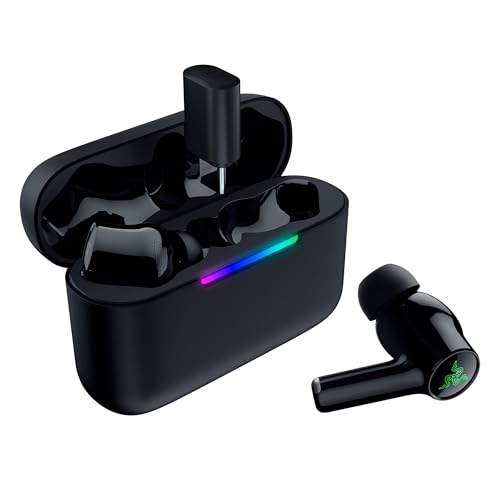
Listing note: the verified listing is a Renewed unit
The Amazon listing verified for this article — checked through the retailer’s own product data on the date recorded in the sources file — is titled as a Renewed unit: the same Hammerhead V3 HyperSpeed product, sold through Amazon’s renewed channel rather than as a factory-sealed retail box. That distinction matters and this article will not blur it. Renewed products are inspected and tested under Amazon’s renewed programme and carry its guarantee, but they are not new stock, their packaging and included extras can differ, and their price should be read against the new-unit price rather than against rival earbuds. Everything in the review below assesses the Hammerhead V3 HyperSpeed as a product — its design, connections and sound character — which is identical either way. The buying sections return to the renewed question with the seriousness it deserves, because for some buyers it is a sensible saving and for others it is a reason to choose the alternative listing discussed later in the article.
In this guide
Key takeaways
Three judgements organise everything that follows. First, gaming earbuds are a latency product: the HyperSpeed 2.4GHz connection exists because Bluetooth, even in its newest versions, adds delay that competitive players can feel in fast games, and the dongle path is the entire technical argument for this product class. Second, earbuds and headsets divide the world by session shape rather than by sound quality — earbuds win on portability, heat and glasses comfort; headsets win on microphone quality, battery endurance and long-session ease. Third, the Hammerhead V3 HyperSpeed is the right buy for the multi-platform player who games on PC or console at a desk and wants one small case to serve the phone as well — provided the renewed-listing terms suit them, or the new-unit route is chosen with eyes open.
Hammerhead V3 X HyperSpeed in depth
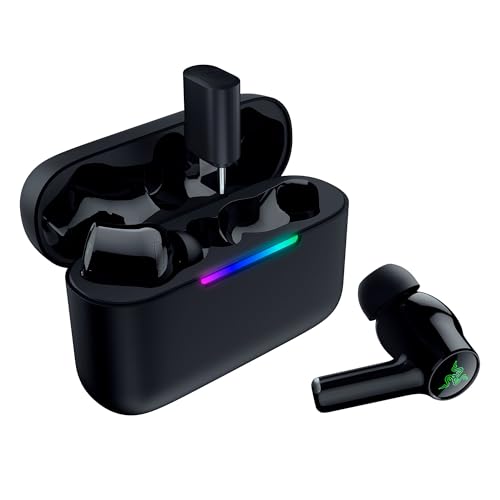
Razer Hammerhead V3 HyperSpeed — the dongle earbuds for desk and console
Badge: Best for multi-platform players who want earbuds with a real gaming connection
- Connections: 2.4GHz HyperSpeed wireless and Bluetooth 6.0 (per the verified listing)
- Noise control: active noise cancellation (per the verified listing)
- Battery: up to 40 hours total playing time claimed in the listing title
- Audio: THX spatial audio (per the verified listing)
- Listing status: Renewed unit — see the listing note above
The dual-connection design is the product’s skeleton, and it maps onto a real day. At the desk or in front of the console, the 2.4GHz dongle carries the game with the low delay that fast play demands; away from the desk, Bluetooth 6.0 pairs the same buds with a phone or tablet for music, calls and video. Players who have tried to game on ordinary Bluetooth earbuds know the sensation the dongle abolishes: the gunshot that arrives a fraction after the muzzle flash, the rhythm game that feels drunk, the dialogue that trails the lips. None of that ruins a film — video players compensate — but games cannot compensate, because the action has not happened yet when the sound is made. HyperSpeed is Razer’s answer, proven across its headsets and mice, and its presence in an earbud case is the V3’s whole premise.
Active noise cancellation in gaming earbuds serves a different master than it does in travel earbuds. The enemy here is the room: the household, the shared flat, the fan, the street outside the window where you play. In-ear buds already seal passively better than most headsets, and the V3’s ANC takes the remaining low-frequency wash down further, which keeps game audio intelligible at lower volumes — a genuine comfort benefit across long sessions. It will not silence a shouting sibling, and this review will not claim otherwise; ANC of any brand is a reducer of drones, not an eraser of events. For calls and phone use, the same system plus the buds’ microphones handles a street or a station platform respectably.
Sound character follows Razer’s gaming tuning: present, energetic bass that gives explosions and engines their body, a midrange clear enough for dialogue and callouts, and treble that carries footsteps and reload cues without turning glassy at sensible volumes. THX spatial audio widens the stage for games and films that support it, and like all virtual surround it is a preference rather than a law — many players enable it for single-player atmosphere and disable it for the unprocessed stereo image they trust in competitive play. Battery life, per the listing, reaches up to 40 hours in total with the case’s reserves included; the buds alone carry a session-sized share of that, and the case is therefore part of the product rather than packaging — it is the fuel tank that makes a day of mixed desk and mobile use plausible. Fit is the standing earbud caveat: the V3’s shape will suit most ears, tips decide the seal, and the seal decides both the bass and the ANC, so the five minutes spent trying every tip size in the box is the highest-value setup step in the entire product.
Strengths
- The 2.4GHz HyperSpeed path removes the Bluetooth delay that makes ordinary earbuds poor gaming tools
- ANC plus a good in-ear seal quiets the room enough for lower, safer listening volumes
- One small case genuinely covers desk gaming, console play and phone duty
Trade-offs
- The verified listing is a Renewed unit — terms, packaging and price must be read accordingly
- Microphones in earbuds never match a boom microphone for team communication
- Fit is individual; a poor seal quietly undermines bass, ANC and comfort together
Best for: PC and console players who prefer earbuds, play in noisy rooms, and want one case for gaming and phone. / Not suited for: players whose team communication is constant and critical, or who simply dislike anything in their ears.
The new-unit alternative in the same family

Razer Hammerhead HyperSpeed (PlayStation edition) — the earlier generation, sold new
Badge: Best for PlayStation players who want the HyperSpeed idea in a standard retail listing
- Platform focus: PlayStation 5, PC and mobile (per the verified listing)
- Features: ANC, noise-cancelling microphone, Bluetooth 5.2, RGB Chroma (per the verified listing)
- Connection: HyperSpeed wireless for gaming, Bluetooth for mobile
The previous Hammerhead HyperSpeed generation remains on sale, and its PlayStation edition is the natural comparison for a buyer unsettled by the renewed V3 listing. The concept is identical — dongle for the console, Bluetooth for the phone, ANC for the room — executed with the earlier generation’s Bluetooth version and Razer’s Chroma lighting on the buds, which the V3 drops in favour of a cleaner design. Console players should note the platform editions carefully in this family: the PlayStation and Xbox variants of HyperSpeed earbuds have historically differed in their console compatibility, and the listing’s platform line is the authority. As a product, the earlier model gives up refinement rather than any core capability; as a purchase, it offers the standard new-unit route — sealed box, full retail terms — that the V3’s verified listing does not. Choosing between them is therefore less about sound than about buying posture: newest hardware under renewed terms, or the generation behind under new ones. Both postures are defensible; the mistake is not knowing which one you took.
Strengths
- The same HyperSpeed-plus-Bluetooth concept, in a standard new retail listing
- PlayStation-focused edition suits console-first players
- ANC and a noise-cancelling microphone cover the room and the call
Trade-offs
- Earlier Bluetooth generation than the V3
- Chroma lighting is decoration that costs battery
- Platform editions demand a careful read of the listing before ordering
Best for: PlayStation players who want gaming earbuds new-in-box. / Not suited for: buyers who want the newest model, or Xbox-first players who have not checked the edition’s compatibility line.
Relatives in prose: the wired V3 and the older true-wireless models
Razer’s wider Hammerhead family fills the shelves around the subject of this review, and two branches deserve prose mention. The wired Hammerhead V3 Chroma swaps wireless freedom for a USB-C cable, in-ear ANC and the family’s lighting — a sensible tool for a single-device player who sits at one desk and distrusts batteries on principle. The older Hammerhead True Wireless generations, Bluetooth-only with a low-latency gaming mode, are the products the HyperSpeed models exist to correct: their gaming mode narrows Bluetooth delay without closing it, and at their current street positioning they serve casual mobile play rather than desk gaming. Neither branch is linked here, because the verification behind this article covers the two listings reviewed above; both are named so that a buyer browsing the family’s crowded shelf can place them. The family’s organising rule is simple once seen: Bluetooth-only models are phone earbuds with gaming manners, HyperSpeed models are gaming earbuds with phone manners, and the wired model is the desk purist’s option.
How this review was put together
Specifications in the linked reviews come from the verified Amazon listings named in the sources file, checked through the retailer’s product data on the date recorded there — including the renewed status of the V3 listing, which this article discloses rather than smooths over. Latency discussion reflects how the connection technologies behave as classes: 2.4GHz dongle links are engineered for delay measured in the low milliseconds, while Bluetooth audio carries codec and buffering delay an order of magnitude larger, which is why the category exists. Sound-character judgements are desk-review reasoning about Razer’s house tuning across the Hammerhead line, and no hands-on testing is claimed. Products that could not be verified to the same standard appear in prose only.
Buying guide: gaming earbuds without the guesswork
Decide the connection before the brand
The first question in this category is not whose logo is on the case but how the buds will talk to your machine. If you play fast games on PC or console, a 2.4GHz dongle model — HyperSpeed here, rival systems elsewhere — is the requirement, and Bluetooth-only earbuds should be struck off the list no matter how good their music reviews are. If your gaming is turn-based, story-driven or mobile, Bluetooth delay stops mattering and the whole true-wireless market opens up. This single decision, made honestly, does more for your satisfaction than any subsequent comparison of drivers and codecs.
Microphones: the earbud tax
Every gaming earbud pays the same tax: without a boom arm near the mouth, its microphones work harder for worse results. Modern processing makes earbud voice perfectly serviceable for casual team chat, calls and streaming to friends. For ranked play with constant callouts, for content creation, or for anyone whose teammates have complained before, a headset’s boom microphone remains the correct tool — several are covered in our headset coverage, including the models our headset-mic troubleshooting guide discusses. Buy earbuds for their freedom; do not buy them expecting a broadcaster’s voice.
The renewed question, taken seriously
Amazon’s renewed programme inspects, tests and guarantees the products it sells under that label, and for earbuds the calculus has a specific shape. In your favour: the price gap against new stock, the programme’s guarantee, and the fact that the electronics either work or visibly do not. Against: earbuds are personal items that live in ears, tips and hygiene deserve a moment’s thought, packaging and bundled extras can vary, and the return posture should be confirmed before ordering rather than assumed. The hygienic concern is manageable — new tips transform the wearing experience and cost little — but it should be a decision, not a discovery. Buyers who decide the renewed terms suit them get the newest hardware in this review for the renewed price; buyers who do not should take the new-unit alternative above rather than abandoning the product class.
Platform editions and dongle logistics
Two practical checks save the commonest returns in this category. First, platform: confirm the edition’s stated compatibility with your console before ordering, because gaming earbuds are the one audio category where the same product name hides platform-specific hardware. Second, the dongle’s home: a 2.4GHz receiver needs a port — on a PC that may mean the front panel or a short extension for the cleanest signal path, on a console it means a front USB port kept free. Players who keep their dongle in the case and swap it between machines should also confirm the buds remember both pairings gracefully; the V3’s dual-connection design is built for exactly that two-home life.
Setup and daily use: a practical how-to
Fit first, settings second
Before any software step, spend the unglamorous minutes on tips. Fit each ear separately — many people are a different size on each side — and judge by three tests: the bass firms up, the room’s low hum drops when ANC engages, and a head shake moves nothing. A seal that fails those tests will make every later setting feel broken, and no equaliser repairs a leak. Once sealed, pair the dongle path first and Bluetooth second, so the buds learn their gaming home before their phone manners.
Dial in the game audio
Start from the flat or default profile and change one thing at a time. If footsteps and cues hide under explosions, the fix is usually less bass rather than more treble. Try spatial audio in a single-player session before trusting it in a competitive one, and decide per game rather than globally — the processing that flatters an open-world soundscape can smear the precise directional cues a shooter depends on. Set a volume ceiling you will not cross in the excitement of a match; earbuds sit close to the eardrum, ANC lets you play quieter, and the combination is an opportunity to protect your hearing that headsets rarely offer as naturally.
Case discipline and charging habits
The case is the product’s fuel tank and its home; buds returned to it after every session are buds that are charged, paired and findable. Develop the dock-the-dongle habit too — a receiver left in whichever machine you used last is a receiver that will be missing from the machine you are about to use. Once a week, wipe the buds and the case’s contacts; earbuds fail by grime more often than by electronics, and the failure announces itself as one side charging intermittently, which a thirty-second cleaning usually cures.
Mistakes buyers make with gaming earbuds
Buying Bluetooth-only buds for competitive play
The category’s founding mistake, repeated daily: superb music earbuds, glowing reviews, and a shooter that feels like it is being played through a wall of delay. The reviews were not lying — the buds are excellent at music — and the buyer was not careless, merely shopping in the wrong connection class. The buying guide’s first question exists to prevent exactly this purchase.
Judging the microphone by a quiet room
Earbud microphones demo beautifully in silence and degrade in the conditions of real play — a fan, a keyboard, a household. Judge by your noisiest honest scenario, or by the experience of the teammates who will listen to you. If your play is communication-critical, let that judgement route you to a boom microphone without regret; the headset is not a failed earbud, it is the other correct answer.
Ignoring the renewed label until the box arrives
Renewed stock announced in a listing title still surprises buyers who shop by thumbnail. The label is not a defect — it is a set of terms, priced accordingly — but discovering it at the door converts a fair bargain into an unwanted one. Read the listing’s condition line the way you read its platform line: before the order, as part of the decision.
Losing the seal and blaming the sound
Thin bass and weak ANC in a new set of earbuds are fit complaints wearing sound complaints’ clothing, nine times in ten. Work the tip sizes, including the size you are sure is wrong, before concluding anything about the product. Reviewers who skip this step write the strangest reviews in the category, and buyers who skip it make the strangest returns.
Final recommendation
A closing caution about expectations, because earbuds attract magical thinking at both extremes. The V3 will not out-shoot a wired headset on a microphone, will not out-isolate a travel flagship on a plane, and will not out-last a big headset’s battery in a single sitting — and none of those is the contest it entered. Judge it as the pocketable gaming connection it is, against the Bluetooth earbuds it replaces at the desk and the headset it replaces in the bag, and its measurements all land where its design aimed them.
The Hammerhead V3 HyperSpeed is the gaming-earbud idea executed by the company that has pursued it longest:
a real low-latency connection for the games that need it, Bluetooth for everything else, ANC for the room you actually live in, and a case-sized footprint that a headset cannot approach. Buy it — on the renewed terms disclosed in this article, or through the new-unit route the previous generation offers — if you play fast games on PC or console, prefer earbuds to a headband, and share your audio life between a desk and a phone. Choose a headset instead if your microphone is a working tool, and choose ordinary Bluetooth earbuds if your gaming never punishes delay. Within its brief, the V3 is the coherent choice, and its compromises are the honest prices of its size.
Related guides
the best gaming earbuds compared
the best wireless earbuds for everyday listening
what to do when your headset mic stops working
studio headphones for a different kind of listening
gaming monitors to pair with your setup
Latency, explained properly: why the dongle exists
Audio delay in games is worth understanding rather than merely fearing, because it decides which products are even candidates. Sound in a game is an event report: the engine knows the shot was fired and asks the audio system to say so. On a wired connection the report arrives almost immediately. On a 2.4GHz gaming link like HyperSpeed, the radio protocol is stripped down for speed — small packets, minimal buffering, a dedicated channel — and the report arrives within a span the brain files under “now”. Bluetooth was designed for a different set of virtues: universal compatibility, power thrift and robustness, with audio codecs that compress, buffer and reconstruct the signal. Even its gaming modes are negotiations within that design, and the delay, while small in absolute terms, sits in the band where fast, reactive play exposes it — most noticeably in rhythm games, in fighting games, and in the felt connection between a mouse click and its sound.
Two corollaries matter for buyers. First, latency is a chain, not a component: a fast earbud link behind a laggy display still feels wrong, which is why this site’s monitor coverage and its audio coverage belong to the same desk. Second, latency sensitivity is personal and genre-dependent in a way no specification settles. The player who cannot feel Bluetooth delay in their games is not wrong and does not need a dongle; the player who can feel it is not imagining it and cannot be argued out of it. The V3’s dual design is the pragmatic answer to that uncertainty — the dongle for the desk, where the question is asked, and Bluetooth for everywhere it is not.
Earbuds versus headsets: the honest comparison
Where earbuds win
Heat is the first victory: nothing covers the ears, nothing clamps the head, and a summer gaming session in earbuds is simply a cooler experience. Glasses wearers win twice, since no earcup presses a temple arm into the skull. Hair, hats and headsets’ headband dent are all non-issues. Portability is the largest win of all — the V3’s case vanishes into a pocket or a controller bag, travels to a friend’s house or a tournament without a plan, and turns any phone into the same audio system you use at your desk. For players whose gaming happens in more than one place, that continuity is worth more than any single specification.
Where headsets win
The microphone, as this review has said, is a headset’s birthright: a boom near the mouth beats physics that earbuds must fight with processing. Battery endurance per charge is the second win — a gaming headset measures its life in tens of hours of continuous play, while earbuds measure theirs in sessions punctuated by the case. Soundstage and driver size favour headsets for the cinematic end of gaming, and long-session comfort divides by person: some ears tire of in-ear buds in two hours, while some heads tire of a headband in the same span. Neither product class is the other’s replacement; they are two answers to the question of where you play and what you say while playing, and the V3’s honest role is to be the earbud answer at its most complete.
Genre by genre: where the V3 earns its place
Shooters and competitive play
The dongle’s home ground. Directional cues arrive on time, the seal and ANC keep the room out of the round, and the absence of a headband suits long, hot sessions. The microphone caveat applies at full strength here — competitive squads are the audience least forgiving of a distant voice — so the competitive player who talks constantly should weigh the headset alternative with genuine seriousness rather than as a formality.
Story games and open worlds
The most forgiving genre and, paradoxically, one of the most rewarding for these buds: spatial audio flatters a big world, the tuning gives weather and engines their body, and Bluetooth would honestly suffice for the delay question — but the dongle is already in the machine, so the question never arises. Comfort over a four-hour session is where the V3 quietly beats the headset most players would default to.
Rhythm and fighting games
The latency absolutists, and the genres that expose Bluetooth without mercy. If your library leans here, the connection class is the purchase and everything else is commentary; the V3’s HyperSpeed path is precisely the requirement, verified before any question of fit or tuning.
Mobile and handheld play
Bluetooth to a phone, dongle or Bluetooth to a handheld console depending on the machine, and a case that lives in the same bag as the device. Handheld players are the earbud class’s natural constituency — the whole setup is pocket-scale — and the V3’s dual connections cover the handheld’s options without adapters or ceremony.
Ownership over time: batteries, tips and the second year
True wireless earbuds age on a schedule their owners should know. The buds’ small batteries lose capacity across hundreds of charges, so a set that carried a long session when new will carry a shorter one in its third year; the case slows the felt effect by topping up constantly, and honest expectations beat disappointment. Tips are consumables — foam degrades, silicone loosens its seal — and a fresh set restores both comfort and bass in a way that feels like a new product. The dongle, having no battery, ages not at all, which is one more argument for the dongle architecture: the part that defines the product’s gaming value is the part that does not wear. Buyers who treat tips as maintenance and the case as the product’s home will get the design’s full lifespan; buyers who lose the case will discover that the case, in this category, is half the product.
Troubleshooting the common complaints
One bud is quieter, or silent
Check the case contacts and the bud’s charging pins for grime first, then the mesh at the bud’s nozzle, which collects wax and strangles volume asymmetrically. A reset through the case — the family’s documented button sequence — resolves pairing amnesia between the two buds. True driver failure exists but is the last explanation, not the first.
The dongle connects but the game still feels delayed
Confirm the game is actually using the HyperSpeed device rather than a Bluetooth connection the buds fell back to, confirm no second audio processing chain — a virtual surround layer in the operating system stacked on the game’s own — is buffering the signal, and check the display’s own delay before blaming the audio at all. The chain rule from the latency section applies to diagnosis exactly as it applies to purchase.
ANC seems weak
Return to the seal, as this article has advised for bass complaints, because ANC in an in-ear design is a partnership between the electronics and the physical plug of the tip. A correctly sealed bud with ANC engaged drops a room’s low wash audibly; an unsealed one makes the same electronics feel broken. Fit is not a preliminary to this product’s performance. Fit is this product’s performance.
Decoding the name: V3, X and HyperSpeed
Razer’s naming stacks three claims that are worth separating, because buyers meet siblings wearing parts of the same name. HyperSpeed is the connection — Razer’s low-latency 2.4GHz wireless system, shared with its mice and headsets — and it is the word that decides whether a Hammerhead is a gaming product or a phone product with gaming styling. V3 is the generation: the third major iteration of the Hammerhead earbud design, bringing the current Bluetooth version, the ANC implementation and the case design described in this review. The X that the search keyword carries belongs to the naming of the wider V3 X family in Razer’s line-up — the value-leaning branch of the generation — and its presence in a search usually means the searcher has met the family’s shelf and wants the HyperSpeed model within it. The practical lesson is the one this article opened with: shop by the listing’s full title and its connection line, because in this family the difference between the right product and its near-namesake is a word or two, and those words are the product.
What ANC and THX spatial audio do — and do not do
Two features on the V3’s box invite misunderstanding, and a review owes its readers the unglamorous versions. Active noise cancellation samples the room’s sound and generates its inverse, cancelling steady, low-frequency noise — fans, engines, traffic wash, the hum of a house — with real effectiveness. It does little against sudden, irregular sounds: voices in the next room, a door, a dog. In the V3 it works in partnership with the passive seal of the tips, which handles the higher frequencies electronics cannot chase, and the pair together produce the quiet that lets game audio sit at lower volumes. That is the honest claim, and it is a valuable one; anything beyond it is brochure language.
THX spatial audio is a processing layer that widens and externalises the sound image, placing cues around the listener rather than inside the head. In films and atmospheric games it can be genuinely pleasurable, and THX’s involvement means the processing follows a defined standard rather than a random echo. In competitive play, opinion divides on evidence: some players read processed cues more easily, others find processing smears the exact directional information they rely on, and the correct setting is the one your own ears vote for in your own game — which is why the setup section advises deciding per game. Neither feature is a reason to buy or reject the earbuds alone. The connection is the reason; these are the comforts that travel with it.
The value question, across the whole earbud shelf
Set the V3 — renewed listing and all — against the shelf it competes on, and its position clarifies. Below it sit Bluetooth-only gaming-styled earbuds, cheaper and entirely adequate for mobile and casual play, which lose the moment a fast game on a big screen enters the buyer’s life. Beside it sit rival dongle earbuds from the other gaming brands, comparable in concept and differing in fit, tuning and platform manners — the honest differences, which a buyer chooses between by ears and ecosystem rather than by specifications. Above it, in effective cost, sits the gaming headset wardrobe: more money, more microphone, more battery, no pocketability. The V3’s claim within that shelf is narrow and strong — it is the pocketable, dual-life option from the brand that has iterated the idea longest — and the renewed listing, read on its own terms, sharpens the value side of that claim for buyers whose posture suits it. What the V3 is not is a universal recommendation, and this review’s alternatives and caveats are the map of where its claim ends.
Comfort over a long session: the in-ear reality
Earbud comfort is the most individual variable in gaming audio, and the V3’s design makes the standard, sensible choices: a shaped shell that rests in the ear’s bowl rather than spearing down the canal, multiple tip sizes, and a weight low enough that the buds disappear when the seal is right. What no design can abolish is the category’s truth — an object in the ear canal is felt, by some ears, after hours, in a way a headband’s pressure is not. The practical management is unglamorous and effective: alternate tip materials if one irritates, take the buds out during loading screens and lobby waits, and let the case breaks that charging imposes double as ear breaks. Players who know from past earbuds that their ears revolt at the two-hour mark should believe that knowledge over any review, including this one, and route themselves to the headset shelf where their comfort actually lives. Players whose ears accept buds happily will find the V3’s freedom — no clamp, no heat, no headband — the most comfortable gaming audio they own, and both of those readers are right about themselves.
A word on volume, hearing and the ANC dividend
Gaming audio’s long-session risk is not dramatic; it is cumulative volume. Earbuds deliver sound millimetres from the eardrum, and excitement turns volume wheels upward invisibly. The V3’s combination of a good seal and ANC offers the countermeasure this review has mentioned in passing and now states as advice: a quieter room behind the game means the game itself can sit lower, and a level you can converse over is a level your ears can live with for years. Set the ceiling in a calm moment, in the settings, rather than negotiating with yourself mid-match. It is the least exciting paragraph in this article and the one most likely to matter in a decade.
A day with two connections: the dual-life workflow in practice
The V3’s specification promises a desk life and a mobile life in one case; it is worth walking the day to see where the promise holds and where it frays. Morning: the buds come out of the case for a call on the phone over Bluetooth, and the ANC earns its keep against the street. Midday at the desk: the dongle wakes them into the PC, and a game’s audio arrives with the immediacy wired players take for granted — the transition is a matter of which device the buds are told to prefer, and owners develop the small ritual quickly. Evening on the console: the dongle moves, or stays, depending on the household’s port geography, and the same buds that carried the morning call carry the night’s session. The fraying points are human rather than technical — a dongle left in the wrong machine, a phone that seizes the Bluetooth connection mid-game if the owner wanders into its range with the buds in desk mode, a case left in yesterday’s bag. Every one of those is solved by the habits the setup section teaches, which is the pattern of this whole product class: the technology is finished, and the remaining engineering is the owner’s routine. Build the routine in the first week and the dual life the box promises becomes the unremarkable reality, which is the highest praise a tool can earn.
It is also worth stating who should not force that routine. The player with one machine, one chair and no mobile audio needs is buying a dual-life product for a single life, and a wired headset or a wired earbud will serve that chair more simply. The V3’s value scales with the number of places and devices in your play, and an honest buyer counts theirs before paying for the multiplication.
How the V3 sits in Razer’s own audio line
Buyers meeting Razer’s catalogue whole can place the V3 with a simple map. At one end, the Barracuda and BlackShark headsets serve the single-desk player with boom microphones and long battery life; the BlackShark line in particular is the microphone-first choice this review keeps pointing competitive talkers toward. At the other end, Razer’s lifestyle earbuds serve the phone. The Hammerhead family is the bridge, and the V3 HyperSpeed is the bridge’s current flagship: the only Razer audio product that is simultaneously a serious desk-gaming device and a pocketable everyday carry. That in-between position is sometimes read as compromise, and the microphone section of this review concedes where the reading is fair. But for the growing class of players whose gaming is genuinely distributed — desk, console, sofa, phone, a friend’s house — the bridge is not a compromise at all. It is the only shape that follows them, and the V3 is its most complete current expression.
Frequently asked questions
What does HyperSpeed actually change compared with Bluetooth?
Delay, and the feel of the game that delay produces. A 2.4GHz HyperSpeed link is engineered to move audio with delay small enough that cause and effect feel simultaneous; Bluetooth audio, even in current versions, carries codec and buffering delay that fast games expose — shots, jumps and rhythm cues land audibly late. For video and turn-based play the difference is invisible because nothing is reacting to you. For shooters and rhythm games it is the difference between earbuds that work and earbuds that merely play sound.
Is buying the Renewed V3 listing a good idea?
It is a legitimate option with specific terms, and this article’s position is that it should be chosen deliberately. You get the newest hardware, Amazon’s renewed inspection and guarantee, and a price that should sit below new stock. You accept non-retail packaging, possible variation in bundled extras, and the wisdom of fitting fresh tips. Buyers comfortable with that exchange save money on a product whose electronics are fully testable on arrival; buyers who want the sealed-box experience should take the new-unit alternative reviewed above.
Do these earbuds work with PlayStation, Xbox, PC and phone?
The V3’s listing describes a multi-platform product — 2.4GHz and Bluetooth across PC, consoles and mobile — but this family has a history of platform-specific editions, and the listing’s compatibility line for the exact unit you order is the final authority. Check it before ordering, particularly for Xbox, where gaming-audio compatibility has historically been the restrictive case across the whole category, not just for Razer.
How good is the microphone for team chat?
Serviceable, and that word is chosen carefully. Teammates will hear you clearly in a reasonably quiet room, and noise handling keeps a keyboard and a fan from dominating. What earbuds cannot do is match a boom microphone’s closeness to the mouth, so in a loud room or for communication-critical play, a headset remains the better instrument. Judge by your room and your squad’s standards, as the mistakes section advises.
Can I use one bud at a time?
For phone duty — calls, podcasts, staying aware of the room — single-bud use is a normal earbud behaviour and suits the V3’s second life as everyday buds. For gaming, wear both: the spatial information, the ANC and the game’s own stereo mix all assume two ears, and a one-bud gaming session is a self-imposed handicap no setting can repay.
How long do the buds last on a charge in real use?
The listing’s headline figure — up to 40 hours — describes the buds plus the case’s reserves across a cycle of use, which is the honest way to read every earbud battery claim in the category. The buds alone carry a long session; ANC and high volume shorten that, Bluetooth and 2.4GHz draw differently, and the case restores them between sessions. In practical terms, a mixed desk-and-phone day is comfortably inside the system’s capacity, and the case on the desk each night makes battery a non-topic — which is the real test of any wireless audio product.
Are gaming earbuds a good gift for a player?
With one check, yes: confirm the platform they play on and that they do not already live in a headset they love. Gaming earbuds solve real problems — heat, glasses, portability, a second machine — and the V3’s dual connections make it the safest version of the gift, since it serves the desk and the phone alike. If the listing route matters to the recipient, remember that the verified listing in this review is a renewed unit; for a gift, the new-unit alternative in the family may be the more comfortable choice, and the review above exists partly to make that a conscious decision rather than an accident.
Do the buds work for work calls and video meetings?
Perfectly well, and many owners will use them for calls more than for games. Bluetooth pairs them with the laptop or phone, the microphones handle a normal room, and the ANC quiets the household behind you. In a formal setting the same microphone caveat applies as in team chat — a boom or a dedicated desk microphone sounds more professional — but for the ordinary run of hybrid-work calls, earbuds of this class are unremarkable in the best sense: nobody on the call will think about your audio at all.
What happens if I lose the dongle?
The buds remain fully usable over Bluetooth, which covers phone duty and forgiving games, but the low-latency gaming path — the product’s reason to exist — goes with the dongle. Treat it accordingly: a fixed home in a port or in the case, never loose in a bag. Replacement availability varies by period and region, so the honest advice is preventive; the dongle is small, cheap-feeling and functionally irreplaceable in the short term, a combination that deserves respect.
Is the case pocket-friendly enough for daily carry?
Yes — the case is sized for a trouser or jacket pocket alongside the phone it serves, and that pocketability is a designed feature rather than an accident. It will share the pocket with keys and coins less happily than the buds share your ears, so a soft pouch or a dedicated pocket keeps its finish and its hinge in good order. Owners who carry it daily report the same discovery owners of all good earbud cases report: within a week the case has a home pocket, and the product’s whole dual-life promise rests on that small domestic fact.
Do gaming earbuds stay in during active or VR play?
For seated and standing play, a well-fitted set like the V3 stays where it is put — the seal that serves the sound also serves retention. For energetic VR or fitness-adjacent play, the honest answer is that earbuds vary by ear and by movement, and a bud that works loose mid-session is a distraction no specification prevents. Test retention with your own head movements during the first sessions, experiment with tip sizes for the most secure seal, and accept the category’s boundary if your play is athletic: a lightweight headset or a sport-specific earbud with retention wings is the tool for that job, and the V3’s brief is the desk, the sofa and the commute between them.
Should I wait for the next Hammerhead generation?
Razer refreshes this line on its own rhythm, and each generation has improved the same short list: Bluetooth version, battery, ANC refinement, case design. None of those improvements changes the product’s fundamental equation, which the V3 already solves — dongle latency, dual life, pocketable form. If your current audio fails your games today, the V3 fixes it today, and the marginal gains of a future generation will not repay a year of playing on the wrong connection. If your current setup serves you and you are upgrading from curiosity, curiosity is patient and can wait for any generation it pleases.
How do I know whether I am sensitive to Bluetooth latency?
Test yourself rather than trusting descriptions. Play your fastest game for ten minutes on the Bluetooth earbuds you already own, then play the same passage wired — a cable into the controller or the machine — and attend specifically to the bond between action and sound: the jump, the shot, the note in a rhythm game. If the wired passage feels merely the same, your ears are Bluetooth-tolerant and this whole category of dongle products is optional for you. If it feels like a fog lifting, you have your answer, and the dongle class — the V3 at its head — is where your money belongs.