Disclosure: As an Amazon Associate, reviewstook.com earns from qualifying purchases. Links on this page are affiliate links; they cost you nothing extra. Prices and availability change often, so check the current Amazon listing before you buy.
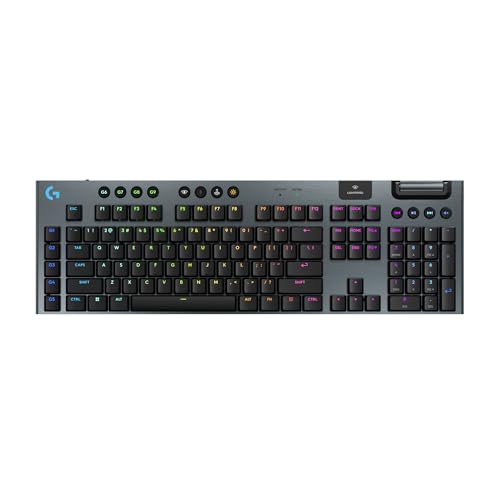
The Logitech g915 x lightspeed is the keyboard for people who looked at the esports boards elsewhere in this cluster — wired, compact, single-minded — and asked why wanting wireless freedom and a full set of keys should mean surrendering flagship status. Its verified listing describes a full-size wireless mechanical board with double-shot PBT keycaps, fully programmable keys and RGB backlighting, built around Logitech’s low-profile GL switches and the LIGHTSPEED wireless connection that made the original G915 a phenomenon. The X generation refines that formula rather than reinventing it: better keycaps than the original’s shine-prone set, a more mature design language, and the same essential proposition — a keyboard thin enough to look like office furniture, fast enough for ranked play, and free enough to travel between desk, sofa and second machine without a cable’s permission. This review examines who that proposition serves in a market that has since filled with rapid trigger specialists, and where the honest boundaries of a low-profile wireless flagship now sit.
The timing question deserves stating plainly, because buyers researching this board in 2026 are choosing between philosophies, not just products. The magnetic-switch boards reviewed alongside the G512 X and the Pro X TKL Rapid offer a specific competitive technology this keyboard does not have. The G915 X offers a different bundle: wireless excellence, low-profile comfort, a complete layout and a design that belongs in a grown-up room. Neither bundle is the other’s failure. They are answers to different censuses of a player’s week, and this review’s job is to help you count yours.
Key takeaways
- LIGHTSPEED wireless at this level is a solved problem: the connection is not a compromise to be forgiven but a feature to be enjoyed.
- Low-profile GL switches shorten key travel, which some players experience as speed and others as a shallower, laptop-adjacent feel — try before committing if you can.
- The X generation’s double-shot PBT caps fix the original G915’s most-criticised detail, keycap shine and legend wear.
- Full-size completeness — number cluster, media controls, programmable keys — is the point of this board; compact-board buyers should look at its TKL sibling.
- It has no rapid trigger or adjustable actuation; competitive specialists should weigh that absence against everything else it offers.
In this guide
Brief verdict on the G915 X Lightspeed
As a wireless flagship for a mixed life, the G915 X remains close to the top of its class: fast, complete, comfortable across long days, and handsome in a way gaming boards rarely attempt. Its low-profile switches are the one genuinely divisive element — a feel that devotees describe as effortless and detractors as shallow — and no review can settle that argument for your fingers. What can be settled is the rest: the wireless is trustworthy, the layout is complete, the X’s keycaps answer the original’s critics, and the board’s manners suit both a spreadsheet morning and a ranked evening. Buy it for the whole life, not for a single game’s movement tech, and it will not disappoint.
How the comparison set was chosen
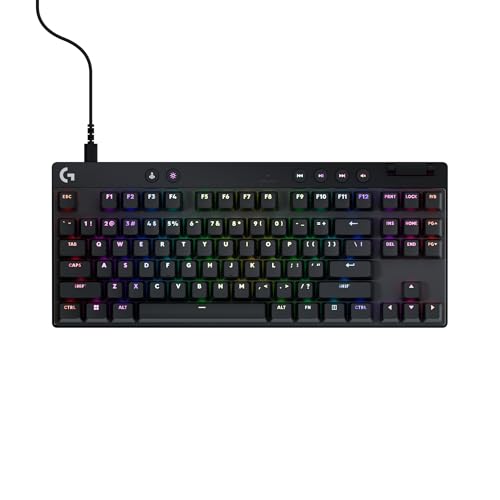
The G915 X TKL is the same formula in a tenkeyless frame, included because the full-size-versus-TKL decision is the first one this board’s buyers actually face. The G Pro X TKL Lightspeed is Logitech’s other wireless flagship keyboard — standard-height switches, esports posture, no number cluster — and it brackets the low-profile question from inside the same catalogue and the same wireless ecosystem. All three listings were verified through the site’s Creators API data on 2026-11-24, with exact titles recorded in the accompanying sources file.
Detailed reviews

Logitech G915 X Lightspeed — the complete wireless flagship
Badge: Best full-size wireless gaming keyboard in this comparison
- Layout: full-size with number cluster
- Switches: low-profile GL mechanical
- Keycaps: double-shot PBT per the listing
- Keys: fully programmable, RGB backlit
- Connection: LIGHTSPEED wireless, with Bluetooth and wired modes in the line’s tradition
The first thing the board teaches your hands is its height — or rather its lack of it. Low-profile switches cut the key travel substantially compared with standard mechanicals, and the deck sits slim enough that wrists rest at a gentler angle without a palm rest doing rescue work. In play, that shorter travel reads as immediacy: keys bottom out sooner, repeated presses cycle quickly, and the whole board feels like it is skimming rather than stomping. In typing, the same trait divides the room. Fast, light typists often convert within a day and thereafter find standard boards ponderous; heavy typists who rest their fingers’ weight on the keys may trigger neighbours and miss the deep, forgiving travel of a conventional switch. This is the board’s one true gamble, and it is a gamble about your hands, not about its quality — the GL switches themselves are consistent, well-made and available in the line’s familiar personalities, so the question is purely whether the low-profile dialect is one your fingers speak.
Around that gamble, everything is flagship competence. The wireless connection carries the LIGHTSPEED name honestly — in years of the line’s service, its latency and stability have been the benchmark that made wireless keyboards respectable in competitive rooms. The full-size layout keeps the number cluster, dedicated media handling and programmable keys that the X listing emphasises, so the board never asks its owner to learn a function-layer dialect for daily tasks. The double-shot PBT keycaps deserve their own sentence of appreciation, because they answer the original G915’s longest-running complaint: legends that cannot wear away and a surface that resists the greasy shine that made the first generation look old before its time. Battery life in this line is measured in weeks of ordinary use with lighting disciplined, and the board charges over USB-C in the modern manner. What it does not do is chase the magnetic era: no rapid trigger, no adjustable actuation, no analog anything. In a shooter whose movement tech lives on those features, that absence is a real competitive datum, and this review will not pretend otherwise — it will simply insist on pricing the absence against the fifty weeks a year the board spends being everything else.
Strengths
- Benchmark wireless performance with a complete full-size layout
- Low-profile comfort suits long mixed days of work and play
- PBT keycaps fix the original’s shine and legend-wear complaints
Trade-offs
- Low-profile feel genuinely divides players; it cannot be configured away
- No rapid trigger or adjustable actuation for movement-tech specialists
- Flagship pricing for a refinement of an established formula
Best for: wireless-first players with mixed work-and-play desks who type as much as they game. Not suited for: rapid trigger specialists, or players who know they dislike low-profile switches.

Logitech G915 X Lightspeed TKL — the same idea, tenkeyless
Badge: Best for low-profile fans who want mouse room
- Layout: tenkeyless
- Switches: low-profile GL mechanical, tactile variant in the verified listing
- Keycaps: double-shot PBT
- Finish: white in the verified listing
- Connection: LIGHTSPEED wireless
The TKL sibling removes the number cluster and little else, and for the right desk that removal is the whole argument: the mouse gains its territory back, the shoulders sit narrower, and the board becomes genuinely portable between rooms in a way the full-size never quite is. The verified listing’s tactile switches add a small, civilised bump to the low-profile stroke that many typists prefer, and the white finish continues the line’s furniture-grade ambitions. Everything said about the full-size board’s wireless, keycaps and divisive profile applies unchanged. Choose between the siblings by the census method used throughout this cluster: count your weekly number-cluster hours honestly, and if the count is near zero, take the mouse room and never look back; if the count is real, the full-size board’s completeness will pay you every single workday.
Strengths
- All the full-size board’s virtues with a tenkeyless footprint
- Tactile low-profile switches suit typists who want feedback
- Portable enough to live between desk and sofa
Trade-offs
- The number cluster’s absence is permanent, not a mode
- Same low-profile gamble as its sibling
- White finish shows a household’s history more honestly than black
Best for: low-profile converts who aim with their whole arm. Not suited for: number-cluster dependents.

Logitech G Pro X TKL Lightspeed — the standard-height wireless flagship
Badge: Best for esports-leaning wireless players
- Layout: tenkeyless, ultra-portable design per the listing
- Switches: standard-height mechanical, linear in the verified listing
- Keycaps: dual-shot PBT
- Lighting: LIGHTSYNC RGB
- Connection: LIGHTSPEED wireless
If the G915 X line is Logitech’s wireless flagship for the whole desk, the Pro X TKL Lightspeed is its wireless flagship for the arena: standard-height switches with the full travel traditionalists expect, a compact frame built to travel to events, and a feature set trimmed toward competition rather than domestic completeness. For a buyer hesitating over the low-profile question, this is the control group — the same brand, the same wireless trust, the conventional switch height — and choosing between them is the purest possible referendum on profile. The Pro X gives up the number cluster and the G915’s furniture elegance; the G915 gives up the arena posture and, in its full-size form, the mouse room. Neither gives up wireless excellence, which is why this comparison is a pleasure to write: it is entirely about hands and habits, the things peripheral buying should be about.
Strengths
- Conventional switch height for players who distrust low-profile feel
- Compact, travel-minded esports design
- The same trusted LIGHTSPEED wireless ecosystem
Trade-offs
- No number cluster and fewer domestic graces than the G915 X
- Conventional switches mean conventional reset behaviour
- Less elegant as shared office furniture
Best for: competitive wireless players with traditional switch tastes. Not suited for: number-cluster users or low-profile devotees.
The low-profile question, taken seriously
What shorter travel does to a keystroke
A standard mechanical switch travels roughly twice as far as a low-profile one, and that distance is not dead space — it is where the finger’s sense of a keystroke lives. Long travel gives a press a beginning, a middle and an end; it forgives resting weight, sloppy angles and the half-presses of a tired hand at midnight. Short travel compresses the story: the key fires and bottoms out in a gesture closer to tapping a table than pressing a piano key. Players who type with a light, hovering technique experience that compression as pure speed, because their fingers were never using the travel anyway. Players who type from the wrists, resting and rolling, experience it as a board that fires when they think. Neither experience is a defect in the switch. They are two honest hands meeting one honest design, and the only reliable test is a week of your own typing — which is why this review keeps recommending return windows as part of any low-profile purchase.
Ergonomics: the slim deck’s quiet argument
The strongest case for low profile is not speed but posture. A slim board lets the wrists work at a flatter angle, closer to the desk’s own plane, and many owners find that a full day on the G915 format leaves their forearms fresher than a tall board with a wrist rest propping them into position. This is individual anatomy, not a medical claim — players with existing strain should consult the ergonomic category and professional advice — but as a matter of design intent, the G915 X’s thinness is a comfort feature wearing a style feature’s clothes. Buyers whose workdays are longer than their gaming sessions should weigh it accordingly: the board you type on for eight hours matters to your body more than the board you strafe on for two.
Sound and the shared room
Low-profile switches, bottoming out over a shorter distance in a slim aluminium-topped deck, produce a quieter, tighter sound than standard mechanicals in a tall case — closer to a well-made laptop keyboard’s confidence than to a hobby board’s acoustics. In shared rooms, on calls, in households where the gaming desk is also the living room, that discretion is a feature with daily value that no specification sheet prints. The G915 X will never win a sound-test video against a tuned gasket board, and it does not need to: its acoustic ambition is to be unremarkable in company, which for its intended life is the correct ambition.
Wireless, treated as the mature technology it now is
What LIGHTSPEED’s reputation rests on
Wireless gaming peripherals crossed their credibility threshold years ago, and this line helped push them across: a connection whose latency is indistinguishable from a cable in instrumented testing, whose stability survives the interference of a modern home, and whose behaviour in tournament settings has been validated by players with money on the line. A buyer in 2026 does not need to be argued into trusting it. What remains genuinely worth discussing is the domestic dividend — the desk that reconfigures freely, the keyboard that follows the laptop to the sofa, the second machine paired over Bluetooth while the gaming PC keeps the fast link. The G915 X’s wireless is not a gaming compromise with lifestyle benefits; it is a lifestyle feature with gaming credentials, and that ordering is precisely its market.
Battery discipline for a board you will forget to charge
Weeks-long battery life creates its own failure mode: the board is so rarely charged that the one time it dies feels like a betrayal. The habits that prevent it are small. Keep the lighting at a brightness your room actually needs rather than the maximum the showroom used; let the board’s sleep settings be aggressive rather than sentimental; and adopt a monthly charging ritual tied to a date you already observe, so the cable comes out on schedule instead of in a panic before a match. The wired mode exists as the safety net — the board plays perfectly well plugged in — and owners who route the cable neatly once will find the net so painless they stop fearing the fall.
Setting up the G915 X for a double life
Step one: pair both connections on day one
Connect the LIGHTSPEED receiver to your gaming PC and pair Bluetooth to your second machine — laptop, work computer, tablet — before you customise anything. The board’s party trick is moving between lives at a switch’s flick, and owners who postpone the second pairing tend never to build the habit that justifies the board’s price. Test the switch a dozen times on the first evening until it is muscle memory.
Step two: build two lighting personalities
Create a work profile with calm, legible lighting — or none — and a game profile with your colour-coded key groups. On a full-size deck the colour map doubles as a labelling system for the programmable keys, which are otherwise a grid of identical promises. Keep the work profile as the default the board wakes into; a keyboard that greets a Monday morning in full rainbow is a small but real tax on a household’s patience.
Step three: program the extra keys for your actual week
Programmable keys earn their keep when they carry your specific repetitions: the spreadsheet manoeuvres, the call controls, the game’s awkward three-key chords compressed into one press. Spend twenty minutes listing the actions you perform twenty times a week and assign those, rather than accepting a default macro set written for an imaginary average user. Revisit the assignments after a month; the first list is always partly wrong, and the board’s software makes the correction painless.
Step four: give the low-profile feel its fair trial
If you are new to low-profile switches, commit to the full return window before judging, and type real documents — not test sentences — during the trial. The first days will produce extra bottom-outs and the occasional neighbour key; both fade as your fingers recalibrate their landing depth. Players who still dislike the feel at the window’s end have their answer with evidence, and the standard-height Pro X TKL Lightspeed is waiting in this same review with the same wireless trust and none of the gamble.
Side-by-side comparison
| Keyboard | Layout | Switch profile | Connection | Character |
|---|---|---|---|---|
| G915 X Lightspeed | Full-size | Low-profile GL | LIGHTSPEED wireless | Complete flagship for mixed lives |
| G915 X Lightspeed TKL | Tenkeyless | Low-profile GL | LIGHTSPEED wireless | The same, with mouse room |
| G Pro X TKL Lightspeed | Tenkeyless | Standard-height mechanical | LIGHTSPEED wireless | Arena-leaning wireless flagship |
Notice what the table cannot show: the feel of the keystroke, which is the actual decision. Specifications can bracket the choice to these three excellent wireless boards, but the last step belongs to your fingers, and any retailer whose return policy lets your fingers vote is worth preferring for this particular purchase.
Mistakes buyers make with wireless flagships
Paying for wireless and then never moving the board
If your keyboard will sit in one place for five years, a wired board delivers the same performance for less money and zero battery thought. Wireless earns its premium in motion — between machines, rooms and postures. Buyers should audit their actual mobility before paying for the radio, because the audit sometimes surprises: the desk that feels static actually hosts a laptop migration every evening, and the supposedly mobile setup never leaves its tray.
Judging low-profile switches in a shop’s thirty seconds
A demo unit’s half-minute tells you the switches are different, which you already knew. The conversion curve for low-profile typing runs in days, and the players who love these boards are disproportionately those who gave them a week. If a full trial is impossible, at least type a real paragraph on the demo — addresses, passwords and punctuation included — rather than drumming the WASD cluster and imagining.
Leaving lighting at maximum and blaming the battery
Full-brightness RGB is the single largest controllable drain on a wireless board, and the owners who complain about battery life are very often running a light show for an empty room. Set brightness for the room you play in, let sleep timers be ruthless, and the battery becomes the non-issue the line’s reputation promises.
Final recommendation
Buy the G915 X Lightspeed if your keyboard leads a complete life — full layout, multiple machines, rooms that are not gaming dens — and you want that life served at flagship level with wireless you never have to think about. Take the TKL sibling if your number-cluster census comes back empty and your mouse arm wants its territory. Take the Pro X TKL Lightspeed if the low-profile feel is your one hesitation and standard-height switches are home. And take one of the magnetic boards from this cluster’s other reviews if your competitive life revolves around movement technology — with the acknowledgement that you will be trading away the domestic completeness this board exists to provide. The G915 X is not the sharpest tool for any single job in this cluster. It is the best tool for all of the jobs together, which is a rarer and, for most desks, more valuable thing to be.
The original G915’s legacy, and why the X exists
When the first G915 launched, a flagship wireless mechanical keyboard was close to a contradiction in terms: wireless meant office compromises, mechanical meant a cable, and slim meant a laptop. The board’s commercial success rearranged those assumptions so thoroughly that its formula — low-profile switches, a metal-topped slim deck, dual wireless, media controls in a roller — became a template rivals have been annotating ever since. The X generation is therefore best understood as a custodian’s revision: the formula was right, its details had aged, and the revision addresses the details owners actually complained about across years of service. Keycaps lead that list, because a flagship that looks worn in year two betrays its price; the PBT double-shot set is the X’s answer. Buyers who owned the original and are deciding whether the X is a worthy successor should frame it exactly that way — not a new keyboard, but the same keyboard with its known faults retired — and judge the upgrade by how much those particular faults bothered them.
Choosing a GL switch personality
Low-profile lines live or die by their switch variants, and the G915 family has traditionally offered its GL switches in linear, tactile and clicky personalities. The choice deserves more care than it usually gets, because on a slim board the variants’ characters are compressed closer together than on standard-height switches. Linear suits the gamer-typist who wants the stroke to disappear entirely — smooth, quiet, and the easiest to actuate accidentally while learning the profile. Tactile adds a small bump that many touch-typists use as their landing signal, and on a short-travel board that signal does real work, which is why the verified TKL listing’s tactile variant is a sensible default for mixed use. Clicky is the personality purchase: delightful to its owner, audible to everyone else, and on a board designed for shared rooms it should be chosen only by players whose households have explicitly consented. If you are buying without a trial, tactile is the recommendation this review gives the undecided — it forgives the most hands, in the most rooms, at the most hours of the day.
The living-room life this board was secretly designed for
Specifications aim the G915 X at a desk, but its design keeps escaping to the sofa, and the escape is worth reviewing as a use case in its own right. A slim, wireless, full-layout board with media controls is the natural keyboard for a PC connected to a television — browsing from the couch, driving a media library, playing the strategy and simulation titles that read beautifully on a big screen. The low profile that divides gamers is an unmixed blessing here, because lap use rewards a board that sits flat and light. Owners with a living-room PC should consider the G915 X not as a gaming keyboard that can visit the sofa but as the rare board genuinely native to both rooms, and should pair it with a wireless mouse from the same ecosystem so the receiver story stays simple. It is a niche the esports boards cannot enter and the office boards cannot enliven, and for households whose PC lives on the television, it may be the strongest argument in this entire review.
Durability across a flagship’s real lifespan
A wireless flagship should be amortised across four or five years, and the G915 X’s design choices mostly point the right way for that horizon. The PBT keycaps will outlast the board’s electronics in appearance. The aluminium top plate shrugs off the flex and scuffs that age polymer decks. The switches, being low-profile mechanicals in a mature line, have a known service character and a healthy ecosystem of owner knowledge around them. The honest wear items are the battery — lithium cells age whether we consult them or not, and by year four or five the board will want its cable more often than it did — and the USB port that charging depends on, which rewards owners who plug in gently and occasionally rather than daily and carelessly. Neither is a scandal; both are the standard physics of the category, and the board’s wired mode guarantees that even a tired battery demotes it to an excellent wired keyboard rather than to e-waste. Buyers who keep hardware longest should read that failure path as a feature: this is a product whose worst old age is still a good keyboard.
How it sits among this cluster’s keyboards, honestly placed
This cluster of reviews covers an unusual moment in keyboard history, and the G915 X’s place in it clarifies every other board. The magnetic specialists — the Rapid, the GMMK 3 Pro HE, the hybrid G512 X — are all, in different proportions, answers to a competitive question. The G915 X is an answer to a domestic one: what should the keyboard of a complete, multi-machine, multi-room digital life feel like at flagship level? Readers who have followed the cluster will notice that no board wins both arguments, because the arguments prize opposite virtues — specialisation against completeness, wired certainty against wireless freedom, deep travel against slim posture. The mature conclusion the cluster keeps arriving at is that the census of your own week outranks every reviewer’s ranking. The G915 X simply has the broadest census it can win: the more varied your keyboard’s life, the more this board’s particular bundle of virtues compounds, and the less any single missing feature can matter.
For the undecided: a two-evening test you can run anywhere
Because this board’s central question is a feel question, it deserves an empirical answer, and most buyers can obtain one without spending anything. Evening one: borrow, demo or trial any low-profile mechanical board — the brand matters less than the profile — and type a thousand words of real work on it, then play your main game for an hour. Note three things only: whether your fingers kept landing long after the key had fired, whether your wrists felt flatter and fresher or strangely unsupported, and whether the short stroke made your gaming inputs feel eager or vague. Evening two, repeat on your current standard-height board and take the same three notes. The comparison will not be subtle, because hands have strong opinions about travel distance; they simply need the two evenings to file them. If the low-profile notes read eager and fresh, the G915 X is your board and this review’s remaining task is only to confirm its wireless and layout suit you. If they read vague and long-landing, the Pro X TKL Lightspeed in this same comparison set is the correct purchase, and the two evenings have saved you a flagship’s worth of regret.
The small features that accumulate into loyalty
Flagship ownership is rarely decided by the headline specification in year two; it is decided by the small behaviours a board gets right when nobody is reviewing it. A volume roller that falls exactly under the finger during a call. A wireless switch that reconnects to the second machine before your hand returns to the keys. A deck that wipes clean in one pass because nothing on it traps crumbs at ankle height. Keycaps whose legends are still perfect when the board is old enough to have a history. None of these will headline a product page, and all of them are the reason the original G915’s owners speak of it with an affection usually reserved for tools that have survived something with them. The X inherits that accumulation and adds the keycap fix its predecessor’s owners asked for by name. Buyers weighing two excellent wireless boards should let these small behaviours break the tie, because they are what ownership actually consists of after the specifications have been forgotten.
What about players who split time between PC and console?
A keyboard’s console life is a modest but real consideration for households where the same screen hosts both. The G915 X’s Bluetooth makes it a civilised companion for navigating console menus, typing messages that would take a controller ten painful minutes, and driving the growing set of console titles with keyboard support — with the caveat that competitive console play has its own rules and input policies that players should check per title. The larger point is the one this board keeps making from different angles: its value is the breadth of the digital life it serves without complaint. A specialist board is a scalpel that stays in one drawer; the G915 X is the good knife that lives on the counter, used for everything, and there is a reason most households, given the choice, end up treasuring the counter knife. Buyers whose gaming is exclusively PC and exclusively competitive should keep scrolling this cluster’s other reviews. Buyers whose keyboard must be a citizen of the whole house have found the citizen this review recommends.
A note on buying the previous generation instead
Because the X is a custodian’s revision, the original G915 will tempt bargain hunters, and the honest guidance is conditional. The original remains a fine keyboard whose wireless, switches and layout are the same formula; what the discount buys you is the old keycaps, with their known shine and wear trajectory, and an earlier stage of the line’s refinements. If the price gap is small, the X is the correct buy and it is not close, because keycaps are the one part of a keyboard you touch and see every minute of its life. If the gap is large and you are the sort of owner who replaces caps as a hobby anyway, the original can be a shrewd purchase — with the discipline that the money saved should actually be spent on the PBT cap set, or the bargain was merely a slower way of buying the X’s main improvement at retail.
The verdict for readers who have somewhere to be
Compress the whole review and it reads like this. The G915 X Lightspeed is the wireless flagship for complete lives: full layout, two machines, long days, shared rooms, and gaming serious enough to demand real wireless and real switches but not so specialised that it lives on magnetic movement tech. Its keycaps fix its predecessor’s famous fault, its battery and build are sized for years, and its one true gamble — the low-profile feel — can be settled by your own fingers in two evenings or one honest return window. Players whose census is narrower than the board’s talents should buy narrower boards, several of which this cluster reviews with enthusiasm. Players whose census is exactly this board’s shape will find, as the original’s owners did, that a keyboard can become part of the furniture of a life in the best sense: unremarked, trusted, and there for everything.
Accessories and pairings that complete the setup
A flagship wireless board invites a small supporting cast, and three pairings earn their mention. A wireless mouse on the same LIGHTSPEED ecosystem simplifies the receiver story to a single dongle habit and a single software home; the mice reviewed elsewhere in this cluster, from the G305 upward, all speak that language. A wrist rest is the second pairing, not because the slim deck demands one — its low angle is the point — but because owners who type with resting palms will still prefer a soft landing for the heel of the hand during long documents, and a slim rest preserves the board’s posture advantage while providing it. The third pairing is a simple charging habit made physical: a short USB-C cable routed to a fixed point at the desk’s edge, so topping up the board is a one-handed, eyes-free act rather than a drawer expedition. None of these is necessary, and the board is complete without them; they are the difference between a product that is merely owned and a setup that feels considered, which is the level at which flagship money should be operating.
One more consideration: the household’s other typist
Keyboards at this level are rarely used by one person alone, and the G915 X’s manners in shared service deserve a paragraph of their own. Its profiles can hold a second person’s lighting and macro preferences; its wireless switching lets a partner’s laptop borrow it without unplugging anything; its quiet, low-profile voice does not colonise a room the way a clicky hobby board can. Households where the gaming desk doubles as the homework desk, the work-from-home desk and the household-admin desk will find that this board’s completeness is a peace treaty as much as a specification: nobody’s use case requires apologising to anybody else’s. Specialist boards, by contrast, tend to be personal property in the territorial sense — configured for one player’s games, unintuitive to everyone else who touches them. Neither model is wrong, but buyers should know which household they live in before choosing which keyboard citizenship to purchase, because the wrong citizenship generates a low-grade domestic friction that no switch technology can lubricate.
What to check in the first week, while returns are easy
Even a board this mature deserves a deliberate first-week inspection, because the faults worth catching are the ones a return window exists for. Type a long document on day one and count your accidental neighbour-key presses; a small number that shrinks daily is the normal conversion curve, while a stubborn count after five days is your hands voting against the profile. Play your most demanding game and deliberately test the wireless at your room’s worst interference moment — evening, every device awake — to confirm the connection’s manners in your actual environment rather than a reviewer’s. Charge the board fully once and note the date, so your sense of its battery rhythm is calibrated from the start. And press every key on the deck once, including the programmable row and the number cluster’s far corners, because a single lazy switch is a warranty conversation best held immediately. A board that passes that week without incident has told you, with evidence, that it is the unit you will be keeping for years — which is the real purpose of a flagship’s first week, and a better use of it than photographing the unboxing.
The final analysis, in the terms this cluster has taught
Every review in this programme has ended by returning the decision to the reader’s own week, and this one has the easiest return of all, because the G915 X is the board whose case is the week itself. If your keyboard’s days contain one game and one posture, buy the specialist that game and posture demand. If they contain work and play, two machines, a shared room, a sofa, a partner’s homework and a spreadsheet that will not wait — the ordinary, various, complete texture of most players’ actual lives — then the flagship built for that texture is sitting in front of you, with its one gamble clearly labelled and fairly testable. Take the two evenings, run the census, and let your own hands close the sale. That is how the original’s owners chose, and the X exists because so many of them chose it again.
A short defence of refinement over revolution
There is a bias in technology coverage toward the revolutionary product — the new sensing method, the new material, the new number — and against the refined one, which is accused of caution when it should be credited with judgement. The G915 X is the refined product in this cluster, and its refinement rests on information the revolutionaries do not yet have: years of returns, complaints and compliments from the original’s enormous owner base, distilled into a revision that fixes the famous fault and keeps the beloved formula. Buyers should not mistake that distillation for a lack of ambition. In a category where most products are replaced annually and forgotten, a flagship that a giant owner base asked to have perfected rather than replaced is making the strongest claim any peripheral can make — that its design was right, early, and worth keeping. The X’s job is to honour that claim for another product generation, and on the evidence of its keycaps, its wireless and its manners, it honours it completely.
Posture, desks and the angle nobody photographs
Product photography shoots keyboards from above, which hides the dimension this board wins: its side profile. A slim deck changes the geometry of the whole workstation in ways that compound quietly — the monitor can sit lower without the keyboard crowding its stand, the wrists meet the keys without the climb a tall board demands, and a laptop beside it stops looking like a different species of object. Owners who move between a laptop’s keyboard and their desktop board across a day consistently under-report how much the context switch costs until a low-profile board removes the second dialect; the hands stop translating, and the day’s typing becomes one continuous language. That continuity, more than any benchmark, is what the G915 format’s devotees are actually loyal to — and it is invisible in every photograph ever taken of the product, which may be why the board’s reputation has always travelled by word of mouth rather than by image. Owners describe the conversion in domestic terms: the desk stopped feeling like a cockpit and started feeling like a room again, without the gaming ever being asked to leave. For a product category that usually sells escalation, that is a distinctive promise, and the X keeps it with better keycaps. It also keeps it at the hours that decide loyalty — the early-morning document, the late-night queue, the call where the keyboard must be furniture and the match where it must be an instrument — and a board that is right at all of those hours has very little left to prove to anybody. That, in the end, is the standard this review has applied to every board in the cluster, and the G915 X meets it on more hours of the day than any other keyboard reviewed here. Readers whose days are similarly various should consider that the strongest single sentence in this board’s favour, because it was earned across the whole calendar rather than in any single match.
Frequently asked questions
Is the G915 X Lightspeed good for competitive gaming?
Yes, within the honest boundary this review has maintained: its wireless, switches and build are competition-grade, and it lacks only the magnetic movement features — rapid trigger and adjustable actuation — that a specific class of specialist now considers essential. Players outside that class will find nothing between them and their rank except the game itself.
How long does the battery last?
In this line, battery life is measured in weeks of typical use, varying strongly with lighting brightness and hours per day. The practical answer is that owners charge it occasionally and briefly, over USB-C, and can keep playing wired while it charges — the battery is a background convenience, not a countdown that organises your week.
What changed from the original G915 to the X?
The headline change owners feel is the keycaps: double-shot PBT in place of the original’s shine-prone caps, answering the first generation’s most persistent complaint. The X also refines the design and programmability the listing emphasises, while keeping the formula — low-profile GL switches, LIGHTSPEED wireless, slim full-size deck — that made the original successful.
Full-size or TKL — which G915 X should I choose?
Count your number-cluster hours for a week. If data entry, simulation bindings or spreadsheet work use it daily, the full-size board pays you back every workday. If the count is near zero, the TKL returns mouse room and portability that you will feel in every gaming session. Both are the same keyboard where it matters.
Will low-profile switches hurt my typing speed?
Temporarily, for most converts — expect a few days of recalibration as your fingers learn the shorter landing. After the adjustment, many typists match or exceed their previous speed, while a minority never take to the feel. The return window exists for that minority, and using it is a successful trial, not a failed purchase.
Can it connect to two computers?
Yes — that is one of its defining conveniences. The fast LIGHTSPEED link serves the gaming machine while Bluetooth serves a second device, and switching between them is a button press. Owners who work and play at the same desk consistently rank this among the features they would least willingly surrender.
How do I choose between its wireless modes during an ordinary day?
Think of the two wireless paths as tools for different rooms rather than rivals with a winner. The dedicated receiver offers the most direct connection and belongs on the machine where you play, where it can sit close to the keyboard with nothing negotiating in between. Bluetooth earns its place at the edges of the day, pairing with a laptop on the sofa, a tablet at the kitchen counter or a work machine you would rather not plug anything into. The habit worth building is deliberate switching: when you sit down to play, take the two seconds to confirm the board is on its gaming connection instead of discovering mid-match that you are typing through the wrong path. Owners who treat the modes as interchangeable tend to blame the keyboard for delays that were really a routing choice made by habit. Label the connections in your own mind by place, desk versus everywhere else, and the decision soon makes itself before your hands reach the keys.
What changes when this board travels with you?
A full-size wireless board invites travel in a way a wired one never does, and the experience teaches a few small lessons quickly. Pack it flat against something rigid, because a bag that lets the board flex under books and bottles is asking for a keycap to arrive loosened. Before leaving, charge it fully and then switch it off rather than letting it sleep, since a board waking repeatedly inside a bag to search for its receiver can greet you at the destination already tired. At the other end, give yourself one match or one page of typing to adjust before judging anything, because a different desk height and chair will change your wrist angle more than the keyboard itself has changed. Travel also reveals the quiet virtue of a board with no cable to coil, forget or replace: the entire setup ritual becomes opening a bag, and that simplicity is a feature no specification table knows how to list.
Related guides
best wireless gaming keyboards compared
best low-profile mechanical keyboards