Disclosure: As an Amazon Associate, reviewstook.com earns from qualifying purchases. Links on this page are affiliate links; they cost you nothing extra. Prices and availability change often, so check the current Amazon listing before you buy.
This elecom ex g pro trackball review is for the largest tribe in the trackball world: the thumb-ball users. The EX-G Pro is Elecom’s flagship of that school — a sculpted, mouse-shaped shell with the ball under the thumb, three ways to connect to three devices, and the bearing quality the maker’s name carries — and it answers a specific reader: the one whose desk is too small, whose sofa arm is an office, or whose travel bag holds exactly one pointing device, and who wants that device to be excellent rather than merely portable in every one of those places. It is reviewed here against Logitech’s Ergo M575S, the mainstream’s thumb-ball champion, and Kensington’s Orbit with Scroll Ring, the finger-ball classic that tempts thumb users with its ring. Between them, the three cover the realistic choices of anyone shopping this category today.
The thumb-ball’s promise deserves stating plainly, because it is the reason the school dominates: your hand keeps the posture it learned from a lifetime of mice, your arm stops travelling, and the thumb — strong, tireless, underemployed — takes over the pointing. The apprenticeship is the shortest in the trackball world, measured in days rather than weeks, and the precision ceiling, while below the finger-balls’, is above what ordinary office and creative work ever asks. The EX-G Pro’s claim within that promise is completeness: more connections, more buttons, better bearings than the mainstream offers. Whether completeness is what your desk needs is the question the whole review works to answer.
Elecom’s position in this school is worth a sentence for readers new to the name. Where Logitech industrialised the thumb-ball for the mainstream, Elecom — a Japanese maker with a deep trackball catalogue — refined it for the enthusiast: more ambitious bearings, more buttons, more connection options, and a community of owners who modify and discuss their devices the way keyboard hobbyists discuss switches. The EX-G Pro is that refinement’s flagship in the thumb school, and this review judges it by the enthusiast’s standard it sets for itself, while keeping the mainstream’s champion beside it for readers whose standard is simply a working life made easier.
All three devices were verified against their current listings, model numbers included — the EX-G Pro’s M-XPT1MRXBK identity is well worth confirming on the listing in front of you, as Elecom’s range holds several thumb-balls of similar silhouette and quite different specification.
Key takeaways
Four properties decide this purchase: how the thumb-ball tracks, how the shell’s angle treats a long session, how the connections switch, and where the wheel and buttons fall. They organise the review, and they are worth holding in mind through the product sections, because each device below wins exactly one of them outright and contests the rest.
- Thumb-ball control and sensor tracking
- Ergonomic shell angle for lengthy sittings
- Triple-form connectivity switching
- Scroll wheel and button placement
In this guide
Swift picks for Elecom Ex G Pro Trackball Review
The shortlist in one view: the complete thumb-ball, the mainstream thumb-ball, and the scroll-ring classic. The detailed reviews make each one’s case, and the buying walkthrough after them supplies the tests to run on whichever you choose.
| Item | Best for | Entry |
|---|---|---|
| Elecom EX-G Pro | Best for specialists | Check price on Amazon |
| Logitech Ergo M575S | Best for extended sittings | Check price on Amazon |
| Kensington Orbit with Scroll Ring | Best for shared spaces | Verify cost on Amazon |
How the shortlist was chosen
The shortlist was built to isolate the EX-G Pro’s two claims. Against the Ergo M575S — same school, same thumb, the biggest brand in the business — the Elecom must justify itself on bearings, buttons and connections rather than on concept, which is the hardest and most honest comparison available. Against the Orbit, the question inverts: not which thumb-ball, but whether the thumb school itself beats the finger school’s most accessible ambassador, the scroll-ring classic that has converted generations of the curious. A reader who finishes the review will know both whether the EX-G Pro beats its twin and whether its twin’s whole school beats the alternative — the two decisions every buyer in this category actually makes, in the order they make them.
Criteria were drawn from the thumb-ball’s daily life: tracking at the small end, where documents and spreadsheets live; shell angle across a full working session, because comfort is the school’s founding claim; switching among devices, because thumb-ball users run laptops and second machines out of proportion; and the wheel-and-button geography, because a stationary shell turns its surface into a control desk whether the maker planned it or not. Each product was verified against its live listing before a word was written about it, and no product that could not be verified in full — model, image, specification — was allowed into the comparison, however strong its forum reputation.
Detailed reviews

Elecom EX-G Pro
Best for thumb-ball users who want the complete package: bearings, buttons and three-device connection
| Unit | Elecom EX-G Pro |
|---|---|
| Class | Trackballs |
| Functions named on its entry | wireless operation, Bluetooth connectivity, trackball control |
| Entry price | Check price on Amazon |
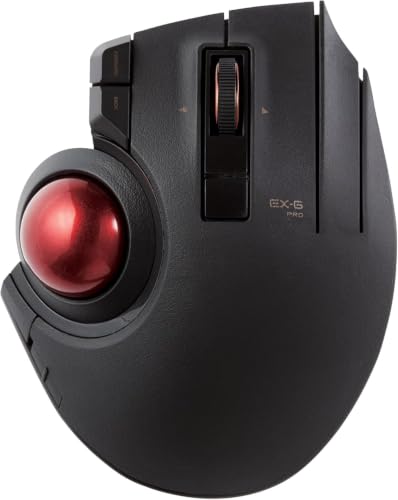
The EX-G Pro’s case begins with the ball’s feel. Elecom’s bearing work gives the thumb a roll that starts easily and tracks truly, and in a thumb-ball that feel is decisive in a specific way: the thumb works alone, without the fingers’ assistance, so any stiction or stutter in the bearings is paid entirely by one digit’s fine control. A smooth EX-G makes the small work — the cell selection, the text cursor, the timeline nudge — feel like the mouse never left, except that your arm is resting and your desk’s geography has stopped mattering. The shell is sculpted to the school’s classic pattern, with the ball high under the thumb and the hand draped rather than gripped, and its angle keeps the wrist in the neutral zone the category promises.
Completeness is the rest of the argument. Three-device connection — Bluetooth, the 2.4 GHz dongle, and a wired USB mode — covers the laptop, the desktop and the borrowed machine without a second device or a compromise, and switching among them is a desk-level operation rather than a settings expedition. The button set exceeds the mainstream’s, with the extra keys placed for the stationary-shell logic this review keeps returning to: back and forward where the fingers rest, a wheel that does its office duty without complaint, and remapping through Elecom’s software for the owners who will turn the shell into a small control desk for their applications. It is, in short, the thumb-ball with the fewest asterisks in the category.
The ball itself contributes a practical virtue worth naming: it is removable in seconds, for the cleaning ritual this review will keep prescribing, and its size gives the thumb a generous contact patch that spreads the work across the digit’s pad rather than its tip. Small things, both — and the kind of small things that decide whether a device is still loved in year three, when the specifications have been forgotten and only the daily sensations remain. Enthusiast products are often accused of optimising the wrong details; the EX-G Pro’s details are the ones the hand actually meets.
The asterisks that remain are the school’s, not the model’s. A thumb’s precision ceiling is real: the finest pixel work will always ask a little more patience than a finger-ball’s, and the thumb carries the whole pointing load, which a minority of hands eventually resent. Elecom’s software, while capable, asks more manual effort than Logitech’s polished ecosystem, and the brand’s support footprint outside its home market is thinner than the giant’s. And the sculpted right-handed shell is a commitment — left-handers and hand-alternators should read the Orbit section twice. None of this dims the central judgement: within its school, the EX-G Pro is the connoisseur’s completion of the idea.
Strengths
- Bearing smoothness that flatters the thumb’s solo fine control
- Three-device connection across Bluetooth, dongle and wired USB
- A button set and remapping depth beyond the mainstream thumb-balls
Trade-offs
- The thumb school’s precision ceiling and single-digit load apply
- Software and support ecosystem are leaner than Logitech’s
- Sculpted for the right hand only
Best for: the multi-device thumb-ball user, the small-desk professional, and the traveller who packs one pointer. Not suited for: left-handers, the finest pixel professions, or owners who want the largest support ecosystem. Check price on Amazon
A first-week prescription for EX-G Pro owners: assign the device slots deliberately on day one — first slot the main machine, second the laptop, third the traveller — and practise the switch until it is one blind motion. The triple connection is this device’s headline in daily life, and owners who leave it unconfigured own a very good single-machine ball and a brochure. The ten minutes of setup is the difference between the product as specified and the product as reviewed.

Logitech Ergo M575S
Best for the mainstream thumb-ball buyer who wants the safe, supported choice
| Variant | Logitech Ergo M575S |
|---|---|
| Class | Trackballs |
| Headline extras from its page | wireless operation, Bluetooth connectivity, trackball control |
| Cost | Check price on Amazon |
The M575S is the thumb-ball as the mainstream perfected it: a comfortable sculpted shell, a ball that tracks reliably for the office’s real tasks, Bluetooth plus a Logi Bolt receiver for two machines, and the deepest support and software ecosystem in the category standing behind it. Its virtues are the virtues of maturity — everything works the way the manual says, the replacement and the advice are one search away, and the device disappears into a working life with the least friction of any ball here. For the buyer whose trackball is an appliance rather than an enthusiasm, that maturity is not a consolation prize; it is the product.
The M575S also inherits the mainstream’s retail reality: it is the trackball a colleague can buy at lunch, from a shop, with a returns desk — a distribution advantage that matters to the buyer whose current device died this morning. Enthusiast products are bought by readers with the luxury of a working interim device and a week to spare. This review respects both urgencies, and it is why the Logitech keeps its place in the shortlist even where the Elecom out-specifies it: availability and support are specifications too, written in a different column.
Its limits are the mainstream’s limits, stated fairly: the bearings are good rather than exceptional, so the finest thumb work lacks the EX-G’s ease; the button set covers the essentials without the Elecom’s surplus; and two connections, while enough for most desks, stop short of the traveller’s three-machine world. The M575S also runs on the replaceable-battery rhythm its line is known for, which some owners prefer — no charging cable, a battery swapped in seconds — and others read as old-fashioned. None of it prevents the obvious verdict: this is the thumb-ball to recommend to a colleague without a follow-up conversation, and that is a genuine and valuable title.
Strengths
- The most mature, best-supported thumb-ball package in the category
- Bluetooth and Logi Bolt receiver cover the standard two-machine desk
- A comfortable shell that disappears into ordinary office work
Trade-offs
- Bearings and buttons are good rather than class-leading
- Two-device connection where the EX-G Pro offers three
- Replaceable-battery rhythm rather than rechargeable convenience
Best for: the office professional who wants the category’s safest purchase. Not suited for: the three-machine traveller, or the enthusiast who shops by bearing feel. Verify expense on Amazon
The M575S rewards one specific owner habit: keeping a spare battery in the desk and a second receiver in the laptop bag. Its whole philosophy is the absence of incidents, and those two cheap spares complete the philosophy — the battery warning becomes a thirty-second swap, and the second machine becomes a receiver’s journey rather than a re-pairing ritual. Owners who stock the spares report the device simply never enters their thoughts, which for this product is the highest praise available.

Kensington Orbit with Scroll Ring
Best for the curious who want the finger-ball classic and its scroll ring
| Whole | Kensington Orbit with Scroll Ring |
|---|---|
| Class | Trackballs |
| Functions named on its entry | trackball control |
| Expense | Check price on Amazon |
The Orbit is the other school’s ambassador, and its embassy is the scroll ring: a physical ring encircling the ball that turns scrolling into a rotary gesture so natural that owners of every other device in this review still speak of it with envy. The ball itself is finger-worked, centred in a low, ambidextrous shell — either hand, any user, no sculpted commitment — and the whole design has the settled confidence of a product that has been answering offices for years without needing to change its mind. For the reader whose work is document-shaped — long files, long timelines, long web pages — the Orbit’s combination of a central ball and a rotary scroll is a genuinely different and arguably superior instrument.
Its compromises are the classic’s: the button count is small, the remapping ambition modest, the connection story the simplest here, and the finger-ball apprenticeship — shorter than the Deft Pro’s, longer than any thumb-ball’s — must still be served. The Orbit also asks its desk for a flat, central territory that small desks begrudge. But its role in this review is not to win the thumb-ball’s contest; it is to make the school decision honestly, by showing the curious exactly what the other tradition feels like at its most welcoming. Readers who finish the Orbit’s section still wanting the thumb have chosen with knowledge; readers who feel the pull of the ring have learned something no specification could have told them.
Strengths
- The scroll ring — the finest scrolling gesture in the category
- Ambidextrous, centred design that suits any hand and any user
- A long-proven classic with a settled, durable design
Trade-offs
- Few buttons and modest remapping ambition
- The finger-ball apprenticeship, though the gentlest of its school
- The simplest connection story of the three
Best for: heavy scrollers, shared desks, either-hand users, and the school-curious. Not suited for: button maximalists, multi-device switchers, or the smallest desks. Check price on Amazon
If the Orbit tempts you, trial its scroll ring on your longest document before anything else — a contract, a codebase, a year’s spreadsheet — because the ring is either a revelation in the first ten minutes or a curiosity you will stop using by Friday. That single test predicts Orbit ownership more accurately than any other in this review, and it costs nothing but a long file and an honest quarter of an hour.
Buying walkthrough: what truly settles Elecom Ex G Pro Trackball Review
Thumb-ball control and sensor tracking
The thumb-ball’s control equation has one variable the others do not: the digit itself. A thumb is strong, well-supplied with endurance, and less dexterous than the index-middle pair, so a thumb-ball’s quality is measured by how completely its bearings and sensor hide that trade. Tracking should be invisible at the small end — the cursor starting without a stiction jump, holding a line without wander, stopping where the thumb stops — and the sensor should never be the story at the fast end either, where a spin across two monitors must land without a skid. Test any candidate with the two honest exercises: draw the slowest diagonal you can across the screen, then flick the cursor corner to corner twenty times and see where it lands. The EX-G Pro’s bearing quality shows in the first exercise; its sensor’s manners show in the second; a mainstream ball passes both respectably and an enthusiast’s ball passes both without asking your attention, which is the entire difference.
Sensitivity setting is the owner’s half of the equation, and thumb-balls reward a slightly brisker setting than instinct suggests: because the thumb’s travel is short, a sensitivity that feels daring on day one becomes the setting that saves a thousand small double-rolls by day ten. Set it brisk, serve three days of the apprenticeship at it, and only then trim it down if the fine work still suffers. Owners who start timid often conclude the device is slow, when the device was only ever obeying their caution.
Ergonomic shell angle for lengthy sittings
The thumb-ball shell’s angle is its comfort mechanism: a good one keeps the hand draped in a near-neutral posture, the wrist neither bent back nor twisted, the weight of the hand resting on the shell rather than held above it by muscle. Judge it across a full session, not a shop minute, because the angle’s virtue is cumulative — it is the absence of the slow build of tension that a flat mouse extracts by the hour. The EX-G Pro’s sculpture follows the school’s proven geometry, and its honest test is the end of your longest ordinary day: a hand that has forgotten the device entirely is a shell that passed.
The chair and desk complete the angle, as the mistakes section insists: an armrest that tilts the forearm, a desk height that lifts the shoulder, will defeat any shell ever moulded. Set the workstation so the forearm arrives level and supported, and let the shell’s angle do the last, smallest part of the work. Comfort in this category is a system with the device as its most visible component, and owners who set the system up once rarely think about any of it again — which is, of course, the point.
Triple-form connectivity switching
Three connections earn their keep in a specific rhythm: the desktop that never moves, the laptop that docks and travels, and the third thing — the partner’s machine, the media PC, the work laptop beside the personal one — that defines modern desks more than any single-machine fantasy. The EX-G Pro’s trio (Bluetooth, dongle, wired) maps onto that rhythm without remainder, and the switching between them is the feature’s daily face: it should be one findable control, memorised by the fingers, because the moment of switching is always a moment of mild urgency. Assign the slots in a fixed, written order on day one — the angle section’s advice generalises — and the comedy of the cursor flying on the wrong screen mostly leaves your life.
Each connection type also has its diagnostic role. The dongle is the low-latency default for the main machine; Bluetooth is the traveller that needs no port; the wire is the incorruptible witness — if a problem exists on the radio paths and vanishes on the wire, the device is innocent and the desk’s radio geography is guilty. Owners of three-mode devices who learn that one diagnostic save themselves the category’s most common false return. It is a small paragraph of knowledge with an outsized lifetime value, which is why this review keeps printing it.
Scroll wheel and button placement
A stationary shell turns its surface into a control desk, and the wheel is its busiest citizen. Judge a thumb-ball’s wheel by the office’s real scrolling: the long document read at a steady pace, the spreadsheet’s hundred-row journeys, the timeline’s nudges. The wheel should ratchet with definition at reading speed and freewheel willingly at travelling speed, and it should sit where the index finger falls without the hand re-gripping — because a wheel that costs a grip change costs it fifty times a day. The EX-G Pro’s layout follows the school’s settled geography, with the buttons arranged for the draped hand rather than for the product photograph, and the extra keys placed where resting fingers can adopt them over the first month.
Button placement has a second test that only time administers: the accidental press. In the first week every owner finds the button their hand brushes unintentionally — usually the one nearest the thumb’s rest or the ring finger’s drift — and the mature response is to remap that button to something harmless or nothing, rather than to train the hand around a design decision. All three devices here permit that mercy through their software. A control desk you have forgiven is a control desk you will keep; the unforgiven button is how good trackballs end up in drawers.
Elecom Ex G Pro Trackball Review in actual habits
Scenario: a laptop user working from a sofa arm or tray table
The sofa-arm office is the thumb-ball’s founding myth, and it is true: a device that needs no surface travel works where a mouse cannot, on an armrest’s width, a tray table’s corner, the laptop’s own palm rest in a pinch. The EX-G Pro serves the myth completely — Bluetooth to the laptop, no dongle to lose in the cushions, a shell that sits still because stillness is its design. The M575S serves it nearly as well and is the choice if the sofa is in a household that values the mainstream’s support. The Orbit, needing its flat central territory, is the only one of the three that declines the scenario, which is information about desks rather than about quality. For the reader whose office is genuinely upholstered, this scenario should outweigh several specification sections.
The sofa scenario has a second act worth planning for: the television. A trackball that serves the laptop on the armrest serves the media PC across the room with the same indifference to surface, and owners routinely find their ball becoming the household’s remote for the big screen — a role no mouse survives, since there is nowhere to mouse on a sofa. If your living room has a screen with a computer behind it, count that role in the purchase; it has justified more trackballs than any office argument in this review.
Situation: an office desktop too shallow for mouse travel
The shallow desk — keyboard, monitor, a hand’s width of territory — is the modern office’s standard issue and the mouse’s quiet enemy. A trackball reclaims the geography entirely: the device occupies its footprint and asks for nothing beyond it, so the shallow desk stops being a compromise and becomes simply a desk. Either thumb-ball here performs the reclamation; the EX-G Pro adds the multi-machine switching that shallow desks often need, because a desk with no room for a mouse usually belongs to a worker with a laptop docked beside a desktop. Set the device at the elbow’s natural arrival, and the shallow desk’s other tax — the shoulder’s daily reach — leaves with the mouse travel.
Scene: a traveller who packs one pointing unit for everything
The traveller’s specification is brutal in its simplicity: one device, every machine, no incidents. The EX-G Pro was arguably designed by someone reading that specification aloud — three connections for the hotel laptop, the client’s desktop and the home machine; a size that packs beside a laptop without negotiation; a wired mode for the day the battery or the radio environment betrays you. The M575S travels nearly as well and adds the replaceable battery’s freedom from charging cables. Either way, the traveller’s first-week duty is the same: pair everything before departure, label the slots, and never let a hotel room be the place a connection is configured for the first time.
Pack the ball like the instrument it is: in the bag’s protected pocket, not loose among the chargers, because a trackball’s exposed sphere collects the bag’s dust directly onto its bearings and arrives at the destination pre-dirtied for its first impression. A small pouch — many owners use the one a pair of sunglasses surrendered — keeps the roll true from the first minute of the trip. Travellers who learn this once stop wondering why hotel desks always felt scratchier than home.
The traveller’s second duty is a thirty-second arrival ritual: ball out, quick wipe of the sphere and its bearings, ball back, one slow roll to confirm the travel did it no harm. Performed at the hotel desk before the first meeting rather than during it, the ritual converts the trackball from luggage back into an instrument, and it catches the one travel injury that matters — a bearing knocked gritty in transit — while there is still a quiet minute to clean it. Road kits earn their keep in rituals like this, small enough to survive a tired evening and regular enough to become invisible.
Configuration and first-spell how-to
The thumb-ball’s apprenticeship is short but real, and these steps keep it short.
Step 1 for Elecom Ex G Pro Trackball Review: compare next to the old gear one final period ahead of selling it
Keep the mouse for the full first week, and near its end give it one honest working session. The comparison will show you what the ball actually changed — the desk territory, the arm’s rest, the fine work’s new patience — and occasionally it will show you a task the mouse still wins, which is worth knowing before the mouse becomes a drawer resident rather than a colleague. Sell or store it only after that session; a trackball adopted against evidence stays adopted, while one adopted against a honeymoon gets renegotiated at the first hard deadline.
Step 2 for Elecom Ex G Pro Trackball Review: change one variable at a while
Sensitivity first, buttons second, connections third — days apart. A thumb-ball has fewer variables than most devices and each one moves the feel of all the others: a new sensitivity changes which buttons your thumb can reach comfortably, a new button map changes the grip that the sensitivity assumed. One change, one working day to judge it, one note. Owners who stack changes spend their apprenticeship debugging their own settings instead of learning the ball, and conclude the device is inconsistent when the inconsistency was theirs.
Step 3 for Elecom Ex G Pro Trackball Review: tidy or maintain the unit following ahead of deciding it is settled
Before you call the setup finished, perform the category’s thirty-second sacrament: pop the ball, wipe the bearing points and the ball, reseat everything, and roll it once with your eyes closed. A surprising share of week-two disappointment is week-one dust, and a device judged dirty is being blamed for its owner’s housekeeping. The ritual also teaches your hands the maintenance they will perform for years, at the moment when learning it costs nothing.
Stage 4 for Elecom Ex G Pro Trackball Review: run one typical bout at default settings and write down what bothers you
Day one, defaults, real work, notebook open — the baseline discipline this site’s reviews repeat because it keeps working. Record the overshoots, the brushed button, the sensitivity that feels wrong in the small work. That list becomes the agenda for your single-variable changes, in order, and the evidence at the trial’s end. A thumb-ball judged against a written baseline gets a fair apprenticeship; one judged against a mood gets returned on a Thursday and regretted on a Monday.
Shift 5 for Elecom Ex G Pro Trackball Review: schedule a two-spell review to catch annoyances that only repetition reveals
Calendar the review for the end of week two. The thumb-ball’s late-emerging truths are specific: the thumb’s honest opinion of its workload, the armrest interaction the mistakes section describes, the slot-switching comedy if the connections were never labelled. None of these appear in a weekend. Bring the baseline notes, check them off, and let the short remainder — usually one setting and one habit — be fixed deliberately rather than endured indefinitely.
Common mistakes with Elecom Ex G Pro Trackball Review
Gripping the shell resembling a mouse and fighting the ball
The mouse convert’s founding error: seizing the trackball as if it might escape, fingers tense, thumb pressing rather than rolling. A gripped ball cannot roll truly, so the cursor stutters, the thumb tires, and the device is convicted of the hand’s crime. The correction is a posture, not a setting — drape the hand, let the shell carry its weight, and move only the thumb, loosely, the way you would roll a marble on a table rather than squeeze it. Owners who make this one change on day two routinely describe the device as transformed by day three, because it was: the same hardware, finally being used as designed.
Overlooking the tilt of your chair armrest
The armrest is the trackball’s silent partner, and a tilted one sabotages quietly: it rolls the forearm, angles the wrist, and delivers the hand to the shell in a posture the shell was never moulded for. The owner blames the device, adjusts the sensitivity, buys a wrist rest — everything except levelling the armrest or lowering it out of the way. Before any comfort verdict on any device in this review, set the chair: armrests level and at elbow height, or dropped entirely so the desk’s edge and your own posture govern. Half the ergonomics of this category lives in the chair, and it is the half nobody photographs.
Expecting gaming-grade flick shots from a thumb ball
A thumb-ball can game — casually, comfortably, for long sessions — but the flick shot is a whole-arm, mouse-born mechanic, and asking a stationary thumb to reproduce it is asking the wrong instrument to play the piece. Players who buy a trackball for competitive shooters return it with the category’s most predictable complaint. Buy it instead for what it wins: strategy games, simulations, builders, RPGs, and every non-gaming hour of the day, where its comfort compounds and its precision suffices entirely. Matching the instrument to the repertoire is not a limitation of the device; it is the definition of choosing well.
There is a hybrid arrangement worth naming for the gamer who loves the ball’s comfort and refuses to surrender the shooters: keep both. Many owners run the trackball as the desk’s default and a gaming mouse as the evening’s specialist, swapping at the desk edge the way a guitarist changes instruments between sets. The desk territory a trackball saves makes room for exactly this dual citizenship. Buyers who frame the purchase as a defection feel obliged to defend it everywhere; buyers who frame it as an addition are free to enjoy it where it wins.
Head-to-head: separating the lineup
EX-G Pro against M575S is the enthusiast against the institution, and it resolves by self-knowledge. If you can feel bearings — if the difference between a good roll and a great one is a sensation you shop by — the Elecom is your device, and its extra connection and buttons are honest bonuses on the same purchase. If a pointing device is an appliance whose highest virtue is never being thought about, the Logitech’s ecosystem will serve you better and its slightly lesser roll will never once occur to you. Neither reader is wrong; they are shopping for different relationships with the same object, and the review’s service is to name the relationships so the purchase can match one.
Either against the Orbit is the school decision wearing a product comparison’s clothes. Choose the Orbit if the scroll ring’s promise moves you and your work is document-shaped; choose a thumb-ball if your hand wants its mouse posture back and your desk is small, soft or plural. The worst outcome in this head-to-head is not choosing the lesser device — there is no lesser device here — but choosing a school by accident while shopping for a product, and discovering the accident in week three.
Living with the pick: upkeep and longevity
The thumb-ball’s maintenance is the category’s standard liturgy, worth its thirty seconds on a rhythm: ball out, bearings wiped, ball wiped, ball in. Add the seasonal checks — the dongle still in its labelled port, the Bluetooth slots still in their written order, the battery or charge state on a schedule your life respects — and the device will hold its factory feel across years. The sculpted shell asks one more kindness: keep it out of the bag’s crushing corners when travelling, because a shell’s geometry is its comfort, and a warped button surround is forever.
Keep the configuration documented with the device: the slot assignments, the button map, the sensitivity figure, photographed or exported. A thumb-ball’s personality is more portable than most — it moves between machines daily — and its documentation is what makes a new machine a five-minute adoption rather than a re-apprenticeship. Owners who keep it find their ball becomes the most stable element of a changing desk; owners who do not find themselves re-solving the same small puzzles at every upgrade, and blaming the wrong component each time.
There is a resale and hand-down grace to this category worth a closing note: a well-kept trackball, bearings cleaned and configuration documented, is one of the easiest peripherals to pass to a colleague or a family member, because its learning curve is the famous part and its hardware ages slowly. Many a sceptic has been converted by a borrowed EX-G or M575 that arrived with its owner’s button map intact. If your trial ends in a no, consider the hand-down before the return — you may be manufacturing the convert whose desk will one day convert you back.
Final recommendation
Choose the EX-G Pro if you are the thumb-ball school’s committed citizen: multi-machine desk, travelling life, a thumb that appreciates bearings, buttons you will actually assign. Choose the M575S if you want the category’s safest, best-supported appliance and your desk has the standard two machines. Choose the Orbit if the scroll ring called to you and your work is made of documents. All three assume the apprenticeship is served loosely — draped hand, level armrest, a week of patience — because a thumb-ball gripped and rushed is a thumb-ball returned, whatever its badge.
The stationary cursor is a modest miracle that takes a week to believe in: the desk stops mattering, the arm rests, the pointer simply goes where the thumb intends. Pick the device whose completeness matches your life’s actual shape, and the miracle becomes furniture — the best kind, the kind you stop noticing entirely.
A final word for the reader replacing a trackball rather than adopting a first one: bring your old device’s lessons with you explicitly. The button you never used, the connection you always lacked, the cleaning rhythm you never kept — write them down before the new box opens, because they are a specification written by your own years, and it outranks every reviewer’s, including this one’s. The EX-G Pro answers the most common of those lessons; if your list matches its completeness, you have found your device by the most reliable method there is.
Frequently asked prompts
What signifies most when choosing for elecom ex g pro trackball review?
The school first — thumb against finger — and then, within the thumb school, the connections. Most buyers’ desks are now plural, and the device that follows you between machines without a second unit or a re-pairing ritual quietly wins more days than any bearing argument. After connections, bearings decide the enthusiast’s choice and ecosystem decides the mainstream’s. Run the three questions in that order — school, machines, temperament — and the three products in this review sort themselves with unusual tidiness.
How much should a beginner spend for elecom ex g pro trackball review?
A beginner in the thumb school should spend at the M575S’s level unless their desk already demands three connections, because the first ball’s job is to teach the thumb, and the mainstream’s teacher is excellent and forgiving. The EX-G Pro is the right first purchase only for the beginner whose life is already multi-machine or travel-shaped, where its completeness is not a premium but a requirement. Beginners in the finger school should start with the Orbit’s welcome rather than a flagship’s depth. In every school, the tuition is the week, not the money — spend the week first in your planning, and the money will follow sensibly.
Which mistake do customers of elecom ex g pro trackball review regret most?
Gripping the device like a mouse and returning it inside the first week for the crime of being held wrongly. The regret is recognisable because it resolves so completely with a posture change the returner never tried. The draped hand is this category’s entire technique, and it cannot be learned from a product page — only from three days of conscious looseness. If you take one sentence from this review into your trial, take that one: the ball is rolled, never squeezed, and the hand’s weight belongs on the shell, not on the ball.
How long until a new EX-G Pro trackball feels natural?
The thumb school is the category’s quick study: ordinary work feels normal within three to five days for a mouse convert, and the finer control keeps improving for a few weeks afterwards. The connection habits — slot order, switching blind — take a week of deliberate practice to become furniture. Budget a fortnight before the device is trusted with your most deadline-sensitive work, keep the mouse in reach for that fortnight without shame, and judge the apprenticeship complete when you catch yourself reaching for the ball on a machine it is not connected to. That reach is the graduation.
When is the premium alternative in elecom ex g pro trackball review genuinely worth it?
When the premium buys connections and bearings your life will exercise weekly: the third device slot for the genuine three-machine desk, the roll quality for the hand that works fine all day. It is not worth it when it buys surplus for a simple desk — a one-machine owner gains nothing from the trio, and a coarse-work owner gains little from the bearings. Premium in this category is refreshingly literal: count your machines and your fine hours, and the answer is arithmetic rather than aspiration.
What should I verify at the outset if my elecom ex g pro trackball review purchase disappoints?
Verify your grip, your bearings and your chair, in that order. Loosen the hand and roll rather than squeeze for one full session; pop the ball and clean the bearing points; level the armrest and check the desk height against your elbow. Those three verifications acquit most disappointing thumb-balls, because the device’s failure modes are overwhelmingly postural and hygienic rather than electronic. If it still disappoints with a draped hand, clean bearings and a set chair, the school itself may be wrong for you — and the Orbit’s section of this review is the map to the other one.
Related guides
- Is the Logitech G Pro 2 Lightspeed Worth It
- Is the Logitech G Pro X 60 Worth It
- Is the Logitech G Pro X2 Superstrike Worth It
- Logitech G Pro X2 Superstrike vs G Pro 2
- Dt 1990 Pro Mkii
- Earfun Free Pro 3 Review
- Earfun Updates Air Pro 4 Plus
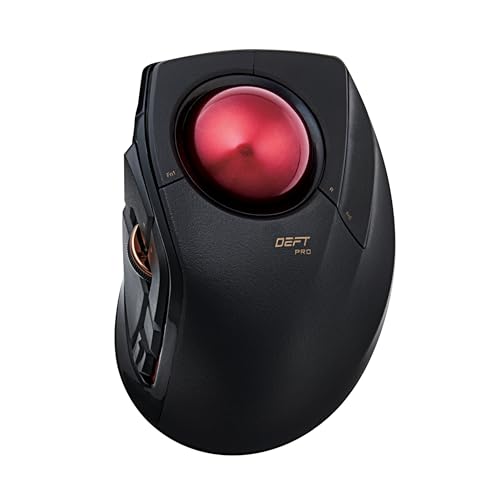
Companion reading for the trackball desk: the Deft Pro review and the Elecom family guide for the finger-ball side of the story, plus the audio and keyboard coverage for the rest of the workstation.
One more angle: ergonomic shell angle for extended sittings, revisited
Revisit the shell’s angle at the season’s change, because your posture changes with your clothes, your chair’s adjustments and your own fitness in ways too slow to notice daily. The ten-minute audit — elbow level, forearm supported, hand draped, wrist neutral — run quarterly, catches the drift that turns a comfortable setup into a quietly costly one. Owners who audit quarterly report that the device seems to stay new; what actually stays new is the geometry around it, which was the comfort all along, with the shell as its most visible accomplice.
One more angle: thumb-ball control and sensor tracking, revisited
Train the thumb’s two speeds deliberately: the travel speed, one roll for a screen’s width, and the placement speed, the last centimetre done at a crawl. Most converts master travel in days and neglect placement for months, then blame the ball for fine work that was never practised. Ten minutes of placement drills — landing on single pixels, tracing a window’s edge, selecting text by the character — in the first week installs the second speed permanently. It is the closest thing this category has to a lesson, and it pays for itself every working day afterwards.
One more angle: scroll wheel and button placement, revisited
Give the wheel a job description beyond scrolling: in most ecosystems it can tilt, click and be reassigned, and on a stationary device those extra verbs are free real estate. Owners who thrive assign the wheel’s click to the precision mode or the application switcher — the two commands a trackball user issues most — and demote the factory default to a button they use less. Audit the assignment after the first month against your actual command counts, the way this review’s Deft coverage advises for buttons generally: the wheel you use five hundred times a day should carry the command you issue fifty times, not the one the designer guessed at.
One more angle: triple-form connectivity switching, revisited
The third connection deserves a deliberate destiny rather than an accidental one. Owners who assign it in advance — the partner’s laptop, the media machine, the office hot-desk — find it earning its keep within the month; owners who leave it empty discover, a year later, that they have been re-pairing Bluetooth like owners of lesser devices. Decide the third machine’s identity during setup week, pair it while the manual is still open, and the EX-G Pro’s headline feature becomes a habit instead of a specification. Infrastructure, in pointing devices as in cities, is only as good as the connections actually made.