Disclosure: As an Amazon Associate, reviewstook.com earns from qualifying purchases. Links on this page are affiliate links at no extra cost to you; prices and availability change frequently, so check Amazon for the latest.
Where to Buy the Best Flatbed Scanner Under $400
Use the links below to check the latest price on Amazon for every pick in this guide to the best flatbed scanner under $400. Each name link and check link goes to the same verified listing, so you can confirm the current model and bundle before you decide. Purchases made through links on reviewstook.com support our testing and writing at no extra cost to you.
- Best Business All-Rounder: HP ScanJet Pro 2600 f1 — Check on Amazon
- Best for Busy Offices: HP ScanJet Pro 3600 f1 — Check on Amazon
- Best Flatbed and Feeder Value: Xerox Duplex Combo Scanner — Check on Amazon
- Best for Enlargements: Epson Perfection V600 — Check on Amazon
- Best A3 Overall: VIISAN VF3240 — Check on Amazon
- Best for Business Software: Epson DS-1630 — Check on Amazon
Finding the Best Flatbed Scanner Under $400 Without Buying the Wrong Shape of Scanner
The search for the best flatbed scanner under $400 is really a search for the right glass. Flatbed design — original face-down on a platen, lid closed, carriage travelling beneath — is the only common format that treats bound, fragile and oversized originals as first-class citizens rather than as jams waiting to happen. The $400 tier is the business-and-enthusiast crossing point. HP’s current ScanJet Pro flatbeds bring duplex feeders and office manners, Epson’s V600 brings enlargement-grade photo capture, and VIISAN’s VF3240 sharpens the A3 offer with 2400 dpi and a four-second cycle. These are no longer starter machines; they are purchases you expect to anchor a desk for years. This guide separates the document-flow buyers from the image-quality buyers, because at $400 the wrong specialisation is an expensive way to be disappointed by an excellent machine.
Not every buyer arrives with a specialism, and this guide respects that: it assumes a pile assembled by life rather than by a profession. The picks are therefore introduced by the slice of ordinary chaos each one handles best, and the detailed reviews keep returning to the same plain question — what happens when this machine meets your actual drawer of unsorted intentions? Machines that answer that question broadly rank ahead of machines that answer a narrower one brilliantly, unless your narrower question is the one being asked. Background reading that genuinely helps here: our explainer at How To Choose A Document Scanner and the wider buying context at Best Batch Photo Scanners.
The six picks below were chosen to cover the distinct jobs hiding inside this one search phrase, and the detailed reviews argue each job openly. If your needs sit between tiers, the neighbouring guides at Best Flatbed Scanner Under $150 and Best Flatbed Scanner Under $1000 frame what stepping down saves and stepping up buys, in the same verified-pick format.
In this guide
Quick Picks
- Best Business All-Rounder: HP ScanJet Pro 2600 f1 — current ScanJet Pro generation.
- Best for Busy Offices: HP ScanJet Pro 3600 f1 — duplex feeder plus glass bed.
- Best Flatbed and Feeder Value: Xerox Duplex Combo Scanner — 25 ppm duplex document pace.
- Best for Enlargements: Epson Perfection V600 — enlargements to 17 x 22 inches.
- Best A3 Overall: VIISAN VF3240 — 2400 dpi optical on A3 glass.
- Best for Business Software: Epson DS-1630 — 25 ppm document pace.
How These Picks Were Chosen
One more exclusion deserves a sentence: legacy and duplicate listings. The candidate sheet contained older generations, refurbished relistings and indeed a power adapter wearing a scanner’s keywords. Duplicates of models before now represented were removed in favour of the source piece listing, and accessories were removed wholly. What stays is a sheet of distinct, present-day, verifiable flatbed scanners — which is the simply kind of sheet a ordering guide should be constructed on.
The pick sheet supplied for this programme carries no price field, so class — read from every model’s verified listing and design — is the honest sorting instrument, and we would somewhat explain that way than hide it to the rear of invented price precision. Tier placement throughout this guide follows product class, not wishful pricing. Entry slimline machines anchor the lowest tiers for the explanation that they are the least elaborate genuine glass-bed machines sold; feeder combinations enter where their class belongs; A3, film and office-grade models rise with their engineering.
Survivors were then matched to this tier by product class — entry, feeder combination, A3, film or office-grade — using their verified listing data, at no point by guessing at prices the listings do not state. Our shortlist started from the full candidate sheet for this category and applied one test before all others: is it an actual flatbed, with a glass bed and a hinged lid? Machines that simply feed sheets, however excellent, failed that test and were removed, since a buyer searching for a flatbed scanner has bound, frail or awkward source pages in mind.
The candidate sheet contained capable machines we by design left out. Feeder-only and sheet-fed models — Epson’s ES-400 II and FastFoto FF-680W, Plustek’s ePhoto Z300, HP’s HPPS100 and the ScanSnap iX1300 and iX2500 — cannot scan a bound page or a delicate original, so they fail this guide’s flatbed test regardless of rate. The CZUR Aura Pro photos pages from higher up rather than scanning them on glass. And a refurbished relisting of the VIISAN VF3120 duplicated a model by now here in original form, so the duplicate went, not the model.
Detailed Reviews: Each Pick for Your Desk
Best Business All-Rounder — HP ScanJet Pro 2600 f1, Flatbed + ADF
Strengths
- Duplex feeder plus true flatbed
- Current ScanJet Pro generation
- Built for business document flow
Trade-offs
- No image in verified listing data
- Document-first; photos secondary
- Premium over home flatbeds
| Modes from listing | Duplex scanning |
|---|---|
| Type | Flatbed document scanner, business use |
| Feeder | Automatic document feeder |
The HP ScanJet Pro 2600 f1 is HP’s current-generation statement of the business flatbed formula: duplex scanning through an automatic document feeder, with a true flatbed in the same body for the originals feeders cannot take. The listing repeats its keywords like a mantra — duplex, ADF, flatbed, business — and for once the repetition is the review: this machine exists so an office stops choosing between stack speed and glass flexibility. Contracts flow through the feeder both sides at once; the bound minute book, the torn page and the plastic card go on the glass. For a growing business, it is the default shortlist name.
For general use with ambitions, a flatbed scanner + adf covers the pair of them the everyday pile and the awkward exception, which is why combination machines anchor so numerous mixed desks.
Set the document feeder’s default to duplex from day one. Workplaces that leave lone-sided as the default discover a year of one-sided archives of two-sided pages, and rescanning history is nobody’s favorite labour.
The combination machine teaches an workplace its own exception rate with embarrassing precision. Whatever the estimate was, the glass bed queue tells the truth weekly — and teams that read that truth adjust their upstream paper, their forms and at times their suppliers. The scanner is the messenger; the wise workplace thanks it rather of blaming the message.
Best for: growing businesses with two-sided administrative paper / Not the right fit for: photo-led home archiving
Best for Busy Offices — HP ScanJet Pro 3600 f1, Flatbed + ADF
Strengths
- Step-up ScanJet Pro flatbed
- Duplex feeder plus glass bed
- Business document throughput focus
Trade-offs
- No image in verified listing data
- Premium over the 2600 f1
- Documents first, photos second
- Modes from listing
- Duplex scanning
- Role in range
- Step-up ScanJet Pro flatbed
- Type
- Flatbed document scanner, business use
- Feeder
- Automatic document feeder
If your in-tray has grown from a nuisance into a process, this is the machine in the range constructed to absorb that growth absent changing how the business functions. The HP ScanJet Pro 3600 f1 is the step-up sibling in HP’s business flatbed line: the identical duplex ADF plus actual flatbed architecture as the 2600 f1, positioned a rung higher for businesses whose scanning volume justifies reaching more. The listing’s language is identical in spirit — duplex scanning, auto document feeder, flatbed, ideal for business use — as the formula is proven; what the higher rung buys is headroom for busier desks and longer day-to-day duty.
For broad use with ambitions, a glass-bed scanner + adf covers the two the day-to-day pile and the awkward exception, which is why combination machines anchor so numerous mixed desks.
Beside a shared machine, pin up a printed one-page guide — the save location, the naming pattern, the person to ask — and you will prevent more lost scans than any specification on the sheet can.
A business combination scanner grows into infrastructure inside a quarter: the in-tray empties by way of it, the digital archive grows to the rear of it, and new staff are inducted into its practices as part of learning the workplace. That infrastructural status is the buy’s genuine return — scanning stops being a task somebody remembers and turns into a property of the area, like the printer’s hum or the kettle’s location.
Best for: busy shared businesses with permanent queues / Not suited for: occasional scanning a few times a month

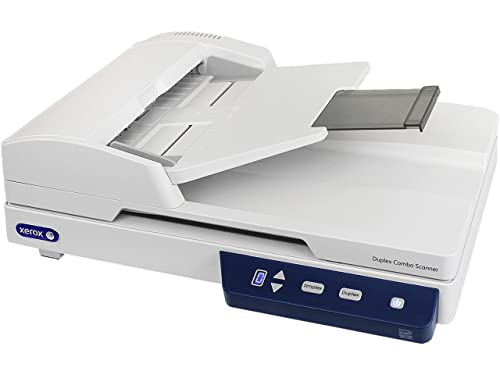
Best Flatbed and Feeder Value — Xerox Duplex Combo Scanner, Flatbed + ADF
Strengths
- Flatbed and feeder in one body
- 25 ppm duplex document pace
- 35-sheet feeder for daily batches
Trade-offs
- 600 dpi ceiling suits documents
- Feeder cannot take bound items
- Business tool, photo afterthought
| Resolution from listing | 600 dpi |
|---|---|
| Speed from listing | 25 ppm duplex |
| Feeder | 35-sheet ADF |
| Use | Digitisation, archiving, document management |
Twenty-five duplex pages a minute from a 35-sheet feeder covers the plenty of at genuine workplace pace; the flatbed further down covers the bound, the delicate and the odd lacking a next buy. The Duplex Combo’s proposition can be written on one line: the automatic feeder handles the a great many, the glass bed handles the rest, and the workplace stops sorting its life into two machines. At 600 dpi it is unapologetically a document engine. For mixed administrative paper — which is to say, for administrative paper — it is the most full response its tier supplies.
For the generalist whose documents has quietly grow into volume, a flatbed scanner + adf is the upgrade that ends the page-at-a-while era without surrendering the glass bed that made glass-bed machines deserving of owning.
Hold on to a compact ‘glass list’ taped near the machine — bound, frail, laminated, harmed — so all users in the business sorts the identical way absent a meeting about it.
A well-held unit at five seasons is an asset with a service history; a neglected one is a alert. Finally, this class ages in public: its rollers, pads and glass record the workplace’s volume frankly. Retain the log, preserve the cloth, preserve the conventions, and the machine will hold on to the workplace’s paper moving for the complete of its long, unglamorous, indispensable life.
Best for: mixed teams: stacks by feeder, exceptions by glass / Not suited for: gallery-grade photo reproduction
Best for Enlargements — Epson Perfection V600, Letter/A4 flatbed + film
Strengths
- 6400 x 9600 dpi capture
- Enlargements to 17 x 22 inches
- Serious photo and film intent
Trade-offs
- No image in verified listing data
- Wired USB only
- Film pace is deliberate
- Resolution from listing
- 6400 x 9600 dpi
- Enlargements
- Up to 17 x 22 inches
- Connection
- Wired USB
Where the V550 is the archivist’s all-rounder, the V600 is aimed at the print at the end of the process: enlargements up to 17 by 22 inches, from a listing quoting 6400 by 9600 dpi. That is a photographer’s specification, written for users who frame things. Wired USB keeps the connection as grave as the capture. If your scans live on screens, the premium buys little; if they live on walls, the V600’s headroom is the gap between a copy and a reproduction — and all users who has compared the two on paper understands the distinction instantly.
Adding a letter/a4 flatbed + film to a general setup is adding a time machine: the negatives in the envelope stop being a mystery format and rejoin the family’s visible history.
No product image accompanied the verified listing data for the V600, so rely on its quoted specifications — 6400 x 9600 dpi and 17 x 22 inch enlargements — and inspect the seller’s present-day listing if the exact revision counts.
Programs literacy carries weight more in this class than in any other here. Holders, batch scan settings, colour care for negatives, settled dust technologies and their exceptions — the machine’s grade expresses itself via the operator’s understanding. The good news is that the learning curve is front-loaded: the tenth sitting runs on the initial sitting’s lessons, and by the fiftieth the operator’s judgement is itself a piece of archiving equipment.
Best for: printing enlargements from treasured originals / Not suited for: screen-only sharing on a budget


Best A3 Overall — VIISAN VF3240, A3 flatbed
Strengths
- 2400 dpi optical on A3 glass
- 4-second A3 colour cycle
- Drawings, photos and records alike
Trade-offs
- Premium over the VF3120
- Desk-hungry A3 footprint
- No feeder; deliberate pace only
| Optical resolution | 2400 dpi |
|---|---|
| Scan area | 304 x 426 mm (A3) |
| Speed from listing | A3 colour page in 4 seconds at 200 dpi |
The VF3240 justifies its step over the VF3120 with two counts a buyer can verify: 2400 dpi optical in its place of 1200, and four seconds as an alternative of eight for an A3 colour page at 200 dpi. All of it else is shared DNA — the 304 by 426 millimetre bed, the generous-format brief. That clarity is refreshing: if your A3 source pages are administrative paper and records, the sibling is enough and the saving is genuine; if they are artwork and prints headed for reproduction, the spare capture depth is not a luxury but the full point of converting to digitised files them.
A a3 flatbed earns generalist respect by making the exceptional commonplace — the one big drawing, the one ledger, the one spread — absent demanding specialist devotion the rest of the year.
Run one A3 original at the two document and full capture resolution before committing to a functioning technique; the comparison teaches you more about your genuine demands than any specification table, and it takes less than a minute on this machine.
An A3 scanner also changes what a home or workplace agrees to retain. The ledger that was ‘too big to copy’ turns into copyable; the poster’s fate stops depending on a frame’s survival. That change in what is preservable is the format’s real buy, and it is why owners of big beds rarely return to compact ones actually when nearly all of their pages are commonplace.
Best for: A3 artwork and records needing finer capture / Not suited for: shoppers who at no point scan beyond A4
Best for Business Software — Epson DS-1630, Flatbed + ADF
Strengths
- 25 ppm document pace
- TWAIN and ISIS for business software
- 3-year next-day replacement warranty
Trade-offs
- No image in verified listing data
- Document focus, not photo work
- Business pricing over home models
- Warranty from listing
- 3-year, next business day replacement
- Speed from listing
- 25 ppm
- Drivers
- TWAIN and ISIS
The Epson DS-1630 is the business-serious flatbed-and-feeder combination: 25 ppm document scanning, TWAIN and ISIS drivers for integration with professional document software, and a listing that leads its warranty as a feature — three years with next business day replacement. That warranty tells you who Epson built it for: offices where a dead scanner is a stopped process, not an inconvenience. Under the lid it keeps a true flatbed for bound and fragile originals, so the awkward ten percent of paperwork stops being a separate problem. For a small business formalising its records, this is the grown-up option.
For the generalist whose paper files has quietly grow into volume, a glass-bed scanner + adf is the upgrade that ends the page-at-a-while era without surrendering the platen that made glass-bed machines meriting owning.
No product image was supplied in the verified listing data for the DS-1630, so judge it by its business specifications — 25 ppm, TWAIN and ISIS, three-year next-day warranty — which are the reasons businesses buy it anyway.
Home purchasers can skim those paragraphs; owners should read them on two occasions. Warranty stops being a line in a listing the initial hours a scanner fails in a busy week. Businesses in this class learn to file the proof of buy with the process documentation, to know the claim route before it is needed, and to worth next-day promises at their genuine price — the price of the calendar days they prevent.
Best for: businesses standardizing document capture / Not the right fit for: hobbyist photo archiving
Comparison Table
| Pick | Format | Verified highlight | Best role |
|---|---|---|---|
| HP ScanJet Pro 2600 f1 | Flatbed + ADF | Automatic document feeder | Best Business All-Rounder |
| HP ScanJet Pro 3600 f1 | Flatbed + ADF | Automatic document feeder | Best for Busy Offices |
| Xerox Duplex Combo Scanner | Flatbed + ADF | 35-sheet ADF | Best Flatbed and Feeder Value |
| Epson Perfection V600 | Letter/A4 flatbed + film | Up to 17 x 22 inches | Best for Enlargements |
| VIISAN VF3240 | A3 flatbed | 2400 dpi | Best A3 Overall |
| Epson DS-1630 | Flatbed + ADF | 25 ppm | Best for Business Software |
If the table and the reviews seem to disagree, confidence the reviews: the table reveals what every pick is, the reviews show what per pick is like. The format column is the initial filter, the highlight the next, and Best Printers For Compact Business supplies the deeper background for after the shortlist forms.
How to Choose the Best Flatbed Scanner Under $400 for Your Workload
At $400 the money buys depth in one direction. Document buyers get current-generation duplex feeder-plus-flatbed combinations built for daily queues. Photo buyers get 6400-class capture aimed at enlargements. A3 buyers get resolution and speed together instead of choosing. What the tier still withholds is the flagship layer — dual-lens pro photo systems, the biggest archiving beds, the heaviest office duty cycles — which is what the $700 and $1000 guides exist to cover. Buy depth where your work is deep, and let the other directions go.
List the five scanning jobs you actually do, confirm which picks cover all five, and simply then compare the finer specifications. For a mixed accumulation, the choosing logic is coverage initial, excellence next. A scanner that does your entire list adequately beats a brilliant machine that refuses one item on it — the refused item is the one that sends you back to photographing administrative paper with a phone, which is where this buy started.
Warm-up, lamps and the myth of the slow start
A machine that is set when the envelope is opened gets used for the lone page; a machine with a ritual gets bypassed for it. Older scanner generations needed lamp warm-up; the LED-era machines in these pages are for practical purposes instant, which quietly changes how scanning fits a day. When comparing picks, treat readiness as a throughput figure in disguise — the fastest scanner in this series, in lived experience, is frequently the one that was by now awake.
The archive’s enemy is the rescan
Every specification in these pages can be re-read as a defence in opposition to rescanning. Capture resolution headroom defends the enlargement; the big bed defends the oversized original; the warranty defends the schedule; the searchable output defends the query asked in three seasons. Price the picks by the rescans they prevent and the flagship tiers stop looking extravagant — a rescan of a returned, lost or degraded original is the majority of costly scan in any electronic archive, when it is feasible at all.
Size the desk before the scanner
A3 and big-format models require a level surface with operating area around them; slim models earn their premium in centimetres; business combinations call for clearance for feeder trays and the stacks that feed them. Glass-bed machines are furniture. Measure the intended home — depth, lid clearance, cable reach — before comparing any other specification, as the best scanner in these pages is a poor buy if it lives in a cupboard, and a cupboard scanner’s real outlay per scan is infinite.
Understanding ‘optical’ versus headline resolution
Listings in this category quote two kinds of number: optical capture resolution, which the hardware truly samples, and larger statistics achieved in part by companion software interpolation. This guide’s spec cartons quote the optical counts from the verified listings — the figures that describe captured information rather than computed guesses. Interpolation has its uses, but electronic archive decisions should be made on captured truth: an enlargement can merely spend fine detail the sensor actually collected, and no arithmetic afterwards can mint more of it.
Two practices shield per buyer in this category. Opening, settle the destination filing folder and naming pattern before the scanner turns up, for the explanation that the collection is the product and the machine is merely its supplier. Next, preserve the neighbouring tier in view: the guide at Best Flatbed Scanner For Home Business Under $400 presents what the next step changes, and the one at Best Flatbed Scanner For Compact Business Under $400 displays an identical workload read by way of a distinct lens — the pair of them useful correctives before cash moves.
Scanning Workflows: Three Jobs This Tier Handles Constantly
Making a household document vault
The vault’s merit is realised on the worst working days — the flood, the theft, the bereavement — when the right document in ninety seconds is deserving of more than the whole lot else the scanner ever did. Every household has twenty files on paper that constitute its legal self: identities, deeds or tenancy, insurance, warranties, certificates, wills’ locations. Scan them a single time, by design, into an encrypted or access-controlled directory, backed up in a next place, and rehearse finding them.
Capturing a research project’s sources
Researchers drown in photocopies of things they half-bear in mind reading. Scan sources at the moment of scanning minutes — the chapter, the article, the digitised collection page — with the citation in the filename, and the campaign gains a searchable memory that outlasts the library loan. Book-friendly picks guard the bindings; searchable output protects the argument. When the writing starts, the sources response at the pace of thought, and the work’s bibliography assembles itself from the filing folder it by now lives in.
Clearing an estate’s paperwork with care
Executors and households face paper at its the majority of emotional and nearly all bureaucratic simultaneously: certificates, policies, letters, prints, the contents of a workstation that meant a life. A flatbed scanner, used carefully and in sittings, lets a number of relatives share the labour and the consequences — source pages retained by one, perfect copies held by all. Scanning here is not efficiency; it is fairness and preservation at one time, and the machines throughout this guide are at their nearly all humane in this labour.
How Do You Set Up a Flatbed Scanning Routine That Sticks?
Separate the river from the rocks
Do the split at the in-tray, not at the machine, and per stream runs uninterrupted at its natural pace. A combination scanner invites one organisational act: split every pile into the river — clear loose pages that flow by way of the automatic feeder — and the rocks — bound, frail, laminated or injured pieces destined for the platen. The river turns into background labour; the rocks get brief, careful attention; and the automatic feeder never meets the source piece that would have jammed it at page nine of twenty.
Load like the feeder is listening
Watch the opening pages of a long run emerge properly — order, orientation, the pair of them sides present — before trusting the rest. Document feeders reward ceremony: staples and clips out, pages fanned and jogged square, sizes retained uniform in the span of a batch, duplex set as the standing default for business paper. Ninety seconds of ceremony at the start is the full distinction between a document feeder that feels like automation and one that feels like a slot machine, and the ceremony at no point stops funding itself.
Begin with the station, not the scanner
Fix the stage a single time and per coming scanning session inherits the fix, which is the closest thing scanning has to compound interest. Arrange the material stage initial: scanner level and reachable, a clear landing strip for incoming pieces, a next for completed ones, and the computer close enough that inspecting a scan is a glance rather than a journey. Scanning sessions fail on logistics more regularly than on scan settings — the accumulation over the room, the chair that must be moved, the cable that reaches merely now and then.
Let each original type have its moment
Run all the paper files at document capture settings, then all the prints at photo capture settings, then the bound material with the lid arranged for them. Resist the mixed accumulation. Type-by-type scanning keeps capture settings stable, keeps your treatment appropriate — paper is robust, photos are not — and yields directories that are coherent before they are actually named. The backlog appears slower sorted and finishes faster; operators who learn this once at no point willingly return to the shuffle.
Protect the glass stream’s dignity
Hold on to a written glass list near the machine — bound, torn, taped, laminated, valued, oversized — and empower all users to route those source files on paper to the bed absent debate. A single time an automatic feeder exists, the whole lot starts looking feedable. The combination design’s entire worth is that the exceptions have a proper home; an business that forces them by way of the automatic feeder anyway has ordered the home and refused to live in it, and will pay for the refusal in jams and, in minutes, in a harmed original.
Difficulty: book scans curve and darken near the spine -> fix: change the geometry, not the pressure. Forcing a book flatter damages the binding and barely aids the image. In its place, support the volume so the page being scanned rests naturally on the platen, scan in smaller sittings so you can reposition patiently, and think about the book-edge designs throughout this guide if bound material is your principal workload — reading close to the spine is a hardware feature, not a technique you can bully an routine flatbed into.
Issue: scans of glossy prints show rainbow sheen patches -> fix: change the angle, not the configuration. Glossy surfaces and flatbed light can interfere into iridescent patches, in particular on resin-coated prints. Rotate the print a few degrees flat on the platen and rescan; the interference pattern hinges on angle, and a modest rotation in the majority of cases moves it off the image wholly. Scanning via the print’s protective sleeve, if it has one, can also break the effect — test on one print before committing a crate to the route.
Issue: scans show a repeating line or speck in an identical place -> fix: wipe the glass bed. A mark that appears at an identical position on per scan lives flat on the glass bed, not on your source files on paper. Clear the platen with a soft, lint-open cloth and a bit glass cleaner applied to the cloth, never sprayed into the machine, and inspect the underside strip the carriage parks under. On feeder models, also wipe the narrow scanning strip in the paper path — a sole crumb there draws a line down any page until it is removed.
Difficulty: pages feed two at a while or skew in the document feeder -> fix: prepare and maintain. Double feeds as a rule mean a glazed separation pad or a batch loaded with static and mixed sizes. Fan the pile, square it, hold on to sizes uniform per batch, and wipe the document feeder’s pad and rollers with a slightly damp cloth as routine maintenance. If one original is curled or folded, it belongs on the platen bed for that pass — the combination design exists so that no page has to be forced by way of a path it does not fit.
Going Deeper: Habits That Make Any Flatbed Better
Finally, note what the number on the crate cannot tell you: whether you will use the thing. Per pick in these pages, from the entry floor to the flagship ceiling, outperforms the scanner that stays in its packaging awaiting the perfect weekend. Set the machine up the day it turns up, scan one genuine thing before bed, and let momentum do what motivation keeps promising to. Archives are not constructed by purchases; they are constructed by Tuesdays.
Colour honesty beats colour enthusiasm. Screens differ, printers differ, and a scan that appears vivid on your monitor may solely be your monitor. For artwork and photos that count, judge scans versus the source piece under the identical light, retain the master unedited, and make your vivid version a copy. The CCD and dual-lens picks in these pages earn their tiers by capturing faithfully; the worst use of that fidelity is to overwrite it with the initial filter that catches your eye.
There is a moment in per big undertaking when the accumulation stops looking infinite. It comes earlier than expected — characteristically a third of the way via, when the system is proven and the rhythm is yours. Safeguard that moment by not upgrading all of it mid-exertion: new machine, new programs and new filing folders introduced in parallel will outlay the rhythm that made the end visible. Full with the tools that started the job where you can; let the next labour enjoy the upgrades, planned from a position of completed strength.
The scanners over this guide will outlast a great many projects; the routine of finishing is what turns their capacity into a collection you are proud to hand over. End per campaign with a victory lap that takes five minutes: open three random files from the completed carton, confirm they are legible, named and backed up, and then write the carton’s name on the done list. It sounds ceremonial since it is, and ceremonies are how long projects actually end in its place of dissolving.
Faded handwriting wishes for contrast care; glossy prints hope for settled dust habit; thin paper wishes for a backing sheet. Inkjet-printed pages, laser prints, typewriting and handwriting all age differently on the platen, and a varied collection teaches the differences swiftly. None of this requires expertise — merely the habit of looking at the initial scan of per new type before running its complete household via. The scanner scan settings are a modest vocabulary; source pages are the grammar, and grammar is learned per document, not per manual.
The picks overhead differ in size and velocity, but all of them share this truth: the routine around the platen carries weight as much as the platen. Ergonomics decides whether scanning happens. A scanner at the wrong height, with pieces piled spanning the area and output directories three menus deep, loses to the phone camera per while — not on standard, but on friction. Arrange the station so a sole page can be scanned inside a minute of deciding to: machine out, cable in, piles one or the other side, presets set.
Scanning in a following language, or scanning paper files whose language you do not read, is a hushed argument for searchable output and careful naming. Where a pick gives text recognition, use it, and name files with dates and document types that survive translation. A passport page, a foreign property deed, a grandparent’s letters in one more alphabet — these are merely the files that get searched for in a hurry, by a person else, calendar years later, and findability is the gift you leave them.
Think of the scanner and the shredder as a pair, at least for business and home paper files whose pieces call for not survive digitisation. A scan you confidence — verified, named, backed up — is what makes the shredder protected to use, and the shredder is what makes the filing cabinet shrink. The machines in these pages earn the confidence half of that partnership; the verification routines spanning this guide’s how-to sections earn the rest. Paper reduction done in the wrong order is merely loss with good intentions.
Common Mistakes
Ignoring the software half of the purchase
Two scanners with alike glass can generate absolutely distinct archives depending on tagging, searchability and driver support. A photo collection absent names, a book scan absent searchable text, a business scanner the business programs cannot see — every is a hardware success and a process failure. Read the programs lines of the spec containers as seriously as the hardware ones.
Buying for the archive you wish you had
The film scanner for negatives you do not own, the A3 bed for artwork you at no point made, the automatic feeder for stacks that turn up on two occasions a year — aspirational purchases strand actual cash in imaginary workloads. Inventory the concrete accumulation, with your hands, before ordering. The right scanner for the real accumulation will yet be a pleasure; the right scanner for the imaginary one turns into furniture with a specification sheet.
Scanning the archive in the wrong order
Order by perishability, not by convenience. Starting with the plain, indestructible administrative paper feels productive and quietly risks the collection: the fading receipts and borrowed prints wait at the bottom of the carton while their deadlines pass. A undertaking interrupted after the frail material is saved has succeeded at the part that could not be repeated, whatever persists in the container.
Assuming the biggest number wins the comparison
A pick can win any row and lose your workstation. Comparison tables reward the largest figure in every row, but workloads reward fit: the bed that takes your original, the automatic feeder that matches your pile, the capture that serves your output. Read tables as maps of territory rather than as league standings — the reviews throughout this guide are written in that spirit, and your shortlist should be too.
Letting one bad scan poison a batch’s reputation
Faith in an collection is statistical — it rises with verified batches and falls with discovered errors — and it is much cheaper to maintain than to rebuild. A skewed page in a directory of good ones makes reviewers distrust the filing folder. Verify in compact batches so the bad page is caught while its original is in reach, and the batch keeps its good name.
Buying a sheet-fed machine for bound originals
The nearly all costly scanner error is a type error: a rapid feeder machine that cannot open like a book, ordered by a person whose backlog is half bound. Verify the format before the counts — glass bed, hinged lid — for the explanation that no rate specification rescues a scanner from the wrong shape.
Final Recommendation
For most buyers reading a guide to the best flatbed scanner under $400, the first pick — the HP ScanJet Pro 2600 f1 — is the recommendation to beat, because it covers the widest share of this audience’s real pile at this tier. Choose the photo-leaning picks when images are the point, the feeder combinations when stacks are the point, and the format specialists when size or binding is the point; the reviews above make each of those cases explicitly. What every pick here shares is the thing the search promised: a true flatbed, verified from its listing, with its compromises stated in its own section rather than discovered in your first week.
The picks in these pages were picked to reward that momentum for calendar years; the rest of the outcome is, as it should be, in the operator’s hands. Our closing advice comes at a price no funds and applies to any badge overhead: set the machine up the day it lands, scan one real document in front of you sleep, and file that scan thoroughly. Momentum, a single time established, carries projects that motivation alone abandons by February.
Frequently Asked Questions
Why do some picks in this guide have no product image?
For the cause that the verified listing data supplied for those models included no image, and this programme does not borrow or fabricate imagery. The affected picks — a minority, named in their reviews — are presented on their verified specifications alone. It is a modest visible gap that buys a larger invisible one: all of it else in the article, from ASINs to specifications, comes from the identical verified source, so the absence of a picture is itself a sign the rest can be trusted.
Can a flatbed scanner handle thick or bound items like passports and books?
Yes — that is simply the work sheet-fed machines cannot do and glass-bed machines exist for. The variable is the lid: rising lids for thick books, removable lids for albums, adjustable lids on the A3 VIISAN, book-edge designs from Plustek for text near the spine, and a specialist A5 bed from an identical maker for passports and ID files on paper. Match the lid to the item and thickness stops being a drawback at all; it turns into the grounds the buy was right.
Do I need an automatic document feeder?
Count last month’s pages, not next year’s ambitions. If multipage pages arrived weekly in stacks, an automatic feeder changes your life and the combination picks here add one without surrendering the glass bed. If your scanning was a page here and a photo there, an automatic feeder buys you an pricey lid ornament. There is no prestige in the feature one or the other way — only fit. The honest count takes two minutes and has saved more anybody reading shopping from the wrong tier than any review paragraph ever written.
Can I scan directly to my phone or tablet?
Some ecosystems enable companion-app functioning methods, but the flatbed scanners throughout this guide are computer-centred machines: the scan is made at the worktop, then shared onward by directory, cloud or message. The Epson V39 II’s scan-to-cloud listing is the closest thing here to a direct route, landing files where phones by now appearance. Treat the computer as the electronic digitised archive’s home and the phone as a window onto it, and the operating method stays sane — masters in one backed-up place, copies in per pocket that calls for them.
Is a flatbed scanner still worth buying when phones have cameras?
For records, yes — and the gap is not close. A phone leans over a page and guesses; a flatbed scanner holds the page flat, lights it evenly and measures it square, which is why scanned pages are accepted where photographed ones are queried. Hold on to the phone for whiteboards and receipts in the field if you must, but let the glass bed manage contracts, certificates, photos and any item whose next reader is official. Indeed the floor models throughout this guide yield files with a distinct legal and archival weight than a snapshot.
How long will a flatbed scanner last?
Seasons, as a rule — the design has few moving parts beyond a carriage and, on combination models, feeder rollers that count as consumables. Longevity is for the most part environmental: a clear, level, permanent home, settled dust retained out by a closed lid, and glass cleaned with a light hand rather than heroically. The business picks here add warranty structures that assume everyday duty. Treat any pick over this guide as a five-to-ten-year appliance, buy the tier your workload justifies rather than the one your optimism prefers, and it will apt be retired out of abundance rather than failure.
How do I keep scans organised across a big project?
Organization is a determination made one time and executed ten thousand times. Pick the directory shape, opt for the naming pattern, opt for the backup, and then let every sitting only obey. Tagging bundled software, bundled with the Visioneer picks here, and searchable output, the book picks’ speciality, multiply the system’s merit — but they multiply whatever system exists, among them a chaotic one. Build the boring structure initial; the interesting electronic archive grows inside it, findable at per stage of its growth.
Can a flatbed scanner scan books without damaging them?
The book rests open flat on the platen rather than being forced by way of rollers, and models with high-rise or removable lids, adjustable lids, or the specialist book-edge designs in these pages go more, reading close to the spine while the binding stays at a natural angle. Yes — that is one of its defining advantages. Labour carefully, support the volume, and never press a spine flat to satisfy a scanner; the book specialists here exist simply so you do not have to.

