Disclosure: As an Amazon Associate, reviewstook.com earns from qualifying purchases. Links on this page are affiliate links at no extra cost to you; prices and availability change frequently, so check Amazon for the latest.
Where to Buy
At one hundred and fifty dollars, the power supply market’s center of gravity sits exactly here: 850 watts of Gold-class, fully modular, current-standard engineering from the brands that define the category — and this search for the best pc power supply under $150 is stocked entirely from that class, with all six picks linked to listings verified against this site’s catalog data. No holdovers, no legacy compromises, no prose-only slots: at this budget, a guide owes you the real shelf. Product pages here are served through reviewstook.com, and each linked name below goes straight to the listing — check the live price there, because this tier’s prices move with card launches and sales seasons alike.
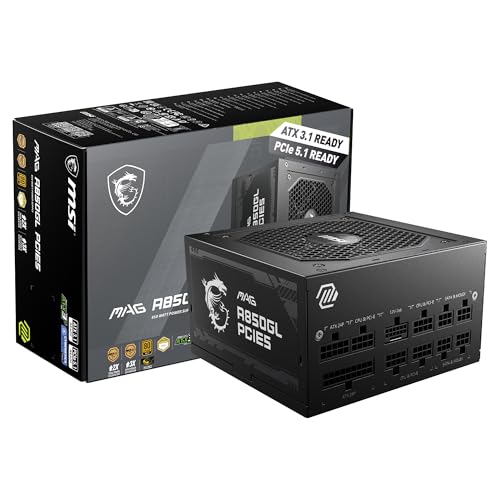
- Best Overall: MSI MAG A850GL PCIE5 — Fully Modular 850W 80+ Gold, ATX 3.1 — Check on Amazon
- Best Premium Alternative: CORSAIR RM850e (2025) — ATX 3.1, 850W, Fully Modular — Check on Amazon
- Best Smart Fan Features: Thermaltake Toughpower GT 850W — ATX 3.1, 80 Plus Gold, Smart Zero Fan — Check on Amazon
- Best Value in the Class: ASRock PRO 850G Power Supply — 850W 80 Plus Gold, ATX 3.1 — Check on Amazon
- Best Compact Modular: MSI MAG A750GL PCIE5 — Fully Modular 750W 80+ Gold, ATX 3.1 — Check on Amazon
- Best 750W Value: ASRock PRO 750G Power Supply — 750W 80 Plus Gold, ATX 3.1 — Check on Amazon
The Best PC Power Supply Under $150 Is the Category’s Center of Gravity
Every product category has a price where the engineering stops being rationed, and for power supplies that price is this one. The best pc power supply under $150 is an 850W unit from the modern class: Gold-tier efficiency, the ATX 3.1 standard with its native 12V-2×6 connector, modular cabling as an expectation rather than a luxury, and — on this page’s top picks — a warranty stated at ten years. Nothing in that sentence was available at the tier below without a compromise attached, and nothing above this tier changes the sentence’s fundamentals; the higher guides in this cluster add capacity, silence engineering, and flagship headroom, but they refine a formula that is completed here. If a single page in this cluster deserves the word “default,” it is this one, for the mainstream of serious builds.
The audience is correspondingly broad. The gamer on a strong current card, the creator whose workstation games on weekends, the platform builder assembling a machine for the next five years, the upgrader whose older unit predates their card’s connector — all of them land on this shelf, and the differences between the six picks are differences of emphasis rather than of adequacy. Two brands’ flagship-adjacent 850W modular units anchor the top, a feature-led Thermaltake offers the smart-fan alternative, ASRock’s PRO pair delivers the same modern standard at value prices with shorter stated coverage, and MSI’s compact 750W serves the smaller case. Choosing among them is the pleasant kind of problem: every route through this page ends at a unit this guide would install in its own machine.
One discipline survives from the cheaper tiers, because it should: the entry class does not appear here. The Bronze and White units that anchored the $50–$100 guides are good products in their place, and their place is not a list whose premise is the modern class complete. A $150 guide that padded itself with a $50 unit would be lying about both. What you get instead is six variations on the correct answer — and a comparison, warranty column first, that this cluster has been building toward for twelve articles.
In this guide
Quick Picks
- Best Overall — MSI MAG A850GL PCIE5: 850W, Gold, fully modular, compact, native dual-color cable, and ten stated warranty years.
- Best Premium Alternative — CORSAIR RM850e (2025): Corsair’s modular 850W with a Cybenetics Gold rating, low-noise brief, native 12V-2×6 cable, and Modern Standby support.
- Best Smart Fan Features — Thermaltake Toughpower GT 850W: Gold efficiency with a Smart Zero Fan and a native PCIe 5.1 connector rated in the listing at 450W.
- Best Value in the Class — ASRock PRO 850G: the modern 850W standard at the class’s value price, with three stated warranty years.
- Best Compact Modular — MSI MAG A750GL PCIE5: the 750W sibling — fully modular, compact, ten stated years — for smaller cases and cards.
- Best 750W Value — ASRock PRO 750G: the modern 750W standard at its floor price in this tier.
How These Picks Were Chosen
All six linked picks were verified through this site’s own catalog check on the date recorded in this article’s source notes, and the spec boxes quote only the verified listing titles — wattage, the exact efficiency certification each listing claims, standard and connector wording, modularity, fan features, and warranty where printed. One distinction this page is careful to preserve, because the market blurs it deliberately: the Corsair pick’s listing claims a Cybenetics Gold rating, which is a different certification program from 80 Plus, while the MSI, Thermaltake, and ASRock listings claim 80 Plus Gold (written as 80+ Gold in MSI’s titles). Both are independent efficiency certifications; they are not the same program, and this guide reports each exactly as listed rather than flattening them into one word. Where a title does not state a warranty — the Corsair’s does not — the review says so.
The criteria at this tier assume the modern baseline and differentiate above it: capacity class matched to the strong mainstream (850W) and the mainstream proper (750W); modularity, now an expectation, with the ASRock pair’s unclaimed cabling noted as their value trade; warranty as printed, where the MSI pair’s decade sets the page’s standard; and feature honesty — the Thermaltake’s Smart Zero Fan and its connector’s stated 450W rating are reported as the listing states them, without inventing acoustic or electrical measurements no listing provided. Excluded: the entire entry class, by tier discipline; recalled products, absolutely; and any unit whose listing could not be verified. The standards and sizing background lives in PC Power Supply Guide and How Many Watts Does A Gaming PC Need, and the tier below — where this class begins — is at Best PC Power Supply Under $100.
Detailed Reviews: The Best PC Power Supply Under $150, Pick by Pick

Best Overall — MSI MAG A850GL PCIE5, Fully Modular 850W 80+ Gold, ATX 3.1, 10-Year Warranty
Strengths
- The complete modern specification at the class’s center: 850W, 80+ Gold, ATX 3.1 and PCIe 5.1 ready, fully modular and compact.
- Ten-year warranty stated in the listing — the decade platform, at the capacity the strong mainstream actually uses.
- The native dual-color 12V-2×6 cable makes the critical seating check visual for the unit’s whole life.
Trade-offs
- It commands this tier’s premium position among the modern picks; the ASRock pair undercuts it on price with coverage traded away.
- Fully modular ownership means a labeled bag of spares, kept for a decade.
- 850W is the strong mainstream’s ceiling, not the flagship class’s — that story continues in the $200 and $250 guides.
| Verified spec | From listing title |
|---|---|
| Wattage | 850W |
| Efficiency | 80+ Gold |
| Cabling | Fully Modular, Compact design |
| Standard | ATX 3.1 & PCIe 5.1 Ready |
| GPU connector | Native Dual-Color 12V-2×6 Cable |
| Warranty | 10 Year Warranty |
The A850GL leads this tier because it is the pick with no asterisk. Capacity: 850W, the size the strong current card class and its upgrade paths actually ask for. Standard: ATX 3.1 with PCIe 5.1 readiness, the current rulebook, claimed in the listing’s own words. Cabling: fully modular, in a compact body that respects modern case design. Connector: native, in MSI’s dual-color design that turns the generation’s one critical seating check into a glance — color visible means push, color gone means home — at installation and at every reseat for years afterward. Warranty: ten years, stated in the title, which converts the unit from a component purchase into a platform decision. A buyer can disagree about which of those matters most; a buyer cannot point at the one that is missing, because none is.
In a build, the compound effect is calm. The case holds only the cables the system uses, so airflow is a property of the case rather than a negotiation with a cable bundle. The unit cruises in the middle of its capacity under a strong card’s gaming load, which is where Gold efficiency holds its plateau and fans stay unhurried. The card connects natively, the way its maker intended, with the transient standard standing behind the pairing. And the decade of coverage quietly removes the power supply from every future upgrade conversation in the mainstream class — the next card, and the one after, plug into a foundation that was specified for them in advance.
The premium over the ASRock pair is the honest cost of the modularity and the decade, and this guide’s position is that for a platform-minded builder it is the best-spent difference in the tier. The builder it does not serve is the one whose horizon is a single card cycle — that buyer should take the value picks below with this page’s blessing — and the one whose ambitions are flagship-class, who should keep reading upward. For the center of the market, this is the center’s pick.
Best for: strong mainstream builds and platform buyers who want the complete modern unit, once, for a decade / Not suited for: single-cycle buyers who should bank the value picks’ savings, or flagship-class builds

Best Premium Alternative — CORSAIR RM850e (2025), ATX 3.1 PCIe 5.1 Ready 850W, Fully Modular, Cybenetics Gold
Strengths
- Corsair’s RM-series lineage in its current ATX 3.1 form: fully modular, native 12V-2×6 cable included, low-noise brief stated in the listing.
- A Cybenetics Gold efficiency rating — an independent certification program whose testing also speaks to acoustics.
- Modern Standby mode support, a small modernity that suits always-connected desktops.
Trade-offs
- The listing title does not state a warranty length — a notable omission at this level; read the product page’s terms before buying.
- Its certification is Cybenetics rather than 80 Plus, which buyers comparison-shopping by the older program’s tiers should understand before comparing.
- It competes head-on with the MSI above, whose listing prints the decade this one leaves unstated.
| Verified spec | From listing title |
|---|---|
| Wattage | 850W |
| Efficiency | Cybenetics Gold (per listing — a different program from 80 Plus) |
| Cabling | Fully Modular |
| Standard | ATX 3.1, PCIe 5.1 Ready |
| GPU connector | Native 12V-2×6 Cable Included |
| Features | Low-Noise, Modern Standby Mode |
| Warranty | Not stated in listing title |
The RM850e is the establishment’s answer on this page: Corsair’s RM line has been the default recommendation of the modular mainstream for years, and the 2025 ATX 3.1 revision brings the formula current — native 12V-2×6 cable in the box, PCIe 5.1 readiness, a low-noise design brief, and full modularity in a black, compact, unshowy housing. For the builder who values the deepest bench of community knowledge, the longest lineage, and a support operation of global scale, this is the pick, and its Cybenetics Gold rating deserves a precise word: Cybenetics is an independent certification program distinct from 80 Plus, and its ratings speak to efficiency with acoustic measurement in the methodology — a natural fit for a unit whose listing leads with low noise.
The ownership proposition is refinement rather than revelation. Modular cabling keeps the case clean; the native cable retires adapters; Modern Standby support suits the always-connected desktop that wakes instantly and sips correctly. In a strong mainstream build, the RM850e behaves the way its lineage promises: unremarkable in the best sense, session after session, which at this tier is not faint praise but the product category’s entire ambition.
Its one paperwork gap is real, and this guide flags it rather than smoothing it: the listing title states no warranty length. That does not mean the unit lacks coverage — it means the term lives on the product page, and the careful buyer reads it there before ordering, especially with the MSI’s printed decade sitting one review above as the comparison. A buyer who does that two-minute read and prefers Corsair’s lineage and acoustic brief is buying well. A buyer who skips it is buying a logo, and this page does not sell logos.
Best for: builders who value Corsair’s lineage, acoustic brief, and global support, and who read the warranty on the page / Not suited for: buyers who want the warranty term stated in the listing itself


Best Smart Fan Features — Thermaltake Toughpower GT 850W, ATX 3.1, 80 Plus Gold, Smart Zero Fan
Strengths
- Smart Zero Fan, per the listing: the fan strategy is a headline feature, aimed at silence at low loads.
- A native PCIe 5.1 connector whose listing states a 450W rating — a concrete, checkable claim about the GPU connection.
- 80 Plus Gold efficiency and a five-year warranty, both stated in the title.
Trade-offs
- The title does not claim full modularity, so confirm the cabling arrangement on the product page if that matters to your case.
- Five stated warranty years sit between the ASRock pair’s three and the MSI pair’s ten.
- Its connector’s stated 450W rating should be matched against your card’s requirements, as with any specific claim.
| Verified spec | From listing title |
|---|---|
| Wattage | 850W |
| Efficiency | 80 Plus Gold |
| Standard | ATX 3.1 Standard |
| GPU connector | Native 450W PCIe 5.1 Connector (rating as listed) |
| Cooling feature | Smart Zero Fan |
| Model | PS-TPT-0850FNFAGU-3 |
| Warranty | 5 Year Warranty |
The Toughpower GT is this page’s features pick, and its headline is a fan philosophy. Smart Zero Fan, as Thermaltake names it in the listing, describes a unit whose fan strategy prioritizes silence when the load does not demand airflow — the operating profile of a PC that spends its days in documents and its evenings in games, quiet in the first and capable in the second. For the desk-distance builder whose machine is a roommate first and a gaming rig second, that philosophy is not a garnish; it is the product. Paired with 80 Plus Gold efficiency — which reduces the heat the fan exists to remove — the GT makes the most explicit acoustic argument on this page short of the Corsair’s low-noise brief, and it makes it with a named feature rather than an adjective.
Its second specificity deserves equal respect: the listing states the native PCIe 5.1 connector’s rating — 450W — in plain figures. Specific claims are checkable claims, and a maker who prints the number invites the comparison this guide exists to make: match that rating against your card’s requirements, as the listing invites, and the pairing decision becomes arithmetic rather than faith. The five-year stated warranty completes a paperwork profile that sits, deliberately, in this tier’s middle — longer than the value pair’s, shorter than the decade pair’s, and printed where a buyer can find it.
The open question is cabling: the title does not claim full modularity, and a builder for whom detachable cables are decisive should confirm the arrangement on the product page rather than assume it in either direction. That single check aside, the GT is the tier’s thoughtful alternative — the unit for the builder whose priorities run acoustic and specific, from a brand whose power supply lineage stretches back through this entire cluster’s cheaper guides.
Best for: desk-distance builders who prioritize fan behavior and stated specifics / Not suited for: buyers for whom confirmed full modularity is a hard requirement

Best Value in the Class — ASRock PRO 850G, 850W 80 Plus Gold, ATX 3.1 & PCIe 5.1 Ready
Strengths
- The modern 850W standard — Gold, ATX 3.1, native connector — at the lowest price position in its class on this page.
- Capacity headroom that lets a strong build’s unit live in its calm middle range.
- A 120mm low-noise fan per the listing.
Trade-offs
- Three-year stated warranty — the class’s shortest, and the explicit price of the value position.
- No modularity claimed in the title; the routing exercise is the buyer’s.
- ASRock’s PSU line is the youngest here.
| Verified spec | From listing title |
|---|---|
| Wattage | 850W |
| Efficiency | 80 Plus Gold Certified |
| Standard | ATX 3.1 & PCIe 5.1 Ready |
| GPU connector | Native 12V-2×6 Connector |
| Cooling | 120mm Low-Noise Fan |
| Warranty | 3-Year Warranty |
The PRO 850G’s proposition is the standard without the ceremony. Everything electrical that defines this tier — the Gold efficiency, the ATX 3.1 rulebook, the native connector, the 850W capacity class — is present in its listing, at the price position that makes a buyer ask what, exactly, the premium picks are charging for. This guide’s answer, given in their own reviews, is cabling and coverage: modularity, and warranty years counted to ten. A builder whose horizon is one strong card cycle, whose case has a shroud and room, and whose budget has a graphics card competing for every dollar can rationally decline both charges and take this unit with the page’s full endorsement. Value at this tier is not a lesser product; it is the same standard with the options declined.
The ownership experience follows from that framing. The unit will run a strong build in its comfortable middle, quietly by its listing’s fan claim, and the savings will be visible elsewhere in the machine — in the card tier, the storage, the display — every day, in a way a modular cable never is. The three-year stated warranty matches the horizon of the buyer it serves: the upgrader whose next build, three or four years out, will re-shop the standard of that day anyway.
Where the value case collapses is horizon. A platform builder who takes the 850G for its price and keeps it for a decade has not saved the difference; they have spent it on risk the MSI’s decade would have retired. This guide orders the two picks adjacently so that the choice is made with both prices visible — which is all value ever is: the right product for the horizon you actually have.
Best for: strong builds on a single-cycle horizon that would rather spend the difference on the card / Not suited for: platform builders, for whom the decade picks are the real value

Best Compact Modular — MSI MAG A750GL PCIE5, Fully Modular 750W 80+ Gold, ATX 3.1, 10-Year Warranty
Strengths
- The full platform package — modular, compact, decade warranty, dual-color native cable — at the 750W size smaller builds actually need.
- Compact dimensions suit the smaller cases that 850W units crowd.
- Ten stated years make it a two-card platform for the mainstream class.
Trade-offs
- 750W will not serve the stronger card class its sibling anchors; size honesty applies.
- Modular spares to keep and label, as with its sibling.
- Buyers with full-size cases and strong cards should simply take the 850GL.
| Verified spec | From listing title |
|---|---|
| Wattage | 750W |
| Efficiency | 80+ Gold |
| Cabling | Fully Modular, Compact design |
| Standard | ATX 3.1 & PCIe 5.1 Ready |
| GPU connector | Native Dual-Color 12V-2×6 Cable |
| Warranty | 10 Year Warranty |
The A750GL is this tier’s reminder that capacity is a fit, not a score. For the mainstream card class — the majority of serious builds — 750W is the size the card makers themselves recommend, and everything else about this unit matches its 850W sibling feature for feature: the full modularity, the compact body that the listing emphasizes, the dual-color native cable with its visible seating check, and the ten-year stated warranty that turns a purchase into a platform. A builder in a smaller case, or with a mainstream card and a decade plan, loses nothing by choosing it and gains the room its compactness returns to the build.
That room is a working feature in modern cases, whose design trend — smaller volumes, glass panels, dense layouts — punishes oversized components and rewards the ones that fit the era. The A750GL was clearly designed into that trend: compact first, modular always, with the cable set the build needs and no more. In such a case, this pick is not the smaller option; it is the correct one, and its sibling is the one that would have been a compromise.
The discipline is the same one this cluster applies everywhere: let the card’s recommendation choose between the siblings. Mainstream class, decade horizon — this pick, without a backward glance. Stronger class — the 850GL, equally without one. The worst outcome is buying the larger unit for a smaller build out of unexamined caution and spending the difference on capacity that will spend a decade at a third of itself.
Best for: mainstream-card platform builds, especially in compact cases / Not suited for: stronger card classes, which belong to the 850GL
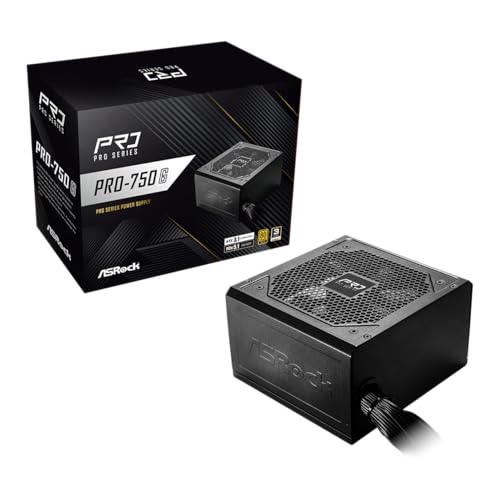
Best 750W Value — ASRock PRO 750G, 750W 80 Plus Gold, ATX 3.1 & PCIe 5.1 Ready
Strengths
- The modern 750W standard at its floor price in this tier — the complete electrical checklist, value-priced.
- Gold efficiency and a low-noise 120mm fan per the listing.
- The natural pair for a mainstream card on a single-cycle horizon.
Trade-offs
- Three-year stated warranty, the value position’s signature.
- No modularity claimed in the title.
- Mainstream capacity only — the stronger class needs its 850G sibling.
| Verified spec | From listing title |
|---|---|
| Wattage | 750W |
| Efficiency | 80 Plus Gold Certified |
| Standard | ATX 3.1 & PCIe 5.1 Ready |
| GPU connector | Native 12V-2×6 Connector |
| Cooling | 120mm Low-Noise Fan |
| Warranty | 3-Year Warranty |
The PRO 750G closes the list the way its sibling opened the value argument: the standard, complete, at the floor. A mainstream card’s recommendation lands at 750W; this unit meets it with Gold efficiency, the current rulebook, and the native connector, at the lowest price on this page. For the builder whose plan is this card, this machine, this cycle — a description that fits most builds ever assembled — the premium picks’ extra years and detachable cables are options, and options declined at a fair price are the definition of value.
Its session behavior is the modern class’s behavior: the unit lives in its middle under a mainstream card, the low-noise fan minds its business, and the native connection retires the adapter era without ceremony. Nothing about the daily experience announces the savings, which is precisely what a value pick owes its owner — the absence of the compromise from every moment except the receipt.
As with the 850G, the horizon test governs. Single-cycle mainstream builds: this is your unit, and the difference belongs in the card or the display. Decade builds: the MSI pair. Stronger cards: the 850G. The 750G’s clarity about its own brief — printed in its title, honored in this review — is the quality this whole cluster has been shopping for since the fifty-dollar guides, here finally available with the modern standard attached.
Best for: mainstream single-cycle builds that want the complete modern standard at its floor price / Not suited for: decade platforms or stronger card classes
Comparison Table
The tier’s whole argument in one view: read the warranty column against the price positions, and the certification column with care — one of these programs is not the other, and both are real.
| Pick | Wattage | Efficiency (as listed) | Cabling | Warranty (as listed) | Link |
|---|---|---|---|---|---|
| MSI MAG A850GL | 850W | 80+ Gold | Fully modular | 10 years | Check on Amazon |
| CORSAIR RM850e (2025) | 850W | Cybenetics Gold | Fully modular | Not stated in title | Check on Amazon |
| Thermaltake Toughpower GT 850W | 850W | 80 Plus Gold | Not stated in title | 5 years | Check on Amazon |
| ASRock PRO 850G | 850W | 80 Plus Gold | Not stated as modular | 3 years | — |
| MSI MAG A750GL | 750W | 80+ Gold | Fully modular | 10 years | — |
| ASRock PRO 750G | 750W | 80 Plus Gold | Not stated as modular | 3 years | — |
How to Choose at One Hundred and Fifty Dollars: Horizon, Then Size, Then Brand
This tier’s decision runs in a new order, because the baseline questions are already answered — every pick here is Gold-class, current-standard, and natively connected. Horizon first: a decade plan routes you to the MSI pair; a single-cycle plan routes you to the ASRock pair; a middle horizon with acoustic priorities routes you to the Thermaltake or the Corsair. Size second: the card maker’s recommendation chooses 750W or 850W within your horizon’s pair, and it is not a close call in either direction — buy the class the card names. Brand third, and only third: Corsair’s lineage and acoustic certification story against MSI’s printed decade and dual-color cable against Thermaltake’s named fan feature — legitimate preferences, all of them, once horizon and size have done the real work. Beginners arriving at this tier for a first build will find the same sequence taught with the mistakes annotated at Best PC Power Supply For Beginners Under $150.
Two Certification Programs, One Honest Explanation
This page’s table contains a subtlety the whole industry prefers blurry, and a $150 buyer deserves it sharp. 80 Plus is the older efficiency certification program, tiered White through Bronze, Silver, Gold and beyond, and four of this page’s picks claim its Gold tier. Cybenetics is a newer, independent program that certifies efficiency too — with acoustic measurement built into its methodology — and the Corsair pick claims its Gold rating instead. Neither program’s Gold is the other’s; the badges are not interchangeable, and a comparison that treats them as one word is a comparison with a hole in it. The practical guidance is simple: both are legitimate independent certifications, which puts all six picks on the right side of the only line that matters — verified versus claimed — and the choice between programs is a preference about methodology, not a quality verdict. What this guide will never do is upgrade a listing’s claim in the retelling: each unit here is described by the certification its own listing states.
Installing a Fully Modular Flagship-Class Unit: The Careful Version
At this tier the installation gains a deliberateness the hardware deserves. Bench first: lay out the exact cables the build needs — main, CPU, the native card cable, one drive lead per cluster — and click them into the unit before it enters the case, while every socket is visible. Label the spares immediately, with the model name, and put them in the unit’s box with a note of the purchase date and warranty term; at this tier that box is a decade archive, not packaging. Seat the unit on the case’s filtered intake. Route the CPU lead behind the tray. Give the native cable its gentle bend and its ritual — seat fully; on MSI units, watch the color disappear; tug lightly; look again. Connect drives last, close the case, and run the build’s most demanding workload for twenty watched minutes as the pairing’s formal introduction.
Problem: the system is silent at first power. Fix: the standing checklist — rear switch, wall cable, main connector, CPU connector — then the modular sockets at the unit end, this tier’s addition, since a bench-clicked cable can still sit a fraction short. Problem: shutdowns under one heavy workload. Fix: the native connector’s seating first, then the honest capacity audit against the card’s recommendation. Problem: a needed cable cannot be found at upgrade time. Fix: it is in the labeled archive box; if it is genuinely lost, order the exact model’s cable from the manufacturer — never substitute another unit’s modular cable, at this tier above all, where the energies are highest and the rule is absolute.
Common Mistakes at This Price Point
Comparing certifications as if 80 Plus and Cybenetics were one program is the tier’s intellectual error, and this page has spent a section retiring it. Second: buying capacity for a flagship you do not own while your actual card’s class wanted the warranty decade instead. Third: leaving the native connector fractionally unseated — the mistake survives every tier and is cheapest to prevent here, where one pick literally color-codes it. Fourth: mixing modular cables between units, the standing dangerous error, now with more cables in more drawers. Fifth: assuming the premium brand’s warranty without reading it — one listing on this page leaves the term to the product page, and the two-minute read is the difference between knowing and believing. Sixth: paying this tier’s prices for last tier’s compromises out of brand habit — every pick here earned its place against the current standard, and habit is not a criterion.
Final Recommendation
The default answer, for the strong mainstream build this tier exists to serve, is the MSI MAG A850GL: complete specification, full modularity, the self-checking native cable, and a decade of stated coverage. Builders who prefer Corsair’s lineage and acoustic certification story — and who read its warranty on the product page — should take the RM850e without a backward glance. Acoustic-first builders belong to the Thermaltake Toughpower GT and its named fan strategy. Single-cycle builders should take the ASRock pair at their card’s size and spend the difference where it shows. And mainstream platform builders in smaller cases should take the A750GL as the correct-sized decade. At this tier there is no wrong door among the six — only horizons matched or mismatched — and matching yours is the last skill this cluster teaches.
Where This Tier Sits: The View From $150
Every tier in this cluster earns its place by answering a question the neighboring tiers cannot, and the under-$150 shelf’s question is the one most builders actually ask: what does the complete modern standard cost when it is bought without apology and without excess? The answer, visible across the six reviews above, is this page — Gold efficiency throughout, the current rulebook throughout, native connectors throughout, and a spread of warranties and cabling philosophies that turns the remaining choice into a genuine preference rather than a compromise. The tier above, surveyed in Best PC Power Supply Under $200, buys the same class at higher capacities and longer stated terms; it is the right page when the card plan is flagship-adjacent or the horizon is a full decade in the strong class. The tier below buys the same standard with concessions distributed across terms and features. This page is the hinge between them, and hinges are where doors are decided.
The same shelf reads differently through the cluster’s other lenses, and the differences are instructive rather than redundant. The budget reading, at Best PC Power Supply For Budget Builds Under $150, converts every pick on this page into cost per covered year and finds a different winner than this general reading does — not because either is wrong, but because a spreadsheet and a household ask different questions of identical hardware. The gaming reading, at Best PC Power Supply For Gaming Under $150, weighs the acoustic and transient behavior of the same six units against session quality and arrives, again, at its own ordering. A buyer who reads two of the three will understand their purchase better than a buyer who reads any single ranking twice, because the picks are the hardware’s facts while the rankings are the reader’s priorities made visible. Choose the priority first; the pick follows, and on this shelf it cannot follow far wrong.
Efficiency, Revisited at the Meter: What Gold Buys Over a Tier’s Lifetime
Every pick on this page carries a Gold-tier certification, and it is worth one clear-eyed paragraph on what that uniformity is worth in money, because the answer disciplines how much any buyer should pay for efficiency claims beyond it. A gaming-class machine under load draws several hundred watts for several hours a day; the difference between efficiency tiers at that draw is a few tens of watts, which compounds across a year into a sum best described as real but small — on the order of a modest dinner, not a component. The larger returns on Gold at this tier are not monetary at all: the unconverted fraction of power becomes heat inside the case, so the efficient unit’s quieter fan, cooler neighbors, and slower dust-baking of everything nearby are the tier’s true dividends, paid nightly. Buyers should therefore hold two ideas at once. Efficiency differences within this page are settled — the badge is uniform, and no pick should be chosen over another on efficiency grounds the listings do not support. And efficiency differences between this page and the legacy shelves below the cluster’s floor are genuine, compounding, and thermal before they are financial. The meter will not make you rich for choosing Gold. The room, the rig, and the years will make you glad.
A Word on Second-Hand Units at This Tier
Sooner or later every buyer at this level is offered a used premium power supply at a value pick’s price, and the offer deserves a principled answer rather than a reflex. The case against is not snobbery; it is information. A power supply’s life is written in heat cycles and dust, neither of which a photograph reports; its warranty, however long the original term, belongs to paperwork a second owner may not hold; and its modular cables — the component whose correctness matters most — are the parts most likely to have been separated, substituted, or lost between owners. Against those unknowns, the used unit’s discount must be weighed not against this page’s prices but against this page’s certainty: verified listings, stated terms, complete cable sets, and a seller accountable for all three. There are buyers equipped to price that risk — builders with test loads, spare cables of the exact model, and a machine whose loss they can afford. For everyone else, this tier’s new-in-box value picks are the honest bargain they appear to be, and the used market’s apparent shortcut is priced in a currency — information — that the buyer does not hold. Buy the certainty. It is, at this level, unusually cheap.
Frequently Asked Questions
Is 850W the right default at this tier, or is 750W enough?
Your card’s published recommendation decides, as at every tier. The strong current class points to 850W; the mainstream class points to 750W. This page stocks both sizes in both philosophies — value and platform — precisely so the card, not the budget, makes the call.
What is the difference between 80 Plus Gold and Cybenetics Gold?
They are ratings from two different independent certification programs. 80 Plus is the long-established efficiency program; Cybenetics is a newer program that also incorporates acoustic measurement into its methodology. Both are legitimate third-party certifications; their badges are not interchangeable, and this guide reports each listing’s claim exactly as stated.
Why do the MSI picks state ten-year warranties while others state three or five?
Because the manufacturers have made different engineering and pricing decisions, and printed them in their listings. The term is the maker’s own commitment, in writing. Platform builders should weight it heavily; single-cycle builders can rationally trade it for the value picks’ lower prices.
Does the Corsair RM850e have a warranty?
Its listing title does not state a term, which this guide reports as-is rather than filling in. The product page carries the terms — read them before ordering, as you should for any pick whose title leaves the column blank.
What does the Thermaltake’s “Native 450W PCIe 5.1 Connector” mean?
The listing states that its native PCIe 5.1 connector — the modern graphics card connection — is rated at 450W. It is a specific, checkable claim: match it against your graphics card’s requirements when you compare picks, the way you would match any stated figure.
Can I use the MSI’s modular cables in the Corsair unit later?
No. Modular cables are model-specific at the unit end, across all brands and within them. Each unit uses only its own cables, kept labeled with it. This rule has no exceptions at any tier, and the energies at this tier make it the one rule to internalize permanently.
When should I shop the tiers above this one instead?
When your card is flagship-class, when you want this class’s features at still larger capacity, or when premium acoustic engineering with published data is a stated goal. The under-$200 and under-$250 guides continue this page’s shelf upward, with the same six-pick discipline.
