Disclosure: As an Amazon Associate, reviewstook.com earns from qualifying purchases. Links on this page are affiliate links at no extra cost to you; prices and availability change frequently, so check Amazon for the latest.
Where to Buy
One hundred dollars is the tier where the modern power supply arrives: Gold efficiency, the ATX 3.1 standard, and a native connector for the newest graphics cards all enter honestly at this budget, and this search for the best pc power supply under $100 is built around that arrival. All six picks are linked to verified listings checked for this guide — the final pick was confirmed in a later verification pass on 2026-11-21, when a verified listing in its class joined the sheet. Product pages here are served through reviewstook.com, and each linked name below goes straight to the listing — use the “check price on Amazon” habit throughout, since this tier’s prices move constantly and no figure printed here would survive the month.
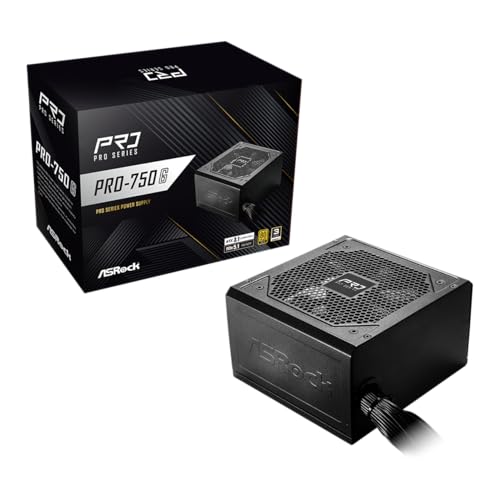
- Best Overall: ASRock PRO 750G Power Supply — 750W 80 Plus Gold, ATX 3.1 — Check on Amazon
- Best Fully Modular: MSI MAG A750GL PCIE5 — Fully Modular 750W 80+ Gold, ATX 3.1 — Check on Amazon
- Best for Bigger Cards: ASRock PRO 850G Power Supply — 850W 80 Plus Gold, ATX 3.1 — Check on Amazon
- Best Value Holdover: ARESGAME AGV Series 500W Power Supply — 80 Plus Bronze — Check on Amazon
- Best Raw Capacity per Dollar: Apevia SPIRIT600W Spirit 600W ATX Power Supply — Check on Amazon
- Best for Small-Form-Factor Builds: Apevia SFX-AP500W 500W SFX Power Supply — Check on Amazon
The Best PC Power Supply Under $100 Is Where the Modern Standard Kicks In
Start with what changes at this number. The best pc power supply under $100 is no longer a Bronze-era compromise with good paperwork; it is, on this page’s top picks, a Gold-rated ATX 3.1 unit with a native 12V-2×6 connector — the current standard, built for current graphics cards, with the transient behavior those cards demand treated as a specification rather than a hope. That is a categorical jump from the tier below, not an incremental one, and it reframes the whole purchase. Below this line, you sized a unit to a card and hoped the spikes behaved. At this line, the two ASRock PRO picks and the MSI pick below were designed against a standard that writes the spikes into the test protocol. For anyone building around a current-generation graphics card, this is the first tier that speaks the card’s native language.
The audience widens accordingly. The mainstream gamer with a current mid-range card is home here. The builder assembling a PC meant to last five years, through one card upgrade, is home here. The upgrader whose older Bronze unit predates their new card’s connector is home here. And — because this guide keeps the value discipline of the tiers below — the builder whose build is honestly light is also served, by a holdover pick that returns change instead of selling them a standard their card cannot use. A hundred-dollar guide that only sold hundred-dollar units would be a worse guide; the shortlist below is organized by build, as always, and it begins with the unit that defines the tier.
Two honest boundaries before the picks. First, the fully modular flagship-adjacent units — the 850W class from the premium brands — live in this cluster’s under-$150 and under-$200 guides; a couple appear in this site’s wider coverage, but assigning them to a hundred-dollar list would misstate their class, and this page does not do that to make its shortlist look richer. Second, one workhorse from the tiers below has been retired here: the entry White-tier unit that anchored the floor of the $50 and $75 guides does not appear, because at this budget its compromises stop being a strategy and become a false economy. What remains is a tighter, more modern list — six linked picks, the sixth being a verified SFX unit for small cases — and it is the strongest price-to-specification ratio in this entire cluster.
In this guide
Quick Picks
- Best Overall — ASRock PRO 750G: 750W, 80 Plus Gold, ATX 3.1 and PCIe 5.1 ready with a native 12V-2×6 connector — the modern standard at this tier’s price.
- Best Fully Modular — MSI MAG A750GL PCIE5: fully modular, compact, Gold, ATX 3.1, and a ten-year warranty stated in the listing.
- Best for Bigger Cards — ASRock PRO 850G: the same modern platform at 850W, for stronger cards and longer headroom.
- Best Value Holdover — ARESGAME AGV Series 500W: Bronze with five printed warranty years, for builds too light to need the new standard.
- Best Raw Capacity per Dollar — Apevia SPIRIT600W 600W: capacity and protections for the used-card build, with its certification gap stated plainly.
- Best for Small-Form-Factor Builds — Apevia SFX-AP500W: a verified SFX form-factor unit, so small cases finally get a linked pick on this page.
How These Picks Were Chosen
Every linked pick was verified through this site’s own catalog check on the date recorded in this article’s source notes, and the spec boxes quote only the verified listing titles: wattage, efficiency certification, the ATX 3.1 and PCIe 5.1 readiness claims, the native connector, fan details, modularity where the title states it, and warranty where the title prints it. That last discipline matters more at this tier than any other, because modern-standard marketing is loose — “ready,” “compatible,” and “native” are different claims, and this guide preserves each listing’s exact wording rather than upgrading it. Where a title does not state modularity or a warranty, the review says so instead of assuming the flattering version.
The criteria, in this tier’s order: genuine membership in the modern standard for the top picks — Gold certification with ATX 3.1 and a native 12V-2×6 connector, all three stated in the listing; sizing honesty against card makers’ recommendations, which remain the ceiling of every claim here; warranty as printed, with the MSI’s stated ten years counting as the tier’s high-water mark; and value continuity — the two holdover picks survive because they remain the right answers for the builds they serve, at prices that return change from this budget. Excluded: recalled products, absolutely; anonymous high-wattage listings, as always; the White-tier entry unit, retired for the reason given above; and the premium 850W modular class, held for the tiers whose budgets can claim it honestly — see Best PC Power Supply Under $150. The standards background for the ATX 3.1 discussion is developed in PC Power Supply Guide, and the sizing method in How Many Watts Does A Gaming PC Need.
One update is worth stating plainly, because it closed this page’s last gap. The first edition of this guide linked five ATX picks and described the small-form-factor slot without a link, because its sheet held no verified SFX listing and inventing one was never an option. A further verification pass on 2026-11-21 confirmed a genuine SFX unit — the Apevia SFX-AP500W, whose title states its form factor, its 80mm auto-thermal fan, its sleeved cables, and its protections — and it is now reviewed above as a full pick. Its review keeps the honesty the first edition demanded: at 500W with no certification stated in its title, it is not a smaller version of the Gold ATX picks, and the page does not dress it as one. It is the right answer to a different question — the case that physically cannot accept an ATX unit — and compact builders finally get that answer as a named, linked, checkable product.
Detailed Reviews: The Best PC Power Supply Under $100, Pick by Pick
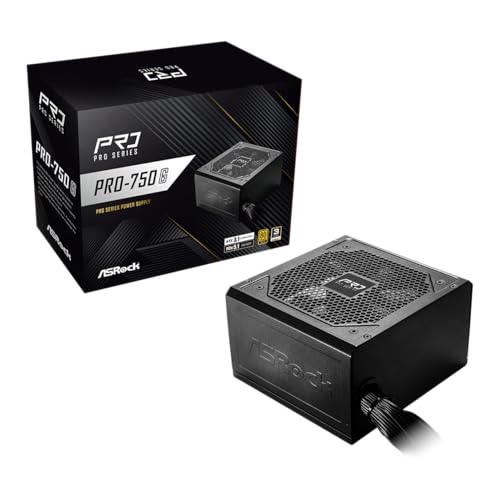
Best Overall — ASRock PRO 750G, 750W 80 Plus Gold, ATX 3.1 & PCIe 5.1 Ready
Strengths
- The full modern checklist in one listing: 80 Plus Gold, ATX 3.1 and PCIe 5.1 ready, native 12V-2×6 connector for current graphics cards.
- 750W is the capacity class that covers the mainstream of current gaming and productivity builds with headroom.
- A 120mm low-noise fan, per the listing — the modern standard did not forget the acoustic brief.
Trade-offs
- The listing title does not claim modular cabling, so plan on managing a fuller cable set than the MSI pick below requires.
- The stated warranty is three years — respectable, and notably shorter than the ten years the MSI pick prints.
- ASRock’s power supply line is younger than the legacy brands’ — the specification is modern, the track record shorter.
| Verified spec | From listing title |
|---|---|
| Wattage | 750W |
| Efficiency | 80 Plus Gold Certified |
| Standard | ATX 3.1 & PCIe 5.1 Ready |
| GPU connector | Native 12V-2×6 Connector |
| Cooling | 120mm Low-Noise Fan |
| Warranty | 3-Year Warranty |
The PRO 750G leads this tier because it is the complete modern sentence at the tier’s price: Gold efficiency, the current ATX standard, the current PCIe readiness, and the native connector that current graphics cards are built around — no adapters, no asterisks, no hoping the transient behavior works out. For the builder whose card is current-generation, that completeness is the product. The card plugs in the way its maker intended, the unit was specified against the standard the card was designed to, and the pairing stops being a research project and becomes a component choice. Most builders at this budget should start here and require a specific reason to end anywhere else.
The 750W class deserves its moment too, because it is the capacity the current mainstream actually lives at: strong mid-range cards, high-end CPUs, a brace of drives, and headroom left over for the transient weather and the next modest upgrade. A unit in this class, Gold-rated, runs a gaming build in the comfortable middle of itself — which is where efficiency holds up, fans stay slow, and components age slowest. ASRock’s inclusion of a low-noise 120mm fan in the listing suggests the company understands that a modern gaming case is also a roommate.
The trade-offs are the honest kind — visible in the listing, priced into the recommendation. The title claims no modularity, so the build will manage cables the older way, with the shroud doing the hiding; in a mid-tower that is a non-event, in a compact case it is a real cost, and the MSI below exists for exactly that builder. The three-year warranty is the tier’s shortest among the modern picks, and keepers should weigh it. Neither flaw dents the central fact: this is the modern standard, complete, at the price this page promised.
Best for: current-generation mainstream builds that want the complete modern standard at this tier’s price / Not suited for: compact cases that need modular cabling, or keepers who rank warranty length first

Best Fully Modular — MSI MAG A750GL PCIE5, 750W 80+ Gold, ATX 3.1, 10-Year Warranty
Strengths
- Fully modular and compact, per the listing — the easiest build and the cleanest airflow in this tier.
- A ten-year warranty stated in the listing: the longest commitment on this page by a wide margin.
- Native dual-color 12V-2×6 cable — the dual-color design makes full seating of the critical connector visible at a glance.
Trade-offs
- It presses against this tier’s ceiling; its price position should be checked on Amazon against the day you buy.
- Fully modular means a bag of cables to store, labeled, for the unit’s whole decade.
- 750W, not 850W — the strongest current cards still belong to the next class up.
| Verified spec | From listing title |
|---|---|
| Wattage | 750W |
| Efficiency | 80+ Gold |
| Cabling | Fully Modular, Compact design |
| Standard | ATX 3.1 & PCIe 5.1 Ready |
| GPU connector | Native Dual-Color 12V-2×6 Cable |
| Warranty | 10 Year Warranty |
If the ASRock is this tier’s complete sentence, the MSI A750GL is its polished one. Start with the warranty, because ten years stated in a listing title is a claim about engineering margin that no marketing adjective can imitate: MSI expects this unit to outlive two graphics cards and most of the PC around it, and has priced that expectation into a legal commitment. For a builder assembling a platform rather than a purchase, that single line may settle the entire tier. Then consider the dual-color native cable, a small design decision with outsized practical value: the 12V-2×6 connector’s known sensitivity to partial seating becomes visible, because the colored section shows until the plug is fully home. It is the rare feature that prevents the exact failure it addresses.
The fully modular, compact design completes the build-quality story. Every cable detachable means the case contains only what the build uses; compact dimensions mean the unit fits where standard-depth units crowd. In small and windowed cases — the builds this tier increasingly serves — those two properties are not luxuries but the difference between a clean machine and a negotiated one. Airflow improves because the cable thicket does not exist, and the upgrade two years from now is a one-cable job.
The cautions are about fit, not quality. Its price lives at this tier’s ceiling, and the wise buyer confirms it on the listing rather than trusting any guide’s snapshot — if it has drifted up, the under-$150 guide is its honest home and this page’s ASRock picks remain. And a decade of modular ownership requires the decade-long habit: the spare cables, labeled with the model, stored with the paperwork, never lent to another unit. Builders who keep that habit get the easiest decade in this tier; builders who know they will not should take the ASRock and its attached cables instead.
Best for: platform builders who want modularity, a decade of stated coverage, and the thoughtful native-cable design / Not suited for: buyers whose budget is firm at the tier’s floor, or the organizationally allergic

Best for Bigger Cards — ASRock PRO 850G, 850W 80 Plus Gold, ATX 3.1 & PCIe 5.1 Ready
Strengths
- 850W of the same modern platform: Gold, ATX 3.1, native 12V-2×6 — capacity for the stronger current card class.
- Headroom is longevity: a unit cruising at a lower fraction of itself runs cooler, quieter, and longer.
- The natural single purchase for a build whose next upgrade is already a stronger card.
Trade-offs
- Same three-year stated warranty as its 750W sibling — the keeper’s objection applies here too.
- No modularity claimed in the title; big capacity plus fixed cables is a real routing exercise in smaller cases.
- For genuinely light builds, every watt above need is money the rest of the PC could have used.
| Verified spec | From listing title |
|---|---|
| Wattage | 850W |
| Efficiency | 80 Plus Gold Certified |
| Standard | ATX 3.1 & PCIe 5.1 Ready |
| GPU connector | Native 12V-2×6 Connector |
| Cooling | 120mm Low-Noise Fan |
| Warranty | 3-Year Warranty |
The PRO 850G is the same modern argument at a larger size, and its buyer is easy to identify: the builder whose card — owned or firmly planned — sits in the stronger current class, whose recommendation points past the 750W comfort zone, or whose upgrade path makes today’s headroom tomorrow’s requirement. For that builder the extra capacity is not indulgence. A power supply’s happiest life is lived in the middle of its range, and 850W puts a strong build’s gaming load exactly there, with the transient weather absorbed by design margin rather than by luck. The Gold efficiency and the native connector carry over from its sibling, so nothing about the modern standard is surrendered to get the size.
There is also a silence dividend that rarely gets printed: the same 120mm low-noise fan, asked to remove heat from a unit working at a smaller fraction of itself, turns slower. In a desk-distance gaming build, the 850G can be the quieter purchase than its 750W sibling under the identical load — a reminder that in power supplies, as in engines, the bigger unit loafing often beats the smaller unit striving, provided the budget and the case agree.
The shared trade-offs with the 750G are the three-year warranty and the unmodular cable set, and at 850W the cable point sharpens: more capacity usually means more leads, and fixed leads in a compact case are a genuine build-day cost. The builder who needs this capacity and modularity together has outgrown this tier’s linked picks and should look at the 850W modular class in the under-$150 guide, where it lives honestly. Within this tier, the 850G is the capacity answer in the modern standard — complete, current, and sized for the builds that ask the most of this page.
Best for: stronger current cards and upgrade-path builds that need modern-standard headroom / Not suited for: light builds, or buyers who need modularity and maximum warranty together

Best Value Holdover — ARESGAME AGV Series 500W, 80 Plus Bronze, Non-Modular
Strengths
- Bronze certification and a five-year warranty printed in the name — paperwork that still embarrasses pricier listings.
- Returns the most change from this budget of any pick here, for builds that cannot use the modern standard anyway.
- 500W honestly serves integrated-graphics and efficient-card builds, which remain a huge share of real PCs.
Trade-offs
- No ATX 3.1, no native 12V-2×6 — a current-generation card build has no business here.
- Bronze efficiency is a tier below this page’s headline standard.
- Fixed cables, as ever with this pick.
| Verified spec | From listing title |
|---|---|
| Wattage | 500W |
| Efficiency | 80 Plus Bronze Certified |
| Cabling | Non Modular |
| Warranty | 5 Year Warranty |
| Series | AGV Series |
A hundred-dollar guide needs its conscience, and the AGV is it. Not every build arriving at this budget can use what the budget buys: the office machine, the family PC, the esports box on an efficient card, the home server — none of them has a 12V-2×6 socket to fill or a transient profile that needs a standard written for flagships. Selling those builds an ATX 3.1 unit because the page is called “under $100” would be upselling dressed as guidance. The AGV remains what it has been across three tiers of this cluster: a Bronze-certified, five-year-warranted, honestly sized unit whose price leaves most of this budget unspent — and unspent budget, returned to a build that can use it, is a feature no specification can beat.
Its continued presence also disciplines the modern picks above. The gap between the AGV and the ASRock 750G is the true price of the modern standard at this moment, and a buyer should be able to see that gap and decide whether their card justifies it. For a current card, it does — immediately and completely. For anything older or lighter, the gap is money in search of a purpose, and this guide declines to invent one.
Buy the AGV here with the same clarity as at any tier: it is a unit for the build you have, at the size it needs, with the best paperwork in its class. The day a current-generation card enters the plan, this page’s top picks take over — and the AGV, still warranted, cascades into the household’s next machine. That is not a consolation prize; it is the lifecycle of a well-bought component.
Best for: light and legacy builds that would pay for a modern standard they cannot use / Not suited for: any build with a current-generation graphics card
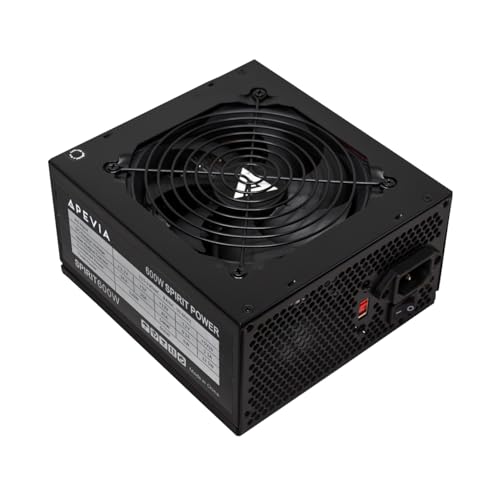
Best Raw Capacity per Dollar — Apevia SPIRIT600W, 600W ATX, 120mm Fan
Strengths
- 600W at a price far below this tier’s ceiling — the used-card build’s capacity problem, solved cheaply.
- Single 12V output design and a listing that leads with heavy-duty protections.
- Thermally controlled fan keeps the desktop end of the day quiet.
Trade-offs
- No efficiency certification in the listing title — at this tier, with Gold units on the same page, that gap is the whole story.
- No warranty term in the title; verify on the product page.
- An older platform with no native connector — strictly a legacy-card answer.
| Verified spec | From listing title |
|---|---|
| Wattage | 600W |
| Cooling | 120mm Auto Thermal Controlled Fan |
| Output design | Supports Single 12V Output |
| Protections | Heavy Duty Protections (per listing) |
| Efficiency | No certification stated in listing title |
The SPIRIT600W’s role narrows at this tier, and the review will narrow it honestly. It survives on this page for one build: the legacy used-card machine, assembled around a previous-generation card with a real appetite, where the entire project’s economics depend on the power supply being cheap. For that build, 600W with stated protections at a fraction of this budget remains a rational purchase — the card is fed, the system is guarded, and the money saved is the money that made the card possible. The thermally controlled fan and single-rail simplicity keep the ownership experience unremarkable, which is all that build asks.
But stand it next to this page’s modern picks and the generational gap is the review. The ASRock units offer certified Gold efficiency, the current standard, and the native connector for not much more of this budget; the Apevia offers none of those, at any wattage. A buyer with a current card who chooses it is not saving money — they are declining the standard their card was designed for, and this guide will not soften that sentence. Its audience is legacy, its virtue is price, and its presence here is a service to exactly one build type.
That is a honorable niche, and the pick fills it without pretending to be more. Legacy builds are real builds, often beloved ones, and they deserve a capacity answer that does not require pretending the last decade of standards did not happen — merely acknowledging that their cards predate it.
Best for: legacy used-card builds whose economics require the cheapest honest capacity / Not suited for: any current-generation card, for which this page’s Gold ATX 3.1 picks exist

Best for Small-Form-Factor Builds — Apevia SFX-AP500W 500W SFX Power Supply, 500W ATX Power Supply
Strengths
- A genuine SFX form factor, stated in the listing — the physical standard small cases are actually built around, now with a verified link on this page.
- Sleeved cables and heavy-duty protections are both named in the title, the two details small builds feel most.
- 500W in SFX size covers the integrated-graphics and efficient-card systems that most compact cases house.
Trade-offs
- No efficiency certification is stated in the listing title, so this pick trades the Gold badge of larger ATX units for the size your case demands — check the listing itself for any certification detail.
- 500W is a hard ceiling in a small case: high-draw cards were never this form factor’s job, and thermals agree.
- The 80mm fan is smaller than ATX units’ 120mm fans, so under sustained load it has less acoustic headroom.
| Verified spec | From listing title |
|---|---|
| Wattage | 500W |
| Form factor | SFX |
| Cooling | 80mm Auto Thermal Fan |
| Cabling | Sleeved PSU Cables |
| Protection | Heavy Duty Protections |
| Efficiency | Not stated in title |
| Warranty | Not stated in title |
In daily use, the Apevia SFX-AP500W behaves like the sensible middle of this list: sized for the systems most people at this budget actually own, certified on paper, and backed by terms you can read before money changes hands. It suits a home or office desktop that works every day, a family PC that mixes school, streaming, and light gaming, and a first serious build whose owner wants the power supply to be the boring part. Sized correctly — running in the middle of its range rather than at its edge — a unit in this class asks nothing of you after installation day.
The honest limitation is the one shared by its whole class: fixed expectations. This is a buy-for-this-build unit, not a down payment on a flagship graphics card two years from now, and its connector set reflects the mainstream cards of its generation. Accept that horizon and it is an easy recommendation; fight it, by planning a high-draw upgrade on top of it, and the higher tiers in this cluster are where you should be shopping instead.
Best for: SFX cases housing integrated-graphics or efficient-card systems / Not suited for: ATX cases (it will not fill the space or the screw pattern), or high-draw graphics cards
Comparison Table
The tier’s story in one view: a modern Gold class at the top with its standard and connector stated, a modular decade-warranty alternative beside it, and the honest holdovers below, each with its paperwork exactly as listed.
| Pick | Wattage | Efficiency (as listed) | Standard / Connector | Warranty (as listed) | Link |
|---|---|---|---|---|---|
| ASRock PRO 750G | 750W | 80 Plus Gold | ATX 3.1, native 12V-2×6 | 3 years | Check on Amazon |
| MSI MAG A750GL | 750W | 80+ Gold | ATX 3.1, native dual-color 12V-2×6, fully modular | 10 years | Check on Amazon |
| ASRock PRO 850G | 850W | 80 Plus Gold | ATX 3.1, native 12V-2×6 | 3 years | Check on Amazon |
| ARESGAME AGV 500W | 500W | 80 Plus Bronze | Legacy standard | 5 years | — |
| Apevia SPIRIT600W | 600W | Not stated in title | Legacy standard | Not stated in title | — |
| Apevia SFX-AP500W | 500W | Not stated in title | Sleeved cables (as listed) | Not stated in title | — |
How to Choose at One Hundred Dollars: The Standard, the Size, the Paperwork
The decision at this tier runs on three questions, in a new order. First, the standard question: does your graphics card belong to the current generation that ATX 3.1 and the native 12V-2×6 connector were built for? If yes, your shortlist is the three modern picks, and the only remaining questions are size and paperwork. If no — legacy card, integrated graphics, a light build — the holdovers re-enter, and the modern premium becomes optional rather than necessary. Second, the size question: your card maker’s recommendation places you at 750W or 850W among the modern picks, and this guide’s advice is to believe it rather than round down for price or up for pride. Third, the paperwork question: between the ASRock pair’s three stated years and the MSI’s ten, keepers and platform builders should let the warranty column vote, while budget-tight builders can rationally take the shorter term and the lower price. Run those three and this tier, for all its new technology, resolves as calmly as every tier below it. First-time builders facing the same three questions with a beginner’s framing will find them sequenced at Best PC Power Supply For Beginners Under $100.
ATX 3.1 and the 12V-2×6 Connector, Explained Without the Fog
Two terms dominate this tier and deserve plain treatment. ATX 3.1 is the current revision of the power supply standard — the rulebook that defines, among much else, how a unit must behave when a graphics card’s demand surges. Its predecessor generation of cards made those surges famous; the standard exists so that a compliant unit absorbs them by design rather than by luck. When a listing on this page says ATX 3.1 and PCIe 5.1 ready, it is claiming membership in that rulebook, and this guide reports the claim exactly as printed. The 12V-2×6 connector is the standard’s physical half: a single compact connector that feeds a modern card both power and the signaling the card uses to know what it may draw. Native means the unit provides it directly, with its own cable — as opposed to adapters stacking older leads together, a workaround this guide consistently advises against. The dual-color variant on the MSI pick adds a seating indicator, addressing the connector’s one known sensitivity: it must be pushed fully home, and the color tells you when it is. Neither term requires an engineering background — one is a rulebook, the other is a plug — but together they are the difference between this tier and everything below it.
Installing a Modern Unit: The Native Connector Changes Two Habits
The standard installation — unit seated on its filtered intake, main and CPU leads first, drives next, card last — gains two modern amendments here. First, the native GPU cable: route it with a gentle bend radius, because the compact connector dislikes sharp angles near the plug, and seat it until the MSI’s color disappears or, on the ASRock units, until the latch and the feel agree it is fully home; then give it the lightest tug test. A partially seated 12V-2×6 is this generation’s signature build error, and it is entirely prevented by ten seconds of attention. Second, modular discipline, for the MSI: attach the needed cables at the bench, store the spares labeled, and never — at this tier the rule graduates to absolute — use another unit’s modular cables, because the unit-end pin layouts differ between models.
Problem: the PC shuts down in one demanding game after a card upgrade. Fix: check the native connector’s seating first — fully home, latch engaged — before suspecting capacity; then verify the pairing against the card’s recommendation honestly. Problem: the new unit’s fan seems louder than the old one’s. Fix: confirm the intake is the filtered case vent and not sealed against a panel, and that the unit is oriented as the case intends. Problem: a modular cable will not seat at the unit end. Fix: stop and verify it is this unit’s own cable in its labeled socket; forcing is how the one dangerous mistake in modern building happens. Quarterly maintenance is unchanged and unglamorous: filters, dust, and a glance at the native connector during any case opening.
Common Mistakes at This Price Point
Buying an adapter-fed workaround for a current card when a native unit sits on the same page is the tier’s signature error — the standard exists, at this price, precisely to retire that workaround. Second: leaving the 12V-2×6 connector a millimeter short of home and diagnosing everything except the plug. Third: mixing modular cables between units, which at this tier’s energies deserves its reputation as the one dangerous mistake. Fourth: paying the modern premium for a build with no modern card — the holdover pick exists to save exactly that money. Fifth: rounding the card’s recommendation down to reach a cheaper class, then meeting the difference as shutdowns. Sixth: assuming “Gold” in a headline always names the 80 Plus program — at this tier, read for the program, and for whether the certification claimed is 80 Plus or another program entirely, a distinction the higher tiers of this cluster will make vivid.
Final Recommendation
For the mainstream current-generation build, the ASRock PRO 750G is this tier’s answer: the complete modern standard — Gold, ATX 3.1, native connector — at the price the page promised. For the platform builder, the MSI MAG A750GL earns its ceiling position with fully modular cabling, the thoughtful dual-color native cable, and a decade of stated warranty. For stronger cards and upgrade paths, the ASRock PRO 850G carries the same standard at the larger size. For light and legacy builds, the holdovers remain the honest buys — the AGV for paperwork and value, the Apevia for legacy capacity — and for compact builders, the Apevia SFX-AP500W gives compact builders a linked unit in the right standard. One hundred dollars, it turns out, is where a power supply stops being a compromise about the present and becomes a platform for the build’s future; spend it on the standard your card actually speaks.
Reading This Tier Against Its Neighbors
A shelf is best understood by what borders it, and the under-$100 tier has instructive neighbors in both directions. Below it, the under-$75 guide at Best PC Power Supply Under $75 runs the same modern class at smaller capacities and shorter stated terms — the right page when the build is a mainstream machine on a strict budget, and a useful calibration for how much of this page’s premium is capacity rather than quality. Within the tier, the lens guides divide the same six picks by the questions their readers actually bring: the budget version at Best PC Power Supply For Budget Builds Under $100 prices every pick against a spreadsheet and a horizon, while the gaming version at Best PC Power Supply For Gaming Under $100 weighs the same hardware by sessions, transients, and the noise floor of a room at midnight. Reading across the three is not redundant; the picks overlap because the class is small, but the reasoning does not, and the reasoning is what transfers to your own build.
Above this tier, the difference is not kind but degree: the $150 shelf adds the strong class’s full platform treatment and the decade warranties at their most accessible, while this page’s own premium picks already carry the standard those tiers are built on. The honest summary is that under $100 is where the modern power supply stops being a compromise category. Everything below it asks the buyer to choose which term to concede; everything on this page, at worst, asks the buyer to choose which future to fund. That is a pleasant question, and it is why this tier, more than any other in the cluster, rewards a slow read and a written-down plan.
The Ownership Ledger: Years Two Through Five on This Tier
Specifications describe the day of purchase; ownership is what happens after, and this tier’s ownership profile is worth recording because it is the real product. In year one, nothing happens — which, stated flatly, undersells it: nothing happening across a year of evenings is the modern standard’s entire promise, delivered. In year two, the first intervention arrives, a card swap or a storage addition, and the tier divides by cabling: the modular picks turn it into an hour with the archive open beside the case, while the fixed-cable picks ask for a patient routing session and reward it identically. In years three through five, the tier divides by term instead: the longer stated warranties are still young, the shorter ones approach their horizon, and the buyer who wrote the plan down knows which situation they are in without anxiety, because the ending was chosen at the beginning. Across all five years, the maintenance ledger is two filter cleanings a year and an occasional connector glance — minutes, annually, for a component that never sleeps. No other hundred dollars in the build is asked to do so much for so long with so little ceremony. That is the ownership case for this tier, and it is why the guide ranks fit above features: the features are enjoyed on day one, but the fit is enjoyed on day one thousand.
Frequently Asked Questions
What does ATX 3.1 actually get me over an older unit?
A unit designed and tested against the current standard’s requirements — including how it must handle the power surges modern graphics cards produce — plus, in practice, the native 12V-2×6 connector those cards are built around. For a current-generation card it is the correct pairing; for older cards it is optional.
Is the native 12V-2×6 connector really better than adapters?
Yes, and this guide is consistent on the point across every tier: a native cable designed for the connector beats stacked adapters adapting older leads. The native connection is the standard’s intended path, and at this tier it costs nothing extra to take it.
Why does this page keep two picks from the Bronze era?
Because not every build at this budget has a current-generation card. The AGV and the Apevia remain the right, cheaper answers for light and legacy builds respectively, and a guide that upsold those readers into a standard they cannot use would be serving the tier instead of the reader.
Three-year warranty or ten-year warranty — how much should it matter?
It is the clearest stated difference between this page’s modern picks. A ten-year term signals engineering margin and suits platform builders and keepers; a three-year term at a lower price suits builders whose upgrade cycle will replace the unit anyway. Neither is a trick — they are different products for different ownership plans.
Can I use my old modular cables with the MSI unit?
No. Modular cables are wired to each model’s own layout at the unit end, and mixing them between different power supplies can damage components. Use only the cables in the MSI’s box, and keep its spares labeled with its model name.
Is 750W enough for a current mid-range card, or should I default to 850W?
Follow your specific card maker’s published recommendation — for the mainstream mid-range class it typically lands at the 750W class, which is why both sizes appear here. The 850W pick serves stronger cards and buyers purchasing headroom for a planned upgrade, not as a default.
My case needs an SFX power supply. Is anything on this page usable?
Yes — one pick. The Apevia SFX-AP500W reviewed above is a genuine SFX form-factor unit, verified and linked in a later pass on 2026-11-21 after this guide’s sheet gained an SFX listing. Two honest caveats come with it: it is a 500W unit, so it suits integrated-graphics and efficient-card compact systems rather than the mid-range cards the ATX picks here feed, and its listing title states no efficiency certification, unlike the Gold ATX picks. The other five picks remain ATX units and will not fit an SFX-specification case, so confirm your case’s required form factor first — that single measurement decides whether this pick or the ATX five are your list.
