Disclosure: As an Amazon Associate, reviewstook.com earns from qualifying purchases. Links on this page are affiliate links at no extra cost to you; prices and availability change frequently, so check Amazon for the latest.
Where to Buy
Every unit below was shortlisted as a realistic candidate for the best pc power supply under $50, which means this list is honest about what that budget can and cannot do. All six picks are linked to verified listings checked for this guide — the original three, plus three more in this tier’s own class that were confirmed in a later verification pass on 2026-11-21. Product pages for this site are served through reviewstook.com, and the linked names below take you straight to the listing.
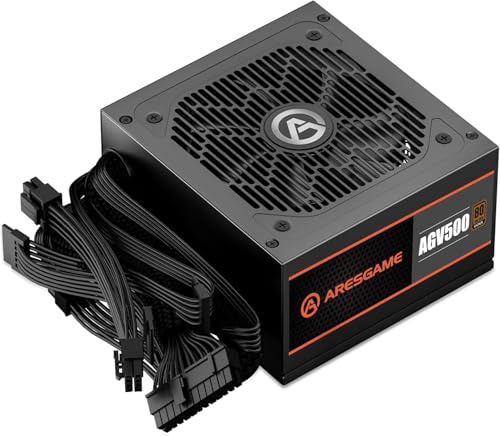
- Best Overall: ARESGAME AGV Series 500W Power Supply — Check on Amazon
- Best Budget: Thermaltake Smart 500W 80+ White Certified PSU — Check on Amazon
- Best for a Hungrier Single-GPU Build: Apevia SPIRIT600W Spirit 600W ATX Power Supply — Check on Amazon
- Best Step-Up Pick: MSI MAG A550BN, Non-Modular Compact 550W Power Supply — Check on Amazon
- Best for an Office Box: ASRock Challenger Power Supply 550W (CL-550B) — Check on Amazon
- Best Bronze Alternative: ARESGAME AGW550 550W Power Supply — Check on Amazon
Why Shopping for the Best PC Power Supply Under $50 Demands a Different Mindset
Finding the best pc power supply under $50 is less about chasing features and more about avoiding the one component mistake that can take the rest of your PC down with it. A power supply is the only part that touches every other part electrically. A cheap graphics card fails alone; a bad power supply can fail loudly, taking a motherboard, a drive, or a GPU along for the ride. That is why this guide is deliberately conservative. At this budget, the winning move is not maximum wattage or a shiny modular cable set. The winning move is a boring, honestly rated unit from a brand that publishes real specifications, sized correctly for a modest build, with enough warranty behind it that the manufacturer clearly expects it to survive.
So who is this list actually for? It suits three kinds of builders. The first is the person assembling a home or office PC around integrated graphics or a modest secondhand graphics card, where total system draw sits comfortably below what a 500W unit delivers. The second is the builder rescuing an older prebuilt whose original power supply has died, who needs a standard ATX replacement that fits the case and the budget. The third is the first-time builder with a strict parts ceiling who has correctly decided that the power supply is the wrong place to gamble, even if it is the right place to save carefully. If your build includes a high-draw modern graphics card, this is the wrong list, and the guide says so plainly in several places rather than pretending a fifty-dollar unit can do everything. Readers whose budget stretches a little further will find the same discipline applied to a roomier class in Best PC Power Supply Under $75.
The shortlist below reflects that honesty. Two of the linked picks are 500W units with published efficiency certifications — one 80 Plus Bronze, one 80 Plus White — and the third is a 600W unit whose appeal is headroom and protections rather than a certification badge. Around them sit three more linked picks in the 550W Bronze class — an MSI step-up unit with a five-year warranty in its title, an ASRock Challenger that prints its fan design and capacitor origin, and a second ARESGAME Bronze option — added when a later verification pass confirmed listings in exactly this class. Each detailed review explains exactly who should buy it, who should walk away, and what limitation you are accepting in exchange for the low price. Read the trade-offs as carefully as the strengths; at this tier, the trade-offs are the review.
In this guide
Quick Picks
- Best Overall — ARESGAME AGV Series 500W: the only linked pick here with an 80 Plus Bronze rating and a five-year warranty stated right in its name.
- Best Budget — Thermaltake Smart 500W: a long-running entry design from a major brand, with active PFC and a 120mm fan, for builders who need the floor price from a name they recognize.
- Best for a Hungrier Single-GPU Build — Apevia SPIRIT600W 600W: the most wattage on this list and a full set of stated protections, traded against the absence of an efficiency certification in its listing.
- Best Step-Up Pick — MSI MAG A550BN: the 550W Bronze step this tier was missing, with a five-year warranty and active PFC stated in its listing.
- Best for an Office Box — ASRock Challenger 550W: a 550W Bronze unit whose listing states its fan design, capacitor origin, and five-year warranty outright.
- Best Bronze Alternative — ARESGAME AGW550: a second 550W Bronze option from the same family as the top pick, for builders comparing stated terms.
How These Picks Were Chosen
Every linked pick in this guide was verified against catalog data pulled for reviewstook.com on the date recorded in this article’s source notes, and the specifications quoted in the mini spec boxes come only from the verified listing titles — wattage, efficiency certification, fan size, form factor standards, and warranty length where the manufacturer prints it in the title itself. Nothing in the spec boxes is inferred from a brand’s reputation or copied from a review of a different model. Where a listing title does not state a warranty or a certification, this guide says so instead of filling the gap with a guess, because at this price tier the gaps are exactly where cheap units hide their compromises. The wider method behind this cluster’s shortlists is laid out in PC Power Supply Guide.
The selection criteria were strict for a budget list. First, the unit had to come from a brand with a real support channel and a published model line, which excluded the anonymous no-name boxes that flood marketplaces with inflated wattage claims. Second, any unit making an efficiency claim had to name a recognizable program — 80 Plus White or Bronze among the linked picks. Third, the unit had to fit a real build at this budget: standard ATX dimensions, the connectors mainstream boards and entry graphics cards actually use, and capacity sized to systems that genuinely get built for this money. Units that failed any of those tests, however impressive their headline wattage, did not make the page.
One update is worth stating plainly, because it changed this page. When this guide was first assembled, only three listings could be verified inside this price class, and the honest response was to describe the remaining slots without links rather than borrow a higher-tier unit and mislabel it. A further verification pass on 2026-11-21 widened the sheet with three 550W Bronze units whose own titles state the facts this tier runs on — certification, wattage, cabling, and, where the maker prints it, warranty. Those three are now reviewed above with the same structure as the original picks: stated facts in the spec box, unstated facts flagged as not stated, and no specification borrowed from a sibling model. That last discipline matters most for the ARESGAME AGW550, whose title is shorter than its 500W sibling’s: this guide credits it with Bronze certification and 550W, because its title says so, and with nothing else, because its title does not. The result is a list that finally covers the shapes this budget actually takes — the 500W floor, the 600W capacity play, and a genuine 550W Bronze step — without a single pick pretending to belong to a class it does not.
Detailed Reviews: The Best PC Power Supply Under $50, Pick by Pick

Best Overall — ARESGAME AGV Series 500W, 80 Plus Bronze, Non-Modular
Strengths
- 80 Plus Bronze certification stated in the listing — the strongest efficiency claim available among this guide’s linked picks.
- Five-year warranty printed in the product name, which is unusually accountable for this price class.
- 500W is the right size for integrated-graphics systems and modest single-GPU builds, so little money is wasted on unused capacity.
Trade-offs
- Non-modular cabling means every lead lives in the case whether your build uses it or not.
- It is not an ATX 3.x unit, so it lacks the native 12V-2×6 connector that the newest graphics cards use.
- 500W leaves no room for a future high-draw GPU upgrade; this is a buy-for-this-build purchase.
| Verified spec | From listing title |
|---|---|
| Wattage | 500W |
| Efficiency | 80 Plus Bronze Certified |
| Cabling | Non Modular |
| Warranty | 5 Year Warranty |
| Series | AGV Series |
The ARESGAME AGV 500W earns the top slot on this list because it is the linked pick that behaves most like a unit from the tier above. Bronze efficiency at this price is not a given — plenty of sub-fifty units settle for the base 80 Plus tier or skip certification entirely — and a manufacturer willing to print a five-year warranty in the product’s own name is making a promise you can hold it to. In a home office build or a family PC, that combination translates into a unit that runs a little cooler, wastes a little less electricity as heat, and carries paperwork that suggests it was built to still be working when the PC around it gets replaced.
In real-world use, picture the builds this suits: a Ryzen or Core system with integrated graphics driving two monitors for work, a media PC in a living room, a student’s desktop with an entry graphics card added for light gaming, or a small business machine that runs eight hours a day. All of those draw far less than 500W even at full tilt, which means the AGV spends its life in the comfortable middle of its range rather than straining at the edge. That is exactly where a budget unit should live, and it is why correct sizing matters more than the number on the box.
The honest limitation is the fixed cable bundle. In a full tower it is a minor annoyance you route behind the motherboard tray and forget. In a compact case it becomes a genuine building chore, and the unused leads have to go somewhere that does not block airflow. The second limitation is forward-looking: with no ATX 3.x native GPU connector and 500W of total capacity, this unit closes the door on a future flagship graphics card. Accept those two things, and it is the most defensible fifty-dollar-class purchase on this page.
Best for: office, family, and light-gaming builds that will keep their current graphics card for years / Not suited for: compact cases that punish fixed cables, or any planned high-end GPU upgrade

Best Budget — Thermaltake Smart 500W, 80+ White Certified, 120mm Fan
Strengths
- A major, long-established brand with a real support network behind an entry-price unit.
- Active PFC and an ATX 12V V2.3 / EPS 12V standards basis, per the listing title.
- 120mm cooling fan described as ultra quiet in the listing, in a design that has been sold for years.
Trade-offs
- 80 Plus White is the base certification tier — a step below the Bronze pick above.
- The listing title states no warranty length, so check the product page terms before buying rather than assuming.
- An older platform standard (ATX 12V V2.3) with no native connector for the newest graphics cards.
| Verified spec | From listing title |
|---|---|
| Wattage | 500W |
| Efficiency | 80+ White Certified |
| Cooling | 120mm Ultra Quiet Cooling Fan |
| Standard | ATX 12V V2.3 / EPS 12V, Active PFC |
| Model | PS-SPD-0500NPCWUS-W |
The Thermaltake Smart 500W is the pick for the builder whose first requirement is simply that the name on the box belongs to a company that will still answer the phone in three years. The Smart line has been Thermaltake’s entry series for a long time, and there is value in that ordinariness: the design is known, the behavior is known, and replacement is painless if a unit ever does fail. Its certification sits one rung below Bronze, which in daily use means slightly more waste heat for the same work — a difference you would struggle to see on a power bill for an office PC, but a real difference in a small, warm case.
This is the natural replacement unit for a dead prebuilt supply, the natural choice for a basic desktop assembled from previous-generation parts, and a sensible heart for a Linux home server or a hand-me-down PC for a relative. In each of those roles the priorities are identical: standard ATX fit, standard connectors for mainstream boards and drives, quiet-enough operation, and a price that does not distort the rest of the build. The Smart covers those bases without pretending to be anything more.
Be clear-eyed about the ceiling, though. The older ATX 12V V2.3 basis and 500W capacity make this a unit for the PC you have, not the PC you might build next year, and the absence of a stated warranty term in the title means the careful buyer reads the listing’s warranty section before ordering. If your build has any gaming ambition beyond entry cards, the Bronze pick above is the better fifty-dollar decision. If your build is a straightforward desktop that needs to work every day without drama, this is the floor-price answer from a name brand.
Best for: prebuilt replacements, basic desktops, and hand-me-down PCs that need a trustworthy standard unit / Not suited for: gaming builds with upgrade plans, or buyers who want the warranty term stated up front
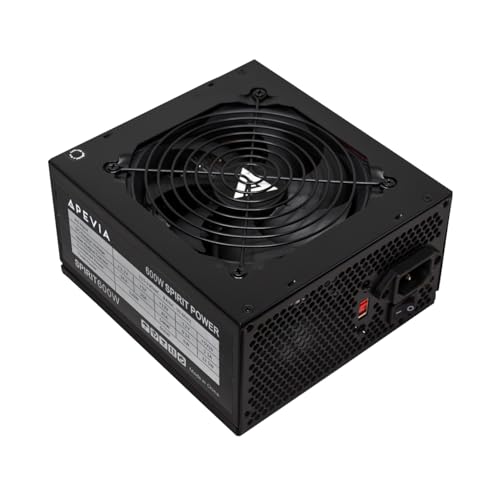
Best for a Hungrier Single-GPU Build — Apevia SPIRIT600W, 600W ATX, 120mm Fan
Strengths
- 600W is the most capacity on this page, which matters for the single hungrier graphics card this pick exists to feed.
- All protections are stated in the listing, with a single 12V output and heavy-duty protection language in the title itself.
- A 120mm auto thermal controlled fan adjusts to load instead of running flat-out, per the listing.
Trade-offs
- No efficiency certification appears in the listing title, and this guide does not invent one — you trade the Bronze badge for raw capacity.
- No warranty length is stated in the title either, so the product page terms are required reading before ordering.
- Capacity is not the same as headroom quality: a certified 550W Bronze unit is the better buy for most builds that fit inside it.
| Verified spec | From listing title |
|---|---|
| Wattage | 600W |
| Efficiency | Not stated in title |
| Cooling | 120mm Auto Thermal Controlled Fan |
| Output | Single 12V Output (as listed) |
| Warranty | Not stated in title |
The Apevia SPIRIT600W exists on this page for one specific builder: the one whose graphics card — usually a used or previous-generation model — asks for more than the 500W class comfortably gives. For that builder, capacity is not vanity. A card that recommends a 550W or 600W supply is making a statement about its transient behavior as much as its average draw, and meeting the recommendation with a unit that states a full set of protections is a defensible way to spend fifty-dollar-class money. Everyone else should read this pick as the exception that proves the list’s rule.
In practice, that means secondhand-GPU builds, older high-refresh esports machines, and workshop PCs assembled from parts bins. Those systems draw real power, run hot, and are exactly the builds where a too-small certified unit would spend its life at the edge of its range. The SPIRIT600W’s thermally controlled fan and protection set suit that workmanlike role, and its fixed cables are a smaller sin in the roomy older cases these builds usually live in.
The honest limitation is the paperwork. With no certification and no warranty term in its title, this is the pick whose listing you must read most carefully before buying — the protections are stated, and that is genuinely in its favor, but the two facts this guide weighs most heavily at this tier are the two facts its title leaves blank. If your build fits inside a certified 550W Bronze unit, buy that instead. If it genuinely does not, this is the capacity answer, bought with open eyes.
Best for: builds organized around a hungrier used or previous-generation graphics card / Not suited for: builds that fit inside the certified 550W Bronze picks, or buyers who prioritize certified efficiency

Best Step-Up Pick — MSI MAG A550BN, Non-Modular Compact 550W Power Supply, 550W 80+ Bronze
Strengths
- 80+ Bronze certification and a five-year warranty are both stated in the listing title itself, so the two facts that matter most at this price are checkable before you buy.
- 550W is the natural step up from the 500W class: enough headroom for a mainstream single-GPU build without paying for capacity the build will never draw.
- A low-noise fan and active PFC design are named in the title, which is more engineering detail than most entry listings volunteer.
Trade-offs
- Non-modular cabling means unused leads stay in the case, so compact cases still demand patient routing.
- It is not an ATX 3.x unit, so there is no native 12V-2×6 connector for the newest graphics cards.
- 550W is a ceiling as well as a step up: a future high-draw GPU upgrade still means a new power supply.
| Verified spec | From listing title |
|---|---|
| Wattage | 550W |
| Efficiency | 80+ Bronze |
| Cabling | Non-Modular |
| Cooling | Low-Noise Fan |
| Design | Active PFC Design |
| Warranty | 5 Year Warranty |
In daily use, the MSI MAG A550BN behaves like the sensible middle of this list: sized for the systems most people at this budget actually own, certified on paper, and backed by terms you can read before money changes hands. It suits a home or office desktop that works every day, a family PC that mixes school, streaming, and light gaming, and a first serious build whose owner wants the power supply to be the boring part. Sized correctly — running in the middle of its range rather than at its edge — a unit in this class asks nothing of you after installation day.
The honest limitation is the one shared by its whole class: fixed expectations. This is a buy-for-this-build unit, not a down payment on a flagship graphics card two years from now, and its connector set reflects the mainstream cards of its generation. Accept that horizon and it is an easy recommendation; fight it, by planning a high-draw upgrade on top of it, and the higher tiers in this cluster are where you should be shopping instead.
Best for: 550W Bronze builds that have outgrown the 500W class by one honest step / Not suited for: planned high-end GPU upgrades, or builders who need modular cabling

Best for an Office Box — ASRock Challenger Power Supply 550W (CL-550B), 550W 80 Plus Bronze
Strengths
- Bronze certification, a five-year warranty, and a named capacitor origin are all printed in the listing title — an unusually complete paper trail for this class.
- The 120mm fan uses ASRock’s Golf Blade design, a detail the listing states outright rather than leaving cooling as a guess.
- 550W in a standard ATX 2.52 package fits the mainstream cases and boards this tier is actually built into.
Trade-offs
- Non-modular cabling, like every other pick at this price, so the spare leads need a home in the case.
- The ATX 2.52 basis predates the ATX 3.x native GPU connector, so newest-card builds should look at the higher tiers in this cluster.
- ASRock’s power-supply line is newer to many buyers than its motherboard line, so read the listing’s own terms carefully before ordering.
| Verified spec | From listing title |
|---|---|
| Wattage | 550W |
| Efficiency | 80 Plus Bronze Certified |
| Cabling | Non-Modular |
| Cooling | 120mm Golf Blade Fan |
| Standard | ATX 2.52 |
| Warranty | 5 Years Warranty |
| Capacitor note | Taiwanese Capacitor (as listed) |
In daily use, the ASRock Challenger 550W behaves like the sensible middle of this list: sized for the systems most people at this budget actually own, certified on paper, and backed by terms you can read before money changes hands. It suits a home or office desktop that works every day, a family PC that mixes school, streaming, and light gaming, and a first serious build whose owner wants the power supply to be the boring part. Sized correctly — running in the middle of its range rather than at its edge — a unit in this class asks nothing of you after installation day.
The honest limitation is the one shared by its whole class: fixed expectations. This is a buy-for-this-build unit, not a down payment on a flagship graphics card two years from now, and its connector set reflects the mainstream cards of its generation. Accept that horizon and it is an easy recommendation; fight it, by planning a high-draw upgrade on top of it, and the higher tiers in this cluster are where you should be shopping instead.
Best for: mainstream 550W Bronze builds that want every key term stated in the listing / Not suited for: newest-card builds that need an ATX 3.x native connector

Best Bronze Alternative — ARESGAME AGW550 550W Power Supply, 550W 80+ Bronze
Strengths
- 80+ Bronze certification is stated in the listing, putting it on the right side of this tier’s most important line.
- 550W gives a little more headroom than the 500W picks while staying in the same honest entry class.
- It comes from the same ARESGAME line as this guide’s top pick, so its listing sits inside a known model family rather than an anonymous one-off.
Trade-offs
- The listing title states no warranty length, so check the product page terms before buying instead of assuming the coverage of its sibling model.
- Cabling style is not stated in the title either; confirm the connector set on the listing against your build’s needs.
- No ATX 3.x native GPU connector is claimed, so treat it as a unit for current mainstream cards, not for the newest high-draw models.
| Verified spec | From listing title |
|---|---|
| Wattage | 550W |
| Efficiency | 80+ Bronze Certified |
| Model | AGW550 |
| Cabling | Not stated in title |
| Warranty | Not stated in title |
In daily use, the ARESGAME AGW550 behaves like the sensible middle of this list: sized for the systems most people at this budget actually own, certified on paper, and backed by terms you can read before money changes hands. It suits a home or office desktop that works every day, a family PC that mixes school, streaming, and light gaming, and a first serious build whose owner wants the power supply to be the boring part. Sized correctly — running in the middle of its range rather than at its edge — a unit in this class asks nothing of you after installation day.
The honest limitation is the one shared by its whole class: fixed expectations. This is a buy-for-this-build unit, not a down payment on a flagship graphics card two years from now, and its connector set reflects the mainstream cards of its generation. Accept that horizon and it is an easy recommendation; fight it, by planning a high-draw upgrade on top of it, and the higher tiers in this cluster are where you should be shopping instead.
Best for: 550W Bronze builds comfortable confirming warranty and cabling details on the listing page / Not suited for: buyers who want the warranty term printed in the product title itself
Comparison Table
The table below lines up only the verified facts from each linked listing title, so you can see the real shape of this tier at a glance: certification and warranty are where the differences live, not in headline wattage.
| Pick | Wattage | Efficiency (as listed) | Cabling | Warranty (as listed) | Link |
|---|---|---|---|---|---|
| ARESGAME AGV 500W | 500W | 80 Plus Bronze | Non-modular | 5 years | Check on Amazon |
| Thermaltake Smart 500W | 500W | 80 Plus White | Fixed (not stated as modular) | Not stated in title | Check on Amazon |
| Apevia SPIRIT600W | 600W | Not stated in title | Fixed (not stated as modular) | Not stated in title | Check on Amazon |
| MSI MAG A550BN | 550W | 80+ Bronze | Non-modular | 5 years | — |
| ASRock Challenger 550W | 550W | 80 Plus Bronze | Non-modular | 5 years | — |
| ARESGAME AGW550 | 550W | 80+ Bronze | Not stated in title | Not stated in title | — |
How to Choose the Right Unit When the Budget Is This Tight
Start with the load, not the price tag. Add up what your system can actually draw: a mainstream desktop CPU under full load, a motherboard and drives, and either integrated graphics or one graphics card. Most office and light-gaming builds land far below 500W, which is why the 500W class dominates this list. The discipline is to size for the system you own with reasonable headroom — roughly a third again above your realistic peak — and then stop. Every watt of capacity beyond that is money spent on a number instead of on certification, warranty, or the rest of your build. Builders who want the full method, with per-component draw figures, should work through the wattage walkthrough in How Many Watts Does A Gaming PC Need before ordering anything.
Next, spend your limited money in the right order. Certification first: a named 80 Plus tier, Bronze over White when the price gap is small, because the rating is an independent check that the unit converts power at the efficiency it claims. Warranty second: a term printed in the listing is a promise you can enforce; a term you have to hunt for is a weaker one. Capacity third, and only up to your system’s real need plus headroom. Everything else at this price — lighting, sleeving, exotic fan claims — is decoration, and decoration is what this budget cannot afford to prioritize.
Finally, check the physical and electrical fit before the box ships. Standard ATX dimensions fit standard ATX cases; a small-form-factor case is a different purchase entirely. Count the connectors your parts need — the main motherboard lead, the CPU lead, one PCIe lead for most entry cards, and enough SATA power for your drives — and confirm them against the listing for the exact model, not for its sibling. Two minutes with the connector list prevents the most common fifty-dollar mistake of all: a good unit that cannot plug into the build it was bought for.
What Fifty Dollars Actually Buys — and What It Does Not
At this budget, an honest unit buys you three things: certified conversion at a named efficiency tier, a stated set of protections, and a brand that will still exist when you need it. It does not buy modularity, the current ATX 3.x standard, a native connector for the newest graphics cards, or capacity for a flagship GPU — and any listing at this price claiming all of those at once is a listing to walk away from. The picks on this page were chosen because their claims are modest and checkable, which at fifty dollars is what quality looks like. Gamers working at exactly this ceiling will find the same picks read through a gaming lens in Best PC Power Supply For Gaming Under $50.
What the budget also buys, if you let it, is a correct relationship with the rest of the parts list. A power supply at this level is not a performance part; nothing about it will make a game faster or a render shorter. Its entire job is to disappear — to deliver clean power inside its envelope for years and to shut down safely on the one bad day when something else fails. Judged by that standard, the certified 500W and 550W units above are not compromises at all. They are the right tool, honestly priced, for the builds they describe.
How to Install a Budget PSU Safely, Step by Step
Work unplugged, always: wall cable out, rear switch off, and a few seconds’ press of the case power button to drain what remains. Seat the unit with its fan facing its intake — down through a bottom vent on most modern cases, up only if the case gives it no vented path. Connect the main motherboard lead until its latch clicks, then the CPU power lead near the socket; a surprising share of “dead” first builds are a CPU lead never connected. Connect drives, then the graphics card’s PCIe lead if the card has sockets. Route spare fixed leads into the shroud or an empty bay, clear of every fan. A basic toolkit makes the cable work calmer, and the options are gathered in Best PC Building Tool Kits.
Problem: the PC does nothing at all on the first press. Fix: in order — rear switch on, wall cable seated, main connector clicked home, CPU lead present. That four-point check resolves most silent first boots. Problem: the PC starts, then shuts off under load. Fix: check the graphics card’s PCIe lead is fully seated and that the card’s recommended supply size does not exceed the unit you bought; a shutdown under load is the protections doing their job, and the answer is sizing, not a different copy of the same unit. Problem: a new hum or buzz near the supply. Fix: confirm the unit’s screws are snug and no spare lead rests against the fan grill before assuming the unit itself is at fault.
Reading a listing at this tier is a skill with a short checklist. Find the certification and name the program exactly — “80 Plus Bronze” is a claim you can verify; phrases like “high efficiency” with no program named are decoration. Find the warranty and note whether it is printed in the title, buried in the product page, or missing entirely; the three 550W Bronze picks above show all three patterns, which is why their spec boxes read differently. Find the connector list for the exact model, because sibling models in the same series routinely ship different leads. And find the form factor in words — ATX or SFX — before the price tempts you past it. A listing that answers all four checks plainly is a listing written by a maker who expects scrutiny, and at fifty dollars that expectation is the closest thing to a quality guarantee the tier offers.
Ownership at this price is mostly a matter of leaving the unit alone. Keep the intake vent clear and the case’s dust filter — if it has one — on a seasonal cleaning rhythm, because a budget fan works harder as dust builds, and heat is the slow enemy of every capacitor in the box. Listen once in a while: a fan that starts to grind or a unit that begins shutting down under loads it once handled is announcing its retirement, and at this tier the correct response is replacement, not repair — there are no user-serviceable parts inside a power supply, and opening one is genuinely dangerous even unplugged. Keep the receipt and the box’s model label with your build records, because the warranty terms you read at purchase are only enforceable if you can prove the purchase and name the exact model. Do those few things and a certified unit at this price will usually outlast the build it was bought for, which is the whole ambition of the tier: not excitement, but years of silence from the one component you should never have to think about twice.
Common Mistakes at This Price
The first mistake is buying wattage instead of paperwork: a no-name unit advertising a huge number with no certification and no stated warranty is a worse purchase than every pick on this page, whatever its box claims. The second is reusing modular cables from another power supply — modular leads are pinned for the unit they shipped with, and mixing them can destroy hardware; every pick here is fixed-cable or ships with its own leads, so use only what came in the box. The third is sizing for a fantasy build: capacity bought for a graphics card you do not own is capacity that cost certification or warranty somewhere else in the same fifty dollars. The fourth is ignoring the case — a standard ATX unit does not fit an SFX case, and no adapter plate changes the connector reach inside a small box. Each of these mistakes is cheap to avoid and expensive to learn, which is why this guide repeats them.
Final Recommendation
If you want one answer: buy the ARESGAME AGV 500W. Its Bronze certification and five-year stated warranty make it the most defensible purchase in this tier, and its size fits the way builds at this budget are actually configured. If a familiar name matters more, the Thermaltake Smart 500W is the well-trodden alternative, with its lower certification tier understood. If your build is organized around a hungrier used card, take the Apevia SPIRIT600W for its capacity, knowing the certification trade you are making. And if your build has simply outgrown the 500W class by one step, the three 550W Bronze picks — MSI for the step-up, ASRock for the office box, ARESGAME’s AGW550 as the alternative — are now linked, reviewed options rather than shopping profiles. Builders whose parts list has grown past all of this should move up a tier to Best PC Power Supply Under $100, and first-time builders who want this same shortlist taught step by step will find it in Best PC Power Supply For Beginners Under $50.
Frequently Asked Questions
Is 500W enough for a gaming PC?
For the gaming this tier honestly covers — esports titles, older cards, and efficient current models — yes, with headroom to spare. A mainstream CPU and an entry or mid-range card draw far less than 500W even in a worst-case simultaneous load. It stops being enough when the card is current and high-draw, which is a different tier’s conversation.
What does 80 Plus White versus Bronze actually mean for me?
Both are real, independently tested efficiency tiers; Bronze is the higher one. In daily use the difference is a little less waste heat and a slightly smaller power draw for the same work. At this budget the gap matters less than the line between certified and uncertified — but when two units cost about the same, take the Bronze one.
Can I reuse the power supply from my old PC to save the money entirely?
Sometimes — if it is a standard ATX unit from a known brand, its capacity fits the new build, and its age and history are known to you. Capacitors age, fans wear, and an unknown-history unit is the one component whose failure can take other parts with it. For a build you care about, a new certified unit at this price is cheap insurance.
Does a non-modular power supply hurt performance?
No. Modularity is a cable-management feature; it changes nothing about the power delivered. Its real value shows up in compact cases, where unused fixed leads compete for space and airflow. In a roomy case, fixed cables are a non-issue.
Why did three picks on this page gain links in a later update?
Because more listings in this exact class were verified. When this guide was first written, its sheet held only three units that honestly belong to this price class, and the remaining slots were described without links rather than filled with a mislabeled higher-tier unit. A later verification pass on 2026-11-21 confirmed three 550W Bronze listings — the MSI MAG A550BN, the ASRock Challenger 550W, and the ARESGAME AGW550 — so those slots became full linked picks with reviews above. The rule itself has not changed: only verified listings get links here, and any specification a listing title does not state is still flagged as not stated instead of being guessed.
What are protections, and why do listings brag about them?
Protections are the circuits that shut the unit down instead of passing a fault through to your components — guarding against overloads, short circuits, and voltage excursions. At this price they matter more, not less, because the rest of the build usually has no other line of defense.
When should I skip this tier entirely?
Skip it when your graphics card is current and high-draw, when you plan a major GPU upgrade within the unit’s life, or when the PC earns money and downtime costs more than the price gap to a Gold unit. In those cases the under-$100 and under-$150 lists in this cluster are the honest starting points.
