A sleep tracker is a wearable, under-mattress pad or bedside device that records nightly patterns such as movement, heart rate and time in bed. The data shows up in an app so you can see trends over weeks. These are consumer gadgets and are not medical devices. This guide covers what to weigh before you buy.
These trackers suit anyone curious about their nightly routine. We have not used these products ourselves. Our picks compare listing information and maker descriptions, so read each listing closely before you decide, and speak to a qualified professional about any health concern.
As an Amazon Associate we earn from qualifying purchases. Links on this site are affiliate links, and they do not change the information we give.
In this guide
Quick Picks
| Pick | Product | Best For |
|---|---|---|
| 1 | Fitbit Charge 6 (Obsidian/Black) | Best all-round wrist tracker |
| 2 | Oura Ring 4 (Gold, Size 9) | Best ring for discreet tracking |
| 3 | Withings Sleep (WSM02) | Best under-mattress pad |
| 4 | WHOOP 4.0 with 12-Month Subscription | Best for recovery and strain coaching |
| 5 | Fitbit Inspire 3 (Midnight Zen/Black) | Best slim, simple band |
Our Picks
1. Fitbit Charge 6 (Obsidian/Black) — Best all-round wrist tracker
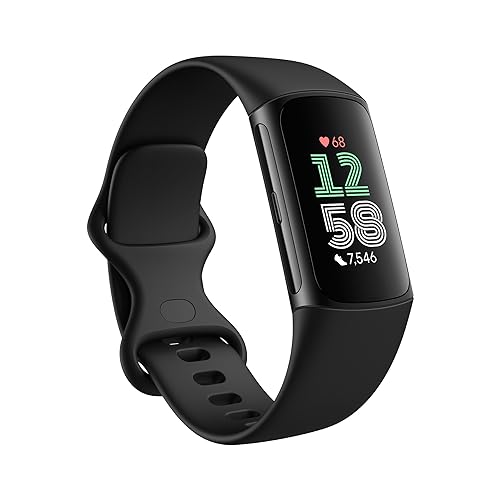
The Charge 6 is the wrist option to start with if you want sleep tracking plus a full fitness tracker in one slim band. Fitbit lists automatic sleep tracking with sleep stages, a nightly Sleep Score and a sleep profile that builds a picture of your patterns over time, alongside 24/7 heart rate tracking and health metrics such as SpO2 estimates in the Fitbit app. A Smart Wake alarm can stir you during a lighter stage near your set time, which suits the guide’s advice about reading trends rather than single nights. Battery life is listed at up to 7 days, so charging rarely breaks the routine, and both small and large bands are in the box for a proper fit. It also carries built-in GPS and Google apps for daytime use. Note that some deeper insights sit in Fitbit Premium, and the listing includes a 6-month membership, so check what continues after that period ends.
2. Oura Ring 4 (Gold, Size 9) — Best ring for discreet tracking
The Oura Ring 4 puts the sensors in an all-titanium ring for people who dislike wearing a watch or band in bed. Oura’s Smart Sensing platform adapts its readings to your finger and feeds more than 50 health metrics, including sleep stages, a Readiness Score, heart rate variability and temperature trends, into the Oura app for iOS and Android. Battery life is listed at 5 to 8 days depending on use, and it recharges on a small desktop charger. Sizing is the catch the guide warns about: Oura sizes are not standard ring sizes, so the maker tells buyers to use the Oura Ring 4 Sizing Kit first, and the ring comes in sizes 4 to 15 and several finishes. This listing is the Gold finish in size 9; pick your own size and finish on the page. Full app insights need Oura Membership after the first included month, so factor that ongoing cost in.
View Oura Ring 4 (Gold, Size 9) on Amazon
3. Withings Sleep (WSM02) — Best under-mattress pad
Withings Sleep is the nothing-to-wear option: a pneumatic pad that slides under the mattress at chest level and stays there. It records sleep cycles (deep, light and REM), sleep duration and interruptions, heart rate and snoring, then syncs automatically over Wi-Fi to the Withings app, where you get a daily Sleep Score and can export a PDF of your data. Because it is mains powered, there is no battery to charge and no nightly setup, which removes the habit problem the guide highlights. The maker rates it for most mattress types (spring, latex, foam and memory foam) from 10 to 45 cm thick, and core sleep data does not need a subscription. One pad tracks one side of the bed, so couples who both want data need one each, and it cannot travel with you like a wearable. It suits anyone who knows they will not keep a band or ring on every night.
View Withings Sleep (WSM02) on Amazon

4. WHOOP 4.0 with 12-Month Subscription — Best for recovery and strain coaching
WHOOP takes a different approach: a screenless sensor on a soft SuperKnit band (Onyx) that monitors continuously and leaves all reading to the app. It tracks sleep, including stages and sleep need, alongside heart rate, heart rate variability, skin temperature and blood oxygen, then turns the numbers into daily Strain and Recovery scores with coaching suggestions. That coaching angle fits readers who want guidance, not just graphs. The bundle includes the 4.0 sensor, the band, an initial 12-month membership for new members, and a wearable, water-resistant battery pack that slides on to charge the device while you wear it, so tracking never pauses; battery life runs several days per charge over USB-C. There is no display and no way to use the full service without membership, which is exactly the subscription trade-off the guide asks you to check before buying.
View WHOOP 4.0 with 12-Month Subscription on Amazon

5. Fitbit Inspire 3 (Midnight Zen/Black) — Best slim, simple band
The Inspire 3 is the lightest way into wrist tracking: a slim band with a small color display that covers the sleep basics well. Fitbit lists sleep stages and a Sleep Score, a Daily Readiness Score that uses your recent sleep and activity, 24/7 heart rate and stress management features, all in the same Fitbit app as the Charge 6. Its standout figure is battery life of up to 10 days, the longest here, which makes it easy to keep on every night and charge rarely. Small and large bands are included, and the listing bundles a 6-month Premium membership for the deeper reports. It leaves out built-in GPS and the extra health sensors of the Charge 6, so it suits someone whose main goal is sleep and gentle activity tracking rather than full training data. This listing is the Midnight Zen/Black version; other band colors are on the same page.
View Fitbit Inspire 3 (Midnight Zen/Black) on Amazon
What to Look For
| Factor | Why it matters | What to check |
|---|---|---|
| Form factor | Wrist, ring, pad and bedside styles feel very different overnight | Choose a style you can comfortably keep using |
| Sensors | Decide what the device can record | Check which measurements the maker lists |
| Battery life | Frequent charging breaks the habit | Compare listed battery life and charging method |
| App and data | The app is where you read the results | Look at app features, phone compatibility and data export |
| Subscription needs | Some features sit behind ongoing plans | Read what the listing says is included |
| Comfort and fit | Bands and sensors should not be distracting in bed | Check sizes, materials and band options |
| Warranty | Shows how much the maker stands behind the device | Read the warranty terms in the listing |
Setup and Care Tips
- Charge the device during a time of day when you are not using it.
- Follow the maker’s fitting guidance so the sensors sit correctly.
- Give it a couple of weeks of use before you look for trends.
- Clean bands and sensors with a soft cloth as the maker advises.
- Update the app and the firmware when the maker releases new versions.
Mistakes to Avoid
- Treating the numbers as a medical measurement.
- Choosing a style you will not wear or place every night.
- Overlooking ongoing plan costs described in the listing.
- Ignoring phone compatibility.
- Skipping the warranty details in the listing.
What Sleep Trackers Actually Measure
Sleep trackers do not read your brain. Most consumer devices estimate sleep from indirect signals, such as movement, heart rate, breathing pattern, skin temperature, or sound. Software then turns these signals into labels like light sleep, deep sleep, and time awake. The labels are estimates built on assumptions, so they should be read as rough guides, not precise measurements.
Different device types gather different signals. A wrist or ring device usually combines motion with optical heart rate sensing. An under-mattress pad detects movement and sometimes heart and breathing rhythms through pressure. A bedside device may use sound or radar-style sensing to detect breathing and motion without contact. Each approach has strengths and limits. Wearables can be affected by fit, while pads can be influenced by mattress type and a partner sharing the bed.
Check what the maker says the device records, and how it describes its claims. A listing that is clear about being a wellness gadget, not a diagnostic tool, is more honest than one that suggests medical results. Look for notes on what data is shown, such as total time asleep, wake-ups, heart rate trends, or breathing patterns. Keep expectations modest. The most useful part of a tracker is often the trend over weeks, such as how your routine affects your nights, not the number for any single night.
Comparing Wearables, Pads, and Bedside Devices
Choosing the form that suits you is half the battle, since a tracker only helps if you use it. Wrist devices are familiar and often double as watches or fitness trackers, so they track the whole day. The trade-off is comfort and charging, as some people dislike wearing something in bed. Rings are smaller and less intrusive, but sizing matters, and they can be harder to replace if damaged.
- Wrist wearables: Widely available, versatile, need regular charging, and may be bulky for light sleepers.
- Rings: Discreet and comfortable for many, but need accurate sizing and may have limited display options.
- Under-mattress pads: Nothing to wear, but fit depends on the bed, and a shared bed can complicate readings.
- Bedside devices: No contact needed, but placement and room conditions matter, and sound-based types raise privacy questions.
Think about how you sleep. If you move a lot or share a bed, a pad might pick up both of you. If you travel, a portable wearable may be easier. If you dislike gadgets on your body, a pad or bedside unit may be best. Check the listing for compatibility with your bed size, thickness, and type, and for how many people the device can track.
Privacy, Data, and App Considerations
Sleep data is personal. A tracker collects patterns of when you are asleep, awake, and even at home, so it is worth knowing how that information is handled. Read the privacy notes in the listing or the maker’s policy. Look at what data is stored, where it is stored, and whether it is shared with third parties. Check whether you can delete your data or export it.
The app deserves as much attention as the hardware. Check which phone systems it supports, and whether it requires an account. Look at how easy it is to read the results, and whether it offers trends over time, notes, or tags for events like caffeine or exercise. Some apps provide suggestions or scores, which can be motivating but may feel prescriptive. Think about whether you want those, and whether you can turn them off.
Consider long-term support. Apps and devices rely on software updates, and some features may change or move behind a subscription. Check how the maker describes updates and support periods. If the app stops working, the hardware may lose much of its value. If you share a home, think about how readings are separated between people, and whether children or guests can see your data. Taking a few minutes to read privacy and account settings helps keep you in control.
Making the Device Comfortable to Live With
Comfort and routine decide whether a tracker becomes a habit. For wearables, check band materials, sizes, and any options for hypoallergenic or breathable bands. A band that is too tight can be uncomfortable and affect readings, while one that is too loose can slip. Follow the maker’s fit guidance, and adjust over the first few nights. Clean the band and sensors regularly, as sweat and skincare products can build up.
For pads and bedside devices, think about setup. A pad should lie flat and stay in place, with the cable routed neatly. A bedside unit needs a stable position at the right distance from the bed, away from fans and noise sources if the maker advises. Make sure cables do not create a trip hazard, and keep the device away from water.
Build a simple routine. Charge a wearable at a consistent time, such as during a morning shower, so it is ready at night. Place the pad or device and leave it set up. Check the battery or connection once a week. If you find the device disturbs your sleep, such as with lights, vibration, or discomfort, try adjusting settings or switching to another form. The aim is to learn from the data without letting the device itself become a source of stress.
Using the Data Sensibly and Knowing Its Limits
Used well, a tracker can raise awareness of your habits. Look for patterns over several weeks, such as how late meals, screen time, alcohol, caffeine, or exercise relate to your sleep. Change one thing at a time, and watch for differences. Keep a short note of events alongside the data, because context makes the numbers more meaningful.
Be cautious about overinterpreting. If the device says you slept poorly but you feel rested, trust how you feel. Constant checking can create worry about sleep, which itself can make sleep worse. If scores begin to stress you, take a break from looking at them. Do not use a consumer tracker to diagnose or rule out a condition.
- Persistent difficulty sleeping, loud snoring with pauses in breathing, or heavy daytime tiredness are reasons to talk to a qualified health professional.
- Bring your trend notes to the appointment, but understand that the professional will use their own assessment.
- Do not change medication or treatment based only on a tracker.
Treat the tracker as a curious companion, not an authority. The best result is better habits, a calmer routine, and a clearer sense of what helps you rest. Keep the habit light, and remember that how you feel in the morning counts most.
Wrist, Ring, Mat or Bedside: Where the Sensor Lives
Trackers gather data in different ways, and the form factor shapes comfort and day-to-day habit. Think about what you are willing to wear or place in your bedroom before you compare features.
- Wrist bands and watches: usually double as step counters and phone notification screens. They are convenient, though some people find a bulky case annoying in bed.
- Rings: small and light, with a battery that often lasts several days. Sizing matters, so look for a sizing kit or chart from the maker.
- Under-mattress mats: nothing to wear, but they depend on correct placement and can be affected by a thick topper.
- Bedside devices: sit on a nightstand and use radar or sound, which suits people who dislike jewelry but do not mind a gadget in the room.
If you share a bed, check whether a mat or nightstand device can tell two people apart.
How to Read the Numbers Without Overreading Them
Consumer trackers estimate. They infer patterns from motion, heart rate and sometimes temperature, and their results differ from a clinical sleep study. Treat the nightly figures as a rough trend, not a diagnosis. Look at weekly averages rather than reacting to one odd night, and notice what the app compares: bedtime consistency, time in bed and how often you woke. If a tracker’s numbers worry you, or you suspect a sleep disorder, talk to a doctor instead of relying on the device.
Practical Matters: Battery, App and Data
Charging habits matter. A device that dies halfway through the week quickly becomes a drawer ornament, so check the battery life the maker lists and where it charges. Look at the companion app on your phone’s store page: does it work with your phone, and does it demand a subscription for the full set of insights? Read the privacy policy to learn what is stored and shared, and adjust the settings accordingly.
Habits That Make the Data More Useful
Wear the device the same way every night, with a snug but comfortable fit, and keep the sensor surface clean. Charge it at a regular daytime moment, like during a morning shower, so battery gaps do not leave holes in the record. Add notes in the app about late meals, travel or caffeine if it offers that, since patterns often appear only when you can connect them to what happened that day. Avoid obsessing over the score at bedtime, which can add stress; check the summary once in the morning instead.
A Practical Decision Workflow Before You Buy
Most disappointing purchases in this category do not happen because the product itself is poor. They happen because the buyer skipped a short round of honest homework and ordered on a single headline feature. A sleep tracker has to fit a specific space, a specific routine and a specific set of habits, and those three things differ far more between households than any specification sheet suggests. The workflow below takes about fifteen minutes, needs nothing more than a tape measure, a notebook and your phone, and it will narrow the picks in this guide down to one or two clear candidates.
Start with the space, not the product. Measure the area where the sleep tracker will live or be used, and write down the fixed obstacles as well: doors that swing through the space, sockets that are already spoken for, furniture that cannot move, and anything that generates heat, moisture or dust nearby. Photograph the space from two angles. It sounds excessive, but a photograph taken now will answer questions later that memory will not, especially once you are comparing dimensions on a product page late in the evening.
Next, write down the job in one sentence. Not a wish list, just the main job: what should be different the week after this arrives? Keep that sentence visible while you shop. Every feature you consider after that has to earn its place by serving that sentence. Features that do not serve it are not bargains; they are future clutter, extra cleaning, or settings you will scroll past for years without touching.
Then list your constraints honestly. Budget is only one of them. Time is another: how many minutes a week will you genuinely give to cleaning, charging, adjusting or maintaining this purchase? Storage is a third: where does it, and everything that comes with it, go when it is not in use? Noise tolerance, the patience of other people in the household, and any physical limits such as lifting weight or reaching height all belong on the same short list.
Only now open the product pages, and read them in a fixed order. First the dimensions and requirements, because a mismatch there ends the discussion. Second the controls and the everyday operating steps, because those are what you will live with daily. Third the care requirements, because they decide whether the product still pleases you in month six. Marketing language comes last, if at all. When two picks look identical, the one whose everyday steps are simpler almost always wins in real life.
Finally, do a short reality check against the picks above. The option labelled as the best overall choice earns that label by balancing the most common needs, which makes it the sensible default if your written job sentence sounds ordinary. The more specialised picks earn their place when your constraints list contains something unusual: a very small space, a very heavy workload, a strict noise limit, or a user with specific physical needs. If none of your constraints are unusual, resist paying extra for specialisation you will never call on.
Use Cases in Detail: Matching the Pick to the Situation
Abstract advice only goes so far, so it helps to walk through the situations buyers describe most often and see how the decision changes in each one. Read the scenarios below and find the one closest to your own household; the right choice usually becomes obvious once the situation is stated plainly.
Someone waking unrefreshed despite long nights
In this situation the priority is reliability under daily repetition. The sleep tracker will be used when people are tired, rushed or distracted, so controls need to be forgiving and the basic setup needs to stay put without constant adjustment. Choose the pick whose everyday operation is described most simply in the reviews above, set it up once with care, and then leave the settings alone for the first week so you learn its normal behaviour before you start fine-tuning anything.
A shift worker with an irregular schedule
Here the deciding factor is usually comfort over long stretches rather than peak performance in short bursts. Think about posture, reach, noise and heat over hours, not minutes. A sleep tracker that feels fine in a five-minute test can become irritating by the third hour, so weight the comments in this guide about sustained use more heavily than the headline features. It is also worth planning the surrounding details: lighting, seating, cable routes or storage within arm’s reach make as much difference as the product itself.
An athlete watching recovery between sessions
When several people share the same sleep tracker, the purchase has to survive handovers. Settings get changed, parts get moved, and nobody reads instructions twice. Favour the pick with the clearest controls and the fewest fragile accessories, agree one house rule for how it is left after use, and keep any small parts together in one labelled container. Shared use also raises the value of easy cleaning, because a product that is simple to wipe down or empty actually gets cleaned, while a fiddly one quietly gets worse.
A person testing changes to an evening routine
This last situation rewards planning for the awkward moments rather than the average day. Think about the hottest, coldest, busiest or most tiring version of the routine, and choose the pick that still works then. Capacity, reach and durability matter more than refinements. It is also the situation where buying once, properly, beats buying cheaply twice: a sleep tracker that struggles at the edges of its range tends to be replaced within a year, which costs more than starting with the stronger option would have done.
Comparing the Picks Head to Head
Comparison tables compress a lot of judgement into a few rows, which makes them useful starting points and poor finishing points. The paragraphs below slow the comparison down and look at each pick in this guide on its own terms, using only what the reviews above already establish. Work through them with your constraints list open, and cross picks off rather than ranking them: the right purchase is usually the last one standing, not the one with the longest feature list.
Fitbit Charge 6 (Obsidian/Black). Its role in this guide — best all-round wrist tracker — tells you the job it was picked for, so judge it against that job rather than against every other pick at once. Re-read its section above with your written job sentence beside you, and note the one honest limitation mentioned there. If that limitation touches something you do every day, move on to the next pick; if it touches something you rarely do, it is a fair trade for the strengths the review describes.
Oura Ring 4 (Gold, Size 9). Its role in this guide — best ring for discreet tracking — tells you the job it was picked for, so judge it against that job rather than against every other pick at once. Re-read its section above with your written job sentence beside you, and note the one honest limitation mentioned there. If that limitation touches something you do every day, move on to the next pick; if it touches something you rarely do, it is a fair trade for the strengths the review describes.
Withings Sleep (WSM02). Its role in this guide — best under-mattress pad — tells you the job it was picked for, so judge it against that job rather than against every other pick at once. Re-read its section above with your written job sentence beside you, and note the one honest limitation mentioned there. If that limitation touches something you do every day, move on to the next pick; if it touches something you rarely do, it is a fair trade for the strengths the review describes.
WHOOP 4.0 with 12-Month Subscription. Its role in this guide — best for recovery and strain coaching — tells you the job it was picked for, so judge it against that job rather than against every other pick at once. Re-read its section above with your written job sentence beside you, and note the one honest limitation mentioned there. If that limitation touches something you do every day, move on to the next pick; if it touches something you rarely do, it is a fair trade for the strengths the review describes.
Fitbit Inspire 3 (Midnight Zen/Black). Its role in this guide — best slim, simple band — tells you the job it was picked for, so judge it against that job rather than against every other pick at once. Re-read its section above with your written job sentence beside you, and note the one honest limitation mentioned there. If that limitation touches something you do every day, move on to the next pick; if it touches something you rarely do, it is a fair trade for the strengths the review describes.
Two patterns are worth watching for as you compare. First, the gap between the best overall pick and the specialised picks is rarely about quality; it is about fit. A specialised pick is not a lesser product, it is a narrower one, brilliant inside its niche and merely adequate outside it. Second, accessories and extras sway decisions out of proportion to their value. Ask of every extra whether you would use it weekly. If the honest answer is monthly or never, let it go, and let the core performance, the controls and the care routine decide instead.
If you finish this comparison with two picks still standing, break the tie with ownership questions rather than performance questions. Which one will be easier to clean in your actual space? Which one’s controls will the other people in the household understand without asking you? Which one stores more neatly when it is not in use? Those unglamorous questions predict satisfaction six months from now far better than any single specification does.
Day-to-Day Use, Cleaning and a Simple Care Routine
The first week with a new sleep tracker sets habits that tend to stick, so spend a little of that week deliberately. Run through the full operating cycle slowly once, from start to finish, while you are not in a hurry. Notice the order things have to happen in, where your hands naturally go, and which step feels awkward. Awkward steps are where mistakes and breakages concentrate later, so rearrange the surrounding space now, while changing it is still easy.
Build cleaning into the routine the product already has, rather than treating it as a separate chore. A quick wipe, shake, rinse or empty at the natural end of each use takes seconds and prevents the slow build-up that eventually needs a deep clean. Keep whatever you use for that quick job within arm’s reach of where the sleep tracker lives; supplies stored in another room might as well be stored in another house, because the quick job simply stops happening.
A workable care schedule
After each use: return everything to its resting state, clear away residue, moisture or loose debris, and leave the sleep tracker somewhere air can reach it if it needs to dry. Weekly: give the surfaces and contact points a proper clean with a soft cloth and mild cleaner suited to the material, check moving parts and connections for looseness, and deal with small issues while they are still small. Monthly: do the deeper job — the full wash, descaling, sharpening, re-tightening or inspection the manual describes — and look honestly at wear. Seasonally: review storage, replace anything consumable that has quietly expired or worn out, and reconsider placement if the household’s routine has changed.
Storage deserves the same thought as use. Keep the sleep tracker dry, out of direct extremes of heat and cold, and away from the crush zone at the back of a cupboard or the bottom of a pile. Small parts belong in one container, labelled, stored with the main item rather than near it. If the original packaging includes shaped inserts that protect fragile parts, consider keeping it; flat-pack storage boxes look tidier but protect less.
When something goes wrong, troubleshoot in order of likelihood before assuming failure. Check power, connections and settings first, then positioning, then cleanliness, then wear. Most problems reported with products in this category trace back to one of those four, and most are fixed in minutes without tools or spare parts. Keep the manual, or a photo of its troubleshooting page, somewhere you can find it on a bad evening rather than at the bottom of a drawer.
More Mistakes That Shorten a Product’s Life
Beyond the mistakes covered earlier in this guide, a few quieter habits do most of the long-term damage. The first is running the sleep tracker at its maximum setting as a default. Maximum settings exist for occasional peaks; used constantly, they raise noise, heat and wear while often delivering little extra benefit. Find the lowest setting that does the job properly and treat anything above it as a reserve.
The second is ignoring the environment. Dust, steam, direct sun, cramped airflow and unstable surfaces all age a sleep tracker faster than ordinary use does. You cannot always choose the environment, but you can usually improve it by a few centimetres: a small gap for air, a mat for stability, a move away from a heat source. Those tiny adjustments compound over years.
The third is postponing small maintenance until it becomes a repair. A loose fitting, a frayed edge, a filter or part that is past its best — each is cheap and quick to address when noticed, and expensive or impossible later. The weekly check in the care schedule above exists precisely to catch these while they are still trivial.
The fourth is buying replacement parts, refills or accessories on price alone without checking fit. Incompatible extras are a false economy: they perform poorly, can damage the main product, and usually cannot be returned once opened. Match the part to the model exactly as the manual specifies, and keep a note of the model details on your phone so the information is with you when you need it.
The last is letting the purchase drift away from its original job. Households change, and a sleep tracker bought for one routine gets pressed into another it was never suited to. When that happens, the honest options are to adapt the routine back, accept the compromise knowingly, or replace the product with one designed for the new job. Blaming the product for a job it never claimed to do helps nobody, and recognising the mismatch early saves both money and frustration.
One more practical note for sleep tracker buyers: revisit your original job sentence after the first month of ownership. Many households find the sleep tracker has quietly taken on a second job — a neighbouring task it handles well enough that the routine has shifted around it. That is fine, and often a pleasant surprise, but it is worth noticing, because the second job changes what matters when you clean, store and eventually replace it. Note the change in the same place you kept your measurements, set a reminder to review any consumables or accessories the new job depends on, and adjust the weekly care check to cover the parts the second job uses most. Buyers who do this short review tend to get noticeably more value from the same purchase, simply because the product’s real role in the household is understood rather than assumed, and small mismatches between the role and the setup get corrected before they turn into daily irritations.
One more practical note for sleep tracker buyers: revisit your original job sentence after the first month of ownership. Many households find the sleep tracker has quietly taken on a second job — a neighbouring task it handles well enough that the routine has shifted around it. That is fine, and often a pleasant surprise, but it is worth noticing, because the second job changes what matters when you clean, store and eventually replace it. Note the change in the same place you kept your measurements, set a reminder to review any consumables or accessories the new job depends on, and adjust the weekly care check to cover the parts the second job uses most. Buyers who do this short review tend to get noticeably more value from the same purchase, simply because the product’s real role in the household is understood rather than assumed, and small mismatches between the role and the setup get corrected before they turn into daily irritations.
FAQ
Are sleep trackers accurate?
They give an estimate based on sensors and software. They are consumer devices, so use the results as general trends rather than a diagnosis.
Do I need to wear a tracker on my wrist?
No. Some options are rings, pads placed under the mattress or devices that sit on a nightstand. Pick the style you find easiest to keep using.
Do sleep trackers need a subscription?
Some do for certain features. Read the listing to see what is included at purchase and what is behind an ongoing plan.
Can a tracker tell me if I have a sleep disorder?
No. These are consumer devices and not medical tools. If you have concerns, speak to a qualified health professional.
How long before I see useful trends?
Give it a couple of weeks of regular use. Patterns become clearer over time than on any single night.
Will a tracker work if I share a bed?
It depends on the type. Wearables track the wearer, while pads and bedside units may pick up both people, so check how the maker handles shared beds.
Can I use a tracker with any phone?
Not always. Check the supported operating systems and app requirements in the listing before buying.
Is it a problem if the tracker disagrees with how I feel?
Not necessarily. The data is an estimate, so trust your own sense of rest and use the numbers as one input.
How long should a sleep tracker realistically last?
Longevity depends far more on routine care and a suitable environment than on the badge on the front. A sleep tracker that is cleaned on the simple schedule described in this guide, stored dry and used within the job it was bought for will normally serve for years of regular household use. The earliest signs that replacement is approaching are usually a slow decline in performance, controls or fittings becoming loose or unreliable, and replacement parts getting hard to find. When two of those three appear together, start planning a replacement rather than spending on repairs.
Is it worth paying more for the top pick in this guide?
Only if the extra money buys something your own constraints list actually asks for. The top pick earns its place by balancing the needs most buyers share, which makes it the safest choice for an ordinary household. Paying more for a specialised model makes sense when your situation is genuinely specialised — an unusually large or small space, a much heavier workload than average, or a user with specific needs. If your written job sentence sounds like most people’s, the balanced pick will satisfy you, and the saving is better kept for the accessories or consumables you will genuinely use.
What should I check in the first week of ownership?
Check fit, controls and routine, in that order. Confirm the sleep tracker sits, fits or operates in your space exactly as you measured it, and that doors, sockets and neighbouring items still work as they should. Run every control once so nothing is a surprise later. Then watch your own routine: note anything you keep working around, because small rearrangements made in week one are easy, while workarounds left for a month become permanent habits. Keep packaging until the end of that first week in case an exchange is needed.
How do I know whether to repair or replace?
Compare three things: the cost of the repair against the remaining life you would get from it, the availability of the correct parts, and whether the fault is isolated or part of a general decline. A single failed part on an otherwise sound sleep tracker is usually worth repairing. Repeated faults, declining performance and worn fittings arriving together signal that the product is wearing out as a whole, and money spent on one repair tends to be followed by another. Safety always overrides the calculation: anything electrical, load-bearing or heat-related that behaves unpredictably should be taken out of use until it is checked.
Can I use a sleep tracker for jobs beyond what it was bought for?
Sometimes, cautiously, and only within the limits the manual describes. Products in this category are designed and tested around a particular job, load and environment. Occasional light use outside that pattern is unlikely to cause harm, but making an unsuitable job part of the regular routine accelerates wear and can create safety risks the design never anticipated. If a new job has become a regular part of your household’s life, that is a sign to look at a product designed for it, rather than asking the current one to stretch further every week.
What is the single most useful habit for getting value from this purchase?
The end-of-use reset. Returning the sleep tracker to a clean, dry, ready state every time you finish with it takes under a minute and does more for long-term satisfaction than any other habit. It prevents build-up, reveals small problems while they are still trivial, means the product is always ready when the next person reaches for it, and quietly extends its working life. Most products that disappoint early were not badly made; they were badly reset, day after day, until small neglects added up.
The Short Version
The right sleep tracker fits your routine and gives you data you can read easily. Compare style, battery life, app features and ongoing plan needs, read the warranty, and choose the one you will use.
Related Guides
- How to Choose the Best Dog GPS Trackers: Buyer's Guide (2026)
- How to Choose the Best 8×42 Binoculars: Buyer's Guide (2026)
- How to Choose the Best Activity Centers: Buyer's Guide (2026)
- How to Choose the Best Airbrush Kits: Buyer's Guide (2026)
- How to Choose the Best Approach Shoes: Buyer's Guide (2026)


