Disclosure: As an Amazon Associate, reviewstook.com earns from qualifying purchases. Links to Amazon on this page are affiliate links; they cost you nothing extra. Prices and availability change often, so check the current Amazon listing before you buy.

Where to buy
Short on time? Start with the Apple Watch SE (2nd Gen, 44mm, GPS) at the top of this list, then compare the six best smartwatches for seniors picks below — each name links to its Amazon listing so you can check price on Amazon today.
- Apple Watch SE (2nd Gen, 44mm, GPS) — Check on Amazon — Best for iPhone Households. Check price on Amazon before you buy; listings, colours and band options change often.
- Samsung Galaxy Watch 7 (44mm, Bluetooth) — Check on Amazon — Best for Android Households. Check price on Amazon before you buy; listings, colours and band options change often.
- Garmin Venu 3 (45mm) — Check on Amazon — Best Battery for Low Upkeep. Check price on Amazon before you buy; listings, colours and band options change often.
- Fitbit Sense 2 — Check on Amazon — Best Simple Health Focus. Check price on Amazon before you buy; listings, colours and band options change often.
- Google Pixel Watch 3 (45mm, Wi-Fi) — Check on Amazon — Best Large, Clear Display on Android. Check price on Amazon before you buy; listings, colours and band options change often.
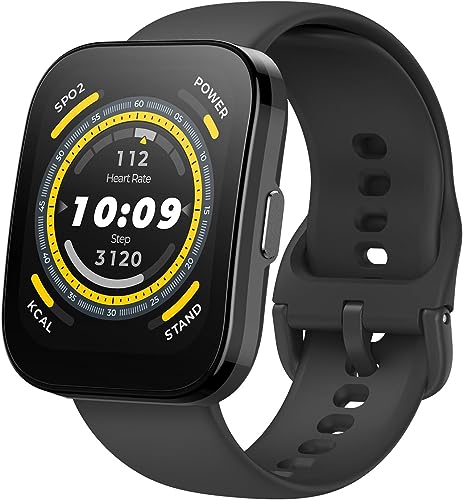
- Amazfit Balance (46mm) — Check on Amazon — Best Value with Big Display. Check price on Amazon before you buy; listings, colours and band options change often.
Read the full guide ↓
Choosing the best smartwatches for seniors is less about having the most features and more about having the right ones, presented clearly: a display that is easy to read, controls that do not punish imprecise taps, a battery that does not demand a daily ritual, and the safety-oriented features each manufacturer publishes — such as emergency SOS calling and, on Apple Watch models, Crash Detection and Fall Detection as Apple describes them — set up correctly from day one. This guide was written for two audiences at once: seniors buying for themselves, and adult children helping a parent choose and configure a watch that will actually stay on the wrist.
A note on honesty before the picks. Smartwatch health features — heart rate tracking, sleep tracking, ECG apps where offered — are described by their manufacturers as wellness and fitness features. They are not medical devices, they do not diagnose or treat any condition, and features such as fall detection are designed to help a wearer contact emergency services after a hard fall is detected; they are not a guarantee of rescue and are no substitute for a dedicated medical alert system where one is needed. We describe each feature exactly as its manufacturer presents it, and we flag where setup by a family member makes the difference between a feature existing and a feature working. Readers comparing simpler step-focused options may also want our guide to the best pedometer watches for seniors.
The practical dividing line is the phone in the household. Apple Watch models need an iPhone — but Apple’s Family Setup, where supported, lets a family member manage a watch for a parent who does not own one. Samsung and Google watches need Android phones. Garmin, Fitbit and Amazfit work with either, and their multi-day batteries solve the single biggest real-world problem in this category: a watch that spends its life in a charger is protecting nobody. Every pick below was chosen with that reality in mind, and the setup section after the reviews is as important as the reviews themselves.
In this guide
Quick Picks
These six earned their places for different reasons — no single watch wins every category, which is exactly why the badges matter more than the order.
| Pick | Badge | Key spec |
|---|---|---|
| Apple Watch SE (2nd Gen, 44mm, GPS) | Best for iPhone Households | 44mm aluminium case, Retina display; Crash Detection and heart rate notifications as published by Apple |
| Samsung Galaxy Watch 7 (44mm, Bluetooth) | Best for Android Households | 44mm case, 1.5-inch AMOLED display; Wear OS with Samsung One UI Watch |
| Garmin Venu 3 (45mm) | Best Battery for Low Upkeep | 45mm case, 1.4-inch AMOLED touchscreen display; Manufacturer-stated battery up to 14 days in smartwatch mode |
| Fitbit Sense 2 | Best Simple Health Focus | Manufacturer-stated battery of 6+ days; Built-in GPS, 24/7 heart rate tracking (manufacturer-stated) |
| Google Pixel Watch 3 (45mm, Wi-Fi) | Best Large, Clear Display on Android | 45mm case, Actua AMOLED display; Wear OS with Fitbit health and fitness tracking built in |
| Amazfit Balance (46mm) | Best Value with Big Display | 46mm case, 1.5-inch AMOLED display; Manufacturer-stated battery up to 14 days typical use |
How These Picks Were Chosen
Selection prioritised readability (display size and brightness), simplicity of the everyday interface, manufacturer-stated battery life, and the safety and communication features each brand publishes — emergency SOS, fall or crash detection where the manufacturer offers it, and the ability to call or message family from the wrist. Models with cramped displays, app-first interfaces, or daily charging as the only option were ranked down unless their ecosystem made them the right household choice.
We also weighted how well each watch works when a family member helps: remote setup options, simple companion apps, and clear health summaries a wearer can share with family or discuss with a clinician as general wellness information. Every feature claim in this article is attributed to its manufacturer, and no watch here is presented as a medical device. If a dedicated health-monitoring brief matters more than smart features, our best health and heart rate watches guide covers that angle separately.
The 6 Best Smartwatches for Seniors

Apple Watch SE (2nd Gen, 44mm, GPS) — Best for iPhone Households
For iPhone households the Watch SE is the natural senior pick: Apple’s interface is the most consistent in the category, and Apple publishes Crash Detection, Emergency SOS and heart rate notifications for this model.
- 44mm aluminium case, Retina display
- Crash Detection and heart rate notifications as published by Apple
- Sleep tracking and Cycle Tracking (manufacturer-stated)
- Water resistant to 50 metres (manufacturer rating)
Strengths
- The simplest route into Apple Watch, with family setup options
- Crash Detection and emergency SOS features published by Apple
- Light, comfortable case that suits all-day and overnight wear
Trade-offs
- No always-on display — raise to wake only
- No ECG app or blood oxygen features on this model
- iPhone required for setup and use
The Apple Watch SE (2nd generation) trims Apple’s line to the essentials: a 44mm aluminium case, heart rate notifications, sleep tracking, Crash Detection and Emergency SOS, in a light watch that is easy to live with. Apple publishes Family Setup support, so a family member can use it with their own number managed from a relative’s iPhone. For iPhone households it is the straightforward, lower-cost way to get a proper smartwatch with Apple’s safety-oriented features.
Family Setup is the quiet advantage — a son or daughter can configure the watch, manage contacts and see that it is being worn, from their own iPhone. The screen is not always-on, so the wearer raises their wrist to read the time, and there is no ECG app on this model; what you get instead is simplicity, lightness, and a price tier that makes replacing a lost watch less painful.
Honest limitation: No always-on display — raise to wake only For some buyers that settles the question immediately; for others it is a fair trade for everything else this watch does well, but it should be a conscious decision rather than a surprise after the box is open.
Best for: Seniors in iPhone families, especially with a helper nearby / Not suited for: households without an iPhone, or anyone needing an always-on display

Samsung Galaxy Watch 7 (44mm, Bluetooth) — Best for Android Households
Android households get their equivalent in the Galaxy Watch 7: a big, bright 1.5-inch display that is genuinely easy to read, straightforward tiles for calls and messages, and Samsung’s published emergency features.
- 44mm case, 1.5-inch AMOLED display
- Wear OS with Samsung One UI Watch
- Manufacturer-stated heart rate, sleep and Energy Score features
- 5 ATM + IP68 water and dust resistance (manufacturer rating)
Strengths
- Bright, responsive AMOLED that stays readable outdoors
- Deep integration with Samsung and Android phones, including calls and notifications
- Manufacturer-stated sleep features include sleep coaching and an Energy Score
Trade-offs
- Best experience is with a Samsung Galaxy phone; some features are Galaxy-only
- Battery is a charge-every-day-or-two proposition for most users
- No iPhone compatibility
The Galaxy Watch 7 is Samsung’s mainstream Wear OS watch: a 44mm aluminum case, a bright 1.5-inch AMOLED, and the full Google app ecosystem sitting alongside Samsung’s own health platform. Samsung publishes heart rate tracking, sleep tracking with coaching, and an Energy Score that summarises readiness each morning. It handles calls, texts, contactless payments and music like a proper smartwatch rather than a fitness band with a big screen, and the dual-band GPS covers runs and rides without a phone along.
Text size can be enlarged in settings, the rotating touch bezel suits imprecise fingers better than tiny icons, and calls from the wrist are clear. The compromises are charging — plan on every day or two — and a feature set that is fullest alongside a Samsung phone. Set up by family with notifications trimmed to family, pharmacy and calendar, it becomes a calm watch rather than a noisy one.
Honest limitation: Best experience is with a Samsung Galaxy phone; some features are Galaxy-only For some buyers that settles the question immediately; for others it is a fair trade for everything else this watch does well, but it should be a conscious decision rather than a surprise after the box is open.
Best for: Seniors with Android or Samsung phones / Not suited for: iPhone households — it cannot pair with an iPhone

Garmin Venu 3 (45mm) — Best Battery for Low Upkeep
The Venu 3 solves the upkeep problem outright: up to 14 days of manufacturer-stated battery means charging becomes a fortnightly event a family visit can cover, not a daily chore to forget.
- 45mm case, 1.4-inch AMOLED touchscreen display
- Manufacturer-stated battery up to 14 days in smartwatch mode
- Built-in GPS and Garmin health features including Sleep Coach and Body Battery
- Speaker and microphone for calls from the wrist (manufacturer-stated)
Strengths
- Up to 14 days of manufacturer-stated battery dwarfs most AMOLED smartwatches
- Works with both Android and iPhone
- Garmin’s Sleep Coach and nap detection are unusually complete for sleep tracking
Trade-offs
- App ecosystem is Garmin’s own — no Google Play store on the watch
- Smart features are simpler than Wear OS or watchOS
- Touchscreen-first design takes adjustment if you prefer buttons
The Venu 3 is Garmin’s answer to the mainstream smartwatch: a 1.4-inch AMOLED in a 45mm case, a speaker and microphone for wrist calls, and Garmin’s full health platform underneath. Garmin publishes up to 14 days of battery in smartwatch mode, built-in GPS, Body Battery energy monitoring, and a Sleep Coach that factors naps into its guidance. Because it pairs with Android and iPhone alike, it is one of the few watches on this page that does not force a phone-ecosystem decision first.
Garmin’s interface rewards setup help — large watch faces are available, the speaker handles wrist calls clearly, and Sleep Coach plus Body Battery give a gentle daily picture of rest and energy as wellness information. There is no app store to get lost in, which many senior wearers experience as a relief. For a parent who will not maintain a charging ritual, this is the most forgiving watch on the page.
Honest limitation: App ecosystem is Garmin’s own — no Google Play store on the watch For some buyers that settles the question immediately; for others it is a fair trade for everything else this watch does well, but it should be a conscious decision rather than a surprise after the box is open.
Best for: Seniors who forget daily charging, on either phone platform / Not suited for: buyers wanting a large app ecosystem on the wrist

Fitbit Sense 2 — Best Simple Health Focus
The Sense 2 keeps the brief health-simple: big tiles, plain-language scores for sleep and stress as Fitbit presents them, and 6+ days of manufacturer-stated battery.
- Manufacturer-stated battery of 6+ days
- Built-in GPS, 24/7 heart rate tracking (manufacturer-stated)
- ECG app and SpO2 features as published by Fitbit
- Stress management tools including cEDA sensor (manufacturer-stated)
Strengths
- 6+ days of manufacturer-stated battery beats most full smartwatches
- Fitbit’s sleep staging and Sleep Score presentation are beginner-friendly
- Stress tracking with the cEDA sensor is a feature rivals mostly lack
Trade-offs
- Some detailed insights require a Fitbit Premium subscription
- App support is narrower than Wear OS or watchOS
- No offline music storage for most services
The Sense 2 is Fitbit’s flagship health watch, built around stress and sleep as much as exercise. Fitbit publishes 6+ days of battery, built-in GPS, continuous heart rate tracking, an ECG app, SpO2 readings, and a cEDA sensor for all-day stress tracking. The interface is deliberately simple — big tiles, plain-language scores — and the Fitbit app remains one of the clearest places to review sleep stages, resting heart rate trends and readiness over time.
For seniors who want to understand their sleep and daily activity without learning a computer’s worth of menus, Fitbit’s app remains the friendliest in the business, and a family member can review trends alongside the wearer. It lacks some flagship safety features found on Apple and Samsung models, and some detailed insights sit in Fitbit’s premium tier, so it suits wellness interest more than safety-first buying.
Honest limitation: Some detailed insights require a Fitbit Premium subscription For some buyers that settles the question immediately; for others it is a fair trade for everything else this watch does well, but it should be a conscious decision rather than a surprise after the box is open.
Best for: Seniors interested in sleep and activity, simply presented / Not suited for: buyers whose priority is fall or crash detection features

Google Pixel Watch 3 (45mm, Wi-Fi) — Best Large, Clear Display on Android
The Pixel Watch 3 in 45mm offers the largest, clearest canvas on the Android side, with Google’s uncluttered interface and Fitbit health features behind it.
- 45mm case, Actua AMOLED display
- Wear OS with Fitbit health and fitness tracking built in
- Manufacturer-stated 24-hour battery life
- Heart rate tracking and Fitbit sleep tracking (manufacturer-stated)
Strengths
- Fitbit sleep and readiness features are presented clearly in the Fitbit app
- Clean Wear OS software with Google apps, Wallet and Maps
- Two case sizes in the range, and the 45mm suits larger wrists
Trade-offs
- Manufacturer-stated battery is about a day, so nightly charging is the routine
- Some Fitbit insights sit behind the Fitbit Premium subscription
- Round, domed glass is pretty but picks up knocks more easily than a flat sapphire lens
The Pixel Watch 3 pairs Google’s Wear OS with the Fitbit platform Google acquired, which makes it the Android watch most focused on presenting health data in plain language. Google publishes a 24-hour battery rating, heart rate tracking, Fitbit sleep tracking with a Sleep Score, and advanced running features. The 45mm version finally gives bigger wrists a proper option, the Actua display is bright, and the software experience — Assistant, Wallet, Maps, Gmail — is the most Google-native you can put on a wrist.
Large text, a bright display and simple navigation help wearers with reduced vision or dexterity, and Google Assistant voice control reduces the need for precise tapping — asking the watch to call a contact is easier than finding one. Battery is the watch’s demand: manufacturer-stated at about a day, so it needs a reliable charging spot and routine, ideally by the bed or the breakfast table.
Honest limitation: Manufacturer-stated battery is about a day, so nightly charging is the routine For some buyers that settles the question immediately; for others it is a fair trade for everything else this watch does well, but it should be a conscious decision rather than a surprise after the box is open.
Best for: Android seniors who value voice control and a big display / Not suited for: anyone unlikely to charge daily

Amazfit Balance (46mm) — Best Value with Big Display
The Balance is the value route to a big, clear display: a 1.5-inch AMOLED in a 46mm case, Bluetooth calling, Alexa voice assistance, and up to 14 days of manufacturer-stated battery.
- 46mm case, 1.5-inch AMOLED display
- Manufacturer-stated battery up to 14 days typical use
- Dual-band GPS (manufacturer-stated)
- Bluetooth calling and Amazon Alexa built in (manufacturer-stated)
Strengths
- Up to 14 days of manufacturer-stated battery with an AMOLED display
- Works with Android and iPhone through the Zepp app
- Body composition and Readiness features add depth beyond step counting
Trade-offs
- Zepp app ecosystem is smaller than Google or Apple stores
- Voice and smart features are more basic than Wear OS
- Brand support network is thinner than Samsung or Garmin
The Amazfit Balance is the value play that does not feel cheap: a 46mm case, a 1.5-inch AMOLED, dual-band GPS, Bluetooth calling, and a manufacturer-stated 14 days of typical battery. Amazfit publishes body composition analysis, a Readiness score drawn from sleep and recovery data, and compatibility with both Android and iPhone via the Zepp app. For buyers who want a real smartwatch screen without a daily charging habit, it undercuts the big brands while covering the essentials well.
That battery figure is what earns it a place here — a senior can wear it for a fortnight between charges while still making wrist calls and seeing sleep and activity summaries in the Zepp app. The app is less polished than Fitbit’s or Apple’s, and the brand’s support network is thinner, so it suits households comfortable setting things up once and leaving them alone.
Honest limitation: Zepp app ecosystem is smaller than Google or Apple stores For some buyers that settles the question immediately; for others it is a fair trade for everything else this watch does well, but it should be a conscious decision rather than a surprise after the box is open.
Best for: Budget-conscious seniors wanting battery and a big screen / Not suited for: buyers wanting the most polished companion app
Comparison Table
| Pick | Badge | Case / display | Platform / battery headline | Standout feature |
|---|---|---|---|---|
| Apple Watch SE (2nd Gen, 44mm, GPS) | Best for iPhone Households | 44mm aluminium case, Retina display | Crash Detection and heart rate notifications as published by Apple | Sleep tracking and Cycle Tracking (manufacturer-stated) |
| Samsung Galaxy Watch 7 (44mm, Bluetooth) | Best for Android Households | 44mm case, 1.5-inch AMOLED display | Wear OS with Samsung One UI Watch | Manufacturer-stated heart rate, sleep and Energy Score features |
| Garmin Venu 3 (45mm) | Best Battery for Low Upkeep | 45mm case, 1.4-inch AMOLED touchscreen display | Manufacturer-stated battery up to 14 days in smartwatch mode | Built-in GPS and Garmin health features including Sleep Coach and Body Battery |
| Fitbit Sense 2 | Best Simple Health Focus | Manufacturer-stated battery of 6+ days | Built-in GPS, 24/7 heart rate tracking (manufacturer-stated) | ECG app and SpO2 features as published by Fitbit |
| Google Pixel Watch 3 (45mm, Wi-Fi) | Best Large, Clear Display on Android | 45mm case, Actua AMOLED display | Wear OS with Fitbit health and fitness tracking built in | Manufacturer-stated 24-hour battery life |
| Amazfit Balance (46mm) | Best Value with Big Display | 46mm case, 1.5-inch AMOLED display | Manufacturer-stated battery up to 14 days typical use | Dual-band GPS (manufacturer-stated) |
Read the table by your non-negotiable first — phone compatibility, battery rhythm, or the one feature you will use weekly — and let it eliminate watches rather than trying to rank them in the abstract.
How to Choose a Smartwatch for Seniors
Readability beats features. A 44mm-or-larger case with a bright display, enlarged text settings and a simple high-contrast watch face will be used daily; a small, dim, information-dense watch will be abandoned in a drawer. Every pick here offers text enlargement — turn it on during setup, not after frustration. If eyesight is the dominant concern, prioritise the largest displays (Pixel Watch 3 45mm, Galaxy Watch 7 44mm, Amazfit Balance 46mm) and analogue-style faces with bold hands.
Battery is a safety feature in practice. Manufacturer-stated battery ranges from about a day (Pixel, Apple) to two weeks (Garmin, Amazfit) in this guide. A watch being charged is a watch not being worn, and the features families care about — emergency calling, fall detection where offered, heart rate notifications — only exist on the wrist. Match the watch to the wearer’s real routine: a diligent nightly charger can use anything; everyone else should buy battery life.
Understand safety features as manufacturers describe them. Emergency SOS lets the wearer summon help from the wrist. Apple additionally publishes Fall Detection on its watches — designed to detect a hard fall and help contact emergency services if the wearer does not respond — and Crash Detection for severe car crashes. These are assistance features, not guarantees, and none replaces a dedicated medical alert service for someone at high risk. Cellular (LTE) versions keep SOS working when the phone is not nearby, which is the configuration families usually actually want; our smartwatch buying guide explains the LTE decision in full.
Plan the household phone question. Apple Watch requires an iPhone in the picture (the wearer’s or, via Family Setup, a family member’s). Samsung and Google watches require Android. Garmin, Fitbit and Amazfit work with either — often the deciding factor in mixed-phone families. Also check our best smartwatches for women guide if the wearer prefers smaller case options, since comfort decides whether any of this gets worn.
Comfort decides everything. Light cases, soft straps and a fit that does not pinch determine wear time more than any specification. Try the watch on the actual wrist if possible, choose the softest strap option, and remember a spare strap in a familiar style prevents the “my strap broke so I stopped wearing it” ending.
Key Takeaways
- Big display, enlarged text, simple face — readability is the top criterion.
- Multi-day battery keeps safety features on the wrist instead of on a charger.
- Safety features are manufacturer-described assistance tools, not medical guarantees.
- A family member’s hour of setup is worth more than any single feature.
How to Set Up a Smartwatch for a Senior (Family Checklist)
If you are configuring a watch for a parent or relative, this sequence turns a gadget into a dependable daily companion:
- Pair the watch and update its software before handing it over. Set the largest comfortable text size and a simple, high-contrast watch face showing time, date and heart rate at most.
- Add family contacts as favourites and, where the platform supports it, configure Emergency SOS and emergency contacts. Practise triggering the SOS screen together — without completing a call — so the gesture is familiar, not frightening.
- Enable the manufacturer’s published safety features that apply: fall detection and crash detection on Apple Watch models that offer them, irregular heart rhythm or high/low heart rate notifications where the wearer and their clinician find them appropriate as wellness information.
- Strip notifications to the essentials: family calls and messages, medication or calendar reminders, pharmacy. Every removed app alert extends the watch’s welcome on the wrist.
- Establish the charging station: a fixed spot, the cable always there, and a routine tied to an existing habit — breakfast, or a Sunday family call for the long-battery models. Put a spare cable in the travel bag.
- Do a one-week check-in. Ask what annoyed them, adjust text, straps and notifications, and confirm the watch is being worn at night if sleep tracking matters to them.
Problem: the watch is “too complicated” after a week. Fix: simplify further rather than teaching harder — one watch face, notifications only from family, and the two or three tiles they actually use moved to the front. Complexity complaints are almost always configuration complaints.
Problem: the watch keeps being forgotten on the charger. Fix: move the charger to where the existing routine happens, shorten the required charge window (a morning top-up during breakfast suits daily-charge models), or accept the signal and switch to a multi-day battery model at the next opportunity.
Everyday Life With a Senior-Friendly Smartwatch
The features that matter most after the first month are rarely the ones on the box. Families consistently find that three ordinary capabilities do the daily work: telling the time without fishing for a phone, receiving a grandchild’s photo or message with a tap, and being reachable — by wrist call — when the phone is in another room, charging, or simply not heard. A watch that does those three things reliably earns its place; everything else is supporting cast. This is why this guide weights display clarity, call quality and battery over app catalogues, and why a modest watch worn constantly beats a flagship worn occasionally.
Reminders are the sleeper feature. Medication prompts, appointment alerts, hydration nudges and a simple “stand up and move” reminder can all be configured on these platforms by the wearer or a helpful relative, and they arrive on the wrist — where they are felt as a vibration — rather than on a phone in another room, where they are missed. Set them thoughtfully: a few meaningful reminders help; a dozen nagging ones teach the wearer to ignore the watch entirely, which quietly disables the safety value of the alerts that matter.
Activity encouragement works best when it is gentle and personal. Step goals should start from the wearer’s actual baseline — most platforms show this after the first week — not from a generic number that guarantees daily failure. Families can help by celebrating streaks and walks taken rather than targets missed. The health summaries these watches produce, as their manufacturers describe them, are wellness information: useful for noticing that sleep has shortened over a month or that walks have quietly stopped, and a good prompt for a conversation or a check-up — never a diagnosis in themselves.
When a Smartwatch Is Not Enough
Honesty matters here, because families sometimes buy a smartwatch to solve a problem it was not designed to solve. A smartwatch’s emergency features depend on the wearer wearing it, it being charged, and — for fall detection on models that offer it — the fall registering as the kind of hard fall the manufacturer describes the feature as detecting. A monitored medical alert service, by contrast, exists for one job: a wearable button, a response centre, and in many services professional monitoring around the clock. For a senior at significant fall risk, living alone, or with a condition where minutes matter, that dedicated service is the responsible primary system — and a smartwatch can still sit alongside it for communication, reminders and everyday convenience.
Similarly, a smartwatch is not a memory aid for serious cognitive decline, a medication dispenser, or a wandering safeguard, even though location features can help a family in a pinch on cellular models with sharing enabled and consented to. The healthiest way to choose is to list the actual risks and needs first — communication, reminders, gentle activity encouragement, emergency calling — and then check honestly which tool answers each. Where the smartwatch answers them, the six picks above are the ones we would hand to our own parents, set up with the checklist in this guide. Where it does not, buy the dedicated tool as well, and let each do the job it was built for.
One last practical point: involve the wearer in the choice. A watch chosen for its looks by the person who will wear it gets worn; a watch imposed as a safety device gets resented and removed. Show the options, let them pick the colour and strap, and frame it as what it mostly is — a convenient, attractive watch that also happens to keep family one tap away. Adoption, in this category, is the whole ballgame.
Costs, Plans and Practicalities Families Ask About
The watch itself is only part of the outlay, and families plan better when the rest is named. Cellular models — the ones that can call independently of a phone — require a monthly plan from the mobile carrier, typically added to an existing family plan; budget for it if independent emergency calling is the point of the purchase. Every brand uses its own charging cable, so a spare for a second home, a carer or a travel bag is a small, wise extra. Replacement straps are inexpensive for the mainstream picks here, and buying a spare of the wearer’s favourite style at the start prevents a broken strap from ending the habit. Our general best smartwatches guide gives a wider market view if other family members are shopping at the same time.
Phone costs matter too. An Apple Watch assumes an iPhone exists in the household; a Samsung or Google watch assumes an Android phone. If the senior has no smartphone at all, Apple’s Family Setup route — a relative’s iPhone managing a cellular Apple Watch for them — is usually the simplest complete answer, and it is worth discussing with the carrier when the plan is arranged. Where the wearer already happily uses a phone, choose the watch that matches it and spend the saved effort on setup instead; a well-configured watch from our smartwatch buying guide checklist will serve better than a theoretically superior watch paired awkwardly.
Helping the Habit Stick: The First Three Months
Most senior smartwatch stories are decided by small comforts, not features. Check the strap weekly at first — skin under a new strap can be irritated by trapped moisture, and the fix is mundane: dry the wrist and strap after washing hands, rotate the strap position slightly, and keep a soft fabric or woven strap as an alternative, as the options in our best watch bands guide illustrate. If the watch comes off for a shower or a swim, build the replacement into the same motion — watch off onto its charger, watch back on when dressed — so “off” always has a paired “back on”.
Families can help most by staying interested without hovering. A weekly call that includes “what did your watch say about your sleep?” normalises the device as a shared interest rather than a monitoring tool, and gives the wearer a reason to keep wearing and charging it. If something in the summaries changes noticeably — far less activity, much shorter sleep — treat it as families should treat any change in a parent: a prompt for a conversation and, where appropriate, a check-up, using the data as general wellness context. That balanced role — connection first, gentle awareness second, technology a distant third — is exactly what the best of these watches are for.
A Short Word on Privacy and Sharing
Health and activity data is personal, and the sharing features that make these watches helpful to families deserve a deliberate conversation rather than a default setting. The wearer should decide what is shared — activity summaries are a common comfortable starting point — and with whom, and should know how to switch sharing off. Every platform here puts those controls in its app, and a family member helping with setup can walk through them together, making the choice explicit and reversible. Framed that way, sharing becomes what it should be: the wearer’s own tool for keeping family close, not a condition of owning the watch. It is also worth agreeing, as a family, what a concerning change in the data would actually prompt — usually a phone call and perhaps a check-up — so that the information leads to calm, proportionate responses. The watches provide general wellness information, as their manufacturers describe it; the family’s judgement provides everything else.
Returns, Exchanges and Getting Help
Buy from a retailer with a straightforward returns window, and keep the packaging until the watch has survived its first fortnight — fit, comfort and confidence declare themselves in that period, and an exchange for a different size or a simpler model is a normal outcome, not a failure. If difficulties appear, work them in order: comfort first (strap and fit), readability second (text size and watch face), notifications third (trim until calm), and only then conclude the model itself is wrong. Most “wrong watch” verdicts are one of those three settings wearing a disguise, and the fix takes ten minutes at a kitchen table.
Common Buying Mistakes
Buying the flagship with every feature. More menus mean more confusion and more accidental taps. The mid-range picks here are not lesser choices for seniors — their simplicity is the feature.
Treating a smartwatch as a medical alert replacement. Fall detection and SOS, as their manufacturers describe them, help a wearer reach emergency services; they are not monitored medical alarms and carry no response guarantee. Someone who needs monitored protection needs a dedicated service, possibly alongside a watch.
Skipping the cellular question. A Bluetooth-only watch cannot call for help when the phone is in another room or left at home. If independent SOS matters, the LTE version plus its plan is the configuration to budget for.
Setting it up and walking away. The one-week check-in catches the strap that pinches, the text that is still too small and the alert that frightens. Watches that survive month one get worn for years; most abandonment happens in week one.
Charging cables in a drawer. Proprietary chargers get lost, and a watch without its cable is retired. Fix the charging spot, cable in place, from day one — and note the cable type somewhere family can find it.
Final Recommendation
For most senior buyers, the recommendation splits by household phone. iPhone families should choose the Apple Watch SE (2nd Gen, 44mm, GPS) for its simplicity, published safety features and Family Setup. Android families should choose the Samsung Galaxy Watch 7 (44mm, Bluetooth) for its big, clear display and straightforward interface. And if the wearer’s charging habits are the real concern — as they so often are — the Garmin Venu 3 is the wisest buy on this page: two weeks between charges means the watch is on the wrist, doing its job, instead of waiting by a cable.
Frequently Asked Questions
Which smartwatch is easiest for a senior to use?
Apple Watch models are generally the most consistent to learn in iPhone households, while Fitbit’s Sense 2 offers the simplest health presentation on either platform. In practice, good setup matters more than brand: enlarged text, a simple face and trimmed notifications make any pick here manageable.
Does fall detection actually work on these watches?
Apple publishes Fall Detection on its watches: it is designed to detect a hard fall, and if the wearer does not respond to the alert, to help contact emergency services and notify emergency contacts. It is an assistance feature as the manufacturer describes it — not a guarantee of detection or rescue, and not a substitute for a monitored medical alert system where one is needed.
Can a senior use a smartwatch without a smartphone?
Most models need a phone for setup. Apple’s Family Setup, where supported, lets a family member set up and manage an Apple Watch for a relative who does not own an iPhone; the cellular version can then make calls independently. Garmin, Fitbit and Amazfit models require the wearer’s own phone nearby for full function.
How often will a senior need to charge these watches?
On manufacturer-stated figures: roughly daily for the Pixel Watch 3 and Apple Watch models, every day or two for the Galaxy Watch 7, 6+ days for the Fitbit Sense 2, and up to about 14 days for the Garmin Venu 3 and Amazfit Balance. Match the rhythm to the wearer’s habits, not their intentions.
Can family members see the health data?
With the wearer’s permission, yes — Apple Health sharing, Fitbit and Garmin family features, and shared app logins all allow a family member to view activity and sleep summaries. These are wellness summaries as the platforms present them, useful for general awareness and for conversations with clinicians, not diagnostic records.
Is a bigger watch always better for seniors?
Bigger displays are easier to read, but the watch must stay comfortable enough to wear all day and overnight. Very large rugged cases can overwhelm smaller wrists; the 44–46mm mainstream picks here balance readability and comfort for most wearers, and strap softness matters as much as case size.