Disclosure: As an Amazon Associate, reviewstook.com earns from qualifying purchases. Links on this page are affiliate links at no extra cost to you; prices and availability change frequently, so check Amazon for the latest.
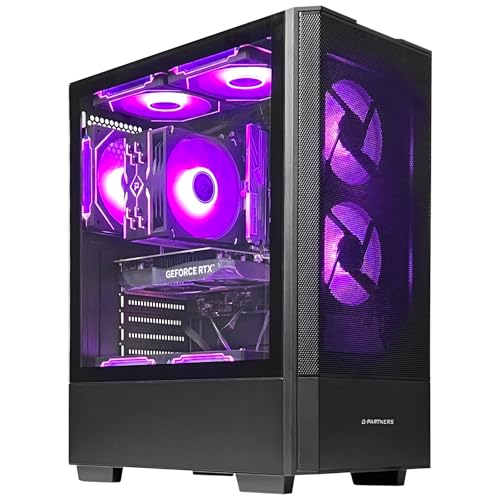
Prebuilt Gaming PC vs Gaming PC Build: Which Route Should You Take?
The prebuilt gaming pc vs gaming pc build question is the oldest argument in PC gaming, and it survives because both sides are right — about different buyers. This comparison settles it the way it should be settled: round by round, on cost, time, risk, performance, warranty, upgrade path, and the experience of ownership, with a verdict for each kind of buyer rather than a single crown. The prebuilt side of the comparison is represented by the six verified configurations in this cluster, from entry tier to flagship; the build side is represented by the same specifications assembled from individual components, which is the only fair comparison — same machine, two routes to owning it.
Two honesty rules govern everything below. First, no straw men: the prebuilt in this comparison is an honestly specified tower with named components, not the worst trap listing ever sold, and the build is a competently planned parts list, not a fantasy of sale prices that never coexist. Second, your time and temperament are real variables, not rounding errors. A comparison that prices components to the last unit of currency while pricing your evenings at zero has rigged its own result, and so has one that treats the build as a chore for everyone when for many people it is the hobby itself. The balance sheet framing in Prebuilt Gaming PC Pros And Cons covers the prebuilt side in isolation; this page is the head-to-head.
If you finish this comparison leaning prebuilt, the shortlist logic in Prebuilt Gaming PC Buying Guide and the range survey in Prebuilt Gaming PC Reviews are your next stops. If you finish it leaning build, the same criteria — graphics tier by resolution, balanced processor, memory and storage minimums, a power supply with headroom — become your parts-list checklist, because a good build and a good prebuilt are the same machine judged by the same rules.
In this guide
Quick Verdict
Choose the prebuilt if you want to be playing this week, you value one warranty and one support channel over component-level control, your time is scarce or expensive, or this is your first gaming PC and you want the troubleshooting lottery outsourced. Choose the build if you enjoy the process itself, you want a specific component combination no integrator sells, you are recycling parts you already own, or you are patient enough to hunt component sales across weeks. Most first-time buyers, honestly assessed, belong in the first paragraph; most hobbyists belong in the second; and a large middle group could be happy either way, which is why the rounds below matter.
Where to Buy
Every configuration named in this article was checked against the verified pick sheet for this cluster before inclusion, and each link below goes to the exact configuration described in the text. Prebuilt line-ups change without warning — a builder swaps a power supply, a storage size, or a wireless card while keeping the model name — so always re-read the full specification on the product page before you order, and use the links here to check the latest price on Amazon rather than trusting a figure quoted anywhere else. reviewstook.com recommends only configurations whose processor model, graphics card, memory, and storage are all named explicitly; if any one of those four lines is vague on a listing you are considering elsewhere, treat that vagueness as information in itself.
Best Budget — ZYNEEX Prebuilt Gaming Desktop — GeForce RTX 3050 6GB, 16GB DDR4 3200MHz, 1TB NVMe SSD. Check on Amazon
Best Balanced — CyberPowerPC Gamer Xtreme (Intel Core i5-14400F, RTX 5060) — GeForce RTX 5060 8GB, 16GB DDR5, 1TB PCIe 4.0 SSD. Check on Amazon
Best Overall — CyberPowerPC Gamer Master (Ryzen 7 8700F, RTX 5060 Ti) — GeForce RTX 5060 Ti 8GB, 16GB DDR5, 1TB PCIe 4.0 SSD. Check on Amazon
Best for Streaming — KOTIN Gaming PC Desktop (Ryzen 7 8700F, RTX 5060 Ti) — GeForce RTX 5060 Ti 8GB, 16GB DDR5, 1TB SSD. Check on Amazon
Best Premium — MSI Codex Z2 Gaming Desktop (Ryzen 7-8700F, RTX 5070) — GeForce RTX 5070, 32GB DDR5, 2TB SSD. Check on Amazon
Best Flagship — Alienware Aurora Gaming Desktop (RTX 5080, Core Ultra 9 285) — GeForce RTX 5080, 32GB DDR5, 1TB SSD. Check on Amazon
Round One: Cost — Closer Than the Argument Suggests
The build traditional advantage is price: buy the components, skip the assembly margin, and the same specification can cost less. The advantage is real but routinely overstated. It assumes sale prices across many retailers at once, prices your assembly and troubleshooting time at zero, ignores the operating system licence that prebuilts include, and compares against prebuilt list prices rather than the sale prices prebuilts also cycle through. System integrators buy components at a scale no individual matches, and in turbulent component markets — graphics card shortages above all — complete systems have repeatedly been the cheaper route to a given card. The honest summary: at mainstream tiers in calm markets, building usually saves a modest amount; at entry tiers the gap shrinks further; in shortage markets it can invert. Cost alone rarely decides this comparison anymore, which is why the argument has moved to the rounds below.
Round Two: Time, Risk, and the First Boot
A prebuilt converts a project into an evening: unbox, connect, update, play, following How To Set Up Prebuilt Gaming PC. A build converts an evening into a project: research compatibility, order from several sellers, assemble carefully, and face the first-boot moment, which a meaningful share of first-time builders fail on the first attempt for reasons — a missed cable, an unseated module, a front-panel connector — that take hours or days to isolate without experience or a knowledgeable friend. None of this is an argument that building is hard in absolute terms; it is an argument that the risk and the calendar are real line items. Experienced builders discount them correctly, because for them both are small. First-time buyers should price them honestly, because for them both are large.
Round Three: Performance and Component Choice
Performance is a draw at equal specification — the same card and processor perform the same in either route, inside normal case-to-case thermal variation. The build wins the adjacent round: choice. A builder selects every component, including the exact power supply, motherboard, memory kit, and case that prebuilt listings sometimes leave vague, and can pursue specific goals — silence, a small footprint, a particular aesthetic — that no integrator catalogue targets. The prebuilt counter is that good integrators have already made defensible choices, and the audit in our buying guide exists precisely to verify that claim machine by machine. Choice is worth most to buyers who know what they would choose; it is worth least, and can even be a burden, to buyers who would be guessing.
Round Four: Warranty, Support, and What Happens When Something Breaks
This is the prebuilt strongest round and it is not close. A prebuilt carries one warranty on the system as a system: one company, one conversation, and a repair path that does not begin with you diagnosing which of six components failed. A build carries a wallet of separate warranties, each with its own process, and the diagnosis is yours — as is the downtime, and the possibility that two vendors each blame the other component. Builders with experience and spare parts absorb this easily; for everyone else, the prebuilt warranty structure is worth a measurable share of its price, and pretending otherwise is how cost comparisons go wrong.
Round Five: Upgrades and the Long Game
A build is born upgradeable: standard parts, chosen by you, in a case you selected for the purpose. A prebuilt upgrade path is a per-model question — conventional integrator towers upgrade exactly like builds, while some proprietary large-brand designs restrict power supplies, motherboards, or clearances. The round therefore scores: build wins on certainty, prebuilt ties wherever the specific model uses standard components, which is every integrator tower in this cluster and is a checkable fact before purchase rather than a gamble. Over a five-year life with one graphics upgrade, a standard-parts prebuilt and a build converge almost completely; a proprietary prebuilt and a build do not, and that divergence should be priced into the proprietary machine purchase from the start.
Round Six: The Experience Itself
The round nobody prices and everybody feels. For a substantial minority of PC gamers, building is not the cost of gaming; it is a pleasure adjacent to gaming — the research, the assembly, the immaculate cable run, the machine as an artefact of its owner choices. No prebuilt discount compensates that buyer for losing it, and this comparison will not try. For the majority, the machine is a means to games, films, work, and friends, and the best build experience is the one that happened in someone else factory. Know which person you are before the other rounds seduce you: they can tell you which route is rational, but only this round tells you which route you will still be pleased about in year three.
The Prebuilt Side of This Comparison: Six Verified Exemplars
These configurations are what the word prebuilt means throughout this article — named components, current platforms, standard towers from integrators and specialists alongside the large-brand flagship, whose proprietary-design caveat is stated in its own trade-offs. Judge the category by machines like these, audited the way How To Choose A Prebuilt Gaming PC teaches, rather than by the worst listing in the category.

Best Budget — ZYNEEX Prebuilt Gaming Desktop
Strengths
- A full terabyte of NVMe storage at the entry tier, where many rivals still ship half that capacity
- The RTX 3050 is a genuine discrete graphics card with modern upscaling support, so this is real gaming hardware rather than a styled office tower
- The Ryzen 5 5500 and RTX 3050 pairing is honestly matched — neither component is waiting on the other in mainstream titles
Trade-offs
- Expect sensible settings rather than maximum settings in the most demanding new releases
- The DDR4 platform is mature and affordable, but it is at the end of its upgrade road
- A smaller assembler means a smaller support network than the largest national brands
| Component | Specification (verified) |
|---|---|
| Processor | AMD Ryzen 5 5500 |
| Graphics | GeForce RTX 3050 6GB |
| Memory | 16GB DDR4 3200MHz |
| Storage | 1TB NVMe SSD |
| Other | ARGB air cooling; Wi-Fi; Windows 11 |
A first-time buyer, a student, or an esports-focused player whose library leans toward competitive and mainstream titles and who wants a tower that works on day one without a second purchase hiding behind the first one. If your gaming is a mix of shooters, sports titles, indie games, and a back catalogue you have been meaning to finish, this tier covers it without drama.
In daily use the machine feels quick because the storage is a proper NVMe drive and the memory is sufficient for Windows, a launcher, voice chat, and a game to coexist. Load times are short, the desktop is responsive, and high-refresh play in lighter titles is entirely realistic. Where you will notice the tier is in heavy new releases at their highest presets, where turning a few settings down is the honest price of entry-level hardware.
The honest limitation is the graphics ceiling. This is a 1080p machine in the true sense: excellent at that resolution with sensible settings, not a shortcut to high-refresh 1440p. Buy it for the monitor you own today, not for a monitor you might buy in two years.
Best for: buyers matching the profile above, on a monitor matched to this tier. / Not suited for: buyers whose library, resolution, or budget contradicts the trade-offs listed here.

Best Balanced — CyberPowerPC Gamer Xtreme (Intel Core i5-14400F, RTX 5060)
Strengths
- A current-generation RTX 5060 brings modern upscaling and ray-tracing support to a mainstream tower
- The Core i5-14400F is a well-balanced modern processor that does not hold the graphics card back at 1080p or 1440p
- DDR5 memory and PCIe 4.0 storage put the machine on a current platform rather than a clearance one
Trade-offs
- 16GB of memory is the correct minimum rather than a generous allowance for heavy multitaskers
- CyberPowerPC is a large system integrator, so support is structured rather than personal
- No headline feature beyond the core specification — it wins on balance, not on a single flourish
| Component | Specification (verified) |
|---|---|
| Processor | Intel Core i5-14400F |
| Graphics | GeForce RTX 5060 8GB |
| Memory | 16GB DDR5 |
| Storage | 1TB PCIe 4.0 SSD |
| Other | WiFi Ready; Windows 11 Home; GXiVR8060A47 |
The mainstream buyer who plays a bit of everything — new releases, competitive titles, and older favourites — and wants one tower that handles all of it at high settings without paying flagship money. It is also the natural recommendation for a household PC that games in the evening and does school or office work in the day.
Day to day, this is the configuration that disappears into the background in the best way. Games install quickly, alt-tabbing to a browser or guide is painless, and the RTX 5060 has enough headroom that most titles can be left at high presets with upscaling available when a demanding release arrives. For streaming, the NVIDIA encoder keeps the cost of broadcasting low.
The limitation is headroom for the heaviest multitasking. If you routinely stream, record, edit clips, and keep dozens of browser tabs open while gaming, the 32GB premium configurations further down this page will serve you better than adding memory later and hoping the slots cooperate.
Best for: buyers matching the profile above, on a monitor matched to this tier. / Not suited for: buyers whose library, resolution, or budget contradicts the trade-offs listed here.


Best Overall — CyberPowerPC Gamer Master (Ryzen 7 8700F, RTX 5060 Ti)
Strengths
- The RTX 5060 Ti is more graphics card than 1080p needs and exactly right for high-refresh 1440p, which gives the machine a long useful life
- The Ryzen 7 8700F is a current-generation eight-core-class processor with real headroom for streaming and future titles
- CyberPowerPC’s Gamer Master line uses standard tower layouts that are straightforward to upgrade later
Trade-offs
- Some of what you pay for is reserve capacity that a basic 60Hz monitor cannot show you
- 16GB of DDR5 is sufficient for gaming but not the final word for creators who edit large projects
- As with any large integrator, check the exact power supply fitted to your unit on arrival
| Component | Specification (verified) |
|---|---|
| Processor | AMD Ryzen 7 8700F |
| Graphics | GeForce RTX 5060 Ti 8GB |
| Memory | 16GB DDR5 |
| Storage | 1TB PCIe 4.0 SSD |
| Other | WiFi Ready; Windows 11 Home; GMA2900A3 |
A buyer who wants one machine to last — flawless high-refresh 1080p today, confident 1440p tomorrow, and enough processor for streaming, recording, or light content work on the side. If you keep computers for four or five years rather than replacing them every two, this is the tier where that habit starts to pay.
In practice the 5060 Ti changes how you set games up: instead of negotiating with the settings menu, you start at high or ultra and adjust only the most expensive effects. Frame rates in competitive titles are high enough to justify a fast monitor, and upscaling support means that as games grow heavier, the machine has a lever to pull before it has a problem.
The limitation is economic rather than technical. Paired with an old 60Hz display, a meaningful share of this machine’s ability is invisible. Budget for a high-refresh monitor alongside it, or step down a tier and put the difference toward the screen.
Best for: buyers matching the profile above, on a monitor matched to this tier. / Not suited for: buyers whose library, resolution, or budget contradicts the trade-offs listed here.

Best for Streaming — KOTIN Gaming PC Desktop (Ryzen 7 8700F, RTX 5060 Ti)
Strengths
- The specification names its 650W Gold power supply explicitly, which is the single best sign of a thoughtfully built prebuilt
- DLSS 4 support and WiFi 6 cover both the performance-longevity and connectivity boxes in one tower
- The Ryzen 7 8700F and RTX 5060 Ti pairing is the proven sweet spot for gaming plus streaming
Trade-offs
- KOTIN is a smaller brand than MSI or Alienware, so long-term support depends on a narrower organisation
- 16GB of memory, again, is standard rather than generous for the heaviest multitaskers
- ARGB showpiece styling will not suit every room or every taste
| Component | Specification (verified) |
|---|---|
| Processor | AMD Ryzen 7 8700F |
| Graphics | GeForce RTX 5060 Ti 8GB |
| Memory | 16GB DDR5 |
| Storage | 1TB SSD |
| Other | WiFi 6; Windows 11 Home; DLSS 4; ARGB cooling; 650W Gold PSU |
A streamer or aspiring creator who wants the 8700F and 5060 Ti combination with the power supply question already answered properly. It also suits any buyer who has read enough prebuilt horror stories to care about the unglamorous components as much as the headline ones.
The Gold-rated power supply matters in ways you feel indirectly: stable power under load, quieter operation than a strained budget unit, and a realistic path to a future graphics upgrade without replacing the PSU at the same time. Combined with WiFi 6 and current upscaling support, the machine asks very little of its owner beyond being used.
Brand scale is the honest caveat. The hardware specification is strong and verified, but if white-glove national support coverage matters more to you than any single component, one of the larger brands on this page is the safer home for your money.
Best for: buyers matching the profile above, on a monitor matched to this tier. / Not suited for: buyers whose library, resolution, or budget contradicts the trade-offs listed here.

Best Premium — MSI Codex Z2 Gaming Desktop (Ryzen 7-8700F, RTX 5070)
Strengths
- 32GB of DDR5 and 2TB of storage as standard remove the two most common upgrade errands entirely
- The RTX 5070 is a clear step above the 5060 class, aimed squarely at high-refresh 1440p and entry 4K with upscaling
- MSI is a major manufacturer with the support infrastructure to match, and USB Type-C plus VR-Ready labelling round out a complete specification
Trade-offs
- You pay a premium-tier price for a premium-tier specification — value hunters should look at the 5060 Ti machines first
- 1TB would be enough for many buyers, so part of the spend is storage some owners will never fill
- A machine this capable deserves a monitor to match, which is a real additional cost if you do not own one
| Component | Specification (verified) |
|---|---|
| Processor | AMD Ryzen 7-8700F |
| Graphics | GeForce RTX 5070 |
| Memory | 32GB DDR5 |
| Storage | 2TB SSD |
| Other | USB Type-C; VR-Ready; Windows 11 Home; A8NVP-436US |
A buyer who plays demanding single-player releases at 1440p, creates content, or simply refuses to think about upgrades for several years. The combination of a stronger graphics card, double memory, and double storage makes this the configuration for people whose previous PC annoyed them in small ways every week.
The lived experience is headroom everywhere: large game libraries installed at once, editing timelines that do not stutter, virtual reality that runs without a settings negotiation, and multitasking that never forces you to close anything. It is the first configuration on this page where the honest advice is to stop reading specifications and start thinking about your monitor and chair instead.
The limitation is that premium tiers have diminishing returns for lighter libraries. If your gaming is mostly esports and indie titles, this machine will spend its life under-used, and a 5060 Ti configuration plus a better monitor is the smarter allocation.
Best for: buyers matching the profile above, on a monitor matched to this tier. / Not suited for: buyers whose library, resolution, or budget contradicts the trade-offs listed here.


Best Flagship — Alienware Aurora Gaming Desktop (RTX 5080, Core Ultra 9 285)
Strengths
- The RTX 5080 is flagship-class graphics that makes 4K with upscaling and high-refresh 1440p both genuinely comfortable
- The Core Ultra 9 285 is the strongest processor in this roundup, with abundant cores for creation and streaming workloads
- Wi-Fi 7 and 2.5Gb Ethernet give it the most complete connectivity of any machine here, inside a distinctive Aurora chassis
Trade-offs
- Flagship pricing buys flagship performance, but the value curve is steepest at the tiers below this one
- Alienware’s proprietary design language can make some future upgrades less standard than in a conventional tower
- 1TB of storage is, oddly, the one specification where the cheaper MSI above it offers more
| Component | Specification (verified) |
|---|---|
| Processor | Intel Core Ultra 9 285 |
| Graphics | GeForce RTX 5080 |
| Memory | 32GB DDR5 |
| Storage | 1TB SSD |
| Other | 2.5Gb Ethernet; Wi-Fi 7; Windows 11 Home; ACT1250 |
An enthusiast who plays at 4K or high-refresh 1440p, creates seriously, and wants a single flagship tower from a brand with a long gaming history. It is also the pick for buyers who value industrial design and are willing to pay for a machine that looks like nothing else on the desk.
At this level the conversation changes from settings to experiences: path-traced scenes become playable with upscaling and frame generation, large creative projects render without planning your day around them, and a high-end monitor finally has a partner worthy of it. The machine is quiet confidence rather than a compromise negotiated title by title.
The honest limitation is proportionality. Most players, on most monitors, in most games, will not see a difference large enough to justify stepping from the premium tier to this one. Buy it because you will use the headroom or because you simply want the flagship — both are legitimate, but know which one is true.
Best for: buyers matching the profile above, on a monitor matched to this tier. / Not suited for: buyers whose library, resolution, or budget contradicts the trade-offs listed here.

Comparison Table: The Six Reference Configurations Side by Side
Use this table the way experienced buyers do: find the graphics card first, then check that memory and storage do not undercut it. A strong card paired with too little memory or storage is a compromise wearing a headline; a balanced row is a machine that will feel right for years.
| Machine | Processor | Graphics | Memory | Storage |
|---|---|---|---|---|
| ZYNEEX Prebuilt Gaming Desktop | AMD Ryzen 5 5500 | GeForce RTX 3050 6GB | 16GB DDR4 3200MHz | 1TB NVMe SSD |
| CyberPowerPC Gamer Xtreme (Intel Core i5-14400F, RTX 5060) | Intel Core i5-14400F | GeForce RTX 5060 8GB | 16GB DDR5 | 1TB PCIe 4.0 SSD |
| CyberPowerPC Gamer Master (Ryzen 7 8700F, RTX 5060 Ti) | AMD Ryzen 7 8700F | GeForce RTX 5060 Ti 8GB | 16GB DDR5 | 1TB PCIe 4.0 SSD |
| KOTIN Gaming PC Desktop (Ryzen 7 8700F, RTX 5060 Ti) | AMD Ryzen 7 8700F | GeForce RTX 5060 Ti 8GB | 16GB DDR5 | 1TB SSD |
| MSI Codex Z2 Gaming Desktop (Ryzen 7-8700F, RTX 5070) | AMD Ryzen 7-8700F | GeForce RTX 5070 | 32GB DDR5 | 2TB SSD |
| Alienware Aurora Gaming Desktop (RTX 5080, Core Ultra 9 285) | Intel Core Ultra 9 285 | GeForce RTX 5080 | 32GB DDR5 | 1TB SSD |
Two patterns are worth noticing. First, every configuration here names its exact processor and graphics card — that transparency is itself a quality signal. Second, the jump from 16GB to 32GB of memory and from 1TB to 2TB of storage happens at the premium tier, which is exactly where heavy multitaskers and large-library owners should be shopping anyway.
How Should You Think About Value Without Chasing a Price?
Prices on prebuilt PCs move constantly – between sale events, component cycles, and configuration revisions, the same tower can present very differently from one month to the next. That volatility is exactly why experienced buyers think in tiers and specifications rather than in fixed figures. A machine is good value when its components are balanced, current, honestly named, and matched to your monitor and library – and it stays good value when prices wobble, because the specification does not change when the discount does.
The value traps are consistent enough to memorise. Paying a premium tier price for a lower tier specification, hidden behind lighting and adjectives. Saving a small amount by accepting memory or storage below the practical minimum, then paying it back in upgrades and irritation. Buying headroom you will never use – the flagship for a light library on a basic monitor – while starving the components you use every day. And the reverse: buying the minimum for a demanding library and shopping again within a year, which is the most expensive outcome of all.
Judge value across the machine whole life: the purchase, the upgrades it will or will not need, the monitor it deserves, and the years it will serve before relevance fades. The cheapest machine that genuinely fits your gaming is good value. The machine one tier above it, bought for headroom you will actually grow into, can be equally good value. Everything else – underbought, overbought, or misdescribed – is expensive at any price. Use the links in this article to check the latest price on Amazon for the configurations that fit, and let the specification, not the discount banner, make the decision.
How Should You Judge Warranty, Support, and Returns?
Two towers with identical components are not identical products, because one of them will eventually need help. Before ordering, spend a few minutes on the unglamorous questions. How long is the warranty, and does it cover parts and labour or parts only? When something fails, do you ship the whole tower at your inconvenience, or will the builder send a replacement component with instructions – the difference between a week without a PC and an afternoon with a screwdriver? Is support reachable by phone and chat, in your timezone, and do owners describe it as competent? Large brands justify part of their price here; smaller assemblers often compete with surprisingly personal support. Both models can be good, but no information available is also a model, and it is the bad one.
Returns deserve the same attention. Marketplace purchases generally carry protective return policies in the first weeks, which is precisely when manufacturing defects reveal themselves. Use that window deliberately: in the first fortnight, run the machine hard. Play your most demanding game for long sessions, test every port you will ever use, confirm the wireless and Bluetooth work with your actual peripherals, and check that the machine you received matches the specification you ordered, component by component. A gaming PC that survives two weeks of heavy use almost always survives for years; the early window is when weak units identify themselves, and it costs you nothing but attention to catch them.
Keep records as you go: the order confirmation, the exact configuration as listed on the day you bought it, and photographs of the machine on arrival. Configurations change silently in this market, and if a dispute ever arises, the listing as it stood at purchase – not as it stands today – is the document that matters. A screenshot takes ten seconds and settles arguments that memory cannot.
What Does a Realistic Upgrade Path Look Like?
A prebuilt is not a sealed appliance unless its builder made it one. In a conventional tower with standard components, the realistic upgrades form a ladder. Storage is first and easiest: adding a second solid-state drive is a short job on most motherboards and instantly relieves the most common pressure. Memory is next, provided the motherboard has free slots or accepts larger modules – one more reason to check whether a 16GB machine ships as a single module or a pair, and how many slots remain. The graphics card is the transformative upgrade, and it is gated by two things: physical space in the case and power supply capacity and connectors.
This ladder is why the unglamorous specifications matter at purchase time. A named power supply with headroom converts a future graphics upgrade from a two-component project into a one-component swap. A current motherboard platform – DDR5 memory and a recent socket – keeps processor upgrades possible for years, while an end-of-life platform caps the machine at the best processor of a finished generation, which may still be a fine bargain if the price reflects it. Neither choice is automatically wrong; what is wrong is paying current-platform money for a finished platform without noticing.
Plan the ladder honestly at purchase. If you know a monitor upgrade is coming, buy the graphics headroom now. If you know your library grows faster than your storage, favour the larger drive or confirm the empty slot exists. And keep the packaging and documentation from any component you replace: when you eventually sell or hand down the machine, a tidy history and a box of original parts are worth real money and real trust.
How Long Will a Good Prebuilt Gaming PC Actually Last?
Longevity has two meanings that buyers often merge. The first is survival: will the machine still work in five years? With reasonable care – clean vents, sensible placement, no sustained abuse – modern components are durable, solid-state storage has no moving parts to wear, and the components most likely to fail announce themselves early, which is what warranties and the first-weeks shakedown are for. The second meaning is relevance: will it still play the games you want, the way you want to play them? That clock runs faster, and it runs at different speeds for different owners.
An esports-focused machine ages slowly, because competitive titles are engineered to run on the widest possible hardware base and change their demands gently. A machine bought for maximum-settings single-player releases ages fastest, because those titles are designed to sell new hardware. Most libraries sit between the two, and most well-bought machines serve them well for four to five years, helped substantially by upscaling, which lets an ageing card trade a little internal resolution for a lot of frame rate. Stepping up one graphics tier at purchase is the most reliable way to buy an extra year or two of relevance; stepping up two tiers buys less additional time than the price suggests.
Plan the end of the story at the beginning. A tower built from standard components can be upgraded, handed down to a younger player, repurposed as a family or media machine, or sold with its history documented – all of which return value that a sealed, proprietary design cannot. Longevity is not only about how long the machine stays fast; it is about how many useful lives it can have after the first one.
Why Does the Graphics Card Matter More Than Anything Else?
Every buying decision about a gaming PC starts with the graphics card, because the graphics card does the work that defines gaming: drawing each frame. The processor prepares the scene, the memory holds the data, and the storage delivers it — but the card renders it, dozens or hundreds of times per second, and the resolution and settings you can enjoy are set by its capability more than by any other component. This is why two towers with identical processors can feel like machines from different generations, and why a listing that leads with processor branding while whispering about the graphics card deserves suspicion.
The current landscape sorts into recognisable tiers. Entry cards such as the RTX 3050 class handle 1080p with sensible settings and excel in esports titles. Mainstream cards such as the RTX 5060 run new releases at high settings at 1080p and credibly at 1440p with upscaling. The 5060 Ti class adds the headroom for high-refresh 1440p. The RTX 5070 class is premium 1440p hardware, and the RTX 5080 class is flagship hardware for 4K with upscaling and for buyers who simply refuse to negotiate with a settings menu. None of these tiers is a trap in itself; the trap is paying for one tier and receiving another, which is why exact model names matter more than any adjective a seller attaches to them.
Video memory is the specification inside the specification. At 1080p, modest memory capacities remain workable, but modern texture budgets keep growing, and cards with more memory age more gracefully at 1440p and above. Upscaling technology — DLSS on NVIDIA cards, FSR on AMD cards — has changed the ageing curve for everyone: a card that renders internally at a lower resolution and reconstructs a sharp image can stay relevant years longer than raw specifications suggest. When you compare two otherwise similar prebuilts, prefer the one whose graphics card is newer, better supported, and more generously supplied with memory; it is the component you will feel every single day.
What Are the Most Common Buying Mistakes – and How Do You Avoid Them?
The first mistake is buying a gaming label instead of gaming hardware. Towers with aggressive styling and colourful fans are placed in gaming categories with integrated graphics, very small storage, and memory below any sensible minimum, because the case photographs well and the headline price looks like a bargain. The defence is a single habit: find the exact graphics card model in the specification. If no discrete card is named, the machine is not a gaming PC for modern titles, whatever the category, the lighting, or the seller description says.
The second mistake is buying yesterday flagship at today prices. Older high-end graphics cards were excellent in their era, but they lack modern upscaling, draw substantial power for their performance, and age poorly against current entry cards that outperform them with modern features. The third mistake is ignoring the power supply: an unspecified or very low-wattage unit closes the upgrade path and risks the whole system under sustained load. The fourth is accepting memory or storage below the practical minimum to save a small amount now and pay it back, with interest in frustration, every week you own the machine.
The final mistake is mismatch: a premium tower on a slow monitor, a budget tower expected to drive a huge high-resolution display, a streaming ambition paired with the minimum processor and memory. Every one of these errors is visible before purchase, in the specification, for free. The buyers who regret gaming PCs almost never regret a resolution or a brand; they regret a specific, checkable component choice. Check the components, in order – graphics card, exact processor, memory, storage, power supply – and the regrets mostly disappear.
What Else Belongs in the Budget Besides the Tower Itself?
The tower is the largest purchase, not the only one, and honest budgeting counts the whole desk. The monitor comes first, for the reasons covered elsewhere in this article: it is the component you actually look at, and a mismatch there wastes the tower ability every day. A keyboard and mouse you enjoy using come next – gaming is an hours-long physical activity, and peripherals are the parts your hands grade, not the benchmark charts. Players in this cluster often pair a new tower with a mouse chosen for their grip and game type, and the time spent choosing is repaid every session.
Then come the quiet essentials. A headset or speakers and a microphone if you play with others. A surge protector, because the cheapest insurance in the whole setup is the one between a flagship tower and a storm. Desk space and cable management enough that the tower breathes and the setup stays pleasant. And, for buyers who will stream or work from the machine, a camera and lighting modest enough to be honest about – audiences forgive simple production and do not forgive bad audio, so the microphone outranks the camera every time.
None of this argues for buying everything at once. It argues for sequencing: tower and monitor together, because they define each other; peripherals as your hands demand them; the rest as needs prove themselves. A budget that reserves a sensible share for the screen and the essentials produces a setup that feels complete, while a budget spent entirely on the tower produces a powerful machine attached to compromises you notice daily.
Frequently Asked Questions
Is a prebuilt gaming PC or a custom build cheaper?
At the same specification in a calm market, building usually costs modestly less; the gap shrinks at entry tiers and can invert when components are scarce or prebuilts are on sale. Always compare total cost, including the operating system and your time.
Is performance different between a prebuilt and a build with the same parts?
No, not meaningfully. Identical graphics cards and processors perform identically within normal thermal variation between cases. The differences are in choice, warranty, time, and risk — not frame rates.
Which is better for a first gaming PC?
For most first-time buyers, a good prebuilt: it arrives tested, carries one warranty, and turns the first month into gaming rather than troubleshooting. The exception is the first-timer who actively wants to learn building as a hobby.
Can I upgrade a prebuilt later like a custom build?
Yes, if the model uses standard components — storage, memory, and graphics card upgrades all behave normally in conventional integrator towers. Check proprietary designs model by model, because some restrict power supplies or layouts.
What is the biggest hidden cost of building your own?
Time and diagnosis risk: compatibility research, multi-seller ordering, assembly, and owning every fault-isolation problem yourself across several separate warranties. Experienced builders pay these costs cheaply; beginners pay them in full.
When does building clearly win?
When you already own reusable components, when you want a specific combination no integrator sells — extreme silence, a tiny footprint, a particular look — or when the build itself is part of your hobby.
If I choose prebuilt, how do I choose well?
Audit the specification: exact graphics card and processor models, 16GB or more of memory, NVMe storage, a named power supply, and plain warranty terms. The method is in Prebuilt Gaming PC Buying Guide.
Final Recommendation
Score the rounds against your own life and the answer assembles itself. The prebuilt wins on time, risk, and warranty; the build wins on choice and, usually, on headline cost; performance is a draw; upgrades are a draw wherever the prebuilt uses standard parts. Buyers who game to game should buy the prebuilt and spend their enthusiasm on the monitor and the library. Buyers who game and build should build, and use this cluster criteria as their parts-list conscience.
Either way, the machine you end up with should be the same honest specification — and if the prebuilt route wins your comparison, the six exemplars above are the standard to hold every listing to, with the value question given its own straight answer in Is A Prebuilt Gaming PC Worth It.


