Disclosure: As an Amazon Associate, reviewstook.com earns from qualifying purchases. Links on this page are affiliate links at no extra cost to you; prices and availability change frequently, so check Amazon for the latest.
Where to Buy
Every linked kit below was checked against the pick sheet for this guide on reviewstook.com (reviewstook.com). Listings change, pack sizes get mixed up in search results, and laptop SODIMM kits look deceptively similar to desktop UDIMM kits, so open the exact listing, confirm the form factor and stick count in the title, and check price on Amazon before you order. If a kit is described in this guide without a link, treat it as prose-only context: useful for comparison, not a shortcut to buy.
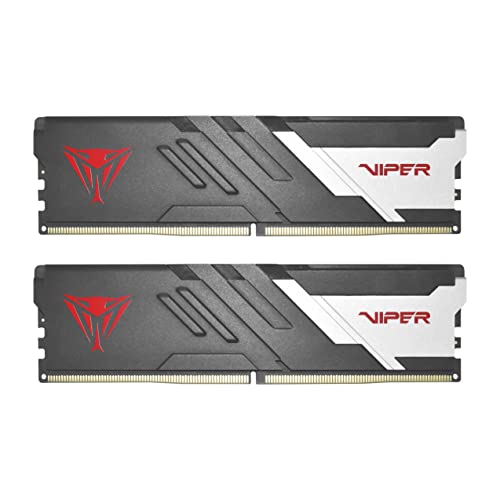
Best Overall for Beginners: Patriot Viper Venom DDR5 RAM 16GB (2x8GB) 6000MT/s CL36 — Check on Amazon
Easiest Install: CORSAIR Vengeance SODIMM DDR5 RAM 16GB (1x16GB) 5600MHz CL48 — Check on Amazon
Best Laptop Upgrade: Crucial 32GB DDR5 RAM Kit (2x16GB) 5600MHz SODIMM — Check on Amazon
Best Set-and-Forget: G.SKILL Flare X5 Series DDR5 RAM 32GB (2x16GB) 6000MT/s CL36 — Check on Amazon
Best Performance Step-Up: Patriot Viper Venom DDR5 RAM 32GB (2x16GB) 6000MHz CL30 — Check on Amazon
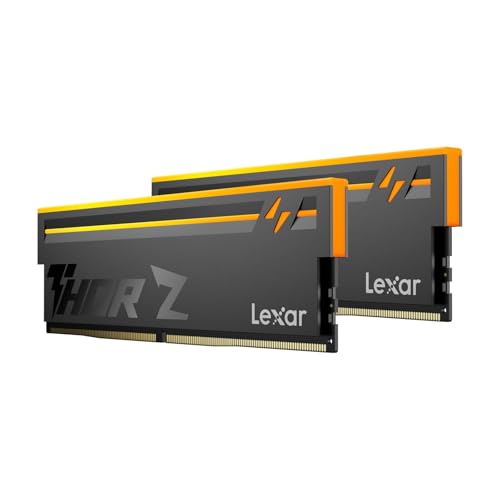
Best Looking Easy Pick: Lexar Thor Z RGB DDR5 RAM 32GB Kit (2x16GB) 6000MHz CL38 — Check on Amazon
Best DDR5 RAM Under $75: What Actually Matters For Beginners
Finding the best ddr5 ram for beginners under $75 is less about chasing the biggest number on the box and more about matching three things: the right form factor for your machine, enough capacity for how you actually use it, and a speed and latency profile your motherboard and processor can run without a fight. This guide is written for first-time builders, with one goal in mind: a first build that should boot first time without BIOS drama. Every recommendation below comes from a small, verified shortlist, and each one is judged on fit first and headline speed second.
Here is the short version before the detail. For most desktop builders in this tier, a two-stick 32GB kit at 6000 MT/s is the modern sweet spot: enough capacity for gaming, streaming, browsing and light creation at once, in the configuration that is easiest for a memory controller to run. Laptop and mini PC owners need the SODIMM side of this list instead, where 5600 MT/s kits dominate and compatibility with your exact model matters more than latency. And if your budget is at the very bottom of this tier, a smaller 16GB kit bought as a matched pair is still far better than a single mismatched stick added on hope. You will find all three paths below, plus the deeper dives in Best DDR5 RAM and RAM Speed Latency And Dual Channel Guide if you want the background first.
Be honest about what an under $75 ceiling means for DDR5. This is the entry floor of a newer memory standard, not a bargain basement where flagship kits hide. At this level you are choosing between a modest matched kit now, a single-stick laptop upgrade now with a second stick later, or saving a little longer for the 32GB desktop sweet spot. This guide does not pretend otherwise: the picks below are ranked by how gracefully they handle that constraint, and the buying guide further down explains exactly when waiting is the better decision. That honesty matters more at this tier than at any other, because a wrong-form-factor return costs you the very money you were trying to save.
New to this? Two reassurances before the jargon starts. First, installing DDR5 is one of the most beginner-friendly jobs in a PC: no cables, no paste, no drivers — the skill is in choosing the right kit and enabling its advertised profile afterwards, and the how-to section in this guide walks through both in plain steps. Second, you cannot damage anything by reading the compatibility checks twice. Every beginner mistake in the mistakes section below comes from ordering first and checking later, so work through this guide in order and you will be fine.
In this guide
Quick Picks
Best Overall for Beginners — Patriot Viper Venom DDR5 RAM 16GB (2x8GB) 6000MT/s CL36: the smallest matched desktop pair on the shortlist, and the natural entry point when the ceiling is tight.
Easiest Install — CORSAIR Vengeance SODIMM DDR5 RAM 16GB (1x16GB) 5600MHz CL48: a single-stick SODIMM path for laptops and mini PCs that need one slot filled now and a second later.
Best Laptop Upgrade — Crucial 32GB DDR5 RAM Kit (2x16GB) 5600MHz SODIMM: a matched 32GB SODIMM pair for laptops and mini PCs, from the most conservative name in memory.
Best Set-and-Forget — G.SKILL Flare X5 Series DDR5 RAM 32GB (2x16GB) 6000MT/s CL36: a low-profile 32GB desktop kit tuned with both EXPO and XMP profiles, built for clearance and stability.
Best Performance Step-Up — Patriot Viper Venom DDR5 RAM 32GB (2x16GB) 6000MHz CL30: the latency leader here — CL30 at 6000 MT/s in a 32GB desktop kit with both profile standards covered.
Best Looking Easy Pick — Lexar Thor Z RGB DDR5 RAM 32GB Kit (2x16GB) 6000MHz CL38: a 6000 MT/s RGB desktop kit with on-die ECC and modern power management for gaming and AI-flavoured workloads.
How These Picks Were Chosen
Every linked kit in this guide comes from a shortlist verified through the site’s Creators API check on 2026-11-20, and the product names, capacities, speeds and form factors quoted here are taken from those verified titles — not from marketplace blurbs, not from memory, and not from similar-looking listings. That discipline matters for DDR5 more than for most components, because the same brand sells near-identical kits that differ only in stick count, latency or pin format, and a single wrong digit in a model code means a kit that does not fit or does not boot at its rated profile.
The ranking criteria, in order, were: correct form factor for the machines this tier serves; matched-stick configuration over single sticks wherever the budget allows; capacity appropriate to the tier rather than maximal; a rated speed the current Intel and AMD platforms can actually hold, which is why 6000 MT/s dominates the desktop picks and 5600 MT/s dominates the SODIMM picks; latency in proportion — tighter is better, but not at the cost of capacity; dual profile support (Intel XMP and AMD EXPO) so a kit survives a future platform switch; and physical profile, because a kit that collides with your cooler is not a bargain at any price. Kits were demoted for single-stick desktop use, for 8GB sticks at tiers where 16GB sticks are affordable, and for capacity so far beyond the tier that recommending them would be fantasy shopping.
Excluded from the linked six: the Crucial 96GB DDR5 5600MHz Laptop Memory Kit SODIMM — 96GB laptop kit — capacity far above an under $75 brief; excluded from linked picks. It is discussed in prose only where comparison helps, and it carries no buy link in this guide.
Excluded from the linked six: the CORSAIR VENGEANCE RGB RS DDR5 32GB (2x16GB) 6000MHz CL36 — RGB 32GB kit sits at/above this tier in typical positioning; kept out of the six to prioritise capacity-matched kits — see SOURCES note. It is discussed in prose only where comparison helps, and it carries no buy link in this guide.
One more note on honesty: this guide prints no fixed prices and no star ratings, deliberately. Memory pricing moves faster than almost any other component category, and a printed figure would be wrong within weeks; the tier in the title is your budget frame, and the live figure is the one on the listing when you check price on Amazon. If two picks look identical on paper, prefer the one whose form factor and profile support match your machine exactly — that tiebreak is worth more than any marginal latency difference.
Detailed Reviews: Best DDR5 RAM Under $75 Picks in Full

Best Overall for Beginners — Patriot Viper Venom DDR5 RAM 16GB (2x8GB) 6000MT/s CL36
Strengths
- Matched 2x8GB pair, so dual-channel works from day one
- 6000 MT/s rating matches the current desktop sweet spot
- Supports both Intel XMP and AMD EXPO profiles
Trade-offs
- 8GB sticks limit future upgrades — replacing beats adding
- 16GB total is a floor for modern gaming plus background apps, not headroom
- CL36 is fine, not class-leading
| Specification | Verified detail |
|---|---|
| Capacity / configuration | 16GB (2x8GB) |
| Rated speed | 6000 MT/s |
| Latency | CL36 |
| Form factor | UDIMM desktop |
| Voltage | 1.35V |
| Profiles | Intel XMP and AMD EXPO |
The Patriot Viper Venom 16GB is a desktop UDIMM kit built around the configuration modern platforms like best: 2x8GB at 6000 MT/s with CL36 timings. Two sticks are easier for the memory controller than four, leave your remaining slots free, and give you dual-channel bandwidth from the first boot. In everyday terms that means the kit is aimed squarely at a first build that should boot first time without BIOS drama, without asking you to gamble on the stability lottery that comes with exotic speeds or fully populated boards.
In this under $75 edition for first-time builders, it is ranked number 1 of six — a position set by fit for this tier, not by specification-sheet bragging.
Where it earns its place in an under $75 guide is balance. Capacity, speed and latency are in proportion: nothing is spent on a headline figure that the rest of the kit cannot support. Enable the XMP or EXPO profile after installation — until you do, the kit will run at a slower standard speed, which is the single most common reason buyers think a new kit ‘made no difference’. Then leave it alone. A kit like this should disappear into the build, and the highest praise available is that six months later you have never thought about it again.
For the for beginners reader at this ceiling, that balance is the point: position 1 here means it survived the tier cut that removed two other verified kits entirely.
The honest limitation depends on your workload, and this guide will not hide it. If you regularly edit large video timelines, run multiple virtual machines or work with datasets that already push past this capacity, step up within the tier rather than expecting this kit to stretch. If, by contrast, your machine is for gaming, study, office work and everyday creation, this capacity class is the point of diminishing returns — extra memory beyond it sits idle. Judge it against your worst normal day, not your best benchmark day, and it will rarely disappoint. Check on Amazon to confirm the exact kit code before ordering.
Best for: builders who need a matched 16GB pair at the lowest sensible entry point / Not suited for: anyone who expects to upgrade later by adding sticks — 8GB modules are a dead end.

Easiest Install — CORSAIR Vengeance SODIMM DDR5 RAM 16GB (1x16GB) 5600MHz CL48
Strengths
- Single 16GB stick is the cheapest sensible way to fill one SODIMM slot
- 5600 MT/s matches what most current laptops run natively
- Corsair Vengeance line with a plain, low-key design
Trade-offs
- Single stick means single-channel until you add a second
- CL48 is loose — this is a compatibility buy, not a performance buy
- SODIMM only: it will never fit a desktop board
| Specification | Verified detail |
|---|---|
| Capacity / configuration | 16GB (1x16GB) |
| Rated speed | 5600 MT/s |
| Latency | CL48 |
| Form factor | SODIMM laptop / mini PC |
| Voltage | See listing |
| Profiles | Intel XMP 3.0 (per API title) |
The Corsair Vengeance SODIMM 16GB exists for the machines the desktop kits cannot touch. If your laptop or SODIMM-based mini PC shipped with a single small stick or a mismatched pair, this is the class of upgrade that changes how the machine feels everywhere at once: browser tabs stop reloading, integrated graphics get the dual-channel bandwidth they quietly depend on, and the whole system stops treating memory as a scarce resource. At 16GB (1x16GB) running 5600 MT/s, it is specified for compatibility first — and for a laptop, that ordering is correct, because a laptop gives you no BIOS playground to rescue an aggressive kit with.
In this under $75 edition for first-time builders, it is ranked number 2 of six — a position set by fit for this tier, not by specification-sheet bragging.
Fit checks matter more here than any benchmark. Confirm your machine actually uses DDR5 SODIMM — many laptops still in service are DDR4, and the two are physically incompatible — then confirm the maximum capacity per slot your model accepts, especially before considering very large sticks. Check whether your existing configuration leaves a free slot or whether this kit replaces what you have, and remember that mixing this kit with a slower leftover stick usually means everything runs at the slower stick’s pace. For first-time builders, the discipline is simple: match the machine, not the headline.
For the for beginners reader at this ceiling, that balance is the point: position 2 here means it survived the tier cut that removed two other verified kits entirely.
The honest limitation depends on your workload, and this guide will not hide it. If you regularly edit large video timelines, run multiple virtual machines or work with datasets that already push past this capacity, step up within the tier rather than expecting this kit to stretch. If, by contrast, your machine is for gaming, study, office work and everyday creation, this capacity class is the point of diminishing returns — extra memory beyond it sits idle. Judge it against your worst normal day, not your best benchmark day, and it will rarely disappoint. Check on Amazon to confirm the exact kit code before ordering.
Best for: laptop and mini PC owners who need 16GB (1x16GB) of compatible DDR5 without drama / Not suited for: desktop builders — this SODIMM kit physically does not fit a desktop board.

Best Laptop Upgrade — Crucial 32GB DDR5 RAM Kit (2x16GB) 5600MHz SODIMM
Strengths
- Matched 2x16GB pair gives laptops a true 32GB dual-channel setup
- Runs at standard speeds (5600/5200/4800) for maximum compatibility
- Crucial is Micron’s own retail brand — conservative, compatibility-first memory
Trade-offs
- SODIMM only — laptops and compatible mini PCs, never desktops
- No XMP/EXPO performance profile story; it runs at standard timings
- 5600 MT/s ceiling is about compatibility, not peak performance
| Specification | Verified detail |
|---|---|
| Capacity / configuration | 32GB (2x16GB) |
| Rated speed | 5600 MT/s (also 5200/4800 per title) |
| Latency | CL46 (from model code in API title) |
| Form factor | 262-pin SODIMM laptop |
| Voltage | See listing |
| Profiles | JEDEC plug-and-play |
The Crucial 32GB DDR5 SODIMM exists for the machines the desktop kits cannot touch. If your laptop or SODIMM-based mini PC shipped with a single small stick or a mismatched pair, this is the class of upgrade that changes how the machine feels everywhere at once: browser tabs stop reloading, integrated graphics get the dual-channel bandwidth they quietly depend on, and the whole system stops treating memory as a scarce resource. At 32GB (2x16GB) running 5600 MT/s (also 5200/4800 per title), it is specified for compatibility first — and for a laptop, that ordering is correct, because a laptop gives you no BIOS playground to rescue an aggressive kit with.
In this under $75 edition for first-time builders, it is ranked number 3 of six — a position set by fit for this tier, not by specification-sheet bragging.
Fit checks matter more here than any benchmark. Confirm your machine actually uses DDR5 SODIMM — many laptops still in service are DDR4, and the two are physically incompatible — then confirm the maximum capacity per slot your model accepts, especially before considering very large sticks. Check whether your existing configuration leaves a free slot or whether this kit replaces what you have, and remember that mixing this kit with a slower leftover stick usually means everything runs at the slower stick’s pace. For first-time builders, the discipline is simple: match the machine, not the headline.
For the for beginners reader at this ceiling, that balance is the point: position 3 here means it survived the tier cut that removed two other verified kits entirely.
The honest limitation depends on your workload, and this guide will not hide it. If you regularly edit large video timelines, run multiple virtual machines or work with datasets that already push past this capacity, step up within the tier rather than expecting this kit to stretch. If, by contrast, your machine is for gaming, study, office work and everyday creation, this capacity class is the point of diminishing returns — extra memory beyond it sits idle. Judge it against your worst normal day, not your best benchmark day, and it will rarely disappoint. Check on Amazon to confirm the exact kit code before ordering.
Best for: laptop and mini PC owners who need 32GB (2x16GB) of compatible DDR5 without drama / Not suited for: desktop builders — this SODIMM kit physically does not fit a desktop board.

Best Set-and-Forget — G.SKILL Flare X5 Series DDR5 RAM 32GB (2x16GB) 6000MT/s CL36
Strengths
- Low-profile Flare X5 heat spreader clears most air coolers
- Both AMD EXPO and Intel XMP 3.0 profiles on one kit
- 32GB at 6000 MT/s is the mainstream desktop sweet spot
Trade-offs
- CL36 rather than the CL30 of the latency leader here
- No RGB — a plus for some, a dealbreaker for showcase builds
- Rated speed is ‘up to’ 6000 MT/s; your board and CPU still decide
| Specification | Verified detail |
|---|---|
| Capacity / configuration | 32GB (2x16GB) |
| Rated speed | 6000 MT/s |
| Latency | CL36-36-36-96 |
| Form factor | U-DIMM desktop |
| Voltage | 1.35V |
| Profiles | AMD EXPO and Intel XMP 3.0 |
The G.SKILL Flare X5 32GB is a desktop UDIMM kit built around the configuration modern platforms like best: 2x16GB at 6000 MT/s with CL36-36-36-96 timings. Two sticks are easier for the memory controller than four, leave your remaining slots free, and give you dual-channel bandwidth from the first boot. In everyday terms that means the kit is aimed squarely at a first build that should boot first time without BIOS drama, without asking you to gamble on the stability lottery that comes with exotic speeds or fully populated boards.
In this under $75 edition for first-time builders, it is ranked number 4 of six — a position set by fit for this tier, not by specification-sheet bragging.
Where it earns its place in an under $75 guide is balance. Capacity, speed and latency are in proportion: nothing is spent on a headline figure that the rest of the kit cannot support. Enable the XMP or EXPO profile after installation — until you do, the kit will run at a slower standard speed, which is the single most common reason buyers think a new kit ‘made no difference’. Then leave it alone. A kit like this should disappear into the build, and the highest praise available is that six months later you have never thought about it again.
For the for beginners reader at this ceiling, that balance is the point: position 4 here means it survived the tier cut that removed two other verified kits entirely.
The honest limitation depends on your workload, and this guide will not hide it. If you regularly edit large video timelines, run multiple virtual machines or work with datasets that already push past this capacity, step up within the tier rather than expecting this kit to stretch. If, by contrast, your machine is for gaming, study, office work and everyday creation, this capacity class is the point of diminishing returns — extra memory beyond it sits idle. Judge it against your worst normal day, not your best benchmark day, and it will rarely disappoint. Check on Amazon to confirm the exact kit code before ordering.
Best for: air-cooled and compact desktop builds that need low-profile clearance and dual-profile support / Not suited for: RGB showcase builds.

Best Performance Step-Up — Patriot Viper Venom DDR5 RAM 32GB (2x16GB) 6000MHz CL30
Strengths
- CL30 is the tightest latency on this shortlist at 6000 MT/s
- Both Intel XMP and AMD EXPO supported
- 32GB in two sticks — the easiest configuration for memory controllers
Trade-offs
- Taller gaming heat spreader — check cooler clearance
- Patriot’s software ecosystem is thinner than Corsair’s
- CL30 advantage is real but modest outside latency-sensitive work
| Specification | Verified detail |
|---|---|
| Capacity / configuration | 32GB (2x16GB) |
| Rated speed | 6000 MT/s |
| Latency | CL30 |
| Form factor | UDIMM desktop |
| Voltage | 1.35V |
| Profiles | Intel XMP and AMD EXPO |
The Patriot Viper Venom 32GB is a desktop UDIMM kit built around the configuration modern platforms like best: 2x16GB at 6000 MT/s with CL30 timings. Two sticks are easier for the memory controller than four, leave your remaining slots free, and give you dual-channel bandwidth from the first boot. In everyday terms that means the kit is aimed squarely at a first build that should boot first time without BIOS drama, without asking you to gamble on the stability lottery that comes with exotic speeds or fully populated boards.
In this under $75 edition for first-time builders, it is ranked number 5 of six — a position set by fit for this tier, not by specification-sheet bragging.
Where it earns its place in an under $75 guide is balance. Capacity, speed and latency are in proportion: nothing is spent on a headline figure that the rest of the kit cannot support. Enable the XMP or EXPO profile after installation — until you do, the kit will run at a slower standard speed, which is the single most common reason buyers think a new kit ‘made no difference’. Then leave it alone. A kit like this should disappear into the build, and the highest praise available is that six months later you have never thought about it again.
For the for beginners reader at this ceiling, that balance is the point: position 5 here means it survived the tier cut that removed two other verified kits entirely.
The honest limitation depends on your workload, and this guide will not hide it. If you regularly edit large video timelines, run multiple virtual machines or work with datasets that already push past this capacity, step up within the tier rather than expecting this kit to stretch. If, by contrast, your machine is for gaming, study, office work and everyday creation, this capacity class is the point of diminishing returns — extra memory beyond it sits idle. Judge it against your worst normal day, not your best benchmark day, and it will rarely disappoint. Check on Amazon to confirm the exact kit code before ordering.
Best for: gamers and responsive-system fans who want the tightest latency in this guide / Not suited for: tight-clearance builds that cannot fit a gaming heat spreader.
Best Looking Easy Pick — Lexar Thor Z RGB DDR5 RAM 32GB Kit (2x16GB) 6000MHz CL38
Strengths
- 6000 MT/s with RGB for gaming and AI-oriented builds
- On-die ECC and PMIC per the verified title
- Both Intel XMP 3.0 and AMD EXPO supported
Trade-offs
- CL38 is the loosest latency among the 6000 MT/s desktop kits here
- RGB adds cost and a small amount of heat and wiring/software overhead
- Lexar is a newer name in desktop DRAM than the legacy brands
| Specification | Verified detail |
|---|---|
| Capacity / configuration | 32GB (2x16GB) |
| Rated speed | 6000 MT/s |
| Latency | CL38 |
| Form factor | 288-pin UDIMM desktop |
| Voltage | 1.35V |
| Profiles | Intel XMP 3.0 and AMD EXPO |
The Lexar Thor Z RGB 32GB is a desktop UDIMM kit built around the configuration modern platforms like best: 2x16GB at 6000 MT/s with CL38 timings. Two sticks are easier for the memory controller than four, leave your remaining slots free, and give you dual-channel bandwidth from the first boot. In everyday terms that means the kit is aimed squarely at a first build that should boot first time without BIOS drama, without asking you to gamble on the stability lottery that comes with exotic speeds or fully populated boards.
In this under $75 edition for first-time builders, it is ranked number 6 of six — a position set by fit for this tier, not by specification-sheet bragging.
Where it earns its place in an under $75 guide is balance. Capacity, speed and latency are in proportion: nothing is spent on a headline figure that the rest of the kit cannot support. Enable the XMP or EXPO profile after installation — until you do, the kit will run at a slower standard speed, which is the single most common reason buyers think a new kit ‘made no difference’. Then leave it alone. A kit like this should disappear into the build, and the highest praise available is that six months later you have never thought about it again.
For the for beginners reader at this ceiling, that balance is the point: position 6 here means it survived the tier cut that removed two other verified kits entirely.
The honest limitation depends on your workload, and this guide will not hide it. If you regularly edit large video timelines, run multiple virtual machines or work with datasets that already push past this capacity, step up within the tier rather than expecting this kit to stretch. If, by contrast, your machine is for gaming, study, office work and everyday creation, this capacity class is the point of diminishing returns — extra memory beyond it sits idle. Judge it against your worst normal day, not your best benchmark day, and it will rarely disappoint. Check on Amazon to confirm the exact kit code before ordering.
Best for: showcase and gaming builds that want 6000 MT/s performance with lighting / Not suited for: stealth or ultra-budget builds paying for looks they will never see.
Comparison Table
| Kit | Capacity | Speed | Latency | Form factor | Profiles |
|---|---|---|---|---|---|
| Patriot Viper Venom 16GB | 16GB (2x8GB) | 6000 MT/s | CL36 | UDIMM desktop | Intel XMP and AMD EXPO |
| Corsair Vengeance SODIMM 16GB | 16GB (1x16GB) | 5600 MT/s | CL48 | SODIMM laptop / mini PC | Intel XMP 3.0 (per API title) |
| Crucial 32GB DDR5 SODIMM | 32GB (2x16GB) | 5600 MT/s (also 5200/4800 per title) | CL46 (from model code in API title) | 262-pin SODIMM laptop | JEDEC plug-and-play |
| G.SKILL Flare X5 32GB | 32GB (2x16GB) | 6000 MT/s | CL36-36-36-96 | U-DIMM desktop | AMD EXPO and Intel XMP 3.0 |
| Patriot Viper Venom 32GB | 32GB (2x16GB) | 6000 MT/s | CL30 | UDIMM desktop | Intel XMP and AMD EXPO |
| Lexar Thor Z RGB 32GB | 32GB (2x16GB) | 6000 MT/s | CL38 | 288-pin UDIMM desktop | Intel XMP 3.0 and AMD EXPO |
Read the table by form factor first and speed second. The SODIMM rows and UDIMM rows are not alternatives to each other; they serve different machines entirely. Within the desktop rows, the meaningful contest is latency at the same 6000 MT/s — CL30 versus CL36 versus CL38 — and the honest summary is that tighter latency helps responsiveness and some games modestly, while capacity helps multitasking obviously. Within the laptop rows, the contest is capacity and stick configuration, because laptop speeds cluster at the standard 5600 MT/s for good compatibility reasons. If you want the theory behind those trade-offs, the companion explainer at RAM Speed Latency And Dual Channel Guide is the right next read.
How to Choose the Best DDR5 RAM Under $75
Start with form factor, because it is binary. Desktop boards take UDIMM sticks; laptops and most SODIMM mini PCs take shorter SODIMM sticks; the two cannot be adapted, forced or filed down. Check your motherboard or laptop model page, not a marketplace title — at least one kit on this very shortlist carries a confusing title, which is why this guide quotes form factors from verified data and tells you to re-confirm on the listing. Getting this one fact right prevents the most common and most pointless return in the whole category. For anyone shopping specifically for the best ddr5 ram for beginners under $75, treat this as the first filter, not the last.
Then choose capacity by workload, not by fear. Sixteen gigabytes is the working floor for a modern Windows or Linux machine that games and multitasks; 32GB is the comfortable mainstream answer that removes memory from your list of worries for years; beyond that, buy capacity only for a named reason — virtual machines, large creative projects, heavy data work, or a mobile workstation that demonstrably runs dry. Unused RAM does not make a system faster. It makes the receipt longer. At an under $75 ceiling, that discipline is what leaves budget for the components that do change your experience. Readers comparing options for the best ddr5 ram for beginners under $75 should apply this before looking at any speed figure.
Speed and latency work as a pair. DDR5-6000 is the current desktop sweet spot because both Intel and AMD platforms handle it well in two-stick configurations; laptop DDR5 clusters at 5600 MT/s and below for compatibility. Latency refines the picture: at the same speed, CL30 responds a little faster than CL36, which responds a little faster than CL38 — a real but modest effect that matters most to gamers chasing smoothness and matters least to office and study machines. Never compare latency across different speeds by the CL number alone, and never pay a capacity downgrade to buy a latency upgrade. In an under $75 shortlist like this one — the best ddr5 ram for beginners under $75 — this check decides more outcomes than latency does.
Buy matched kits, in pairs, and leave slots free. A kit of two sticks was tested to work together; two separately bought singles were not, even with identical labels. Two sticks also run faster profiles more reliably than four, so the standard advice is a two-stick kit in the board’s preferred slots (usually the second and fourth from the CPU — your manual decides) with the other slots left empty for a future matched upgrade. Filling every slot on day one feels generous and behaves like a restriction. When the brief is the best ddr5 ram for beginners under $75, this is the step that separates a kit you keep from a kit you return.
Check the qualified vendor list and the profile standard. Your motherboard maker’s QVL is a list of kits tested on that board; being on it is reassurance, not a legal requirement, but at the top of a tier it is free peace of mind. Match the profile to your platform — EXPO is AMD’s standard, XMP is Intel’s — and prefer kits like most of this shortlist that carry both, because they survive a future platform change and are easier to resell or reuse. Finally, check physical clearance: measure from the slot to your cooler or radiator before ordering any tall or RGB kit, a step the compact-build readers of this guide should treat as mandatory. Related reading: Best Gaming Motherboards and Motherboard Buying Guide. Finally, for the best ddr5 ram for beginners under $75, cross-check this point against your motherboard or laptop support page before you pay.
What Does an Under $75 DDR5 Budget Actually Buy?
At under $75, it buys a beginning — and beginnings are worth doing properly. Expect a matched 16GB desktop pair or a meaningful single-slot laptop upgrade, at standard-to-good speeds, from real brands with real warranties. Do not expect 32GB of low-latency desktop memory, RGB, or exotic speeds at this ceiling without a catch somewhere else, and treat any listing that promises all of it at once as a listing to read three times. The wisest under-$75 buyers either buy the honest entry kit and plan a matched upgrade later, or wait until the budget reaches the 32GB sweet spot. Both are respectable; the only bad move is the mismatched, wrong-format impulse buy in between.
One cost buyers forget is time: a kit that needs BIOS fiddling, fails to hold its profile, or has to be returned for a form-factor mistake costs evenings, not dollars. That is why this guide weights verified fit, dual-profile support and conservative speeds so heavily at every tier. The cheapest kit is the one you install once.
How Do You Install DDR5 RAM and Enable Its Full Speed?
Step 1 — Prepare. Shut the machine down fully, switch the power supply off, unplug it, and ground yourself by touching the case. For a laptop, shut down, unplug, and follow the maker’s bottom-panel instructions; if the battery is removable, remove it. Lay out only the kit you are installing and keep the old sticks aside until the new ones are proven. (Step written for buyers of the best ddr5 ram for beginners under $75: do not skip it because a previous build went smoothly.)
Step 2 — Use the right slots. For a two-stick desktop kit, use the slots your motherboard manual specifies for two modules — most commonly the second and fourth slots counting from the CPU. Open the retention clips, align the notch (DDR5 notches sit in a different position from DDR4, so a DDR4 stick physically cannot seat), and press down evenly with both thumbs until both clips click. A stick that looks seated but has not clicked is the classic cause of a first-boot black screen. Owners working through the best ddr5 ram for beginners under $75 shortlist will find this is where most first-boot problems are prevented.
Step 3 — Boot and verify before you celebrate. Power on and go straight to the system information in BIOS or your operating system. Confirm the full capacity is recognised and both sticks are reported. If the machine does not boot, power off and reseat each stick firmly; if one stick is suspect, test sticks one at a time in the primary slot to isolate it. Only retire or sell the old memory once the new kit has survived a few normal days. At the under $75 level, this step protects the whole purchase — there is no spare budget for a replacement kit.
Step 4 — Enable XMP or EXPO. As delivered, performance kits run at a slower standard speed. Enter the BIOS, find the memory profile setting, and enable XMP (Intel) or EXPO (AMD), then save and reboot. Verify the new speed where you verified capacity. This two-minute step is the entire difference between the kit you paid for and the kit you are actually using, and skipping it is the most common disappointment in the whole category. This is the step that turns the best ddr5 ram for beginners under $75 from a specification into the speed you actually run.
Step 5 — Stability-check like an adult. Use the machine normally, then run a memory test or a long gaming session. Problem: the system crashes or reboots under load after enabling the profile → fix: update the motherboard BIOS, confirm the kit sits in the recommended slots, and if instability persists, run the kit at the next speed step down — a stable slightly slower kit beats an unstable headline speed every time. Problem: only half the capacity shows → fix: reseat the missing stick and swap slots to tell a seating issue from a faulty module. If anything in this step misbehaves on a best ddr5 ram for beginners under $75 build, work the fixes in order before blaming the kit.
Common Mistakes
Buying the wrong form factor. SODIMM and UDIMM share a name and nothing else. It is the number-one DDR5 return reason and it is entirely preventable with one check of your machine’s specification page. It is the most returned-for reason among buyers of the best ddr5 ram for beginners under $75.
Mixing old and new sticks and expecting full speed. Mixed kits run at the slowest stick’s speed and loosest timings, and sometimes refuse performance profiles altogether. If capacity matters more than speed, mixing can be a conscious compromise; as an accident, it is just a downgrade you paid for. In guides like this one — the best ddr5 ram for beginners under $75 — this mistake quietly taxes the whole tier budget.
Never enabling XMP or EXPO. Covered above because it deserves repeating: without the profile enabled, a 6000 MT/s kit commonly runs far slower, and the owner blames the memory instead of the two-minute BIOS step. Every kit shortlisted for the best ddr5 ram for beginners under $75 assumes you will actually do this two-minute step.
Filling all four slots for looks. Four sticks are harder for the controller to run at full profile speed, especially on AMD platforms. Two larger sticks beat four smaller ones for stability, upgradability and usually price. Four-stick show builds aside, the best ddr5 ram for beginners under $75 shortlist is built on two-stick kits for exactly this reason.
Chasing latency or speed past your platform’s comfort zone. The gains shrink fast and the troubleshooting grows faster. Buy the sweet spot, enable it, and spend your remaining budget and patience on things you can feel. The under $75 ceiling makes this mistake more expensive, not less — measure before you order.
Ignoring clearance. Tall heat spreaders and big air coolers occupy the same air. Measure first — compact builders, this mistake has your name on it — or choose a low-profile kit like the Flare X5 in this guide and skip the drama. Clearance is a headline filter in the best ddr5 ram for beginners under $75 rankings, not a footnote.
Final Recommendation
For most readers of this guide, the answer is the balanced desktop choice: a matched 32GB two-stick kit at 6000 MT/s, with the CL30 Patriot Viper Venom as the latency-first pick and the low-profile G.SKILL Flare X5 as the clearance-first pick. Laptop and mini PC readers should mirror that logic on the SODIMM side with the matched Crucial 32GB kit, unless a single-slot start or the huge 96GB ceiling is genuinely their situation. Readers at the tightest end of the under $75 range should buy the matched 16GB pair without embarrassment — it is a proper foundation, not a compromise to apologise for. Compare your shortlist once more against Best DDR5 RAM, check price on Amazon for the exact kit code, and then stop shopping: memory is a component to install and forget, and every pick above was chosen to let you do exactly that.
Frequently Asked Questions
How much DDR5 RAM do I actually need for gaming under $75?
For current games plus the usual background apps, 32GB in a matched two-stick kit is the comfortable answer and 16GB is the workable floor. More than 32GB does not raise frame rates in any way you can feel; spend any surplus on storage or the graphics card instead. (Answer framed for the best ddr5 ram for beginners under $75: apply it to your exact machine and board, not to a generic build.)
Is DDR5-6000 really the sweet spot, or is faster better?
For current Intel and AMD desktop platforms in two-stick configurations, 6000 MT/s is the point where speed, stability and price agree. Faster kits can work, but gains are small, stability becomes board- and CPU-dependent, and troubleshooting time rises sharply. (Answer framed for the best ddr5 ram for beginners under $75: apply it to your exact machine and board, not to a generic build.)
Can I mix DDR5 sticks from different kits?
Physically, usually yes; sensibly, usually no. Mixed sticks run at the slowest common settings and can block XMP or EXPO profiles. A matched kit costs little more and removes a whole category of intermittent, hard-to-diagnose problems. (Answer framed for the best ddr5 ram for beginners under $75: apply it to your exact machine and board, not to a generic build.)
Will DDR5 fit my DDR4 motherboard or laptop?
No. DDR5 uses a different notch position and electrical design, so DDR4 and DDR5 are physically and electrically incompatible in both directions. Check your board or laptop specification before ordering anything in this guide. (Answer framed for the best ddr5 ram for beginners under $75: apply it to your exact machine and board, not to a generic build.)
What is the difference between XMP and EXPO?
They do the same job — loading the kit’s rated speed and timings — for different platforms: XMP is Intel’s profile standard and EXPO is AMD’s. Most kits in this guide carry both, which is what you want if you may switch platforms later. (Answer framed for the best ddr5 ram for beginners under $75: apply it to your exact machine and board, not to a generic build.)
Why does my new kit run slower than advertised?
Because performance profiles are off by default. Enter the BIOS and enable XMP or EXPO, save, reboot, and verify the speed. If it becomes unstable, update the BIOS and confirm the sticks are in the manual’s recommended slots. (Answer framed for the best ddr5 ram for beginners under $75: apply it to your exact machine and board, not to a generic build.)
Should compact builds choose low-profile or SODIMM memory?
It depends on the machine, not the case size. Desktop small-form-factor boards still take UDIMM, so choose a low-profile UDIMM kit and measure cooler clearance. Laptops and SODIMM mini PCs take SODIMM only. Confirm which machine you own before comparing any kits. (Answer framed for the best ddr5 ram for beginners under $75: apply it to your exact machine and board, not to a generic build.)
