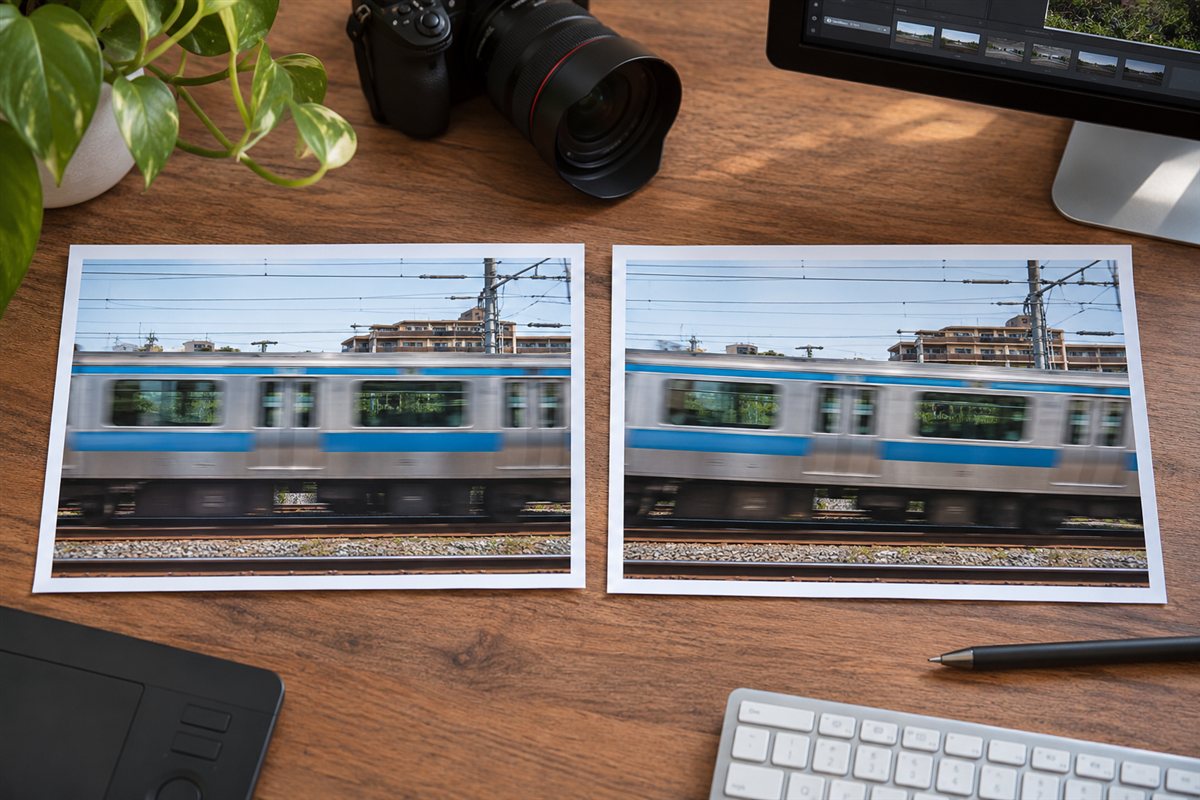
Rolling shutter is a distortion that happens when a sensor reads the image line by line from top to bottom instead of all at once, so fast motion gets skewed and handheld footage can wobble like jello. You can reduce it by slowing your movement, choosing a faster readout mode and shooting in a way that limits fast pans.
What Causes It
Most cameras with electronic shutters scan the sensor row by row. If the subject or the camera moves during the scan, the top of the frame is captured slightly earlier than the bottom. Vertical lines lean, spinning propellers bend, and quick whip pans make buildings look like they are tilting. When the camera shakes, the picture appears to ripple or wobble.
A global shutter sensor reads every pixel at the same moment and avoids the effect, but these sensors are less common in consumer cameras.
In this guide
Common Examples
- Fast horizontal pans that lean vertical lines.
- Footage from a vehicle or drone with high frequency vibration.
- Flash and strobe lights that show as a bright band across part of the frame.
- Fast objects like golf clubs, wheels or propellers that look bent.
How to Reduce It
- Slow down your pans and tilts. Smooth, deliberate moves show less skew than fast ones.
- Use a tripod, gimbal or a stabilized rig to remove small shakes that cause the wobble.
- Pick a recording mode with a faster readout. Lower resolution modes and some crop modes can scan faster than full width 4K, though this varies by camera.
- Check your camera manual or independent measurements for readout speed, and compare models before choosing for fast action.
- Where available, use a mechanical shutter for stills and avoid the electronic one during fast subject motion.
- Consider the correction feature in editing software, which can partly straighten the skew in handheld clips.
Planning Shots Around It
Shoot fast subjects at a distance, so the apparent motion across the frame is smaller. Avoid placing bright flashing lights in the shot, and in places with LED screens or artificial lighting, test your shutter speed for banding. For drones, damping mounts and propeller balance reduce the vibration that feeds the wobble.
Judging a Camera for Rolling Shutter Before You Buy
Makers rarely print a single clear number for rolling shutter, so you have to look for indirect signs. The most useful concept is sensor readout time, the time the sensor takes to scan from the top row to the bottom. A shorter readout means less skew. Some independent reviewers measure and publish this for specific cameras and modes, and where such figures exist they make comparison easier. Treat them as one input, since methods differ between reviewers, and since readout can change from one recording mode to another on the same camera.
Look for details that hint at faster readout. Cameras with stacked or partially stacked sensors, which have memory layers that speed data transfer, are often described as better in this respect, though the maker’s wording will tell you what the design actually is. Recording modes also matter. A mode that uses a smaller area of the sensor or fewer pixels may read faster than a full-width high resolution mode, while oversampled modes that read the full sensor can be slower. Check your camera’s manual and independent reviews for your exact modes.
- Search for sample clips with fast pans, spinning objects or vertical lines moving across the frame.
- Look at footage from the specific mode you plan to use, not only the headline mode.
- Check whether a global shutter or an unusually fast readout is offered, and what the trade-offs are, such as price or resolution.
- Rent the camera and shoot your own worst-case scenes before committing.
If you mostly shoot interviews, slow travel footage and static scenes, rolling shutter may hardly matter, so do not sacrifice other features for it.
Camera Movement Technique That Hides the Effect
How you move the camera shapes how visible the skew becomes. Fast whip pans and abrupt tilts produce the most obvious leaning verticals, so slow your movements and plan them. Think of the move as a curve: begin gently, travel at a steady speed, and slow down at the end. Smooth starts and stops look better and show less distortion than sudden jerks. Practice a pan several times before recording.
Distance and lens choice also matter. When you stand close to a moving subject, it crosses the frame quickly, and the skew grows. Moving back or using a longer lens changes framing, but a longer lens magnifies camera shake, which can also cause wobble. Choose the combination that gives stable shots. Wider lenses tend to hide small vibrations better, while longer ones demand more support.
Think about the direction of motion. Vertical lines lean when the camera or subject moves sideways, so fast horizontal movements of buildings, door frames and poles are the most noticeable. If you must film fast sideways action, consider framing so that fewer vertical lines are visible, or have the subject move toward or away from the camera, which shows less skew. For handheld work, bend your knees, hold the camera close to your body and use a strap or support to reduce shake. A shoulder rig, a handle or a monopod adds stability without the bulk of a tripod, and a gimbal removes many of the small movements that create the wobbly look.
How Stabilization Interacts With Rolling Shutter
Stabilization systems help, but they do not erase rolling shutter. In-body and in-lens stabilization move optical elements or the sensor to counter shake while you record, so the sensor sees a steadier scene during readout. This can reduce wobble in handheld shots, particularly small vibrations. However, they cannot remove skew caused by fast panning or by a subject moving quickly across the frame.
Electronic stabilization works differently. It crops into the image and shifts the frame in software to cancel shake. Because the sensor still reads line by line, quick movements can still produce skew, and aggressive electronic stabilization may crop the view noticeably. Some cameras combine optical and electronic methods to get smoother results. Consult the manual to learn which modes are available, how much they crop and whether they can be combined with your recording settings.
Sometimes stabilization can make things worse. Rapid corrections can interact with the scan and create odd wobbling, particularly when the camera is mounted on a vehicle, drone or other vibrating object. On a tripod, turn stabilization off unless the maker advises otherwise, since the system may try to correct movement that does not exist. If you use a gimbal, set the camera’s stabilization according to the gimbal maker’s advice. Test your whole setup, not just single parts, by shooting a few moves and viewing the results at full size before the actual job.
Lights, Banding and Flash Artifacts
Rolling shutter does not only distort motion; it also shows up in how cameras handle flickering light. Many artificial lights flicker at a rate tied to the power supply, which the eye does not see. A camera that scans the sensor line by line can capture different brightness in different rows, creating dark bands that roll up or down the frame. Screens, LED panels and some stage lighting can produce similar effects.
Fix banding by adjusting shutter speed. Many cameras offer a flicker reduction or a special shutter mode, and most editors choose a shutter speed that matches the local power frequency, as described in the camera manual. Try the options in the venue and watch the screen for rolling bands. Use a frame rate and shutter combination that works with the lights. If you are filming a monitor or a display, test several shutter speeds, and some cameras have a clear scan mode to help.
Flash and strobe effects are another issue. A single burst of light that lasts less than the scan time will expose only part of the frame, leaving a bright band across a section of the image and a darker area elsewhere. Avoid photographers’ flashes and lightning in critical shots, or accept that some frames will show the effect. For still photography, use a mechanical shutter or a shutter mode that supports flash. When filming events with camera flashes, consider shooting a little longer so you have unaffected frames, and plan to cut around the affected ones in editing.
Fixing It in Post and Knowing When to Let It Go
Editing software often includes a rolling shutter correction tool, which analyzes motion and attempts to straighten the skew. It works best on moderate distortion in clips with clear camera motion, and results vary. Start by applying the correction at a low setting and compare it with the original. Stronger correction can create warping, stretch edges or leave odd artifacts, particularly with moving subjects and complex backgrounds. Some tools allow you to specify the camera model or the severity, which helps.
Corrections work best when you provide clean material. Shoot with a steady camera and moderate movement, because correcting a very shaky shot may be impossible. Keep original files, since you may want to try different settings or newer software later. Render a short test and view it at full screen to check the result.
Also know when to let it go. Small amounts of skew in a quick camera move are often invisible to viewers, particularly at normal playback speed on a phone. Perfect elimination is not always worth the time. For crucial shots, consider re-shooting with a slower move, a different mode or a different camera. For fast sports, drone work or action, plan the footage with the effect in mind, and choose angles and speeds that suit your equipment. Maintain a short list of settings that work, such as the best recording mode, the stabilization choice and the shutter angle, and use it as your starting point for each shoot. That planning will save more time than any fix in post.
Global Shutter and Rolling Shutter Compared
To understand the problem, it helps to know the alternative. A global shutter exposes every part of the sensor at the same moment, so a fast-moving object is captured as a single frozen shape. A rolling shutter reads the sensor line by line, so the top of the image is recorded slightly before the bottom. When something moves quickly across the frame, or when the camera itself shakes, those small time gaps show up as bent lines, leaning buildings and wobbling edges.
| Feature | Rolling shutter | Global shutter |
|---|---|---|
| How the image is read | Line by line | All at once |
| Fast pans | Skew and wobble possible | Shapes stay straight |
| Typical use | Most consumer cameras and phones | Some specialist cameras |
| Cost to the user | Needs careful technique | Often a different camera class |
Most people shoot with rolling shutter sensors every day, and the effect is often small enough to ignore. Knowing how it works lets you decide when it matters.
A Shooting Checklist to Reduce Wobble
- Move the camera slowly and smoothly, and avoid sudden whip pans.
- Use a tripod, gimbal or other support for shots where steadiness is essential.
- Turn off any digital stabilization that crops and warps the picture, if your footage looks wavy.
- Choose the highest quality or fastest sensor readout mode that the camera offers for your resolution.
- Avoid filming fast cross-frame motion up close, such as a passing car right in front of the lens.
- Step back or use a wider lens so movement across the frame appears smaller.
- Check the maker manual for modes that mention lower rolling shutter distortion.
Using these habits together lowers the effect more than any single change.
Common Mistakes When Fighting Jello
The first mistake is assuming a faster shutter speed will fix the problem. The shutter speed sets how long each line is exposed, not how quickly the lines are read, so a very fast speed does not remove the skew. Readout speed is the main factor.
The second mistake is blaming the editing stage. Software can reduce some wobble, but it cannot rebuild the correct shape of an object that was recorded with a time gap. Better shooting habits usually beat any repair.
Third, many people forget that vibration from a vehicle, a drone or a wind-hit tripod produces the same wavy look as handheld motion. Isolate the camera from vibration with a soft mount or a stable support where possible.
Fourth, some shooters leave a higher resolution mode on without checking its effects. A mode that uses the whole sensor at high resolution may read slower than a lower resolution mode. Experiment with your camera, and consult its manual to see how each recording option behaves.
Which Situations Make It Worse
Certain scenes bring out rolling shutter more than others. Vertical lines such as poles and building edges show skew clearly when you pan. Propellers, spinning wheels and swinging objects may look bent or oddly shaped. Cameras attached to vehicles, bikes or boats pick up vibrations that turn into a rippling picture.
Flash and flickering lights also behave oddly with line-by-line capture. A short burst of light can brighten only a band of the frame instead of the whole picture. Some screens and LED lighting produce visible bands for similar reasons. In these cases, change the shutter speed, choose steady continuous lights or use a flash mode that is suited to video, as recommended in the maker guide.
Learning Useful Terms
- Readout speed: how quickly the sensor sends out all its lines for one frame.
- Skew: the leaning of vertical lines in a fast pan.
- Wobble: a wavy movement of the image caused by vibration.
- Crop mode: a recording mode that uses only part of the sensor.
- Stacked sensor: a sensor design that can read faster than a conventional one.
These terms appear often on maker pages and in manuals, and knowing them helps you see which camera features matter for your work.
When to Read the Manual or Ask the Maker
Camera makers sometimes describe readout speed only in general terms, and the specific effect on your footage depends on the mode you choose. Look in the manual for details on stabilization options, video modes and any recommended settings for fast motion. Updating the firmware, using the maker instructions, can also change how a mode behaves.
If you see strange bands, tearing or heavy distortion in every clip, even from a still camera on a tripod, check for a loose mount, a faulty cable or a damaged lens before blaming the sensor. For persistent faults, contact the maker support team or a qualified repair service, and avoid opening the camera yourself.
Rehearsing Your Move Before You Record
Much of the wobble in footage comes from hurried camera movement, so rehearse. Before you record, walk through the shot without pressing the button. Plan where your feet will land, where the camera will open and close, and how slowly you will turn. Keep your elbows against your body, bend your knees a little and let your hips, not your wrists, do the turning.
When the shot allows, let the camera settle for a second at the opening and the end. Those still moments give you clean frames for cutting and hide the small unevenness that occurs when a move begins or stops. Try the same pan at three different speeds and compare the results on a large screen. You will quickly see the speed at which your camera begins to bend vertical lines.
Picking Camera Settings That Help
Look through the video menu with rolling shutter in mind. Many cameras offer several resolution and frame rate choices, and each may have a different readout time. A mode that reads fewer pixels, such as a lower resolution option, tends to read faster, though it may give up some detail. Some cameras also offer a crop that trades field of view for speed.
Frame rate matters in a less direct way. A higher rate shows more frames per second, which can make the distortion look smoother, though it does not remove it. Check your manual for specific recommendations, and keep notes on the combinations that suit your work best.
Deciding When the Effect Is Acceptable
Not every clip needs a perfect result. For casual family videos and relaxed travel clips, mild skew is rarely noticed, and a plain steady shot is far more important. For action, sport or fast pans, it deserves more care, and you may choose a different camera or a more careful shooting style. Judge the final use: a short clip on a phone screen hides far more than a big screen presentation.

Ready to Buy? Start Here
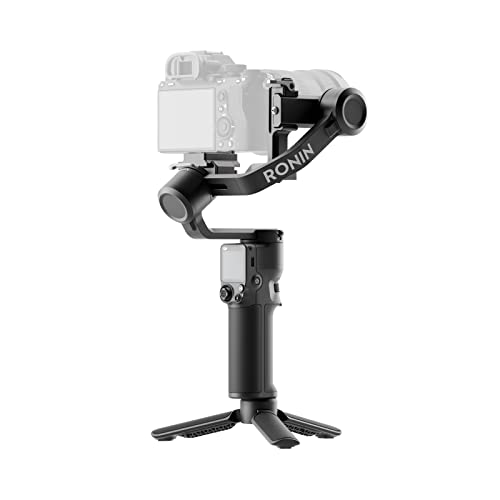
If this guide helped you decide what to look for, these products are a place to start.


As an Amazon Associate we earn from qualifying purchases. Prices and availability are shown on Amazon.
FAQ
Does a higher frame rate fix it?
Not by itself. The readout speed matters more, though some modes with higher frame rates also read the sensor faster.
Is a faster shutter speed the answer?
No. Shutter speed controls exposure time per line, not how long the whole scan takes.
Do all cameras have rolling shutter?
Most cameras with electronic shutters read the sensor progressively, so they show some. The amount varies widely by model and recording mode. Global shutter designs avoid it.
Is rolling shutter visible in photos?
It can appear with the electronic shutter when shooting fast subjects or panning. Using the mechanical shutter, where available, usually avoids it.
Does a smartphone have rolling shutter?
Many phone cameras show it, especially with fast movement or vibration. Holding the phone steadily and moving slowly helps.
Can a gimbal remove the jello effect?
A gimbal reduces shake that triggers wobble, but it cannot remove skew from fast pans or rapid subject motion. Combine it with smooth movement.
Does shutter angle matter?
Shutter angle affects motion blur, not the readout speed. A particular shutter setting may help with flicker, but it will not cure skew by itself.
Why does my drone footage wobble?
Vibration from propellers and motors is a common cause. Balanced propellers, damping parts and smooth flying help, and you should follow the drone maker's guidance.
Is it worth buying a new camera just for rolling shutter?
Only if your work demands it, such as fast action. For most types of shooting, technique and stabilization are enough.
Readout Speed in Practice: Testing Your Own Camera
Specifications and reviews can tell you a great deal, but the most useful knowledge is how your own camera behaves in the situations you actually shoot. A simple home test makes rolling shutter visible and measurable. Point the camera at a vertical edge such as a door frame, pan quickly from side to side while recording, and then step through the footage frame by frame. The lean of the door frame during the pan shows the skew your sensor produces at that resolution and frame rate. Repeat the test in every recording mode you use, because many cameras read the sensor differently in different modes: a cropped mode may scan faster, a high-resolution mode slower, and an electronic-shutter stills mode may behave differently again.
Keep the results somewhere you will actually consult, even if it is only a note on your phone: which mode wobbles least, which mode bands under your household lights, which mode you trust for fast pans. That small personal reference saves you from rediscovering the same lessons on paid or unrepeatable shoots. It also turns vague anxiety about jello into a concrete plan, because you will know, before you arrive, exactly which settings keep the effect below the level your audience will notice.
The test has a second benefit: it trains your eye. Photographers who have studied their own test footage start seeing the early signs of skew in real footage while they are still shooting, in time to slow a pan or change a mode. Those who have never looked closely tend to discover the problem in the edit, where the only fixes are cropping, stabilization that may add its own wobble, or reshooting.
Subject Motion Versus Camera Motion: Two Different Problems
It helps to separate two situations that are often blamed on each other. When the camera moves during readout, the whole frame leans or wobbles, because each line records the scene from a slightly different camera position. When the subject moves but the camera is still, only the subject distorts: a spinning propeller bends, a fast-moving car stretches, a golfer’s club appears to flex. The remedies differ. Camera-motion wobble responds to slower movement, better support and stabilization. Subject-motion distortion responds mainly to faster readout, because the subject crosses the frame during the scan no matter how steady the camera is.
This distinction matters when you judge sample footage online. A camera praised for clean handheld walking shots may still bend a racing car’s wheels, and a camera that handles fast subjects well may still wobble when its owner pans carelessly. Match the test to your subject. If you film sports, watch the players and the ball. If you film real estate or travel scenes, watch the vertical lines during pans. If you film interviews on a tripod, rolling shutter may barely matter to you at all, and other qualities of the camera deserve your attention and budget instead.
Flash photography has its own version of the problem in stills, where a moving subject lit by a brief flash can show partial exposure artifacts with an electronic shutter. The main guide touches on banding under artificial light; the practical rule is to test your exact combination of shutter mode and lighting before any shoot where the images cannot be repeated, because the interaction depends on the specific lights and mains frequency in the room.
Shooting Scenes That Forgive: Composition Choices That Hide the Effect
Experienced videographers quietly compose around the limitation. Scenes without strong vertical lines near the frame edges forgive a great deal of skew, because there is nothing straight for the eye to measure the lean against. A pan across a landscape of trees, hills and water can move noticeably faster than a pan across a city street of lamp posts and building edges before the effect becomes visible. When you must film architecture, keeping the strongest verticals near the center of the frame helps, because distortion is least apparent there and the viewer’s eye tolerates it better.
Direction of movement matters too. A tracking shot that moves with the subject, keeping it steady in the frame while the background flows past, often looks cleaner than a fixed camera panning to follow, because the subject itself stays undistorted and the background motion reads as natural blur and flow. Dolly and gimbal moves that travel through a scene rather than sweeping across it also tend to hide skew, since the geometry changes gradually instead of shearing sideways.
None of this requires new equipment, which is why it is worth practicing deliberately. Take one location and film it three ways: a fast pan, a slow pan, and a walking move through the scene. Compare the footage honestly. Most people find the walking move both the most stable-looking and the most engaging, which is a useful reminder that working around a sensor limitation often improves the filmmaking at the same time.
Rolling Shutter in Stills: The Silent and Electronic Shutter Question
Still photographers meet rolling shutter when they switch to a fully electronic shutter for silent shooting. The readout in stills modes can be slower than in video, so fast-moving subjects distort more, and artificial light can band across the frame in stripes. The situations that suffer are predictable: indoor sports under flickering lights, a bride’s bouquet toss, a dog shaking water, a musician’s drumsticks. The situations that shine are equally predictable: ceremonies where silence matters, wildlife that startles at shutter sound, and any static subject where the mechanical shutter’s vibration is the bigger enemy.
The working habit is to treat shutter type as a deliberate choice per scene rather than a global preference. Set up your camera so switching between mechanical and electronic is quick, learn which of your regular venues have lights that band, and check the first frames of any fast sequence at full magnification before committing to the mode for the whole event. A thirty-second check early in a shoot is far cheaper than a folder of banded frames discovered at midnight.
Hybrid approaches exist on many bodies: a mechanical first curtain with an electronic second curtain reduces vibration while keeping readout behavior closer to the mechanical shutter. If your camera offers it, test whether it behaves well under your typical lights and with your fastest subjects, because it can be a comfortable default for general work, leaving the fully electronic mode for the quiet, slow scenes where it excels.
Talking to Clients and Viewers About Wobble
If you shoot for other people, rolling shutter occasionally becomes a conversation. A client reviewing footage may describe the effect as the video looking drunk, wobbly or cheap, without knowing the cause. The professional response is to have prevented it where it matters and to be able to explain, in plain terms, what happened in any shot where it survives: the sensor reads the picture line by line, very fast movement during that read leans the picture, and the fix on the day would have been a slower move or a different camera mode. Clients accept limitations explained calmly and in advance far better than surprises defended afterward.
Prevention, for paid work, means building the limitation into your shot planning. Scout the location, note the scenes that demand fast pans, and decide then how you will cover them: a wider static frame, a tracking move, a second camera, or a slower choreographed motion. On the day, review risky shots on a larger screen if one is available, because wobble that is invisible on a small camera display can be obvious on the monitor the client will use. Where a shot is unrepeatable and critical, the humble option of a slightly slower, safer move beats the heroic fast pan that leans.
A Short Decision Guide for Common Scenarios
For sports and wildlife video, prioritize the fastest readout mode your camera offers, even if it costs some resolution, and keep pans smooth and unhurried by tracking with the subject rather than whipping to catch up. For music and stage work, test for banding under the venue lights before the performance, and choose shutter settings that divide evenly into the local mains rhythm where your camera allows it. For travel and city footage, slow your pans to a count, brace the camera against your body, and prefer walking shots through streets to sweeps across them. For interviews and dialogue, relax: a locked-off camera on a seated subject is the kindest possible scenario for a rolling shutter, and your attention belongs on light and sound instead.
For stills at events, match the shutter to the pace: mechanical or hybrid for the fast, unpredictable moments, electronic for the quiet ones. For product and studio work with flash, follow the sync guidance in the main guide and test at your working power settings, because flash duration and readout interact in ways that vary by gear. In every case, the pattern is the same: know your camera’s behavior from your own tests, choose the mode for the scene in front of you, and review early frames before the moment passes.
Can editing software completely remove the jello effect?
Modern editors include rolling shutter repair tools that can reduce moderate wobble, and they sometimes rescue a shot. They work by warping frames back toward alignment, which costs resolution at the edges and can introduce its own artifacts on complex motion. Severe jello, especially with fast vibration, is rarely fully repairable. Treat the tools as a safety net, not a plan, and keep prevention as your main strategy.
Why does the effect look worse in vertical video?
Vertical video is often shot on phones with modest readout speeds, and the tall frame gives vertical lines a long run over which lean becomes obvious. The narrow width also encourages quick wrist pans, which are exactly the movement the sensor handles worst. Slowing the pan and bracing the phone with both hands makes a visible difference, as does choosing the phone’s higher frame rate mode when the light allows it.
Does image stabilization cause rolling shutter?
No, the cause is the sensor’s line-by-line readout. Stabilization can interact with it, though: a stabilizer correcting shake during the readout can add small warps, and aggressive electronic stabilization crops and warps frames in ways that sometimes resemble jello. If footage looks odd, test with stabilization reduced or off on a tripod to see which part of the look comes from which system.
Audio, Dialogue and the Shots Where Nobody Notices the Sensor
It is worth remembering how much of everyday video work rolling shutter never touches. Interviews, dialogue scenes, cooking demonstrations, tutorials, vlogs recorded at walking pace, product shots on a table — in all of these the camera is still or moving gently, the subject’s motion is human-scaled, and the audience’s attention is on faces, words and story. A creator choosing a camera for such work should weigh microphones, autofocus reliability, battery life and color long before readout speed, because those are the qualities their viewers will actually experience. Rolling shutter dominates forum discussions partly because it is easy to demonstrate with a violent pan at a fence; it dominates real footage far less, because real footage is rarely a violent pan at a fence.
This perspective also protects your wallet and your morale. Every camera has a readout speed, including expensive ones, and the photographer who chases a perfect specification may trade away qualities their actual work needed more. The mature approach is the one this guide has built toward: know the effect, know your camera’s version of it from your own tests, know the handful of situations where it will genuinely trouble your kind of shooting, and handle those situations with technique. The rest of the time, forget the sensor and think about the scene.
There is a corollary for reviewing your own old footage. When you find wobble in an archive clip, judge it by the audience’s standard, not the pixel-peeper’s: if the moment is strong and the wobble is mild, the clip is fine, and deleting it for a technical flaw no viewer would name is a loss disguised as standards. Save your severity for the faults viewers feel — missed focus on the key face, inaudible words, the moment itself missed — and let minor skew pass as part of the record.
Drones, Action Cameras and Phones: Rolling Shutter in Small Sensors
The cameras that suffer most visibly from rolling shutter are often the smallest ones, because they combine electronic shutters, wide lenses and violent motion. Action cameras mounted on helmets, handlebars and vehicles vibrate at frequencies that turn footage to jelly when the mount is rigid and the light forces slower readout behavior. The established remedies are mechanical as much as electronic: mount the camera with some isolation from the vibration source, prefer positions on the body or the vehicle that move least, and shoot in the camera’s higher frame rates when the light allows, because the associated modes often read the sensor faster. Modern action cameras also fight the effect with powerful electronic stabilization, which works impressively until the motion exceeds what cropping and warping can hide, at which point the honest fix is a better mount.
Drones add a distinctive case: the aircraft moves smoothly, but its propellers and motors transmit high-frequency vibration through the frame, and a gimbal can only remove the movements it can sense. Propellers that are damaged or unbalanced, or a gimbal asked to work in wind beyond its comfort, produce the classic wavy horizon and shimmering verticals. Drone pilots learn to treat persistent jello as a maintenance signal — check the propellers, the gimbal’s calibration and the mounting — rather than as an inevitable property of flight, because a healthy drone in reasonable conditions produces strikingly stable footage.
Phones deserve a practical note, because they are the cameras most people actually film with. Their readout has improved steadily, their stabilization is excellent, and their weakness is the same as it ever was: the quick wrist pan and the fast-moving subject close to the lens. The phone filmmaker who braces with two hands, pans slowly, and walks instead of whipping will produce footage that embarrasses many larger cameras used carelessly. Technique scales down as reliably as it scales up.
How Rolling Shutter Is Changing: Sensors, Standards and What to Watch
Readout speeds improve with each camera generation, driven by sensor designs that move data off the chip faster and by the stacked architectures that high-end bodies have adopted. The practical effect for buyers is that the gap between models is narrowing at the middle of the market: cameras that would have wobbled noticeably a few generations ago now handle ordinary video movement cleanly, and the remaining differences show mainly in the extreme cases — whip pans, strobing lights, the fastest sports. Global shutter sensors, which expose every pixel simultaneously and eliminate the effect entirely, have begun appearing in specialist video cameras, and their arrival changes the conversation for the productions that can use them, while their cost and their own trade-offs keep rolling shutter the norm elsewhere for now.
For a working photographer or videographer, the sensible posture toward this progress is calm. Buy for the work you do today, test what you buy, and let the improvement curve be a pleasant tailwind rather than a reason to wait or to churn equipment. The technique in this guide — slower movements, stable support, mode awareness, honest testing — will remain useful on every future camera, because even very fast readout rewards a smooth operator, and audiences will always prefer footage that was filmed with care.
When you do evaluate a new body, evaluate readout the way you now know how: your door-frame pan test in every mode, a banding check under your own lights, and a fast-subject test that matches your work. Reviews and charts can shortlist the candidates, but your hands and your subjects make the final decision, and a camera whose wobble profile fits your shooting is worth more than a technically faster one that fails you somewhere you actually live, such as autofocus, battery life or the simple pleasure of using it.
Why do propellers and ceiling fans look bent or broken in video?
Because each line of the frame is recorded at a slightly different instant while the blade sweeps through a large angle between the first line and the last. The blade’s position at the top of the frame and at the bottom belong to different moments, so the blade renders as curved, segmented or even apparently detached. It is the purest everyday demonstration of rolling shutter, and slowing the fan, changing the frame rate, or using a camera with faster readout all reduce the strangeness — though a slowly turning fan under a slow-readout camera remains one of photography’s reliable magic tricks.
Can a gimbal make rolling shutter worse?
Occasionally, yes. A gimbal that is poorly balanced, working at its limits in wind, or introducing its own small vibrations can add motion during the readout that the sensor then renders as warp. The footage looks like jello but the cause is mechanical. Test the same shot handheld or on a tripod: if the warp disappears, service the setup — balance, firmware, mounting — rather than blaming the camera.
Is rolling shutter a defect I can claim under warranty?
Ordinary rolling shutter behavior is a characteristic of the sensor design, not a defect, and every comparable camera shows it to some degree. What would justify a service conversation is behavior dramatically worse than the same model normally shows — severe warping in gentle motion, or new artifacts that appear suddenly — because those can indicate a fault. Compare against your own earlier footage from the same camera before concluding anything; a change in the camera is meaningful, while the effect itself is physics.
Frame Rates, Shutter Angles and the Look of Motion
Video adds a variable stills photographers never meet: the shutter’s relationship to the frame rate, conventionally expressed as a shutter angle. The familiar natural-motion look comes from an exposure near half the frame interval, which gives moving subjects a moderate blur that the eye reads as smooth. Rolling shutter interacts with this choice quietly: at the conventional setting, each line’s exposure is long relative to the readout, which can soften some artifacts while making others, like partial flash exposure and banding under flickering light, more likely. Deviating to much faster shutter speeds sharpens each frame’s motion but can exaggerate the segmented look of fast subjects, because each line captures a crisper, more separate slice of the movement.
The practical guidance is to choose the shutter for the motion look first, as filmmakers have always done, and then check the rolling shutter consequences in your test footage rather than the reverse. If a fast shutter is needed for a particular effect — crisp sports frames, a staccato action look — accept the skew as part of the bargain and manage it with the movement discipline this guide teaches. If banding appears under artificial light at your chosen settings, adjust the shutter in the small steps your camera allows toward the values that sit comfortably with the local mains rhythm, a fix that usually costs the motion look almost nothing.
Above all, keep the combination consistent within a scene. A sequence that changes frame rate or shutter logic between shots draws attention to its own mechanics, while a sequence shot on one settled combination lets the audience forget the camera exists — which, for all this guide’s technical detail, remains the actual goal of every choice in it.
The Short Version
Rolling shutter comes from line by line sensor readout, which skews fast motion and creates the jello look. Move more slowly, stabilize the camera, choose faster readout modes and consider a model with quick sensor scanning if you shoot action.
