The Sony A6700 is a compact APS-C camera, and the Sony A7 IV is a larger full-frame hybrid. Choose the A6700 if size, weight and reach with small lenses matter, and choose the A7 IV if you want the light-gathering and depth-of-field advantages of a larger sensor and a body with two card slots.

What Each Camera Is For
The A6700 suits travel, wildlife with a modest telephoto, sports and video work where a light kit is an advantage. The A7 IV is a general-purpose full-frame camera for portraits, weddings, events, landscapes and video, built for people who want higher resolution and a roomier body with extensive controls.
In this guide
Key Differences
| Trait | Sony A6700 | Sony A7 IV |
|---|---|---|
| Sensor size class | APS-C | Full-frame |
| Body | Smaller, lighter | Larger, heavier |
| Card slots | One | Two |
| Lens mount | Sony E | Sony E |
| Strength | Portability and reach | Low light and image depth |
Confirm exact specifications on the maker’s pages.
Sensor Size in Practice
A larger sensor gathers more light, so the same scene is usually cleaner at high ISO and background blur is easier to achieve at the same field of view. APS-C offers extra reach, since a lens shows a narrower view on the smaller sensor, which helps with distant subjects.
Lenses follow the sensor. Full-frame lenses are bigger, and many cost more. APS-C lenses are compact, which is the main reason the system stays small.
How to Choose
- Decide how much you will carry each day.
- Think about your light conditions: evening events favor full-frame.
- Add the lens costs to the body cost, not just the camera.
- Consider dual card slots for paid or irreplaceable work.
- Check video needs on the maker’s pages.
Who Should Choose Which
- Choose the A6700 for hiking, travel and wildlife where reach and weight matter.
- Choose the A7 IV for portraits, weddings and low-light events.
- Choose the A6700 first if you are unsure, as lenses carry over to full-frame bodies later.
Video and Handling
Both cameras record video and offer stabilization in the body, but the larger A7 IV body gives more room for controls, ports and heat management, which some filmmakers value. The A6700 is easier to mount on a small gimbal or carry on a long walk. If you record long interviews or events, read the maker’s notes on recording times and connections for each model.
Total Kit Weight and Cost, Not Just Body Versus Body
The real difference between a compact APS-C setup and a full-frame one shows up when you add lenses. Body weights differ by a modest amount, but lens sizes diverge much more. A full-frame standard zoom, a wide zoom and a telephoto will normally weigh and cost more than their APS-C equivalents, and fast apertures make the gap larger. If you carry your camera all day, that accumulated difference is what you feel in your shoulders.
Build a sample kit for each camera. For example, write down the three lenses you would actually use, check their weights and prices on the maker pages, and add batteries, filters and a bag. Compare the totals qualitatively: which kit would you willingly carry on a long hike or a trip with airline limits? Which one fits in your usual bag?
Also think about equivalence. A given field of view and background blur on APS-C often requires a different aperture or focal length than on full frame, so comparing lenses by number alone can mislead. Fast primes are a good example: a bright full-frame prime can be larger and pricier than an APS-C one with a similar field of view, but it may give shallower focus. Decide whether you need that look. Used lenses ease the cost on both systems, and E-mount has a wide choice from the maker and third parties. Plan to spend more on lenses than on the body, and treat the body as the smaller decision in a long-term system.
Low Light and Depth of Field: A Reality Check
Larger sensors collect more light in total, which usually produces cleaner images at high ISO and gives more room to brighten shadows. That advantage is real but not dramatic in every situation. In good light, differences between the two cameras can be hard to see, especially in prints or web images. The gap becomes more visible in dim venues, indoor events, night scenes and when you need fast shutter speeds without raising noise.
Depth of field works similarly. At the same framing and aperture, full frame renders a shallower plane of focus and more background blur. That helps for portraits and subject separation. However, shallower focus also makes accurate focusing more demanding, and many photographers choose to stop down for group photos or moving subjects. APS-C gives deeper focus at the same aperture, which can be helpful for landscapes and street work.
Do not rely only on sensor size. Lens aperture, shutter speed, image stabilization and good technique all contribute. A stabilized body with a bright lens can capture still subjects in dim light with a lower ISO, while moving subjects need fast shutter speeds regardless of sensor size. Test both cameras at the ISO values you will actually use, view the files at the sizes you will deliver and judge whether the difference matters to you. If your work is mostly daylight, travel and online sharing, you may find APS-C entirely sufficient.
Resolution, Cropping and File Handling
Resolution affects how much you can crop, how large you can print and how heavy your files are. The two cameras differ in pixel count, so check the maker pages for the exact numbers. A higher count gives more flexibility to crop a distant subject or reframe a picture, but it also demands more storage, faster cards and a stronger computer for editing.
Cropping interacts with sensor size. APS-C gives a tighter view with the same lens, but a full-frame camera can be cropped to a similar framing, though at a lower final pixel count. Which one yields more detail depends on the pixel numbers, lens sharpness and how much you crop. If you shoot wildlife and rely on reach, compare the results of a crop from the larger sensor against the native APS-C frame using your own lenses.
Think about the entire workflow. Check file formats and compression options, as these change size and quality. Make sure your editing software supports the raw files from each camera; new models sometimes need software updates. Calculate storage needs for a typical shoot, and plan backups, such as two drives or a cloud copy. If you deliver quickly after events, consider how long it takes to import, cull and export. Finally, check card types and speed ratings, since high resolution bursts and high bitrate video need fast cards. Buying cards twice because the first set was too slow is an avoidable expense.
Professional Use: Reliability and Backup Planning
Professionals care less about specifications than about not losing a job. For paid work, think about redundancy: dual card slots allow simultaneous recording to two cards, protecting you against a failure. If your camera has one slot, build habits that reduce risk, such as swapping cards often, copying files during breaks and carrying a second body when the shoot cannot be repeated.
Battery planning is another point. Carry enough batteries for the longest day, charge them the night before and label them so you know which are fresh. Check how the camera handles power through USB for long video or tethered use. Consider weather and handling: check the maker pages for sealing information and test how the camera feels with gloves or in damp conditions.
Client expectations also matter. Some clients, such as wedding couples or commercial customers, expect certain deliverables and a professional approach, but rarely ask what camera you use. What they notice is reliable results, sharp images and consistency. Both cameras can deliver these when used well. Before an important job, test your complete setup: lenses, flash, cards and settings. Keep firmware updated, but avoid updating the night before a shoot in case of bugs. Having a plan for repairs, such as a rental option or a backup body, matters more than the badge. Many working photographers keep an older body as a spare, which is a sensible use of a previous camera.
Starting Small and Upgrading Later
If you cannot decide, consider the path with the least regret. Because both cameras share the same mount, lenses you buy can move with you. Full-frame lenses work on APS-C bodies, with a crop that makes them act longer, while APS-C lenses on full-frame bodies produce a cropped image or use a crop mode that lowers resolution. That means full-frame lenses are the safer long-term investment if you may upgrade, while APS-C lenses offer lighter, cheaper kits for now.
Ask yourself what would make you upgrade. If the answer is cleaner low light files, shallower focus or dual slots, you may eventually want full frame. If the answer is lighter kit and reach, APS-C may stay right for years. Many photographers keep a compact body as a second camera even after moving up, as it is easy to carry.
Also check the used market. Buying a used body can reduce the entry cost, and selling it later usually recovers part of the money. Be careful with condition, shutter count and warranty. Rent before buying if possible, since a weekend with each camera reveals handling, autofocus and file quality more reliably than a list of specifications. Finally, set a budget for the whole system and stick to it, leaving room for a good lens, memory cards, batteries and a bag. A modest camera with a good lens often outperforms an advanced body with a weak one.
Which Should You Buy, the Sony A6700 or the Sony A7 IV?
Buy the Sony A6700 if you want a compact APS-C camera with reach and a light kit, and buy the Sony A7 IV if you want a full-frame sensor, two card slots and the strongest low-light and depth-of-field advantages. Both use Sony E-mount lenses.
Match your needs to the camera:
- Hikers and travelers: choose the Sony A6700, because smaller bodies and APS-C lenses keep the whole bag lighter.
- Wildlife shooters with a modest telephoto: the A6700 gives a tighter view from the same lens.
- Wedding and event photographers: the Sony A7 IV suits you, since dual card slots protect work you cannot repeat.
- Portrait photographers: the A7 IV makes shallow focus and subject separation easier.
- Hybrid shooters who want a roomy body: the A7 IV offers more space for controls and ports.
- Buyers who are unsure: start with the A6700 and keep full-frame lenses in mind for a later move.
Whichever you pick, budget for lenses first. They shape your results for years.
What to Check Before Buying an APS-C or Full-Frame Camera
Check the lens plan, the weight you will carry and the storage and software you need, because the body is only one part of the cost. A short checklist keeps the decision grounded.
- Lens list: write down the lenses you would buy and check their size and weight on the maker pages.
- Bag and accessories: confirm your bag, strap and tripod plate suit a larger or smaller body.
- Cards: confirm card types and the speed class needed for high-bitrate video and fast bursts.
- Batteries and charging: check what is included, whether USB charging is supported and how many spares you need.
- Software: make sure your editing program reads the raw files from the model you pick.
- Computer and storage: larger files need storage space and a computer that can edit them smoothly.
- Return and warranty terms: read these on the listing before ordering.
Try holding both cameras if you can. Grip comfort, button reach and menu feel matter on a long day.
Is Full Frame Worth the Extra Cost and Weight?
Full frame is worth it if you often shoot in dim light, want shallow focus or need dual card slots, and it is not worth it if you shoot mostly in daylight and value a light kit. The best camera is the one whose strengths you will use.
Weigh the honest trade-offs:
- Cost: the A7 IV is the more expensive route once you add full-frame lenses.
- Weight: a full-frame kit adds up quickly, and long days feel it.
- Reach: the A6700 gives a tighter view with the same lens, which helps distant subjects.
- Image benefits: cleaner high ISO files and easier blur from the A7 IV are real but may be hard to see in good light or small web images.
Who should skip the A7 IV? Travelers who count every gram and photographers who shoot mostly in daylight. Who should skip the A6700? Event shooters who need dual slots or people who want the shallowest focus with a wide lens.
A fair test is to look at your last year of photos. If most were taken in good light and shared online, a smaller camera likely serves you well.
APS-C vs Full Frame for Wildlife, Travel and Portraits
For wildlife and travel, APS-C usually gives the better balance of reach and weight, while for portraits and events full frame gives more flexibility. Your main subject should drive the choice.
Think through each type of shooting:
- Wildlife: APS-C gives a tighter view from the same lens, so a modest telephoto goes further. Full frame can be cropped, but the final pixel count drops.
- Travel: smaller lenses and a lighter body make long days easier, and they are easier to take on planes and trains.
- Portraits: the larger sensor makes background blur easier at a given framing, which helps subject separation.
- Weddings and events: two card slots and better high-ISO behavior in dim halls make full frame a safer tool.
- Landscapes: either works. Full frame can give more room to recover shadows, while APS-C keeps the tripod kit lighter.
- Video: compare crops and recording limits for both models on the maker pages, since modes differ.
Do not choose a system for one rare job. Pick the camera that fits what you shoot most weeks, and rent a different one for a special occasion if you need to.
Setting Up Your Camera for Sharp, Reliable Results
Good setup gives sharp results on either body: pick the focus mode for the subject, set a safe shutter speed and check images early. These habits matter more than small spec differences.
- Autofocus: use continuous focus with subject detection for moving subjects and a single point for still ones.
- Shutter speed: keep it fast enough for the subject and the focal length you are using.
- Custom buttons: assign the functions you use most so you can change them without menus.
- File settings: choose raw or high-quality files for important work and keep backups.
- Test shots: review images at full zoom at the start of a shoot.
Name and label cards, carry spares and update firmware well before an important job.
When you are ready, compare the two cameras above, check the current listing for what is included and the return terms, then choose the one that fits how you will use it.
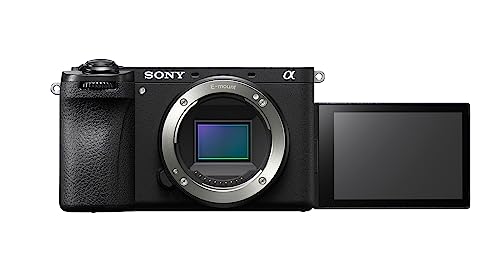
Ready to Buy? Start Here
If this guide helped you decide what to look for, these products are a place to start.
As an Amazon Associate we earn from qualifying purchases. Prices and availability are shown on Amazon.
Video and Hybrid Shooting in Practice
Hybrid shooting, stills and video on the same outing, is where the Sony A6700 and the Sony A7 IV reveal their working styles. Switching modes should not mean rebuilding your settings from scratch. Look at how each body remembers separate stills and video settings, how quickly you can change frame rate or picture profile, and whether the controls you need sit in the same places in both modes. A camera that treats video as a first-class citizen encourages you to capture the clip as well as the photograph, and over a year that doubles the record you bring home.
Colour is the other practical divide. Some shooters want footage that looks finished straight from the camera for family and social sharing. Others prefer a flatter profile that grades well alongside stills from the same scene. Try both approaches on each body with the same subject: a face in window light is the most revealing test you own. Skin tones, highlight roll-off on a bright background and how the camera handles mixed indoor lighting will tell you more than any chart, and they will tell you in the vocabulary of your own work.
Finally, think about the whole chain after the shoot. Video files are large, and a happy hybrid workflow needs cards with room to spare, a card reader that does not bottleneck your evening, and a simple folder routine you will actually follow. Back up footage before you format a card, every time, without exception for small shoots. The Sony A6700 and the Sony A7 IV both produce files your future self will value; the discipline of keeping them safe and findable is yours to build, and it is worth building in the first week rather than after the first loss.
A Note From the Field: What Actually Decides This One
The Sony A6700 and the Sony A7 IV divide buyers by what they refuse to compromise. Choose the A6700 and you refuse to compromise on size: the body and its lenses stay genuinely portable, and you accept a smaller sensor as the price of that freedom. Choose the A7 IV and you refuse to compromise on the file: low-light headroom, shallow depth of field and cropping room, and you accept a heavier bag as the price. Both refusals are respectable, and most regret comes from choosing against your own. Look at your last holiday or your last paid shoot and ask which complaint you actually voiced, weight or image quality. That memory is a better guide than any comparison table.
Planning Lenses Around the Body You Choose
A camera body is a five-year decision, but a lens collection is a fifteen-year one, so plan the glass before you finalise the body. Start with the focal lengths your existing photographs actually use. Most photographers discover their work clusters around two or three lengths, with everything else shot rarely. For the Sony A6700 and the Sony A7 IV, list the lenses that cover your cluster well, check their size against your bag, and be honest about which single lens would live on the camera most days. That everyday lens, more than the body, defines the kit you will experience.
Everyday choices usually come down to a flexible zoom against a small fast prime, and the right answer depends on your subjects. A zoom suits unpredictable days: travel, family events and work where you cannot move freely. A prime suits repeatable days: portraits, street walks and low-light evenings where its wider aperture and smaller size change both the pictures and your willingness to carry the camera. Many photographers end up owning one of each, bought in the order their shooting demands, and that sequence is a better plan than buying a large set at once.
Leave room in the plan for the unglamorous essentials. A second battery, a fast card and a spare, a comfortable strap and a simple cleaning kit will improve more shooting days than a third lens bought too early. When you do add lenses, buy for a named purpose, a trip, a project or a recurring frustration in your current photographs, rather than for a gap in a focal-length chart. Collections built by purpose stay small, stay used and hold their value. Collections built by chart tend to stay at home, which is the most expensive place a lens can be.
Batteries, Cards and a File Routine That Holds Up
Battery behaviour differs enough between bodies that it should be tested, not assumed. The Sony A6700 and the Sony A7 IV draw power differently depending on finder use, screen brightness, stabilisation and how much video you mix into a day. For a week, note what a full charge actually delivered in your shooting and write it on a card in your bag. That personal number, unglamorous as it sounds, ends battery anxiety more completely than any accessory, because planning replaces guessing. A small USB power bank can top up many modern bodies between locations, which suits travel days well.
Card speed is worth understanding at a practical level. A card that is fine for single photographs may stall a long burst or refuse a demanding video mode, and the failure always appears at the worst moment. Test your cards at home with your longest burst and your highest video setting before trusting them at an event. Keep one known-good card reserved for important shoots, and retire cards that have ever behaved oddly; storage is cheap compared with an unrepeatable moment. Label cards with numbers so your notes can refer to them unambiguously.
Finally, decide how you will cull and keep. A workable rule is to delete only the obvious failures, technical misses and true duplicates, and to keep everything else in the dated archive, because storage grows cheaper while moments do not repeat. Star or flag your favourites during the first review and build small collections around projects and people rather than around camera models. Whether your files come from the Sony A6700 or the Sony A7 IV will matter far less in five years than whether you can find the photograph you are looking for in under a minute.
Setting Up Either Body During the First Week
The first week with the Sony A6700 or the Sony A7 IV sets habits that last for years, so spend an evening on setup before the first real shoot. Begin with the basics that protect files: set the clock correctly, choose your file format deliberately rather than by default, and decide whether you want the camera to write smaller companion files for quick sharing. Photographers who shoot family and travel often appreciate an easy sharing copy, while those who edit everything can keep things simple. There is no universal right answer, only an answer that matches your routine.
Next, assign the custom buttons while your needs are fresh. Put the settings you reach for mid-shoot, focus mode, subject detection, exposure compensation or silent shooting, on the controls your fingers find without looking. Resist copying a stranger’s full configuration from a video; their subjects and habits are not yours, and an inherited setup full of mysteries will confuse you under pressure. Change one thing at a time, shoot with it for a day, and keep a short note of what you changed and why. That note becomes your personal manual supplement.
Finish the week by rehearsing recovery from the common accidents. Switch the camera to fully manual and back. Find the format command and the reset options so you are never hunting for them in a panic. Practise changing a battery and a card in the dark, slowly, until it is boring. Cameras rarely fail photographers at convenient moments, and the difference between a lost minute and a lost shoot is usually familiarity earned in calm conditions. Both of these bodies reward that investment quickly, because their depth is there to be used, not to intimidate.
Care, Troubleshooting and Sensible Used-Buying Checks
Troubleshooting works best as a short ladder you climb in order. First, confirm the obvious: battery charge, card space, lens seated properly and contacts clean. Second, check the settings that silently change results, drive mode, focus mode, exposure compensation and any bracketing left over from an experiment. Third, reset only the shooting settings if the camera still behaves strangely, keeping your custom configuration noted somewhere safe. This ladder solves the great majority of field problems on the Sony A6700 and the Sony A7 IV alike, and it solves them without the regret of a full reset performed in frustration.
Firmware updates belong on the same calm list. Manufacturers use them to refine autofocus, add lens support and fix rare faults, and installing them is a five-minute job with a charged battery and the instructions open beside you. Read the release notes before updating; if nothing in them touches your shooting, there is no urgency, and if something does, update before your next important shoot rather than after it. Keep a note of the version you are running in the same place you keep your setup notes, so troubleshooting conversations with support start from facts.
A used purchase of the Sony A6700 or the Sony A7 IV should also include the accessories in your inspection. Check that the battery holds a plausible charge through an afternoon, that the charger works, and that the finder and screen are free of marks that would annoy you daily. Cosmetic scuffs on corners are honest wear and often priced in your favour; gritty dials, a loose mount or intermittent errors are not. Spend your first used-camera week shooting everything, portraits, bursts, video, low light, so any hidden fault surfaces while returning the body is still simple.
More Field Notes Worth Keeping
Care is mostly a matter of environment. Keep the body cap on when no lens is fitted, change lenses with the mount facing down and out of the wind, and let a cold camera warm up inside a sealed bag after winter shooting so condensation forms on the bag rather than inside the camera. Wipe salt spray and rain off before storing, store the kit somewhere dry and unremarkable, and remove the battery for long storage. Neither the Sony A6700 nor the Sony A7 IV asks for elaborate maintenance; both repay these small, boring habits with years of uneventful service.
Most problems owners blame on a camera are small, predictable and fixable in a minute. Dust spots that appear in skies at narrow apertures usually mean the sensor needs a blower first and, if spots persist, a proper clean rather than panic. Soft photographs at slow shutter speeds usually mean stabilisation expectations were optimistic or the subject moved, not that the lens failed. When something looks wrong, change one variable at a time, photograph a test subject in good light, and let the evidence narrow the cause before you change settings at random or book a repair.
Adapted and older lenses deserve a mention for budget-conscious buyers. Both of these systems can make use of earlier glass, sometimes with full autofocus and sometimes with manual focus only, and the savings can be considerable. The trade-offs are predictable: slower or less certain focus, no weather sealing in some combinations, and occasional quirks with corrections. For deliberate work such as landscapes, still life and portraits, adapted glass can be a pleasure. For fast-moving subjects, native lenses earn their keep. Match the compromise to the subject and it stops feeling like a compromise at all.
Finally, practise the handover between stills habits and moving subjects. Set a custom button to toggle tracking on and off, learn how each body behaves when you half-press on a static subject and then follow it as it moves, and check the first frames of every burst rather than the middle ones. Beginners often judge autofocus by its best frames. Working photographers judge it by the first three frames of a sequence and by how rarely they have to think about it at all. That is the standard to hold both of these cameras to.
End the setup week with a deliberate practice shoot and a review. Photograph a cooperative subject in mixed light, indoors and out, moving and still, and then look at the results at full size. Note what the camera did that you did not intend: those surprises are your real setup list for week two. This loop of shoot, review and adjust is how professionals tune any new body, and it works identically for a first camera. By the end of it, the Sony A6700 or the Sony A7 IV stops being a new purchase and starts being your camera, which is the actual goal.
Eye detection deserves a proper test with your own subjects, at your own distances. Stand a patient friend at the far end of a garden or a long room and walk toward the camera while a second person crosses behind. Watch how early each body finds the eye, how calmly it stays there, and what it does when the eye disappears behind a hand or a shoulder. The Sony A6700 and the Sony A7 IV make different choices in that moment of confusion, and the one whose choices match your instincts will produce keepers with less supervision from you.
Build the home routine while your archive is small. Copy files to a dated folder the day you shoot, back that folder up to a second drive or a cloud service, and only then format the card. Rename or tag the keepers while the day is fresh in your memory, because future you will not remember which frame of a burst was the good one. Ten unhurried minutes after each shoot keeps a library searchable for years. The Sony A6700 and the Sony A7 IV both produce files worth keeping; the routine is what makes them findable when it matters.
Stabilisation shapes handheld footage more than resolution does. In-body stabilisation, lens stabilisation and a small gimbal each give a different look and a different amount of fuss. Walk a familiar route with each body, at a natural pace, and compare how the footage feels rather than how sharp it is. Also decide how you will handle sound before you need it: the built-in microphones are fine for atmosphere, but voices deserve a small external microphone or a recorder, and both of these cameras can accommodate that step when you are ready for it.
A useful handling exercise is to change your three most-used settings with your eye held to the finder, without looking at the camera. On the Sony A6700, find exposure compensation, ISO and focus mode by touch. On the Sony A7 IV, do the same. Every photographer has a personal trio, and the body that lets you adjust yours blind will feel faster in real work regardless of processor speeds. Dials with clear detents, buttons you can tell apart by shape, and menus that remember where you left them all contribute to that feeling of a camera that cooperates.
Specifications fit on a page, but handling is measured in hours. Carry the Sony A6700 and the Sony A7 IV through a full day, a family outing, a long walk or an event, and small design decisions compound. A grip that feels merely fine in a shop can ache by the fourth hour with a heavier lens, while a control you ignored in a review, such as a front dial or a well-placed record button, can become the one you use most. If you are choosing between these two, weight your impressions from long sessions far above your impressions from a five-minute counter test.
Many buyers of the Sony A6700 and the Sony A7 IV will shoot far more video than they expect, because family moments, trips and work projects all drift toward motion. Judge the video side by your real clips rather than by headline formats. Most people need clean, reliable footage at normal frame rates, focus that follows a face without pulsing, and audio that does not embarrass the picture. Test exactly that: film someone walking and talking toward the camera, indoors and out, and listen back on headphones before you look at the image quality at all.
Low light is the other honest test. Focus that feels instant in a bright shop can hunt in a candlelit room or a hall with mixed lighting, especially with a slower lens fitted. If you shoot events, receptions or evening street scenes, test both bodies in genuinely dim conditions with the lens you plan to use, not the fastest lens in the cabinet. A body that stays decisive in poor light saves frames that no amount of later editing can recover, and that reliability is worth weighing heavily against smaller differences elsewhere.
Sound and discretion are handling qualities too. Shutter character, the option of a silent electronic shutter, and how obtrusive a camera looks all matter at ceremonies, performances and on the street. A smaller or quieter setup can keep you unobserved and your subjects natural. Try both bodies in a quiet room and in a crowd and ask which one lets you work the way you prefer to work. Comfort is not a soft criterion in photography; it decides whether the camera is in your hand or at home, and only one of those produces photographs.
FAQ
Do both use the same lenses?
Yes, both use E-mount. APS-C lenses on the A7 IV give a cropped image, so full-frame lenses are better suited.
Is the A6700 enough for professional work?
Many people use APS-C cameras for paid work. The right choice depends on delivery needs and the maker’s specifications.
Is full frame always better for image quality?
Not always. It generally helps in low light and with shallow focus, but in good light the difference can be small. Lenses, technique and processing matter as well.
Which is better for travel?
The A6700 is usually easier to carry because the body and lenses are smaller. If you want better low light capability and accept more weight, the A7 IV is a reasonable alternative.
Can I use full-frame lenses on the A6700?
Yes, they fit the E-mount, and the field of view crops. They are larger than APS-C lenses but allow easier upgrading.
Do I need dual card slots?
They are valuable for work you cannot repeat, such as weddings. For personal photography, one slot with good backup habits may be enough.
Which gives more reach for wildlife?
APS-C gives a tighter view with the same lens, which helps. A larger sensor can be cropped, so compare real results with your lenses.
How do I judge the lens costs?
List the lenses you would buy for each camera and compare weights and prices on maker pages. Include used options.
Is video quality different between them?
Their video features differ, so compare the recording modes, crops and limits on the maker pages for the formats you need.
Is the Sony A6700 good for beginners?
It can be, since it offers helpful automatic modes and room to grow. It costs more than entry-level bodies, so beginners on a small budget may prefer a simpler model. Check the maker's page for current features.
Is the Sony A7 IV good for video?
It is a hybrid camera designed for both stills and video, with a roomy body for ports and heat management. Check the maker's page for recording modes, crops and limits for the formats you need.
Do full-frame cameras need full-frame lenses?
For the best result, yes. APS-C lenses on a full-frame body use a cropped mode that lowers resolution. Full-frame lenses are the safer long-term choice if you may move up.
How much storage do I need for these cameras?
It depends on file size, shooting volume and video use. Higher resolution and high-bitrate video need more space and faster cards. Plan backups on two drives or a drive plus a cloud copy.
Which camera is lighter to carry on a trip?
The A6700 is the lighter option, especially once lenses are included. Compare the weights of your intended lenses on the maker pages before deciding.
Can I use the same lenses on both cameras?
Yes, both use Sony E-mount, so lenses fit either body. The field of view changes with the sensor size, and APS-C lenses give a cropped image on the A7 IV.
Should I rent a camera before buying?
Renting is a good idea if you are unsure. A weekend with each body shows you handling, autofocus and file quality in your own conditions, which a specification list cannot.
How long can you expect either camera to stay relevant?
Bodies in this class stay capable for many years because their sensors, mounts and file quality age slowly. What ages fastest is convenience: focus intelligence, video features and connectivity. If you buy the Sony A6700 or the Sony A7 IV for what it does today rather than for future promises, it will serve until your needs genuinely change, and lenses bought for it will usually outlast it into the next body as well.
Is it sensible to buy the body first and lenses later?
Yes, provided the first lens is a versatile one you will actually use daily. A body with one well-chosen zoom or a single fast prime teaches you more in a month than a body with a shelf of lenses you rotate anxiously. Add glass when a real limitation appears in your photographs, name that limitation, and buy the lens that answers it. That order keeps both spending and learning honest.
What should you check in the first week if you buy used?
Shoot everything: bursts, video, low light, bright backlit scenes and long sessions. Check the sensor with a plain bright frame at a narrow aperture, test every dial and port, and confirm the battery holds a plausible charge. Any hidden fault is most likely to surface under varied use, and varied use in week one is also exactly how you learn a new camera, so the diligence costs you nothing.
Do you need a computer upgrade to handle the files?
Modern files from either body are comfortable on a reasonably recent computer, though video and large bursts reward fast storage and a card reader that is not the bottleneck. Before blaming the camera for a slow evening, check the chain in order: card, reader, drive space, then software. Most photographers find one inexpensive link in that chain is responsible for nearly all of their frustration.
Which camera is better for learning photography seriously?
The one whose controls encourage you to change settings deliberately and review the results. Both of these bodies can be used fully automatically, and both reward manual control as your confidence grows. Choose based on handling comfort and the subjects you love, then commit to a season of regular shooting. Serious learning comes from that repetition, and either body will support it for years without becoming the limiting factor.
The Short Version
The A6700 is portable and light, and the A7 IV is the larger-sensor all-rounder. Choose by weight, light and lens costs in your own plans, and check the details on the maker pages.
