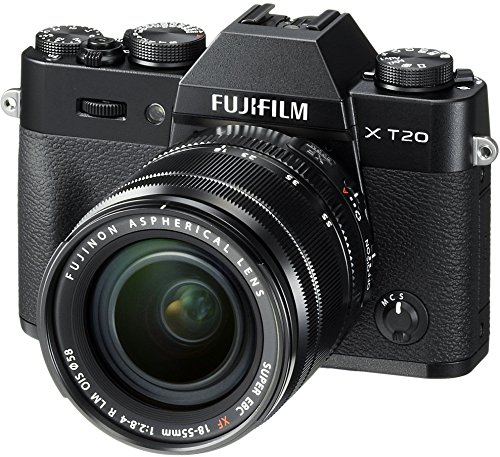
The Sony A6000 and the Fujifilm X-T20 are both compact APS-C mirrorless cameras with an electronic viewfinder. Choose the A6000 for its simple, lightweight approach and wide lens choice, and choose the X-T20 if you want physical dials, a touchscreen and 4K video recording.

What Each Camera Is For
The A6000 is an older, small body that became popular as an affordable way into interchangeable-lens photography. It suits travel, family photos and general use, and it is usually found used today. The X-T20 is a small, dial-driven camera in the Fujifilm line, built for people who enjoy adjusting exposure by hand and who like the maker’s color rendering.
In this guide
Key Differences
| Trait | Sony A6000 | Fujifilm X-T20 |
|---|---|---|
| Mount | Sony E | Fujifilm X |
| Sensor size class | APS-C | APS-C |
| Controls | Mode dial and wheels | Dedicated dials for shutter speed, ISO and exposure compensation |
| Touchscreen | No | Yes |
| 4K video | No, Full HD class | Yes |
| Style | Rangefinder-like, plain | Small retro SLR-like |
Please confirm exact specifications on each maker’s page before buying.
Lenses and Ecosystem
Lens choice matters as much as the body. The E-mount has a very large range from the maker and from third-party brands, including many used options. The X-mount has a strong set of compact primes and zooms from Fujifilm, with fewer third-party choices. Think about the focal lengths you use most and check what is available for each mount.
How to Choose
- List the subjects you shoot most: people, travel, street, landscapes, or moving subjects.
- Decide whether you want to adjust exposure by dials or through menus and wheels.
- Decide if 4K video matters to you.
- Check the lenses you already own or can borrow, since a mount switch affects the whole kit.
- Hold both if you can. Grip comfort with a lens attached is a personal matter.
Who Should Choose Which
- Choose the A6000 if you want a light, simple camera and the widest lens selection, including used glass.
- Choose the X-T20 if you value tactile controls, a touchscreen and 4K clips from a small body.
- Choose either with a fast prime lens if low light is common in your photos.
Buying an Older Body Used: What to Inspect
Both of these cameras are no longer the newest models, so many buyers will shop on the used market. A careful inspection protects you from paying for a camera that needs repairs, and the same checks apply to either body.
- Look over the body. Check for dents on the corners, loose dials and worn rubber grips. Heavy wear can indicate rough use.
- Check the sensor. Set a small aperture, photograph a plain bright surface and look for dust spots or marks. A few specks are normal and can be cleaned.
- Test the shutter. Ask for the shutter count if the seller can provide it, and use online tools to read it where the model allows. Compare it with typical expectations from the maker, if published.
- Try the viewfinder and screen. Look for dead pixels, burn-in, scratches and flicker. Test the eye sensor that switches between the viewfinder and screen.
- Test every control. Press the buttons, turn the dials, move the tilting screen and check the memory card door and ports.
- Inspect the battery. A worn battery may drain quickly. Ask if replacements are included.
Fit a lens and shoot several frames, checking focus at different distances. Review images at full size for softness or odd artifacts. Ask about the seller’s return policy and request clear photos of the actual camera, not stock images. If the price seems too good for the condition, ask why. A fair listing explains any faults openly.
Batteries, Charging and Day-to-Day Endurance
Compact mirrorless cameras with electronic viewfinders tend to use their batteries quickly, and an older battery is even more limited. Before you decide, check the rated shots per charge on each maker’s page, remembering that real-world numbers vary with screen use, flash, video and temperature.
Plan on carrying at least one spare battery for outings. Find out which battery type each camera uses and whether replacements are widely available. Third-party batteries are sold for many cameras, but quality varies, so read buyer reviews carefully and check compatibility before buying. Genuine batteries cost more, but come with the maker’s support.
- Check whether the camera can charge over USB, which helps when traveling with a power bank.
- Find out whether a separate charger is included, or whether you must charge in the camera.
- Turn off features you do not use, such as continuous preview or wireless connections, to save power.
- Keep batteries warm in cold weather, since low temperatures reduce capacity.
- Replace a battery that swells, leaks or loses charge quickly.
When you test a used camera, ask the seller how long a charge typically lasts and see whether the battery shows its health. A fresh battery can transform the experience of an older camera.
Learning the Controls as a Beginner
Whichever body you pick, you will get better results by learning a few core controls rather than staying in full auto. Start with a simple structure that builds understanding step by step.
First, learn aperture priority mode. You set the aperture, which controls background blur and depth of field, and the camera chooses the shutter speed. Combine it with auto ISO and a minimum shutter speed so images stay sharp. Next, learn exposure compensation, which brightens or darkens the picture when the camera misjudges the scene. Then explore focus modes, using single-shot for still subjects and continuous for moving ones.
- Spend a week in aperture priority and notice how changes in aperture affect the image.
- Learn how to set the focus point where you want it, instead of letting the camera pick.
- Try manual mode once you are comfortable with exposure, using the meter as a guide.
- Review your photos and check the settings stored with each image to learn from the results.
- Customize one or two buttons for features you use constantly.
The dial layout on one camera and the wheel-based layout on the other teach in different ways. Some people learn faster by seeing settings on the top of the camera, while others prefer a screen-based approach. Neither is better, so pick the one that makes you want to pick up the camera.
Accessories Worth Getting Early
A few accessories improve the experience more than a second lens does. Start with the basics and add others only when you notice a need.
- A fast memory card: choose a reliable card of an appropriate speed class for your video and burst needs, and check the camera manual for supported types.
- A spare battery: as discussed above, this is the most useful accessory for any trip.
- A comfortable strap: small cameras can feel light, but a wide strap helps with heavier lenses. A wrist strap suits compact setups.
- A camera bag or insert: choose padding that fits your body with a lens attached, plus room for a spare battery and cards.
- A lens hood and cloth: a hood reduces flare and protects the front, and a microfiber cloth handles smudges.
- A small tripod: useful for night shots, self-timer photos and video. Check the weight capacity.
- A screen protector: inexpensive protection for the rear screen, particularly on a used camera.
Be careful with cheap accessories that do not fit well, such as ill-fitting caps or poorly made straps that could fail. A loose or weak strap lug is a risk to the camera. Buy from sellers with clear return policies, and avoid accessories you do not understand.
Simple Low-Light and Travel Tips
Small APS-C cameras are popular for travel, and a few practices help both models perform well when you are on the move. In low light, the lens matters as much as the body. A fast prime lens lets in more light, allowing lower ISO and faster shutter speeds. When you use a slow kit zoom, steady your elbows against your body or lean against a wall, and take several frames to improve your chances of a sharp one.
Use auto ISO with a sensible ceiling, and be willing to accept some noise rather than a blurry shot. Noise can be reduced in editing, while motion blur cannot be fixed. Shoot raw if you plan to edit, as it gives you more room to recover shadows and adjust white balance.
- Pack a light cleaning kit and keep the lens capped while moving through crowds.
- Back up your photos each evening to a phone, laptop or portable drive.
- Carry the camera on a cross-body strap in busy places to reduce the risk of loss or theft.
- Protect it from rain and sand, since neither camera is described as weather-sealed here, so check the maker’s pages for protection details.
- Set the camera to silent shutter or low volume in quiet places, if your model offers it.
Prepare before departure by formatting your cards, charging batteries and updating firmware if the maker recommends it. A simple routine keeps you ready for good moments.
Understanding What an Older Compact Body Can and Cannot Do
Both of these cameras belong to an earlier generation of APS-C mirrorless design, and that matters for expectations. They can make excellent images in good light, and they are far lighter than most DSLRs. They also lack some newer conveniences, such as modern subject recognition, very long battery life or the latest video formats. Knowing this up front keeps your expectations realistic and helps you judge listings sensibly.
Think of these cameras as capable learning tools and travel companions. They reward good technique, and they teach the fundamentals clearly. If you want the newest autofocus tracking or advanced video, you may be happier with a more recent model. If you want a light, affordable way to practice and grow, either of these is still a fair choice, provided you buy a good copy.
Comparison Table of Everyday Handling
| Handling trait | Sony A6000 approach | Fujifilm X-T20 approach |
|---|---|---|
| Controls | Mode dial and customizable buttons | Dedicated dials for common settings |
| Body feel | Compact and plain | Retro styling with more tactile controls |
| Rear screen | Tilting screen | Tilting screen, check touch features |
| Learning curve | Menu-driven | Dial-driven, more visible settings |
| Best suited to | Casual shooters who like simplicity | People who enjoy manual control |
Details vary between versions and firmware, so check the exact model listing before you buy.
Lens Planning for a Small System
Lenses decide how your camera feels and what it can do. For a small camera, compact lenses keep the whole outfit light. A standard zoom is a sensible first purchase, and a fast prime adds low light ability and background blur. As your skill grows, consider a wide lens for landscapes and a short telephoto for portraits. Look at the used market for older lenses, which often offer good value, and check that the lens is made for your mount and sensor size.
- Begin with one versatile lens and learn it well.
- Add a prime when you want more light and blur.
- Think about size: very large lenses can feel unbalanced on a small body.
- Check for autofocus support in third-party lenses.
Used-Camera Inspection: A Detailed Walk-Through
Because both models are mostly bought used, a careful inspection pays off. Ask for clear photos from several angles, and ask whether the seller can provide the shutter count or any history. When the camera arrives, check it right away within the return window.
- Inspect the body for dents, loose parts and worn grips.
- Insert a charged battery and confirm the camera powers on normally.
- Look at the sensor area for dust by taking a photo of a plain surface at a small aperture.
- Test every button, dial and the screen hinge.
- Test the flash, the hot shoe and the memory card slot.
- Record a short video clip and check that it saves properly.
- Check the lens mount for scratches and wear.
If any part looks wrong, contact the seller quickly and return the camera if needed. It is easier to resolve a problem at once than weeks later.
Batteries and Power Management
Small mirrorless cameras of this age do not last as long on a charge as many modern models. Plan to carry at least one spare battery, and more for travel days. Turn off the screen playback features and long image display times to save power, and switch the camera off when walking between locations. Used batteries lose capacity with age, so check how long a battery lasts before an important trip, or buy a fresh one from a reputable source.
- Charge batteries the night before.
- Carry a small power bank if the camera supports USB charging.
- Store batteries in a case so terminals do not touch metal.
- Keep spare batteries warm in cold weather.
Learning the Camera in Your First Month
Give yourself a plan. In week one, learn the menus and take photos in automatic modes. In week two, switch to aperture priority and observe how background blur changes. In week three, try shutter priority and photograph moving subjects. In week four, try manual mode on a still subject. Keep notes on what worked, and look at your pictures on a larger screen to learn from them.
Worked Example: A Student Choosing on a Tight Plan
Consider Chiara, a student who wants a camera for travel and weekend projects. She has a modest budget and wants something she can carry in a small bag. She finds listings for both cameras, each with a basic kit lens. One listing includes a spare battery and a bag. She compares the sellers’ return policies and the condition descriptions. She picks the listing with clear photos, a short return window and a seller who answers her questions politely.
On arrival, she runs through the inspection steps. The camera works, but the kit lens has a small amount of dust inside. She decides it is acceptable for now, and plans to buy a fast prime later. Over the next month she learns the camera, photographs her friends and takes it on a trip. When the trip ends, she has hundreds of pictures she likes, and she has learned that the camera is less important than the time she spent using it.
Common Mistakes to Avoid
- Paying for a body in poor condition because the listing looked good.
- Skipping the return window to test the camera properly.
- Buying large lenses that make the camera awkward to hold.
- Not updating firmware following the maker’s instructions.
- Forgetting that older cameras may have limits with modern accessories.
Glossary
- APS-C: a sensor size smaller than full frame, common in compact cameras.
- Kit lens: the basic lens sold with a camera body.
- Electronic viewfinder: a small screen inside the eyepiece.
- Shutter count: the number of photos the camera has taken.
- Hot shoe: the mounting slot on top for flash and accessories.
Photo Projects That Build Skill Quickly
A new camera is best learned through small projects. Try a week of photographing the same street at different times of day, to see how light changes the scene. Try a portrait series of friends using window light and a single lens. Try a series of close-ups of everyday objects to learn about focus and depth of field. Each project gives you a goal and a way to measure progress.
- Choose a theme and a time limit.
- Limit yourself to one lens.
- Take at least twenty frames per session.
- Pick your three best and write down why.
- Share them with a friend and listen to feedback.
When to Move On
There comes a point when a camera no longer meets your needs. You might want faster focus, better battery life or more advanced video. Before upgrading, ask whether a lens or a technique change could solve the problem. Upgrade when the camera is clearly the limit, not simply because newer models exist. Keep your older body as a backup, which is useful on trips.
Memory Cards and File Settings
Choose a reliable card from a known seller, and match its speed to your needs. For stills, a mid-range card is usually enough, while video and bursts benefit from faster cards. Check the camera’s manual for supported card types and sizes. Shoot raw plus JPEG if you want to edit later but still have quick files to share. Format the card in the camera before each trip, and copy files to two places as soon as you can.
- Label cards and keep them in a small case.
- Do not delete files in-camera while shooting; do it on the computer later.
- Turn off the camera before removing a card.

Ready to Buy? Start Here
If this guide helped you decide what to look for, these products are a place to start.


As an Amazon Associate we earn from qualifying purchases. Prices and availability are shown on Amazon.
Setting Up Either Body During the First Week
The first week with the Sony A6000 or the Fujifilm X-T20 sets habits that last for years, so spend an evening on setup before the first real shoot. Begin with the basics that protect files: set the clock correctly, choose your file format deliberately rather than by default, and decide whether you want the camera to write smaller companion files for quick sharing. Photographers who shoot family and travel often appreciate an easy sharing copy, while those who edit everything can keep things simple. There is no universal right answer, only an answer that matches your routine.
Next, assign the custom buttons while your needs are fresh. Put the settings you reach for mid-shoot, focus mode, subject detection, exposure compensation or silent shooting, on the controls your fingers find without looking. Resist copying a stranger’s full configuration from a video; their subjects and habits are not yours, and an inherited setup full of mysteries will confuse you under pressure. Change one thing at a time, shoot with it for a day, and keep a short note of what you changed and why. That note becomes your personal manual supplement.
Finish the week by rehearsing recovery from the common accidents. Switch the camera to fully manual and back. Find the format command and the reset options so you are never hunting for them in a panic. Practise changing a battery and a card in the dark, slowly, until it is boring. Cameras rarely fail photographers at convenient moments, and the difference between a lost minute and a lost shoot is usually familiarity earned in calm conditions. Both of these bodies reward that investment quickly, because their depth is there to be used, not to intimidate.
A Note From the Field: What Actually Decides This One
This pairing splits along a line that has little to do with image quality. The Sony A6000 is the camera you operate with buttons and menus, quickly and quietly, while the Fujifilm X-T20 invites you to slow down and set exposure with your fingertips before you even raise it. People who learned photography on film often feel at home within minutes on the Fujifilm, while people who shoot moving children or pets usually prefer the Sony approach of letting the camera handle more decisions. If you can, hold both for ten minutes each and change settings with your eye to the finder. The one whose controls you stop thinking about is usually the one you will still enjoy in a year.
Care, Troubleshooting and Sensible Used-Buying Checks
Troubleshooting works best as a short ladder you climb in order. First, confirm the obvious: battery charge, card space, lens seated properly and contacts clean. Second, check the settings that silently change results, drive mode, focus mode, exposure compensation and any bracketing left over from an experiment. Third, reset only the shooting settings if the camera still behaves strangely, keeping your custom configuration noted somewhere safe. This ladder solves the great majority of field problems on the Sony A6000 and the Fujifilm X-T20 alike, and it solves them without the regret of a full reset performed in frustration.
Firmware updates belong on the same calm list. Manufacturers use them to refine autofocus, add lens support and fix rare faults, and installing them is a five-minute job with a charged battery and the instructions open beside you. Read the release notes before updating; if nothing in them touches your shooting, there is no urgency, and if something does, update before your next important shoot rather than after it. Keep a note of the version you are running in the same place you keep your setup notes, so troubleshooting conversations with support start from facts.
A used purchase of the Sony A6000 or the Fujifilm X-T20 should also include the accessories in your inspection. Check that the battery holds a plausible charge through an afternoon, that the charger works, and that the finder and screen are free of marks that would annoy you daily. Cosmetic scuffs on corners are honest wear and often priced in your favour; gritty dials, a loose mount or intermittent errors are not. Spend your first used-camera week shooting everything, portraits, bursts, video, low light, so any hidden fault surfaces while returning the body is still simple.
Autofocus in Real Shoots, Not Just on Paper
Autofocus is where the Sony A6000 and the Fujifilm X-T20 stop being spec sheets and start being personalities. On paper both systems promise subject detection and tracking, but what you feel in the field is how each one behaves when the subject is small in the frame, partly hidden, or moving toward you rather than across it. Spend time with the focus area modes rather than leaving the camera on its widest setting. A smaller, deliberately placed area often beats a clever wide mode when the scene is busy, because you are telling the camera which subject matters instead of asking it to guess among several.
Eye detection deserves a proper test with your own subjects, at your own distances. Stand a patient friend at the far end of a garden or a long room and walk toward the camera while a second person crosses behind. Watch how early each body finds the eye, how calmly it stays there, and what it does when the eye disappears behind a hand or a shoulder. The Sony A6000 and the Fujifilm X-T20 make different choices in that moment of confusion, and the one whose choices match your instincts will produce keepers with less supervision from you.
Finally, practise the handover between stills habits and moving subjects. Set a custom button to toggle tracking on and off, learn how each body behaves when you half-press on a static subject and then follow it as it moves, and check the first frames of every burst rather than the middle ones. Beginners often judge autofocus by its best frames. Working photographers judge it by the first three frames of a sequence and by how rarely they have to think about it at all. That is the standard to hold both of these cameras to.
Handling Over a Long Day of Shooting
A useful handling exercise is to change your three most-used settings with your eye held to the finder, without looking at the camera. On the Sony A6000, find exposure compensation, ISO and focus mode by touch. On the Fujifilm X-T20, do the same. Every photographer has a personal trio, and the body that lets you adjust yours blind will feel faster in real work regardless of processor speeds. Dials with clear detents, buttons you can tell apart by shape, and menus that remember where you left them all contribute to that feeling of a camera that cooperates.
Size interacts with lenses in ways a body-only comparison hides. A compact body behind a large lens feels front-heavy and tires the left hand, while the same lens on a deeper-gripped body balances calmly. When you test the Sony A6000 and the Fujifilm X-T20, mount the lens you genuinely shoot with most, ideally the heaviest one you own, and hold your normal shooting posture for a full minute. Also check how the combination fits your actual bag, because a kit that needs a bigger bag quietly changes how often the camera comes along at all.
Sound and discretion are handling qualities too. Shutter character, the option of a silent electronic shutter, and how obtrusive a camera looks all matter at ceremonies, performances and on the street. A smaller or quieter setup can keep you unobserved and your subjects natural. Try both bodies in a quiet room and in a crowd and ask which one lets you work the way you prefer to work. Comfort is not a soft criterion in photography; it decides whether the camera is in your hand or at home, and only one of those produces photographs.
Video and Hybrid Shooting in Practice
Many buyers of the Sony A6000 and the Fujifilm X-T20 will shoot far more video than they expect, because family moments, trips and work projects all drift toward motion. Judge the video side by your real clips rather than by headline formats. Most people need clean, reliable footage at normal frame rates, focus that follows a face without pulsing, and audio that does not embarrass the picture. Test exactly that: film someone walking and talking toward the camera, indoors and out, and listen back on headphones before you look at the image quality at all.
Heat and recording length deserve honest attention if you film events, interviews or long performances. Compact bodies shed heat less easily than larger ones, and behaviour varies with frame rate, room temperature and whether the screen is open. The sensible approach is to test your longest realistic take in your warmest realistic room before an important shoot, and to build simple habits: start with a cool camera, keep a spare battery ready, and avoid leaving the body recording in direct sun between takes. These habits matter more than any single specification.
Stabilisation shapes handheld footage more than resolution does. In-body stabilisation, lens stabilisation and a small gimbal each give a different look and a different amount of fuss. Walk a familiar route with each body, at a natural pace, and compare how the footage feels rather than how sharp it is. Also decide how you will handle sound before you need it: the built-in microphones are fine for atmosphere, but voices deserve a small external microphone or a recorder, and both of these cameras can accommodate that step when you are ready for it.
More Field Notes Worth Keeping
Think about how each body behaves one-handed and at awkward angles. Photographers hold cameras overhead in crowds, low to the ground for children and pets, and out to the side for video more often than product photographs suggest. The screen mechanism matters here: a screen that flips forward helps self-recording and low angles, while a tilting screen keeps the camera’s profile slimmer and the finder centred. On the Sony A6000 and the Fujifilm X-T20 these choices were made differently, and your most common awkward angle should have a say in the decision.
Adapted and older lenses deserve a mention for budget-conscious buyers. Both of these systems can make use of earlier glass, sometimes with full autofocus and sometimes with manual focus only, and the savings can be considerable. The trade-offs are predictable: slower or less certain focus, no weather sealing in some combinations, and occasional quirks with corrections. For deliberate work such as landscapes, still life and portraits, adapted glass can be a pleasure. For fast-moving subjects, native lenses earn their keep. Match the compromise to the subject and it stops feeling like a compromise at all.
Battery behaviour differs enough between bodies that it should be tested, not assumed. The Sony A6000 and the Fujifilm X-T20 draw power differently depending on finder use, screen brightness, stabilisation and how much video you mix into a day. For a week, note what a full charge actually delivered in your shooting and write it on a card in your bag. That personal number, unglamorous as it sounds, ends battery anxiety more completely than any accessory, because planning replaces guessing. A small USB power bank can top up many modern bodies between locations, which suits travel days well.
Before buying any lens, run the two-week test in your head against your real calendar. Name the shoots in the next fortnight where this lens beats the one you already own, and be specific: the room, the light, the distance. If you can name three, the lens will earn its place. If you are inventing occasions, wait. Photographers rarely regret delaying a lens purchase by a month, while the reverse regret is a familiar story in every camera club. Bodies tempt us with novelty, but lenses repay patience, and a patient kit built around either of these cameras will serve for years.
Finally, think about the whole chain after the shoot. Video files are large, and a happy hybrid workflow needs cards with room to spare, a card reader that does not bottleneck your evening, and a simple folder routine you will actually follow. Back up footage before you format a card, every time, without exception for small shoots. The Sony A6000 and the Fujifilm X-T20 both produce files your future self will value; the discipline of keeping them safe and findable is yours to build, and it is worth building in the first week rather than after the first loss.
Most problems owners blame on a camera are small, predictable and fixable in a minute. Dust spots that appear in skies at narrow apertures usually mean the sensor needs a blower first and, if spots persist, a proper clean rather than panic. Soft photographs at slow shutter speeds usually mean stabilisation expectations were optimistic or the subject moved, not that the lens failed. When something looks wrong, change one variable at a time, photograph a test subject in good light, and let the evidence narrow the cause before you change settings at random or book a repair.
Low light is the other honest test. Focus that feels instant in a bright shop can hunt in a candlelit room or a hall with mixed lighting, especially with a slower lens fitted. If you shoot events, receptions or evening street scenes, test both bodies in genuinely dim conditions with the lens you plan to use, not the fastest lens in the cabinet. A body that stays decisive in poor light saves frames that no amount of later editing can recover, and that reliability is worth weighing heavily against smaller differences elsewhere.
The least glamorous part of owning the Sony A6000 or the Fujifilm X-T20 decides how the camera feels after the first month: power, storage and what happens to files when you get home. Start with power. Learn roughly how many photographs and how much video a battery gives you in your own shooting, not in a laboratory test, because screen use, stabilisation and cold weather all change the answer. Carry one charged spare as a minimum, mark your batteries with a small label so you rotate them evenly, and charge the night before a planned shoot rather than in a panic on the morning.
Care is mostly a matter of environment. Keep the body cap on when no lens is fitted, change lenses with the mount facing down and out of the wind, and let a cold camera warm up inside a sealed bag after winter shooting so condensation forms on the bag rather than inside the camera. Wipe salt spray and rain off before storing, store the kit somewhere dry and unremarkable, and remove the battery for long storage. Neither the Sony A6000 nor the Fujifilm X-T20 asks for elaborate maintenance; both repay these small, boring habits with years of uneventful service.
The fairest autofocus test for the Sony A6000 and the Fujifilm X-T20 is the shooting you actually do, repeated on both bodies in the same light. If that is children in a living room, set up there. If it is birds at a feeder, dogs in a park or players on a pitch, go there instead of a showroom. Tracking systems are trained on patterns, and each of these cameras has patterns it reads confidently and patterns it hesitates over. Twenty minutes of honest testing in your own environment teaches more than a weekend of reading other people’s charts.
Memory cards reward the same calm approach. Buy cards fast enough for your most demanding mode, bursts or high-quality video, and prefer two smaller cards to one enormous one if your body has a single slot, so a failure never holds a whole trip. Format cards in the camera, not on a computer, and only after two copies of the files exist elsewhere. Photographers lose images far more often to a rushed format or a single copy than to card failure itself, and both of those losses are prevented by routine rather than by money.
Card speed is worth understanding at a practical level. A card that is fine for single photographs may stall a long burst or refuse a demanding video mode, and the failure always appears at the worst moment. Test your cards at home with your longest burst and your highest video setting before trusting them at an event. Keep one known-good card reserved for important shoots, and retire cards that have ever behaved oddly; storage is cheap compared with an unrepeatable moment. Label cards with numbers so your notes can refer to them unambiguously.
FAQ
Can I use Sony lenses on the Fujifilm body?
Not directly, because the mounts differ. An adapter route exists for some combinations, but it usually costs function and size, so most buyers stay with native lenses.
Which one is easier for a beginner?
Many beginners find the A6000 menus simple to use in auto modes, while others find the X-T20 dials easier to understand because each setting has its own control. Handling both is the best test.
Is the shutter count important when buying a used camera?
It gives a rough idea of use, but it does not guarantee condition. Combine it with a physical inspection and test shots, and ask the seller about how the camera was used.
Can I use the cameras for video as a beginner?
Yes. Check the video formats and limits on the maker's pages, and consider an external microphone and stable support if audio and smooth footage matter to you.
Do I need image stabilization in the lens?
It depends on the body and the lens. Check whether the camera has stabilization built in, and consider a stabilized lens if you shoot handheld in low light or at long focal lengths.
Which lenses should I buy first?
A standard zoom for general use and a fast prime for low light are a sensible starting pair. Add specialized lenses only after you see a clear gap.
How do I clean the sensor safely?
Use a blower for loose dust and follow the manual's guidance. For stubborn marks, ask a camera shop to clean it, since mistakes can scratch the sensor.
Should I buy extra memory cards?
Having a second card is a useful backup and gives you room on long trips. Choose cards from reputable sellers to avoid counterfeits.
Is it worth buying a newer model instead?
Newer models may offer better autofocus and video, but they cost more. If your needs are modest, an older body with a good lens can still produce excellent images.
How important is the screen mechanism for everyday use?
More than most buyers expect. A screen that flips forward changes how easily you record yourself and shoot from very low or high angles, while a tilting design keeps the camera slimmer and the operation centred. Think about your last month of photographs and count the awkward angles honestly. The mechanism that serves your real habits beats the one that wins a feature comparison.
Should you buy Sony A6000 or Fujifilm X-T20 if you mostly photograph family life?
Family life rewards reliability over specialisation: focus that finds a child’s eye without ceremony, a body small enough to be present at ordinary moments, and files that look good with minimal editing. Try both with your own children or relatives if you can, in your own home’s light. The body that gets out of your way and comes along most often is the right one, and that answer differs between households more than any specification does.
How long can you expect either camera to stay relevant?
Bodies in this class stay capable for many years because their sensors, mounts and file quality age slowly. What ages fastest is convenience: focus intelligence, video features and connectivity. If you buy the Sony A6000 or the Fujifilm X-T20 for what it does today rather than for future promises, it will serve until your needs genuinely change, and lenses bought for it will usually outlast it into the next body as well.
Is it sensible to buy the body first and lenses later?
Yes, provided the first lens is a versatile one you will actually use daily. A body with one well-chosen zoom or a single fast prime teaches you more in a month than a body with a shelf of lenses you rotate anxiously. Add glass when a real limitation appears in your photographs, name that limitation, and buy the lens that answers it. That order keeps both spending and learning honest.
What should you check in the first week if you buy used?
Shoot everything: bursts, video, low light, bright backlit scenes and long sessions. Check the sensor with a plain bright frame at a narrow aperture, test every dial and port, and confirm the battery holds a plausible charge. Any hidden fault is most likely to surface under varied use, and varied use in week one is also exactly how you learn a new camera, so the diligence costs you nothing.
The Short Version
Both are small APS-C cameras that can produce excellent images. The A6000 offers simplicity and lens choice, and the X-T20 adds dials, touch control and 4K video. Choose based on controls, video needs and the lenses you plan to own.
Related Guides
- Fujifilm X-T20 vs Fujifilm X-T2: Compact or Full-Size Body?
- Fujifilm X-A10 vs Sony A6000: Entry-Level Mirrorless Guide
- Fujifilm X-M5 vs Sony ZV-E10 II: Compact Creator Cameras
- Leica D-Lux 7 vs Fujifilm X100V: Compact Camera Comparison
- Fujifilm X-T50 vs Sony A6700: Which APS-C Body Fits You?
