The Insta360 Ace Pro 2 is the follow-up to the original Ace Pro, and both are single-lens action cameras with a flip screen and a Leica-partnered lens. If your current camera already covers what you shoot, the upgrade may not matter much, but if you want the maker’s newer imaging and software features, the Ace Pro 2 is the one to look at. Confirm exact specs on Insta360’s pages.

What Stays the Same
Within one product family, a lot carries over. Both models share the same overall idea: a compact body, a flip-up touch screen for framing yourself, a pocketable size and strong integration with the Insta360 app. Accessories from the same family often fit across generations, though you should check each mount and case before assuming.
In this guide
What a Newer Model Usually Changes
When a maker updates a camera, changes tend to fall into a few predictable areas. These are the areas to compare on the spec sheets:
- Sensor and image processing: affects detail, dynamic range and low-light clips.
- Video modes: maximum resolution, frame rates and slow-motion options.
- Stabilization: how well horizon leveling and shake reduction hold up on rough ground.
- Audio: built-in microphones, wind reduction and wireless microphone support.
- Battery and thermal behavior: how long it records and how it copes with heat.
- Software features: new editing tools and shooting modes in the app.
A Simple Upgrade Check
- Write down what frustrates you about your current camera, such as noisy night clips or short battery runs.
- Look up whether the newer model claims to address exactly those points.
- Watch independent sample footage that matches your conditions.
- Count the cost of replacing batteries, cases and mounts if they do not carry over.
- Consider whether you could resell the older camera to offset the change.
Who Should Choose Which
| Your situation | Suggestion |
|---|---|
| Happy with your results | Keep the original Ace Pro |
| Limited by low light or video modes | Look closely at the Ace Pro 2 |
| Buying your first Insta360 action camera | Compare both, since availability varies |
| Shooting for clients | Choose the newer model for longer support in software |
Reading Spec Sheets Without Being Misled
When you compare two cameras from the same family, the spec sheets look similar, and small differences can seem more important than they are. A few habits keep you focused on what matters.
First, separate headline numbers from usable results. A higher maximum resolution or frame rate is only useful if you will use it. Many modes come with limits, such as a cropped field of view, reduced stabilization or shorter recording time. Look for notes on which features work together and which do not, and check the maker’s pages and manuals.
Second, notice what is a hardware change and what is a software change. Sensor, lens and processor are hardware. Many shooting modes, editing features and app functions can be updated through firmware or the app, and sometimes appear on older models too. Check whether the feature you want is limited to the newer camera.
Third, treat claims about battery life, low-light quality and stabilization with care. Makers test under controlled conditions that may not match your use. Independent footage and user reports give a better sense of real-world behavior, though you should consider the source and shooting conditions.
- Make a short list of features you would use weekly.
- Check which accessories each model needs.
- Look for notes on heat, since small cameras can limit recording when they warm up.
If you cannot find a spec in the official materials, treat it as unknown rather than assuming. Choosing based on verified information leaves fewer surprises after the purchase.
Low Light and Image Quality Considerations
Image quality is often the main reason people consider an upgrade, and low light is where differences are most likely to appear. Small cameras have small sensors, so light is limited, and improvements in sensor design and processing can show.
When you compare footage, look at shadows. Noise appears as grain or color blotches in dark areas, and heavy noise reduction can smear detail, giving a waxy look. Check how each camera handles streetlights and bright signs at night: do the highlights bloom or stay controlled? Look at color: skin tones and neutral surfaces should look natural.
Dynamic range matters in scenes with bright sky and dark ground. Compare how much detail the camera keeps in both areas. Some cameras offer HDR modes or log profiles, which can help but also add complexity in editing. Consider whether you are comfortable grading flat footage.
Sharpness depends on the lens, the sensor and processing. Check the corners of the frame, where small action camera lenses can be softer. Look for flare when shooting toward the sun.
Also consider the type of shooting. Daytime outdoors in good light is where most action cameras do well, so differences may be small. At dusk, indoors, or at night, differences become more visible.
- Watch footage at full screen, not only on a phone.
- Compare clips from similar scenes and times of day.
- Look at stills too if you plan to take photos.
Do not overvalue a small improvement if most of your clips are shot in daylight.
Stabilization, Audio and Everyday Usability
Features you use constantly can matter more than specifications. Stabilization, audio and handling affect every clip you record.
For stabilization, think about how you move. Walking, biking, running and riding vehicles produce different types of shake. Stabilization usually involves cropping into the image, so stronger modes give a narrower view. Horizon leveling keeps the picture straight while you rotate, which suits sports and activities with a lot of turning. Check what each model offers, and watch sample footage of activities like yours.
Audio is easy to neglect. Built-in microphones can pick up wind noise and handling sounds. Look for wind reduction features and support for external microphones, either through a cable, an adapter or wireless connection. If you record talking to the camera, test how clear your voice is in different conditions.
Daily usability includes screen brightness, touch response, button layout, startup time and how fast you can switch modes. A flip screen helps with framing yourself. Check how easy it is to read in sunlight. Try the app, since you will use it for transfers, editing and settings. A slow or confusing app can reduce enjoyment of an otherwise good camera.
Look at storage and transfer. Check memory card requirements, how quickly files transfer to your phone or computer, and whether the camera supports fast file offloading.
- Handle the camera in a store if possible.
- Check how it feels with gloves or wet hands.
- Read about the mounting system and whether it is easy to use.
Battery, Heat and Durability Checks
Small cameras live in demanding conditions: sun, cold, water, vibration and bumps. Reliability and endurance determine whether the camera is there when you need it.
Battery life varies widely depending on resolution, frame rate, stabilization and screen use. Quoted run times are given under specific conditions, so expect lower figures in cold weather or at higher settings. Plan to carry spare batteries if you shoot long sessions. Check whether batteries are interchangeable between models, whether a charging case or a hub is available, and how long a full charge takes. Consider whether you can charge the camera while recording, using a power bank.
Heat can force a camera to stop recording or reduce quality. Small bodies in direct sun, with high settings, are vulnerable. Look for notes on thermal limits, and check whether the maker suggests settings or accessories to help. Shade, airflow and shorter clips can reduce problems.
Durability depends on the design. Check the stated water resistance, whether a dive case is needed for deeper water, and what the maker says about dust and shock. Ensure that seals are intact, and rinse the camera with fresh water after exposure to salt water, following the manual. Check lens protection options, as scratched lenses degrade images.
- Inspect seals and doors before each outing.
- Use a lens guard if the maker offers one.
- Keep firmware updated, following the maker’s instructions.
Warranty and support policies are also useful to consider, particularly if you shoot in rough conditions.
Selling, Trading In and Timing an Upgrade
The financial side of an upgrade is easier to handle if you plan it. A little preparation reduces cost and stress.
Before buying, decide what you will do with the old camera. Selling it privately or through a trade-in program can offset the cost of the new one. Prices depend on condition, completeness and demand, so check current listings rather than assuming a value. Keep the box, accessories, batteries and proof of purchase if you have them, as they make selling easier.
Prepare the camera before sale. Back up your footage, remove the memory card, sign out of any accounts, and reset the camera to factory settings. Clean the body and lens, and photograph it honestly, showing any scratches. Describe its condition accurately to avoid disputes.
Think about timing. Newer models are often priced at their highest at launch, and prices or offers may change later. If you are not in a hurry, waiting can give you more options, including bundles. On the other hand, if you have an important trip or project coming up, buy early enough to learn the camera before you rely on it.
Also consider keeping the old camera as a second angle or a backup. Having two cameras is useful for shooting from different positions or when one battery is empty.
- Check return policies in case the new camera does not meet your needs.
- Test everything within the return window.
- Buy accessories you will use, not a complete kit by default.
An Upgrade Checklist You Can Answer in Five Minutes
Before deciding whether a newer action camera deserves a place in your bag, ask yourself a few concrete questions. Answering them honestly will save more time than hours of reading spec comparisons.
- What did you try to film in the past three months that your current camera could not handle?
- Does that limit come from the hardware, or from your settings and technique?
- How often do you film in low light, on the move, or in windy conditions?
- Would you use any new feature at least once a month?
- Can you sell or trade in the older model, and does that change the upgrade math?
If you cannot name a specific frustration, you are probably buying novelty. If you can, check the maker’s product pages to see whether the newer model addresses it directly.
Mistakes People Make When Comparing Action Cameras
The most common error is trusting a feature list as though every item on it will change your footage. Many additions are incremental, such as a slightly different menu layout or a revised processing mode. They are nice, but not transformative.
Another mistake is overlooking accessories. Mounts, cases, extra batteries, and memory cards all carry over differently between generations, and a change in connector or battery shape can make older gear useless. Check compatibility on the maker’s pages before you commit.
A third mistake is ignoring how you edit. If your workflow already struggles with large files, a camera that records higher-quality formats will make that pain worse. Match the camera to your storage and your computer, not only to the footage you imagine.
Finally, avoid judging from clips shot under perfect light. Sample videos made on a bright day with ideal settings hide the kinds of weaknesses you meet in ordinary use, such as night scenes, quick pans, and wind.
A Short Glossary of Action Camera Terms
- Field of view: how much of the scene the lens captures. A wider view feels more immersive but distorts edges.
- Frame rate: the number of frames each second. Higher rates allow smooth slow motion in editing.
- Bitrate: how much data is recorded per second of video. More data can preserve detail, but files become larger.
- Stabilization: software or hardware that smooths shaky footage. Its effect depends on mode and crop.
- Dynamic range: the span between the darkest and brightest areas the camera can capture without losing detail.
- Color profile: a recording style that determines how flat or punchy the footage looks before editing.
Which Model Fits Which Kind of Filming
| Use case | Lean toward | Reason |
|---|---|---|
| Casual trips and family clips | The older model, if you own it | Core features usually already cover this |
| Regular low-light filming | The newer model, if the maker states improvements | Sensor and processing changes matter most here |
| Vlogging with voice | The one with better audio features | Clear sound often matters more than resolution |
| Sport and fast motion | Whichever offers smoother stabilization modes | Smooth footage is the priority |
| First action camera | Whichever fits your budget and mounts | Learning the basics matters more than small gains |
Setting Up Either Camera for Better Footage
Many complaints about action cameras come down to default settings. Spend a few minutes before a trip choosing a frame rate that suits your final use, turning off modes you do not need, and checking your storage. Clean the lens before every outing, since a single fingerprint can soften a whole clip.
Charge the battery fully and carry a spare, because cold weather and long sessions reduce runtime. Format the card in the camera and run a short trial recording to confirm sound and picture look normal. When the camera gets warm, give it breaks, and read the manual for any maker guidance on heat and water resistance rather than assuming limits.
Timing a Sale or Trade-In
If you do decide to upgrade, take a moment to think about the used market. Cameras lose value as new models appear, so sell the older one soon after the decision, while it is still in good shape and has its original accessories. Clean it, take clear photos, list the included extras, and be honest about marks. Reset the camera and remove the memory card before it leaves your hands, and follow the maker’s steps for clearing any linked account or app data so the next owner begins fresh.
Reading a Product Listing Without Getting Lost
Marketing pages for action cameras pack many claims into a small space. A few habits help you separate substance from decoration. First, look for the footnotes. Figures about battery life, water resistance, or recording time usually come with conditions, such as a particular temperature, mode, or accessory. Second, check what is sold in the box and what needs to be bought separately. A bundle can look generous until you notice it leaves out a case or a mount you need.
Third, notice which claims come with numbers and which are only adjectives. Words like smooth, crisp, and powerful cannot be compared between products, while a stated frame rate or sensor size can. Finally, read the support and compatibility sections of the maker’s website, where limitations are more likely to be stated plainly.
When to Follow the Manual and When to Ask for Service
Action cameras live in tough conditions, so know where the maker’s guidance matters. Water resistance depends on seals and doors being closed and clean, so follow the manual for how to check them and how to rinse the camera after exposure to salt or sand. Do not force a stuck door or push a mount that does not fit.
If the camera will not power on, overheats repeatedly, or shows moisture inside the lens, stop using it and contact the maker’s support instead of experimenting. A repair request costs far less than a ruined camera, and the maker can tell you what your warranty covers.


Products Worth a Look
As an Amazon Associate, Reviews Took earns from qualifying purchases. These picks come from our guide: 6 Best Action Cameras: DJI Osmo, Insta360 (2026).
-
Mini Body Camera 1080P (26g Thumb Action Camera)
 Mini Body Camera 1080P
-
Mini Thumb Body Camera (1080P, 512G)
 zakotu Mini Body Camera 1080P
-
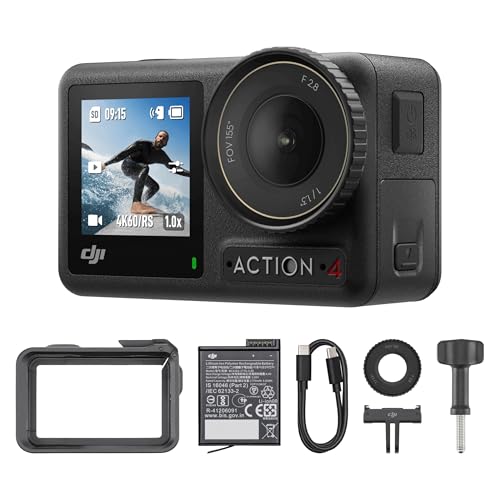
DJI Osmo Action 4 Essential Combo
 DJI Osmo Action 4 Essential Combo
Going Deeper: How to Judge Any Generational Upgrade
Comparing a camera with its own successor is a special kind of comparison, because the similarities are guaranteed and the differences are deliberately easy to exaggerate. Makers launch new models on a rhythm that owes as much to calendars as to breakthroughs, so the honest question is never whether the newer camera is better, it almost always is, in small ways, but whether its specific improvements intersect with your specific frustrations. That intersection is personal. A creator who lost footage to overheating cares about thermal behaviour; a night rider cares about low-light handling; a vlogger cares about the screen, the microphone and the app. An upgrade that fixes a problem you do not have is not an upgrade for you, whatever the launch presentation says.
Use a disciplined test: write down the three things that most recently annoyed you about your current camera, with real examples, clips lost, moments missed, edits that fought you. Then judge the new model only on those three things, plus price, and ignore the rest of the feature list entirely. If the new model answers at least two of your three annoyances clearly, the upgrade is rational and you will feel it weekly. If it answers none, you are looking at a purchase driven by novelty, and the same money spent on mounts, batteries, storage or a trip to somewhere worth filming will improve your footage more. This test works for every generation of every camera line, and it is the surest protection against an upgrade habit that quietly eats a travel budget.
Worked Scenarios: Where the Choice Becomes Obvious
Scenario: The Happy Owner Tempted by the Launch
Consider an owner whose current camera has filmed a year of hikes, holidays and family swims without a single lost clip, who watches the new model’s launch and feels the familiar itch. Applying the three-annoyances test honestly produces a short, empty list, and the rational answer is to keep filming. That answer is not anti-progress; it is pro-footage. The money stays available for the generation that fixes a real problem, or for the accessories, a better mount, a spare battery set, a bigger card wallet, that remove daily friction right now. Cameras improve on a schedule, but your best filming years are not guaranteed to wait, so spend on the bottleneck you actually have.
Scenario: The Creator Whose Work Outgrew the First Model
Now consider a creator whose channel has grown into night markets, evening rides and indoor events, whose comments keep mentioning dark, noisy footage, and whose edits spend long minutes rescuing clips that the newer model’s improved low-light handling would have captured cleanly at the source. For this creator the upgrade test answers itself: the headline improvement and the daily frustration are the same thing. The sensible path is to upgrade, sell or hand down the older camera while it still has value, and standardise batteries and mounts where the new model allows. Growth-driven upgrades like this one pay for themselves in editing time alone, which is exactly how a justified upgrade should feel: like buying back hours, not buying a logo.
Cards and Batteries: Planning a Full Day of Filming
Storage and battery planning shape an action camera day more than any headline resolution figure. High resolutions and high frame rates fill cards quickly and drain batteries at the same pace, so decide your delivery target first: footage destined for a phone screen or a quick social edit rarely needs the heaviest settings, while footage you plan to crop, stabilise further or slow down earns its larger files. Carry cards in a hard case, treat a full card like exposed film, and swap it somewhere sheltered rather than over water or sand with the camera door open. Format cards in the camera after the footage is safely copied, never before, and keep one untouched spare card in reserve for the moment a card reports an error.
Batteries deserve a rotation system. Number them, use them in order, and keep the spent ones in a separate pocket so a tired battery never goes back into the camera by mistake. Cold shortens runtime dramatically, so winter batteries live in an inside pocket until the moment they are needed, and a battery warmed by your hand will often finish a run that a cold one refused to start. Heat is the opposite enemy: a camera recording in direct sun on a dashboard or a still ski lift can shut down to protect itself, so shade it during pauses and let air reach it. With the Ace Pro 2 or the original Ace Pro, the shooters who come home with complete stories are the ones who planned power and storage with the same care as framing.
Audio in the Real World: Wind, Voices and Backup Tracks
Audio is where action footage most often disappoints, because the camera hears wind, handling and its own mount creaks far more faithfully than it hears voices. Position is everything: a camera on a chest or helmet sits close to the speaker and far from the worst turbulence, while a camera on a handlebar or a selfie stick at arm’s length collects rushing air. Foam wind covers help more than any software fix, and they cost little, but they only help if fitted before the activity starts. If commentary matters, record a short test at the speed you will actually travel, then listen on headphones; wind that sounds dramatic and exciting in person usually sounds like static on playback.
When the story needs clear speech, plan for it like a separate recording. A small external microphone, where the camera supports one, or a phone recording in a chest pocket with a lapel microphone, gives you a clean track to lay under the camera’s energetic but noisy sound. Clap once on camera at the start of each take so the tracks are easy to align. Also respect other people: a camera that records conversations at a cafe stop or a lift queue captures more than scenery, so pause recording where speech is private. Whether you film with the Ace Pro 2 or the original Ace Pro, viewers forgive soft footage far sooner than they forgive sound they cannot understand.
Care, Seals and Water: Keeping an Action Camera Alive
Action cameras live hard lives, and a small care routine keeps small damage from becoming a lost shoot. Rinse salt water and grit away with fresh water after ocean or beach use, following the maker’s guidance, and dry the seals before opening any door, because a single grain of sand dragged across a seal becomes the leak path on the next dive. Inspect lens covers and protective lenses for scratches before important shoots, since a scratched cover softens every frame while looking harmless in the hand. Keep the camera in a case rather than loose in a kit bag, where keys and tools do quiet damage between outings.
Understand what waterproof claims actually promise. Depth ratings assume still, clean water and intact seals; surfing impacts, hot showers and ageing rubber all reduce the real margin, which is why a housing is cheap insurance for repeated deep or high-impact use even when the camera is nominally sealed. Check doors and seals every time you close them, replace worn covers promptly, and never charge a camera that is still wet. Both the Ace Pro 2 and the original Ace Pro are built to be knocked about, but built tough is not the same as maintenance free, and the owners who get years from these cameras are the ones who spend two minutes on care for every hour of abuse.
Editing Action Footage Into a Story People Finish
Editing decides whether action footage becomes a story or a folder of clips nobody finishes. Start by being ruthless at the review stage: mark the few seconds around each genuine moment, a turn, a jump, a reaction, a reveal, and let the long uneventful stretches go. Viewers experience pace through change, so a tight sequence of varied angles feels faster and more exciting than unbroken minutes from one mount, even when the unbroken minutes contain the higher speed. Build the simple shape of beginning, build-up, best moment and landing, and let music support that shape rather than covering for its absence.
Protect quality as you export. Edit from the original files rather than copies of copies, keep the project’s frame rate consistent from import to export, and check a test export on the screen your audience will actually use, usually a phone, before rendering the whole piece. Stabilisation and reframing tools reward restraint: a small correction looks professional, while maximum settings can warp edges and breathe oddly as the software hunts. Keep an untouched archive of the original cards’ contents for your best days out, because editing taste changes and storage is cheaper than the trip. With footage from the Ace Pro 2 or the original Ace Pro alike, the edit is where the camera’s work is either honoured or wasted.
Mounts That Tell the Story: Position, Safety and Angles
Mounting decides what an action camera can show, and the best mount is the one that tells the story of the activity rather than merely surviving it. A chest mount puts the viewer inside the action, hands and handlebars or paddle in frame, and stays steadier than a helmet mount when the wearer looks around. A helmet or head mount follows the gaze, which suits commentary and instruction but exaggerates every glance. Fixed mounts on a bike, board, boat or vehicle show speed and terrain best, especially low and close to a wheel or the waterline, where the ground rushes past. Whichever camera you choose, the Ace Pro 2 or the original Ace Pro, test the angle at home: the lens is wider than you expect, mounts sit lower than you picture, and a two-degree tilt becomes a sloping horizon in every clip.
Safety and security come before creativity. Use a tether as well as the mount wherever the camera could fall into water, traffic or a crowd, and check that adhesive mounts have cured fully and sit on a clean, flat patch of the surface. Re-check tightness after the first few minutes of vibration, because that is when a slightly loose mount works itself free. Keep the kit small: one versatile mount you trust beats a bag of novelty attachments you hesitate to use. The footage that gets watched is rarely from the cleverest mount; it is from the mount that was fitted correctly, framed honestly and forgotten about while the activity happened.
Settings Discipline: Modes, Colour and Exposure Choices
Action camera settings reward a less-is-more discipline, because every mode you enable is a decision the camera stops making well or a battery cost you pay all day. Choose resolution and frame rate from the delivery backwards: footage for slow motion needs high frame rates, footage for ordinary sharing does not, and shooting everything at maximum settings buys enormous files and short battery life in exchange for quality your audience’s phone screen cannot display. Stabilisation deserves the same honesty: its strongest modes crop the image and can look unnatural on gentle movement, while a moderate setting on a well-mounted camera usually looks best. Set the camera up for the day’s main activity before you leave, then leave the menus alone and film.
Colour and exposure settings follow the same principle. A flat, gentle colour profile gives an editor room to work but looks dull straight from the camera; a vivid, finished profile delights immediately and punishes mistakes. Beginners and sharers should take the finished look and spend their learning budget on framing and mounting; editors and creators building a consistent channel look should take the flat profile and the extra grading step. Lock exposure where light is tricky, at the boundary between shade and sun, snow and shadow, rather than letting it pump visibly as you move. Both cameras in this comparison offer the tools; the craft is in choosing a small, deliberate set of them and knowing why each is on.
Building the Accessory Kit From Your Own Failures
The accessory kit around an action camera should be built backwards from your last three shoots and the moments that failed. A shot lost to a flat battery argues for a spare battery and a charging habit, not a new mount. A shot lost to wind noise argues for a foam cover. A shot lost to a fogged or scratched lens argues for a replacement cover carried in the bag. This failure-led method keeps the kit small, light and genuinely used, while the alternative, buying the large bundle of attachments sold beside every camera, fills a drawer with novelties that travel nowhere. Review the kit twice a year and evict anything that has not earned its place on the last several outings.
Three categories earn their place for almost everyone. Power: spare batteries, a multi-charger that fills them overnight and a power bank for long days away from sockets. Protection: a real case, lens covers and, for water work, the housing or seals your activity honestly requires. Mounting: one or two mounts you trust completely for your main activity, fitted and tested at home, plus the humble consumables, adhesive pads, a tether, a microfibre cloth, that turn up missing at the worst moments. Everything beyond that should have to argue its way in with evidence from your own footage. A small kit that is always carried beats a comprehensive kit that is often left behind, in action filming above almost every other kind.
Low Light and Travel: Batteries, Backups and Night Work
Low light is where action cameras are most honestly tested, because their small sensors and wide lenses gather less light than larger cameras and their stabilisation needs movement information that darkness withholds. The working techniques are simple and effective: hold or mount the camera as steadily as the activity allows, since every shake the software must remove costs sharpness; add light where you can, a streetlamp, a head torch, a cafe window, rather than asking settings to invent it; and lower your frame rate for stiller scenes, because a slower shutter per frame gathers more light when nothing fast is happening. Accept a little grain as the honest texture of night rather than fighting it into watercolour smearing with heavy noise reduction.
Travel adds logistics to the same lessons. Back footage up nightly to a second device or card, because a camera lost on day nine of a trip takes the whole trip with it, and keep that backup in a different bag from the camera. Carry charging for every device from one multi-port charger to save sockets and weight, and learn the local rules for filming in stations, museums and places of worship before the moment arrives. Shoot the establishing details travellers forget, signs, tickets, maps, the view from the room, because months later those dull clips are the glue of the finished film. Whether the camera in your pocket is the Ace Pro 2 or the original Ace Pro, the trip film that gets watched for years is built from these habits, not from any single specification.
Field Notes: Lessons Action Cameras Teach the Hard Way
Field experience with action cameras converges on a few lessons that no specification sheet teaches. The first is that audio and framing fail more shoots than image quality ever does, so the pre-flight check that matters takes thirty seconds: lens clean, mount tight, angle checked on the phone app or screen, a five-second test clip played back with sound. The second is that heat and cold are managed, not endured: shade the camera during pauses on hot days, warm the batteries against your body on cold ones, and know your own camera’s shutdown behaviour before it introduces itself mid-run. The third is that the best angle is usually lower and closer than instinct suggests, because wide lenses shrink distance and drama alike.
The fourth lesson concerns people. An action camera at a family gathering, a club ride or a team event films everyone, not just its owner, and a moment’s courtesy, announcing the camera, offering to share or delete clips, keeps filming welcome in the owner’s life. The fifth lesson is archival: the clips worth keeping are a small minority, and they stay findable only if the rest are deleted or clearly separated while the day is still memorable. Owners who build these five habits find their cameras improving year on year without a single upgrade, because the camera was rarely the limiting factor; the routine around it was.
A Full Filming Day, Planned Well: Night Before to Night After
A complete filming day, planned well, has a shape worth learning. The night before: batteries on charge in a known order, cards formatted only after their contents are safely copied twice, mounts fitted to the bike, board or helmet they will ride on, and the camera’s clock and settings checked while there is leisure to fix them. The morning of: a thirty-second test clip at the door, played back with sound, which catches the forgotten lens cover, the dead microphone and the angle that points at the sky while all three are still free to fix. Small rituals, repeated until they are boring, are what professional camera departments are actually made of.
During the day, work in loose chapters. Film a few seconds of context whenever the scene changes, the sign, the summit marker, the harbour, the scoreboard, because those fragments are the punctuation of the finished edit and they cost nothing at the time. Swap batteries at natural pauses rather than at the moment of death, which always arrives mid-highlight, and glance at the mount after any impact or fall before trusting it with the descent. At the day’s end, copy the cards before dinner if you can, while the day’s story is fresh enough to rename or note the best moments, because tomorrow’s you will not remember which clip held the laugh that made the trip.
Questions to Ask Yourself Before You Decide
Before money changes hands, sit with the questions that specifications cannot answer. What will I actually use this for in the next three months, described as real occasions rather than aspirations? What do I already own that must work with it, and have I checked that compatibility on the exact model rather than the family name? What is the honest total cost of the working kit, including the spares, mounts, media or accessories that the first month will demand? And what will I do when, not if, something goes wrong on an important day: what is my backup, my rental option, my workaround?
Add two more questions that protect you from your own enthusiasm. What problem from my recent work does this purchase solve, stated with a real example? If the answer is vague, the purchase is probably entertainment, which is allowed, but should be budgeted as entertainment. And what would I advise a friend with my exact kit, my exact budget and my exact diary to buy? That small step outside yourself dissolves most marketing fog. Photographers who ask these questions end up with kits that look unremarkable on paper and perform beautifully in life, because every item in the bag earned its place by answering a question that mattered.
- Define the main job in one sentence before comparing anything.
- Check compatibility with the kit, software and accessories you already own.
- Count the whole working cost, including spares and the second purchase the first one implies.
- Rehearse the workflow at home before it matters in front of other people.
- Choose the option you will use weekly, not the one that impresses you once.
FAQ
Do I need the newer model for casual vlogging?
Probably not. Casual shooting in decent light is handled well by most current action cameras. The newer model matters more when you push into difficult light or want more control over video formats.
Will my old mounts and batteries work?
Mounts often carry over within a family, but batteries and cases can differ. Check the compatibility notes for each accessory before buying a second set.
Should I wait for a sale before upgrading?
If you are not in a hurry, waiting can bring better prices or bundles. If you need the camera for a specific trip or project, buy early enough to learn it and use the return window.
Can I use two Ace Pro cameras together?
Many creators use a second camera as a backup or additional angle. Check the app and the maker's notes on multi-camera use and file management.
Do firmware updates matter?
They can add features and fix problems. Follow the maker's instructions and keep the battery charged during updates.
How do I compare low-light performance fairly?
Watch footage from both cameras shot in similar scenes and times of day, at similar settings. Look at noise, detail and highlights at full screen.
Is a newer camera more durable?
Not necessarily. Check the stated water resistance, the case or seal requirements, and the warranty. Durability depends on design and care.
What should I do before selling my old camera?
Back up footage, remove the card, reset the camera, clean it and gather the accessories. Describe its condition honestly in your listing.
Will the old camera still get app support?
Makers differ in how long they support older models, and the policy can change. Check the maker's support pages for current information.
The Short Version
An upgrade makes sense when a specific limit in your current camera is holding your footage back. If you cannot name that limit, stay with what you have. Compare the spec sheets for sensor, video modes, stabilization and battery, then choose based on your own shooting.
