The Fujifilm X-T1 and X-T2 are early members of the X-T line, and both can still be found on the used market. The X-T2 is the later and more capable camera, with improvements in autofocus, video and handling, while the X-T1 remains an appealing, simple body for stills.

What Each Camera Is For
The X-T1 established the DSLR-style layout with dials on top and a large electronic viewfinder. It was one of the first Fujifilm bodies with weather-resistant construction, and it appeals to people who want a simple, classic way to shoot.
The X-T2 refined that design. It added a focus lever, a faster autofocus system, improved video capability and dual card slots, so it suits a wider range of work, including action and events.
In this guide
Key Differences
| Trait | X-T1 | X-T2 |
|---|---|---|
| Generation | Earlier | Later |
| Autofocus | Adequate for stills | More capable with moving subjects |
| Video | Basic | More advanced |
| Card slots | One | Two |
Exact resolution, burst rates and video formats are best verified on the maker’s page or in the manuals, since details differ between the two.
Decision Criteria for Used Buyers
- Subject type: For still subjects such as landscapes or travel, the X-T1 may be enough.
- Action and events: The X-T2’s improvements make it easier for moving subjects.
- Video: If you record clips, the later model is the better fit.
- Condition: Check dials, the viewfinder, battery doors and the shutter for wear.
- Firmware: Look at what updates are available and whether the seller has applied them.
Because both cameras are no longer new, treat the purchase like buying any used tool. Ask how many shutter actuations the body has seen if the seller knows, check that the electronic viewfinder is clear and bright, and make sure the memory card door and ports work. A clean older camera with a fair return policy is a safer purchase than a rare bargain with no questions answered.
How to Decide Step by Step
- Decide whether you need good video or reliable action focusing.
- Check which lenses you already own or plan to buy for the X mount.
- Read the manuals online to compare menus and features.
- Inspect any used unit in person or ask for detailed photos and a return policy.
- Confirm the battery holds a charge and that spare batteries are available.
What Age Means for a Used Mirrorless Body
Both cameras are several generations old, and buying an older mirrorless body is different from buying an older film camera or a simple DSLR. Electronics age in ways that are not always visible. Rubber seals can harden, dial detents can loosen, screens can yellow or scratch, and batteries lose capacity. None of this means the camera is a poor purchase, but it shapes what you should check and what you should expect.
Start by thinking about how long you want to use the camera. If you see it as a learning tool or a second body, a clean older model can be good value. If you plan to rely on it for paid work, consider the risks of an aging camera that may be difficult to repair. Parts and service availability can decline as models become older, so ask the maker or a repair shop about support before relying on a body professionally.
Software support is another point. Older cameras may not receive further firmware updates, and your editing software must still read their raw files. Check that your current and planned software supports the model. Wireless features on older cameras may also work differently with current phone apps, so check the app’s compatibility notes if you want to transfer files by phone.
- Keep a modest budget for a battery or small repair after purchase.
- Ask whether the seller has used the camera heavily or occasionally.
- Choose a model that fits your needs now, not one you hope to grow into.
Viewfinder Quality and Framing Comfort
The electronic viewfinder is a major part of the experience on these cameras, and it is also one of the things that changed between generations. A viewfinder shows you a live preview of the exposure and settings, so you can judge brightness and focus before taking the picture. The size, clarity and refresh behavior of the finder affect how pleasant the camera is to use, especially in low light or with moving subjects.
When you test a used camera, look through the viewfinder for several minutes. Check that the image is clear with no dead spots or dust that distracts you. Move the camera and see how the display responds. In dim conditions, the finder may become grainy or lag, which is normal to a degree for electronic displays, but you should compare it with what you are comfortable with. If you wear glasses, check the eye relief and how much of the frame you can see.
The rear screen matters as well. Some versions tilt for high and low angles, and this helps with tripod work and waist-level shooting. Look at the maker’s pages for details on what each screen can do, and check the screen for scratches and dim spots.
- Adjust the diopter so the display looks sharp for your eye.
- Test the finder outdoors in bright light as well as indoors.
- Look for signs of moisture or fogging inside the viewfinder.
A viewfinder you enjoy using will make you shoot more, which matters more than almost any spec.
Lens and Accessory Ecosystem Considerations
The camera body is only a small part of your investment. Both models use the same mount, so the lenses you buy can move with you to other X-mount cameras later. That makes the lens a more lasting decision than the body. Think about the focal lengths and apertures you want, and plan a small kit around your interests: a standard zoom for flexibility, a fast prime for low light and portraits, and perhaps a wide lens for landscapes.
Check the used lens market, which can offer good value, but apply the same careful inspection to lenses as to bodies. Look for scratches, haze and fungus inside the glass, and test aperture blades, focus rings and any switches. Confirm that the lens supports the autofocus features you want on an older body, since some lens features rely on newer camera firmware.
Accessories also vary by model. Battery grips, remote releases, flashes and cases are made to fit specific bodies, so confirm compatibility before you buy. Consider how the camera works with flash if you want to explore portraits or events, and read the manual to see what sync speed and modes are supported. If you use a tripod, check the base plate and whether the battery door can be opened while the camera is attached.
- Spend more on lenses than on the body if your budget is limited.
- Test any used accessory with your camera before the return window closes.
- Keep the manual or a digital copy for settings reference.
Setting Up an Older Body for Best Results
A used camera is worth setting up carefully, because previous owners may have left unusual settings. Start by updating the firmware if the maker offers updates for your model, following the instructions with a full battery. Then reset the camera to default settings so that you begin from a known state. Format the memory card in the camera.
Next, choose image quality settings. Raw files keep the most information and give you the most editing flexibility, but they take more space. JPEG files are smaller and ready to share. Many photographers shoot both. Set the date, time and your name for metadata if you like.
Check the autofocus settings, since they affect how often you get sharp pictures. Learn the difference between single and continuous modes, and the choices of focus area. Assign useful functions to the programmable buttons, such as a quick switch of focus area or a way to turn the electronic viewfinder display on and off. Adjust the auto ISO range to avoid very slow shutter speeds in dim light.
Finally, create a small test routine. Take pictures of a static subject at various apertures, check them at full size, and look for dust or other issues. Shoot a few frames in difficult light and see how the camera behaves.
- Write down your preferred settings in a notebook or phone note.
- Check the exposure compensation dial and the lock on each dial.
- Remove or turn off features you do not use, to simplify menus.
Signs of Wear and When to Walk Away
Not every used camera is worth buying, and knowing when to decline a deal saves frustration. Some issues are minor and cheap to fix, while others should make you walk away. Cosmetic wear such as small scuffs on the body is normal and does not affect function. Missing rubber grips can usually be replaced.
More serious signs include a sticky or erratic shutter, inconsistent exposure, and a lens mount that wobbles. Corrosion in the battery compartment, bent contacts or liquid residue suggests water damage. Dead pixels or large dust patches on the sensor can be hard to fix. A viewfinder with fogging, internal marks or burn-in affects your enjoyment every time you shoot. Strange smells, rattling sounds or random shutdowns point to deeper problems.
Pay attention to the seller too. A seller who cannot show the camera working, avoids questions or refuses returns raises the risk. Be careful with cameras described as untested or for parts unless you want a repair project. Compare the offer with other listings, because unusually low pricing often hides a problem.
- Test every button, dial and port before you pay.
- Keep communication and listing details in case of disputes.
- Walk away if the seller will not answer basic questions.
Waiting for a clean example is usually cheaper than fixing a problem camera.
A Used-Body Inspection Checklist for Either Camera
Buying an older mirrorless body means you are judging a particular copy, not just a model. A methodical check takes about twenty minutes and can save a great deal of disappointment. Work through these items before you commit.
- Inspect the lens mount for scratches, bright metal scuffs or signs of forced lens changes.
- Look at the sensor with a lens off, using a torch at an angle, for dust, oily smears or scratches.
- Turn every dial and press every button to confirm a firm, even click.
- Open the battery and card doors and check the hinges and seals.
- Test the screen and viewfinder for dead pixels, marks or a tint.
- Fire the shutter at a range of speeds and listen for a consistent sound.
- Check the tripod socket for stripped threads.
If the seller will not let you do these checks, or in a remote sale cannot supply clear photographs of each point, think carefully before going ahead.
Handling Differences You Will Notice Day to Day
Specifications rarely capture how a camera feels in the hand. These two bodies share a dial-driven layout, but small differences in the grip, the placement of controls and the way the menus are organised change how quickly you can work.
When you handle either one, notice how the shutter speed and exposure dials respond, whether the locks are easy to operate with gloves, and how comfortable the grip is after a few minutes. A camera that feels slightly awkward on first contact often stays awkward.
It is also worth finding out how the camera behaves when switched on, how quickly it wakes from sleep and how the playback buttons behave. These small interactions add up across thousands of pictures. If you can borrow or hire a body for an afternoon, that is far better than guessing from photographs of the controls.
Mistakes Used Buyers Make With Older Mirrorless Cameras
- Judging only the body. Lenses, batteries and cards add up, so budget for the whole system.
- Ignoring the age of the battery. Old batteries lose capacity. Plan to replace one or carry a spare.
- Overlooking firmware. Check which firmware the camera runs and whether updates are available from the maker.
- Assuming newer always means better for you. A newer model adds features, but you only gain if you use them.
- Not asking for the history. Ask whether it was used heavily, stored in damp conditions or ever repaired.
- Rushing the deal. A good example will still be a good example after you sleep on it.
Avoiding these pitfalls matters more than winning an argument about which model is superior on paper.
Comparing Your Priorities in a Table
| If you care most about | Think about |
|---|---|
| Classic, simple operation | The earlier body, which keeps controls straightforward |
| More modern handling and features | The later body, which builds on the earlier design |
| Ongoing maker support | Checking the maker’s current support and firmware pages |
| Cost of accessories | Which batteries, grips and lenses you already own |
| Resale later | Condition, completeness and demand in your area |
Use the table to focus your thinking, then confirm every specific claim against the official specification sheets. Memory and forum posts can be wrong about details like frame rates or video limits.
Maker Guidance, Service Centres and Doing It Yourself
Basic care is yours to handle: wipe the body with a soft dry cloth, store it in a dry bag, and keep the contacts clean. Follow the instruction manual for lens changes and for any cleaning of the sensor area, because the manual describes what the maker considers safe.
Leave deeper issues to a qualified technician. Sticking dials, an unresponsive shutter, moisture inside the viewfinder or error messages that persist after a battery change belong with a professional. Opening the body yourself risks making things worse and may end any remaining warranty.
If you are buying from a shop, ask whether it offers a service check or a limited coverage period. For private sales, a short written receipt with the serial number, the date and the condition you agreed on protects both sides if a dispute ever arises.
Setting Realistic Expectations for Older Bodies
An older camera can still make excellent pictures, and many people prefer the simpler experience. What you give up is usually convenience: newer autofocus behaviour, faster processors and extended video options tend to improve with each generation.
Decide in advance which compromises you can live with. If you shoot slow subjects such as landscapes, architecture and still life, patient handling matters more than the latest tracking system. If you photograph fast action, check whether either body keeps up with your needs before you buy.
A trial period helps. Shoot a few hundred frames in your usual conditions, view them at full size, and decide whether the files and the handling make you want to pick up the camera again tomorrow.
Questions to Ask a Seller Before You Pay
A short message to the seller can reveal more than the photographs. Keep your questions polite and specific, and note the answers in case you need them later.
- How long have you owned the camera, and what did you use it for?
- Has it ever been dropped, repaired or exposed to rain, sand or sea air?
- Does it come with the original charger, strap, body cap and box?
- Can you share a photo of the camera showing the battery level and a test picture taken recently?
- What is your return policy if something is wrong when it arrives?
Honest sellers usually reply clearly and quickly. Evasive or inconsistent answers, or a refusal to provide extra photographs, are reasons to think twice.
For private deals, meet in a public place if you can, and bring a charged battery and a card of your own so you can take a few frames on the spot. For online deals, use a payment method that offers buyer protection, and keep all messages and receipts until you are satisfied the camera works as described.
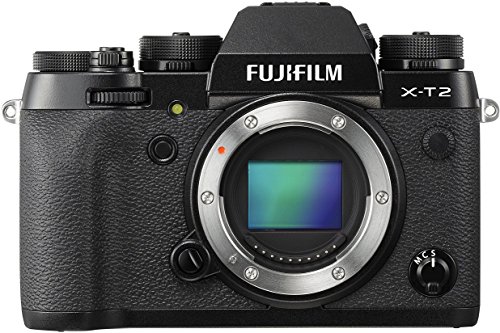

Check Current Listings
As an Amazon Associate, Reviews Took earns from qualifying purchases.
Both options are sold on Amazon. Check the current listing, what is included in the box and the seller before you decide.
Fujifilm X-T1

Fujifilm X-T2
Buying a Decade-Old Camera Without Regrets
Both of these bodies now live entirely in the used market, which changes the buying skill from choosing a model to judging an individual camera. Two X-T2s can differ more from each other, in wear, shutter count, and care, than an X-T1 differs from an X-T2 on paper. So shop in two passes: first decide which model suits your subjects, then forget the model and inspect the specific example in front of you as if it were the only one. Check every dial for positive clicks, because the dials are this line’s interface and a mushy dial is a daily annoyance. Run the shutter at several speeds and listen for consistency, photograph a plain wall at a small aperture to reveal the sensor’s condition, test both card slots on the model that has two, and confirm the viewfinder is bright, clean, and free of the haze that age can bring. A seller who welcomes these checks is telling you something good about the camera’s history.
Batteries and support belong in the same inspection. Confirm that fresh batteries for the model are still easy to obtain, budget for at least one new battery alongside any used body, and retire swollen or rapidly draining packs without sentiment. Download the last firmware the maker released for your model and confirm the camera’s version; an example already current suggests an owner who cared, and updating it yourself is a normal first task. Keep expectations calibrated to the era: these are cameras from a period when mirrorless systems were still maturing, and their charm includes a certain deliberateness that no firmware removes.
Which subjects still flatter each body
The X-T1 remains a lovely instrument for slow photography: landscapes on a tripod, considered portraits, street work with zone focus, and any subject that lets the photographer set the dials and wait. Its files in good light are still genuinely pleasing, and its simplicity makes it a fine camera for learning exposure, because everything important is visible on top of the body. The X-T2 widens the territory considerably: its autofocus follows children, pets, and casual sport with a success rate the earlier body cannot match, its video is usable for family and travel clips rather than merely present, and its dual slots and focus lever suit events and travel where a missed card or a missed setting costs real photographs. If your subjects stand still, save the money; if they move, the later body earns its premium every weekend.
Handling and the Small Differences That Compound
Owners of both generations consistently mention the same small things, because small things are what a camera is after the first month. The later body’s focus lever changes autofocus from a menu task into a thumb movement, and once your thumb learns it, going back feels like losing a gear. The earlier body’s slightly simpler control set has its own devotees, who find nothing between them and the exposure. Viewfinders on both are large and satisfying for their era, and glasses wearers should test with their own frames, since eye relief, not magnification, decides finder happiness. Shutter sound and feel differ subtly too, and in quiet places, ceremonies, theaters, and sleeping-baby rooms, the quieter, softer action is a feature no specification table lists.
Weather sealing on both bodies should be understood as resistance, not immunity, and it only works as a system with sealed lenses. A decade of age also means seals and gaskets have aged, so treat an old sealed body as a camera that tolerates a shower better than most, not as a camera to stand in the rain with confidence. The practical kit for either is unchanged by generation: a dry cloth, a zip bag for sudden weather, and the habit of drying the camera slowly at room temperature after a wet outing rather than sealing it damp in a bag.
Files, Lenses, and Building a Small Classic Kit
The mount is the enduring part of this purchase, because the lenses you buy for either body work across the X system, and the classic compact primes suit these bodies’ size and spirit perfectly. Build the kit the slow way: one standard prime or the classic kit zoom first, a season of shooting, then the lens your files ask for. Both bodies reward small, light glass; mounting a large modern zoom on them is legal but defeats their balance and much of their point. In editing, files from both generations respond well to modern software, and the earlier camera’s files in particular benefit from current noise reduction when the light forced high sensitivity settings, which narrows the practical gap between the generations more than most buyers expect.
Storage and workflow are refreshingly simple with bodies of this era: files are modest by modern standards, cards can be small and affordable, and a simple folder routine with one backup copy is enough for most owners. Set the camera’s file numbering sensibly, format cards in the body, and keep the second slot, where fitted, working as overflow or backup according to the day’s importance. The absence of modern complications is part of these cameras’ appeal; honor it by keeping your own system around them equally simple.
More Questions About the X-T1 and X-T2
Is the X-T1 still worth buying over the X-T2 if I find a bargain?
Yes, when the bargain is a genuinely well-kept example and your subjects are still or slow. The money saved buys a lens, which improves photographs more than the generation gap does. The bargain stops being one when the example is tired, when your subjects move, or when the price creeps close to a good X-T2; at that point the later body’s autofocus, handling, and resilience are worth more than the small saving.
Which body is better for learning photography?
Both teach exposure beautifully through their dials. The earlier body teaches it in its purest form, with fewer systems to lean on, while the later body adds modern autofocus that lets a learner also succeed with family and movement while they learn. A learner with patient subjects can start with either; a learner whose life includes fast children and dogs will enjoy the later body’s forgiveness.
Can these cameras still handle paid work?
For portraits, small products, and deliberate work in decent light, yes, in skilled hands, and many photographers built businesses on exactly these bodies. For fast events, very dark venues, and work where a backup card slot is a professional requirement, the later body is the minimum of this pair and a modern body is the honest recommendation. Match the tool to the promise you make the client, and these classics still keep their promises in their territory.
What should I check about the electronic viewfinder on a used example?
Look through it in bright and dim light, confirm the image is sharp edge to edge and free of discoloration or dead areas, switch the eye sensor on and off with your hand to confirm it responds, and check that the diopter adjustment holds its setting. The viewfinder is the window you will look through for every photograph, so any flaw in it is a flaw in every picture the camera will ever make for you.
A Month With Each Camera: How the Choice Ages
The first day with either camera is about novelty; the thirtieth day is about truth. By then the X-T1 owner has learned its tempo completely: which subjects to approach with zone focus and patience, which light makes its files sing, and which situations to decline gracefully. That mastery is satisfying in the way mastery of any classic tool is satisfying, and many owners report that the camera’s limits improved their photography by forcing anticipation and care. The X-T2 owner at thirty days has had a different education: the autofocus lever is unconscious, the tracking settings are dialed for their subjects, and the camera has quietly handled a month of family chaos, travel, and low light without becoming the story. Both educations are real photography. The question the buyer is really answering is which education they want the next year of their hobby to be.
Regret patterns are predictable enough to be useful. X-T1 buyers who regret the purchase almost always bought it for moving subjects, children, pets, sport, and discovered that the romance of slowness ends when the subject will not wait. X-T2 buyers who regret it usually bought it for an intangible, the classic experience, and found the more capable camera’s competence slightly less soulful than they hoped, which is a real but gentler regret, and one the camera usually outgrows as its owner starts trusting it with harder subjects. Read those two regret stories and notice which one sounds like a warning addressed to you personally; buyers are remarkably consistent in knowing, once it is phrased as regret, which mistake they were about to make.
Renting, borrowing, and the borrowed-weekend test
Because both cameras are used-market purchases, the classic advice to rent is harder to follow, but the spirit of it survives: buy from a seller with a return window and treat the first weekend as a structured test rather than a honeymoon. Photograph your actual subjects, including the hardest one, a toddler indoors, a dog at the park, a dim restaurant table. Process the files the same evening and look at them at the size you actually share and print. Test the viewfinder with your glasses, the dials with your winter gloves if relevant, and the battery over a full day rather than an hour. A camera that passes your weekend has earned its place; a camera that fails it goes back while the window is open, and the small cost of return postage is the cheapest tuition in photography.
Video Realities and Hybrid Expectations
Honesty about video prevents the most common disappointment with this pair. The earlier body records video as an afterthought of its era, adequate for a short clip of a birthday candle and not much more, with focusing and controls that remind you it was designed by stills photographers. The later body records genuinely usable video for family, travel, and casual projects, with autofocus that can follow a subject and quality that holds up on a television. Neither is a video-first tool, and a buyer whose work is mainly moving images should not be shopping this pair at all. But within a stills-first life, the difference between an afterthought and a usable tool is the difference between never pressing the record button and actually capturing the school play, so hybrid shooters should weight it accordingly and test both with a one-minute clip of a person walking and talking before deciding.
Color, Character, and the Files Each Camera Leaves You
Photographers keep cameras for their files as much as their handling, and these two generations leave slightly different raw material. The earlier body’s files have a gentleness that flatters skin and soft light, with colors that many owners describe as the classic look of the system finding its voice. The later body’s files are cleaner in difficult light and more flexible when an exposure needs rescuing, which suits the working photographer who cannot choose their light. In both cases the film simulations do real work: choose one as your home for a project, a season, a whole year, and the camera starts producing a coherent body of work instead of a pile of experiments. The discipline of one look is worth more than the difference between the sensors, and it costs nothing, which makes it the best upgrade available to an owner of either body.
Black and white deserves a special word with this pair, because both bodies, with their dials and their viewfinders, invite monochrome thinking, and their files convert beautifully. The later body’s cleaner high-sensitivity files extend monochrome into dimmer places, while the earlier body’s grain character at modest sensitivity settings has a filmic quality owners seek deliberately. A photographer drawn to black and white street or documentary work can build a serious practice on either camera, and the choice returns, as it always does with this pair, to whether the subjects stand still for the photographer or refuse to.
The Decision, Compressed
If your photography is a slow craft and your subjects cooperate, the earlier body at a careful used price is one of the pleasant bargains of the mirrorless era, and its limitations will teach you more than they cost you. If your photography must keep up with a life in motion, children, animals, events, travel that mixes everything, the later body is the one that will still be answering in five years, and its premium over its predecessor is the most defensible money in this entire comparison. Buy the best-condition example of the one you choose, feed it a small kit of classic lenses, set its dials up once and well, and then spend your attention where both cameras agree it belongs: on the light, the subject, and the moment, which neither generation can manufacture for you.
Traveling With a Classic: A Field Kit That Works
These bodies make superb travel cameras precisely because they predate the era of enormous files and endless menus, and a small field kit honors that simplicity. Pack the body with one prime mounted, a second lens only if your itinerary truly calls for it, two batteries and their charger, two modest cards, a blower, and a microfiber cloth, all in a bag that does not announce itself as a camera bag. Set the camera up before departure, your home simulation, your focus habits, your file numbering, and then leave the menus alone for the whole trip; travel is for seeing, and a classic camera’s gift is that it asks almost nothing of you beyond exposure and attention. Each evening, copy the day’s card to a small drive or a phone as your single backup ritual, format nothing until you are home, and spend the remaining evening looking at the place instead of the pictures, because the next day’s photographs are made by the looking, not by the reviewing.
If the trip includes family or events, this is where the generation choice reappears in miniature: the later body will forgive the chaos and come home with the running, laughing frames, while the earlier body will produce the trip’s most beautiful still photographs and a few affectionate stories about the ones that escaped. Travelers who know this in advance pack their expectations correctly, and expectations, far more than equipment, are what a camera is ultimately judged against at the kitchen table afterwards.
The Community and Knowledge Base Around Classic Bodies
An underrated asset of buying into a long-lived camera line is the accumulated knowledge of its owners. For bodies of this age, every quirk has been met, named, and solved in public: the settings files owners share, the battery sources that proved reliable, the repairers who know the model’s habits, the honest accounts of which failures are fatal and which are a clean and a firmware refresh away from health. Before buying either body, spend an evening in that accumulated knowledge with a specific purpose: list the three problems owners mention most, and check whether each is a problem for your subjects and your temperament. A camera whose famous flaws never touch your photography is a bargain wearing a disguise; a camera whose famous flaw is exactly your weekly subject is a warning delivered free of charge.
The same community softens the risk of the used market itself. Owner forums and local camera groups are full of these bodies changing hands between people who can describe their cameras’ histories in detail, and a purchase from within the community often includes the strap, the spare battery, the settings advice, and the honest story that no marketplace listing provides. Classic cameras circulate among people who love them, and buying into that circulation, patiently and with your inspection checklist in hand, is how the best examples find their next decade of work.
An Honest Note on Nostalgia
Finally, a word about the emotion that surrounds this entire comparison, because it is real and it is not a reliable adviser. These cameras photograph beautifully and they also photograph the buyer’s self-image: the dial-led classic promises a more deliberate, more analog self, and that promise is pleasant to purchase. Test the promise against your calendar. If your life genuinely contains slow mornings, considered walks, and subjects who wait, the classic body will deliver the self it advertises. If your life is mostly motion and your slow mornings are theoretical, buy the camera that serves the life you have, and let the deliberate self be built by practice rather than by equipment. The photographers who love these classics longest are the ones whose lives and cameras agree, and that agreement, not the generation badge, is what you are shopping for.
The One Accessory Conversation Worth Having
Owners of classic bodies attract accessory advice the way the cameras attract admiring glances, so here is the short, evidence-based version. Buy the strap that makes the camera disappear on your shoulder, the spare battery that makes a long day unremarkable, and the small bag that fits the body with its most-used lens and nothing else. Consider a thumb rest or a soft release only after a month of shooting names the exact discomfort they would solve. Decline, with thanks, the leather half-cases that slow battery changes, the grip extensions that betray the body’s size, and the filter collections for effects you have never missed. These cameras were designed as complete objects by people who thought hard about their proportions, and the accessories that honor them are the ones that protect the design’s intent: light, simple, and ready. Spend the money the accessory market wanted on film-stock travel instead, a train ticket to a photogenic city, a weekend in the hills, because a classic camera’s favorite accessory has always been somewhere worth pointing it.
Passing It On: These Cameras as Gifts and Heirlooms
Classic dial-led cameras have a way of traveling between generations of a family, and both of these bodies are already old enough to have begun that journey: bought new by one photographer, handed to a child or a parent a decade later, still teaching exposure with their honest dials. If you are buying with that future in mind, it argues for the best-condition example you can find and for keeping its kit complete, because the camera that gets handed on is the one that still works completely and still feels like an occasion. It also argues for teaching as you go: the young photographer who receives one of these bodies receives its settings, its strap, and ideally an afternoon of your company on a photowalk, which is worth more than the camera. Few objects in a household carry skill between generations as gracefully as a well-kept camera, and few purchases made this year will still be making photographs, and photographers, in twenty years. Buy the generation that fits your subjects, keep it kindly, and let time do the rest.
Why These Two Refuse to Become Obsolete
Most cameras become obsolete on a schedule set by their successors, but dial-led classics obey a different clock, because their core experience, direct controls, a fine finder, a lens with character, does not improve at the pace of processors. That is why both of these bodies remain in daily service long after their specifications became modest, and why the used market treats good examples with respect. Buying into either is therefore less like buying electronics and more like buying a good bicycle or a mechanical watch: the value lives in use, the maintenance is understood, and the object improves its owner a little with every outing. Choose the generation whose pace matches your subjects, and you are not buying an old camera. You are buying into the slowest, most durable idea in modern photography, which is that a camera should be operated, not merely operated by.
FAQ
Is the X-T1 too old to use today?
Not necessarily. It still produces good stills, but it lacks some conveniences of later cameras, so it works best when your needs are simple.
Do both use the same lenses?
Yes, both use the Fujifilm X mount, so the same native lenses fit either body.
Are parts and repairs available for older bodies?
It varies by model and region. Ask the maker or a repair shop about support before you rely on an older camera for important work.
Will my editing software read raw files from these cameras?
Most current editors support older models, but check the software's supported camera list to be sure.
Should I buy extra batteries?
Yes. Older batteries lose capacity, and spares give you a full day of shooting. Choose batteries listed as compatible by the maker.
How can I tell if the viewfinder is in good condition?
Look through it for several minutes in different light. Check for dust, fogging, dead spots and slow response, and adjust the diopter for your eye.
What lens should I buy first?
A standard zoom is a flexible start. Add a fast prime when you find you need more light or background blur.
Can I use these cameras for video?
Yes, to different degrees. Check the maker's pages for formats and limits, and test a clip to see if it meets your needs.
Is it worth paying for a service?
For a camera you rely on, a service by an authorized center can address wear and give peace of mind. Compare the cost with that of a replacement.
The Short Version
Choose the X-T1 if you want a simple, classic stills camera and can find a clean example. Choose the X-T2 if you want better autofocus, video and card options for a wider range of work. Confirm specs on the maker’s page and inspect any used unit.
