The Fujifilm X-E5 is a stylish rangefinder-style camera built around film simulations and tactile controls, while the Sony A6700 is a compact performance camera built around advanced autofocus and video. Choose the X-E5 for street and travel photography with a small prime; choose the A6700 for action, wildlife and video work.

Two Different Priorities
Both cameras use an APS-C sensor, which keeps bodies and lenses smaller than full frame. Beyond that, they differ in character. The X-E5 puts style, dials and a slim shape first. The A6700 puts function first, with a deeper grip, more customizable buttons and a menu system that lets you configure almost everything.
In this guide
Side By Side
| Area | X-E5 | A6700 |
|---|---|---|
| Body style | Slim rangefinder | Compact SLR-style with grip |
| Known for | Film simulations, controls | Subject-tracking autofocus, video |
| Lens mount | Fujifilm X | Sony E |
| Best subjects | Street, travel, portraits | Action, wildlife, video, family |
Exact figures for resolution, burst rate, stabilization and recording formats are on each maker’s website. Check them for the final decision.
Where Each One Shines
- Autofocus: Sony autofocus is broadly known for strong subject recognition, so moving subjects are easier to keep sharp.
- Look out of the camera: Fujifilm film simulations give finished color and monochrome looks with little editing.
- Size: the X-E5 is slimmer and easier to slip into a bag with a pancake-style lens.
- Video: the A6700 is aimed more at hybrid shooters who record often.
- Lens options: E-mount offers a very large selection, including many third-party lenses.
Choosing For Your Habits
Ask what you photograph on a normal weekend. If it is cities, cafes, trips and friends, the X-E5 matches the mood and invites you to shoot more. If it is kids at sports, pets or birds at the park, the A6700 will lose fewer shots. If you edit raw files anyway, in-camera looks matter less, and Sony’s flexibility may appeal. If you want to share straight from the camera, Fujifilm saves time.
Handling matters too. Hold both before deciding, since a camera you enjoy holding gets used more often.
Carrying And Lenses
Pair the X-E5 with a small prime and it becomes a camera you can wear on a strap all day. The A6700 works well with compact zooms and small primes too, but its deeper grip and taller body take more room. If you plan to add a telephoto lens later, E-mount offers more choice, while Fujifilm lenses tend to be compact and well built.
How Film Simulations Fit a Real Workflow
Film simulations are built-in color and tone presets that give pictures a finished look straight from the camera. They are a major part of the appeal of Fujifilm bodies, and understanding how they fit a workflow helps you decide how much they matter to you. If you shoot in a processed format such as JPEG, the simulation is baked into the file, so the look you choose in the camera is the look you get. This saves editing time and suits people who share pictures quickly or who do not enjoy sitting at a computer.
If you shoot raw files, the situation is different. A raw file is a record of the sensor data, and you can apply any look afterward, with any editing software. In that case, the in-camera look serves as a preview rather than a final result. Many photographers shoot raw plus JPEG, which gives them a quick sharing file and a flexible master. This approach works on either camera, but the Fujifilm menus are designed around it.
It helps to consider how you actually finish pictures. Do you open every file on a computer, or do you send most of them straight to friends? If you edit everything anyway, a camera with a neutral file and strong adjustment latitude may suit you as well. If you want to spend less time editing, in-camera looks are a real advantage.
- Experiment with a few simulations before deciding, and note which you use most.
- Try custom settings slots, if the camera has them, for your favorite looks.
- Remember that the Sony body also offers creative looks and picture profiles, so compare what each offers for your taste.
Street and Travel Handling Compared
The way a camera feels in busy places affects your pictures more than most specification lists suggest. A slim body with a small lens draws less attention, and people tend to relax around it. This helps with candid street photography, family moments and casual travel scenes. The rangefinder-style body also feels more like a tool for slow, observant shooting, where you wait for a moment instead of firing bursts.
A body with a deeper grip and more buttons, on the other hand, suits fast operation. If you need to change settings quickly as light and subjects shift, extra custom buttons and a well-shaped grip help your fingers find the right control without looking. When wearing gloves or holding the camera in cold weather, a deeper grip also gives you more confidence.
Consider the shooting position as well. Some bodies are comfortable when held at the chest or hip, and others work best at eye level. Think about whether you will use the viewfinder or the rear screen, and check how well each can tilt for low or high angles. In travel situations, you may also need to shoot with one hand while carrying something else.
- Walk around with each camera at a shop, if possible, and take a few test shots.
- Pay attention to how it feels after ten minutes, not just in the first minute.
- Think about how your camera looks to other people in the places you shoot.
The best street or travel camera is the one you carry willingly and use confidently.
Video Needs and Hybrid Shooting
If video is part of your plan, the choice becomes more specific. Hybrid shooting means mixing photos and videos, and it puts different demands on a camera than stills alone. Think about the kind of video you want to make: short family clips, travel diaries, interviews, or more polished work for a channel or a client. Each use has different needs for stabilization, audio input, recording time and file handling.
Start by checking the video features on each maker’s page. Look at the available recording formats, frame rates, and whether the camera can record for long periods without overheating. Find out whether a microphone input and headphone output are provided, as audio quality is often more important to viewers than resolution. Consider the camera’s autofocus behavior in video, particularly when a person moves toward or away from the lens.
Think about the rest of your gear too. A gimbal, a tripod with a video head, an external microphone and a monitor all add weight, and you should check that the camera works well with them. Heat can limit recording on small bodies, so find out how the maker handles that.
Also think about file sizes and editing. Higher-quality video files take more storage and need a more powerful computer. If you only share short clips, simpler formats may be enough.
- Record a short test clip on each camera, if you can, and review it on a larger screen.
- Check what accessories you need for good sound.
- Be realistic about how often you will shoot video.
Lens Strategy for an APS-C System
An APS-C camera is only as capable as the lenses you use with it, so make a plan before you buy. Begin with the focal lengths that matter to your photography. For street and travel, a short prime or a compact standard zoom may cover most needs. For family events, a mid-range zoom with some reach is practical. For sports or wildlife, a telephoto is essential, and it is where size, weight and cost grow quickly.
Compare the lens lineups of the two mounts. Look at the focal lengths available, the size and weight of each lens, and whether the maker offers weather-sealed or fast-aperture versions. The E-mount has many third-party choices, while the X-mount has a strong set of lenses from the camera maker. Ask which lenses are made specifically for APS-C, because lenses designed for larger sensors tend to be bigger and heavier.
Think about the order of purchase. A single prime or a compact zoom is a good first lens, and you can add a second lens when you discover a limit. Avoid buying a full set of lenses before you have shot with the camera for a while.
- Choose lenses that match the way you carry the camera.
- Check used lens availability, which can reduce cost.
- Read the manual to see whether lens corrections are applied automatically.
Treat lenses as the long-term investment, because they usually outlast the body.
Menus, Customization and Learning Curve
Every camera has a learning curve, and the menu system plays a large role. A camera with deep customization lets you assign functions to buttons, create custom modes and adjust how autofocus behaves. That is powerful, but it can feel overwhelming at first. A simpler layout gets you shooting quickly, but may lack options when you want to fine-tune.
Spend time in the menus before an important outing. Set up the basics: file format, image quality, autofocus mode, and a few custom buttons for functions you use often, such as switching focus areas or turning a setting on and off. Save your preferred setup in a custom slot, if the camera has one, so you can recall it quickly. Back up your settings to a card if the camera offers that, in case of a reset.
Think about how you learn. Some people like physical dials with labels, which show the setting at a glance, even when the camera is off. Others prefer a screen-based interface that changes with the mode. Neither is better in general, but one will probably feel more natural to you.
Updating firmware can fix bugs and add features. Check the maker’s site from time to time and follow the update instructions carefully with a full battery.
- Read the manual once, even if you only skim.
- Reset the camera to default settings when you are lost, then start again.
- Change one setting at a time and take test pictures to see the effect.
A Situation Guide: Which Camera Fits Which Photographer
These two APS-C cameras come from very different design philosophies. One leans toward a classic, dial-driven shooting experience in a compact, rangefinder-style body, while the other is a more conventional, feature-packed camera with a strong focus on autofocus and video. The table below connects common situations with the camera that tends to suit them. Always confirm exact specifications on each maker’s own site, since details change with firmware and new releases.
| Situation | Fujifilm X-E5 | Sony a6700 |
|---|---|---|
| Street and travel photography | Compact, discreet and enjoyable to carry all day | Also compact, with a more traditional grip |
| Shooting with physical dials | Strong appeal, with dedicated controls for key settings | Relies more on menus and customizable buttons |
| Fast-moving subjects | Capable, though less of a focus of the design | Known for its advanced subject-tracking autofocus |
| Video work | Good for casual clips | A more video-oriented feature set |
| Out-of-camera color | Famous for its film simulation looks | Offers its own creative looks and profiles |
| Vlogging and self-shooting | Less focused on this use | Articulating screen and video tools suit it better |
| Lens selection | Fujifilm X mount lenses, with many compact primes | Sony E mount, with a very large range from many makers |
If you enjoy the process of photography and prefer a tactile approach, the Fujifilm may feel more rewarding. If you want a flexible all-rounder with strong autofocus and video, the Sony may be easier to live with.
Questions to Ask Yourself Before You Decide
Many buying decisions go wrong because people focus on spec sheets rather than their own habits. These questions can bring your priorities into focus.
- How do I like to change settings? If you enjoy turning dials, the Fujifilm approach is appealing. If you prefer assigning functions to buttons, the Sony approach may suit you.
- What do I photograph most? Portraits, street scenes and travel work suit both. Sports and wildlife lean toward stronger tracking.
- Will I shoot video often? If video is a main use, compare the video features and recording limits carefully.
- How important is size and weight? Compare the body with the lenses you plan to use, since lens size shapes the whole kit.
- What lenses do I already own or want? The lens range and the cost of each system matter for years.
- How much do I edit? If you prefer to share photos with little editing, the built-in color looks can be a big help.
- Do I need a flip-out screen? Check the screen design and how well it suits your shooting position.
Write your answers down, and compare them against the features of each camera on the maker’s pages.
A Glossary for Reading the Two Spec Sheets
Camera listings use a lot of shorthand. A short glossary makes them easier to compare fairly.
- APS-C: A sensor format smaller than full frame, common in compact interchangeable-lens cameras.
- IBIS: In-body image stabilization, which moves the sensor to reduce the effect of small shakes.
- Film simulation: A Fujifilm term for built-in color and tone profiles inspired by classic film looks.
- Subject recognition: Autofocus that identifies faces, eyes, animals, vehicles or other subjects and follows them.
- Electronic viewfinder: A small screen inside the viewfinder showing a live view of the image.
- Rolling shutter: A distortion that can appear with fast motion when using the electronic shutter.
- Crop factor: The multiplier that relates lens focal length to the field of view of a full-frame camera.
- Recording limit: The longest single video clip the camera can record, often tied to heat or file size rules.
When two listings use different terms for similar features, look for the definitions on the maker’s site.
Cost of Ownership Beyond the Body
A camera body is only the first step of your spending. Lenses, memory cards, spare batteries, a bag and a tripod all add up, and the right choice depends on what you will use. Think about the lens range you will want in a year, not just the lens that is bundled today.
Consider the cost of lenses in each mount. Both systems offer compact primes and zoom lenses, and the used market is active. Third-party makers offer many lens options for the Sony mount, while Fujifilm’s own lens range is well regarded and mostly made by the maker itself. Compare the specific focal lengths you need, such as a wide-angle, a standard prime and a short telephoto.
Also think about batteries. Mirrorless cameras use batteries faster than many DSLRs, so one or two spares are a sensible purchase, and a charger that works over USB can help when traveling. Look at the card type needed and the speed the camera requires for video. Spending a little time planning these extras keeps the total picture clear and prevents surprises when you open the box.
Handling a Camera Demo or a Rental Before You Commit
Nothing replaces holding a camera. If a local shop has both models, bring a memory card and your usual lens ideas, and spend ten minutes with each. Notice where your fingers fall, how the shutter button feels, how quickly menus respond and whether the viewfinder suits your eye. If you wear glasses, check that you can see the whole frame comfortably.
Renting is another good route. Many rental services lend bodies and lenses for a weekend, which is enough time to try your regular subjects in real conditions. Write down what bothered you and what delighted you. Small things, such as how the camera wakes after a nap, the sound of the shutter or how easy it is to change a setting with one hand, often decide the matter.
- Bring your usual photography subjects, such as people, pets or street scenes.
- Try changing settings quickly while walking, as you would on a real outing.
- Look at the files at full size on a computer, rather than only on the camera screen.
- Check the battery indicator after a day of use.
After the trial, go back over your notes and decide which camera made you want to pick it up again. That feeling is a better guide than any chart.
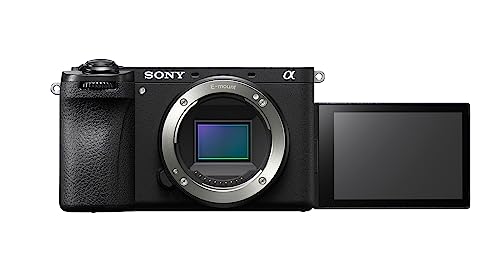
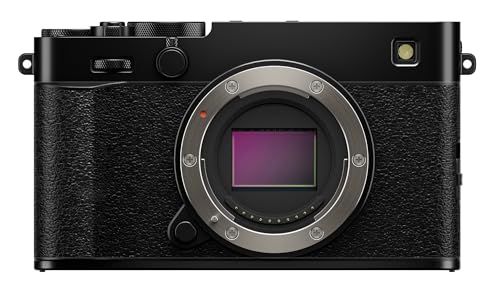
Check Current Listings
As an Amazon Associate, Reviews Took earns from qualifying purchases.
Both options are sold on Amazon. Check the current listing, what is included in the box and the seller before you decide.
Fujifilm X-E5

Sony A6700
A Tale of Two Shooting Days
Imagine the same Saturday spent with each camera. The morning is a city walk: you want discretion, quick framing, and files that look finished with minimal fuss. One body slips into that rhythm naturally, its styling and simulations turning the walk into a set of images that feel authored by lunchtime. The afternoon is a family sports session followed by a school performance: now tracking, responsiveness, and confidence in dim light matter more than charm. The other body earns its keep there, holding focus on movement that would leave a more contemplative tool behind. Most photographers live both halves of that Saturday across a year, which is why this comparison resists a simple winner.
The practical question is proportion. Count your shooting days honestly: how many are walks, travel, and quiet observation, and how many are action, events, and demanding video? The majority should choose the camera, because a body optimized for your rare days will frustrate you on your common ones. Photographers whose year is genuinely split often solve it by letting one body lead and renting or borrowing for the exceptional assignments, rather than compromising every day for the sake of a few.
Proportion also changes with life stages. A new parent suddenly photographs movement indoors; a traveler photographs stillness abroad. Neither stage is permanent, so value the system that adapts: lenses, accessories, and settings that stretch across subjects soften the risk that today’s perfect choice becomes next year’s mismatch.
Focus Philosophies in Everyday Language
Autofocus marketing speaks in superlatives, but daily photography speaks in trust. Trust is built when the camera finds the eye you intended, in the light you actually have, without a menu visit or a second attempt. One of these systems has built its reputation on that trust for moving and unpredictable subjects, with subject recognition that feels like a collaborator. The other offers precise, dependable focusing for the deliberate photographer, with tools that reward placing the point yourself and working methodically. Neither is broken; they simply allocate intelligence differently, one toward prediction, the other toward control.
Test trust with your own subjects before buying if you can. Photograph a child crossing a room, a dog changing direction, a cyclist approaching, and a portrait in dim window light. Review not the best frame but the proportion of frames that are usable, because working photographers live by proportions, not by highlights. A system that gives you eight good frames in ten changes your confidence and your keeper rate more than one that gives you one perfect frame and nine near misses.
Manual focus deserves a mention too, since both systems support it with aids such as magnification and peaking. For deliberate work, landscapes, still life, and careful street compositions, manual focus can be a pleasure rather than a fallback, and the quality of those aids influences how often you will choose it. Photographers who enjoy older adapted lenses should weigh this heavily, because focus aids become their daily interface.
Carrying Comfort Over a Full Season
Comfort is a specification measured in months. A body that feels charming for an afternoon in a shop must still feel right after a season of weekends, and small ergonomic truths emerge slowly: whether the grip suits your hand with the lens you actually own, whether the dials fall where your fingers expect, whether the weight balance keeps your wrist fresh on a long walk. Renting or borrowing for a full day teaches more about comfort than any review, because fatigue and familiarity both need hours to speak.
Strap and bag choices multiply or erase comfort. A compact body on a poor strap can saw at a neck, while a slightly larger body in a well-fitted sling bag disappears. Budget for carrying as part of the camera, and test the complete system you will actually take out: body, favorite lens, spare battery, and the bag that holds them. The best camera in this comparison is partly the one whose complete kit you will carry without negotiation on an ordinary Tuesday.
Weather and clothing change the equation across a season as well. Gloves favor larger, more positive controls; summer travel favors the smallest kit that still delights you. If your photography spans those extremes, note which body you would choose in each and let the more frequent season lead the decision.
Files, Color and the Shape of Your Archive
Both systems produce files that reward good archiving habits, and the archive is where a system choice quietly compounds. A consistent color approach, whether you lean on in-camera simulations or on your own editing presets, makes a year of photographs feel like one body of work. Mixed approaches fragment it. Decide early which philosophy will govern your everyday output, set the camera accordingly, and let exceptions be deliberate projects rather than daily drift.
Storage planning is mundane and decisive. High-resolution files from either body accumulate quickly during travel and events, so a routine of same-day copying, honest culling, and duplicated storage protects the work the cameras were bought to make. Name folders by date and place, keep the rating system simple enough to use when tired, and your future self will find any frame in moments. Photographers rarely regret an hour spent on archive discipline; they often regret the opposite.
Printing closes the loop. Both bodies produce files that print beautifully at the sizes most homes and exhibitions need, and seeing your work on paper recalibrates every digital debate. Print the photographs you love from whichever system you choose, and let the wall, not the forum, judge the result.
The Decision, Stated Plainly
Choose the Fujifilm path if your photography is primarily about the experience of seeing and the finished look of the file: street, travel, everyday documentation, and portraits made at a human pace. Choose the Sony path if your photography regularly demands prediction and speed: moving subjects, hybrid video with high expectations, and assignments where missed focus is not an acceptable cost. Both statements can be true of one photographer in different seasons, which is why proportion, not preference in the abstract, should cast the deciding vote.
Whichever you choose, spend the first month learning it deeply rather than comparing it further. Set up the custom controls, shoot a small personal project, print a few frames, and let muscle memory form. Comparison is a tool for choosing, not a hobby to continue after the choice, and the photographers who flourish are the ones who close the comparison and open their eyes to their subjects.
If the decision still feels balanced after honest testing, let lenses decide. List the three lenses you will realistically own, price them in each system, hold them if you can, and follow the kit that makes you want to go out tomorrow morning. Desire, sustained over years, is a practical specification.
Borrowed Weekends and Rental Wisdom
If the decision resists all reading, buy information instead: rent or borrow each camera for a real weekend of your own photography. Structure the weekends identically, the same walk, the same family event, the same evening review, so the comparison is about the cameras rather than the days. Photograph moving subjects, quiet subjects, and one session in poor light, because those three territories are where these bodies differ most. Keep the files in paired folders and compare them a few days later, when the pleasure of the new has faded and the photographs must speak for themselves.
During each weekend, keep the friction log honestly. Every time you hunt for a control, miss a moment to a menu, or smile at a result on the rear screen, note it in a sentence. At the end, count the sentences by kind. Photographers are often surprised that the log, not the image comparison, decides them, because image quality from both is excellent while daily friction is personal and permanent.
Return the cameras and wait a day before ordering anything. A decision that survives a day’s distance is a decision; one that evaporates was novelty. This small discipline has saved more photographers from regret than any review ever written.
The Supporting Kit Decides More Than the Body
Price and test the supporting kit with the same seriousness as the body, because you will touch it daily. The bag that fits the system you actually carry, the strap that suits your shoulder, the charger routine that fits your home, and the card and battery ecosystem all shape ownership more than a specification gap between two excellent bodies. A system whose accessories you already partly own, through friends, a previous camera, or a local shop’s stock, starts with an advantage that is practical rather than sentimental.
Lenses remain the largest part of that kit, and the advice bears repeating in concrete form: list the three lenses, price them in both systems, check their used availability, and hold them if you can. The body is the part of the system you will replace first; the lenses are the part you will keep, lend, and build a style upon. Choose the mount as a lens decision wearing a body decision’s clothes, and the choice tends to stay satisfying for years.
Software is part of the kit too. Confirm that your editing tools handle both systems’ files the way you like, and that your backup routine can absorb the file sizes each produces. A weekend of editing test files, borrowed from a friend or a shop, is a legitimate and revealing part of the purchase process.
After the Purchase: The First Project Rule
Protect a new camera from comparison remorse with the first project rule: within a week of buying, begin a small, defined project that the camera must serve for a month. A street series, a portrait of everyone at your workplace who agrees, a study of one park in all weathers, any project with a subject and a mild deadline will do. The project converts the camera from an object of evaluation into an instrument of work, and evaluation is where remorse breeds.
By the project’s end you will know the camera’s genuine virtues and its genuine annoyances, in proportion, from evidence. Annoyances that survive a month of real work deserve solutions, an accessory, a setting, occasionally a different lens. Annoyances that vanished were novelty wearing a disguise. Either way, you will own a body of work instead of a month of doubt, and that trade is always worth making.
Keep the project’s best frames printed or gathered where you can see them. They are the answer, visible daily, to any future moment of comparison temptation: this is what the camera does in your hands, which was the only question that ever mattered.
Gift Purchases and Other People’s Cameras
These two bodies are often bought as gifts for a partner, a parent, or a graduating student, and gift buying changes the rules. The right question is not which camera is better, but which camera the recipient will pick up. A recipient who loves objects with character and immediate, beautiful results will bond with one; a recipient who wants the camera to keep up with sports, children, and ambitious video will bond with the other. When in doubt, gift the experience around the camera as well: a first lens chosen for their subjects, a small bag, and an afternoon shooting together to set it up.
Set up a gifted camera before wrapping it if your relationship allows: charge the battery, set the language and clock, configure the obvious defaults, and include a note with three suggested first settings and one suggested first project. That small preparation converts an intimidating instrument into an invitation, and it is remembered long after the wrapping is forgotten.
Resist gifting your own preference in disguise. The camera you would choose is evidence about you, not about them, and the most generous version of this purchase is the one that takes the recipient’s subjects, hands, and patience as the specification. A gift camera that gets used daily is a triumph; a technically superior one that stays in its box is a lesson.
The Classroom and the Camera Club
In teaching environments, the comparison plays out at group scale. A class or club benefits when students can borrow lenses, compare settings meaningfully, and troubleshoot together, which quietly favors whichever system the local group already speaks. If you are choosing partly to join a community of learners, ask the community what it uses and why, and weigh the answer heavily; shared fluency accelerates everyone’s progress more than any single feature accelerates one person’s.
Instructors see the failure modes of both philosophies at scale: students fighting customization they never finished setting up, and students outgrowing simplicity they once loved. The lesson for an individual buyer is to know which student you are. If you enjoy configuring tools, depth is a pleasure; if you want the tool to recede, simplicity is a feature. Neither temperament is more serious, and both have produced excellent photographers in every class ever taught.
Whichever you bring to the group, bring prints to share and questions that come from real shooting. Communities repay that currency generously, and a camera chosen partly for its community will keep paying its owner back in knowledge for years.
What Experienced Owners Say After a Year
Ask owners who have lived with either camera for a year and a pattern emerges that no launch review can reproduce: they talk about habits, not features. The Fujifilm owners describe the photographs they did not have to edit, the walks the camera talked them into, and the pleasure of a file that already looks like their intention. The Sony owners describe the moments the camera refused to miss, the confidence of stepping into bad light and worse chaos, and the depth of a system that always had one more lens or one more solution. Both groups sound satisfied in a way that has little to do with the other’s specifications, which is the deepest evidence that the choice is about fit rather than rank.
Notice what the year-two owners complain about, because complaints are data too. They complain about small, specific, livable things: a dial that could be better placed, a menu page that hides, a lens that does not exist yet. Nobody complains that they chose the wrong philosophy, because photographers choose philosophies more carefully than they choose products, even when they do not know that is what they are doing. Name your own philosophy honestly, and the year-two version of you is likely to be as content as the owners quoted here.
They also share a piece of advice with suspicious unanimity: the second lens mattered more than the body debate. Whatever system you enter, enter it with a plan for the glass, because the body’s virtues are experienced through lenses, and a beloved lens reconciles an owner to almost any body quirk. Choose the mount whose lenses you dream about in your price range, and the dream will do the rest.
Finally, year-two owners have mostly stopped reading comparisons, which is perhaps the surest sign of a decision well made. The comparison’s job is to be outgrown. When you notice you have stopped reading articles like this one, you will know the camera has become yours.
Until then, use the reading as it was meant to be used: as a map of the questions, not as a verdict. The verdict is yours to reach, with your hands and your diary as the court.
And when you reach it, write it down and close the case. The photographs are waiting, and they have been patient long enough.
The Tiebreaker Nobody Lists
There is one tiebreaker no comparison table lists, because it cannot be measured in a laboratory: which camera’s photographs, straight from a day’s shooting, make you want to show someone. That small flare of pride is the fuel of a photographic life, and it is not evenly distributed between technically equal tools. One system’s files will match the pictures in your head a fraction more often, and that fraction, multiplied across years of evenings spent reviewing the day’s work, becomes the difference between a camera that is used and a camera that is loved.
Trust the flare when the practical scores are close. It is not frivolous data; it is your taste reporting early, and taste, in the end, is what all the technique in this guide exists to serve.
Buy the camera whose pictures you keep turning back to, set it up with care, and let the first project begin. The debate ends where the work starts.
Permission to Stop Comparing
Consider this your permission to stop comparing, whichever camera is now in your bag or on its way to you. The comparison had a job, and the job is done: it taught you what the real questions were, your subjects, your proportion of stillness to motion, your relationship with editing, and your honest budget for the whole kit. Those questions will serve every future purchase, long after the details of this particular pair have faded into the general history of cameras.
What remains is the part no guide can do for you: the first month of shooting, the first project, the first print. Begin it today if the camera allows, and let the archive, growing week by week, become the only review you consult. It is the one written in your own light.
FAQ
Is the X-E5 good for action?
It can handle casual moving subjects, but a camera built around tracking autofocus is usually easier for sports and wildlife.
Is the A6700 good for street photography?
Yes. It is compact and responsive, though it has a less discreet, more functional look than a slim rangefinder-style body.
Do I need film simulations if I edit my photos?
Not necessarily. If you edit every picture, in-camera looks matter less, though they can still guide your editing. They help most when you want to share pictures directly without extra work.
Which camera is easier to learn?
It depends on your style. Dial-based bodies show settings at a glance, while a button-and-menu body offers more customization. Handle both and see which feels natural.
Is APS-C good enough for serious photography?
Yes. APS-C cameras produce excellent results and have smaller, lighter lenses than full-frame systems. Technique and lenses matter more than sensor size for most uses.
How should I protect the camera while traveling?
Use a padded bag or insert, keep the lens cap on when not shooting, and avoid leaving the camera in hot cars. Carry spare batteries and cards in a separate pocket.
Should I shoot raw or JPEG?
Raw gives more editing flexibility, while JPEG saves time and storage. Many people shoot both and keep the raw files for pictures they want to edit later.
What accessories help with video?
An external microphone, a stable tripod or gimbal, and spare batteries are common choices. Check the camera's ports and the maker's accessory notes before buying.
Can I use third-party lenses?
In many cases, yes, but check compatibility and feature support for your camera. Look at what autofocus and stabilization features work with a given lens before you buy.
Which camera would suit a school sports parent better?
The body with the stronger tracking reputation is usually the safer choice for unpredictable movement, especially indoors where light is limited. Pair it with a lens that gathers plenty of light and practice on practice sessions before the important game.
Can I get the film look from the Sony with editing?
You can get close with well-made presets and a consistent editing routine, though it takes desk time the Fujifilm approach saves in camera. Many photographers enjoy that editing craft; others prefer to finish the look while shooting. Your relationship with the desk should decide.
Is either camera a sensible only camera for travel and family?
Both are, which is what makes the comparison hard. The deciding factors are your subjects: quiet travel and everyday beauty favor one, energetic family action and demanding video favor the other. Either will serve a mixed life well if its lenses are chosen thoughtfully.
What should I check on a demo unit in a shop?
Work the controls you use most, test focus on a moving person if the shop allows, review an image at magnification, and hold the camera with the lens you actually plan to buy. Ten honest minutes of use teach more than an hour of specification reading.
Is it a mistake to choose based on which camera looks better?
Appearance is a weak reason alone but a legitimate tiebreaker, because a camera you find beautiful gets picked up, carried, and cared for. When capability and cost are genuinely close, choosing the one that delights you is choosing the one you will use.
How long should I give a new system before judging it?
A month of regular shooting is a fair trial: long enough for muscle memory to form and for the camera to meet several kinds of subjects and light. Judging in the first week mostly measures unfamiliarity, not the camera.
The Short Version
The X-E5 is for photographers who value design, color and a minimal carry. The A6700 is for those who want a capable, versatile tool for fast subjects and video. Verify current specifications with Fujifilm and Sony.
