An affordable action camera can do the job well if you focus on a few things: stabilization, video options that match your use, battery life and water resistance. Skip features you will never use and choose the camera that fits how you actually shoot. This guide covers general decision criteria and does not recommend specific models.

Features That Matter Most
- Stabilization. Action cameras bounce around on helmets and handlebars. Electronic stabilization smooths footage, and implementations differ between makers. Look at sample footage published by the maker and by independent creators.
- Resolution and frame rate. 4K video is common, and 1080p is enough for many online uses. A higher frame rate lets you slow footage down. As a general guide, 60 frames per second suits moderate slow motion, and 120 or more suits dramatic slow motion.
- Battery life. Small bodies mean small batteries. Check the maker’s stated recording time, and plan on carrying spares.
- Water resistance. Some cameras are water resistant on their own, and others need a separate housing. Read the maker’s stated depth figure and conditions.
- Mounting. Check that it works with common mounts so you can reuse accessories.
In this guide
Features You Can Often Skip
- Extra shooting modes you will rarely use.
- The highest resolution, if you only share clips on phones.
- Built-in screens on the front, unless you vlog.
A Simple Checklist
- Write down your main activity, such as cycling, hiking, snorkeling or travel.
- Decide on the video quality you need for where the clips will be shown.
- Check the stabilization approach and watch sample clips for your activity.
- Confirm the camera’s water resistance and what accessories you must add.
- Look at the memory card type and capacity, since high quality video fills cards fast.
- Count the total cost of ownership: spare batteries, cards, mounts and a case.
Where Savings Can Hide
Older models from major makers are often available after a newer version arrives, and they remain good for many uses. Compare the features you need rather than the age of the model. Also consider lesser-known brands carefully, checking support, app quality and how long software updates continue.
Mounts, Housings and Where the Camera Will Live
An action camera is only as useful as the places you can put it. Before choosing, list the spots you plan to use: helmet, handlebars, chest, wrist, tripod, a pole or a car mount. Check how each camera attaches. Many cameras use a common mounting style, which opens up a large choice of third-party accessories, while others use a proprietary connector that limits options. The product listing and manual should say what mount system is used and what comes in the box.
Consider whether the camera needs a cage or case to attach to a mount. Some include folding fingers on the body, while others need a frame that adds bulk and cost. A frame can also help protect the camera, but it may block access to buttons, ports or the battery door. Check how easy it is to change the battery and card while mounted.
If you plan to use it underwater or in harsh weather, understand whether the body is water resistant on its own or needs a housing. A housing can add bulk and affect audio, so look at how the maker describes it. Inspect seals before each use, keep them clean, and follow the manual on rinsing after salt water or dust. Small details like a lens cover that screws on or clips on matter if you often swap between environments or want to protect the lens from scratches.
Audio Quality, Wind Noise and Microphones
Many people focus on video and forget that poor audio can ruin a clip. Action cameras are exposed to wind, engines and rushing water, and tiny built-in microphones struggle in those conditions. Look at whether the camera offers wind reduction settings, multiple microphones, or a port for an external microphone. The maker’s page should list audio options, and sample clips from independent creators can show how it sounds outdoors.
Housings and cases change audio. A waterproof case may muffle sound, and some models offer a different case design with openings to improve recording. If you plan to talk to the camera or record voiceover, think about using a separate recorder or a wireless microphone, and check compatibility with the camera’s connectors.
Wind noise can be reduced with a small foam cover or by positioning the camera so the microphone is shielded. If clean audio matters, decide whether you will add music in editing and treat the original sound as ambient. Check whether the camera records stereo or mono, and how it handles loud sounds, since distortion can be hard to fix. For budget cameras, an external microphone option is a useful differentiator, but it may require adapters, which add to the total cost.
Low-Light Performance and Image Quality
Action cameras use small sensors, and small sensors struggle when light fades. Footage at dusk, indoors or in forest shade can look noisy or smeared as the camera tries to compensate. When comparing models, look for sample footage in dim conditions and pay attention to noise, color and how the camera handles bright and dark areas in the same frame.
Dynamic range is another factor. Scenes with strong sun and deep shadow, such as riding through a tunnel or under trees, can clip highlights or crush shadows. Some cameras have modes that merge exposures or adjust tone, but their effectiveness varies. Check what the maker offers and look for independent footage rather than relying on a feature name.
Lens coating and field of view also influence image quality. A wide field of view captures more of the scene and can feel immersive, but it distorts edges. Many cameras offer narrower modes or distortion correction at a trade-off with stabilization or resolution. Choose a field of view that suits your activity: wide for close mounts like helmets, narrower for distant subjects. Keep the lens clean, since water spots and fingerprints cause haze and flare. Bring a microfiber cloth and a lens protector if the camera supports one.
Storage, Memory Cards and File Handling
High-quality video fills memory cards quickly, and an unsuitable card can cause dropped frames or recording stops. Check the camera’s manual for the card types and speed ratings it requires, and buy cards from reputable sellers to avoid counterfeits. Capacity matters for long trips, so consider carrying more than one card and formatting them in the camera before use.
Think about how you will transfer footage. Some cameras connect to a phone app for quick sharing, while others need a card reader or cable. Wireless transfer can be slow with large files, so test the workflow before a trip. Check whether the app is well supported and whether it works on your phone’s operating system.
Editing demands vary. Higher resolutions and frame rates produce large files that stress older computers. If your machine struggles, record at a lower setting or generate lightweight proxy files. Back up important footage promptly to two places, and keep original files until the project is complete. Pay attention to file segmentation, as many cameras split long recordings into chunks, which you will need to join in editing. Label cards and keep spares in a dry case to avoid mix-ups on the road.
Durability, Warranty and Signs It Is Time to Upgrade
Action cameras take knocks, so durability is a practical concern. Check what the maker says about impact resistance, and look at the build: a sturdy shell, tight seals and a lens that is recessed or protected. Remember that water resistance claims usually apply under specific conditions, and seals wear over time. Replace gaskets if the maker offers them, and follow the manual’s advice on rinsing and drying.
Warranty and support are part of the value, especially with budget brands. Look at the length of the warranty, what it covers and how claims are handled. Check whether firmware updates are provided and for how long. A camera with good hardware but no updates may develop bugs that never get fixed.
Questions to ask before buying: Does it overheat during long recordings? What are the accessories I must add? Is the battery removable so I can swap spares? How is the menu navigation, especially with gloves? Can I use it as a webcam if I need that? Signs it is time to upgrade include fogging that persists after drying, a battery that no longer holds a useful charge, repeated freezing or card errors, and footage quality that no longer meets your needs. Replace swollen batteries immediately and dispose of them correctly according to local rules.
Matching Camera Features to Your Activity
An affordable action camera is easiest to choose when you picture one activity in detail. A cyclist needs a mount that resists vibration and stabilization that smooths road buzz. A swimmer needs water resistance and a housing designed for the job. A hiker values battery life and low weight. A parent filming children at a playground may prefer a screen that is easy to see and a camera that is simple to operate with one hand. Write down your top activity and the three features that matter most for it, then judge every camera by those, ignoring the rest.
Be wary of long specification lists. Many numbers on a box describe maximum values that you may rarely use. A camera that records at a very high frame rate is not useful if the resolution drops or the picture goes dark. Look for balanced performance in the modes you will use daily.
Comparison Table of Priorities by User Type
| User | Main priority | Secondary priority | Can often skip |
|---|---|---|---|
| Cyclist or runner | Stabilization | Mount security | Extreme frame rates |
| Water sports | Water resistance | Housing and lens care | Large screens |
| Hiker and traveler | Battery and weight | Storage | Heavy accessories |
| Family use | Simplicity | Screen visibility | Advanced profiles |
| Vlogger | Audio and screen | Webcam ability | Underwater features |
Questions to Ask a Seller or Check on the Listing
Before you buy, collect answers to a few practical questions. Honest sellers and clear listings make these easy to find, and unclear answers are a warning sign.
- What video modes are available, and at what resolution and frame rate?
- Is stabilization built in, and does it work in every mode?
- Is the camera water resistant without a case, and to what depth, according to the maker?
- What is the battery type, is it removable and can you buy spares?
- Which memory cards are supported, and what speed class is recommended?
- What is included in the box, and which mounts are extra?
- What warranty and support options exist in your region?
Understanding Image Quality Beyond Resolution
Resolution is only one part of picture quality. Sensor size, lens quality, processing and bit rate all shape the result. A camera that records at high resolution with heavy compression may look worse than one with moderate resolution and cleaner processing. Look at sample footage in conditions similar to yours, such as bright sun, shade and dusk, and pay attention to dynamic range, the span from dark to bright areas. Check how the camera handles fast movement, where weak processing can create smearing or blockiness.
Color rendering matters as well. Some cameras produce very vivid color, others a flatter look that is easier to grade. Neither is wrong; choose what suits your editing habits.
Accessories That Add Real Value and Those That Do Not
Accessory bundles can look attractive, but not every item will earn its place. A spare battery, a sturdy mount for your main activity and a reliable memory card give the most benefit. A floating handle is useful for water. A small case protects the lens when you carry the camera in a bag. Large collections of rarely used clips and adapters mostly take up space.
- Buy a mount that fits your actual use first.
- Check compatibility of any third-party mounts with the camera’s connector.
- Carry a lens cloth and clean the lens before each outing.
- Consider a screen protector for rough use.
Common Mistakes When Buying on a Budget
- Choosing the longest feature list instead of the best match.
- Ignoring battery life and then running out of power halfway through the day.
- Forgetting the cost of memory cards and spare batteries.
- Believing that waterproof means unlimited depth or time.
- Skipping sample footage and judging only by marketing images.
- Buying from an unclear source without a return route.
Troubleshooting Early Problems
Footage is shaky even with stabilization
Check that the stabilization mode is on and that the mount is solid. Loose mounts add vibration that software cannot fully remove.
The camera gets warm
Long recording in warm weather can heat the camera. Give it airflow, shorten clips, and consult the maker’s guidance.
Audio sounds muffled
A case can block the microphone. Use the camera without the case when conditions allow, or record audio separately.
Clips will not play on a computer
Some formats need updated software. Try a different player or convert the file with a reliable tool.
Short Glossary
- Bit rate: the amount of data used per second of video.
- Dynamic range: the span of tones the camera can capture.
- Field of view: how wide an area the lens covers.
- Time-lapse: a series of still frames joined into a fast motion clip.
- Housing: a protective case for rough or wet use.
- Speed class: a label for how quickly a memory card writes data.
Related guides
Final Thoughts for Smart Shoppers
The right affordable camera is the one that reliably records the moments you care about, in the conditions where you shoot, with accessories you can afford. Compare a short list of options, read the specifications carefully, watch sample clips and plan a small trial outing as soon as it arrives. If it falls short, use the return window rather than hoping it will improve. A modest, well matched camera that you actually carry will give you far more memories than an ambitious purchase that stays at home.
Trying a Camera Before the Return Window Closes
When your camera arrives, treat the first week as a trial. Charge the battery fully, update the firmware through the official app, and format the memory card in the camera. Then work through a short test plan that mirrors your main activity. Record a few clips in bright light, in shade and indoors. Try the stabilization with a deliberately bumpy walk. Check the audio by speaking at arm’s length and in light wind. Run a long clip to see how the battery and temperature behave, and copy the files to your computer to confirm they play well.
- Record in each of your usual modes for at least a minute.
- Watch the footage on a large screen, not only on the camera display.
- Check the mount for wobble and the lens for smears.
- Note battery use after an hour of normal recording.
- Decide before the return window ends whether the camera suits you.
When It May Be Time to Spend More
Not every limit can be solved with settings. If you consistently shoot in dim light and the footage looks noisy, if you need professional audio, or if you want advanced color options and longer recording times, a more capable camera might be worthwhile. The same is true if your activity is demanding enough to damage lower cost gear regularly. Weigh the cost of a better camera against the cost of replacing weaker ones, and think about how often you will use it. Many people are happiest with a simple, dependable model that they replace when it truly stops meeting their needs.
Caring for the Camera After Each Outing
Good habits stretch the life of an affordable camera. After salt water, mud or sand, rinse the camera as the maker advises, dry it with a soft cloth and let it air dry fully before storing it. Open doors only in a clean, dry place, and check seals for grit. Remove the battery if you will not use the camera for a long period, and keep it in a cool, dry spot. Copy your footage soon after each trip and clear the card so you are ready for the next one.
Keep a simple log of any issues, such as sudden shutdowns or strange noises. If a problem repeats, contact the seller or maker while the warranty is still valid, and keep your receipt and packaging until you are confident the camera is sound.
If you remain unsure after reading about several models, write a short list of what you would miss most if it were absent, such as battery time, a bright screen or reliable mounts, and use that list as your tie-breaker. Simple priorities cut through marketing noise and make the final decision easier.


Products Worth a Look
As an Amazon Associate, Reviews Took earns from qualifying purchases. These picks come from our guide: 6 Best Action Cameras: DJI Osmo, Insta360 (2026).
-
Mini Body Camera 1080P (26g Thumb Action Camera)
 Mini Body Camera 1080P
-
Mini Thumb Body Camera (1080P, 512G)
 zakotu Mini Body Camera 1080P
-
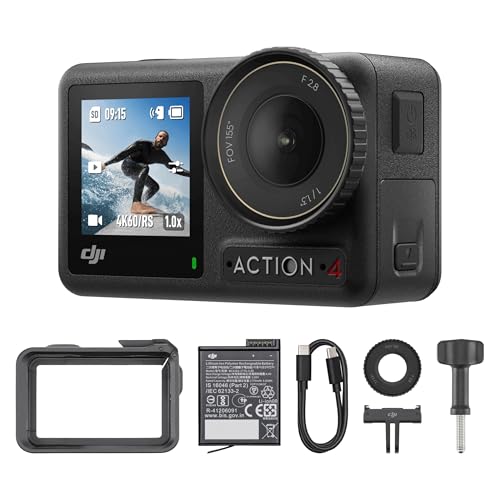
DJI Osmo Action 4 Essential Combo
 DJI Osmo Action 4 Essential Combo
How the Three Picks in This Guide Compare in Real Use
The products listed earlier in this guide sit in two quite different families, and understanding that split will help you choose faster than any feature list. The two mini thumb cameras are built around one idea: be so small and light that you forget you are wearing them. The DJI Osmo Action 4 Essential Combo comes from the opposite direction: a full-size action camera from an established maker, with the accessory system and support network that implies. Neither approach is automatically better. They suit different people, and the honest comparison below works through the differences that actually show up in day-to-day use.
Size, weight and how you carry them
The thumb cameras earn their place when the camera must disappear: clipped to a cap, a shirt or a strap, they record a point of view without a harness or a bulky mount, and their tiny weight means they can ride on light clothing and small accessories that would never hold a full-size camera steady. The trade-off is control. A camera that small has little room for a useful screen or large buttons, so framing is often approximate and settings changes can be fiddly. The Osmo Action 4 is still small by camera standards, but it is a deliberate handful: you hold it, mount it on proper brackets and check its screens. For travel days, family outings and any filming where you want to review clips on the spot, that presence is a benefit rather than a burden.
Where each one makes sense
Choose a thumb camera if your filming is mostly spontaneous point-of-view clips: cycling commutes, walks, workshop tasks, or any activity where a bigger camera would simply be left at home. Choose the DJI if your filming is planned — trips, sports days, water activities — and you expect to rely on the maker’s mounts, cases and spare parts being easy to find later. The Essential Combo bundle also matters here: a bundle that includes the basic mounts and protection you need can close much of the real-world cost gap between a famous-name camera and a cheaper body that still needs a case, mounts and cards bought separately.
Support, updates and the long view
One quiet difference between established makers and no-name models is what happens six months after purchase. Firmware updates that fix bugs and improve stability, replacement doors and lenses that can actually be ordered, and instructions written clearly enough to follow — these things rarely appear in a feature list, yet they decide whether a camera stays useful or becomes e-waste. If you buy one of the mini cameras, test everything thoroughly inside the return window, because your protection is that window rather than a support network. If you buy the DJI, still register and update it promptly; support only helps owners who use it.
Setting Up a Budget Action Camera for Your Main Activity
Most disappointment with affordable action cameras comes not from the camera but from default settings chosen for nobody in particular. A short setup session, matched to the one activity you film most, transforms the results. Work through these areas once, save the combination if your camera allows presets, and you will rarely touch the menus again.
Resolution and frame rate: pick for the edit, not the spec sheet
Higher resolution only helps if your computer, phone and sharing platforms handle it comfortably. If your clips go straight to social apps that compress everything anyway, a moderate resolution with a suitable frame rate often looks cleaner in practice than a maximum setting that overheats the camera and fills cards. Choose a higher frame rate when you plan to slow footage down or when your activity involves fast, jerky movement; choose a standard frame rate for ordinary recording and enjoy longer battery life and smaller files. The key habit is consistency: mixing resolutions and frame rates across one outing makes editing slower and the finished video uneven.
Field of view and stabilization settings
Wide fields of view suit point-of-view filming because they forgive imperfect aim, but they bend straight lines near the edges and make distant subjects tiny. A narrower or corrected view usually serves filming other people, scenery and anything where the horizon matters. Turn stabilization on for moving activities and check what it costs: on many cameras the strongest stabilization crops the image and can struggle in low light. Film a short test both ways, at the time of day you normally shoot, and keep the setting that survives that test rather than the one that wins on paper.
Sound settings and the humble wind cover
Before your first real outing, record a minute of ordinary speech outdoors and listen back on headphones. If wind dominates, a simple foam or furry wind cover over the microphone area usually improves things more than any menu setting. Check whether your camera reduces wind noise automatically and whether that setting muffles voices on calm days; if it does, you may prefer it off and rely on covers and positioning instead. Good sound is the cheapest production upgrade there is, because viewers forgive soft pictures far sooner than they forgive unintelligible audio.
Care, Storage and Small Habits That Prevent Big Failures
Action cameras live hard lives: pockets, bags, rain, dust and the occasional drop. The failures that end outings are usually mundane — a flat battery, a full card, a fogged lens, a mount that worked loose — and nearly all of them are preventable with a short routine.
A five-minute routine after every outing
When you get home, wipe the camera and its housing with a soft, slightly damp cloth to remove salt, sand and sunscreen, all of which attack seals and coatings over time. Open every door only once the outside is dry, charge the battery rather than leaving it flat, and copy the footage off the card the same day. Then format the card in the camera, not on the computer, so its file system is exactly what the camera expects. Finally, look at the lens and the housing seal: a single hair or grain of sand across a seal is the classic cause of a leak that the owner blames on depth ratings.
Storing the camera between trips
Store the camera clean, dry and out of its sealed housing, with doors able to breathe, in a cool place away from direct sun. Batteries prefer to rest partly charged rather than brim-full or empty for long periods, and they should be checked and topped up before a trip rather than trusted from last season. Keep mounts and screws together in one small pouch; the mount you cannot find is functionally the same as a mount you never owned. If the camera will sit unused for months, power it on once in a while, confirm it still records and plays back, and let it remind you of any update it wants while there is no trip depending on it.
Cards and files: treat footage like it matters
Use cards from reputable sellers, because counterfeit cards are a leading cause of corrupted action footage and they fail precisely when full of irreplaceable clips. Keep two smaller cards rather than one huge one if your activity allows swaps, so a single failure cannot take the whole day with it. Name your folders by date and activity as you copy them across; future you, searching for one clip among thousands, will be grateful. And keep at least one copy of anything precious in a second place — a second drive or a cloud folder — because a camera that survives drops and drowning deserves a filing system that survives a lost laptop.
Troubleshooting: Five Problems and What to Check First
Footage looks wobbly despite stabilization
Confirm stabilization is actually enabled in the mode you are using — on many cameras it is unavailable at the highest resolution or frame rate, and the camera may not warn you clearly. Check the mount next: a loose or flexing mount adds movement no software can remove, so tighten, shorten the arm, or move the camera closer to the body or vehicle. Finally, remember that stabilization has limits in near-darkness; if evening clips wobble while daytime clips are smooth, light, not the camera, is the problem.
The camera stops recording mid-activity
The usual suspects are a full card, an overheated camera pausing itself, or a battery that reads fuller than it is in the cold. Check how much space a minute of your chosen settings consumes and size your cards honestly. In hot weather or still air, expect shorter continuous runs and plan around them by recording in clips. A battery that dies early in cold conditions often recovers some charge when warmed, which is a sign to carry spares against your body rather than in an outside pocket.
Colours look flat or strange
Many action cameras offer a flat colour profile meant for editing. It looks dull straight out of the camera by design. If you do not edit, switch to the standard or vivid profile and let the camera finish the picture for you. Underwater, expect colours to shift with depth; the fix is lighting, filters made for the purpose, or correction in editing — not a different camera. Also check the white balance is not locked to a setting from a previous, very different scene.
The app will not connect
Connection problems are usually a tangle of permissions and power saving rather than a fault. Update both the camera firmware and the app, grant the app the local network and location permissions it asks for, and try connecting with mobile data temporarily off, since phones sometimes route the camera’s signal nowhere. If your camera offers it, transferring clips by card reader remains the unfashionable but reliable fallback, and for large files it is often faster anyway.
One more question worth answering: when is a cheap camera the wrong saving?
When the footage is unrepeatable and the moment matters more than the money — a once-a-year event, a trip you will not take again, work you are being paid for — the cost of failure dwarfs the saving. In those cases either step up to the established-maker option in this guide, or build redundancy: a second angle from a phone, spare everything, and tests done the day before rather than the morning of. For everyday, repeatable fun, the budget choice remains a sensible one; the skill is knowing which day you are having.
Planning a Day of Filming: Power, Cards and Spares
Budget cameras reward owners who plan a little. The cameras themselves are cheap; the ruined day caused by one flat battery is not. This short planning method works for any of the picks in this guide and scales from a family beach afternoon to a full day on the trails.
Work backwards from your settings
Your chosen resolution and frame rate decide everything downstream: how many minutes fit on a card and how fast the battery drains. Before an important outing, run one honest test at home — record continuously with your real settings until the battery gives up, and note the time and the file size. That single test replaces all guesswork. Multiply by the number of hours you actually expect to film, remembering that real days involve far more standby and short clips than continuous recording, and you will know how many batteries and how much card space the day truly needs.
The spare kit that fits in a pocket
A practical minimum kit is small: one or two spare batteries kept warm and dry, one spare card in a hard case, a short charging cable with a power bank you may already own, a microfibre cloth, and the one mount adapter your setup cannot work without. Add a strip of tape and a spare mount screw if your activity vibrates — screws loosen, and tape has saved more filming days than any premium accessory. Pack the kit the night before, because the morning of an outing is when small essentials get forgotten on the kitchen table.
Charging away from home
Many budget cameras charge slowly, and some cannot record while charging, so treat charging as an overnight job rather than a midday rescue. A multi-battery charger that fills two or three batteries at once is one of the few accessories worth its cost for regular users. In a car or at a campsite, charge during the drive or the meal, not during the activity. And keep batteries out of hot dashboards and freezing boots; temperature extremes quietly shorten their lives long before they fail outright.
Getting Better Footage From the Camera You Already Bought
Technique improves budget footage more than upgrades do. These habits cost nothing and apply to every model in this guide.
Move less, and move slower
The shakiness viewers hate usually comes from quick pans and sudden tilts, not from walking. Turn your whole body slowly, keep clips shorter than you think you need, and let subjects move through the frame instead of chasing them with the camera. When you must walk with the camera, bend your knees slightly and keep the camera close to your body. Two calm five-second clips will edit together better than one frantic thirty-second sweep, every time.
Think in shots, not in hours
Before an activity, decide on three shots you want: a wide establishing view, the main action from your chosen mount, and one close detail — hands, wheels, water, faces. Filming with a tiny shot list turns a card full of similar footage into a story you can actually edit. It also saves battery and card space for the moments that matter, because you stop recording everything just in case. Review the three shots at your first break; if one failed, you still have time to try again while the day is young.
Light and angle beat settings
Small sensors struggle when light is poor and mixed. Where you can, film with the light behind you rather than in front of the lens, avoid shooting straight into a low sun unless you want silhouettes, and get closer instead of relying on digital zoom, which on budget cameras simply crops and softens the picture. A step or two nearer the subject improves a clip more than any menu change. Indoors, move towards windows and lamps rather than raising settings that add noise.
Edit ruthlessly, share selectively
The final quality jump comes after filming. Cut the beginnings and endings where the camera was still being positioned, keep only the strongest seconds of each moment, and let a finished clip be short. Viewers judge a video by its weakest ten seconds, so removing them is the fastest quality upgrade available at any price. Keep the full originals archived if storage allows; tastes change, and a clip that misses today’s edit may be perfect for tomorrow’s.
Buying Second-Hand or Refurbished Without Regrets
One legitimate way to stretch a tight budget is to buy a better camera used. Established models like the DJI in this guide appear regularly on the second-hand market, and a careful purchase can beat a new no-name camera on support, accessories and image quality. The risks are real but manageable if you check the right things.
What to check before money changes hands
Ask for a short, recent video recorded by the actual camera, not a sample from the internet, and watch it for focus problems, dead patches and strange noises. Check the lens and screens for scratches, the doors and seals for damage, and the battery for swelling or a runtime that has clearly collapsed. Confirm that the charger, at least one working battery and the basic mounts are included, because replacing missing pieces quietly eats the saving. If the seller cannot demonstrate the camera powering on and recording, treat that as your answer and walk away.
Refurbished and open-box options
Manufacturer-refurbished and reputable open-box listings sit between new and private used sales: the camera has been checked, and there is usually some route back if it fails immediately. Read what the refurbishment actually included and what happens if the camera develops a fault in the first weeks. A modest saving with a real return route is worth more than a larger saving with none, especially on a camera you plan to take into water, where a tired seal is an invisible risk.
First jobs for a used camera
When a used camera arrives, update its firmware, format a known-good card in the camera, and run the same home test described earlier: one continuous recording to learn its true battery life. Inspect the housing seal and replace any worn gasket before the camera goes near water. Do these jobs in the first days, while returning the camera is still simple, rather than discovering its limits on the first real trip.
A Note on Safety and Courtesy While Filming
Action cameras invite filming in places where attention should be elsewhere. Keep mounts and straps clear of anything that must move freely, never let a camera setup delay a safety check, and follow the rules of the venue, the trail or the water you are on — some places restrict cameras entirely, and a few activities forbid loose equipment outright. Be considerate of other people, too: a camera on your chest records everyone you meet, so say what you are doing when it matters, and delete footage of strangers who object. The best action footage comes from days that were enjoyable for everyone involved, not just the person holding the camera.
Keeping a Simple Log of What Worked
Photographers who shoot regularly keep notes; action camera owners benefit from the same habit in miniature. After an outing that went especially well — or badly — write two lines in your phone: the settings you used and the one thing you would change. Over a season, those notes become a personal settings guide tuned to your activities, your light and your camera, which is worth more than any generic preset list. The log also settles buying decisions: if your notes keep blaming the mount, buy a mount; if they keep blaming low light, that is honest evidence about what your next camera needs to do better, and what it does not.
One last habit ties the whole guide together: decide what a successful clip looks like before you press record. A camera at this level will not do everything, and judging it against footage from sponsored productions leads only to disappointment and unnecessary upgrades. Judge it against your own previous outings instead. If the clips are steadier, the sound clearer and the stories easier to follow than last season’s, the camera — and the small amount of planning around it — has done its job.
Keep that standard in mind when friends suggest a newer model. Newer is only better when it fixes a problem your own log actually records.
FAQ
Is an action camera better than a phone for sports?
It depends. Action cameras are small, tough and easy to mount, which is a big plus for helmets and bikes. A phone can be better for casual, close-up shooting with the screen in view.
Do I need 4K?
Not always. Many clips are viewed on phones where 1080p looks good. Higher resolution helps with cropping and large screens.
Do budget action cameras overheat?
Some can in warm weather or during long, high-quality recordings. Check the maker's notes on recording limits and allow airflow around the camera.
Is image stabilization enough to replace a gimbal?
Electronic stabilization helps with bumps, but a gimbal can offer smoother motion in some uses. Look at sample footage for your activity.
Can I use my action camera as a webcam?
Some models support it through a cable or software. Check the manual and the maker's support page for compatible settings.
Should I buy third-party batteries?
They can save money but vary in quality and may not be supported by the maker. Check reviews and the camera manual before using them.
How do I prevent lens fogging?
Let the camera adjust gradually to temperature changes, keep seals dry, and use anti-fog inserts if the maker supports them.
Do I need a case?
A case protects against scratches and impacts in transport, and a housing may be needed for water use. Check what your camera requires.
The Short Version
Choose an affordable action camera by matching stabilization, battery life and water resistance to your main activity. Skip features you will not use, plan for accessories, and check the maker’s own information for exact details.
