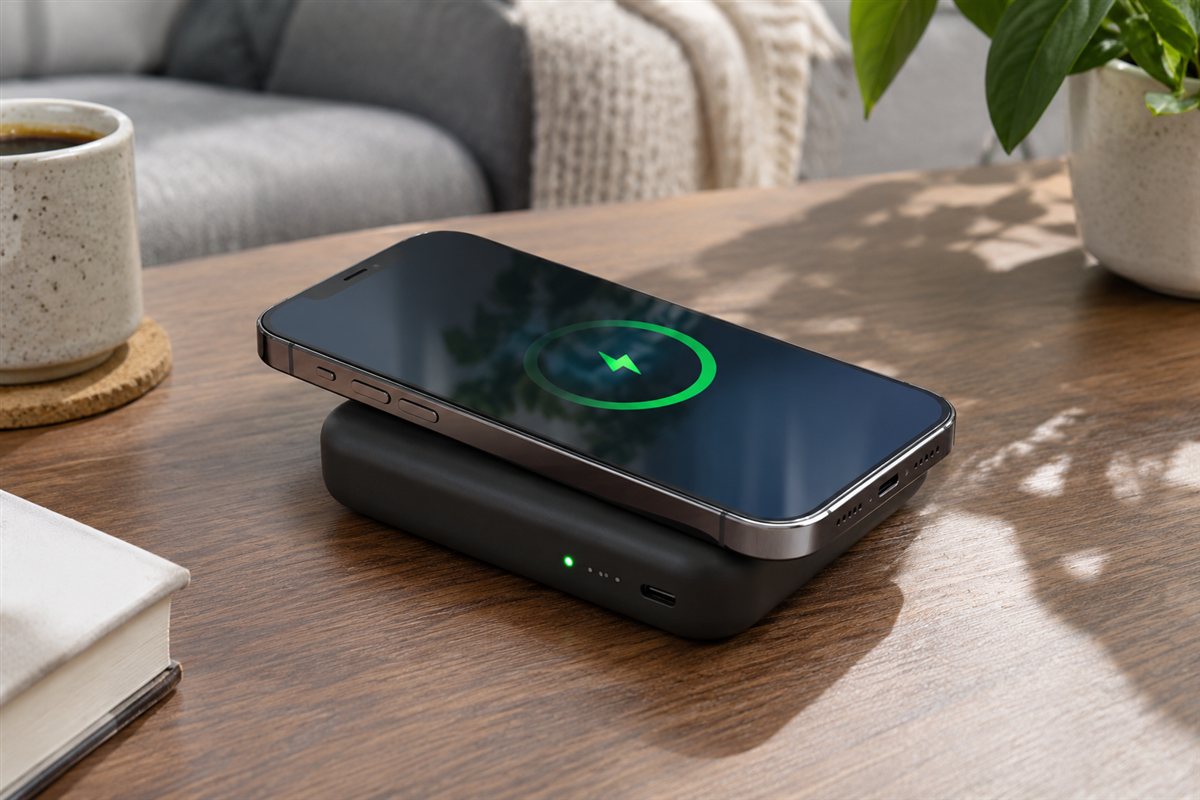
A wireless charging power bank holds a battery pack that can top up a phone without a cable. Many attach by magnet to the back of the phone, while others offer a flat pad. Most also include a wired port, which gives you a second way to charge.
We have not used these products ourselves, so this guide has no rankings and no personal results. It shows how to compare listings: what capacity figures mean, how charging standards fit your phone, and which small features, like a kickstand or pass-through charging, change how a pack feels in daily use.
As an Amazon Associate we earn from qualifying purchases. Links on this site are affiliate links, and they do not change the information we give.
In this guide
Quick Picks
| Pick | Product | Best For |
|---|---|---|
| 1 | Anker MagGo Power Bank 10K (A1654) | Best Overall |
| 2 | UGREEN MagFlow Magnetic Power Bank 10000mAh | Best for Fastest Wireless Charging |
| 3 | ESR Qi2 MagSlim Kickstand Power Bank 10K, Black | Best Kickstand and Display |
| 4 | Belkin BoostCharge Pro Wireless Power Bank 5K (BPD006) | Best for Pass-Through Charging |
| 5 | Anker 321 MagGo Battery (PowerCore Magnetic 5K), Black | Best Slim Top-Up |
Our Picks
1. Anker MagGo Power Bank 10K (A1654) — Best Overall
This 10,000mAh pack covers the main points in the guide above in one unit. It is Qi2 certified, so magnetic phones that support the standard can charge wirelessly at up to 15W with the ring holding the coils in alignment. A smart display on the front shows the remaining battery as a figure rather than a row of dots, which makes it easier to judge whether the pack needs a refill before a trip. The foldable stand props the phone up for video calls while it charges. Anker states the pack holds about 1.8 charges for an iPhone 15 Pro, and the USB-C port works for both recharging the pack and charging a device by cable when you want the faster, more efficient route. A USB-C cable is included in the box. It suits iPhone 12 and later owners who want one pack for daily top-ups and longer days out.
View Anker MagGo Power Bank 10K (A1654) on Amazon

2. UGREEN MagFlow Magnetic Power Bank 10000mAh — Best for Fastest Wireless Charging
The MagFlow is built around the newer Qi2 25W level, so phones that accept it, including recent iPhones on current software and the Pixel 10 Pro XL, can draw wireless power faster than the 15W Qi2 packs above. The 10,000mAh battery sits behind a magnetic face that snaps onto the back of a compatible phone or magnetic case. A built-in USB-C cable doubles as a carry strap and supports 30W two-way charging, so it can fast-charge a phone by cable or refill the pack itself, and a second USB-C port means up to three devices can charge at once across wireless, cable and port. That mix answers the wired-port point in the checklist without a separate cable in your bag. It suits people who find standard magnetic charging slow and want one pack that handles a phone plus earbuds or a second phone on travel days.
View UGREEN MagFlow Magnetic Power Bank 10000mAh on Amazon
3. ESR Qi2 MagSlim Kickstand Power Bank 10K, Black — Best Kickstand and Display
ESR pairs a 10,000mAh battery with Qi2-certified 15W magnetic charging and an unusually detailed set of extras. The maker rates the magnetic hold at 1,200 g, which addresses the alignment and grip points in the guide: the pack is designed to stay put on a phone or magnetic case instead of sliding off in a pocket. The built-in kickstand adjusts between about 45 and 70 degrees, so the phone can stand for a video call or sit lower for watching a show on a train. A smart LED display shows the remaining charge, and the USB-C port handles two-way charging at up to 27W for wired top-ups. At roughly 15.5 mm thick and 213 g, it stays closer to the slim end of 10,000mAh packs. It suits commuters who use their phone as a small screen while it charges and want a clear battery readout.
View ESR Qi2 MagSlim Kickstand Power Bank 10K on Amazon
4. Belkin BoostCharge Pro Wireless Power Bank 5K (BPD006) — Best for Pass-Through Charging
This 5,000mAh Belkin pack is the one to look at if pass-through charging matters to you. Belkin lists a pass-through mode that supports 15W Qi2 wireless charging while the pack itself is plugged in, so the phone can keep charging on a desk or nightstand. Running on its own battery, it charges an iPhone wirelessly at 7.5W, and the USB-C port can output up to 12W for a wired top-up or a second small device. A pop-up kickstand holds the phone upright, LED indicators show the charge level, and Belkin ships the pack pre-charged so it works out of the box. The capacity is a top-up rather than a multi-day reserve, as the guide notes for 5,000mAh models. It suits iPhone users who want a bedside-friendly magnetic pack that doubles as a stand during the day.
View Belkin BoostCharge Pro Wireless Power Bank 5K on Amazon
5. Anker 321 MagGo Battery (PowerCore Magnetic 5K), Black — Best Slim Top-Up
The 321 MagGo is the smaller, simpler option in this list: a 5,000mAh magnetic pack (model A1616) that snaps onto the back of an iPhone 12 or later, or a magnetic case, and charges without a cable. That size will not give multiple full charges, and the guide explains why the delivered charge is always less than the headline figure, but it matches the top-up use case: part of a charge to get through a busy day, in a pack slim enough to stay on the phone while you hold it. A USB-C port covers recharging the pack and wired charging when you need the more efficient route. There is no stand or display here, which keeps the design plain and pocket-friendly. Anker backs it with an 18-month warranty. It suits anyone who values a light everyday carry over maximum capacity and already owns a larger pack for trips.
View Anker 321 MagGo Battery (PowerCore Magnetic 5K) on Amazon
What to Look For
| Factor | Why it matters | What to check |
|---|---|---|
| Battery capacity | Sets how many top-ups you get. | Stated mAh figure and your phone’s battery size. |
| Wireless standard | Your phone must support it. | Qi or Qi2 support and magnet alignment notes. |
| Wired port | Gives a backup charging method. | USB-C input and output, and stated wattage. |
| Magnet strength | Keeps the pack aligned. | Magnet ring, case compatibility, and thickness of your case. |
| Size and weight | It travels with your phone. | Dimensions and weight in the maker’s table. |
| Extras | Small features add convenience. | Kickstand, pass-through charging, and display. |
Setup and Care Tips
- Line up the pack with the center of the phone’s back to help the coil connect.
- Use a case that the maker says works with magnetic or wireless charging.
- Charge the pack fully before a trip and carry a short cable as a backup.
- Keep it away from extreme heat and cold, following the maker’s notes.
- Wipe the surface with a dry cloth and avoid liquids.
Mistakes to Avoid
- Assuming every phone supports magnetic attachment.
- Reading the capacity figure as the amount a phone will actually receive.
- Choosing a pack too thick to carry comfortably.
- Using a thick or metal case that blocks wireless charging.
- Forgetting the cable you need to recharge the pack itself.
Capacity Versus the Charge You Actually Get
The capacity printed on a power bank is measured in milliamp-hours, and it describes the cells inside, usually at a different voltage from the one your phone uses. Converting between the two involves losses, so the energy that ends up in your phone is always lower than the headline figure suggests. Wireless charging adds further loss because some energy turns to heat between the coils.
To judge a pack, compare its stated capacity with the battery size of your phone, which is listed in the phone maker’s specifications. A pack with roughly twice your phone’s battery size will not give two full charges, and the real number is lower. Treat the arithmetic as a rough guide, and favor a margin rather than a tight match.
Think about how you use the pack. If it is a top-up for a busy day, a slim, lighter model that gives you part of a charge may be more useful than a heavy one that stays in a drawer. If you travel for several days without an outlet, a larger pack makes sense, and you may accept the weight. Neither choice is wrong, but the best one matches your habits.
Also note that some listings quote capacity for the cells and others for the usable output. Read the fine print or the manual, and ask the seller if the figure is unclear.
Magnets, Cases and Alignment
For magnetic packs, how well the pack grips the phone decides whether it is pleasant or irritating to use. A pack that slides off in a pocket or when you walk is not helping you. Look at what the maker says about the magnet ring and about which phones it is meant for. Do not assume that any magnet will hold the same way on every model.
Your case matters just as much. A thin case designed for magnetic accessories usually works well, while a thick, rugged or metal-backed case can weaken the grip or block the coils. Some cases include a wallet or a ring stand that sits exactly where the pack needs to go. If you use one, check whether the pack and the accessory can share the back of the phone.
Alignment affects speed as well. If the coils are off center, charging can slow down, get warm or stop altogether. Magnetic ring designs help here, which is the point of the newer standard. For flat pads without magnets, take a moment to find the spot where your phone starts charging, and check the screen for the charging icon before you put it in a pocket.
Keep the following in mind:
- Remove cards and metal objects from between the phone and the pack.
- Check the phone becomes only warm and not hot, and stop if it does.
- Test the fit with your own case before relying on it on a trip.
Wired Ports and Charging Speed Claims
The wired port is often the most efficient way to use a pack, so do not overlook it. Check whether the port is USB-C, whether it works as both input and output, and what wattage the maker states for each. Output wattage tells you how fast the pack can charge a phone, tablet or other device by cable, while the input figure tells you how quickly the pack itself refills.
A common frustration is a pack that takes many hours to recharge because of a low input rate. If you will recharge it overnight, this may not matter. If you want to top it up quickly before leaving the house, look for a higher stated input and use a charger that can supply it.
Speed claims for wireless charging are usually lower than for cable. Read what the maker says about wireless output and compare it with what your phone accepts, because the phone limits the speed. The slower of the two ends up setting the pace.
Pass-through charging, where the pack charges your phone while it is itself plugged in, sounds handy, but how it behaves varies. Some packs handle it well and others slow down or run warm. Read the manual for the maker’s notes, and avoid leaving a pack charging unattended on soft surfaces such as a bed.
Travel and Everyday Carry
If the pack will go on planes, check the airline and the aviation authority rules for lithium batteries before you travel. Rules usually limit the size of spare batteries and require them in carry-on baggage, not in checked luggage. The pack should show its capacity on the case or in the manual, and an unmarked pack may cause problems at security.
Weight and shape matter more than the spec sheet suggests. A pack that fits comfortably in a pocket or bag is a pack you will carry. Thickness is the figure people forget, and a thick wireless pack on the back of a phone makes the phone awkward to hold for calls or photos. Handle one in a shop if you can, or compare the stated dimensions with something you own.
Useful extras to weigh include:
- A kickstand for video calls or watching a show on a train.
- A small display or lights that show the remaining charge clearly.
- A surface that does not slip on a table or in a bag.
- A short cable stored with the pack, so you never go without one.
Avoid leaving the pack in a hot car or in direct sun. Heat is hard on batteries and can shorten their life or cause safety problems.
Battery Health and When to Replace
All rechargeable batteries lose capacity over time. Heavy use, heat and deep discharges speed this up, while moderate use and cool storage slow it down. If you will not use the pack for a while, store it partly charged in a cool, dry place, and top it up every so often as the maker suggests.
Watch for signs that the pack is wearing out. It may hold a lot less charge than before, take far longer to refill, or shut off early. The case may feel hotter than it used to during use. If you ever see swelling, a cracked case, a strange smell or leaking, stop using the pack at once, keep it away from flammable items and follow local guidance for safe disposal of damaged lithium batteries.
Do not throw old power banks in household rubbish. Many areas run battery collection points, and some retailers accept them. Check your local council or waste service for the right option.
When you shop, look at the warranty terms and any information about how many charge cycles the maker expects the pack to handle. If the listing does not say, that is a reason to be careful with claims of long life. Buying from a seller with a clear returns policy gives you room to test the fit and feel at home.
Magnetic Alignment and Case Thickness
A magnetic power bank is only convenient if it stays put on the back of your phone. Alignment, case thickness and the strength of the magnet ring all influence whether charging runs smoothly or stops each time you move. Begin by checking whether your phone supports magnetic charging natively or needs a case with its own magnet ring, because the maker of your phone will state this.
- Thick or rugged cases can weaken the hold and slow charging, so use a thin case or a magnet-ready one where possible.
- Metal plates, wallet cards and rings between the phone and the bank can interfere with charging.
- A slight offset can cause the phone to warm up and reduce its charging speed, so center the pack on the back.
- Using the phone while it charges is fine, but gripping a magnetic pack tightly may nudge it out of place.
If the pack slides around, remove the case and see whether charging improves before blaming the device.
Capacity Versus Carry Weight
Larger packs hold more energy, yet they are heavier and thicker in a pocket. Compare capacity with the way you actually travel, and keep in mind that a pack never delivers its full stated capacity to the phone, because some energy is lost as heat and in conversion.
| Typical day | What to look for |
|---|---|
| Commute and desk | A slim pack that tops up a phone once |
| Travel days with maps and photos | A larger pack with a kickstand or pass-through |
| Flights | Check the airline’s current limits on spare batteries and keep the pack in carry-on luggage |
| Shared use | A pack with a wired port for a second device |
Charge the pack fully before a trip, and recharge it on a schedule so it does not sit empty for months. Read the maker’s guidance on storage, heat and what to do if the case swells or the unit feels unusually warm.
Daily Habits That Keep the Pack Healthy
Small routines extend the working life of any lithium battery pack. Avoid leaving it in a hot car or under a pillow, since heat is hard on cells. Use the cable the maker supplies or one that meets the stated standard, and unplug the pack once it is full instead of leaving it connected for days. If you rely on it for trips, run it down and recharge it from time to time so you know it still holds the charge you expect. A damaged or swollen pack should be retired and recycled at a proper collection point rather than thrown out with household waste.
A Practical Decision Workflow Before You Buy
Most disappointing purchases in this category do not happen because the product itself is poor. They happen because the buyer skipped a short round of honest homework and ordered on a single headline feature. A wireless charging power bank has to fit a specific space, a specific routine and a specific set of habits, and those three things differ far more between households than any specification sheet suggests. The workflow below takes about fifteen minutes, needs nothing more than a tape measure, a notebook and your phone, and it will narrow the picks in this guide down to one or two clear candidates.
Start with the space, not the product. Measure the area where the power bank will live or be used, and write down the fixed obstacles as well: doors that swing through the space, sockets that are already spoken for, furniture that cannot move, and anything that generates heat, moisture or dust nearby. Photograph the space from two angles. It sounds excessive, but a photograph taken now will answer questions later that memory will not, especially once you are comparing dimensions on a product page late in the evening.
Next, write down the job in one sentence. Not a wish list, just the main job: what should be different the week after this arrives? Keep that sentence visible while you shop. Every feature you consider after that has to earn its place by serving that sentence. Features that do not serve it are not bargains; they are future clutter, extra cleaning, or settings you will scroll past for years without touching.
Then list your constraints honestly. Budget is only one of them. Time is another: how many minutes a week will you genuinely give to cleaning, charging, adjusting or maintaining this purchase? Storage is a third: where does it, and everything that comes with it, go when it is not in use? Noise tolerance, the patience of other people in the household, and any physical limits such as lifting weight or reaching height all belong on the same short list.
Only now open the product pages, and read them in a fixed order. First the dimensions and requirements, because a mismatch there ends the discussion. Second the controls and the everyday operating steps, because those are what you will live with daily. Third the care requirements, because they decide whether the product still pleases you in month six. Marketing language comes last, if at all. When two picks look identical, the one whose everyday steps are simpler almost always wins in real life.
Finally, do a short reality check against the picks above. The option labelled as the best overall choice earns that label by balancing the most common needs, which makes it the sensible default if your written job sentence sounds ordinary. The more specialised picks earn their place when your constraints list contains something unusual: a very small space, a very heavy workload, a strict noise limit, or a user with specific physical needs. If none of your constraints are unusual, resist paying extra for specialisation you will never call on.
Use Cases in Detail: Matching the Pick to the Situation
Abstract advice only goes so far, so it helps to walk through the situations buyers describe most often and see how the decision changes in each one. Read the scenarios below and find the one closest to your own household; the right choice usually becomes obvious once the situation is stated plainly.
A commuter charging a phone on the train
In this situation the priority is reliability under daily repetition. The power bank will be used when people are tired, rushed or distracted, so controls need to be forgiving and the basic setup needs to stay put without constant adjustment. Choose the pick whose everyday operation is described most simply in the reviews above, set it up once with care, and then leave the settings alone for the first week so you learn its normal behaviour before you start fine-tuning anything.
A traveller keeping cables to a minimum
Here the deciding factor is usually comfort over long stretches rather than peak performance in short bursts. Think about posture, reach, noise and heat over hours, not minutes. A wireless charging power bank that feels fine in a five-minute test can become irritating by the third hour, so weight the comments in this guide about sustained use more heavily than the headline features. It is also worth planning the surrounding details: lighting, seating, cable routes or storage within arm’s reach make as much difference as the product itself.
A desk worker topping up through the day
When several people share the same power bank, the purchase has to survive handovers. Settings get changed, parts get moved, and nobody reads instructions twice. Favour the pick with the clearest controls and the fewest fragile accessories, agree one house rule for how it is left after use, and keep any small parts together in one labelled container. Shared use also raises the value of easy cleaning, because a product that is simple to wipe down or empty actually gets cleaned, while a fiddly one quietly gets worse.
An outdoor day trip away from sockets
This last situation rewards planning for the awkward moments rather than the average day. Think about the hottest, coldest, busiest or most tiring version of the routine, and choose the pick that still works then. Capacity, reach and durability matter more than refinements. It is also the situation where buying once, properly, beats buying cheaply twice: a power bank that struggles at the edges of its range tends to be replaced within a year, which costs more than starting with the stronger option would have done.
Comparing the Picks Head to Head
Comparison tables compress a lot of judgement into a few rows, which makes them useful starting points and poor finishing points. The paragraphs below slow the comparison down and look at each pick in this guide on its own terms, using only what the reviews above already establish. Work through them with your constraints list open, and cross picks off rather than ranking them: the right purchase is usually the last one standing, not the one with the longest feature list.
Anker MagGo Power Bank 10K (A1654). Its role in this guide — best overall — tells you the job it was picked for, so judge it against that job rather than against every other pick at once. Re-read its section above with your written job sentence beside you, and note the one honest limitation mentioned there. If that limitation touches something you do every day, move on to the next pick; if it touches something you rarely do, it is a fair trade for the strengths the review describes.
UGREEN MagFlow Magnetic Power Bank 10000mAh. Its role in this guide — best for fastest wireless charging — tells you the job it was picked for, so judge it against that job rather than against every other pick at once. Re-read its section above with your written job sentence beside you, and note the one honest limitation mentioned there. If that limitation touches something you do every day, move on to the next pick; if it touches something you rarely do, it is a fair trade for the strengths the review describes.
ESR Qi2 MagSlim Kickstand Power Bank 10K, Black. Its role in this guide — best kickstand and display — tells you the job it was picked for, so judge it against that job rather than against every other pick at once. Re-read its section above with your written job sentence beside you, and note the one honest limitation mentioned there. If that limitation touches something you do every day, move on to the next pick; if it touches something you rarely do, it is a fair trade for the strengths the review describes.
Belkin BoostCharge Pro Wireless Power Bank 5K (BPD006). Its role in this guide — best for pass-through charging — tells you the job it was picked for, so judge it against that job rather than against every other pick at once. Re-read its section above with your written job sentence beside you, and note the one honest limitation mentioned there. If that limitation touches something you do every day, move on to the next pick; if it touches something you rarely do, it is a fair trade for the strengths the review describes.
Anker 321 MagGo Battery (PowerCore Magnetic 5K), Black. Its role in this guide — best slim top-up — tells you the job it was picked for, so judge it against that job rather than against every other pick at once. Re-read its section above with your written job sentence beside you, and note the one honest limitation mentioned there. If that limitation touches something you do every day, move on to the next pick; if it touches something you rarely do, it is a fair trade for the strengths the review describes.
Two patterns are worth watching for as you compare. First, the gap between the best overall pick and the specialised picks is rarely about quality; it is about fit. A specialised pick is not a lesser product, it is a narrower one, brilliant inside its niche and merely adequate outside it. Second, accessories and extras sway decisions out of proportion to their value. Ask of every extra whether you would use it weekly. If the honest answer is monthly or never, let it go, and let the core performance, the controls and the care routine decide instead.
If you finish this comparison with two picks still standing, break the tie with ownership questions rather than performance questions. Which one will be easier to clean in your actual space? Which one’s controls will the other people in the household understand without asking you? Which one stores more neatly when it is not in use? Those unglamorous questions predict satisfaction six months from now far better than any single specification does.
Day-to-Day Use, Cleaning and a Simple Care Routine
The first week with a new power bank sets habits that tend to stick, so spend a little of that week deliberately. Run through the full operating cycle slowly once, from start to finish, while you are not in a hurry. Notice the order things have to happen in, where your hands naturally go, and which step feels awkward. Awkward steps are where mistakes and breakages concentrate later, so rearrange the surrounding space now, while changing it is still easy.
Build cleaning into the routine the product already has, rather than treating it as a separate chore. A quick wipe, shake, rinse or empty at the natural end of each use takes seconds and prevents the slow build-up that eventually needs a deep clean. Keep whatever you use for that quick job within arm’s reach of where the power bank lives; supplies stored in another room might as well be stored in another house, because the quick job simply stops happening.
A workable care schedule
After each use: return everything to its resting state, clear away residue, moisture or loose debris, and leave the power bank somewhere air can reach it if it needs to dry. Weekly: give the surfaces and contact points a proper clean with a soft cloth and mild cleaner suited to the material, check moving parts and connections for looseness, and deal with small issues while they are still small. Monthly: do the deeper job — the full wash, descaling, sharpening, re-tightening or inspection the manual describes — and look honestly at wear. Seasonally: review storage, replace anything consumable that has quietly expired or worn out, and reconsider placement if the household’s routine has changed.
Storage deserves the same thought as use. Keep the power bank dry, out of direct extremes of heat and cold, and away from the crush zone at the back of a cupboard or the bottom of a pile. Small parts belong in one container, labelled, stored with the main item rather than near it. If the original packaging includes shaped inserts that protect fragile parts, consider keeping it; flat-pack storage boxes look tidier but protect less.
When something goes wrong, troubleshoot in order of likelihood before assuming failure. Check power, connections and settings first, then positioning, then cleanliness, then wear. Most problems reported with products in this category trace back to one of those four, and most are fixed in minutes without tools or spare parts. Keep the manual, or a photo of its troubleshooting page, somewhere you can find it on a bad evening rather than at the bottom of a drawer.
More Mistakes That Shorten a Product’s Life
Beyond the mistakes covered earlier in this guide, a few quieter habits do most of the long-term damage. The first is running the power bank at its maximum setting as a default. Maximum settings exist for occasional peaks; used constantly, they raise noise, heat and wear while often delivering little extra benefit. Find the lowest setting that does the job properly and treat anything above it as a reserve.
The second is ignoring the environment. Dust, steam, direct sun, cramped airflow and unstable surfaces all age a wireless charging power bank faster than ordinary use does. You cannot always choose the environment, but you can usually improve it by a few centimetres: a small gap for air, a mat for stability, a move away from a heat source. Those tiny adjustments compound over years.
The third is postponing small maintenance until it becomes a repair. A loose fitting, a frayed edge, a filter or part that is past its best — each is cheap and quick to address when noticed, and expensive or impossible later. The weekly check in the care schedule above exists precisely to catch these while they are still trivial.
The fourth is buying replacement parts, refills or accessories on price alone without checking fit. Incompatible extras are a false economy: they perform poorly, can damage the main product, and usually cannot be returned once opened. Match the part to the model exactly as the manual specifies, and keep a note of the model details on your phone so the information is with you when you need it.
The last is letting the purchase drift away from its original job. Households change, and a power bank bought for one routine gets pressed into another it was never suited to. When that happens, the honest options are to adapt the routine back, accept the compromise knowingly, or replace the product with one designed for the new job. Blaming the product for a job it never claimed to do helps nobody, and recognising the mismatch early saves both money and frustration.
FAQ
Why does my phone get less than the stated capacity?
Some energy is lost as heat and during conversion, especially in wireless mode. Wired charging is usually more efficient, so use it when you need the most from a pack.
What is Qi2?
Qi2 is a newer wireless charging standard that adds a magnetic ring for alignment. Only phones and accessories that support it benefit, so check your phone’s details. Older phones may still charge on a Qi pad without magnets, though they can sit loosely, so a magnetic ring sleeve or a case with built-in magnets is sometimes added to hold the pack in place.
Is wireless charging slower than a cable?
Usually yes. Wireless charging loses more energy as heat and is often limited to a lower speed than wired charging. Use the cable when you need the fastest top-up.
Will a magnetic pack work with my existing case?
It depends on the case. Thin cases made for magnetic accessories generally work, while thick or metal cases can weaken the grip or block charging. Check the case maker's notes before you buy.
Can I use a wireless power bank with earbuds or a watch?
Some packs can charge small devices by cable, and a few have a flat area for accessories. Check the listing to see what the pack supports, as not every model does.
Why does my phone get warm on the pack?
Some warmth is normal because wireless charging produces heat. If the phone feels hot, remove the pack, take off the case and check alignment. Persistent heat is a reason to stop and read the manual.
How should I store a power bank I rarely use?
Keep it in a cool, dry place at a partial charge, and top it up now and then as the maker advises. Avoid hot cars, windowsills and damp rooms.
Is it safe to charge a pack overnight?
Many people do, but it is wise to follow the maker's manual and place the pack on a hard, open surface. Do not cover it with bedding or leave it near flammable items.
Can I take one in checked luggage?
Airlines usually require spare lithium batteries in carry-on bags. Check your airline's current rules before you travel.
How long should a wireless charging power bank realistically last?
Longevity depends far more on routine care and a suitable environment than on the badge on the front. A power bank that is cleaned on the simple schedule described in this guide, stored dry and used within the job it was bought for will normally serve for years of regular household use. The earliest signs that replacement is approaching are usually a slow decline in performance, controls or fittings becoming loose or unreliable, and replacement parts getting hard to find. When two of those three appear together, start planning a replacement rather than spending on repairs.
Is it worth paying more for the top pick in this guide?
Only if the extra money buys something your own constraints list actually asks for. The top pick earns its place by balancing the needs most buyers share, which makes it the safest choice for an ordinary household. Paying more for a specialised model makes sense when your situation is genuinely specialised — an unusually large or small space, a much heavier workload than average, or a user with specific needs. If your written job sentence sounds like most people’s, the balanced pick will satisfy you, and the saving is better kept for the accessories or consumables you will genuinely use.
What should I check in the first week of ownership?
Check fit, controls and routine, in that order. Confirm the power bank sits, fits or operates in your space exactly as you measured it, and that doors, sockets and neighbouring items still work as they should. Run every control once so nothing is a surprise later. Then watch your own routine: note anything you keep working around, because small rearrangements made in week one are easy, while workarounds left for a month become permanent habits. Keep packaging until the end of that first week in case an exchange is needed.
How do I know whether to repair or replace?
Compare three things: the cost of the repair against the remaining life you would get from it, the availability of the correct parts, and whether the fault is isolated or part of a general decline. A single failed part on an otherwise sound power bank is usually worth repairing. Repeated faults, declining performance and worn fittings arriving together signal that the product is wearing out as a whole, and money spent on one repair tends to be followed by another. Safety always overrides the calculation: anything electrical, load-bearing or heat-related that behaves unpredictably should be taken out of use until it is checked.
Can I use a power bank for jobs beyond what it was bought for?
Sometimes, cautiously, and only within the limits the manual describes. Products in this category are designed and tested around a particular job, load and environment. Occasional light use outside that pattern is unlikely to cause harm, but making an unsuitable job part of the regular routine accelerates wear and can create safety risks the design never anticipated. If a new job has become a regular part of your household’s life, that is a sign to look at a product designed for it, rather than asking the current one to stretch further every week.
What is the single most useful habit for getting value from this purchase?
The end-of-use reset. Returning the power bank to a clean, dry, ready state every time you finish with it takes under a minute and does more for long-term satisfaction than any other habit. It prevents build-up, reveals small problems while they are still trivial, means the product is always ready when the next person reaches for it, and quietly extends its working life. Most products that disappoint early were not badly made; they were badly reset, day after day, until small neglects added up.
The Short Version
Match the standard to your phone, choose a capacity you can carry comfortably, and confirm the wired port options. A pack that attaches well and stays slim is easier to use every day. Check your phone’s model name against the maker’s compatibility list, think about whether you want a kickstand for video, and look at how many ports you need. If you travel, confirm the carry rules for batteries with your airline before you pack.
Related Guides
- How to Choose the Best High Capacity Power Banks (2026 Guide)
- 6 Best Radio Alarm Clocks: AM/FM, Bluetooth and Charging (2026)
- 6 Best Wireless Doorbell Chimes: Plug-In and Battery (2026)
- 6 Best Fight Sticks: Wired, Wireless and Sanwa-Ready (2026)
- How to Choose the Best Wireless Alarm Systems: A Buyer's Guide