We have not used these products ourselves, so this guide does not claim any personal results. It describes how to choose a smart lock by looking at entry methods, door fit, power source and connection type, so you can match a unit to your door and your daily routine. Use the table below to compare features, then check the maker details against your own door and habits before you decide.
A smart lock replaces or adds to the deadbolt on an entry door and lets people in through a keypad, a phone, a fingerprint reader, a card or a plain key. Some swap only the inside part and keep your existing outside hardware, while others replace the whole lock. Doors differ in thickness, bore size and backset, so measure before you shop and read the maker fit notes closely. Think about who uses the door, whether guests need temporary codes, and how you would get in if the batteries ran down. Maker claims about finishes and certifications should be read as their own statements.
As an Amazon Associate we earn from qualifying purchases. Links on this site are affiliate links, and they do not change the information we give.
In this guide
Quick Picks
| Pick | Product | Best For |
|---|---|---|
| 1 | Schlage Encode Plus Smart WiFi Deadbolt (BE499WB CEN 622) | Best overall |
| 2 | Yale Assure Lock 2 Touch with Wi-Fi (YRD450-F-WF1-BSP) | Best for fingerprint entry |
| 3 | August Wi-Fi Smart Lock, 4th Generation (AUG-SL05-M01-G01) | Best retrofit for existing deadbolts |
| 4 | ULTRALOQ U-Bolt Pro WiFi with Door Sensor | Best for the most ways to unlock |
| 5 | Kwikset Halo Wi-Fi Touchscreen Smart Lock (99390-004) | Best for lots of user codes |
Our Picks
1. Schlage Encode Plus Smart WiFi Deadbolt (BE499WB CEN 622) — Best overall
The Encode Plus is Schlage’s flagship deadbolt, and its main draw is that WiFi is built in, so it connects to your home network and the Schlage Home app with no bridge or hub. From the app you can lock and unlock from anywhere, manage up to 100 access codes, view lock history and set notifications. It also works with Apple HomeKit and Apple home keys, so an iPhone or Apple Watch can tap to unlock, and it pairs with Amazon Alexa and Google Assistant for voice control. The touchscreen deadbolt carries BHMA’s highest residential ratings for security, durability and finish, runs on four AA batteries that are included in the box, and still provides a physical backup key. This Century-trim version comes in matte black. It suits households that want one lock that covers codes, phone control and voice assistants without extra hardware. Check your door thickness and backset against Schlage’s fit notes before ordering.
View Schlage Encode Plus Smart WiFi Deadbolt on Amazon

2. Yale Assure Lock 2 Touch with Wi-Fi (YRD450-F-WF1-BSP) — Best for fingerprint entry
Yale’s Assure Lock 2 Touch adds a fingerprint scanner to the touchscreen keypad, so a touch of a finger is the fastest way in, with codes, the Yale Access app and optional Auto-Unlock as alternatives. This built-in WiFi version includes the WiFi smart module in the box, so you can lock, unlock and send entry codes from anywhere without a separate hub. DoorSense is included and tells the lock whether the door is actually closed, which makes the auto-lock feature more reliable. The lock is ANSI/BHMA Grade 2 certified and IPX5 rated, and this key-free Black Suede version has no key cylinder at all, which removes lock-picking and lost-key worries but means you should keep the app and codes in good order. It runs on four AA batteries, included. It suits families who want fingerprint entry and a tidy, key-free exterior, and who are comfortable managing access from a phone.
View Yale Assure Lock 2 Touch with Wi-Fi on Amazon
3. August Wi-Fi Smart Lock, 4th Generation (AUG-SL05-M01-G01) — Best retrofit for existing deadbolts
August takes a different route: this lock fits over the inside half of your existing deadbolt, so the outside of the door, and your existing keys, stay exactly as they are. That makes it a strong option for renters and for anyone whose door hardware must not change. WiFi is built in, so there is no bridge to plug in; through the August app you can lock and unlock remotely, check door status and grant virtual guest keys for set periods. The box includes the DoorSense sensor, which reports whether the door is closed as well as locked, along with mounting hardware and the two CR123 batteries it runs on. At 2.8 inches across it is noticeably smaller than the earlier August generations. It suits people who want app control and guest access without replacing the deadbolt or re-keying anything, provided your existing deadbolt is on August’s compatibility list.
View August Wi-Fi Smart Lock, 4th Generation on Amazon
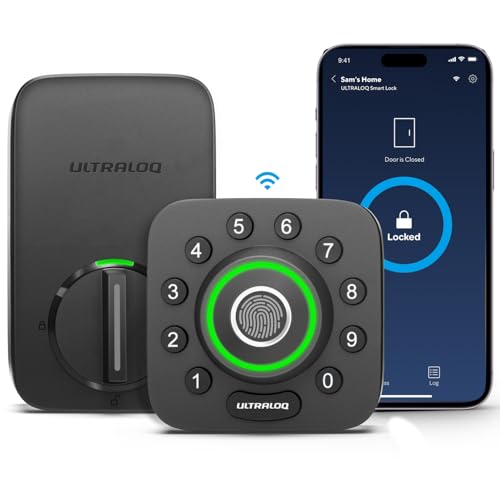
4. ULTRALOQ U-Bolt Pro WiFi with Door Sensor — Best for the most ways to unlock
The U-Bolt Pro WiFi offers eight ways in: an AI-powered fingerprint reader, an anti-peep keypad that lets you enter random digits around your code, smartphone app control, auto unlock as you arrive, eKey sharing, a web portal, voice control through Alexa and Google Assistant, and two ordinary mechanical keys as backup. WiFi is built in and connects directly to a 2.4 GHz network, so no hub is needed for remote access. The included door sensor enables smart auto-lock and can alert you if the door is left open. ULTRALOQ rates the lock to ANSI/BHMA Grade 1, the highest grade, and the exterior unit is IP65 rated against dust and weather. It runs on four AA batteries and installs as a full deadbolt replacement. It suits households that want fingerprint speed with a key backup, and rentals where eKeys and logs are useful.
View ULTRALOQ U-Bolt Pro WiFi with Door Sensor on Amazon

5. Kwikset Halo Wi-Fi Touchscreen Smart Lock (99390-004) — Best for lots of user codes
Kwikset’s Halo Touchscreen connects straight to your home WiFi, so there is no hub to buy, and the Kwikset app lets you lock and unlock remotely, share guest access and review activity history. The backlit touchscreen supports up to 250 access codes, which is generous for a household with family, guests and regular visitors, and codes can be temporary or scheduled. Kwikset’s SmartKey Security lets you re-key the lock yourself in seconds if a key is lost or a tenant moves out, which is a practical advantage few smart locks offer. The maker lists the lock as BHMA Grade AAA certified, with auto-lock and one-touch locking, and the exterior is weather resistant. This is the matte black touchscreen version. It suits households that hand out many codes and want the safety net of instant re-keying, plus a physical key alongside the touchscreen.
View Kwikset Halo Wi-Fi Touchscreen Smart Lock on Amazon
What to Look For
| Factor | Why it matters | What to check |
|---|---|---|
| Entry methods | Keypads, phones, fingerprints and keys suit different households. | List who uses the door and pick the methods they will actually use. |
| Door fit | Door thickness, bore size and backset limit what installs cleanly. | Measure your door and compare it with the stated fit range. |
| Power source | Batteries need upkeep, and a backup entry method matters. | Check battery type, low-power warnings and any emergency option. |
| Connection | Direct network, bridge and short-range links change remote access. | Match the type to your router, hub or voice assistant. |
| Access codes | Guests, cleaners and family may need different codes. | Read how many codes it stores and whether schedules are offered. |
| Finish and weather | Outdoor hardware faces rain, sun and cold. | Look for the maker’s weather notes and finish options. |
Setup and Care Tips
- Check that the door closes properly and the bolt lines up before you install anything.
- Follow the maker steps in order and keep the old hardware until the new lock works.
- Replace batteries on a regular schedule instead of waiting for a warning.
- Wipe the keypad or reader with a soft dry cloth.
- Keep a physical key or backup method somewhere you can reach.
Mistakes to Avoid
- Ordering a lock without measuring the door.
- Using easy codes that others could guess.
- Forgetting to remove old guest codes.
- Ignoring low-battery alerts.
- Skipping the manual about door alignment and weather.
Retrofit Versus Full Replacement Locks
Smart locks generally come in two installation styles, and choosing between them affects cost of effort, appearance and security feel. A retrofit unit replaces only the interior part of your deadbolt, so the outside keyed cylinder and bolt stay as they are. You keep your existing keys, and installation is often simpler because you do not need to change the exterior hardware. A full replacement lock swaps both the inside and outside, often adding a keypad or reader on the exterior.
Retrofit suits renters, people who like their current deadbolt, and households that want to use a phone or voice assistant but keep a familiar key. Full replacement suits people who want an exterior keypad or fingerprint reader and are ready to fit new hardware.
- With a retrofit, confirm that the maker lists your deadbolt brand and type as compatible.
- With a replacement, check the bore, backset and door thickness against the stated ranges.
- Either way, look at whether the turn piece on the inside is easy to operate by hand, since you will still turn it manually at times.
Read the lease or building rules if you rent, because some landlords require that the original lock stays in place or that you can restore it. Keep the removed parts in a labeled bag so you can put everything back when needed.
Connection Types and What They Mean for Remote Access
The way a lock talks to your phone or home network shapes what you can do away from the door. Listings use varied terms, so look for how the maker describes remote control.
- Bluetooth-only: the lock responds to your phone when you are nearby. It uses less power and needs no hub, but you cannot lock or unlock it from far away unless an additional accessory is added.
- Wi-Fi built in: connects directly to your router, so remote access works without extra hardware. This can draw more power from the batteries, and it depends on your network being reliable.
- Hub or bridge based: uses a short-range protocol to talk to a separate device that connects to the internet. It can save battery life and suit larger smart-home setups, but it is another device to power and place.
Think about your needs. If you only want to let in family and guests with codes, a local-only lock may be enough. If you want to check status or let someone in while traveling, you need a remote-capable type. Also check which voice assistants and home platforms the maker lists as supported, since compatibility varies. Consider what happens if the internet goes down: a good design should still work with a code, key or local phone connection, but confirm this in the manual.
Managing Codes and Guest Access Sensibly
One of the main benefits of a smart lock is flexible access, but it needs a plan. Decide who gets a permanent code, who gets a temporary one and how you will remove old ones. Family members and regular helpers may need long-term codes, while visitors, short-term rentals or delivery needs call for time-limited or one-time options if the lock supports them.
- Check the number of codes the lock can store and whether you can set schedules by day and time.
- Look at whether codes can be added or removed from the lock itself, or only through the app.
- See whether the lock keeps an activity log, and how many entries it shows.
- Choose codes that are not birthdays, repeated digits or sequences.
Review your list on a regular schedule, for example when a contractor finishes work or a guest leaves. Share codes through a method you trust, and avoid writing them on or near the door. If the lock has a feature that locks automatically after a delay, read how it works and consider whether it could lock someone out when they step outside briefly. Setting a spare entry method for trusted neighbors or family can help in those moments.
Power, Batteries and Backup Planning
Because a smart lock is powered by batteries, planning for power loss is part of choosing one. Check what type of batteries the lock uses, how many, and how the maker describes typical life. Real life depends on usage, temperature and connection type, so treat any stated figure as the maker’s own estimate and plan for variation. Cold weather in particular can shorten battery life for some types.
Understand the warning system. Does the lock give audible or app alerts, and how early? Setting a reminder to replace batteries on a regular schedule is wiser than waiting for the alert. Keep a spare set where you can reach it without going through the locked door.
- Physical key: some models keep a key cylinder as a backup. Keep a copy with a trusted person or in a safe place away from the door.
- External power contacts: some locks let you touch a battery to terminals on the outside to wake the keypad temporarily.
- Mechanical override: check what the manual describes for stuck or misaligned situations.
Test your backup method before you need it, with the door open, so you know it works and how it feels.
Security Habits, Questions to Ask and When to Replace
A lock is only part of home security, so combine it with good habits. Keep the phone app and lock firmware updated according to the maker’s instructions, use a strong, unique password for the account, and enable any extra sign-in protection offered. Avoid sharing your login with others, and use the guest code features instead.
Before buying, ask:
- Does the lock fit my door thickness, bore and backset?
- Which entry methods does it offer, and will everyone in my home use them?
- Does it work if the internet or the app is unavailable?
- How are firmware updates delivered?
- What is the return policy if it does not align with my door?
Budget tiers, described qualitatively, tend to track build and features: simpler models focus on basic keypad or phone entry, mid-range models add more entry methods and connection options, and higher-end models may add heavier hardware or integrated readers. Check any claims about ratings or certifications on the maker’s page and read them as their own statements.
Replace or service the lock if the bolt drags or sticks even after the door is aligned, the keypad becomes unresponsive, the motor sounds strained, batteries drain unusually fast, or the maker stops supporting the app you rely on.
Will It Fit Your Door? A Compatibility Walkthrough
Most smart lock disappointment traces back to the door, not the lock. Before you order, spend a few minutes inspecting what you already have.
- Check whether the door has a single-cylinder deadbolt, meaning a key on the outside and a thumb turn on the inside, or a double-cylinder with keys on both sides.
- Measure the door thickness and the diameter of the cross bore, the large hole through which the lock passes.
- Look at the backset, which is the distance from the door edge to the center of that hole.
- Check the thumb turn space on the inside, since retrofit units often clamp onto the existing hardware.
- Confirm whether the strike plate lines up well. A door that sticks in humid weather will strain any motor.
Full replacement locks swap the whole deadbolt, whereas retrofit models keep your exterior hardware and replace only the interior side. Pick based on how you feel about your current keys and finish.
Ways to Unlock: Weighing the Options
| Method | Good for | Consider |
|---|---|---|
| Keypad codes | Guests, cleaners and children | Wear on buttons over time |
| Phone app or Bluetooth | Hands-free entry | Depends on the phone’s battery |
| Fingerprint | Quick personal access | Wet or dirty fingers can fail |
| Physical key backup | Emergency use | Keep a spare somewhere safe |
Batteries, Connectivity and Keeping Control
Know what powers the lock and how it warns you when charge runs low, and always keep a plan for entering if the batteries die, such as a key override or an external terminal that accepts a temporary power source. Understand the connection type: Bluetooth works at close range, while Wi-Fi or a hub provides remote control. Read the maker’s guidance on firmware updates and account security, use a strong unique password, and remove access codes for people who no longer need them. If your door lock is part of a rental or a condominium, ask the landlord or the board before swapping hardware.
Handling Guests, Family and Daily Routines
A smart lock earns its place when it fits the way people actually come and go. Set up individual codes for each family member, so you can tell who arrived and remove one person without disturbing the rest. Offer temporary codes with set opening and closing times for dog walkers, cleaners or visiting relatives, if the system supports scheduling. Auto-lock timers are handy but can lock someone out while carrying groceries, so choose a delay you are comfortable with. Walk through a few real scenarios before you rely on it: arriving with full hands, leaving at night and a power cut on a cold evening.
Matching Smart locks to Real Life: Four Situations Buyers Describe Most
Most disappointment with smart locks does not come from a bad product. It comes from a good product bought for the wrong job, the wrong room or the wrong routine. The picks above were chosen for different strengths, and the clearest way to choose between them is to start with the situation that sounds most like yours, then check the details of that pick against your own space, habits and expectations. Work through the four situations below honestly, because the best smart lock for a neighbour, a colleague or an online reviewer may be a poor match for the way you actually live.
A family home with children coming home alone
For this kind of use, individual codes you can change easily, plus a reliable auto lock, give independence without handing out keys that can be lost or copied. Think about who else is involved, how often the smart lock will be used each week, and what happens on the busiest or worst day rather than the best one. A choice that copes gracefully with the awkward day, the guest, the bad weather or the rushed morning is worth more than a choice that only shines in ideal conditions. Compare the picks above with that harder day in mind, and be wary of paying for strengths you will rarely call on while missing a basic that you will need constantly.
A home with regular cleaners or carers
In this situation, time limited or individually named codes let you grant access cleanly and remove it just as cleanly when arrangements change. That starting point changes what you should look for first when you read the pick descriptions above. Instead of comparing every feature in order, begin with the one or two details that decide comfort and success here, and let the rest be secondary. It also helps to picture the second week, not just the first day: routines settle, novelty fades, and the smart lock has to keep earning its place when you are tired, busy or in a hurry. If a pick still looks right under those conditions, it is very likely the right direction.
A rental or holiday let
Here, remote code management and a clear audit trail in the app simplify changeovers, provided the door and local rules suit a smart lock. Buyers in this position often focus on the wrong headline detail and only notice the mismatch once the smart lock is in daily use. A calmer approach is to write down the one outcome you need, the one frustration you want to avoid, and the space or routine the smart lock must fit, then score each pick above against those three lines. The pick that wins on your own list will serve you better than the pick that wins on a generic list, and it will usually be obvious once your priorities are written down.
An older relative’s home
For this kind of use, fingerprint or simple code entry can be easier than a small key, and remote checking gives family quiet reassurance without daily calls. Think about who else is involved, how often the smart lock will be used each week, and what happens on the busiest or worst day rather than the best one. A choice that copes gracefully with the awkward day, the guest, the bad weather or the rushed morning is worth more than a choice that only shines in ideal conditions. Compare the picks above with that harder day in mind, and be wary of paying for strengths you will rarely call on while missing a basic that you will need constantly.
The Details Behind the Details: Reading Smart lock Listings Like an Owner
The main buying guide above introduces the criteria that matter for smart locks. This section slows down and looks at how to judge each one from a listing, a box and a first week of ownership, without needing specialist knowledge. None of these checks requires special tools. They require attention, a tape measure where size is involved, and a willingness to believe your own measurements and routines over attractive presentation.
Retrofit or full replacement for your door
What this means in practice: keeping your existing deadbolt and exterior look suits some doors and rentals, while a full replacement gives a keypad and a fresh mechanism in one unit. When you read a listing, look for this point described in plain, specific language rather than in slogans, and compare how each pick above presents it. If two picks look similar overall, this is often the factor that should break the tie, because it is the one you will feel every single time you use the smart lock. After purchase, it is also the first thing to check during any return window: if this detail is wrong for you, the rest of the product rarely makes up for it.
Ways to unlock that suit everyone
Put simply, codes, fingerprints, phones and a physical key backup each help different people, so list who comes and goes before you rank features. A useful habit is to separate what the maker states from what the maker implies. Stated details can be compared between the picks above; implied promises cannot. Ask what evidence the listing gives, what it leaves vague, and whether the vague part happens to be the part you care about most. Owners who do this before ordering tend to keep their smart lock for years, while buyers who skim this factor are the ones writing frustrated comments a month later.
Connectivity and remote access needs
The short version: decide whether you truly need to lock, unlock and check status from away, because that choice drives the connection type and battery use. This factor also interacts with the others, so avoid judging it in isolation: a strong showing here can compensate for a modest showing elsewhere, and a weakness here can undermine an otherwise excellent smart lock. As you read the individual pick reviews above, keep this criterion in mind and notice which picks the guide itself associates with it. That pattern is deliberate, and following it is the fastest route to a shortlist of one or two.
Door fit, thickness and handing
What this means in practice: measure the door, backset and existing holes carefully, because most fitting frustration comes from a lock meeting a door it was never sized for. When you read a listing, look for this point described in plain, specific language rather than in slogans, and compare how each pick above presents it. If two picks look similar overall, this is often the factor that should break the tie, because it is the one you will feel every single time you use the smart lock. After purchase, it is also the first thing to check during any return window: if this detail is wrong for you, the rest of the product rarely makes up for it.
Living With Your Smart lock: Setup, Everyday Use and Care in Practice
A calm first setup
The best first session with any smart lock is a slow one. Begin by measuring and photographing the existing deadbolt, fitting the lock with the door open, calibrating the throw, and testing every unlock method before the door is closed on it. Resist the urge to judge the purchase in the first ten minutes, because most smart locks feel unfamiliar before they feel right, and many early complaints are really setup details that take minutes to correct. Keep the packaging and paperwork until you have lived with the result for a few days, and make notes on anything you adjust, so you can return to a setting or arrangement that worked instead of rediscovering it later.
The daily routine that makes it feel effortless
Ownership settles down once a small routine forms. For smart locks, that routine is checking the app status as part of locking up, keeping codes private to each person, and acting on low battery warnings the week they appear. None of this takes long, and that is the point: thirty seconds of attention at the right moment prevents most of the problems that owners later blame on the product. Households share these habits best when they are simple and visible, so agree the routine with anyone else who uses the smart lock, and keep any needed accessories within reach of the place where the routine happens.
Cleaning without damaging anything
Cleaning is where good intentions most often cause harm, usually through water, sprays or force in the wrong place. The safe pattern here is wiping the keypad or fingerprint area with a soft dry cloth, keeping liquids and abrasive cleaners away, and checking the strike and latch for smooth engagement. Always follow the maker instructions for your specific model where they differ, because materials and constructions vary across the picks above. Little and often beats a rare, aggressive deep clean: grime, dust and residue are easy to shift when they are fresh and stubborn once they have been left through a season of use.
Storage and the quiet months
How a smart lock is stored decides how it greets you next season or after a break. Good practice is keeping the physical backup keys in two sensible, separate places and the fitting tools and spare screws together in a labelled box. Before storing, give everything a final check for damage, looseness or wear that will be easier to sort now than later, and make a short note of anything that needs replacing. That note, kept with the smart lock, turns the next setup from an inspection into a simple, confident start.
Accessories worth considering, and those to skip
Useful additions around smart locks include spare batteries in the correct size, a spare strike plate where offered, and a simple door alignment check before blaming the lock for sticking. Buy accessories to solve a problem you have actually met, in the order you meet it, rather than collecting every add on at the point of purchase. Equally, skip accessories that duplicate what your chosen pick already includes, that only suit a different model, or that promise to fix a mismatch that should really be solved by choosing a different pick in the first place.
Head to Head: How the Picks in This Guide Differ in Practice
Readers often ask for a single winner, but the honest answer is that each pick above was included for a different reader. This comparison uses only the roles the guide itself gives each product, and translates those roles into the question you should ask before ordering. If your answer points at the same pick from several angles, you have found your match. If it points at two, use the criteria section above to break the tie.
Consider Schlage Encode Plus Smart WiFi Deadbolt (BE499WB CEN 622), described above as best overall, when that role is your deciding factor. Before ordering, re-read its individual review with your measurements, your routine and your household in mind, and check the parts of the listing that confirm the details the guide highlights. If those checks pass, this is a confident choice; if they raise doubts, the guide gives you alternatives in the same category rather than leaving you to start the search again.
Yale Assure Lock 2 Touch with Wi-Fi (YRD450-F-WF1-BSP) is presented in this guide as best for fingerprint entry. Choose this direction if that description matches the outcome you wrote down earlier, and if the details of the review above line up with your space, routine and expectations. Look elsewhere in the list if your priority is different, not because this pick falls short, but because another pick was included precisely for readers whose needs point the other way. That distinction, fit rather than rank, is the most reliable way to use a guide like this one.
August Wi-Fi Smart Lock, 4th Generation (AUG-SL05-M01-G01) earns its place here as best retrofit for existing deadbolts. It will suit you best when that strength is the one your situation demands most, and when any trade offs described in its review are ones you can accept without thinking about them weekly. If you find yourself hoping the review said something different about a basic point, take that as useful information and move your attention to the pick whose stated role already matches what you were hoping for.
Consider ULTRALOQ U-Bolt Pro WiFi with Door Sensor, described above as best for the most ways to unlock, when that role is your deciding factor. Before ordering, re-read its individual review with your measurements, your routine and your household in mind, and check the parts of the listing that confirm the details the guide highlights. If those checks pass, this is a confident choice; if they raise doubts, the guide gives you alternatives in the same category rather than leaving you to start the search again.
Kwikset Halo Wi-Fi Touchscreen Smart Lock (99390-004) is presented in this guide as best for lots of user codes. Choose this direction if that description matches the outcome you wrote down earlier, and if the details of the review above line up with your space, routine and expectations. Look elsewhere in the list if your priority is different, not because this pick falls short, but because another pick was included precisely for readers whose needs point the other way. That distinction, fit rather than rank, is the most reliable way to use a guide like this one.
Planning the Purchase: Timing, Checks and Total Cost of Ownership
The purchase itself is only the first commitment. Owning smart locks well involves consumables, wear parts, occasional accessories and, above all, your own time, so think about the whole period you expect to keep the smart lock rather than the day it arrives. None of this needs a spreadsheet. It needs a realistic look at how often you will use it, what will need replacing or refilling, and whether those items are easy to find for the model you choose. A pick that is simple to maintain and easy to source parts for will usually cost you less effort over its life than a pick that is marginally more impressive on day one.
Timing deserves a thought as well. Measure and prepare before you order, not after a box is sitting in the hall, and avoid buying in a rush the night before the event, trip, season or project that depends on it, because rushed buyers skip exactly the checks that prevent returns. If you are buying as a gift, keep the receipt route simple, favour the pick whose stated role is the most versatile, and remember that fit, size and personal routine matter more with smart locks than with most purchases, so an easy exchange is part of a thoughtful gift.
Finally, do a last, deliberate pass before you confirm an order. Re-read the one pick review that matters, confirm the size, shape, fitting or compatibility detail that applies to your home, check what is included in the box against what you assumed, and confirm the delivery and returns arrangements while they are still easy to change. That five minute pass is unglamorous, and it is also the difference between the confident owners and the disappointed ones in almost every category, including this one.
When Something Feels Wrong: A Troubleshooting Mindset
Most problems with smart locks announce themselves small: a change in feel, sound, fit or result that was not there in the first weeks. Treat that change as information rather than as a verdict on the whole purchase. Work from the simplest explanations first, because setup drift, wear, dirt, batteries, connections and environment explain far more cases than genuine faults do. Change one thing at a time, test honestly, and give the change a fair chance before moving to the next possibility, otherwise you will never know what actually helped.
Keep a few notes as you go, even if they are only dates and a line each in your phone. A short record of when a problem started, what changed around the same time and what you tried turns a vague frustration into a pattern you, a maker support team or a repairer can act on. And know the point at which to stop troubleshooting: anything involving damaged electrics, structural parts, safety features or a problem that keeps returning after the maker guidance has been followed belongs with the maker, a qualified professional or a replacement, not with another evening of hopeful adjustment.
FAQ
Will a smart lock fit my existing door?
Most makers list the door thickness, bore size and backset they support. Measure your door and compare each figure before you buy.
What happens if the batteries run out?
Makers describe their own backup options, such as a physical key slot or an outside power contact. Check that the model you choose offers one and keep the needed item within reach.
Can I install a smart lock myself?
Many are designed for do-it-yourself installation with basic tools, and the maker usually provides step-by-step instructions. If your door needs drilling or alignment, you may prefer help from a locksmith or handy person.
Do smart locks work during a power outage?
Because they run on batteries, most keep working when household power fails. Remote features that depend on your router may not work, so know your local entry methods.
Will my existing keys still work?
With retrofit models that keep the exterior cylinder, usually yes. Full replacement locks may come with new keys, so check the listing.
What if I lose my phone?
Use a code, key or other entry method as your backup, and use the account tools to remove the lost phone's access if the system allows it.
How many codes can a smart lock hold?
It varies by model, so read the listed capacity. Think about family, helpers and guests, and plan to delete old codes regularly.
Can a smart lock be used on a glass or sliding door?
Most are made for standard hinged doors with a deadbolt bore. For other door types, look for products the maker specifically lists for them.
Does a smart lock work with voice assistants?
Many list supported platforms, but compatibility differs. Check the listing for your assistant and note whether some functions, such as unlocking by voice, are limited by design.
What happens if the batteries run out?
Most locks warn well in advance and offer a backup route such as a physical key or emergency power contacts, so learn your model method before you ever need it. This is one of the questions owners most often wish they had asked earlier, because the answer shapes daily satisfaction with a smart lock far more than most headline features do. Read the relevant pick reviews above with this question in mind, and let the answer steer you between picks rather than trying to make one pick fit every situation.
Can a smart lock be hacked through the app?
Use a strong account password, two factor sign in where offered and prompt updates, because account hygiene protects a connected lock far more than any single feature claim. As with most questions about smart locks, the details of your own home and routine decide the final answer, so use this as the starting point and then check the specific guidance for the pick you are considering. If the question matters enough to affect the purchase, it is worth resolving before you order rather than discovering the answer afterwards.
Will a smart lock fit my existing door holes?
Many are designed around common deadbolt spacing, but you should measure your door thickness, backset and hole sizes against the maker template before ordering. This is one of the questions owners most often wish they had asked earlier, because the answer shapes daily satisfaction with a smart lock far more than most headline features do. Read the relevant pick reviews above with this question in mind, and let the answer steer you between picks rather than trying to make one pick fit every situation.
Should I use auto lock?
Auto lock suits most households because it removes the forgotten door problem, though you should set a delay that gives people time to get in with bags and children. As with most questions about smart locks, the details of your own home and routine decide the final answer, so use this as the starting point and then check the specific guidance for the pick you are considering. If the question matters enough to affect the purchase, it is worth resolving before you order rather than discovering the answer afterwards.
Can I still use a normal key?
Most full replacement locks keep a key cylinder and retrofit models keep your existing one, which is reassuring for guests, power cuts and the early weeks of ownership. This is one of the questions owners most often wish they had asked earlier, because the answer shapes daily satisfaction with a smart lock far more than most headline features do. Read the relevant pick reviews above with this question in mind, and let the answer steer you between picks rather than trying to make one pick fit every situation.
The Short Version
Pick a smart lock by entry methods, door fit, power source, connection and code features. Measure first, read the manual and keep a backup way in.
Related Guides
- How to Choose the Best Fingerprint Door Locks: A Buyer's Guide
- How to Choose the Best Keypad Door Locks: Buyer's Guide (2026)
- How to Choose the Best Sliding Door Locks: Buyer's Guide (2026)
- How to Choose the Best Smart Air Purifiers: Buyer's Guide (2026)
- How to Choose the Best Smart Blinds: Buyer's Guide (2026)