A selfie light is a small LED panel or ring that clips onto a phone, tablet, laptop or monitor to put soft light on your face. It helps with video calls, makeup checks and quick vlogs when the room light is dim or comes from behind you.
The six lights below range from a corded USB panel with no battery to a magnetic Godox light that doubles as a power bank. LED counts, color modes and power details come from each listing page. We have not used these lights ourselves, and brightness and color claims are the makers’ own.
As an Amazon Associate we earn from qualifying purchases. Links below are affiliate links, and they do not change the product information we give.

What to Look For
| Feature | Why it matters |
|---|---|
| Color modes | Warm, neutral and cool settings suit different rooms and skin tones |
| Brightness steps | More steps make it easier to avoid glare on screens and glasses |
| Power | Built-in battery, corded USB or a magnetic power bank change how you use it |
| Clip or mount | Clip width and padding decide what it can attach to |
In this guide
Specs at a Glance
| Light | LEDs and modes | Power | Notes |
|---|---|---|---|
| Meluha GL-01 | 3 modes (3000K, 4500K, 6500K); 10 levels | Rechargeable; 2000 mAh listed | Digital display; silicone pad clip |
| Kimwood RL15 | 60 LEDs; 3 modes; 5 levels | 600 mAh; about 2.5 hours listed | 1.38 inch clip; 3 ft USB cable |
| Newmowa | 60 LEDs; 3 modes; 10 levels | Micro USB and Type-C input | Front and back clips; 150 g |
| Ulanzi VL100X | 100 LEDs; 2500K to 6500K; CRI 95+ | 2000 mAh; Type-C | 900 lux max; soft light board; cold shoe mounts; 150 g |
| Meluha GL-02 | 3 modes; 10 levels | Corded USB 5V; no battery | Inline controller; padded clip for monitors |
| Godox Ma5r-140 | 140 LEDs; 1800K to 10000K; RGB | 4900 mAh; also a power bank | Magnetic; CRI 96+; app and button control |
The 6 Best Selfie Lights

Top pickBest for video calls and quick selfies
1. Meluha GL-01 Rechargeable Clip-On Selfie Light
A rechargeable clip-on light with three color temperatures (3000K, 4500K and 6500K), ten brightness levels from 10 to 100 percent and a digital display. The maker lists a spring-loaded clip with a silicone pad, a tilt adjustment and a 2000 mAh battery, and says it fits phones, tablets and laptops.
Suits: video calls and quick selfies. Strengths: a digital display and ten levels. Weaknesses: the LED count is not given on the page. Skip it if you need a stand or a tripod mount.


Best for a small light for a bag
2. Kimwood 60 LED Clip on Ring Light
A ring-style clip light with 60 LEDs, three light modes (cold, natural and warm) and five brightness levels. The maker lists a 600 mAh battery with about 2.5 hours of use, a 1.38 inch clip for phones, tablets, laptops and makeup mirrors, and a 3 ft USB cable for charging while in use.
Suits: a small light for a bag. Strengths: a ring shape and charging while in use. Weaknesses: only five levels and a small battery. Skip it if you want long runtime.

Best for front and rear camera use
3. Newmowa 60 LED Clip Fill Light
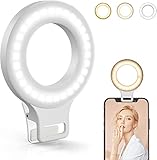
A 60 LED clip light with both a front clip and a back clip, listed at 150 grams. The front clip tilts 90 degrees and has a hole for the phone lens, while the back clip puts the light behind the phone for the rear camera. It lists three light modes, ten brightness levels and charging by micro USB or Type-C, but the page does not give a battery size.
Suits: front and rear camera use. Strengths: two clip positions. Weaknesses: no battery capacity listed. Skip it if you want the runtime spelled out.

View Newmowa 60 LED High Power Rechargeable Clip Fill Video Conference Light on Amazon
Best for vlogs and camera use
4. Ulanzi VL100X Selfie Light
A clip-on panel with 100 LEDs, CRI of 95 or more, a color range of 2500K to 6500K adjusted with a scroll wheel, and brightness up to 900 lux. It has a soft light board, a 2000 mAh battery with Type-C charging (about 3 hours to charge, 120 minutes at full output), a 2 cm maximum clip width, cold shoe mounts and a weight of 150 grams.
Suits: vlogs and camera use. Strengths: 100 LEDs and cold shoe mounts. Weaknesses: the clip opens only 2 cm. Skip it if you want to clip it on a thick monitor.
View Ulanzi VL100X Selfie Light, Mini Clip LED Light Panel for Phone Bi-Color on Amazon
Best for desk calls and streaming
5. Meluha GL-02 Corded USB Clip-On Light
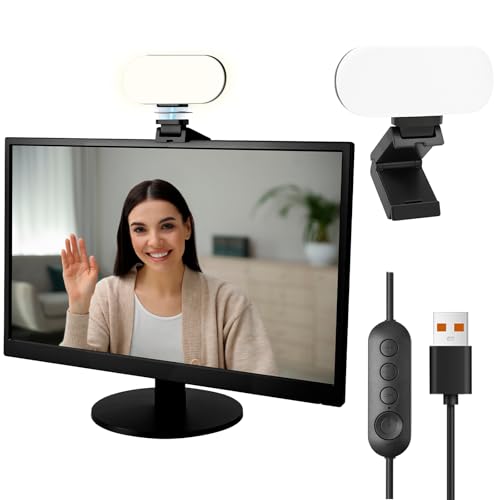
A corded clip-on panel for phones, thin laptops and thick desktop monitors, with Warm (3000K), Neutral (4500K) and Cool White (6500K) modes and ten brightness steps. The maker says it has no built-in battery: connect the USB cable to a laptop, PC, power bank or 5V adapter, and use the inline controller for power, color and brightness.
Suits: desk calls and streaming. Strengths: no battery to charge and a padded clip for monitors. Weaknesses: needs a cable. Skip it if you want a cordless light.

Best for creators who want color effects
6. Godox Magnetic Selfie Light with Power Bank (Ma5r-140)
A magnetic phone light with 140 LEDs, a 4900 mAh battery that also works as a power bank when the lights are off, an adjustable range of 1800K to 10000K, CRI of 96 or more and TLCI of 98 or more. The maker lists 360 degree RGB colors with 14 effects, up to 1500 lux, button or app control and a 12 month warranty.
Suits: creators who want color effects. Strengths: a big battery and a wide color range. Weaknesses: the most complex of the six. Skip it if you only need a simple clip light.

View Selfie Phone Light with Magnetic 140 LED Professional Portable and Power bank on Amazon
Using Them Well
- Angle the panel beside the camera so it lights your face without blocking the lens.
- Begin on a warm or neutral mode and raise the brightness a step at a time.
- Keep the clip padding clean so it does not mark a screen or case.
- Charge before a call, or use a corded model on a desk.
Mistakes to Avoid
- Picking by LED count alone and ignoring the clip width.
- Pointing a bright light straight at glasses or a glossy screen.
- Assuming every rechargeable light lists its battery size.
- Buying a magnetic light without checking your phone case.
Matching Color Temperature to Your Room
Color temperature, shown in kelvin, is the single setting that decides whether a selfie light looks natural or fights with everything else in the frame. Lower numbers around 3000K give a warm, yellow-orange cast similar to a household bulb. Numbers near 4500K read as a neutral white, and numbers near 6500K look cool and bluish, close to overcast daylight. A light that offers only a few fixed modes gives you three or so choices, while one with a continuous range lets you fine-tune.
The goal is usually to match the light you already have in the room. If a lamp behind you is warm, a cool panel on your face can make the image look split in two, with a blue face against an amber background. In that case, start on a warm or neutral setting. If you sit near a window in daytime, a cooler setting blends in better. Many video call apps and phone cameras adjust white balance automatically, which can partly hide a mismatch, but the correction is rarely perfect, so it helps to get close at the source.
Skin tone matters too. Very cool light can make skin look pale or gray, and very warm light can make it look flushed. Most people end up happiest in the middle of the range, then nudge warmer in the evening and cooler in the daytime. If you use the light for makeup checks, try to judge color in the same kind of light you will be in when you go out, since makeup that looks right under a cool panel can look different under warm indoor bulbs.
When comparing listings, look at whether the maker states a color range or only names the modes, and whether a color rendering figure such as CRI is given. A higher CRI claim suggests colors may look truer, but it is the maker’s own figure, so treat it as a hint rather than proof.
Checking That the Clip Fits Your Device
A selfie light is only useful if it stays on the thing you clip it to, so fit deserves as much attention as brightness. Start by measuring the thickness of the device at the edge where you plan to attach it. A bare phone is thin, but a phone in a bulky protective case, or a tablet with a folio cover, can be considerably thicker. Laptop lids are usually slim at the top edge, while desktop monitors can be much thicker, especially older models with deep housings. Listings normally give a maximum clip opening, so compare it with your measurement and leave a little margin.
Padding is the second check. Soft silicone or rubber pads grip without scratching, while bare plastic can mark a glossy case or screen bezel. Look for pads on both jaws, and clean them now and then, because dust and skin oils reduce grip. A spring that is too weak lets the light slide or tilt forward, and one that is too strong may press hard on a thin bezel, so read what other buyers say about grip on devices like yours.
Think about weight and balance as well. A light hanging off the top of a phone adds weight to the top edge and can tip a phone that is propped on a soft surface. Some lights use a front clip and a back clip so they can sit behind the phone, and others add mounting points for a camera shoe. Those extras only matter if you plan to use them.
Finally, check where the light sits relative to the camera lens. A panel that blocks the lens, or a ring that does not leave a gap for it, defeats the purpose. Magnetic designs need a compatible back, so confirm with the listing and your case before relying on them.
Battery Runtime and Charging Habits
Selfie lights fall into three power styles: a built-in rechargeable battery, a corded design that draws power from a USB port, and hybrids that can do both or even work as a power bank. Each suits a different routine. A built-in battery gives freedom to move, which helps for travel, commuting or filming in different rooms. A corded light never runs out mid-call, which suits a fixed desk. A hybrid costs you some complexity but covers both cases.
Battery capacity is listed in milliamp-hours, but the number alone does not tell you runtime. Brightness is the biggest factor: a light run at full output drains much faster than the same light at a middle setting. Makers often quote runtime at a particular level, so check which level was used. Where a listing gives a capacity but no runtime, or no capacity at all, ask yourself whether that gap matters for how you will use it.
Good habits extend a battery’s useful life. Avoid leaving it fully drained for long periods, do not leave it charging in a hot car, and use a charger that matches the input listed, since some lights take micro USB while others take Type-C. Keeping the right cable in your bag avoids the common problem of a light that cannot be topped up on the go.
If you spend hours on calls each day, plan to either run the light at a modest brightness or charge it while using it, provided the listing says that is supported. For short selfies and makeup checks, a small battery is usually enough. Charging indicators vary, so consult the manual to learn what the lights on the unit mean.
Placing the Light for Flattering Video
Where you put the light changes the picture more than any specification. Light coming from directly in front and slightly above eye level is generally flattering, because it fills in shadows under the eyes and nose. Light from below tends to look harsh and unnatural, so avoid letting a clipped panel sit lower than your chin. On a laptop, the top of the screen is already a good position, but a laptop that sits low on a desk may need to be raised so the camera and light are near eye level.
Distance matters because light spreads and softens as it travels. A small panel very close to your face creates strong, narrow light with clear shadows. Moving back a little, or turning the brightness down, softens the look. If the manufacturer provides a diffusing cover or soft board, keep it in place, since it spreads the output and reduces glare on skin.
Mixed lighting is the most common problem. A bright window behind you will make the camera expose for the window and leave your face dark, and no small panel can fully beat strong daylight. Turn so that the window is beside or in front of you, then use the clip light to add a gentle fill. Overhead room lights can also add shadows, so try dimming them slightly.
For glasses, angle the light slightly off to one side rather than straight on, and lower the brightness until reflections fade. Test with a short recording before an important call, then watch it back to check color, glare and how the edges of your face look.
Care, Storage and Signs It Is Time to Replace
A clip light is a simple device, and a little care keeps it working. Wipe the front with a soft dry cloth, and use a barely damp one if needed, keeping moisture away from ports and buttons. Do not use harsh solvents on the diffuser, since they can cloud it. Wipe the clip pads too, because grit trapped between a pad and a screen is the usual cause of scratches.
When traveling, store the light where the clip cannot be crushed or the panel scratched, ideally in a small pouch with the cable. Avoid keeping it in extreme heat. If the unit has a hinge or tilt joint, move it gently rather than forcing it past its stop.
There are several signs that a light is due for replacement. Runtime that has fallen sharply compared with when it was new suggests the battery is aging. Flickering, uneven brightness across the panel, or a color that has shifted noticeably can mean failing LEDs or a loose connection. A clip that no longer holds firmly, or pads that have worn smooth, may make the light unsafe to leave on a device. A swollen or hot battery should be treated as a safety issue: stop using it and follow local guidance for electronics disposal.
Before buying a replacement, think about what actually went wrong. If the clip was the problem, look for a wider, better padded one. If runtime was the problem, consider a corded model or one with a larger battery. Matching the new light to the real need avoids repeating the same disappointment.
Selfie Lights FAQ
Which one needs no charging?
The Meluha GL-02 is corded and has no built-in battery. It runs from a USB port or power bank.
Which one lists the biggest battery?
The Godox Ma5r-140 lists 4900 mAh and is also described as a power bank.
Will a clip-on selfie light damage my phone or laptop screen?
It should not if the pads are soft and clean and the clip is the right size for the device. Check the maximum clip opening against the thickness of your device and case. Wipe the pads occasionally, since trapped grit can scratch glossy surfaces.
Is a higher color temperature number warmer or cooler?
Higher numbers are cooler and bluer, and lower numbers are warmer and more orange. Around 3000K is warm, 4500K is neutral and 6500K is cool. Pick the setting that best matches the other lights in your room.
Can I use a clip light with a thick desktop monitor?
Only if the clip opens wide enough. Many clips are designed for phones and thin laptop lids, so check the listed maximum opening against your monitor's thickness. Some corded panels are described as suited to monitors, so read the listing.
How do I reduce glare on my glasses?
Lower the brightness and angle the light slightly to one side instead of pointing it straight at your face. Raising the light a little above eye level can also move reflections out of view. A short test recording will show whether the glare is gone.
Does a bigger battery mean longer use?
Not always, because runtime depends on how bright you set the light and how the unit manages power. A larger capacity usually helps, but the maker's runtime note is more useful if it states the brightness level. When no runtime is given, assume brightness will shorten it.
Do I need a selfie light if I sit near a window?
Daytime window light can be enough if it falls on your face from the front or side. A light behind you works against you. A clip light is helpful in the evening or when the window is behind you.
Can I charge the light while I am using it?
Some models list charging while in use, and corded models are built for it. Others may not allow it, so check the manual. Use the cable and power source the listing recommends.
What a Small Clip Light Can and Cannot Do for Your Face
A clip-on selfie light has one job: to put soft, frontal light on your face when the room has failed to. It does that job by being close. Light from a small source falls off quickly with distance, which is why a modest light clipped to your phone or monitor can transform a video call while a powerful ceiling light across the room cannot. Understanding that closeness is the whole secret explains most buying decisions in this category: brightness figures matter less than where the light sits, how evenly it spreads across your face, and whether its colour agrees with the rest of the light in the room.
What a clip light cannot do is light a scene. It will not brighten a background, rescue a dark room behind you, or replace a window on a bright day. If your background is a dim, cluttered room, the honest fixes are a lamp behind the camera aimed at you plus tidying what the camera sees — the clip light then becomes the finishing touch rather than the whole lighting plan. Photographers and presenters who look consistently good on calls usually run exactly that combination: ambient light for the room, a frontal light for the face, and a background that is either tidy or deliberately plain.
The six lights in this guide approach the job from slightly different angles. The Meluha GL-01 and GL-02 bookend the power question — one rechargeable with a display and many levels, one corded and free of charging forever. The Kimwood and Newmowa 60 LED models represent the mainstream clip fill light, with the Kimwood adding a ring shape that flatters differently. The Ulanzi VL100X brings a photographer’s sensibility to the format, and the Godox Magnetic Selfie Light folds a power bank into the bargain. None of them is the best light in the abstract; each is the best answer to a particular desk, device and routine.
Before comparing them, decide where your light will live. A light that clips to a phone for content on the move faces different demands from one that will spend its life on a monitor for calls: thickness of the device it grips, the angle it can hold, and whether a cable trailing across the desk will annoy you by the third day. The reviews above note clip ranges and mounting styles for each model; match those to your thickest device, not your thinnest, because a clip that cannot open for your monitor or your phone in its case is a light you will stop using.
Colour Temperature: The Setting That Decides Whether You Look Well
Of all the adjustments on these lights, colour temperature changes how you look more than brightness does. Light is described on a scale from warm to cool: warm light resembles lamplight and late sun, cool light resembles overcast daylight. Skin looks healthiest when the light on the face matches the light the camera expects and the light in the rest of the scene. A cool light on your face against a warm room makes you look faintly ill; a warm light in a cool, daylight room makes you look flushed. The mismatch, not either temperature alone, is what viewers notice.
The practical method is to match the dominant light in your space. If you sit in a room lit by warm household bulbs, set the clip light toward its warmer settings. If your room is lit by daylight from a window, set it cooler, toward the daylight end. Change one step at a time and judge on the camera’s image, not by looking at the light itself, because your eyes adapt and lie to you while the camera reports honestly. Most people find their setting within a few tries and then never touch it again — which is fine. Colour temperature is a set-once adjustment for a fixed workspace, and only needs revisiting when you move rooms or the seasons change your window light.
Brightness has its own matching rule: the face should be a little brighter than the background, not dramatically brighter. A face lit like a stage against a dark room looks pasted on, and the camera, exposing for the bright face, will sink the background further. Raise the room’s ambient light a touch, or lower the clip light a step, until you look like a person in a place rather than a head in a void. The multi-level controls on models like the Meluha GL-01 exist for exactly this fine balancing, and the finest steps are the ones you will use most.
One more subtlety: two lights are not always better than one. A clip light plus a window at an angle can model the face pleasantly, but a clip light plus a strong overhead bulb can create competing shadows and a shiny forehead. If you add a clip light to a room that already has strong light, turn the existing light down or reposition yourself so the clip light becomes the main source on your face and everything else plays a supporting role.
Position and Angle: Thirty Seconds That Matter More Than Specifications
Clip the light on, then spend thirty seconds on position before judging it. The light should be roughly at eye level or a little above, close to the camera’s line of sight, so shadows fall behind you rather than across your face. A light clipped low — to the bottom of a laptop screen or a desk edge — lights from below, which is the angle horror films use on purpose. A light far to one side carves one cheek into shadow; that can be a deliberate, characterful look for a stream, but it is rarely what a work call wants.
Distance is the second adjustment. Because a small light’s output falls quickly, moving it even a short way changes its effect a lot. If the light feels harsh, do not only dim it — try moving it slightly further away or angling it so it grazes rather than blasts. Ring-shaped lights such as the Kimwood soften their effect by wrapping the light around the lens axis, which is why they flatter skin and put a pleasing ring reflection in the eyes; panel-style lights give a broader, more even wash that many people prefer for calls because it looks like good room light rather than studio light.
Glasses wearers need one extra manoeuvre. A frontal light will reflect in lenses pointed straight at it. Tilting the light a little higher, or shifting it slightly to one side while keeping it near the camera, usually moves the reflection out of the lenses without wrecking the evenness on the face. Raise your chin a fraction as well; small angle changes at the face are as powerful as moving the light, and quicker.
Finally, check yourself the way others will see you: in the actual app, at the actual size. A face that looks fine in a large preview can look overexposed in a small call window, and the camera settings of different apps vary. Do your positioning once, in your main app, and write nothing down — your muscles will remember where the light goes, and the setup will take seconds thereafter.
Power Habits: Batteries, Cables and Never Being Caught Dark
The rechargeable-versus-corded question is really a question about your habits. A rechargeable light such as the Meluha GL-01 or the Newmowa is free to move — phone today, laptop tomorrow, a mirror for makeup, a shelf for a product shot — but it joins the list of things that can be flat when needed. The defence is routine: charge it where you charge your phone, or top it up after long sessions, and treat a low-battery warning as a same-day job. The display on some models earns its place here, because knowing the state of the battery beats guessing.
A corded light such as the Meluha GL-02 makes the opposite bargain: it will never be flat, it will never need a charging slot in your evening, and it will work at full brightness indefinitely — but it lives where its cable reaches. For a fixed desk setup that is no bargain at all, just a good arrangement; for a creator who films in five places a day, it is a tether that will be resented by Friday. The Godox model’s power-bank function adds a third pattern: the light that can also rescue your phone, useful for travel and long shooting days away from sockets, at the cost of size and of one more device whose charge state matters.
Runtime figures in listings are best read as comparisons between models rather than promises about your day, because brightness setting dominates everything: a light run at a gentle level for calls lasts far longer than the same light at full power for filming. If your sessions are long, plan around the setting you actually use, keep a charging cable within reach of your desk even for a rechargeable light, and — for calls that truly matter — have the room light as a fallback so a flat battery degrades your picture instead of ending it.
Whichever power style you choose, keep the cable that belongs to the light with the light. Small lights are lost to the wrong-cable drawer more often than to any failure of their own, and a light that cannot be charged because its lead has wandered is, for practical purposes, a broken light.
More Questions About Selfie Lights
Can a clip light help with photographs, not just video?
Yes. For close portraits and selfies it works as a small, soft flash substitute that is easier to judge because you can see its effect before you shoot. It is also handy for photographing small objects, documents and details indoors, where its even, frontal light fills shadows. For anything further than arm’s length or so, its light fades quickly and a larger source will serve better.
How do I stop my skin looking shiny under a clip light?
Shine is usually a position problem before it is a brightness problem. Raise the light slightly and angle it down a little so the forehead’s reflection bounces away from the lens, lower the brightness a step, and move the light a touch further off if you can. A light that is larger or ring-shaped spreads its reflection thinner, which is why ring designs are kind to skin. Blotting your forehead before an important call is not vanity; it is lighting technique.
Will a clip light work on a tablet or a thick-cased phone?
It depends on the clip’s opening range and the depth of your device with its case on. Measure the total thickness the clip must grip and compare it with the range in the listing. A clip stretched to its limit grips weakly and can slide mid-call; if your main device is thick, favour a model whose clip range covers it comfortably rather than barely.
Is it safe to leave a rechargeable light charging overnight?
Follow the maker’s guidance for your model, charge on a hard surface away from bedding and papers, and use the cable supplied or a reputable equivalent. As with any small rechargeable device, stop using a light whose body is swelling, cracking or getting unusually hot, and replace it rather than nursing it along.
Do I need a ring light on a stand instead?
Only if your filming regularly frames more than your head and shoulders, or if you need the light further from the camera than a clip allows. For calls, streaming from a desk and phone content, a clip light covers the need with far less furniture. Creators who film full-body or room-scale content will outgrow a clip; everyone else usually finds the clip is the setup they actually use, because it is the one that takes ten seconds.
A Small Light, Used Well, Beats a Big Light Used Rarely
The pattern across all six lights in this guide is that the winner is the one that fits your device, your room and your routine. Match the colour to your space, position the light at eye level near the camera, balance its brightness against the room, and keep it charged or corded according to its kind. Do those four things and a modest clip light will make you look like someone who cares about how they appear — which, on a call or a stream, is most of what lighting was ever for.
Selfie Lights Beyond the Desk: Travel, Content and Family Calls
The clip light’s portability opens uses its desk-bound reputation hides. Travellers who work from hotel rooms meet the worst lighting in the world — a single warm ceiling light and a mirror over the sink — and a clip light in the wash bag turns any of those rooms into a passable studio in a minute. Because it is small, it also survives being carried daily in a way a ring light on a stand never will; the best travel light, like the best travel camera, is the one that is actually in the bag.
Content creators use these lights differently from callers: the light moves with the phone, so the face stays lit while walking a hallway, filming in a car, or showing a product at a market stall. For that work, grip security and weight matter more than fine colour steps, and a light that can be operated one-handed — switched on, brightened, dimmed without a menu dive — is worth more than a technically superior light that needs two hands and your full attention. Test any candidate one-handed before deciding it is your content light.
Family calls are the third quiet use. A clip light on a tablet makes grandparents visible and grandchildren patient, because faces that can be seen clearly hold attention better than voices from a murk. If you are buying for a relative, choose simplicity over features: a light with few buttons, obvious charging and a clip that fits their device without force. Set it up for them once, at their table, in their room’s light, and it will be used for years; hand it over in its box and it may never be used at all.
Across all these uses the same truth holds: a clip light succeeds when it disappears into a routine. The moment using it becomes a project — finding it, charging it, clipping it, adjusting it — it starts being left behind. Keep yours where it is used, charged in the place it sleeps, and it will be used so automatically that you will only notice it on the day you forget it and see your own dim face in the corner of the screen.
When the Picture Still Looks Wrong: A Short Diagnostic
If you have a decent clip light and still look wrong on camera, work through the usual suspects in order. First, the window behind you: a bright background makes the camera expose for the window and turn you into a silhouette, and no frontal light fully wins that fight — close the curtain or turn so the window lights you instead of competing with you. Second, the overhead light: switch it off for a test frame and see whether the shadows under your eyes and nose soften; if they do, your clip light was fighting it, and the room light should be dimmed, moved or abandoned during calls.
Third, the camera’s own settings and cleanliness. A smeared laptop lens softens and glares under any light; wipe it. An app applying an aggressive beauty filter or an exposure lock left over from a previous scene can defeat good lighting entirely; restart the app and let it judge the scene afresh. Fourth, your distance from the camera: sitting very close exaggerates the light’s falloff across your face, while a little more distance evens everything out and flatters most faces.
Only after those four should you suspect the light itself. If the colour cannot be matched to your room at any setting, if the clip will not hold your device, or if the battery no longer lasts a working session, the light has reached the end of its usefulness for you — and the sections above will help you choose its successor by the qualities that actually failed, rather than by the longest feature list.
Setting up a second light without spoiling the first
Some presenters eventually add a second small light — one for the face, one to lift the background or add a gentle edge. Done well, this separates you from the room and looks quietly professional; done carelessly, it produces two sets of shadows and a face lit like an interrogation. The rules are simple. Keep the clip light as the main source and the second light clearly weaker. Aim the second at the background or at your shoulder and hair from the side, never straight at your face from a second angle. Match its colour to the first light and to the room, because a warm edge against a cool face looks like a mistake rather than a style. And add it only when the single-light picture already looks good; a second light is a refinement of a working setup, not a rescue for a broken one. Streamers and teachers who record daily benefit most from this small upgrade, precisely because their single-light setup is already a habit and the addition has something solid to build on.
One last habit separates people who look consistently good from people who look good occasionally: they check the picture before the call starts, not after it begins. Thirty seconds in the app’s preview — light on, angle set, background glance — is the whole routine. It feels fussy the first week and automatic ever after, and it is the cheapest production value in all of video: the appearance of someone who prepared, delivered by a light that cost less than the chair you are sitting on.
Store the light clipped to the device it serves, or in the same spot on the desk every night, rather than in a drawer of cables and adapters. Small lights are rarely broken and frequently mislaid, and a light with a fixed home is a light that is present for the unscheduled call, the quick recording and the sudden interview — the moments when there is no time to go hunting and the difference between looking ready and looking caught out is decided in seconds.
If you present to the same audience regularly, consistency itself becomes part of your credibility: the same framing, the same light, the same background, session after session. A clip light, precisely because it is small and repeatable, is one of the easiest tools for achieving that consistency — it returns to the same place on the same device and gives the same result, which is more than can be said for daylight, ceiling lights or good intentions.
Teach the setup to anyone who shares your space or your device. A partner who knows which button, which setting and which clip position produces the good picture will restore it after borrowing the desk, instead of leaving the light dimmed, angled at the ceiling and set to its coolest colour for your next call.
The Short Version
For a display and ten levels, the Meluha GL-01. For a ring shape, the Kimwood. For front and back clips, the Newmowa. For 100 LEDs and cold shoes, the Ulanzi VL100X. For desk calls without a battery, the Meluha GL-02. For color effects and a power bank, the Godox.