A gaming desk is a work surface built around a computer, a few monitors and a pile of cables. Shapes include straight, L-shaped and corner models, and many add cable trays, headset hooks or lighting strips. The goal of this guide is to help you compare desks by what they are built from and how they fit.
We have not used these products ourselves, so we do not make claims about how a desk holds up over time. Instead we focus on dimensions and features you can check on a listing. Measure the room, count your monitors, and note the gear that must sit on the surface, then go through the checklist below.
As an Amazon Associate we earn from qualifying purchases. Links on this site are affiliate links, and they do not change the information we give.
In this guide
Quick Picks
| Pick | Product | Best For |
|---|---|---|
| 1 | EUREKA ERGONOMIC Z60 Gaming Desk 60 Inch | Dual-monitor setups |
| 2 | Arozzi Arena Gaming Desk 63 x 32 Inch | Full-surface mouse pad |
| 3 | EUREKA ERGONOMIC L60 L-Shaped Gaming Desk 60 Inch | L-shaped corner setups |
| 4 | SEVEN WARRIOR Gaming Desk 55 Inch | Built-in power outlets and LED light |
| 5 | Mr IRONSTONE L-Shaped Gaming Desk 51 Inch | Compact corner desk |
Our Picks
1. EUREKA ERGONOMIC Z60 Gaming Desk 60 Inch — Best for dual-monitor setups
The Z60 gives a straight desk the full 60 inches of width, with a desktop about 23 inches deep at a fixed 30-inch height, so two monitors can sit side by side with room left for speakers and a keyboard. The top has a carbon-fiber texture with a melamine finish, and a large 31.5 by 23.6 inch mouse pad is included to cover most of the working area. The Z-shaped frame is alloy steel, and the maker rates the desk for loads up to 500 pounds, so heavy monitor arms and a full tower sit within the stated limits. RGB LED strips run along the edges of the desktop with several color options. Two things to check before choosing it: the desktop comes in two pieces, so there is a visible seam down the middle, and the height is fixed, so compare the 30-inch height with your chair and arm position first.
View EUREKA ERGONOMIC Z60 Gaming Desk on Amazon
2. Arozzi Arena Gaming Desk 63 x 32 Inch — Best for a full-surface mouse pad
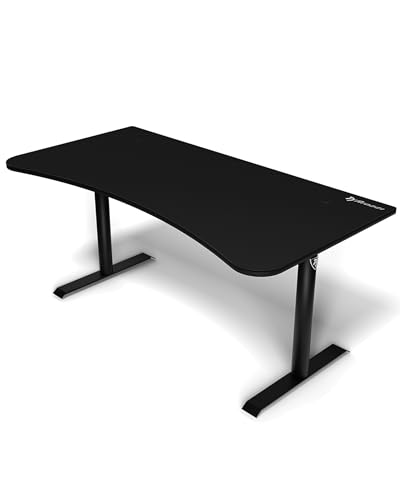
The Arena is the widest and deepest desk in this list at 63 inches across and 32 inches deep, dimensions aimed at triple-monitor setups. Instead of a bare top, the whole surface is covered by a thick microfiber mat that is water resistant and can be removed and washed, which suits players who use low mouse sensitivity and sweep across the whole desk. Three cutouts in the top route cables into a net slung underneath, keeping the surface clear in line with the cable checks in the guide above. The steel legs adjust manually over a small height range with screws, so it is a set-once adjustment rather than a standing desk. Arozzi rates the load capacity at 176 pounds (80 kg) spread evenly, and the front edge is curved for wrist comfort. The top is built from three MDF sections, so take care aligning them during assembly.
View Arozzi Arena Gaming Desk on Amazon
3. EUREKA ERGONOMIC L60 L-Shaped Gaming Desk 60 Inch — Best L-shaped for corner setups
The L60 wraps a 60-inch main run and a return into an L shape that measures about 60 by 43 inches overall, adding a second surface for a console, a laptop or paperwork without taking width away from the monitor area. The carbon-fiber textured top sits at a fixed 30-inch height, and a mouse pad for the main section is included. Cable handling is built in, with two covered grommet holes and a holder under the desk for a power strip, which matches the guide’s advice about keeping cables off the floor and away from chair wheels. This listing has the return on the left side, so sketch your room first and check the variant if your corner needs the return on the right. The frame is steel with a laminate-style top, so keep drinks away from the seams and edges as the care notes suggest.
View EUREKA ERGONOMIC L60 L-Shaped Gaming Desk on Amazon
4. SEVEN WARRIOR Gaming Desk 55 Inch — Best with built-in power outlets
This 55-inch straight desk builds the extras into the frame: an LED light strip, power outlets at the desktop and a raised monitor stand, so chargers and a power strip do not have to compete for surface space. The desktop is 55 inches wide by 23.6 inches deep with a carbon-fiber textured surface, and a full-desk mouse pad is included. The legs are Y-shaped steel, the monitor stand lifts the screen so the space under it stays usable, and a headphone hook keeps a headset off the top. The height is fixed at about 29 inches, so it suits seated play rather than standing work. Because so much is wired into the desk, plan the cable route to your wall outlet before assembly, and check the listing’s outlet and USB layout against the plugs and chargers you actually use every day.
View SEVEN WARRIOR Gaming Desk 55 Inch on Amazon

5. Mr IRONSTONE L-Shaped Gaming Desk 51 Inch — Best compact corner desk
The Mr IRONSTONE L-shaped desk is the smaller corner option here: two runs of about 50.8 inches at 18.9 inches deep, so it tucks into a corner and still leaves one run for a monitor and a side area for a console or notes. The top has a carbon-fiber style surface over MDF board, and a separate large monitor stand raises the screen and frees the space beneath it. A cup holder and a headphone hook are included, and the feet adjust so the desk can be leveled on an uneven floor. At about 30 inches high it is a fixed-height seated desk. The shallower 18.9-inch depth is the main trade-off, so measure your monitor’s stand or arm clamp first, because a deep monitor base can crowd the keyboard on a top this narrow. For small rooms that still want a corner layout, it covers the guide’s key checks.
View Mr IRONSTONE L-Shaped Gaming Desk on Amazon
What to Look For
| Factor | Why it matters | What to check |
|---|---|---|
| Desktop size | Depth and width decide how far monitors sit from you and how much room is left for peripherals. | Measure your monitors, keyboard and mouse area, then compare with the listed size. |
| Shape | L-shaped and corner models add surface but need more floor space than straight ones. | Sketch the room and check which side the return should sit on. |
| Frame and stability | Steel frames with levelers tend to wobble less when you move your arms or a monitor arm is mounted. | Look at leg design, crossbars and the load capacity the maker states. |
| Surface material | Laminate, carbon-look finishes and glass each handle scuffs and cleaning differently. | Read the surface description and the care notes. |
| Cable management | Cables running down the legs look untidy and can be tugged by chairs. | Look for grommet holes, trays or a rear channel. |
| Height options | Fixed height suits some users, while adjustable models fit more people and tasks. | Check the height range and how the desk adjusts, by crank or motor. |
Setup and Care Tips
- Assemble on a soft surface such as the packaging to avoid scratching the top.
- Tighten all fasteners again after a week, since joints can settle.
- Route cables through the tray before plugging in the monitors and tower.
- Use a power strip with surge protection mounted under the desk edge.
- Clean the surface with a soft cloth and a mild cleaner, then dry it.
Mistakes to Avoid
- Buying on looks and then finding the depth is too shallow for two monitors.
- Skipping the weight limit when you plan to mount heavy monitor arms.
- Putting a large corner desk in a room where it blocks a door or vent.
- Letting liquids sit on the surface near the edges and seams.
- Forgetting space for a chair to roll back without hitting a wall.
Working Out the Depth, Width and Height You Really Need
Desk size is about more than fitting a monitor on top. The depth decides how far your eyes sit from the screen, the width decides how much room your mouse and keyboard have, and the height decides how your arms and shoulders feel after a long session. Measure your current setup before you shop, including the monitor stand footprint, keyboard, mouse area and any speakers.
Depth
A deeper surface lets you push the monitor back, which many people find easier on the eyes. Shallow desks force screens close to the front edge. Check the stated depth in the listing and compare it with your monitor stand and your seating distance.
Width
Width should cover the screen or screens, a keyboard area, and generous space for mouse movement. If you swing your mouse in wide arcs, allow extra room to each side.
Height
Most fixed desks are built for an average seated height. If you are tall or short, check whether the legs adjust. A desk and chair work as a pair, so consider raising your chair and using a footrest if the desk is too high for you.
Surface Materials Explained
The top of a desk takes daily wear from elbows, mice, drinks and the occasional dropped controller. Materials differ in feel, weight and durability.
| Material | Typical feel | Points to consider |
|---|---|---|
| Particle board with laminate | Smooth, light colour or wood effect | Common and light, but edges can chip and water can swell exposed board |
| Medium density fibreboard | Smooth and even | Stable, though heavy, and sensitive to moisture at cut edges |
| Carbon fibre pattern film | Textured look | A surface effect over a board, so check the core material |
| Metal frame with glass | Sleek and cool | Shows fingerprints and can feel hard under forearms |
| Solid wood | Warm and sturdy | Heavier and often needs more care |
Look for descriptions of edge banding, thickness and weight capacity. Thicker surfaces generally resist sagging, but the listing should state the numbers. Use a coaster for drinks and a mat under the keyboard area to protect the finish.
Frame Design: Legs, Bracing and Wobble
A wobbly desk spoils precise mouse work. Stability depends on the leg design, bracing and floor contact. Steel frames with cross bars or a rear brace resist movement, while thin legs without bracing can sway.
- Four-leg frames: Familiar and stable when well braced.
- Z-shaped or C-shaped frames: Offer more legroom but depend on strong joints.
- L-shaped designs: Spread weight across two arms; check the join between sections.
- Levelling feet: Useful on uneven floors and help remove rocking.
Weight capacity is a helpful number. Add the weight of your monitors, computer, speakers and other items, then compare with the stated limit. Leave a good margin.
Layout Shapes Compared
The shape affects how you reach your gear and how much floor space you give up.
- Straight desk: Simple and flexible, easy to fit along a wall.
- L-shaped desk: Uses a corner and gives an extra work zone for a laptop, console or paperwork. Check whether the shape can be flipped to left or right.
- Corner desk: Wraps around a room corner, which can feel immersive but takes more space.
- Compact desk: Suits small rooms, though it limits screen and accessory room.
Mark the footprint on the floor with tape before buying. Walk around it, open the door, and sit down on your chair to feel how much space remains.
Cable Management and Power Planning
Gaming setups generate a tangle of wires. Good desks help hide them, and a few simple habits keep them tidy.
Features that help
- Cutouts or grommet holes that let cables drop behind the desk
- Trays or channels under the surface
- Hooks or clips on the legs
- A raised shelf or monitor riser that gathers cables beneath
Plan power as well. A surge-protected power strip mounted under the desk keeps the plugs off the floor. Do not overload sockets or daisy chain extension leads, and follow the maker’s limits for power strips and the guidance of a qualified electrician for any wiring questions. Label each cable at both ends so you know which one to unplug.
Posture, Eyes and Daily Comfort
A desk that fits your body makes long sessions more comfortable. Aim for a setup where your forearms rest roughly level, your wrists stay fairly straight and your screen sits at a comfortable distance and height. Adjust the chair, the monitor stand and the keyboard position until the arrangement feels natural.
Take breaks, stand up and stretch regularly. If you experience ongoing discomfort, talk to a health professional. A desk cannot fix everything on its own, but a surface at the right height and a well-chosen layout remove many sources of strain.
Assembly, Moving and Care
Most desks arrive flat-packed and need building. Clear a space, lay out all parts, and check them against the parts list before you begin. Build on a soft surface to avoid scratching. Loosely fit all bolts first, then tighten them in the order the manual shows.
- Recheck bolts after the first week, since vibration can loosen them.
- Wipe the surface with a soft, slightly damp cloth, and dry it afterwards.
- Avoid harsh cleaners unless the maker approves them.
- Keep the desk away from direct heat and damp.
If you move home, you may need to disassemble the desk. Keep the screws and tools in a labelled bag taped to the frame, and save the manual.
Troubleshooting and Quick Fixes
| Problem | Likely cause | Fix |
|---|---|---|
| Desk wobbles | Loose bolts or uneven floor | Tighten fixings and adjust the feet |
| Surface sags | Overloaded span or thin board | Reduce load or add support, as the maker allows |
| Cables dangle | No management route | Add clips, sleeves or a tray |
| Edges peeling | Moisture or wear | Keep dry; contact the maker if under warranty |
| Holes do not line up | Parts assembled in the wrong order | Recheck the manual steps |
Glossary and Final Checklist
- Grommet: A hole with a cover for cables to pass through.
- Edge banding: A strip that covers the raw edge of the board.
- Weight capacity: The load the maker states the desk can carry.
- Monitor riser: A shelf that lifts screens above the desk surface.
Before choosing, confirm the room measurements, the layout shape, the surface material, the frame stability, the cable plan and how the desk will be built and moved. Writing your answers down helps you compare listings fairly.
Monitor Arrangements and How They Change Desk Needs
How many screens you use, and how you mount them, shapes the desk you need. One central monitor needs little width, while two or three screens need a long surface or a deep corner.
Common arrangements
- Single screen: Place it centred and about an arm’s length away, adjusting to suit your eyes.
- Dual screens side by side: Needs generous width. Angle them slightly inward so both are easy to see.
- Stacked or arm-mounted screens: Frees the surface, but the desk edge must be strong enough for a clamp, so check thickness and construction in the manual.
- Ultrawide screen: Needs both width and depth, and a solid centre support.
A monitor arm clamps to the rear edge or passes through a hole. Before relying on one, confirm that the desk top is thick enough and that the clamp will not crush an edge. Some low-cost boards are hollow or thin and may not suit clamps, so read the maker’s notes on mounting accessories.
Mouse Space, Keyboard Space and Large Mats
Many gamers use a large mouse mat that covers the keyboard and mouse area together. Compare the mat size with the desk depth, because a mat that overhangs the front edge can slide or curl. Measure the mat, then check that it sits flat with room left for your wrists and forearms.
- Place the keyboard centred on your body, not on the desk centre if the monitor is off to one side.
- Leave a clear lane for the mouse to travel without bumping the screen stand.
- Keep everyday items, such as a headset hook or drink coaster, within easy reach but off the mouse path.
- Check that the desk edge is smooth, since a sharp or hard edge can press into your forearms.
A rounded or softened front edge feels more comfortable over time. If the edge is hard, a wrist rest or a larger mat that wraps the lip can help.
Lighting, Accessories and Built-In Extras
Many desks advertise lighting strips, headset holders, cup holders and power outlets. These extras can be pleasant, but weigh them against the basics of size, stability and surface.
- Lighting: Check how it is powered and whether it can be switched off. Some people find bright colours distracting in a dark room.
- Headset hook: Handy and small. Make sure it holds your headset securely.
- Cup holder: Keeps drinks off the main surface, but spills near electronics remain a risk, so place it away from keyboards and power strips.
- Built-in outlets: Convenient, though you should check how they connect to the wall and what loads the maker allows.
- Storage shelf: Useful for consoles and books, but confirm the shelf load limit.
Accessories that you can add later, such as separate clip-on lights or hooks, give you flexibility if your tastes change.
Small Rooms, Shared Spaces and Moving Day
If the desk shares a room with a bed, a sofa or a dining table, plan around the other furniture. Choose a shape that tucks into a corner or against a wall, and leave enough room to pull your chair back. In a shared room, a compact desk with good cable management keeps the space calm and tidy.
Think about moving the desk in, too. Flat boxes can be long and heavy, so measure stairwells, corridors and doors. Ask a friend to help carry them, and lift with care. When you rebuild the desk elsewhere, check bolts and joints again, as older fixings can loosen after being removed and refitted.
Budget Planning Beyond the Desk Itself
A desk is rarely the only thing you need to buy. Think about the supporting items that make it work well, and set aside room in your plans for them.
- A chair that suits the desk height
- A monitor arm or riser, if you want a clear surface
- A power strip with surge protection
- Cable sleeves, clips and ties
- A large mat to protect the surface
- A footrest, if the desk height is fixed and a little too tall
Listing the extras first stops surprise costs later, and it may steer you towards a desk that already includes some of them.
Choosing a gaming desk in More Depth
The shortlists and tables earlier in this guide narrow the field, but the final choice between similar gaming desks usually comes down to a handful of practical details that listings present unevenly. The points below dig into those details one at a time. None of them requires specialist knowledge; they require an honest look at your space, your routine and the people who will share the purchase with you. Work through them in order and you will usually find that one of the picks above separates itself from the rest for reasons that have nothing to do with marketing.
Surface Size From Your Actual Setup
Count what must live on the desk: monitors with their stands, keyboard, mouse with room to move, speakers, and the extras you genuinely use. A wide desk with shallow depth pushes monitors too close; a deep desk in a small room eats the chair space. Measure your monitor stand footprint and your mouse movement style, especially if you play at low sensitivity and sweep widely, because mouse room is the dimension gamers most often under-buy. Treat this as a deciding factor only when it matches how you will actually use the purchase week after week, not just on the first day. A feature that solves a problem you genuinely have is worth prioritising, while the same feature is wasted money and extra bulk when your routine never calls on it. Compare the picks above on this point before you look at anything else on the listing.
Frame Rigidity and Wobble
A desk that wobbles when you type will wobble more when you game, and monitor arms amplify every shake. Leg design, cross-bracing and the thickness of the top all matter more than styling. If you plan a monitor arm, the desk edge and top must suit clamping, and the frame must take the off-centre load. Judge stability as a gaming feature, because it is one. It helps to decide your position on this before you start comparing models, because listings are written to make every version sound essential. Write down what your space, your routine and your household actually demand, then check each pick against that short list. Anything that fails a genuine requirement can be crossed off early, which makes the remaining choice much simpler.
Cable Management as a System
Look for a tray, grommets or a rear channel that give cables somewhere planned to go, plus space for a power strip off the floor. Good cable management is not tidiness for its own sake: it stops cables pulling on ports, makes cleaning possible, and lets you change one device without unravelling everything. Desks with built-in outlets add convenience and one more thing to check for sensible placement. Shoppers often notice this detail only after the first week of use, when returning or exchanging is at its most inconvenient. Reading the product description and the manual-style information on the listing with this one point in mind takes a few minutes and prevents the most common source of disappointment. When two picks look equal elsewhere, let this be the tie-breaker.
Surface Material and Mouse Behaviour
Some desks are designed to work with a full-surface mat, others as a direct mousing surface, and the feel differs. Think about wrist comfort at the front edge, resistance to drink rings and scratches, and how the surface cleans. A separate quality mouse pad can redeem many surfaces, but if the desk’s selling point is its mat, check its size covers your keyboard and mouse zone completely. There is usually a trade-off hiding here, and the honest version of it is that you cannot maximise everything at once. Decide which side of the trade-off suits your home and accept the compromise on the other side deliberately rather than discovering it later. The picks in this guide differ from each other on exactly this kind of point, which is what makes the comparison table worth a second look.
Extras: Lights, Hooks and Cup Holders
LED lighting, headphone hooks and cup holders are pleasant when placed well and gimmicks when they steal surface or sit where elbows go. Decide which extras you will use weekly and ignore the rest of the list. Built-in power is the extra most owners praise later; decorative lighting is the one most often switched off after the first month, which is fine as long as you did not pay a premium for it. A practical way to judge this is to picture the busiest, least convenient day on which you will still want the product to work well. If it copes with that day, it will cope with ordinary days easily. If it only works when everything is calm, tidy and unhurried, it will frustrate you in real life no matter how good it looks in photographs.
A gaming desk in Real Life: Situations Worth Planning For
Specifications and feature lists only tell half the story. The other half is how a gaming desk fits the situations your household actually creates, including the awkward ones that never appear in product photographs. These are the scenarios readers most often say they wish they had thought about before ordering.
A Dual-Monitor Battlestation
Two screens plus speakers and a PC define this setup. Width and depth both matter, the frame must stay rigid under the load, and cable management stops being optional. Plan where the PC itself lives, on the desk for display or underneath for surface, and confirm the desk depth keeps both screens at a comfortable viewing distance rather than in your face. In this situation the differences between the picks stop being abstract and become easy to rank, because one or two features suddenly matter more than everything else on the list.
A Corner of a Bedroom or Shared Room
An L-shaped or compact desk turns a corner into a station without taking the room. Measure the corner honestly, including skirting boards and radiators, and think about light: a screen facing a window fights glare all day. In shared rooms, a desk that tidies well, with cables contained and a surface that clears quickly, keeps the peace. Planning for this case in advance usually costs nothing, but discovering the mismatch after purchase is what leads to returns, workarounds and money spent twice.
Gaming and Homework or Office Work Combined
A desk that serves two masters needs a surface that clears fast, storage or a shelf for work things, and ergonomics that suit long sitting as much as gaming. Sit-stand ambitions, a second laptop, or paperwork all change the size maths. Choose the plain, sturdy desk over the most aggressively styled one if it must pass as furniture all day. If this sounds like your household, weight the buying criteria above toward durability and ease of everyday handling rather than toward the longest feature list.
A Streaming or Content Setup
Microphone arms, cameras, extra lighting and a second screen for chat add clamping points, cable runs and surface load. Frame rigidity and edge strength matter for arms, and cable management becomes a genuine production tool. Plan the layout on paper, including where each cable drops, before choosing between straight and L-shaped formats. In this situation the differences between the picks stop being abstract and become easy to rank, because one or two features suddenly matter more than everything else on the list.
Getting Set Up and Using It Well, Step by Step
The order below follows the sequence most owners settle into after the first few uses. It avoids the two classic beginner errors: rushing the first setup, and only reading the instructions after something has already gone wrong.
Step 1: Measure the room and the route. Record the wall space, the corner if relevant, and door widths for delivery. Note sockets, radiators and windows, since they dictate placement more than preference does.
Step 2: Sketch your layout to scale. Draw the desk outline and place monitors, PC, keyboard and extras at real sizes. This is where too-shallow desks and impossible monitor positions reveal themselves for free.
Step 3: Assemble on a protected floor. Build the desk where it will live if space allows, keeping screws sorted by step. Two people make flipping a large top safe and scratch-free.
Step 4: Set ergonomics before cables. Position chair, monitors at eye level and comfortable distance, and keyboard and mouse where your elbows sit naturally. Live with it for a session before committing cable runs.
Step 5: Route cables with slack where needed. Run power and data separately where you can, leave service loops at moving parts, and fix the power strip to the desk rather than the floor.
Step 6: Finish with the small comforts. Add the mat, headphone hook and lighting last, then play a full session and adjust. Every setup needs one rearrangement after real use; plan for it instead of fighting it.
Care, Cleaning and Long-Term Ownership
A gaming desk’s care is mostly surface and structure. Wipe the top with a slightly damp cloth and dry it; coasters are not beneath a gamer’s dignity and they prevent the ring marks that no cloth removes later. Full-surface mats should be lifted and cleaned underneath occasionally, because dust and crumbs migrate under them and change how a mouse glides. Clean LED strips and vents on the PC with the power off and a dry cloth.
Check the frame fixings every few months. Desks work loose through daily leaning, monitor arm loads and enthusiastic gaming, and a two-minute pass with the Allen key restores the rigidity you paid for. Inspect cable trays and grommets for cables rubbing on edges, and re-route anything that is being pinched, since a damaged cable is a fault you can prevent entirely.
When you change the setup, and you will, resist stacking old gear on the desk as storage. Excess weight and clutter creep is what turns a battlestation into a shelf. Keep the surface load within reason, store boxes and spare parts elsewhere, and the desk will stay what it was bought to be: a stable, comfortable command centre that disappears under your attention while you play.
How the Picks Compare With Each Other
Readers often ask for the picks to be set directly against one another rather than described one at a time. The comparison below uses only what this guide has already said about each model: its position in the Quick Picks table, the job it is listed as best for, and the strengths and limits covered in its review above. It is a way of double-checking a shortlist, not a new ranking.
EUREKA ERGONOMIC Z60 Gaming Desk 60 Inch appears in the Quick Picks table as the choice for dual-monitor setups. The wide straight desk for dual monitors is the mainstream choice here, prioritising surface and simplicity. If that description matches the job you described for yourself in the criteria sections above, it is the natural starting point; if it does not, the honest answer is that a neighbouring pick will serve you better even if this one caught your eye first. Re-read its full review above with your own situation in mind before deciding, because the limitation noted there matters more to some households than to others.
Arozzi Arena Gaming Desk 63 x 32 Inch appears in the Quick Picks table as the choice for full-surface mouse pad. The full-surface mat concept defines this one: the desk top itself is the mouse area, which suits wide, low-sensitivity play. If that description matches the job you described for yourself in the criteria sections above, it is the natural starting point; if it does not, the honest answer is that a neighbouring pick will serve you better even if this one caught your eye first. Re-read its full review above with your own situation in mind before deciding, because the limitation noted there matters more to some households than to others.
EUREKA ERGONOMIC L60 L-Shaped Gaming Desk 60 Inch appears in the Quick Picks table as the choice for l-shaped corner setups. The L-shaped version of the wide desk trades a corner for a second work zone, useful for a PC tower or a streaming screen. If that description matches the job you described for yourself in the criteria sections above, it is the natural starting point; if it does not, the honest answer is that a neighbouring pick will serve you better even if this one caught your eye first. Re-read its full review above with your own situation in mind before deciding, because the limitation noted there matters more to some households than to others.
SEVEN WARRIOR Gaming Desk 55 Inch appears in the Quick Picks table as the choice for built-in power outlets and LED light. Built-in power and lighting make it the convenience-led pick, aimed at setups that want everything integrated. If that description matches the job you described for yourself in the criteria sections above, it is the natural starting point; if it does not, the honest answer is that a neighbouring pick will serve you better even if this one caught your eye first. Re-read its full review above with your own situation in mind before deciding, because the limitation noted there matters more to some households than to others.
Mr IRONSTONE L-Shaped Gaming Desk 51 Inch appears in the Quick Picks table as the choice for compact corner desk. The compact L-shape is the small-room answer, accepting less surface to fit corners the bigger desks cannot use. If that description matches the job you described for yourself in the criteria sections above, it is the natural starting point; if it does not, the honest answer is that a neighbouring pick will serve you better even if this one caught your eye first. Re-read its full review above with your own situation in mind before deciding, because the limitation noted there matters more to some households than to others.
Ownership Details Worth Settling Early
Plan for the second monitor, the bigger GPU or the new hobby before it arrives. Desks are bought rarely and outlived by several generations of hardware, so a little spare surface, a frame that takes a monitor arm, and cable management with spare capacity are future-proofing that costs nothing at purchase and everything to retrofit. The desk that fits today’s setup exactly will be the constraint on tomorrow’s, usually within the year.
Lighting in the room deserves a thought alongside the desk. A screen facing a window fights glare, a screen with a window behind it strains eyes against the contrast, and bias lighting behind the monitor genuinely reduces eye fatigue in dark rooms. Position the desk for the light first and the wall second where the room allows it; your eyes will use this desk for thousands of hours and they get a vote.
One last ownership habit separates satisfied buyers from frustrated ones in this category: keep the manual, the receipt and a note of the exact model name together from day one. A gaming desk ownership involves small questions over the years, about a replacement part, a setting, a cleaning product or a warranty term, and every one of them is answered faster when the paperwork is findable. Photograph the specification label with your phone as a backup. It takes two minutes on the first day and saves an afternoon of searching at some point in the product’s life, usually the afternoon when something has just gone wrong and patience is shortest.
It is also worth deciding, before the purchase arrives, where its accessories and consumables will live. A gaming desk ownership always accumulates small companions: tools, spares, cleaning items, attachments or paperwork, and when they have a home the routine stays tidy and the product stays easy to use. When they do not, they migrate into drawers and boxes and are effectively lost. A single labelled box or shelf section near where the product is used is the whole system, and setting it up on delivery day is far easier than retrofitting order onto a year of drift.
FAQ
How wide should a desk be for two monitors?
It depends on the monitor sizes, so add their widths and leave room for speakers and a mouse. Many people find a wider top more useful than a deeper one.
Are built-in lights worth having?
That is a matter of taste. They add a visual feature, but they also need a power source and a switch, so check how the strip is wired.
How deep should a gaming desk be?
Deep enough that your monitor sits at a comfortable viewing distance with keyboard and wrist room in front of you, which for most setups means a genuinely deep top rather than the shallowest desks sold. Large monitors and monitor arms push the requirement further. If you are between sizes, depth is usually the dimension to protect, because width can be supplemented with a side shelf and closeness cannot be fixed.
Are L-shaped desks better for gaming?
They are better for some rooms and setups: corners become useful, a second zone holds a PC, console or streaming screen, and the main run stays clear. They are worse if the corner is where your legs or chair need to be, or if the room is simply small. Judge by your floor plan and your gear list, not by shape fashion.
Do I need a full-surface mouse mat desk?
Only if your play style uses the whole surface: low-sensitivity aiming with wide sweeps benefits most. Many players are perfectly served by a good separate pad on a plain desk, which is also easier to replace when worn. The integrated mat is a preference with real merit for some, not an upgrade everyone needs.
How do I stop my desk wobbling?
First, assemble it fully tightened on a level floor and check every fixing. Second, load it sensibly, with heavy items low or centred. Third, look at the floor: a desk on thick carpet settles unevenly. If wobble persists, the frame design is the limit, which is why rigidity belongs in the buying decision rather than the troubleshooting list.
Where should the PC go, on or under the desk?
On the desk shows the build off and keeps it out of floor dust, but costs surface and puts fan noise nearer your ears. Underneath frees the top and needs a stand to lift the case off carpet and a thought for airflow. Either works; decide by surface need, dust, and how often you reach ports and power buttons.
What chair and desk height work together?
Your elbows should rest near desk height with shoulders relaxed, feet flat, and the top of the screen around eye level. Fixed-height desks suit most people with an adjustable chair; if you are notably tall or short, check the desk height against your seated elbow height before buying. Comfort over a three-hour session is the test, not the first three minutes.
Are height-adjustable gaming desks worth it?
For players who also work at the desk all day, the ability to stand for part of the day is a real health and comfort benefit, and sit-stand desks have become a category of their own. For pure gaming sessions, a well-set fixed desk and a good chair cover most needs. Judge by your total sitting hours, not your gaming hours alone, and check the frame’s stability at full height, where wobble grows.
How do I hide cables without a cable tray?
Use adhesive cable clips under the rear edge, a fabric cable sleeve for the drop to the socket, and a power strip fixed under the desk so only one cable descends. Velcro ties beat zip ties because setups change. The goal is not invisibility but order: cables that do not pull, tangle or collect dust, and that you can reconfigure in minutes when a device changes.
The Short Version
Decide on the number of monitors and the room shape, then compare size, frame and cable features. A steady frame and tidy cable routing do more for daily use than extras.
Related Guides
- How to Choose the Best L Shaped Gaming Desks: A Buyer's Guide
- How to Choose the Best Standing Gaming Desks: A Buyer's Guide
- 6 Best Gaming Desks for Small Rooms: 33 to 53 Inch Picks (2026)
- How to Choose the Best Rgb Gaming Pcs: Buyer's Guide (2026)
- How to Choose the Best Computer Desks: Buyer's Guide (2026)