A gimbal smooths handheld footage by keeping your phone or camera level while you move. DJI offers handheld stabilizers for phones, compact cameras and larger rigs. We have not used these products ourselves, so this guide helps you choose by type rather than by model. Keep in mind that handheld stabilizers differ in how they fold, charge and connect to a phone, so small details can change daily use.
Begin with the device you want to stabilize and how you like to shoot. That decides payload, size and features, and makes the six options below far easier to sort. Consider the places you film most, such as travel, family events or small studio work, since size and battery life matter differently in each.
As an Amazon Associate we earn from qualifying purchases. Links on this site are affiliate links, and they do not change the information we give.

In this guide
Quick Picks
| Pick | Product | Best For |
|---|---|---|
| Best Phone Gimbal | DJI Osmo Mobile 7P | Native tracking, extension rod and tripod built in |
| Best Pocket Gimbal Camera | DJI Osmo Pocket 3 | A 1-inch sensor camera on its own gimbal |
| Best Mirrorless Gimbal | DJI RS 4 | 3 kg payload and native vertical shooting |
| Best Compact Camera Gimbal | DJI RS 4 Mini Combo | 2 kg payload with intelligent tracking module |
| Best for Cinema Rigs | DJI RS 4 Pro | 4.5 kg payload for DSLR and cinema cameras |
Our Picks

1. DJI Osmo Mobile 7P — Best Phone Gimbal
The 7P is the fuller-featured of DJI’s current phone gimbals, and it answers several of the guide’s checks in one unit. The Multifunctional Module gives native tracking that works without relying only on the companion app, and it adds a fill light and receiver functions. A built-in extension rod and a built-in tripod are already in the handle, so the extras question is settled in the box. DJI rates battery life at up to 10 hours, and the gimbal can charge your phone over USB-C while you shoot. The magnetic clamp speeds up mounting, the body folds down for a bag or large pocket, and ActiveTrack 7.0 handles subject tracking through the Mimo app. It suits solo creators filming with an iPhone or Android phone who want tracking, light and a selfie extension without bolting on accessories.

2. DJI Osmo Pocket 3 — Best Pocket Gimbal Camera
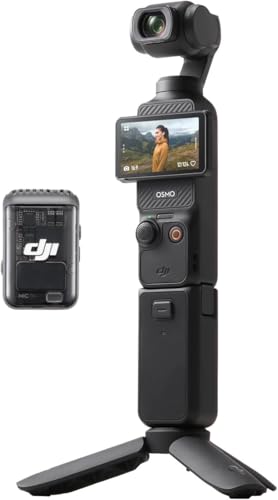
The Pocket 3 takes a different route: instead of stabilising a phone, it is a camera with a 1-inch CMOS sensor mounted on its own 3-axis gimbal. It records 4K at up to 120 fps, with fast focusing and face and object tracking, and the 2-inch rotatable touchscreen switches between horizontal and vertical framing by turning the screen. Because the camera and gimbal are one unit, there is no payload or clamp-width check to make and no balancing step beyond unfolding it. A three-microphone array records stereo sound and reduces wind noise, and DJI Mic 2 transmitters can connect directly. Battery life and charging are handled over USB-C, and the whole unit fits a jacket pocket. Choose it if you want gimbal-smooth footage in the smallest possible package and prefer a dedicated camera to tying up your phone.


3. DJI RS 4 — Best Mirrorless Gimbal
The RS 4, model P14C, is the standard camera gimbal in the current RS line, rated for a 3 kg tested payload that covers most mirrorless bodies with a 24-70mm class lens. Second-generation native vertical shooting lets you switch the horizontal plate to a vertical lock without extra accessories, which matters for social formats. Teflon-coated axis arms are there to make balancing adjustments slide more smoothly, the tilt axis is extended for easier balancing, and a joystick mode switch changes between pan follow and FPV-style behaviour. The BG21 battery grip gives up to 12 hours of runtime and supports 18W fast charging. Automated axis locks hold the arms in place when powered off. It fits the guide’s mirrorless case well: check your body and heaviest lens against the 3 kg limit and the supported camera list before ordering.


4. DJI RS 4 Mini Combo — Best Compact Camera Gimbal
The RS 4 Mini scales the RS formula down for smaller cameras and phones. Its tested payload is 2 kg, automatic axis locks open and secure the arms, and DJI lists a gimbal weight of roughly 890 g in shooting form, so it answers the folding and weight checks better than the full-size RS models. This Combo version includes the RS Intelligent Tracking Module, which adds subject tracking that works without the phone app, plus the briefcase handle for low-angle shots and the RS 4 Mini tripod. Runtime is rated up to 13 hours. Native vertical shooting is supported, and a phone holder is available for smartphone use. Pick the Mini Combo if your camera and lens sit comfortably under 2 kg and you want tracking and the extra handles included rather than bought separately later.


5. DJI RS 4 Pro — Best for Cinema Rigs
The RS 4 Pro, model P04P, is the step up for heavier camera packages, with a 4.5 kg tested payload that handles DSLR and cinema camera builds the RS 4 cannot. It keeps second-generation native vertical shooting and adds support for the wider Ronin ecosystem: the DJI Focus Pro motor system, the Ronin Image Transmitter and dual focus and zoom motors, which speaks directly to the guide’s extras and rigging checks. The BG30 battery grip detaches for use with heavier setups and supports fast charging, and carbon fibre axis arms keep the larger frame’s weight in check. Car mounts, a briefcase mode and remote control options through the Ronin app suit it to small-crew production work. Choose the Pro when your rig includes a cinema body, a matte box or larger cine lenses and the 3 kg ceiling of the standard RS 4 is too close for comfort.

What to Look For
| Factor | Why it matters | What to check |
|---|---|---|
| Payload | The gimbal motors must handle the weight of your device | Weigh your phone or camera with lens and compare to the maker stated limit |
| Folding design | A foldable body fits a bag or large pocket | Check the folded dimensions and weight |
| Battery life | Longer runtime suits full day shoots | Compare the maker figure and look for charging over USB |
| Tracking | Subject tracking helps solo creators keep themselves in frame | See whether tracking needs a phone app or works on its own |
| Handle and controls | Buttons within thumb reach make shooting smoother | Look for a joystick, record button and zoom control |
| Compatibility | Not every phone case or camera body fits every mount | Check supported devices and clamp width |
| Extras | Tripod legs, magnetic mounts and lights add flexibility | Compare what is included in each bundle |
Setup and Care Tips
- Balance your device on the gimbal before powering it on.
- Remove bulky cases that stop the clamp from gripping evenly.
- Keep the motors free of dust and avoid forcing the arms by hand.
- Update the app and firmware so features work as expected.
- Charge the battery before trips and pack the gimbal in its case.
Mistakes to Avoid
- Choosing a model without checking your device weight against the payload limit.
- Using a heavy lens setup on a phone-sized gimbal.
- Skipping balance, which strains the motors.
- Expecting a gimbal to fix shaky framing choices.
- Leaving out a tripod or extension when planning solo shoots.
How do you choose a DJI gimbal for your device?
Choose the gimbal that matches the device you want to stabilize, then check payload. A phone, a pocket camera, a mirrorless body and a cinema rig each need a different DJI gimbal.
The picks above split into clear groups, and it helps to know which group you belong to before reading any specifications.
- Phone gimbal: the DJI Osmo Mobile 7P holds your phone and adds tracking, a fill light, an extension rod and a tripod.
- Camera and gimbal in one: the DJI Osmo Pocket 3 has no payload check because the camera is built in.
- Camera gimbals: the DJI RS 4 Mini Combo, DJI RS 4 and DJI RS 4 Pro step up in payload, from compact cameras to cinema rigs.
Weigh your camera with the lens, plate and any accessory that stays attached, then compare that total with the maker’s stated limit. Leave some margin, because a setup close to the limit asks more from the motors and can be harder to balance.
If you switch between a phone and a camera, remember the post’s point that one gimbal may not suit both. A device class the gimbal was not built for may not mount or balance well. Decide which you will use most and buy for that.
Phone gimbal vs camera gimbal: which one fits you?
A phone gimbal is the lighter, simpler choice, and a camera gimbal gives you more image quality and lens control. The right one depends on whether you want to shoot with a phone or a dedicated camera.
A phone gimbal such as the DJI Osmo Mobile 7P folds small, mounts quickly with a magnetic clamp and works with an app. It suits casual video, travel clips and solo creators who want tracking without carrying a camera bag.
A camera gimbal such as the DJI RS 4 asks for more setup. You balance the camera on the gimbal, check that your body and lens are supported, and carry a larger unit. In return you use the bigger sensor and the lenses of your camera.
The DJI Osmo Pocket 3 sits between the two. It is a camera and gimbal in one small unit, so you skip balancing and clamp-width checks, and you leave your phone free.
- Pick a phone gimbal if portability and ease matter most.
- Pick an all-in-one pocket camera if you want a dedicated camera with almost no setup.
- Pick a camera gimbal if you already own a camera and want to use it on the move.
None of these is a better product in general. Each is better for a different way of shooting.
How do balance, battery and tracking affect daily use?
These three details decide whether a gimbal feels easy or frustrating. A well balanced gimbal runs smoothly, a good battery covers your shooting day and tracking helps when you film alone.
Balance is the key habit on camera gimbals. Adjust the camera position until the gimbal holds it level before you power on, as the care tips above say. The post notes that the DJI RS 4 has features meant to make balancing adjustments easier, and automated axis locks hold the arms when the unit is off. Phone gimbals are mostly balanced by their design.
Battery planning is simple but easy to forget. The post lists runtime figures for several models, but real use varies with temperature and load, so carry a power bank or a spare for long days. Check whether the gimbal can charge your phone, and which cable you need.
Tracking helps solo shooters keep themselves in frame. Some tracking works through a phone app, while the DJI Osmo Mobile 7P and the DJI RS 4 Mini Combo offer tracking modules that work without relying only on the app. Confirm the setup on the listing.
- Practice balancing before an important shoot.
- Charge everything the night before.
- Test tracking in a quiet place first.
Which DJI gimbal should you buy?
Match the gimbal to your device and how you film. The guide names five options, and each fits a different buyer.
- If you shoot with a phone and want tracking, a light and an extension rod without extra accessories, go for the DJI Osmo Mobile 7P.
- If you want smooth footage from a camera that fits in a jacket pocket and prefer not to use your phone, choose the DJI Osmo Pocket 3.
- If you use a mirrorless camera and a standard lens, choose the DJI RS 4, and check your setup against its payload limit.
- If your camera and lens are lighter and you want a more compact gimbal with tracking and handles included, choose the DJI RS 4 Mini Combo.
- If you run a heavier DSLR or cinema build with extra accessories, choose the DJI RS 4 Pro.
If two of these seem close, ask what you will carry every time you film. The unit that fits your bag and your routine will be used more than a more capable one that stays on a shelf.
Use the buttons above to open the listing for your pick, then check the combo contents before you order.
What to check before you buy a DJI gimbal
Verify compatibility, bundle contents and support terms before you order. Many gimbal problems come from a device that does not fit or an accessory that was assumed to be included.
- Payload: weigh your full camera setup with lens and compare it with the maker’s limit.
- Supported devices: check the compatibility list for your phone or camera body, and the clamp width for phones.
- Phone cases: a bulky case can stop the clamp gripping evenly, so plan to remove it.
- Bundle contents: check whether tracking modules, tripods, handles, cases or battery grips are included.
- Cables and charging: confirm the connector type and whether the gimbal can charge a phone.
- App and firmware: make sure the companion app runs on your phone and that updates are available.
- Warranty and returns: read the terms on the listing, including what the warranty covers.
- Size and weight: check folded dimensions against the bag you plan to use.
Pay attention to the exact product name. The DJI RS 4 Mini and the DJI RS 4 Mini Combo are not the same bundle, and the combo adds the extras the post describes.
If your setup changes later, for example a heavier lens, recheck the limit before you mount it.
Is a DJI gimbal worth it, and who should skip it?
A DJI gimbal is worth it if you shoot moving footage often and want smoother results than built-in stabilization gives. It is less useful if you mostly film from a fixed spot.
Is it worth paying more? A higher-tier gimbal gives a larger payload, more accessory support and sometimes longer runtime. That matters when your camera is heavy or you build a rig. If your phone or compact camera is light, a smaller gimbal covers your needs and saves bag space.
The downsides are honest ones.
- You carry one more item and keep it charged.
- Camera gimbals need balancing, and that takes a little practice.
- Good footage still depends on smooth walking and good framing.
- Some features depend on a companion app and firmware updates.
You may skip a gimbal if your phone already gives you steady clips, you rarely move while filming, or you dislike extra setup. A small tripod may serve you better.
Compare the picks above, check the current listing for your device and what is included, then choose the one that fits how you will use it.
Judging a DJI Gimbal by the Camera It Must Carry
A gimbal is a promise that movement can be smooth, and the five picks in this guide keep that promise for five different payloads: a phone, a pocket camera that is its own gimbal, a mirrorless camera, a compact camera rig, and a full cinema setup. The first judgement is therefore not about features at all; it is about what you shoot with. A gimbal that cannot carry your camera is furniture, and a gimbal vastly oversized for your camera is a burden you will stop carrying. Match the stabiliser to the device you actually film with most, and let the other devices in your life adapt or wait their turn.
The second judgement is about your movement style. Gimbals offer modes that follow your pan, lock the horizon, spin, or track a subject, and different shooters live in different modes: the vlogger walking and talking, the filmmaker gliding through a space, the event shooter panning with action. Read the picks for the modes you will inhabit weekly rather than the tricks you will try once. Smoothness itself is table stakes in this range; the differences that matter are in handling, setup speed and how the gimbal behaves at the edges of its motors’ strength.
Setup speed is the third judgement, and working shooters rank it first. A camera gimbal must be balanced for its payload, and the designs here differ in how forgiving that process is — quick-release plates, axis locks, and memory of your settings all decide whether the gimbal is ready in a minute or in ten. A gimbal that is slow to set up gets left in the bag for run-and-gun work, whatever its smoothness. If your filming is spontaneous, weight setup speed as heavily as any specification in this guide.
Finally, consider the ecosystem around the shot: follow focus, monitoring, subject tracking modules, and how the gimbal hands control of the camera — recording, focus, zoom — to the operator’s fingers. DJI’s system is built to grow in those directions, and the larger picks here are really platforms. Buy the platform your next year of filming plausibly needs, not the one your most ambitious daydream requires.
Matching the Picks to Real Shooters
The phone filmmaker
The DJI Osmo Mobile 7P is the best phone gimbal pick because it understands its job completely: make a phone — already a good camera — behave like a film tool. It adds the smoothness, tracking and handling that turn walking footage, vlogs and family films from seasick to watchable, and it folds or packs into the small kit phone shooters will actually carry. For creators whose audience never asked what camera they used, this is the highest-value stabiliser in the guide. Its limit is the phone itself: when your filming outgrows the phone’s lens and light, the gimbal cannot follow you to a bigger camera.
The pocket everything-camera
The Osmo Pocket 3 is the pick that dissolves the category: a camera and gimbal in one pocket device, ready in seconds, with a rotating screen and image quality that embarrasses the concept of a compromise camera. It suits travellers, vloggers and anyone whose filming must be effortless and constant — the device you carry when a rig would change the day. Its fixed lens and small sensor set its boundaries, and within them it is arguably the most complete filming product DJI makes. Many owners of large rigs keep one for exactly the days the rig stays home.
The mirrorless filmmaker
The DJI RS 4 is the best mirrorless gimbal pick, built for the working heart of modern filmmaking: a full-size mirrorless camera and a real lens, balanced quickly, carried for hours, with the controls and accessory ecosystem a working shooter needs. It is the choice for wedding filmmakers, commercial solo operators and serious creators whose camera is a tool of their trade. Its virtues are professional rather than flashy — capacity with headroom, repeatable setup, and the confidence that the rig will not be the reason a shot fails.
The compact rig and the cinema rig
The RS 4 Mini Combo serves the growing class of compact camera rigs — smaller mirrorless bodies, lightweight lenses, creators who travel and film alone — with a gimbal sized to that reality rather than to a cinema camera. Choosing it over the RS 4 is choosing carrying comfort for the payload you actually have. At the other end, the RS 4 Pro is the cinema pick: built for rigged cameras with matte boxes, focus systems and monitoring, where payload, power options and accessory integration matter more than portability. Both are correct answers; the questions are simply asked by different productions.
Head-to-Head: Where the Five Picks Actually Differ
Osmo Mobile 7P versus Osmo Pocket 3 is the fork every casual filmmaker faces: stabilise the phone you own, or buy the device that replaces it for filming. The Mobile keeps your phone’s lens choice, screen size and instant sharing, and costs less to enter. The Pocket frees your phone to be a phone, starts faster, handles low light and focus as a purpose-built camera, and produces a more consistent filming experience. If your phone is your camera by conviction, take the Mobile. If filming keeps hijacking your phone and your battery, the Pocket’s independence is the feature.
RS 4 Mini versus RS 4 is a payload honesty test. Weigh your real rig — body, the lens you film with most, microphone, any cage or monitor — and be truthful about the rig you will own next year. The Mini carries compact rigs with room to spare and rewards you in weight on every shoot. The RS 4 carries those same rigs and everything above them, and rewards you in headroom and ecosystem. Overshooting one class is a small, sensible insurance; overshooting two is a gym membership you did not want.
RS 4 versus RS 4 Pro divides at the word rigged. If your camera wears accessories — follow focus, matte box, external monitor, heavier cinema lenses — the Pro’s capacity, mounting and power options stop being luxuries. If your camera is a body and a lens, the standard RS 4 does the same job lighter and simpler. Professional buyers sometimes choose the Pro for client perception and future-proofing, which are legitimate business reasons; just name them as such rather than pretending the payload demanded it.
Balancing and Shooting Habits That Make Gimbals Shine
Balance is the whole craft’s foundation, and it is a skill with a learning curve worth respecting. Work axis by axis in the order the maker teaches, aim for a rig that holds its position when you tilt the gimbal gently, and re-balance whenever the lens, filter or accessories change — a different lens is a different rig. A well-balanced gimbal’s motors sip power and respond silkily; a poorly balanced one fights you, drains batteries and ages its motors. Keep your quick-release setup consistent so re-balancing after transport is a touch-up rather than a rebuild.
Walk like a filmmaker. The gimbal removes rotation and shake; it cannot remove the bob of your steps, which your knees and a heel-to-toe, slightly crouched walk must absorb. Practise the walk without filming until it stops feeling theatrical. Move at the speed the shot wants — slower than instinct suggests, almost always — and let subjects move through your frame rather than chasing them. The best gimbal shots are usually the simplest: a steady push-in, a patient follow, a reveal around a corner, executed at walking pace with total calm.
Use modes deliberately. Follow modes suit walking and general work; lock modes suit push-ins and vehicle-style moves where the frame must not wander; sport or fast modes suit action that would outrun a gentle follow. Learn what each mode does to your specific gimbal with practice shots, because mode names are promises that each model keeps slightly differently. And learn the gimbal’s limits — the angles where a motor reaches its stop — in practice, so a real take never discovers them for you.
Troubleshooting Common Gimbal Frustrations
The gimbal vibrates, buzzes or shakes
Vibration almost always means the motors are working against a problem: an unbalanced payload, a payload near the limit with a high centre of gravity, or motor strength settings mismatched to the rig. Re-balance carefully first, then run the gimbal’s auto-tuning or calibration if it offers one, with the exact rig fitted. Check for anything loose — a lens hood, a strap, a cable resting against a motor — because small rattles become visible shaking. Persistent vibration after honest balancing and tuning is a service conversation, not a technique failure.
The horizon drifts or the frame slowly tilts
Drift points to calibration and balance rather than doom. Set the gimbal on a level surface and run its calibration routine as the maker directs; confirm the camera is mounted squarely and the balance is neutral, because a rig that constantly leans asks the motors to hold a tilt they eventually express as drift. Temperature changes between indoors and outdoors can nudge sensors too, so recalibrate when the environment changes dramatically. A gimbal that drifts only at the end of long shoots may be telling you its battery or motors are tiring — note the pattern before judging it.
Battery life disappoints, or the gimbal feels weak
Both complaints usually trace back to balance and payload. A rig at the edge of capacity, slightly unbalanced, makes motors work continuously, which spends battery and feels weak in fast moves. Strip the rig to essentials and re-test; if strength returns, your accessories were the problem, and the answer is a lighter build or a class up, not a complaint. Charge and store the gimbal’s battery as DJI directs, and remember that cold weather shortens every battery’s day, including the one in your camera.
More Questions, Answered
Do I still need a gimbal if my camera has good stabilisation?
In-body and lens stabilisation smooth small shakes beautifully and are enough for static and slow shots. A gimbal adds a different order of smoothness: deliberate camera movement — walking, running, orbiting, rising — that no in-body system can produce, because the camera itself is travelling through space. If your filming is mostly stationary with gentle pans, your camera’s stabilisation may genuinely suffice. If your filming moves, the gimbal is not an accessory but the tool that defines the shot.
How long does balancing take once I know how?
Minutes, and then seconds for touch-ups, once the sequence is in your hands. The first balancing of a new rig is a careful quarter-hour of learning; the tenth is a routine done while talking. This is why quick-release plates and marked positions matter: note or mark where your camera sits for its main lens, and setup becomes recall rather than reasoning. Judge any gimbal in this guide by its tenth setup, not its first — the first is tuition, the tenth is the product.
Can one gimbal serve both my phone and my camera?
Not well, and the picks here are honest about that: phone gimbals and camera gimbals are different machines in size, motors and mounting. Shooters who film with both usually own both classes or choose the device they film with most and let the other go unstabilised. The Pocket 3 is the peacemaker in this dilemma — it replaces the phone for filming and needs no gimbal at all, which is why so many two-device shooters end up carrying it instead of a second stabiliser.
Cables, cages and the small rigging details
Camera control cables and tidy rigging decide whether an RS-class gimbal feels like a system or a pile of parts. Route cables with slack for the gimbal’s full range of motion and test that range before the shoot, because a cable that tugs at full tilt will ruin a take and can strain a port. If you add a cage, monitor or microphone, re-balance and re-tune as one rig, and keep a photograph of the balanced setup on your phone. The photograph sounds excessive until the morning you must rebuild the rig quickly on location, when it becomes the most useful picture you own.
Shooting vertical without fighting the rig
Vertical video is now a first-class deliverable, and the picks here handle it differently — native vertical mounting on the camera gimbals, a rotating screen on the Pocket, a phone’s natural orientation on the Mobile. Decide your vertical workflow before the shoot rather than during it: how the camera mounts, how you monitor, and whether the same take must also serve horizontal edits. Shooters who deliver both orientations often shoot the master take horizontally with headroom to crop, and dedicated vertical takes for the moments that matter, rather than compromising every shot for two frames.
Maintaining a gimbal over years
Gimbals are precision instruments that live rough lives, so treat them accordingly: transport them locked, in their case, never loose in a bag where a motor can be knocked; keep sand and rain off them as you would a lens; and store them with batteries at the maker’s recommended charge. Periodically run the calibration routines even when nothing seems wrong, because small drifts corrected early never become habits the motors must fight. A gimbal maintained this way stays smooth for years, and its resale or hand-down value stays with it.
Practising shots before they are real
Every classic gimbal move — the push-in, the orbit, the reveal, the follow — is a physical skill with a practice curve, and the time to climb it is before a wedding, a client or a once-only event. Keep a small repertoire of moves you can execute reliably rather than a large one you can attempt, and rehearse transitions between them, because real shots are usually two moves joined. Film practice walks around your own home and street, review them at full size, and be honest about the bob and drift you find. The gimbal rewards this humility disproportionately: a month of practice walks is visible in every subsequent take.
Follow focus and monitoring: the RS ecosystem at work
As filming matures, the gimbal becomes the centre of a small system: a follow focus for precise manual lenses, a monitor you can actually judge focus on, perhaps a transmission system so a director or client can watch. The RS picks here are designed for that growth, with mounting points and control connections that assume accessories will come. Add them one at a time, re-balancing and re-tuning with each addition, and resist building the full cinema rig before your work asks for it — every accessory costs weight on every take, and weight is the currency gimbal operators actually spend.
Event work: weddings and the unrepeatable take
Event filmmakers lean on gimbals harder than anyone, because their best shots are unrepeatable and their timelines are not theirs. For that work, reliability habits matter more than features: batteries rotated and labelled, a balanced rig checked before the ceremony rather than during it, a stabilised handheld style ready for the moments the gimbal cannot reach, and settings — modes, speeds, joystick behaviour — configured in advance and left alone on the day. The RS 4 class earns its professional following in this environment, where the product being sold is not smoothness but trustworthiness under pressure.
Travel filmmaking with a gimbal
Travel exposes every gram of a rig, so travelling filmmakers choose from this guide by total carried weight: the Pocket 3 for the lightest possible footprint, the Mobile for phone-based travel, the Mini class for compact camera rigs that still pack into a carry-on life. Build the travel rig at home, weigh it honestly, and walk an hour with it before the trip rather than discovering its cost on day two abroad. A smaller rig carried all day outperforms a cinema rig carried until lunch, which is the travel version of this guide’s oldest lesson: presence beats specification.
Learning from your own footage
Gimbal skill improves fastest with ruthless review. Watch practice footage at full size and name the faults precisely: the bob at each step’s landing, the pan that accelerates at its end, the tilt that creeps during a follow. Each fault has a physical cure — softer steps, a slower mode setting, a re-balanced axis — and naming it converts frustration into a drill. Keep your best take of each classic move as a reference. Within a season, comparing new footage against those references shows progress that feels invisible week to week, which is the encouragement every craft quietly runs on.
Smartphone gimbals and the family archive
Not every gimbal purchase is about filmmaking as a craft; many Osmo Mobile buyers are documenting a family with higher standards. For that use, the virtues are patience-proof ones: it makes school plays watchable, holiday walks cinematic and grandparents’ stories steady enough to keep forever. If that is your purpose, buy the phone gimbal without a moment’s guilt about the professional tiers, keep it charged with the phone cables, and let it live where family life happens. The archive it produces will outvalue every specification in this guide, because it will contain the people, not the equipment.
When not to use a gimbal
Honest guides admit the counter-cases. Locked-off tripod shots beat gimbals for interviews, ceremonies and anything where stillness is the meaning. Handheld shake, used deliberately, gives urgency and intimacy that smoothness would bleach away, which is why war reporting and certain music films avoid stabilisation on purpose. And some shots — very long lenses, extreme low angles, tiny spaces — belong to other tools entirely. The gimbal is a movement instrument; choosing stillness or shake deliberately is not a failure of the tool but a sign the operator has outgrown novelty and started directing.
FAQ
Do I need a gimbal if my camera has stabilization?
Built-in stabilization helps, but a gimbal usually gives smoother movement for walking or panning shots. Stabilization inside a camera or phone handles small shakes, while a motorized gimbal also smooths turns, walking steps and long pans.
Can one gimbal serve phones and cameras?
Some can handle both, but check the payload limits and mounting accessories first. A model built for one class of device may not hold another, so always compare weight limits and mounting width.
What is the best DJI gimbal for a phone?
The DJI Osmo Mobile 7P is the phone gimbal in this guide, with tracking, a fill light, an extension rod and a tripod. Check that your phone fits the clamp and works with the app. A phone gimbal suits you if you want portability.
Is the DJI Osmo Pocket 3 a gimbal or a camera?
It is both, since the camera sits on its own 3-axis gimbal in one unit. That means no payload check or balancing, and your phone stays free. It suits you if you want a dedicated pocket camera.
Which DJI RS gimbal is right for my camera?
Choose by the weight of your camera and lens together. The RS 4 Mini Combo suits lighter setups, the RS 4 suits typical mirrorless builds, and the RS 4 Pro suits heavier cinema rigs. Always check the maker's supported camera list.
How do I balance a camera on a DJI RS gimbal?
Adjust the camera position on the plate until it stays level on its own with the gimbal powered off. Follow the steps in the manual for each axis. Balanced gear puts less strain on the motors and gives smoother footage.
Can a DJI gimbal charge my phone?
The post says the DJI Osmo Mobile 7P can charge your phone over USB-C while you shoot. Other models may differ, so check the listing for the charging options. Bring the right cable either way.
Do I need a tracking module for a gimbal?
You only need tracking if you film yourself or a moving subject without a helper. Some gimbals track through a phone app, while others offer a tracking module that works without it. Check the listing to see what is included.
How long does a gimbal battery last?
Makers state runtime figures, but real use varies with temperature, load and accessories. Carry a power bank or a spare battery for long days. Charge everything before a trip.
How do I get smoother footage with a gimbal?
Bend your knees, take small steps and roll through each footfall. Keep the gimbal balanced and use a slower movement mode if one is available. Practice helps as much as the gimbal itself.
Questions to Ask Before You Buy
A handheld gimbal should disappear into your routine. These questions check whether one will.
- Will I shoot with a phone, a camera, or switch between both?
- How much does my full camera setup weigh with lens attached?
- Do I want a built-in extension rod for different angles?
- Is a foldable design important for my bag?
- Will I rely on a companion app, and does it run on my phone?
- Do I need a tripod base or a place to attach a light?
Matching It to Your Use
Everyday Phone Video
A small foldable unit with simple controls is usually enough. Look for quick clamp mounting and a battery that lasts through a day of casual shooting.
Travel Vlogging
Prioritize low weight, a tripod or extension option, and easy switching between landscape and portrait orientation.
Mirrorless Cameras
Here payload and balance matter most. Check the supported camera and lens list, and consider whether a heavier lens needs a counterweight.
Who Should Skip It
If you only take occasional casual clips and your phone already smooths motion well, a gimbal may sit in a drawer. The extra bag space, charging, and balancing routine only make sense if you shoot moving footage often.
Likewise, if you mostly film from a tripod or fixed spot, a gimbal adds little. Fluid motion is its main strength, so think honestly about how much walking, panning, and tracking you really do.
Compatibility Reminder
Always match the model to your device. Phone clamps have size limits, camera gimbals have weight limits, and some features work only with certain companion apps or firmware versions. A few minutes with the supported device list can save a return later.
Finally, practice smooth walking technique. Bending your knees and rolling through each step often matters as much as the gimbal itself, and a little practice makes footage look more polished.
Battery planning is the last piece. Carry a small power bank or a spare battery for long days, and check whether the gimbal can charge your phone as well. Charging cables, clamps, and pouches add up, so a tidy kit helps you grab the unit and go.
The Short Version
Begin from your device weight and the way you film. A gimbal that fits your gear and folds small enough to bring along will get used. Read each listing closely before ordering. Compare weight, battery runtime and bundle contents side by side, and leave out any extras you are unlikely to carry.