DJ headphones differ from ordinary listening headphones in a few ways: closed cups to keep the booth out, a swiveling or rotating cup for one-ear cueing, and a cable that can be swapped or routed to one side. All six models here are wired.
The six pairs below mix on-ear and over-ear shapes from Sennheiser, Pioneer DJ, RODE and Hercules. Impedance, driver size and cable details come from each product’s listing page. We have not used these headphones ourselves, and sound or durability statements are the makers’ own.
As an Amazon Associate we earn from qualifying purchases. Links below are affiliate links, and they do not change the product information we give.
What to Look For
| Feature | Why it matters |
|---|---|
| Fit style | On-ear is compact; over-ear cups surround the ear |
| Swivel cups | Lets you cue in one ear while hearing the room |
| Cable | Detachable or one-sided cables are easier to replace and route |
| Impedance and driver | Listed figures show how each pair is built; drivers here are 40 or 50 mm |
In this guide
Specs at a Glance
| Headphones | Fit | Impedance | Notes |
|---|---|---|---|
| Sennheiser HD 25 | On-ear, closed-back | 70 ohm | Detachable cable; 3.5 to 6.3 mm adapter; 2-year warranty listed |
| Pioneer DJ HDJ-X5 | Over-ear | 32 ohm | 40 mm drivers; swivel earcups; 1-year limited warranty |
| Pioneer DJ HDJ-X7 | Over-ear | 36 ohm | 50 mm drivers; swivel earcups; detachable cable |
| Pioneer DJ HDJ-X10 | Over-ear | 32 ohm | Flagship model; 50 mm; nano coating; silver |
| RODE NTH-50 | On-ear | 32 ohm | 40 mm driver; aluminium build; locking detachable cable; lifetime warranty listed |
| Hercules HDP DJ45 | Over-ear, closed-back | 60 ohm | One-sided spiral cable; rotating earpieces; foldable |
The 6 Best DJ Headphones

Top pickBest for on-ear DJ use in a compact shape
1. Sennheiser HD 25
A closed-back, on-ear DJ headphone at 70 ohm with a detachable cable and a screw-on 3.5 to 6.3 mm jack adapter. The maker describes lightweight aluminium voice coils and a tough single-sided cable, and the listing gives a 2-year warranty. The box contents line also mentions HD 25 PLUS-only extras such as a pouch and spare earpads, so check which version you are buying.
Suits: on-ear DJ use in a compact shape. Strengths: a detachable single-sided cable and a long warranty. Weaknesses: the listing mixes in PLUS-only accessories. Skip it if you prefer cups that surround the ear.

Best for a first over-ear DJ pair
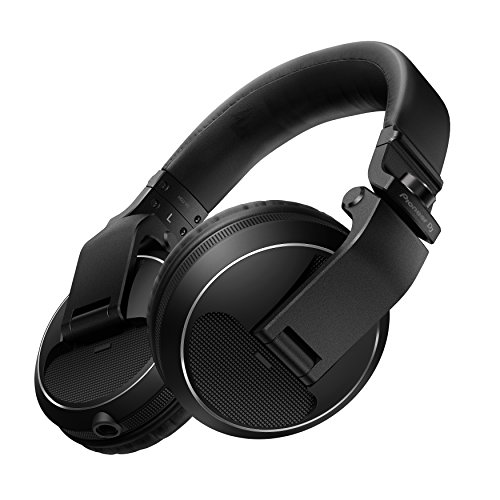
2. Pioneer DJ HDJ-X5
An over-ear 32 ohm pair with 40 mm drivers, swivel earcups for one-ear monitoring, ergonomic earpads and a durable build, according to the maker. The listing shows a 1-year limited warranty.
Suits: a first over-ear DJ pair. Strengths: swivel cups and a familiar DJ brand. Weaknesses: smaller 40 mm drivers than the X7 and X10. Skip it if you want 50 mm drivers.

Best for regular gigging with 50 mm drivers
3. Pioneer DJ HDJ-X7
A step up from the X5 with 50 mm drivers at 36 ohm, strong sound insulation per the maker, swivel earcups and a replaceable detachable cable. It is listed as a professional over-ear model in black.
Suits: regular gigging with 50 mm drivers. Strengths: a detachable cable and swivel cups. Weaknesses: the listing gives few measured figures. Skip it if you want an on-ear shape.

Best for a top-of-the-range Pioneer DJ pair
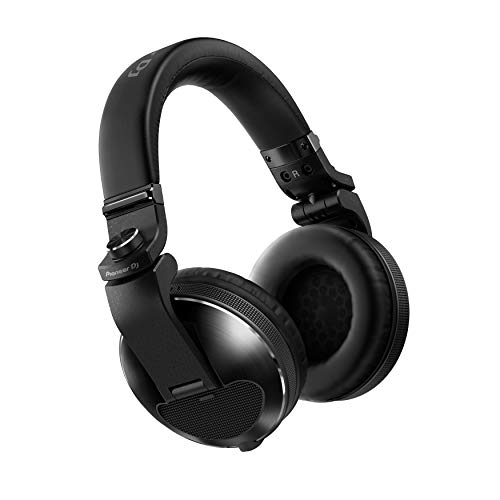
4. Pioneer DJ HDJ-X10
The flagship of the Pioneer DJ HDJ range here, with 50 mm drivers at 32 ohm, a nano coating, a refined silver design and cables packed under the foam, as the listing notes. Spec text on the page is brief, so most detail comes from the title and overview table.
Suits: a top-of-the-range Pioneer DJ pair. Strengths: 50 mm drivers and a flagship design. Weaknesses: thin listing detail. Skip it if you want a lighter on-ear pair.
Best for an on-ear pair with a locking cable
5. RODE NTH-50
An on-ear 32 ohm pair with a custom-matched 40 mm driver, an aluminium build, a contoured headband and a detachable cable with a locking connector that attaches on either side. The listing says it is made in Sydney with a lifetime warranty and includes a storage pouch and a 3.5 mm to 1/4 inch adapter.
Suits: an on-ear pair with a locking cable. Strengths: a pouch, an adapter and a lifetime warranty per the listing. Weaknesses: the listing does not mention swivel cups. Skip it if you rely on one-ear cueing by swiveling.
View RODE NTH-50 DJ Headphones on Amazon
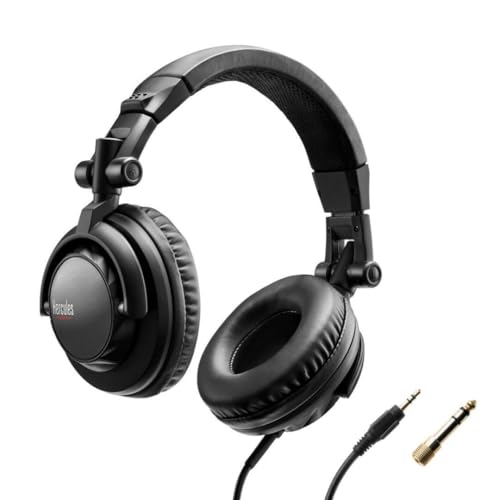
Best for a spiral one-sided cable
6. Hercules HDP DJ45
A closed-back, circumaural over-ear pair with 40 mm drivers at 60 ohm. The cable is on one side only and is a spiral that extends from about 3.3 feet to more than 6.6 feet, the earpieces rotate for one-ear monitoring and fold for transport, and both 3.5 mm and 1/4 inch plugs are supported through an adapter.
Suits: a spiral one-sided cable. Strengths: rotating and folding earpieces. Weaknesses: the cable is not described as detachable. Skip it if you want a swappable cable.

Cable and Connector Notes
- The HD 25, HDJ-X7 and NTH-50 listings describe detachable cables.
- The Hercules HDP DJ45 uses a one-sided spiral cable.
- The HD 25, NTH-50 and HDP DJ45 list 3.5 mm and 6.3 mm connector support.
- Cups that swivel or rotate are listed on the HDJ-X5, X7, X10 and HDP DJ45.
Mistakes to Avoid
- Assuming every pair has swivel cups.
- Skipping the version check on the HD 25 listing, which mentions PLUS accessories.
- Ignoring whether the cable is detachable.
- Choosing by driver size alone.
On-Ear or Over-Ear for DJing
The first decision is shape. On-ear headphones rest on the ear, are usually smaller and lighter, and fold or sit comfortably around the neck between mixes. Over-ear headphones surround the ear with a larger cup, which often feels more comfortable over hours and tends to block more of the room.
Each shape has trade-offs. On-ear pairs are easy to carry and quick to flip on and off, but pressure on the ear can become tiring in a long set, and sound isolation depends on a good seal against the head. Over-ear pairs usually isolate better, which helps in loud booths, but they are bulkier and can feel warm. Glasses, earrings and hairstyles can affect either shape, so think about how you wear them.
Booth conditions matter. In a loud club with monitors blasting, strong isolation helps you hear the cue channel without turning it up to an unsafe level. In a quieter setting, such as a bedroom practice space or a small bar, you can get by with a lighter pair. If you travel with your gear, weight and foldability become more important.
Also think about how you cue. Many DJs hold one cup to an ear and leave the other free, while others wear both cups and simply lower the volume of the room. If you often switch between one and two ears, choose a pair that tolerates that movement and has cups that stay comfortable when pushed against the head. Trying a pair in person, if possible, tells you more than any specification list.
Swivel Cups and One-Ear Cueing
Cueing is the heart of DJing with headphones. You listen to the next track in one ear while the room hears the current one, and you adjust tempo and timing until the two lock together. A pair designed for this makes the movement quick and smooth.
Swiveling or rotating cups let you turn one cup away from the ear without twisting the whole headband. The pivot should move freely but stay put where you leave it. A stiff or loose pivot becomes a daily annoyance, and a weak one can wear out sooner. When you can try a pair, move the cups repeatedly and see how they feel.
Padding affects this too. Cushions that grip the head help keep a single cup in place against one ear, while overly slippery pads can slide when you tilt your head. The headband should hold the cup in place without squeezing so hard that it causes a headache.
Not every pair offers rotating cups. Some on-ear models rely on a flexible headband and light weight so you can hold one cup by hand. That can work fine if you prefer it, but check the listing so you know what you are getting.
Practice good cueing habits too. Keep the cue volume low, use the mixer’s split or mix control to balance cue and master, and try not to cover one ear for a long period at high volume. Comfortable cueing is as much about technique as hardware.
Impedance, Sensitivity and Volume
Listings show an impedance number in ohms. It describes how much electrical resistance the headphones present, and it influences how loud they get from a given output. Lower-impedance headphones are generally easier to drive from a phone, laptop or portable controller, while higher-impedance pairs may need a stronger output to reach the same volume.
DJ gear is usually designed with headphones in mind, so most pairs from DJ brands work well with mixers and controllers. Still, headphone output strength varies between devices. A pair that seems quiet on one controller may be loud enough on another. If you use a mix of equipment, a pair with moderate impedance gives more flexibility.
Sensitivity, if listed, describes how much sound a pair makes for a given input. Higher sensitivity means louder output at the same power. Many listings only provide impedance, so use the maker’s description and buyer comments to judge loudness.
Driver size is often quoted as well. Larger drivers can move more air, but size alone does not tell you how a pair sounds. Tuning, cup design and the seal on your ear all matter more than the number itself.
The key point for DJs is headroom. You need to be able to hear the cue clearly above the booth noise without pushing the volume to the maximum, because that leaves no room to spare and can strain your hearing. If a pair is quiet on your equipment at normal levels, consider a different model or a headphone amplifier.
Cables, Connectors and Durability
The cable is the part that gets stepped on, snagged and yanked, so its design affects how long the headphones last. Detachable cables are the easiest to replace, and some designs allow connection on either side so you can choose what suits your style. Fixed cables are simpler but mean a broken cable can end the life of the pair.
Cable shape matters. Coiled cables stay off the surface and extend when you move around, but they can pull on the head if stretched. Straight cables are lighter and neater, though they can tangle. A cable attached to one side only keeps the other side free, which suits one-ear cueing.
Check the plug. Many DJ headphones use a 3.5 mm jack with an adapter for the larger 6.3 mm (1/4 inch) size, or the other way around. Make sure the adapter is included, and that it is a quality one that does not loosen or crackle. Screw-on adapters tend to stay put better than push-on ones. Gold-plated or not, keep contacts clean.
Look at construction. Metal and thick plastic hinges tend to hold up better than thin plastic, and replaceable ear pads extend the life of the pair. Some makers sell spare cables, pads and headbands separately, which makes repair more practical.
Treat the headphones well. Do not pull on the cable to unplug, keep them in a pouch or case when carrying, and avoid leaving them in a hot car. A little care keeps them working for years.
Comfort, Hearing Care and Replacement Signs
DJs spend long hours with headphones at high volume, so comfort and hearing health deserve attention. Clamping force should hold the headphones in place without causing pressure. Ear pad material changes how they feel: leatherette gives good isolation but can feel warm, while fabric or velour is breathable but may not seal as well.
Protect your hearing. Keep the cue volume as low as you can while still hearing the beat clearly, take short breaks during long sets and use ear protection in loud rooms if you can. Muffled hearing or ringing after a gig is a warning sign you should not ignore.
Look after the headphones. Wipe the pads with a slightly damp cloth, let them dry and keep them out of direct heat. Sweat and skin oils break down pad material, and cracked or flaking pads reduce comfort and isolation. If the maker sells replacement pads, they are an inexpensive way to refresh a pair.
Know when to replace the headphones themselves. Common signs are:
- Crackling or cutting out in one ear when you move the cable.
- A rotating cup that no longer holds its position.
- A cracked headband or loose hinge.
- Uneven volume between the two ears.
- Pads that have collapsed or peeled.
Try a new cable and new pads first, since these are the most common failures. If the problem remains, or if the drivers themselves sound distorted at normal volume, it is time for a new pair. Keep your old pair as a backup for emergencies, because having a spare in your bag can save a gig.
Closed Back, Swivel Cups and Other DJ Specific Traits
Headphones for mixing are built around a few practical needs. Closed back cups block outside sound so you can hear a cue in a loud room. Swivel or fold-flat cups let you hold one ear to the headphone and keep the other on the room. A sturdy hinge and replaceable parts also matter, because these headphones get moved, dropped and twisted more than most.
| Trait | Why a DJ cares |
|---|---|
| Closed back design | Isolates the cue from room noise |
| Single ear monitoring | Lets you compare cue and main output |
| Replaceable cable and pads | Extends the life of heavily used gear |
| Coiled or detachable cable | Reduces tangles at the booth |
| Strong low end clarity | Helps with beat matching |
Check the connector type and the adapter that ships in the box, because mixers and controllers use different plug sizes.
Comfort for Long Sets
A pair that feels fine for ten minutes can become tiring after hours. Look at clamping force, headband padding and cup depth. People who wear glasses sometimes find that tight pads press the frames, so consider softer or larger pads. If you play in warm venues, breathable materials may be more pleasant than thick leatherette.
- Weigh the headphones in your head by thinking about how long your longest set runs.
- Check whether the headband adjusts smoothly without slipping.
- Consider spare pads if sweat or wear is a concern.
- Look for a carry pouch or case for transport.
Protecting Your Hearing and Your Gear
Loud environments tempt DJs to push the cue volume higher than is wise. Keep the level as low as you can while still hearing the detail, and give your ears breaks during long events. Official hearing health organizations offer exposure guidance worth reading. For the equipment itself, coil cables loosely, avoid tight bends at the plug and store the headphones in a case rather than a crowded bag.
On-Ear or Over-Ear: A Decision Guide for DJs
The shape of the ear cup affects how well you hear a cue in a loud room and how comfortable the headphones are during a long set. Match the shape to where you play most often.
| Where you play | Shape to consider | Why it can help |
|---|---|---|
| Loud club or event | Closed over-ear | Larger cups tend to block more room sound |
| Bedroom practice | Either shape | Comfort matters more than isolation |
| Mobile gigs and travel | Compact on-ear | Smaller cups pack down for a bag |
| Radio or studio mixing | Closed over-ear with swivel cups | Cups that turn let you listen with one ear |
Whichever shape you pick, check that the cup can swivel or flip, because single-ear monitoring is a basic part of cueing a track while the room hears something else.
Cable, Plug and Pad Details to Check
Small hardware choices decide whether a pair survives real use. Look at each of these on the listing before you commit.
- Cable style: a coiled cable can stay tidy, while a straight one is lighter. Some pairs have detachable cables, which makes a swap easy if one fails.
- Plug size: many mixers and controllers use a larger jack, so check whether an adapter is included.
- Ear pad material: soft pads feel good but can wear; check whether replacements are sold.
- Headband build: a sturdy but flexible band tends to last longer in a bag.
- Folding design: hinges save space but are a place to inspect for firmness.
Keep a spare cable in your bag if the headphones allow it, and wipe the pads after each session.
How the Six Models Differ in the Booth
The six pairs here divide first by shape and then by how they handle the two jobs that wear headphones out: cueing and cables. The two on-ear models, the Sennheiser HD 25 and the RODE NTH-50, are the compact options. The HD 25 is the long-established booth shape: light, single-sided detachable cable, and a screw-on adapter for the larger jack. The NTH-50 takes a different route to the same job, with an aluminium build and a locking detachable cable that can attach on either side, which suits DJs who route the cable away from their dominant hand or their controller. Between the two, the deciding questions are whether you want the HD 25’s proven, spare-parts-friendly design or the NTH-50’s locking connector, included pouch and the lifetime warranty its listing describes.
The three Pioneer DJ models form a ladder rather than three separate ideas. The HDJ-X5 is the entry rung: over-ear, swivel cups and the smaller 40 mm drivers. The HDJ-X7 keeps the same general design, moves to 50 mm drivers and adds a replaceable detachable cable, which is the single most practical upgrade in the range because cables are the part that actually fails. The HDJ-X10 sits at the top with 50 mm drivers, the nano coating the listing mentions and the flagship positioning. Moving up the ladder buys build and driver changes, not a different way of working, so a DJ who likes the X5’s fit will feel at home in the X7; a DJ who dislikes the fit should not expect the X10 to fix that.
The Hercules HDP DJ45 is the outsider in the group and interesting for one specific reason: its one-sided spiral cable that stretches as you move. A coiled cable keeps slack off the booth floor and out from under your feet, and the earpieces both rotate and fold. Its weakness, noted in the review above, is that the cable is not described as detachable, so a cable failure is a bigger event than on the HD 25, HDJ-X7 or NTH-50. Weigh that against how much the spiral cable suits your booth layout: in a tight home setup where a straight cable constantly snags on the controller, the Hercules design solves a real daily annoyance.
Impedance spreads across the group in a way worth noticing. The HD 25 sits at the higher end of the six, the Hercules is also above the Pioneer models and the NTH-50, and the rest cluster at the lower end. In practice, all of them are made for DJ mixers and controllers, but if you also plan to cue tracks from a phone or a small portable controller with a modest headphone output, the lower-impedance models give you more volume headroom on that weaker source. If your only source is a full-size mixer, impedance should be the last factor you decide on, well behind fit, cueing movement and cable design.
A Cueing Workflow Worth Practicing
Good headphones only help if the cueing routine behind them is solid, and the routine is a skill that can be practiced deliberately at home. Start with the mixer or controller: learn where the cue mix control sits and what it does at each end of its travel, from hearing only the cue channel to hearing only the program. Set the headphone level so the cue is clear at the volume of the room you are practicing in, and resist turning it up to compensate for a poor seal; reseating the cup works better and is kinder to your ears.
Work on the physical movement next. With swivel or rotating cups, as on the Pioneer models and the Hercules, practice flipping one cup off the ear and back without looking down, because your eyes should be on the mixer, the crowd or your library. With a fixed on-ear pair, practice the one-hand hold: cup pressed lightly to one ear, other ear open to the room. Neither method is better in the abstract; the better one is the one you can repeat for hours without thinking about it, and that depends on the headphones you own, which is why cueing style should be part of the buying decision rather than an afterthought.
Then practice the listening itself. Cue the incoming track, match its tempo by ear, and only then blend it in. Do this first at low room volume, where mistakes are easy to hear, and later with the monitors louder, which is closer to a real booth and shows you how much isolation your headphones actually provide. If you find yourself pushing the cue level higher every session, that is information: either the room is too loud for the seal your headphones give, or your ears are tiring, and both problems are solved by breaks and isolation rather than by more volume.
Finally, build a fallback habit. Cables fail and cups crack, usually mid-set. Keep a spare cable in your bag if your pair has a detachable one, know how your backup plan sounds — even a basic spare pair you have practiced with — and store the adapter you need for your mixer with the headphones, not in a drawer at home. The DJs who survive equipment failures calmly are rarely the ones with the most expensive headphones; they are the ones who rehearsed the failure.
Matching Headphones to Your Mixer, Controller and Space
The headphone socket you plug into matters more than most listings admit. Full-size mixers generally provide a strong headphone output and the larger 6.3 mm socket, while controllers vary widely: some have generous output, others are noticeably quieter, and many use the smaller 3.5 mm socket. Check which socket your gear has before choosing, and confirm that the pair you want either matches it or includes the right adapter, as the HD 25, NTH-50 and HDP DJ45 listings describe. A screw-on adapter, like the HD 25’s, stays attached when the headphones are pulled from a bag; a push-on adapter is the part most often lost.
Your space shapes the choice too. In a bedroom or home studio, isolation is a convenience and comfort dominates: a lighter on-ear pair you can wear for a long practice session may serve you better than a heavily isolating over-ear pair. In a club booth with a loud monitor beside you, isolation becomes the feature that protects both your mix and your hearing, and the larger over-ear Pioneer models or a well-sealing on-ear pair earn their bulk. For mobile work — weddings, parties, corporate events — the headphones travel constantly, so folding designs, a pouch or case, and replaceable cables and pads matter more than small differences in driver size.
Think also about what else shares your head. Glasses wearers should pay attention to clamping force and pad softness, since a tight over-ear seal presses frames into the side of the head over a long set. DJs who wear the headphones around the neck for much of the night should check how the cups sit when rotated flat, if they rotate, and whether the headband shape is comfortable against the neck. These details never appear in a specification table, but they decide whether a pair is still comfortable in the third hour.
Troubleshooting the Failures DJs Actually Meet
Most headphone problems announce themselves in one ear first. Crackling that comes and goes as you move is almost always the cable or a connector, not the driver. Test it methodically: swap in a spare cable if the design allows, try the other socket or another source, and gently flex the cable near each end while listening. If the fault follows the cable, you have a cheap fix; if it stays in the same ear with a known-good cable and source, the problem is inside the cup or at the hinge where internal wires flex.
A loose or crackling adapter is the second classic fault. Push-on adapters work loose in bags and develop noisy contacts. Clean the plug and socket, make sure the adapter is fully seated, and consider a screw-on arrangement if your headphones support one. Keep a spare adapter in your gig bag; it weighs almost nothing and its absence can end a night.
Uneven volume between ears has several causes, and only one of them is a dying driver. Check the balance control on your mixer first, then the fit: a pad that has collapsed on one side changes both comfort and the seal, and a cup that no longer swivels to sit flat can sound quieter because it leaks. Replace pads in pairs when they flatten or peel, since mismatched pads make the two sides feel and sound different. If the imbalance survives new pads, a clean cable and a centered balance control, the driver itself is the likely cause and replacement headphones move up the list.
Physical wear follows a predictable order. Pads go first, then cables, then hinges and headband padding. A pair built with replaceable pads and a detachable cable, as several models here are, lets you renew the two cheapest parts and keep the drivers you already know. Learn how your pair sounds when everything is fresh — keep a reference track you know well — because gradual change is hard to notice and a familiar track makes wear obvious.
Choosing by DJ Type
A beginner practicing at home needs comfort, a forgiving fit and a price of admission to good habits rather than flagship hardware; an over-ear pair with swivel cups such as the HDJ-X5 teaches one-ear cueing from the first session, and its habits transfer to any pair bought later. A working mobile DJ needs durability and logistics: folding or rotating cups, a case, and above all a cable arrangement that survives being packed and unpacked several times a week, which points toward the detachable-cable models. A club DJ playing long sets in loud booths should put isolation and headroom first and treat pad comfort over hours as a headline feature, not a footnote. A radio or livestream DJ, working in a quiet room and talking over the music, often prefers a lighter on-ear pair that is easy to lift on and off between links, where the HD 25 and NTH-50 shapes make sense. A producer who also DJs should remember that these are booth tools tuned for cueing clarity rather than studio reference work, and judge them on that job.
Whichever type you are, buy for the failure you can least afford. If a broken cable mid-gig is your nightmare, detachable cables and a spare in the bag matter more than driver size. If losing the room in a loud booth is your nightmare, isolation matters more than weight. The specification table starts the decision; your own worst case finishes it.
Testing a New Pair Before the First Gig
Do not let a paying audience be the first test of new headphones. Spend a few practice sessions with them at home, long enough to learn how they feel in the third hour rather than the third minute. Wear them for a full practice set and note where pressure builds: the crown of the head, the jaw, or the ears themselves. Adjust the headband in small steps; a notch too loose lets the cups drift when you move, while a notch too tight causes the slow headache that DJs often blame on volume.
Test the cueing movement you actually use. If the cups swivel or rotate, flip them through a full session of mixes until the motion is automatic, and check that the pivot still holds its position at the end of the session. If you cue with a one-hand hold on an on-ear pair, practice until you can find the cup’s sweet spot by touch. Then test the practical details: plug into every device you own, confirm the adapter situation for each socket, and run the cable the way you will route it in the booth so you know whether its length works or fights you.
Choose two or three tracks you know extremely well and use them as your reference. Play them at your normal cue level and learn how the kick, the hats and the vocal sit in the new pair. That reference memory is what lets you judge a strange booth quickly, and later in the headphones’ life it is how you will notice worn pads or a tiring driver. Write nothing down if you dislike notes — but do the listening while the pair is new, because you cannot reconstruct a baseline afterward.
Booth Ergonomics: Cables, Stands and Small Habits
Where the headphones live during a set affects how long they last. Resting them around your neck is the common default, and cups that rotate flat sit more comfortably there; check whether your pair does this before assuming it. A headphone stand or a dedicated spot on the booth surface keeps them out of the spill zone and away from the edge they can be knocked from. The worst place is dangling by the cable from the mixer, which strains exactly the joint that fails first.
Route the cable with intention. It should reach everywhere you move without going taut, and the slack should fall somewhere it will not be stepped on, rolled over by a chair or caught when you open a record box or laptop stand. One-sided cables, fitted to most of the models here, keep one side of your body clear, which is why so many DJs route the cable down the side away from their controller hand. Coiled cables manage their own slack but pull gently on the cup when stretched to full length; if you feel that tug, move closer or reroute rather than letting the cable work against the connector all night.
End the night with thirty seconds of care. Wipe the pads, coil the cable in loose loops rather than tight wraps around the headphones, put the adapter back with the pair, and store them in their pouch or case before the bag is packed around them. Those small habits are the difference between headphones that age gracefully for years and a pair that develops a crackle, a torn pad and a missing adapter in the same month.
Reading the Spec Lines That Actually Matter
Headphone listings mix useful figures with decoration, and a DJ’s eye should land on a short list. Fit style and whether the design is closed come first, because they decide isolation and comfort. Next, look for how the cups move — swivel, rotate, fold or fixed — because that decides your cueing style. Then the cable: detachable or fixed, one-sided or both, coiled or straight, and which plug and adapter are included. Those four groups describe how the headphones will behave every night you use them.
The electrical figures come after that. Impedance tells you roughly how demanding the pair is for your headphone output, and driver size gives a general hint about the design class, with the caveats covered earlier in this guide. Weight, if listed, predicts neck and head fatigue better than any comfort adjective in the marketing text. Warranty length is worth reading too: the listings in this roundup range from shorter limited terms to the lifetime cover described for the RODE model, and whatever the term, it only helps if you keep the proof of purchase somewhere findable.
What the spec sheet cannot tell you is fit on your own head, and that is the strongest argument for buying from a seller with a workable returns policy and testing the pair promptly at home. An hour of honest testing — a full practice set, every socket you own, the cueing movement you actually use — tells you more than another hour of reading listings, and it costs nothing but the time you would spend practicing anyway.
DJ Headphones FAQ
Are these wired or wireless?
All six are wired models.
Which are on-ear?
The Sennheiser HD 25 and RODE NTH-50 are on-ear. The Pioneer DJ models and Hercules are over-ear.
Do I need special headphones to DJ?
Not strictly, but DJ headphones are built for the job, with closed cups, a swiveling or flexible design for cueing and a robust cable. Regular headphones can work, though they may be less convenient or durable.
Is higher impedance better for DJing?
Not necessarily. Lower impedance is easier to drive from portable gear, while higher impedance may need a stronger output. Moderate values are the most flexible.
Should I choose wireless headphones for DJing?
Wireless models can add delay and need charging, which many DJs avoid for cueing. Wired pairs are the standard in the booth, and all the models in this roundup are wired.
How loud should I run my cue channel?
As low as you can while still hearing clearly. Extremely loud headphones over long sets can harm your hearing, so use isolation and breaks to keep levels reasonable.
Can I replace the ear pads?
Often, yes. Many makers sell replacement pads, and fitting them is usually simple. Check the listing and the maker's site for compatible parts.
What adapter do I need for my mixer?
Look at the headphone jack on your gear. Larger 6.3 mm (1/4 inch) sockets are common on mixers, while laptops and phones use 3.5 mm, so you may need an adapter for one of them.
How do I store DJ headphones?
Use the pouch or case if one is included, coil the cable loosely and keep them away from heat and moisture. Fold or rotate the cups as the design allows.
How long should DJ headphones last?
It depends mostly on the parts that wear: pads, cables and hinges. A pair with replaceable pads and a detachable cable can be renewed cheaply when those parts wear, while a fixed cable makes one failure much more serious. Storing the headphones in a pouch or case, coiling the cable loosely and keeping them out of heat all extend their working life.
What should I carry as a backup at a gig?
A spare cable if your pair uses a detachable one, the adapter your mixer needs, and ideally a basic spare pair of headphones you have practiced cueing with. Backups only help if they are in the bag, so keep them with the headphones rather than at home.
Why does one side sound quieter than the other?
Work through the simple causes first: the mixer’s balance control, a collapsed or peeling ear pad changing the seal, a cup that no longer sits flat, or a cable fault. If the imbalance remains after trying a different cable and source and checking the balance, the driver itself may be failing.
Are 50 mm drivers always better than 40 mm for DJing?
No. Driver size is one part of the design; tuning, cup shape and how well the headphones seal on your ears matter at least as much for hearing a cue clearly. In this group the 50 mm Pioneer models sit above the 40 mm ones in their own range, but that ordering reflects the whole design, not the driver figure alone.
Can I use DJ headphones for everyday listening?
Yes — they are ordinary wired headphones outside the booth, and their closed cups and sturdy build suit commuting and travel. Just remember they are voiced and built for cueing work, with features like swivel cups and one-sided cables that matter to DJs and simply come along for the ride elsewhere.
Should I keep my old pair when I upgrade?
Yes, if it still works. A familiar spare pair is the cheapest insurance a DJ can carry, because a backup you have already practiced cueing with is far more useful mid-gig than a borrowed pair you have never worn. Keep the old pair in your gig bag with its adapter, and it stops being clutter and becomes part of the kit.
Do DJ headphones need to be run in before they sound right?
Opinions differ, and no listing here makes a claim you need to act on. The practical point is different: your ears need a few sessions to learn a new pair, whatever the drivers are doing. Judge a new pair after several practice sets with tracks you know well, not from the first ten minutes, and make any return decision inside that window rather than after a single gig.
What is the first thing to check if my headphones stop working at a gig?
Work from the outside in: confirm the cue is actually assigned on the mixer, check the headphone level and balance, reseat the plug and adapter, and try the other socket or a spare cable if you carry one. Most gig failures are a loose adapter, a cable at the end of its life or a control set wrong — all fixable in under a minute once you check them in that order.
The Short Version
For a compact on-ear pair, the Sennheiser HD 25. For a first over-ear pair, the HDJ-X5. For 50 mm drivers, the HDJ-X7. For the flagship, the HDJ-X10. For a locking cable, the RODE NTH-50. For a spiral cable, the Hercules HDP DJ45.