Disclosure: As an Amazon Associate, Reviews Took earns from qualifying purchases. Links to Amazon on this page are affiliate links; they cost you nothing extra.
Check tilt and speed range.
This guide is built from Amazon product listings and maker specs, not our own testing, so confirm size, contents and current price on each product page. Health products are for general information and are not medical advice.
Prices are approximate and were shown on Amazon.com on November 2, 2026; check the current price.
Last updated: November 2, 2026.
Quick Picks
| Product | Type | Best for |
|---|---|---|
| DREO Smart Fan for Bedroom Powerful 85 ft Airflow 12 Inches Desk | Desk fan | personal cooling |
| BESKAR USB Clip on Fan Portable Small Desk Fan with Cord Powered | Desk fan | personal cooling |
| DREO Fan for Bedroom Desk Air Circulator Fans with Remote 11 Inch | Desk fan | personal cooling |
| DREO Smart Fan for Bedroom Powerful 85 ft Airflow 12 Inches Desk | Desk fan | personal cooling |
| DREO Fan for Bedroom 12 Inches 70ft Powerful Airflow 25db Quiet | Desk fan | personal cooling |
| Honeywell TurboForce Air Circulator Small Tabletop Fan Quiet | Desk fan | personal cooling |
| AmazonBasics 3 Speed Air Circulator 7-Inch | Desk fan | personal cooling |
| Honeywell TurboForce Air Circulator Small Tabletop Fan Quiet | Desk fan | personal cooling |
Our Picks
Top pickBest for personal cooling
1. DREO Smart Fan for Bedroom Powerful 85 ft Airflow 12 Inches Desk
A DREO Smart Fan for Bedroom Powerful 85 ft Airflow 12 Inches Desk (desk fan), per the listing. It showed at about $60 on Amazon.com on November 2, 2026.
Good for: personal cooling. Watch out: Check size and noise.

Best for personal cooling
2. BESKAR USB Clip on Fan Portable Small Desk Fan with Cord Powered
A BESKAR USB Clip on Fan Portable Small Desk Fan with Cord Powered (desk fan), per the listing. It showed at about $14 on Amazon.com on November 2, 2026.
Good for: personal cooling. Watch out: Check size and noise.
Best for personal cooling
3. DREO Fan for Bedroom Desk Air Circulator Fans with Remote 11 Inch
A DREO Fan for Bedroom Desk Air Circulator Fans with Remote 11 Inch (desk fan), per the listing. It showed at about $50 on Amazon.com on November 2, 2026.
Good for: personal cooling. Watch out: Check size and noise.

Best for personal cooling
4. DREO Smart Fan for Bedroom Powerful 85 ft Airflow 12 Inches Desk
A DREO Smart Fan for Bedroom Powerful 85 ft Airflow 12 Inches Desk (desk fan), per the listing. It showed at about $59 on Amazon.com on November 2, 2026.
Good for: personal cooling. Watch out: Check size and noise.
Best for personal cooling
5. DREO Fan for Bedroom 12 Inches 70ft Powerful Airflow 25db Quiet
A DREO Fan for Bedroom 12 Inches 70ft Powerful Airflow 25db Quiet (desk fan), per the listing. It showed at about $40 on Amazon.com on November 2, 2026.
Good for: personal cooling. Watch out: Check size and noise.

Best for personal cooling
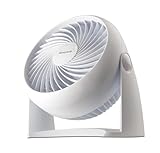
6. Honeywell TurboForce Air Circulator Small Tabletop Fan Quiet
A Honeywell TurboForce Air Circulator Small Tabletop Fan Quiet (desk fan), per the listing. It showed at about $20 on Amazon.com on November 2, 2026.
Good for: personal cooling. Watch out: Check size and noise.
Best for personal cooling
7. AmazonBasics 3 Speed Air Circulator 7-Inch
An AmazonBasics 3 Speed Air Circulator 7-Inch (desk fan), per the listing. It showed at about $17 on Amazon.com on November 2, 2026.
Good for: personal cooling. Watch out: Check size and noise.

Best for personal cooling
8. Honeywell TurboForce Air Circulator Small Tabletop Fan Quiet
A Honeywell TurboForce Air Circulator Small Tabletop Fan Quiet (desk fan), per the listing. It showed at about $19 on Amazon.com on November 2, 2026.
Good for: personal cooling. Watch out: Check size and noise.
How to Choose
Size and fit
Check dimensions for your space or vehicle.
Build and materials
Durable materials last longer.
Ease of use
Simple setup and cleaning help.
Air Circulator Versus Ordinary Desk Fan
The words fan and circulator are often used loosely, but they describe a real difference in design. A traditional desk fan spreads air in a wide, gentle cone, which feels nice when you sit directly in front of it. An air circulator uses a deeper blade design and a tighter housing to push air in a narrower, faster column that travels farther across a room. The point is to keep the air in a space moving, rather than only to cool one person, which can reduce stuffy spots and even out temperatures.
Which one you want depends on how you will use it. If you sit at a desk and want a breeze on your face and arms, a small fan or a clip-on model can do the job. If you want to move air around a bedroom, home office or small apartment, a circulator may be a better match, since it can be aimed at a wall or ceiling to stir the whole room. The titles in this guide mix both types, with some described as air circulators and others as simple desk or clip-on fans.
- Choose a small fan for personal cooling at arm’s length.
- Choose a circulator for moving air across a room or helping a cooling or heating system spread air.
- Choose a clip-on if desk space is tight and you want the fan up and out of the way.
Remember that fans cool people by moving air across skin, and they do not lower the temperature of the room itself. Turn them off when you leave, since they do not help an empty space.
Size, Airflow Claims and Noise
Blade diameter in the product name, such as 7, 11 or 12 inches, is a starting point for judging how much air a fan moves. A larger blade can move more air at a lower speed, which often means less noise for the same effect. A small 7-inch fan is easy to fit on a crowded desk, but it will cover less area. A larger one gives broader coverage but needs more room and can look bulky next to a monitor. Check the listing dimensions against your desk, shelf or nightstand.
Some listings quote how far air travels, in feet, or a noise level in decibels. Treat those as the maker’s claims, which depend on test conditions you cannot see, and compare them only loosely. The post’s watch-out says to check size and noise, and that is the practical approach: read customer feedback for descriptions of how loud the fan is at low and high speed, and whether the motor hums, rattles or whines. Noise at night matters most in bedrooms, so look for comments from people who use it there.
Also check the speed range. A good fan has a low setting that is quiet enough to sleep with and a high setting that moves enough air on hot days. Fewer speeds can be fine if the lowest is gentle. A fan that jumps from silent to very strong with nothing in between can be annoying. A stable base reduces vibration and noise, as does a motor that is well balanced.
Controls, Tilt and Oscillation
How you control the fan affects how often you actually use it. Basic dials and buttons are simple and reliable, but a remote lets you adjust speed from bed or across the room. Smart models, like the DREO options in the list, add app or voice control, timers and sometimes scheduling. Those features can be handy if you like automation, but they add setup, depend on an app and may not be necessary if you only want a quick breeze. Read the listing to see exactly what the smart features do and which systems they work with.
Tilt and oscillation are about aim. A fan that tilts up and down lets you point air at the ceiling, a wall or your face, and an oscillating head sweeps air across a wider area. Oscillation spreads the breeze but may be more distracting than a fixed direction, and a fan that sweeps a draft across a sleeping person may not suit everyone. Look for a model that lets you turn oscillation off. Some circulators also pivot in multiple directions, which makes them flexible for different spots.
- Check that the tilt holds its position and does not slump after a while.
- Check whether a timer or sleep mode is included if you will use it overnight.
- Look for a display that can be dimmed or turned off if you are light sensitive.
Simple controls are not a downside. A fan you can operate without thinking is often the one you reach for most.
Power Source, Cord Length and Placement
Desk fans draw power in different ways. Mains-powered models plug into a wall socket and generally offer more airflow. USB-powered fans, like the clip-on in this list, draw from a computer, power bank or adapter, which makes them convenient for desks and travel but usually limits power. Battery-powered or rechargeable options exist elsewhere in the category, and if one is listed, check run time and charging method. Cord length matters more than you may think, so measure the distance from your desk to the outlet and look for a listing that states cord length.
Placement changes how well a fan works. For personal cooling, set it slightly to the side rather than directly in front, so you get a steady flow without a constant blast. For room circulation, aim a circulator toward a wall or corner so that the air bounces around the room, or point it at the ceiling for a gentler spread. In hot weather, you can place a fan near a window to push warm air out or pull cooler air in, depending on conditions. In winter, a circulator can help spread warm air from a heater or vent, though you should follow the heater’s safety guidance and keep fans clear of it.
Keep the fan on a stable, flat surface and away from loose papers, curtains and anything the blades could catch. A clip-on needs a sturdy edge, so check the maximum thickness the clip can grip. Do not let cords run where they can be stepped on or pinched.
Cleaning, Safety and When to Replace
Dust builds up quickly on fan blades and grilles, and a dirty fan moves less air and can spread dust around. Unplug the fan before cleaning. Wipe the grille and blades with a damp cloth or a soft brush, and use a vacuum attachment for stubborn dust. Some fans have removable grilles that make this easier, but follow the manual and do not force parts apart. Never spray liquid directly into the motor housing, and let everything dry before reconnecting power.
Safety features are worth checking. Look for a guard with gaps small enough to keep fingers out, a stable base that resists tipping and a cord and plug in good condition. If you have children or pets, choose a design with a tighter grille and place the fan out of reach. Do not cover the fan or block its intake. If the fan smells hot, sparks or emits smoke, unplug it and stop using it.
Signs it is time to replace a fan include blades that wobble or rub, a motor that groans or fails to start, a damaged cord, a cracked grille or a base that will not hold the head in place. Cheaper fans are fine for light use, and mid-range ones tend to offer quieter motors and more control, but check recent feedback regardless. Before you buy, check the warranty and return terms on the listing, and consider how and where the fan will be used so you can choose a size and style that suits your space.
Picking a Fan by the Space It Has to Serve
Small fans look similar in photos, but where you put them changes which kind works best. These setups cover most buyers.
Desk or home office
At a desk, the fan sits close to you, so quiet running and a gentle low speed matter more than maximum airflow. The 7-inch AmazonBasics circulator and the compact Honeywell tabletop fan fit a cramped desk, while the 11 and 12 inch DREO models move more air with a bigger footprint. Check that the base does not crowd the keyboard and that the tilt reaches your face.
Bedroom nightstand or dresser
For sleeping, noise level and brightness are the key points. A fan with a remote or smart controls, like the DREO models with remotes, lets you change speed without getting out of bed. Look for a display you can dim or turn off, and a timer so it shuts off after you fall asleep.
Clip-on and tight spaces
The BESKAR USB clip-on fan suits a headboard, a shelf edge or a workbench where there is no flat surface. It is a personal cooler rather than a room mover, and USB power limits its strength. It pairs well with a laptop, a power bank or a wall adapter.
Kitchen, workshop and craft rooms
Rooms where heat or fumes build up benefit from a fan that can be aimed across the room. Keep it away from splashes and open flames, and clean it more often, since cooking grease and dust gather on blades quickly.
Airflow Patterns That Make Rooms Feel Cooler
A circulator does not lower the air temperature. It moves air across your skin, which helps sweat evaporate and makes you feel cooler. Understanding a few simple tricks helps the fan do more with the same power.
- Create a cross-breeze. If you can open two windows, aim a fan to push hot air out of one while another lets cooler air in.
- Aim at a wall or ceiling. A focused jet can bounce and spread more gently, which feels less harsh than a direct blast.
- Pair it with an air conditioner. Placing a circulator so it moves cool air farther into the room can let you set the thermostat a little higher.
- Use the evening trick. When it is cooler outside, a fan in a window facing out can pull warm indoor air away.
- Turn it off when no one is there. Because the cooling effect is on people, a fan in an empty room does nothing useful.
Common Mistakes When Buying a Small Fan
- Trusting the distance claims. Titles that promise a long throw describe a best-case measure in a lab. Treat them as a way to compare models, not as what you will feel at a desk.
- Ignoring the lowest speed. A fan that is loud or strong at its lowest setting is hard to use at night or near the face.
- Overlooking the cord. A short cord limits placement. Check its length, or plan on a safe extension.
- Buying smart features you will not use. App control is nice, but if you only need on and off, a simpler remote model costs less.
- Skipping cleaning access. Grilles that are hard to remove collect dust that then blows around the room.
Budget Versus Premium: Where the Money Goes
Lower-priced fans tend to have fewer speed steps, simpler controls and louder motors. They can still move air well enough for a desk. Higher-priced ones usually add smoother speed control, quieter motors, remotes or app connections, timers and sturdier build. Some use motors designed for more precise speed control, which can mean quieter operation at low settings.
If the fan will run for hours in a bedroom or office, spending more on noise and controls pays off every day. If it is for occasional use in a workshop or as a spare, a basic model is fine. Whatever you buy, the specifications to compare are the speed range, noise rating on the listing, tilt angle and size, since those decide how the fan feels in your space.
Safety and Placement Basics
Small fans are low-risk, but a few habits keep them that way. Place the fan on a flat, stable surface where it cannot be knocked over, and keep the cord out of walkways. Make sure children and pets cannot reach the blades through the grille, and never push objects through the guard. A fan that wobbles, smells hot or makes a grinding noise should be unplugged and checked.
For clip-on and USB models, use a power source that matches the listed voltage and current, and avoid covering the motor with fabric or papers. Placing the fan a little away from curtains, loose paper and bedding prevents anything from being pulled toward the intake. These few checks take seconds and make everyday use worry-free.
Frequently Asked Questions
Is it easy to install?
Check the manual.
Is it worth the price?
Budget options cover basics.
How do I care for it?
Clean as directed.
Does a desk fan cool a room?
Not directly. A fan moves air and helps you feel cooler by evaporating moisture from your skin. It does not lower the room temperature, so turn it off when you are not there.
Is a USB fan strong enough?
USB fans are convenient and suit personal use at a desk, but they usually move less air than a mains-powered fan. Check the listing and read feedback for how they perform on high speed.
Can I sleep with a fan on?
Many people do. Choose one with a quiet low speed and a timer if you wish, and aim it so that it is not blowing directly on you all night. If you have breathing concerns, speak to a health professional.
How do I make a fan quieter?
Clean the blades, place it on a stable, flat surface, and use a lower speed. Check for loose screws or a wobbling base, which can cause rattling.
Where should I place a circulator in a room?
Aim it toward a wall or into a corner so that air moves around the room, or point it at the ceiling for a softer effect. Keep it clear of curtains and papers.
Are smart fans worth it?
They are useful if you like timers, schedules or remote control from a phone. If you only want a simple breeze, a basic model with a remote or dial may be enough.
Can I use a fan with a heater?
A circulator can help spread warm air, but follow the heater maker's safety instructions and keep the fan and cords away from hot surfaces. Check the manuals for both.
Is a small fan cheaper to run than air conditioning?
Generally yes. Small fans draw far less power than air conditioners, so running one for personal cooling costs very little. Check the wattage on the listing. A fan does not cool the air itself, so it works best when combined with sensible window and shade use.
Should a fan blow in or out of a window?
Both can help. At night, a fan facing out can push warm indoor air away while cooler air enters elsewhere. In the day, if outside air is hotter than inside, keep windows closed and use the fan to circulate indoor air only.
Why does my fan make a rattling or humming noise?
Common causes are dust on the blades, a loose grille or base, or an uneven surface. Unplug it, clean the blades and tighten any screws. If the noise persists at a particular speed, try a lower setting or contact the maker about the warranty.
Does a fan help with stuffy air or odors?
It can move air around, which may make a room feel fresher, but it does not filter or remove odors. For real ventilation, open a window or use an exhaust fan. A circulator can help spread air from a filter or purifier through the room.
Bottom Line
Air circulators move air farther than basic fans.
More Home & Garden Guides
- Best Small Thermoelectric Coolers
- Best Heated Throws and Full-Size Blankets
- Best Heated Foot Warmers for Home
- Best Cordless Clippers and Trimmer Kits
- Best Pour-Over Kettles with Temperature Control
- Best Rechargeable Wearable Fans
- Best Low-Profile and Large Ceiling Fans
- Best Indoor Humidity and Temperature Monitors