A clock radio with a CD player puts your discs, the radio and a wake-up alarm in one box on the nightstand. Most are top-loading units with a small LED display, dual alarms and a way to wake to a CD, the radio or a buzzer. Some add USB charging, Bluetooth or a remote.
The six models below run from a compact GPX with a 0.9 inch red display to a larger Crosley with Bluetooth and a front-loading tray. Sizes, features and power come from each product’s listing page. We have not used these products ourselves, and the sound and wake-up claims are the makers’ own.
As an Amazon Associate we earn from qualifying purchases. Links below are affiliate links, and they do not change the product information we give.

What to Look For
| Feature | Why it matters |
|---|---|
| Disc loading | Top-loading trays are common; one model here loads from the front |
| Alarm sources | Wake to CD, radio, buzzer or, on some, USB or Bluetooth |
| Display and dimmer | A dimmer keeps the digits from lighting the room |
| Backup power | Batteries keep the clock or settings during an outage |
| Extras | USB ports, a remote, Bluetooth or wireless charging |
In this guide
Specs at a Glance
| Clock radio | Size and power | Display | Notes |
|---|---|---|---|
| GPX | 7.4 x 3.46 in; corded | 0.9 in red LED; dimmer | Dual alarm; 23 FM presets; 2 AA clock backup (not included) |
| Jensen | Corded; size not listed | Digital; details not listed | AM/FM; dual alarm; 2.1 A front USB port; 2 AA clock backup |
| HANNLOMAX HX-300CD | 6.89 x 3.27 in; corded | 1.2 in green LED; dimmer | Dual alarm; dual USB (2.1 A and 1 A); aux-in |
| Gelielim | 8.86 x 6.7 x 3.15 in; corded or battery | Large LED; 4 brightness levels | Bluetooth; 10 W wireless charging; remote; headphone jack |
| Kuephom | 9 x 8 x 3.2 in; corded | Not described on the page | Remote; Bluetooth, USB and aux; dual alarms with a gradual buzzer |
| Crosley Metro | 14.5 x 9 x 4.5 in; corded | Digital clock | Front-loading CD; Bluetooth; FM; remote; 24 W |
The 6 Best Clock Radios With CD Player
Top pickBest for a simple bedside CD player
1. GPX CD Clock Radio with CD Player
A 7.4 inch wide corded unit with a top-loading CD player that handles CD-R/RW discs with random, repeat and programmable playback. It has a digital FM radio with 23 presets, two alarms, snooze, a sleep timer and a dimmer on a 0.9 inch red LED display, with a two-AA clock backup (batteries not included).
Suits: a simple bedside CD player. Strengths: a dimmer and a clock backup. Weaknesses: no USB or Bluetooth is listed. Skip it if you want to charge a phone from it.
View GPX CD Clock Radio with CD Player, FM Radio and Dual Alarm on Amazon
Best for a CD clock radio with a USB port
2. Jensen Stereo CD Player with AM/FM Dual Alarm Clock Radio
A top-loading, CD-R/RW compatible player with skip, search, repeat and programmable memory. It adds a dual alarm with snooze and sleep, a 2.1 amp USB port on the front, an auxiliary input and a built-in stereo speaker, with an AC adapter included and two AA batteries (not included) for the clock.
Suits: a CD clock radio with a USB port. Strengths: front USB charging and an aux input. Weaknesses: the page gives no size or display details. Skip it if you need to know the display size first.
View Jensen Stereo Compact Disc Player with AM/FM Digital Dual Alarm Clock Radio on Amazon

Best for two people charging phones
3. HANNLOMAX HX-300CD CD Player Alarm Clock Radio
A 6.89 by 3.27 inch corded unit with a top-loading CD player and a PLL FM radio with presets. It has a 1.2 inch green LED display with a dimmer, a dual alarm that can wake to CD, buzzer or radio, a sleep timer, nine-minute snooze, dual USB ports (2.1 A and 1 A) and an aux-in jack.
Suits: two people charging phones. Strengths: two USB ports and a dimmer. Weaknesses: a bright green display. Skip it if you want wireless audio.
View HANNLOMAX HX-300CD CD Player, Alarm Clock Radio, USB Charger (Black) on Amazon

Best for a multi-function bedside unit
4. Gelielim CD Player Alarm Clock with Wireless Charging
An 8.86 by 6.7 by 3.15 inch boombox-style unit that plays CD, CD-R, CD-RW, MP3 and WMA. The listing mentions Bluetooth, FM radio, a 10 W Qi wireless charging pad, a remote, a headphone jack, two alarms with a nine-minute snooze and a four-level dimmer. Power is listed as corded or battery.
Suits: a multi-function bedside unit. Strengths: wireless charging and Bluetooth. Weaknesses: bulkier than a simple clock radio. Skip it if you want a compact clock.
View CD Player Alarm Clock, FM Radio, Clock with Wireless Charging on Amazon
Best for a remote-controlled setup
5. Kuephom CD Player Alarm Clock with Remote
A 9 by 8 by 3.2 inch corded boombox that plays audio CDs, MP3 and WMA discs. The listing mentions FM radio, USB and aux inputs, Bluetooth, a USB charging port, two speakers, a remote for volume, track skip and snooze, and dual alarms including a buzzer that starts gentle and grows louder.
Suits: a remote-controlled setup. Strengths: a remote and a rising buzzer. Weaknesses: the page does not describe the display or a dimmer. Skip it if you need a dim display.
View CD Player Alarm Clock with Remote on Amazon
Best for a shelf or dresser stereo with an alarm
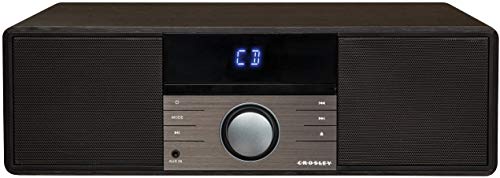
6. Crosley CR3502A-BK Metro Bluetooth FM Clock Radio and CD Player
The largest here at 14.5 by 9 by 4.5 inches and about 8 pounds. It has a front-loading CD tray, a digital FM tuner with a wire antenna, Bluetooth, an aux input, two built-in speakers, a remote, a sleep timer and an AC-powered digital alarm clock, with a vintage look from the maker.
Suits: a shelf or dresser stereo with an alarm. Strengths: Bluetooth and front loading. Weaknesses: large and heavy. Skip it if your nightstand is small.
View Crosley CR3502A-BK Metro Bluetooth FM Clock Radio and CD Player, Black on Amazon
Care and Setup
- Keep discs clean and handle them by the edges.
- Place the unit on a flat, stable surface with room around the speakers.
- Add backup batteries where the listing supports them.
- Pull out the FM antenna wire and move it for clearer radio.
- Set the dimmer before bedtime.
Mistakes to Avoid
- Assuming every model has Bluetooth or USB.
- Forgetting that backup batteries are usually not included.
- Ignoring the footprint of a boombox-style unit.
- Choosing a model with no dimmer for a dark room.
Disc Formats, Playback Features and Disc Care
Every CD clock radio plays standard audio CDs, but support for other discs varies, so read the listing’s format line. Recordable discs, written as CD-R and CD-RW, are not always accepted by older or simpler players. Some units also read data discs with MP3 or WMA files, which lets one disc hold dozens of songs, while others do not. If you burn your own discs or have a collection of mixed ones, check the formats before you buy. Do not assume a model plays every disc just because it is a CD player.
Playback controls are worth a look. Skip and search buttons, repeat and random play, and programmable track order differ from model to model. Some players remember the last track when you turn them off, and some do not. A display that shows track numbers makes navigation easier, particularly when you plan to wake to a particular song. Top-loading drawers are common on bedside units, because they save space and have fewer moving parts, while front-loading trays resemble a stereo system and may need extra clearance in front.
Disc care affects how long the player works well. Handle discs by the edges, store them in cases and wipe fingerprints with a soft, lint-free cloth from the center out. Scratched discs can skip or fail to read. If a player starts skipping on clean discs, the laser lens may be dirty or worn. A lens cleaning disc sold for the purpose can help, and the manual may offer guidance. Keep the player out of damp, dusty or hot places, and avoid moving it while a disc is spinning.
Alarm Features That Matter in Daily Use
A clock radio is judged mostly by how well it wakes you and how easily it lets you set things at night. Dual alarms let two people wake at different times, or let one person set a weekday and a weekend time. Check whether the alarm can be set for weekdays only, weekends or all days, because not every unit offers it. Learn which sources the alarm supports, usually radio, buzzer and CD, and whether each alarm can use a different one.
The wake-to-CD option deserves some thought. Waking to a disc is pleasant, but if the disc does not start or the lid is open, some units fall back to a buzzer and others stay silent, so test the setup before relying on it. Wake-to-radio depends on a stored station and a clear signal. A buzzer is the most reliable for heavy sleepers, and some units offer a gradual volume increase.
- Snooze length varies, and some units have a fixed interval you cannot change.
- A sleep timer turns the radio or CD off after a set time, which is useful if you fall asleep to music.
- Large, clearly labeled buttons are easier to use in the dark.
- Alarm indicators should show clearly which alarms are armed.
- Check the volume of the alarm itself, since some alarms follow the playback volume setting.
Test the whole alarm routine once during the day before trusting it for an early appointment, and double check the AM and PM indication when you set times.
Display, Brightness and Sleeping Next to It
The display is the part you look at every night, so its brightness and color matter. Red digits are often described as less disruptive in a dark room, while green or white can seem stronger, though this varies with brightness and individual sensitivity. A dimmer helps, and several brightness levels are better than a simple on-off switch. Check whether the dimmer affects the whole display or only part of it, and whether it can be turned off completely for a very dark bedroom.
Digit size is a balance. Large digits are easier to read from across the room without glasses, but they can be glaring. A smaller display may suit a compact nightstand. If you have poor eyesight, favor a larger display with a clear contrast, and a unit with large, tactile buttons.
Think about light leaks from other parts of the unit, such as indicator lights, a CD display or a wireless charging pad glow. A light that you cannot dim can bother some sleepers. If you share a room with someone who sleeps lightly, ask whether the unit has a quiet alarm option and whether beeps accompany button presses. Sound can also carry: a CD player may produce a faint whirring noise when it reads a disc. For light sleepers, test the unit during the return window and keep the packaging until you are sure it suits the room.
Sound Quality and Radio Reception
Bedside units have small speakers, and they are designed for convenience rather than for critical listening. A larger body and two speakers can give more volume and a bit of stereo separation, while a very compact unit will sound thinner. Bass is limited by size. If you want better sound, look for an auxiliary input or Bluetooth, which lets you connect a phone or a separate speaker, when the listing offers it. Do not expect a clock radio to replace a dedicated audio system.
Radio reception depends partly on the unit and partly on your location. Most units rely on a wire antenna, usually for FM, that you extend and reposition. Placing it near a window, away from large metal objects and electronics, tends to help. AM reception often uses a built-in ferrite antenna, and rotating the unit can improve a weak signal. Digital tuning with preset memory is easier to use than a slide dial, and the manual should explain how to save stations.
Interference can come from phone chargers, lamps, routers and power adapters near the radio. If you hear buzzing, move the unit or the other device, or try a different outlet. Keep speakers clear of curtains or a pile of books so that sound is not muffled. Place the unit on a stable surface and avoid vibrations from a heavy shelf or a vibrating appliance, which may cause a CD to skip.
Power, Charging Ports and Knowing When to Replace It
Most CD clock radios plug into an outlet, and many offer a battery backup to hold the time during an outage. Backup batteries are often not included, and backup typically keeps the clock or settings, not the music. Without it, the clock may reset after a power loss, and the alarm may not sound. If the alarm matters to you, get backup batteries, check them periodically and replace them before they leak.
Some models include USB ports for charging a phone or other small device, and some offer wireless charging. Read the listing for the output, which is usually given in amps, and remember that a bedside unit may charge a phone more slowly than a dedicated charger. For wireless charging, line up the phone with the pad and remove thick cases if the maker advises it. Do not use a charging port with damaged cables, and do not cover a phone that is charging on a bed.
Compare the unit’s footprint with your nightstand, and check the cord length to your outlet. Keep the unit away from water and from heat sources, and place it where the vents are not blocked. Replacement is worth considering when the disc will not load or read, the display flickers, the alarm fails to sound, the buttons stop working or the radio has persistent static. If a repair costs more than a replacement, it is often more practical to replace the unit. If you no longer use discs, a simpler alarm clock with Bluetooth may suit you better.
Understanding Specifications on a Combination Radio Listing
Clock radios with a disc drawer pack many features into a small case, and listings can bury the details you care about. Begin with the playback line. Most models read standard audio discs, and some also mention formats such as burned discs or files on a drive. If you plan to play anything beyond store-bought albums, look for the formats named in the description and check the manual, since support varies from one unit to the next.
Look next at the radio side. AM and FM tuning are common, and a few models add presets so a favorite station is one touch away. Pay attention to the antenna: a wire that you can stretch and reposition often gives clearer reception than a fixed one. Bluetooth, a headphone jack or an auxiliary input widen what you can play, but they are extras rather than essentials.
The clock features deserve a careful read. Dual alarms let two people wake to different sounds. A battery backup keeps the time if the power blips. A dimmer lets you tame the display at night. A snooze button that is large and easy to find in the dark can matter more than any specification.
Mistakes That Make a Bedside Radio Annoying
A few avoidable slip-ups cause most of the complaints. Keep these in mind before ordering.
- Ignoring the size of the unit and discovering it crowds the nightstand lamp or a glass of water.
- Assuming every model reads every kind of disc without confirming it in the manual.
- Skipping the alarm source options, so the unit only wakes you with a harsh buzz when a gentle radio wake-up was the goal.
- Forgetting the remote, which is handy when the unit sits across the room.
- Placing the radio right beside a router or charger, which can introduce noise in reception.
- Leaving the disc inside the drawer for long periods when the maker suggests removing it.
Set the time and alarms right after unboxing, with the manual open, and test the volume at a low level before your first morning. Keep the lens area clean with a soft, dry cloth as the instructions advise, and store discs in cases so they stay free of dust and scratches.
Sound deserves a short word. Small speakers inside a compact case are built for talk, news and gentle background music, not for filling a large room, so set your expectations to match. If you care about richer audio, look for a model with a headphone jack or an input that connects to larger speakers. Placing the unit on a solid surface rather than on soft bedding also helps the sound stay clear, and a bit of space around the vents prevents stuffiness from dust or fabric.
Clock Radio With CD Player FAQ
Can I wake up to a CD?
Most listings here say yes. The GPX, Jensen and HANNLOMAX name CD as an alarm source; check the Gelielim, Kuephom and Crosley pages for alarm details.
Do they keep the time in an outage?
Some do. The GPX and Jensen list two AA batteries for the clock, and batteries are not included.
Will every CD clock radio play burned discs?
Not necessarily. Check the listing for CD-R and CD-RW support, and for MP3 or WMA playback if your discs contain those files.
Can I wake up to a CD every morning?
Many models offer a CD alarm, but you should test how yours behaves if the disc is missing or the lid is open. Some fall back to a buzzer, and others stay silent.
Will the clock keep time during a power outage?
Only if the unit has a backup battery option and the batteries are installed. Check the listing, because backup batteries are often not included.
Why does my CD skip?
Common causes include a scratched or dirty disc, a dirty lens, vibration or a worn laser. Try another clean disc and a stable surface, and use a lens cleaning disc if the manual allows it.
Can I connect my phone to a CD clock radio?
If the unit has Bluetooth or an auxiliary input, yes. Check the listing for the connection types before buying.
How can I improve poor FM reception?
Extend the antenna wire fully, move the unit near a window and keep it away from chargers and other electronics. Try repositioning until the signal is clearer.
Is the display too bright for a bedroom?
It depends on the unit and your sensitivity. Look for a dimmer with several levels, and test the brightness at night before keeping the unit.
Who Still Buys a CD Clock Radio, and Why
It is easy to assume the CD clock radio belongs to another decade, yet it solves a handful of modern problems surprisingly well. It plays a music collection that many households already own without accounts, passwords, updates or a phone in the bedroom. For listeners who value a screen-free room at night, a dedicated bedside unit offers music and a reliable alarm while the phone charges in another room.
There is also the matter of simplicity for other people in the house. A parent, a grandparent or a guest can operate a physical disc tray and a row of buttons without learning an app. In spare rooms, rental properties and holiday homes, a clock radio with a CD player is a self-contained welcome: radio for the news, a disc for the evening, and an alarm that does not depend on the visitor’s own devices.
Collectors are another quiet audience. Shelves of discs gathered over decades do not become worthless because streaming exists, and many of those discs are live recordings, local releases and compilations that are awkward to replace digitally. A bedside player keeps that collection in daily use rather than archived in boxes, which is, after all, what it was bought for.
If that sounds like your household, the choice among the picks in this guide turns on practical details: how the alarm behaves, how the display treats a dark room, and how the unit handles the discs you actually own. The sections below work through those details one by one.
Setting Up the Alarm So It Works Every Day
Begin by setting the clock itself in good light, following the printed sequence exactly rather than guessing from the buttons. Many bedside units share buttons between functions, and a press held a moment too long can move you from setting the hour to setting the alarm without any obvious sign. Work slowly the first time; the routine becomes quick once your fingers know it.
Decide what you are waking to before you set the time. Waking to a disc means checking that the right disc is loaded, that the chosen track is the one you expect, and that the volume set for evening listening is not the volume you will meet at dawn. Waking to radio means choosing a station with a strong signal at your bedside, because a weak station can greet you with hiss instead of voices.
Test the whole arrangement on a weekend morning before trusting it on a workday. Set the alarm for a time when you are already awake, stay in the room, and watch what the unit does: how the sound builds, whether the snooze behaves as you expect, and how you switch it fully off rather than into another snooze cycle. Most alarm disappointments are really unfamiliarity, discovered too late.
Keep a simple backup for the mornings that truly matter. A phone alarm in another room, set a few minutes later, costs nothing and covers power cuts, flat backup batteries and the day you sleep through the first alarm entirely. The clock radio remains the everyday tool; the backup is insurance, not a verdict on it.
Getting the Best Sound From a Small Bedside Unit
Placement shapes the sound of a small speaker more than any setting on the unit. A clock radio pushed into a corner gains bass from the walls but can boom and blur voices, while one placed on a hard, empty surface can sound thin. Try the unit on the nightstand, then a hand’s width from the wall, then on a book or a cork mat, and keep the arrangement that makes speech clearest at low volume.
Night listening rewards restraint. A modest volume in a quiet room carries detail that a louder setting in the daytime kitchen would drown, and it is far kinder to anyone sleeping beside you. If the unit offers tone or preset adjustments, make changes while listening to a familiar disc, not a new one, so you can hear what the adjustment actually did.
Radio reception follows the aerial, and the aerial follows patience. Extend any wire aerial fully and experiment with its direction while a talk station plays, because voices reveal hiss and fading faster than music does. Keep the wire away from charging cables and metal lamp bases where you can, and accept that a station that is weak at the bedside may simply be weak in your street.
For discs, clean media sounds better. A fingerprint across the playing surface can cause skipping that looks like a failing player, so handle discs by their edges, return them to their cases, and wipe a marked disc gently from the centre outward with a soft cloth before blaming the machine.
Living With the Display, the Buttons and the Remote
The display is the part of a clock radio you interact with in the dark, half asleep, and its design decides whether the unit is a pleasure or an irritation. Digits should be readable from the bed without being bright enough to light the room, and the dimming control should be reachable without sitting up and hunting. If a unit offers several brightness steps, set it on the lowest one you can still read at arm’s length.
Buttons deserve the same scrutiny. The controls you need at dawn are few: snooze, alarm off, and volume. They should be findable by touch, distinct in shape or position from the disc and tuning controls, so that a sleepy hand does not eject a disc or change the station instead of buying nine more minutes. Large top-mounted snooze buttons exist precisely because this problem is universal.
A remote control, where one is included among the picks in this guide, changes the unit from a bedside clock into a small room system. It lets you skip tracks, adjust volume and set a sleep timer from a chair across the room, which suits listeners who read or work in the bedroom during the day. Keep the remote in one fixed place, or its convenience evaporates into the bedding.
Sleep timers are the unsung feature of the category. Setting music to fade after half an hour lets you fall asleep to a disc without leaving the player running all night, and it spares the mechanism wear. If you use the timer nightly, confirm how it behaves with each source, since some units apply it to radio and disc alike and others treat them separately.
Troubleshooting the Problems Owners Actually Meet
A disc that will not play is usually a dirty or damaged disc, a disc loaded upside down, or a format the player does not support. Work through those in that order before concluding the player has failed. Try a commercially pressed disc you know is clean; if that plays, the machine is fine and the problem lives in the first disc.
Skipping during play often traces back to vibration or a marked surface. Move the unit off a wobbly table, check that nothing leans against it, and clean the disc as described earlier. A player that skips on every disc, including new ones, after cleaning and repositioning, is telling you its mechanism is worn, and repair of an inexpensive bedside unit is rarely economical.
Time that drifts or resets points to power. A unit that loses its settings after every brief outage needs its backup battery replaced, where the design uses one, or its internal backup has faded with age. Note that a clock can keep time through an outage yet still fail to sound an alarm during one; the two abilities are separate, and the listing details in this guide flag which models offer what.
Buttons that seem to do the wrong thing usually reflect shared functions rather than faults. A short press and a long press on the same button often do different jobs, and the printed manual, or the maker’s support page, is the fastest route to certainty. Keep the manual in the nightstand drawer; future you, resetting the clock after a power cut at midnight, will be grateful.
Making the Final Choice Between These Six
Start with the alarm, because that is the job the unit must never fail. If you wake best to your own music, favour a pick that wakes to a disc and lets you choose the track. If you share the bed with a lighter sleeper, look for gentler volume behaviour and a snooze that is easy to reach without a performance. If your schedule changes daily, weigh how quickly the alarm can be reset the night before.
Next, weigh the extras honestly against your habits. Wireless charging on the nightstand is genuinely useful if your phone sleeps there too, and pointless if it does not. A remote matters if the unit will be used from across the room. Bluetooth matters if you also want to play phone audio through the unit’s speaker. Each extra is a reason to choose one pick over another only when it matches a routine you already have.
Consider the room as well as the listener. A wide unit with stereo speakers suits a main bedroom where music matters; a compact footprint suits a crowded nightstand in a small room or a caravan. Display colour and brightness deserve a thought for light sleepers, and for anyone whose partner complains about glowing digits.
Whichever pick you choose, give it a week of ordinary use before judging it. Alarm routines settle, fingers learn buttons, and the disc you wake to can be changed. The best clock radio is the one that disappears into the routine, doing three small jobs, telling the time, playing music and waking you, so reliably that you stop thinking about it at all.
Daylight Saving, Power Cuts and Other Clock Chores
Twice a year, the time changes, and bedside clocks divide into those that adjust themselves and those that wait for you. If your pick needs manual setting, learn the sequence before the night it matters, because fumbling through menus at bedtime with the wrong hour glowing is a small but reliable irritation. Some owners keep a note of the button sequence taped inside the manual.
After a power cut, check more than the hour. Alarms can revert to default times or switch off entirely when a unit resets, and a clock showing the correct time may still be carrying no alarm at all. A ten-second check on the evening after an outage prevents the classic missed morning that follows a storm.
Backup batteries, where a model uses them, age quietly. Replace them on a schedule you can remember, such as the day the clocks change, rather than waiting for the outage that reveals they are flat. Keep the correct spare in the nightstand drawer, since a backup system that depends on a shopping trip is not a backup system.
If your unit sets itself from a radio signal or maintains time internally, it still deserves an occasional glance against a known source. A clock that drifts a few minutes over months can shift an alarm routine unnoticed, and the fix is trivial once spotted. Accuracy is the product here; everything else is features.
Using the Radio Half of the Machine Well
Presets are worth setting up properly on the first day. Put the stations you actually listen to in the order you reach for them, news first if mornings are for news, and the radio side of the unit becomes a one-button habit rather than a search through static every time. A few minutes of setup buys years of small conveniences.
Talk radio reveals reception problems that music hides, so judge your aerial arrangement with voices. If a favourite station fades at the bedside but plays clearly elsewhere in the house, the unit is not at fault; the signal path is. Moving the unit a short distance, or running its aerial wire along a different route, often matters more than any replacement would.
Consider the sleep timer for radio as well as discs. Falling asleep to a late programme with the set left running wastes nothing dramatic, but a timer keeps the room quiet in the small hours and spares the speaker a night of unnecessary work. Many listeners find the timer becomes the feature they use most, ahead of the disc player itself.
For households with different schedules, the radio alarm’s volume behaviour matters. A unit that starts quietly and builds is kinder to a partner who rises later than one that arrives at full volume instantly. Where the picks in this guide differ on this point, their entries say so, and it is worth weighting heavily if the bed is shared.
Caring for the Disc Mechanism Over the Years
Dust is the slow enemy of any optical player, and bedrooms are dusty rooms full of fabric fibres. Keep the tray or slot closed when not in use, and resist leaving a disc sitting in the machine for weeks as a default, because the disc collects dust that the lens then has to read through. A disc returned to its case is a disc that will still play in five years.
Never force a tray. If a mechanism resists, something is misaligned, a disc is seated badly, or a small object has found its way inside, and force converts a small problem into a broken one. Open, inspect in good light, reseat the disc, and try again. Children’s bedrooms produce the most interesting foreign objects; check before concluding the player has died.
Lens cleaning discs exist and divide opinion. Used occasionally and exactly as directed, they can clear light dust; used often or roughly, they can do more harm than good. The gentler first steps are always the same: clean discs, a closed tray, and a unit kept away from steamy bathrooms and kitchen grease, which coat a lens in film that no brush removes.
Expect a long life from a lightly used bedside player. The mechanisms in units like these are mature technology, and most failures trace back to dust, damaged discs or perished belts in very old machines rather than electronics. Treat the player decently and it will likely outlast the phone that replaced it in everyone else’s bedroom.
Bedside Companions: Lamps, Chargers and Clutter
A clock radio shares its small territory with a lamp, a book, a glass of water and, in most homes, a thicket of charging cables. Arranging that territory deliberately pays off nightly. Keep the water glass on the far side of the lamp from the electronics, because the one spill a nightstand ever sees will otherwise find the most expensive object on it.
Cable discipline matters for reception as well as tidiness. Aerial wires draped over charging bricks pick up interference, and a nest of cables behind the unit makes the occasional repositioning a wrestling match. Route charging cables to one side, keep the aerial’s path clear, and the unit will sound better and annoy you less.
If your pick includes a charging port or a wireless charging pad, position the unit so the phone’s resting place is natural rather than precarious. A phone balanced on an edge above a hard floor will eventually fall, usually at night, usually loudly. The best arrangement is the one you can operate accurately while half asleep, which is the true design brief of everything on a nightstand.
Light discipline completes the picture. Between the display, a charging indicator and a lamp, a bedroom can glow like a dashboard. Choose the lowest comfortable settings, cover nothing with tape as a first resort, and remember that a unit chosen partly for its dimming range, as several picks here offer, solves the problem properly rather than cosmetically.
Buying for Someone Else: Gifts and Guest Rooms
A CD clock radio makes a thoughtful gift for the person whose music collection predates streaming, precisely because it respects how they already listen. When buying for someone else, favour the simplest controls over the longest feature list, and set the clock and presets before wrapping it, so the recipient’s first experience is music rather than a manual.
For a parent or older relative, check the size of the display digits and the clarity of the button labels with fresh eyes. What is legible to you at arm’s length in daylight may be a blur to them at night without glasses. Models in this guide with larger displays and straightforward layouts exist for exactly this reason, and choosing one is the kind part of the purchase.
In a guest room, the unit should explain itself. A small card beside it, alarm instructions in two lines, the station presets listed, turns a stranger’s device into a welcome. Guests will not read a manual, but they will read a card, and they will sleep better for knowing the alarm glowing at them is set for nobody and can be ignored.
For a child’s room, weigh the disc player as a deliberate, screen-free way to play audiobooks and music at bedtime. Physical discs a child can choose and load themselves give a measure of independence that a phone app does not, and the sleep timer closes the evening without a parent returning to switch anything off.
Signs It Is Time to Replace the Unit
Replace a clock radio when it fails at its first job: keeping and presenting the time reliably. A display with fading segments, a clock that resets without provocation, or an alarm that sounds inconsistently are not quirks to live with in a device whose whole purpose is trustworthiness at seven in the morning.
Mechanical decline announces itself too. A tray that needs coaxing, a player that rejects clean discs it once played, or buttons that need several presses are wear, not bad luck, and they rarely improve. On an inexpensive unit, replacement with one of the current picks in this guide is the rational answer rather than a repair bill.
Changed habits are a legitimate reason as well. A household that now charges phones at the bedside may want the charging features some of these models add; a listener whose discs have gone may want Bluetooth for phone audio. Replacing a working unit because the household changed is not waste if the old one moves to a guest room or passes to someone whose needs it still fits.
When you do replace, recycle the old unit through electronics recycling rather than the household bin, and keep its remote and manual together if it is being passed on. Small kindnesses of that sort are how a still-working machine finds a second bedroom instead of a landfill.
A Note on Volume for Shared Rooms
If the unit will wake two people who rise at different times, run one experiment in the first week: set the alarm for the earlier riser and let the other judge, honestly, whether the sound is tolerable or a daily grievance. Small adjustments, a different wake source, a lower starting volume, a station with voices rather than music, often settle the matter, and settling it early is far kinder than letting resentment accumulate around a machine that is only doing what it was told.
The Short Version
For a simple CD clock radio, the GPX. For a front USB port, the Jensen. For two USB ports, the HANNLOMAX. For wireless charging, the Gelielim. For a remote, the Kuephom. For Bluetooth and a stereo look, the Crosley.