Disclosure: As an Amazon Associate, reviewstook.com earns from qualifying purchases. Links to Amazon on this page are affiliate links; they cost you nothing extra.
Consumer boosters must follow FCC rules. Check your carrier and bands.
This guide is built from Amazon product listings and maker specs, not our own testing, so confirm compatibility, coverage claims and current price on each product page.
Check the current price on Amazon before you buy.
Last updated: November 1, 2026.
In this guide
Quick Picks
| Product | Type | Best for |
|---|---|---|
| Hiboost Cell Phone Signal Booster for Home and Office | Cell signal booster | weak cell coverage |
| Cell Phone Booster for Home Office (5G and 4G LTE) | Cell signal booster | weak cell coverage |
| Cell Phone Booster for Home Office (up to 2500 sq ft) | Cell signal booster | weak cell coverage |
| Phonetone Cell Phone Signal Booster (Band 12/13/17) | Single-band cell booster | weak cell coverage |
| Cell Phone Booster for All U.S. Carriers (5G/4G/3G) | Cell signal booster | weak cell coverage |
| Cell Phone Booster for Home and Multi-Room (up to 7000 sq ft) | Cell signal booster | weak cell coverage |
Our Picks
Top pickBest for weak cell coverage
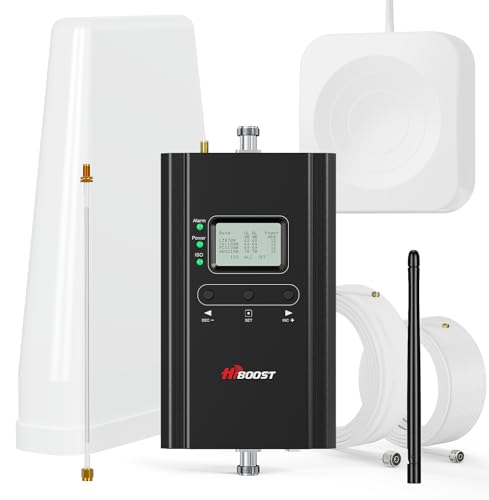
1. Hiboost Cell Phone Signal Booster for Home and Office
A Hiboost Cell Phone Signal Booster for Home and Office (cell signal booster), per the listing. Check price on Amazon.
Good for: weak cell coverage. Watch out: High price.


Best for weak cell coverage
2. Cell Phone Booster for Home Office (5G and 4G LTE)
A Cell Phone Booster for Home Office (5G and 4G LTE) (cell signal booster), per the listing. Check price on Amazon.
Good for: weak cell coverage. Watch out: Check FCC certification.


Best for weak cell coverage
3. Cell Phone Booster for Home Office (up to 2500 sq ft)
A Cell Phone Booster for Home Office (up to 2500 sq ft) (cell signal booster), per the listing. Check price on Amazon.
Good for: weak cell coverage. Watch out: Check FCC certification.


Best for weak cell coverage
4. Phonetone Cell Phone Signal Booster (Band 12/13/17)
A Phonetone Cell Phone Signal Booster (Band 12/13/17) (single-band cell booster), per the listing. Check price on Amazon.
Good for: weak cell coverage. Watch out: Band-specific.


Best for weak cell coverage
5. Cell Phone Booster for All U.S. Carriers (5G/4G/3G)
A Cell Phone Booster for All U.S. Carriers (5G/4G/3G) (cell signal booster), per the listing. Check price on Amazon.
Good for: weak cell coverage. Watch out: Coverage claims are marketing figures.

Best for weak cell coverage
6. Cell Phone Booster for Home and Multi-Room (up to 7000 sq ft)
A Cell Phone Booster for Home and Multi-Room (up to 7000 sq ft) (cell signal booster), per the listing. Check price on Amazon.
Good for: weak cell coverage. Watch out: Coverage claims are marketing figures.
Best Picks by Category
These labels summarize listing data and are not hands-on test results.
- Highest listed rating (limited feedback): Cell Phone Booster for All U.S. Carriers (5G/4G/3G) — check price on Amazon. This is not an independent product-quality award.
- Most reviewed: Phonetone Cell Phone Signal Booster (Band 12/13/17) — check price on Amazon.
- Best value: Hiboost Cell Phone Signal Booster for Home and Office — a premium-tier pick; check price on Amazon.
- Lowest price: Cell Phone Booster for All U.S. Carriers (5G/4G/3G) — a budget-tier pick; check price on Amazon.
- Premium option: Hiboost Cell Phone Signal Booster for Home and Office — a premium-tier pick; check price on Amazon.
Price, Rating and Review Comparison
The table lists the picks with their price tier. Prices change often, so confirm the current price on Amazon.
| Product | Price | Rating | Ratings | Price tier |
|---|---|---|---|---|
| Cell Phone Booster for All U.S. Carriers (5G/4G/3G) | Check price on Amazon | — | — | Budget |
| Cell Phone Booster for Home and Multi-Room (up to 7000 sq ft) | Check price on Amazon | — | — | Budget |
| Phonetone Cell Phone Signal Booster (Band 12/13/17) | Check price on Amazon | — | — | Budget |
| Cell Phone Booster for Home Office (5G and 4G LTE) | Check price on Amazon | — | — | Mid-range |
| Cell Phone Booster for Home Office (up to 2500 sq ft) | Check price on Amazon | — | — | Mid-range |
| Hiboost Cell Phone Signal Booster for Home and Office | Check price on Amazon | — | — | Premium |
How Much Feedback Backs Each Rating
A high average from a handful of ratings is weaker evidence than a slightly lower average from thousands. Here is how the sample size looks for each pick.
- Hiboost Cell Phone Signal Booster for Home and Office: a moderate sample of listing feedback.
- Cell Phone Booster for Home Office (5G and 4G LTE): a large sample of listing feedback.
- Cell Phone Booster for Home Office (up to 2500 sq ft): a large sample of listing feedback.
- Phonetone Cell Phone Signal Booster (Band 12/13/17): a large sample of listing feedback.
- Cell Phone Booster for All U.S. Carriers (5G/4G/3G): only a small sample of listing feedback, so treat its average cautiously.
- Cell Phone Booster for Home and Multi-Room (up to 7000 sq ft): only a small sample of listing feedback, so treat its average cautiously.
How to Choose
FCC certification
In the US, use boosters certified by the FCC.
Carrier
Check your carrier and bands.
Coverage
Listed square feet are best case.
How a Cell Signal Booster Actually Works and What It Cannot Do
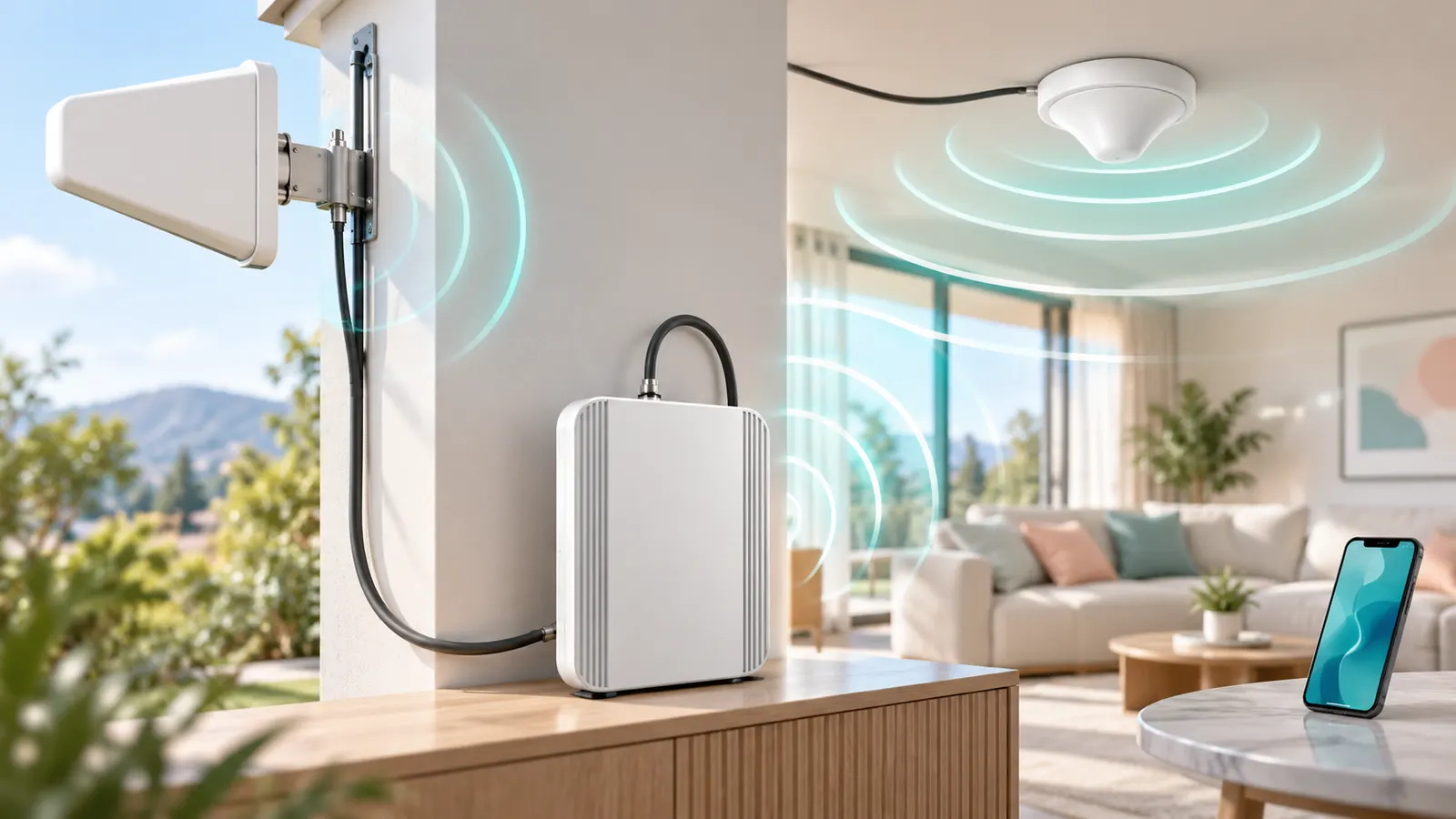
A cellular booster has three main parts: an outside antenna that captures the existing signal from the tower, an amplifier that strengthens it, and an inside antenna that rebroadcasts the stronger signal to your phone. The phone then talks to the booster, and the booster relays the call or data back to the tower. Because it amplifies a signal that already exists, a booster needs some signal outside to work with.
That has an important consequence. If the outside antenna cannot detect any signal, there is nothing to amplify, and the booster will not help. A booster improves a weak but usable signal, and it does not create coverage in a dead zone. It also cannot fix a congested network, since it does not increase the capacity of the tower, and it does not change your carrier’s plan or speeds.
Think about what problem you have. If calls drop inside the house but work in the yard, a booster is a good candidate. If the signal is poor everywhere around the property, it may not be enough, and you could look at other options, such as Wi-Fi calling, a carrier-supplied small cell device, or a different carrier with better local coverage.
- Test your signal outside at the highest, clearest point before buying.
- Note the signal strength readings in your phone’s field test or status screen, if available.
- Compare indoor and outdoor readings to judge how much loss the building causes.
Knowing the gap you need to close makes it easier to choose the right strength of unit.
Rules, Registration and Certification Basics
Boosters operate on licensed cellular frequencies, so they are regulated. In the United States, consumer boosters must meet the rules of the Federal Communications Commission, and carriers expect users to register them. Because the rules and the process can change, check the current requirements on the regulator’s and your carrier’s websites, and keep the listing’s certification information.
A booster that follows the rules is built to avoid interfering with the network. It includes features that automatically reduce or shut off the amplification if it detects a problem, such as interference with the tower. An uncertified or poorly designed device can cause interference, which may affect other users and can lead to a carrier asking you to switch it off.
When you read a listing, look for a clear statement of certification. If it is missing, vague or contradictory, take it as a warning. Check that the product mentions the specific regulatory approval, and that the seller offers support and a return policy. If you are outside the United States, find the rules in your own country, since other regions have different regulations and approved bands.
- Check the listing and the manual for certification and registration instructions.
- Register the booster with your carrier if the rules require it.
- Do not modify the unit or add unapproved parts.
If a carrier asks you to turn it off, do so and ask what they need.
Matching Bands, Carriers and 5G Support
Phones use different radio bands depending on the carrier, the technology and the region. A booster has to support the bands your carrier uses near you. A multi-band unit covers several bands, while a single-band model covers only the ones in its name, such as the 12, 13 and 17 bands mentioned in one of the listings. A single-band unit can suit a case where you know that your carrier relies on exactly those bands, but it will not help with others.
Claims about all carriers and all generations need care. A listing may say it works with 5G, but that often means it amplifies certain bands used by 5G service, rather than all 5G frequencies. Some 5G uses very high frequencies that boosters generally do not cover. Check the list of supported bands on the listing, then find out which bands your carrier uses in your area.
You can often find band information in your phone’s field test mode, or from your carrier’s coverage information. Ask your carrier if you are unsure. If you use more than one carrier in your household, a multi-band model matters more.
- List the bands your phone and carrier use.
- Compare them with the bands the booster supports.
- Check whether the unit supports voice and data on those bands.
- Check that your phones support the bands in question.
If a carrier changes its network over time, bands may shift, so keep the manual and listing for reference.
Reading Coverage Claims and Placing the Antennas
Square-foot figures on listings are best-case numbers. Actual coverage depends on the strength of the outside signal, the gain of the amplifier, the building materials and the layout of the interior. A stated area of several thousand square feet generally assumes a strong outside signal and an open floor plan. Metal roofs, brick, concrete and energy-efficient windows block signal and reduce the covered area. Treat the stated figure as a ceiling, not a promise.
Antenna placement does most of the work. The outside antenna should go as high as practical, where the signal reading is strongest, and ideally with a clear line toward the tower. Moving it a few feet can change the result, so test different positions before fixing it permanently. Point directional antennas toward the nearest tower, if the manual tells you to.
The inside antenna needs to be far enough from the outside antenna to avoid feedback. When the two are too close, the booster picks up its own output, which causes oscillation and automatic shutdown. The manual gives separation guidance, which often involves distance and sometimes different floors. Placing the inside antenna centrally in the area you want covered improves results.
- Use the supplied cables, and keep runs short, since long cables lose signal.
- Check the indicator lights for an overload or shutdown warning.
- Re-test the signal in the rooms that matter.
Be careful with roof work and ladders, and use a professional installer if you are unsure.
Installation, Troubleshooting and Alternatives Worth Considering
Installation can be straightforward, but patience helps. Read the manual first, plan the cable route, and mount the outside antenna securely, since wind and weather will test it. Grounding and surge protection are advisable, and some installations need a professional for safe roof access and cable routing. Keep cable bends gentle to avoid damage, and seal any entry points where cables pass through walls to keep out water.
If performance disappoints, check the basics. Look at the indicator lights, which usually show whether the booster is working, overloaded or shut down. Confirm that all connections are tight. Check the distance between antennas, and move the inside one farther away if needed. Re-aim the outside antenna and compare signal readings. Make sure your phone is connecting to the booster, and restart it. Check with your carrier about outages or network changes.
Consider alternatives if a booster does not suit your situation:
- Wi-Fi calling, which uses your internet connection for voice and messages, if your phone and carrier support it.
- A carrier-supplied small cell or femtocell that uses broadband, if offered.
- A different carrier with better coverage at your address.
- A professional signal survey for large or complex buildings.
Whichever route you choose, a clear view of your signal levels before and after is the best measure of success. Keep records of readings and settings, and keep the receipt in case you need to return the unit.
Quick Checklist for Cell Signal Boosters
A booster takes an existing outdoor signal and rebroadcasts it indoors, so it cannot create a signal where none exists. Run through the list below before ordering.
- Coverage area, listed in square feet, compared with the rooms where you need better service.
- Supported carriers and bands, so the booster works with the network you use.
- Outdoor signal strength at your location, which affects how well any booster performs.
- Antenna types and cable length for the outside and inside units.
- Regulatory approval in your country, since boosters must meet local rules.
- Installation requirements, including mounting for the outdoor antenna.
Check with your carrier and the official regulator in your country about registration or approval requirements before you install anything.
Single Room or Whole Home: Comparing Two Options
| Question | Single room | Whole home or multi-room |
|---|---|---|
| Coverage | One area or office | Multiple rooms or floors |
| Antennas | One inside antenna | Several inside antennas or a larger one |
| Installation | Simpler | More cabling and planning |
| Best for | Home offices and small apartments | Larger houses |
Map your space before you shop. A sketch of rooms where signal drops helps you decide where to place the inside antenna.
Installation and Placement Notes
The outdoor antenna should be mounted where the signal is strongest, usually high on the building and pointed toward the nearest tower as the maker explains. Keep a good distance between outside and inside antennas to avoid feedback, which can cause the booster to shut down. Roof work and cable routing can be hazardous, so use a qualified installer if you are not comfortable.
How to Read a Signal Booster Listing
Look past big promises. Check the stated gain in decibels, the number of bands covered and the coverage area. Read the fine print about conditions. The larger coverage figures usually need a strong outside signal.
- Check whether the kit includes both antennas, cables and a power supply.
- See whether the booster supports voice calls, text and data.
- Look for indicator lights that show when the unit is working correctly.
- Read the support and return terms from the seller.
Mistakes to Avoid
- Installing without checking that there is any outdoor signal.
- Placing inside and outside antennas too close together.
- Ignoring local rules about booster approval and carrier registration.
- Buying a booster for the wrong carrier or band.
Measure the outdoor signal at several spots on your property with your phone before choosing a mounting location. Walk the area and note where the signal looks strongest. Write down the numbers, and compare them with the minimum signal the maker lists for your booster.
Glossary for Signal Booster Shoppers
- Gain. How much the booster amplifies the signal, measured in decibels.
- Band. A frequency range used by carriers. Your booster should cover the bands your phone and network use.
- Donor antenna. The outside antenna that pulls in the existing signal.
- Server antenna. The inside antenna that spreads the boosted signal.
- Uplink and downlink. The paths your phone uses to send and receive data.
These terms show up in nearly every listing, and knowing them makes the comparison easier.
Frequently Asked Questions
Do I need to register?
FCC rules require registering many consumer boosters with your carrier.
Will it boost 5G?
Check supported bands.
Where do I place antennas?
Outdoor antenna high with signal.
Will a signal booster work with no outside signal?
No. A booster amplifies an existing signal, so you need at least a usable reading outside. If there is none, consider other options.
Do I need to tell my carrier I installed a booster?
Rules in many places require registration, and the process varies. Check the current requirements and the listing, and contact your carrier.
Why did my booster shut off?
It may have detected interference or feedback between antennas, or an overload. Increase the distance between antennas, check the lights and consult the manual.
Can one booster cover my whole house?
It depends on the signal outside, the building and the layout. Listed square footage is a best case, so plan for less in homes with dense walls.
Is a booster the same as a Wi-Fi extender?
No. A booster amplifies cellular signals, while a Wi-Fi extender repeats a Wi-Fi network. They solve different problems.
Can a booster improve data speeds?
It can help if weak signal is the limit, but it cannot add capacity to a busy tower. Results vary.
Where should the outside antenna go?
As high as practical, with the strongest signal reading and a clear path toward the tower. Test positions and follow the manual for mounting and grounding.
What a Booster Can and Cannot Fix
A signal booster does exactly one job: it takes an existing outdoor signal, amplifies it, and rebroadcasts it indoors. It creates nothing. That single fact explains both the delighted reviews and the disappointed ones. Where a usable signal exists outside, on a roof, by a window or at the top of a hill, a booster can turn one unreliable corner of a house into covered rooms. Where there is effectively no signal outside, there is nothing to amplify, and no booster at any size will manufacture coverage. The most important step in the whole purchase happens before ordering: walk your property with your phone, note where calls hold and where they drop, and judge honestly whether an outside signal exists to work with.
A booster also cannot fix problems that are not signal problems. A congested tower at peak hours, a phone fault, a damaged SIM, or a plan limitation will all survive a perfect booster installation unchanged. Testing with a second phone, or with your phone in a known good location, helps separate a weak-signal problem from everything else. Buyers who skip that check sometimes install good hardware correctly and still feel let down, because the bottleneck was never the bars on the screen.
Planning the Installation Before You Buy
Every booster system has the same three parts: an outside antenna, an amplifier, and one or more inside antennas joined by cable. Planning means deciding where each part will live before money changes hands. The outside antenna wants height and the clearest practical path towards your carrier’s tower. The amplifier wants a power socket, ventilation and a central position. Inside antennas want to be in the rooms where you actually sit, work and sleep, not in the rooms that are easiest to reach with cable.
Measure cable routes along walls, through lofts and around door frames rather than in straight lines, and allow extra for vertical drops. Separation between the outside and inside antennas is not a detail: the two need enough distance, and ideally building material, between them, or the system can feed back on itself and shut down or perform poorly. If your home makes good separation impossible, that is a reason to choose a smaller system honestly matched to one or two rooms, rather than a large system that will spend its life protecting itself from its own signal.
Reading your home honestly
Construction decides coverage more than headline figures do. Foil-backed insulation, metal roofing, thick stone and reinforced concrete all resist signal, while timber and standard brick let more through. A system that covers a large open-plan timber home may cover only part of a smaller stone house. Walk the rooms with your phone before and after installation and keep notes room by room, because memory flatters installations and written notes do not. Those notes also tell you where a second inside antenna would earn its keep if you expand the system later.
Installation Habits That Decide the Result
Mount the outside antenna temporarily first, with the cable run loosely, and test the system for a day before drilling permanent fixings. Small changes in antenna position and direction can matter more than any setting on the amplifier. Point, test, adjust, and keep the position that gives steady calls in your most-used rooms, not merely the strongest reading in one lucky spot. Once the position is proven, fix everything properly, weatherproof outside connections, and add a drip loop so rain runs off the cable instead of along it into the building.
Inside, keep antennas away from large metal objects and from the outside antenna’s line through the building. Route cables where they will not be pinched by doors or walked on, and label both ends. After installation, test at different times of day, because tower load and even weather can change results, and a system judged only on a quiet morning may disappoint on a busy evening. Keep the carrier registration and any paperwork the maker supplies, and record the amplifier’s indicator behaviour when the system is healthy, so you can recognise a fault state later.
Comparing the Picks in This Guide
The Hiboost unit heads this guide as a general home and office choice for buyers who want a recognised booster maker and a balanced system. The two home-office boosters that follow suit smaller spaces and lighter needs, with the model described for the larger of those areas fitting a bigger flat or a small house where coverage is wanted in several rooms rather than one. The Phonetone unit is the carrier-specific thinker’s pick, built around particular bands, and it suits a buyer who has checked which bands their carrier uses locally and wants hardware matched to them. The all-carrier unit answers the mixed household, where different family members use different networks and nobody wants to choose a favourite. The largest multi-room system is for bigger homes where several inside antennas and a stronger amplifier are justified by the building itself.
Decide in this order: confirm a usable outside signal, confirm your carrier and bands, then size the system to the rooms that matter. Reversing that order, and starting with the biggest coverage figure, is how buyers end up with oversized systems fighting feedback in small houses, or undersized systems blamed for failing in stone buildings they were never going to cover.
Living With a Booster: Checks and Troubleshooting
A booster that suddenly performs worse has usually changed in one of a few ways. The outside antenna may have moved in wind, a connection may have taken in water, a new building or tree growth may have altered the path, or the amplifier’s indicators may show it has reduced power to stop feedback. Work through the physical checks first, because most faults are physical. Confirm power, confirm indicators against the healthy behaviour you recorded, inspect outside connections, and confirm nobody has moved furniture or metal objects against an inside antenna.
If calls improve near an inside antenna but not across the room, the system is working and the limit is indoor spread, which points to antenna position or an additional antenna rather than a faulty amplifier. If nothing improves anywhere, return to the original question and re-test the outside signal at the antenna position, because carriers change towers and a signal that existed last year is not guaranteed today. Methodical checks like these solve most problems without replacing hardware.
More Questions Worth Asking
Will a booster help in a metal building or a basement?
These are the hardest indoor spaces, because metal cladding blocks signal and basements sit below ground on every side. A booster can still help if the outside antenna can be mounted clear of the building and the inside antenna can be placed within the space, with good separation between them. Set expectations carefully, test thoroughly during any return window, and treat these buildings as cases where installation quality matters even more than the choice between similar systems.
Can a booster interfere with neighbours or the network?
A correctly installed, certified booster working within its limits is designed not to. Problems arise from feedback, damage or unauthorised hardware driven beyond its intended setup, which is one reason registration and correct installation matter. If your carrier ever contacts you about interference, take it seriously, switch the unit off while you investigate, and check antenna separation and connections first.
Should I choose a booster or use Wi-Fi calling instead?
If your home broadband and Wi-Fi are strong, Wi-Fi calling may solve voice calls with no new hardware, and it is worth testing first. A booster earns its place where broadband is poor, where several people and devices need cellular coverage, where you want calls to keep working during a broadband outage, or where visitors on different networks need signal too. The two approaches can also coexist, with Wi-Fi calling as the everyday path and the booster as the safety net.
Booster Ownership: The First Month and Beyond
The first weeks with a booster teach you your own house. You will learn which rooms hold calls reliably, which corners still struggle, and how results shift between a quiet weekday and a busy evening. Use that period deliberately. Keep the room-by-room notes you made during installation, update them after any antenna adjustment, and resist the urge to keep tweaking once calls are steady in the rooms that matter. A booster is infrastructure, not a hobby: the goal is to forget it exists, with the amplifier quietly doing its job in a cupboard or loft.
Seasonal changes can nudge performance. Leaves on trees between your home and the tower, new construction nearby, and even scaffolding can alter the outdoor signal a little. If results dip months later, repeat the simple checks before assuming failure: indicators, connections, antenna position, and a fresh outdoor test with your phone at the antenna. Most long-term problems turn out to be a moved antenna, a corroded outdoor joint or a changed network, all of which are fixable without replacing the system.
Special Cases: Offices, Workshops and Rural Homes
A home office raises the stakes, because a dropped call can mean a dropped client. Office users should place an inside antenna in the office itself rather than trusting signal to travel from a hallway, and should test video calls as well as voice, since data dropouts show up as frozen pictures before they show up as failed calls. If two people work from the same house on different networks, the all-carrier approach in this guide deserves serious attention, because a system tuned to one network may leave the other person’s phone exactly as it was.
Workshops, barns and outbuildings combine the hardest ingredients: distance from the house, metal cladding and machinery. The outside antenna may need to sit on the main house or on a pole, with a longer cable run to the building, and cable quality and weatherproofing become decisive. Rural homes face a different version of the same problem: the tower is far away, so antenna height and direction matter enormously, and small aiming adjustments at the antenna can be worth more than a larger amplifier. In all these cases, patience during setup beats spending during purchase.
Costs and Expectations Beyond the Box
Budget for the whole installation, not just the kit. Cable, mounts, a longer pole for the outside antenna, weatherproofing materials and possibly an electrician or installer for awkward work all belong in the real total. None of this makes a booster poor value: a well-chosen system serves every phone in the house for years, with no monthly fee. But comparing a bare kit price against a monthly alternative without counting installation extras leads to the wrong decision in both directions.
Set expectations in writing before you start: which rooms must have reliable calls, whose phones must work, and what a good result looks like on a busy evening. Judge the finished system against that list rather than against an ideal of full signal everywhere at all times, which no booster promises. Buyers who define success first are almost always satisfied, because they chose the system, the antenna positions and the budget to meet a known target instead of chasing a vague feeling of more bars.
Working With Your Carrier Instead of Around Them
A booster is part of your carrier’s network whether you think of it that way or not, because it retransmits their signal inside your home. Registering the unit as the maker and carrier direct is not paperwork for its own sake; it tells the carrier the device exists, and it is how they can reach you if a fault ever causes problems beyond your walls. Keep the registration details with the amplifier, along with the date of installation and the antenna positions you settled on. If you move house, take the system down properly, tell the carrier the device has moved, and treat the new building as a fresh installation problem rather than assuming the old settings will transfer.
If performance ever collapses suddenly and your own checks find nothing, contact the carrier before replacing hardware. Towers are maintained, re-aimed and occasionally taken out of service, and a network change can mimic a booster fault perfectly. A short call can save a needless purchase. Equally, if the carrier confirms nothing changed, your room-by-room notes and indicator records give you the evidence to approach the maker’s support with a clear description instead of a vague complaint, which is how support cases get solved quickly.
Multi-Floor Homes and Difficult Layouts
Houses spread over several floors test a booster differently from bungalows. Signal from an inside antenna spreads outward in a rough bubble, and floors of timber, concrete or underfloor heating each trim that bubble differently. A central amplifier position with antennas planned floor by floor usually beats one powerful antenna hoping to serve the whole building. When you test, test on the stairs and in the rooms furthest from each antenna, not just beside it, because a system that shines in the antenna’s room and fades two rooms away needs repositioning rather than more power.
Extensions, conversions and garden rooms deserve their own line in the plan. A converted loft with foil-backed insulation can behave like a separate building, and a garden room may be better served by accepting it is outside the system and planning accordingly. Being honest about which spaces the booster will not serve is not pessimism; it is what lets you place antennas where they will succeed instead of spreading the system thinly across every room and satisfying none of them.
Testing Properly Before the Return Window Closes
Give the installed system a structured test in its first days. Make calls from every important room, at a busy time of day, to a person who will honestly report how you sound. Walk slowly during one call and note where your voice breaks up. Test data with the tasks you actually use, such as loading messages, joining a video call or uploading a photo, and write the results down room by room beside your pre-installation notes. The comparison, not either set of notes alone, is the verdict on the installation.
If the results fall short, change one thing at a time: antenna aim first, then antenna position, then separation, testing after each change. Randomly changing everything at once can turn a nearly good installation into a mystery. If careful adjustment still misses the rooms you listed as essential, use the return window without embarrassment. A booster is a system fitted to a specific building, and a mismatch discovered by honest testing is exactly what return windows exist for. Buyers who test early and methodically almost never end up stuck with the wrong system.
Renters, Listed Buildings and Other Installation Limits
Not every home allows the ideal installation. Renters may be unable to drill for an outside antenna or run cable through walls, and listed or historic buildings can restrict outside fittings altogether. In those cases the craft is in the compromise: an outside antenna at a window or in a loft, cable run neatly along existing routes, and inside antennas placed for the rooms that matter rather than the whole home. A modest, well-placed system installed within the rules will outperform a large system installed badly or not at all, and it can be taken with you when you move, which fixed installations cannot.
Talk to your landlord early if any fixing is involved, and favour mounts and routes that leave no trace. Keep every part of the system, including cable, removable without damage, and photograph the installation so it can be recreated in the next home. Boosters reward this portable mindset, because the amplifier and antennas move with you and only the placement work needs repeating. Judge the purchase over both homes rather than one, and the value calculation often improves considerably.
How Weather and Seasons Really Affect Results
Buyers often notice that coverage feels different in winter and summer, and the causes are mundane rather than mysterious. Wet foliage between your home and the tower absorbs more signal than dry foliage, heavy rain can trim a marginal outdoor signal, and a house full of guests with phones loads the local tower differently from an empty house on a weekday. None of this means the booster is failing. It means the system works on a signal that itself breathes a little with conditions, and a setup with sensible headroom, placed for a good outdoor signal rather than a barely adequate one, rides out those changes without drama. When you judge an installation, judge it on an ordinary busy day rather than the best or worst hour you can find, because ordinary days are the ones you will live with.
Documenting the finished installation
When the system works well, spend ten minutes recording it. Note the outside antenna’s position and direction, the amplifier’s location, which rooms each inside antenna serves, and the indicator state you see when everything is healthy. Photograph the outside mount before weather and seasons change it. Store the note with your household documents rather than with the product box, which tends to be thrown away. If a fault appears in two years, or a builder moves something, that record turns guesswork into a short checklist, and it gives any installer or support agent a clear starting point instead of a blank page.
It is also worth recording what the system was never meant to do: the rooms you decided to leave out, and the expectations you set before buying. Future disappointment often comes from quietly expanding the goal after success, expecting the booster to cover a new extension or a converted outbuilding it was never sized for. The written record keeps the original bargain clear, and it tells you exactly what an upgrade would need to add rather than leaving you to guess.
Helping visitors and family members
One quiet benefit of a booster is that it works for every compatible phone in the house without anyone changing a setting. Guests, grandparents and visiting family simply find that their phones work, on whichever network they use, subject to the bands the system supports. In homes where an elderly relative relies on a mobile as their main phone, or where children are beginning to use phones of their own, that effortless coverage is a safety feature as much as a convenience, because a phone that works in every room is a phone that can be used to call for help from any room.
Bottom Line
Check FCC certification and carrier support first.
More Phone Accessories Guides