reviewstook.com is reader-supported. When you buy through links on our site, we may earn an affiliate commission.
Where to buy
Five of the six cameras below carry links to their Amazon listings; the dedicated streaming camera at the end is discussed without a link because it sits outside the pool verified for this article, and electronics retailers stock it. Going live is a chain, camera, connection, computer or phone, and the platform’s own requirements, so buy the chain together where you can: the cable that carries the video, the mount that holds the camera at eye level, and the small light that every section of this guide will keep mentioning. Then test the whole chain in a private broadcast before the first public one, because Facebook Live forgives many things but a debut spent troubleshooting in front of an audience is not among them.
Buying used deserves a mention for the produced path specifically: mirrorless bodies and capture chains circulate from upgraders in fine condition, and an organisation that buys its S5IIX-class anchor second-hand from a reputable source can spend the saving on the microphone and light that its audience will actually judge. Check the body’s streaming behaviour in the exact chain before the money settles, as with every recommendation in this guide, because in live work the chain is the product.
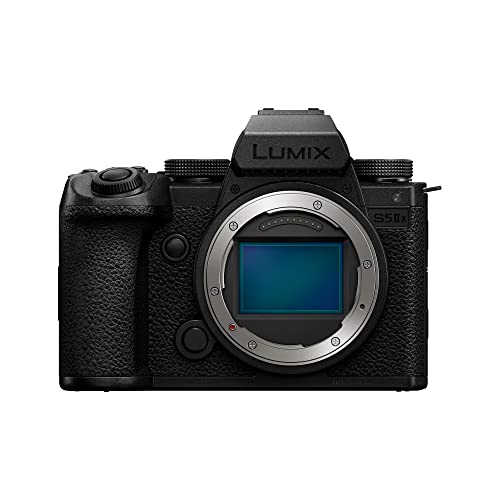
- Panasonic LUMIX S5IIX: check price on Amazon
- Sony ZV-1F: check price on Amazon
- OBSBOT Tiny 2: check price on Amazon
- Logitech Brio 4K: check price on Amazon
- GoPro HERO13 Black: check price on Amazon
- Mevo Start-class dedicated live camera: available from electronics retailers (prose-only pick in this guide)
Facebook Live has become the parish hall, the market stall, the town meeting and the shop counter of half the world, and the best cameras for FB Live are the ones that serve that odd, intimate public square. Its broadcasters are not television professionals: they are pastors and teachers, shopkeepers and musicians, coaches, councillors, crafters, charities and grandparents, going live from rooms and halls and high streets, to an audience that watches on phones, comments in real time, and judges the broadcast in the first five seconds by whether the face is readable and the voice is clear. That five-second judgement is the platform’s whole quality standard, and every recommendation in this guide is downstream of it. The camera’s job in that world is not cinema. It is presence, reliability, and the grace to be forgotten while the message does its work. A camera that draws attention to itself on FB Live, by hunting for focus, by wandering in exposure, by failing at the hour mark, has failed at the only task the platform sets, however beautiful its test footage looked in the shop on the day it was bought.
It is also, not incidentally, the most democratic broadcast medium ever built, and its camera advice should honour that: the teenager’s first live from a bedroom desk and the cathedral’s hundredth from its streaming cupboard are citizens of the same platform, judged by the same audience mercies, and a guide that serves only the cathedral has failed the medium. Both deserve a camera that starts when it should, shows a face honestly, and then gets out of the way of the reason everyone tuned in, which was never the equipment and always the occasion. The rankings below deliberately span that whole republic, from the budget of a first broadcast to the production of a weekly institution.
That job rearranges the usual camera virtues into a platform-specific order. The connection path matters first, whether the camera reaches Facebook by USB as a webcam, by HDMI through an encoder or capture device, by its own streaming features, or by a phone app, because each path has its own failure modes and its own ceiling. Endurance matters next, the long service, the two-hour sale, the all-evening event, where consumer cameras meet their thermal and battery limits in public. Autofocus and exposure manners matter because the broadcaster is also the presenter, the engineer and the host, with no hands free for the camera. And light, as always in this series, matters more than the camera, a truth this guide will repeat because FB Live’s beginners keep learning it live.
One more framing note, because the platform’s name promises a simplicity its settings do not always keep: Facebook’s live tools, scheduling, series, crossposting and the rest, change their menus and their rules with a regularity that no guide can freeze, and this article has therefore been written about the durable layer beneath them, the camera, the chain, the room and the rehearsal, which change slowly and decide everything. Learn the durable layer from these pages and the platform’s current buttons from the platform itself, in the week you set up, and the combination will serve for years.
This guide assumes a broadcaster who is also the audience’s neighbour, because that is FB Live’s actual population and its charm: the viewers know where the hall is, they will meet the presenter at the shops, and the broadcast’s contract is a community one. Equipment advice for such a broadcaster must respect the volunteer’s evening, the organisation’s cupboard and the audience’s phone in equal measure, and the rankings below were made with all three open on the table, which is why reliability and simplicity keep defeating specification in these pages.
Six options are ranked below for the platform’s real range of broadcasters: the mirrorless body built for serious streaming productions, the simple USB camera for the desk-bound presenter, the tracking camera for the teacher and demonstrator, the premium webcam for the office broadcaster, the action camera for the outdoor and on-the-move live, and the dedicated streaming camera that removes the computer from the chain entirely.
Key Takeaways
- Choose the connection path first; the camera follows from it.
- The S5IIX anchors serious, long-form FB Live productions.
- Test the whole chain in a private broadcast before going public.
- Audio and light will decide your audience’s verdict before resolution does.
- The GoPro takes FB Live outdoors, where the platform gets interesting.
- A dedicated streaming camera removes the computer and its failure modes.
- Keep a failure ladder and a log; reliability is a habit, not a feature.
- Produce for the phone in the hand, faces large and voices close.
- Document the setup so a deputy can run the broadcast identically.
- The audience buys the appointment; the camera’s first duty is keeping it.
- In live work the chain is the product; test it whole, in private, first.
- Five seconds decide a broadcast: readable face, clear voice, stable frame.
- The best live camera is forgotten while the message does its work.
- Buy for the fifty-second weekly broadcast, not for the first one.
- A broadcast only one person can run is a single point of failure.
- Used streaming chains, tested whole, beat new ones bought in hope.
In this guide
Quick Picks
| Camera | Badge | Why it is here |
|---|---|---|
| Panasonic LUMIX S5IIX | Best for Serious Productions | Streaming-ready video depth for long, produced broadcasts. |
| Sony ZV-1F | Best Simple USB Camera | Plug in, look good, go live from any desk. |
| OBSBOT Tiny 2 | Best for Teachers and Demonstrators | Tracks the presenter who moves, teaches and shows. |
| Logitech Brio 4K | Best Desk Webcam | Crisp, croppable and professional above any monitor. |
| GoPro HERO13 Black | Best for Outdoor Live | Weatherproof live streaming from markets to mountains. |
| Mevo Start-Class Camera | Best Computer-Free Option | A streaming camera and encoder in one small body. |
How did we choose cameras for Facebook Live?
Judging began with the broadcast chain, because FB Live is a chain and breaks at its weakest link. Each camera was assessed on its path to the platform: direct USB webcam behaviour for the desk broadcasters, HDMI cleanliness and session endurance for the produced ones, app-based streaming for the mobile ones, and how each path behaves across a long broadcast rather than a five-minute demonstration. A camera that overheats at minute forty, drops its connection when the computer sleeps, or buries its streaming settings in a menu labyrinth fails this guide’s first test regardless of its image.
Image and sound manners came second, judged in the platform’s own conditions: the mixed light of halls and shops, the presenter who moves, the audience watching at phone size with phone speakers. Autofocus that holds a face without hunting, exposure that survives a door opening behind the presenter, and colour that keeps people looking like themselves all counted heavily. Third came the broadcaster’s reality, that the operator is the presenter, so setup speed, remote control, readable status indicators and graceful recovery from the inevitable hiccup were ranked as primary virtues rather than conveniences.
The panel also weighed what might be called succession: whether the setup can be run, identically, by the broadcaster’s deputy, successor or substitute, because FB Live’s organisations outlive their founders’ rotas and the broadcast must survive the holiday, the illness and the promotion. Cameras and chains that live in one person’s head were marked down for it, however fine their pictures, and the settings card, the labelled cable and the appliance-like dedicated camera all gained by the same logic. A broadcast that only one person can run is not yet a service; it is a performance with a single point of failure wearing a volunteer’s smile.
The picks in detail
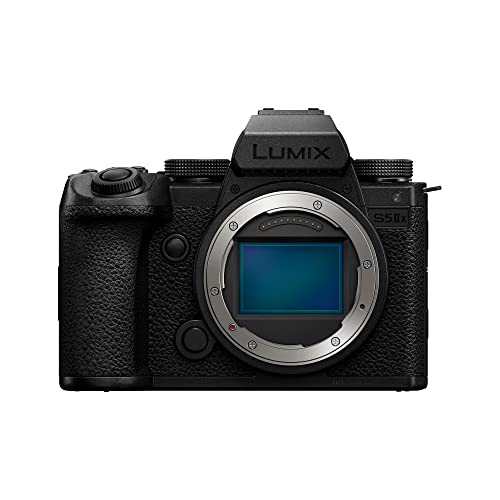
Panasonic LUMIX S5IIX — Best for Serious Productions
For the broadcaster whose FB Live is a production, the church service with a choir, the shop’s weekly showcase with products to demonstrate, the conference or the concert, the S5IIX is this guide’s anchor. It is a full-frame mirrorless body whose video engineering was plainly designed with streaming in the room: professional recording depth, monitoring tools that let a volunteer engineer actually judge exposure and focus, cooling that treats a two-hour broadcast as a working condition rather than an endurance stunt, and direct streaming support in its feature set that can simplify the chain for the setups it serves. The image it sends is a broadcast image, rich, stable and graded kindly, and audiences feel the difference as production value before they can name it.
Its autofocus, the phase-hybrid system of its generation, holds the presenter and the product demonstration without the pulsing that betrays lesser setups, and the L-mount lens choice lets the production pick its look, the wide prime for the intimate presenter frame, the standard zoom for the hall. Paired with a capture device or encoder and a small switching setup, it becomes the heart of a multi-camera FB Live that rivals local television, at a cost structure a parish or a small business can defend.
The honest notes are a production’s notes: it wants an operator, or at least a setup session and a settings discipline, its streaming paths should be rehearsed in the exact configuration the service will use, and it is more camera than a desk broadcaster will ever need. For the organisations whose live broadcasts are their public face, that is not excess; it is the correct specification, and this is the body that fills it.
- Form: full-frame mirrorless, video-led
- Endurance: cooling for long broadcasts
- Tools: professional monitoring built in
- Focus: phase-hybrid, presenter-steady
- Role: services, showcases and produced events
Strengths
- Broadcast image with production depth.
- Long services without thermal drama.
- Scales into multi-camera switching.
Trade-offs
- Wants an operator or a setup discipline.
- Chain must be rehearsed as configured.
- Overkill for the desk presenter.
Best for: churches, businesses and events broadcasting weekly. Not suited for: casual lives from a laptop desk.

Sony ZV-1F — Best Simple USB Camera
The ZV-1F’s FB Live case is the case of the short chain: connect it by USB and it presents itself to the computer as a camera, no capture card, no encoder, no ceremony, with an image a full class above any webcam at its simplicity level, a one-inch sensor behind a bright lens, eye autofocus that keeps the presenter honest, and colour that flatters in the ordinary rooms where desk broadcasts live. For the shopkeeper’s weekly live sale, the teacher’s evening class, the councillor’s update and the creator’s commentary, that combination, real image, trivial setup, is the sweet spot of the entire category.
Its wide lens suits the desk’s geography, presenter and product and a suggestion of the room, and its creator-bred features, the product-showcase focus that shifts between face and object held to the lens, read as if designed for the live seller, because in spirit they were. Battery and session manners suit the typical broadcast’s length comfortably, and the camera doubles, when not live, as the business’s stills and recorded-video camera, which matters to the small organisations this pick serves.
It will not run a produced multi-camera show and its fixed lens sets the frame it sets, but within the enormous middle of FB Live, the one person, one desk, one message, it is the recommendation this guide makes most often, because it respects the broadcaster’s scarcest resources, which are time and technical confidence.
- Form: fixed-lens compact, USB streaming
- Chain: no capture card required
- Focus: eyes and held-up products
- Lens: wide, desk-friendly, bright
- Role: sellers, teachers and solo presenters
Strengths
- Real camera image, webcam simplicity.
- Showcase focus serves live selling.
- Doubles as the business’s everyday camera.
Trade-offs
- Fixed frame, no zoom to reframe.
- Not a multi-camera production heart.
- Session length is the compact class’s.
Best for: solo presenters broadcasting from a desk or shop. Not suited for: produced hall events with a crew.

OBSBOT Tiny 2 — Best for Teachers and Demonstrators
Some FB Live broadcasters cannot sit still because their subject will not let them: the fitness instructor, the craft demonstrator, the cooking teacher, the pastor who walks the sermon, the seller who moves around the stock. The Tiny 2 is their camera, a PTZ webcam whose gimbal head and AI tracking keep the presenter framed while the broadcast happens around them, zooming for the detail, widening for the demonstration, directed by voice and gesture when the hands are full of the work itself. It converts the one-person broadcast’s oldest compromise, be the presenter or be the cameraman, into a solved problem.
Its image, from a sensor large by webcam standards and delivered at 4K for cropping headroom, holds up in the halls and kitchens where demonstration broadcasts live, and its software gives the presenter framing presets that function as a small gallery of shots, wide, close, detail, recallable live. For the teacher whose FB Live is a class, that is a production crew in a paperweight.
The desk-bound presenter gains less, and the tracking must be taught its manners in a rehearsal, because a camera that follows can also be fooled by a passing helper or a busy background until its settings are tuned. For the moving broadcaster, those are small prices, and this pick’s position near the top of the guide reflects how many of FB Live’s most successful formats are, at heart, demonstrations.
- Form: AI-tracking PTZ webcam, 4K
- Tracking: follows the moving presenter
- Control: voice and gesture, hands full
- Presets: a gallery of recallable framings
- Role: classes, demos and live selling on foot
Strengths
- The cameraman a solo broadcaster lacks.
- Demonstrations stay framed and legible.
- Framing presets switch the shot live.
Trade-offs
- Tracking needs a tuning rehearsal.
- Desk-bound users pay for unused talent.
- Premium webcam pricing tier.
Best for: instructors, demonstrators and mobile sellers. Not suited for: static desk commentary alone.

Logitech Brio 4K — Best Desk Webcam
The Brio is the professional desk’s FB Live camera: a 4K webcam whose headroom lets the broadcaster crop and reframe in software, whose field of view adjusts to exclude the room’s untidiness, and whose light correction behaves in the mixed illumination of offices and home studios. For the business update, the professional’s weekly live, the interview format where the host’s frame must look like a broadcast rather than a call, it delivers the crisp, stable, unremarkable excellence that lets the message carry the programme.
Its virtues are the platform virtues: it presents itself to the computer and the streaming software without negotiation, it starts when the broadcast starts, and its image at the sizes FB Live displays is as good as the platform’s own compression will allow any camera to look, which is a truth worth stating plainly, because beyond a certain point the platform, not the camera, is the bottleneck, and the Brio sits comfortably beyond that point.
In dim rooms its small sensor asks for the light this guide keeps prescribing, and it offers no tracking for the presenter who roams. As the seated professional’s instrument it is the category’s reference, and its long service record in offices is the reliability evidence a weekly broadcaster should weight heavily.
- Form: 4K webcam, adjustable view
- Headroom: software cropping and reframing
- Correction: mixed office light handled
- Manners: platform-friendly, instant start
- Role: professional desk broadcasts and interviews
Strengths
- Broadcast polish for seated presenters.
- Reframing headroom in software.
- A decade’s reliability behind the line.
Trade-offs
- Dim rooms expose its small sensor.
- No tracking for roaming presenters.
- Premium over 1080p webcams.
Best for: office and studio-desk FB Live presenters. Not suited for: demonstrations or dark halls.

GoPro HERO13 Black — Best for Outdoor Live
FB Live’s most-watched surprises rarely happen at desks: they happen at the market as it opens, on the farm at lambing, on the boat, at the protest, the festival, the flood, the summit, and the HERO13 is the camera that takes the platform there. It is waterproof, impact-proof in the ways outdoor life requires, and its live-streaming capability, through its app and connection ecosystem, puts a stabilised, wide, bright picture on the page from places a mirrorless rig would need a crew and a weather plan to reach. Its voice control and simple operation suit the broadcaster whose hands are holding a rope, a stall or a steering wheel.
The wide view is the outdoor live’s native grammar, taking in the scene the audience came for with the presenter at its edge, and the stabilisation keeps a walking broadcast watchable rather than nautical. Battery discipline is the working cost, spares rotated, sessions planned, the connection’s appetite respected, because a live from the field is a chain whose weakest link is usually power or signal rather than the camera.
Choose it when your FB Live has weather in it. Its low light is the action class’s, its audio wants a wind plan, and its desk manners are beside the point; outdoors, on the move, in the rain, it is not merely the best pick in this guide but close to the only one speaking the language.
- Form: waterproof action camera
- Streaming: app-based live from the field
- View: wide scene grammar, stabilised
- Operation: voice control, gloved simplicity
- Role: markets, farms, boats and events outdoors
Strengths
- Live from places other cameras cannot go.
- Weather and knocks are non-events.
- Walking broadcasts stay watchable.
Trade-offs
- Battery and signal discipline required.
- Wind audio needs a plan.
- Evening light stretches its sensor.
Best for: outdoor, mobile and event FB Live. Not suited for: the desk or the dim hall.
Mevo Start-Class Dedicated Live Camera — Best Computer-Free Option
The dedicated streaming camera is the category’s specialist answer: a camera with the encoder and the streaming intelligence built in, discussed here without a link as the class sits outside this article’s verified pool, designed to go live to platforms including Facebook through its own app, over Wi-Fi or a wired connection, without a computer in the chain at all. For the broadcaster whose failure stories all involve the laptop, the update that restarted it, the software that forgot the camera, the cable that was the wrong cable, removing the computer removes the genre of failure, and the broadcast becomes an appliance’s job: place, power, press live.
The class’s cameras are built for the long session, with power options and thermal manners for events, app-based control of framing and switching where multiple units work together, and an image tuned for the platform’s expectations rather than for cinema. Churches, schools, sports clubs and market halls have adopted them precisely because a volunteer can be taught the whole broadcast in an afternoon, and the system will behave identically next week in different hands.
The trade is flexibility and ceiling: the dedicated camera does its one job superbly and no other, its image will not grow into a production’s ambitions the way the S5IIX’s will, and its ecosystem is a commitment. For the organisation whose need is a reliable live, every week, run by whoever is available, that trade is the wisest money in this guide.
- Form: streaming camera with built-in encoder
- Chain: no computer required
- Control: app-based framing and switching
- Sessions: built for event-length broadcasts
- Role: volunteers, venues and weekly lives
Strengths
- The laptop’s failure modes, deleted.
- Volunteers learn it in an afternoon.
- Identical behaviour in any hands.
Trade-offs
- One job only, by design.
- Image ceiling below the mirrorless picks.
- An ecosystem commitment to one maker.
Best for: venues and organisations broadcasting weekly. Not suited for: creators growing into full productions.
Comparison table
| Camera | Path to Facebook | Broadcast character | Session strength | Watch out for |
|---|---|---|---|---|
| Panasonic S5IIX | HDMI or direct features | Produced, rich, stable | Long services, cooled | Wants an operator |
| Sony ZV-1F | USB webcam mode | Simple, flattering, wide | Typical live lengths | Fixed frame |
| OBSBOT Tiny 2 | USB with tracking | Moving, framed, alive | Class-length sessions | Tracking rehearsal |
| Logitech Brio 4K | USB webcam | Crisp desk professionalism | All-day desk duty | Dim rooms |
| GoPro HERO13 | App-based streaming | Wide, weatherproof, mobile | Battery-managed bursts | Signal and wind |
| Mevo Start-Class | Built-in, computer-free | Appliance reliability | Event-length by design | One-job ceiling |
How do you set up a reliable FB Live broadcast?
Rehearse the chain in private, exactly as configured
Every element that will be live must be live in the rehearsal: the same camera, cable, computer, network and settings, in a private or unlisted broadcast that runs at least as long as the real one’s riskiest segment. Watch it back as an audience member, on a phone, on the connection your viewers have, and write down what you see, because the rehearsal’s gift is the list of failures that will now happen in private. Change one thing at a time afterward; a chain adjusted in three places is a new chain, and it needs its own rehearsal.
Put the network and the power beyond argument
Wired connections where the venue allows them, the computer on mains power, the camera powered for the session’s full length rather than trusting a battery’s optimism, and the phone that runs the app charged and exempt from sleep. More broadcasts die of infrastructure than of cameras, and the professional’s secret is that their setup photographs would bore you: everything plugged in, everything labelled, nothing depending on a battery’s mood or a signal’s kindness.
Frame, light and mic the presenter like a broadcast
Eye-level camera, light in front, background considered, and the microphone as close to the presenter as the format allows, because the audience’s verdict forms on the voice before the picture. Do a thirty-second test recording in the actual setup and listen to it on the phone’s speaker in a noisy room, which is the examination your broadcast will actually sit, and adjust the room rather than the hopes.
What should you check before choosing an FB Live camera?
Your format decides first: seated or moving, desk or hall or hillside, one presenter or a production, an hour or an evening. Then the chain you are honestly willing to run, because the best camera on a chain you dread will be defeated by a simpler camera on a chain you trust, every week, in public. Check the session endurance in the exact mode you will use, the connection’s behaviour with your computer and network, and the recovery plan, what you will do on air when, not if, something hiccups: the backup phone already logged in and framed is the professional’s signature.
Finally, check the platform’s own current requirements and limits for live video, resolutions, durations and account conditions, because they change and because the camera should be bought for the platform as it is, not as a forum remembers it. The picks above all serve the platform as it stands; the broadcaster’s job is to keep standing with it.
What mistakes do FB Live broadcasters make?
Debuting the equipment and the programme together
The first broadcast on a new chain should be a rehearsal the audience never sees, because every setup has a first failure in it and the only choice is whether it happens in private. Broadcasters who skip the private test are not saving time; they are scheduling their troubleshooting for the worst possible moment.
Letting the voice be an afterthought
A beautiful picture with hall echo and a distant voice reads as amateur within seconds, while a modest picture with a close, clear voice reads as professional. The microphone’s proximity is the cheapest production value in live broadcasting, and its absence is the most common reason good content underperforms on this platform.
Broadcasting on a battery and a prayer
The live that ends at the finale because a battery, the camera’s, the laptop’s, the phone’s, gave its last is a genre of heartbreak entirely preventable by mains power and spares. Plug in everything that can be plugged in; the audience cannot see your power discipline, but they can see its absence, once, at the worst moment.
Ignoring the comments’ existence
FB Live is a conversation wearing a broadcast’s clothes, and the presenter who never reads, answers or acknowledges the comment stream is using the platform as television and losing its whole advantage. Assign the comments a person, even if that person is the presenter with a second screen, because the audience that is answered is the audience that returns.
Final Recommendation
Match the camera to the broadcast you actually make. Produced weekly events take the S5IIX and a rehearsed chain. Solo presenters at desks take the ZV-1F for its image-per-effort ratio, or the Brio where the desk is a professional’s and cropping matters. Teachers, demonstrators and mobile sellers take the Tiny 2 and gain their cameraman. Outdoor and on-the-move lives take the GoPro and a battery plan. Organisations run by volunteers take the dedicated streaming camera and delete the laptop from their worries. In every case: light in front, microphone close, everything plugged in, and a private rehearsal before the public debut, because on FB Live reliability is not a feature of the broadcast; it is the broadcast.
And a final encouragement, because this platform’s broadcasters are so often one person doing an organisation’s work: the audience cannot see your budget, your nerves or your second-hand tripod. They can see whether you showed up, clearly, audibly, at the promised time, and whether you talked to them like neighbours. Every camera in this guide, set up with this guide’s disciplines, clears that bar with room to spare. Choose the one your format names, rehearse it once in private, and go live; the appointment you keep this week is worth more than the production you are planning for next year.
Related guides
Frequently Asked Questions
Do I need a capture card for FB Live?
Only for the cameras that speak HDMI rather than USB: the produced mirrorless path uses one, or an encoder, to bring the camera into the computer or the stream. The USB picks in this guide, the ZV-1F, the Tiny 2 and the Brio, need nothing between the camera and the computer, and the dedicated streaming camera needs no computer at all. Choose the chain first and the capture question answers itself.
What resolution should I stream at?
At the best your connection sustains without strain, which for most broadcasters is the platform’s standard high-definition rather than its maximum, because a stable stream at a modest resolution holds an audience while a stuttering one at a higher number empties the room. Test on your own network at the broadcast’s actual hour, and let the rehearsal, not the specification, decide.
How long can these cameras stream?
Session length is a system property, camera cooling, power and the chain together: the S5IIX and the dedicated streaming camera are built for event-length broadcasts, the desk cameras run as long as their USB power does, and the GoPro works in battery-managed sessions. In every case, power from the mains where the format allows and rehearsed endurance, not brochure endurance, is the number to trust.
Can I use multiple cameras on FB Live?
Yes, through switching software or hardware on the computer path, which is the produced format the S5IIX section describes, or through the dedicated cameras’ own multi-unit app control. Multi-camera is a genuine production step, in cost, rehearsal and operator attention, and most broadcasters should master one excellent angle before buying the second, because the audience rewards the reliable single frame over the ambitious wobble.
What is the minimum viable FB Live setup?
One camera from the middle of this guide, the ZV-1F or the Brio, at eye level; one light in front of the presenter, which can begin life as the room’s best lamp repositioned; one microphone closer than the camera is, even the wired earbuds’ mic worn properly will shame a distant room recording; a wired or strong wireless connection tested at the broadcast hour; and a private rehearsal watched back on a phone. That kit, honestly assembled, outperforms the majority of the platform’s broadcasts, and everything beyond it is growth rather than rescue. Start there, broadcast ten times, and let the log of those ten, not the catalogue, write the upgrade list.
Why does my live look worse than my recordings?
Because the platform compresses live video for delivery to phones on variable connections, and because your room’s light, which recordings forgive in editing, is broadcast exactly as it is. The remedies are the guide’s standing ones: more and better front light, exposure set for the presenter, a connection with headroom, and expectations set by watching your own rehearsal on a phone rather than on the studio monitor.
How do different FB Live formats divide the picks?
The service and the ceremony, long, formal, watched by an audience that includes the housebound for whom this is attendance, belong to the S5IIX and the dedicated camera, whose endurance and manners respect the occasion. The live sale belongs to the ZV-1F and the Tiny 2, product in hand, presenter moving, comments driving the running order. The class and the demonstration belong to the tracker. The update, the interview and the office hour belong to the Brio’s desk. The event in the wild belongs to the GoPro. Formats are the honest spec sheet of this category: name yours in one sentence and the ranking collapses, correctly, into a recommendation.
What does a year of weekly lives teach a broadcaster?
That reliability compounds into audience the way interest compounds into savings: the broadcast that starts on time, in focus, with a clear voice, every week, becomes an appointment, and appointments are the platform’s real currency. The year’s lessons are mostly infrastructural, the labelled cable, the settings card, the rehearsal habit, the backup phone, and broadcasters who learn them stop talking about their camera entirely, which is the sign the camera was chosen correctly. Choose from this guide for the fifty-second broadcast, not the first, and the first will take care of itself.
How do you run a live sale without it becoming a shambles?
The live sale is FB Live’s most demanding popular format, a broadcast, a shop and a conversation running simultaneously in one person’s hands, and its camera requirements are specific: the product must be legible at phone size, which argues for the ZV-1F’s showcase focus or the Tiny 2’s zooming presets; the presenter must be free to fetch, hold and pack, which argues for tracking or a wide forgiving frame; and the session runs long, which argues for mains power and a chain rehearsed to boredom. The sellers who thrive run the broadcast like a market stall with a running order, items numbered, prices and postage settled in advance and pinned where the comments can find them, so the presenter’s whole attention can stay on the performance of selling.
The second person is the sale’s secret weapon, even an unpaid one: a comment-keeper who reads the claims in order, notes the buyers, and answers the repeated questions in text while the presenter keeps talking. Sales with a keeper outsell solo sales by margins that embarrass the camera budget, which is this guide’s recurring lesson in its commercial form, that the system around the camera outearns the camera, and the camera’s job is to never interrupt the system.
What about services, ceremonies and solemn broadcasts?
Some FB Live broadcasts are not content but attendance: the service for the housebound, the funeral for the family abroad, the ceremony for the community scattered, and their camera ethics differ from the studio’s. The picture should be steady, wide enough to hold the occasion, and operated, if at all, with invisibility, because the broadcast’s success is measured by how completely the distant viewer feels present rather than produced. The dedicated streaming camera and the S5IIX on a locked frame divide this duty between them, the appliance for the weekly rhythm, the production body for the great occasions, and both honour the same rule: set it before the first guest arrives, and touch nothing until the last one leaves.
Sound carries these broadcasts even more than faces do, the words and the music arriving through phone speakers in quiet rooms, so the microphone plan, a feed from the venue’s system or a well-placed recorder’s line into the chain, deserves the budget meeting’s first hour. Organisations that get this right discover their live audience includes people for whom the broadcast is not a convenience but a lifeline, and they tend, thereafter, to treat the rehearsal and the backup phone with a seriousness this guide can only applaud.
How do you grow from one camera to a small production?
In the order the audience rewards: first the voice, a microphone system that survives the presenter’s movement; then the second angle, usually the wide safety shot that covers every failure of the first; then the switching, software before hardware, rehearsed until the changes are musical rather than mechanical; and only then the flagship camera at the centre, because a production’s polish is the product of its weakest element and the camera is rarely that element for long. The S5IIX waits patiently at the end of that road, and the broadcasters who arrive at it by this route use its depth from the first service, because the system around it was built to deserve it.
Growth also has a personnel shape: the solo broadcaster becomes a pair, the pair becomes a rota, and the rota is where the dedicated camera’s identical-in-any-hands manners and the written settings card earn their keep. Document the broadcast the way this guide documents the rehearsal, and the production survives holidays, illnesses and the volunteer’s promotion to a job with weekends, which is the true test of any organisation’s live.
What does the audience’s phone do to your production choices?
Almost everything on FB Live is watched on a phone, often in a bright place, often with the sound low, and the wise broadcaster produces for that rectangle: faces larger in frame than television would allow, products shown at a size that survives the small screen, text and prices spoken aloud for the sound-off viewer and written in the comments for the one who cannot hear, and a presenter who recaps, because the audience arrives throughout the broadcast and the person who joins at minute twenty deserves the thread. The cameras here serve that rectangle by their framing disciplines, the croppers reframing for it, the trackers keeping the subject large inside it, the wide lenses resisting the temptation to make the scene the subject.
Vertical and square formats, which the platform increasingly favours in its surfaces, are a framing decision to make in the rehearsal rather than in the edit, and the cameras with adjustable views and cropping headroom adapt to them most gracefully. Produce for the phone in the hand, not the monitor on the desk, and the platform’s own numbers will explain themselves.
How do you handle the broadcast that goes wrong anyway?
It will, and the audience’s memory of the failure will be made of the broadcaster’s recovery rather than the fault itself. The drill is a ladder: keep talking, because silence reads as death while a calm voice reads as a pause; switch to the backup, the phone already framed and logged in, whose rehearsal this guide prescribed; tell the audience plainly what is happening and when you will return, because a promised return keeps them and a frozen frame loses them; and never, in the moment, diagnose at length, because the post-mortem belongs to the settings card you will update that evening. Broadcasters who have a ladder finish their failures with their audience enlarged by sympathy; broadcasters without one finish them alone.
Afterward, the failure goes in the log with its cause, and the chain changes by exactly one element before the next rehearsal. Organisations that keep the log find their failures becoming rarer and more exotic, which is the natural history of reliability, and their cameras, chosen from this guide for the long term, outlast several generations of lessons.
What should a small organisation’s streaming cupboard contain?
One camera from this guide, chosen for the organisation’s dominant format. Its mount, its cables in duplicate, labelled, because cables fail on Sundays. The microphone answer for its main venue, fitted and tested. A light that lives with the kit rather than in a photographer’s home. The settings card and the failure ladder, printed, in the lid. A backup phone, charged on a rota, with the page’s access already proven. And the log book, in which every broadcast’s surprises are written while they are still surprising.
That cupboard costs less than most single flagship cameras and outperforms them in the only metric the audience keeps, the broadcast that happened, properly, every week. Build the cupboard before upgrading the camera; the organisations whose lives are beloved by their audiences all did it in that order, whether or not they ever wrote it down.
How do interviews and guests work on FB Live?
The guest changes the geometry: two faces to frame, two voices to balance, and a conversation whose chemistry the camera must not interrupt. The desk picks serve the seated interview directly, the Brio’s adjustable view holding both chairs, the ZV-1F’s wide lens forgiving the small room, while the produced path earns its money here, a second angle for the guest’s close frame and a switcher operated by the third person every serious interview format eventually hires. Remote guests, joining by link, invert the problem: the host’s camera becomes the studio’s anchor while the guest’s rectangle arrives as it arrives, and the host’s discipline, looking into the lens when addressing the audience and at the screen when listening, is a learnable craft that no camera supplies.
Brief the guest like a broadcaster, not a visitor: where to sit, where to look, what the light is doing, and the thirty-second test call that saves the live one. The interviews that feel effortless on this platform are the ones where the guest was rehearsed and the host was free, and the camera, whichever pick carries it, was the least interesting part of the preparation, which is exactly where this guide wants it.
What does FB Live reward that television never did?
Regularity, responsiveness and the unpolished human signal that the presenter is actually there. The platform’s most durable broadcasters are rarely its most produced; they are the ones whose time slot is a habit in their audience’s week, whose comments are answered by name, whose room looks like a place rather than a set. That economy should discipline the camera purchase in a liberating direction: the reliable middle of this guide, the ZV-1F that always works, the dedicated camera that any volunteer can run, will build more audience across a year than a flagship deployed erratically, because the audience is buying the appointment, and the camera’s first duty is to keep it.
None of which excuses a careless picture. The floor of acceptability, readable face, clear voice, stable frame, is real and rising as audiences grow fluent, and every pick here clears it with room to spare when set up as this guide describes. Above that floor, spend on the appointment’s reliability before the picture’s richness, and the platform will do for your broadcast what it does for all its faithful tenants: bring the neighbours.
How do you choose if your broadcast is mostly music?
Music inverts the platform’s usual hierarchy completely: the picture becomes the accompaniment and the sound becomes the performance, which moves the budget’s centre from the camera to the audio chain while leaving the camera one hard job, to hold a watchable, well-lit frame for an hour without demanding the musician’s attention. The S5IIX serves the produced concert, the dedicated camera serves the venue’s weekly session, and the ZV-1F serves the singer-songwriter’s room, each at its scale, and all three share the virtue music most needs from a camera, that it can be set, framed and forgotten while the performance happens.
Licensing deserves its sentence in any music section, because the platform’s automated systems listen to broadcasts and act on what they hear: perform your own material, or material your licences cover, and treat the platform’s current music policies as part of the pre-broadcast checklist alongside the batteries. A muted archive is a poor monument to a good concert, and the broadcasters who last are the ones who made the rights as routine as the rehearsal.
Related Guides
For the wider streaming desk, see our roundup of cameras for live streaming, and for the voice of the broadcast, our microphone guide. Also relevant: our guide to cameras for facecam streaming, the streaming setup comparison and our introduction to live video for small organisations.


