External SSDs have become the default way to carry files, back up a laptop, and expand a console or a camera kit — and the good news is that you no longer need to pay a premium for one. A 1TB portable SSD from a major brand now costs less than a night out, and it moves files at speeds that make old portable hard drives feel broken. The drives below are all 1TB models from brands with real warranties and real support, chosen because they are fast, reliable, and genuinely cheap for what they do.
Bargain does not mean slow here. The slowest drive on this list still reads at over 1,000 MB/s, which is roughly ten times faster than a portable hard drive and fast enough to edit video directly from the drive. The faster models double that, which matters for 4K video work and large game libraries. The differences that matter are speed, ruggedness, and the cable in the box — not the brand on the label, because every drive here comes from a maker that stands behind it.
Before you buy, check the port you will plug the drive into. A USB 3.2 Gen 2 port (10 Gbps) is what most of these drives need to reach their rated speed; a USB 2.0 port or an old USB 3.0 port will bottleneck them. Check the cable too: most drives here use USB-C, and some include a USB-A adapter while others do not. And buy the size you need, not the size you want: 1TB is the sweet spot for most people, and it is the size every drive below is listed at.
In this guide
Quick picks: best bargain external ssds
| # | Product | Where to buy |
|---|---|---|
| 1 | Samsung T7 Portable SSD 1TB Titan Gray, USB 3.2 Gen 2, Up to 1,050MB/s | Check on Amazon |
| 2 | SANDISK 1TB Extreme Portable SSD, Up to 2000MB/s Transfer Speeds-New Model | Check on Amazon |
| 3 | Crucial X9 1TB Portable SSD, Up to 1050MB/s, USB 3.2 USB-C, External Solid State Drive, Compatible with Windows, Mac, & | Check on Amazon |
| 4 | Western Digital 1TB My Passport SSD Portable External Solid State Drive, Gray, Sturdy and Blazing Fast, Password Protect | Check on Amazon |
| 5 | Kingston XS1000 1TB SSD | Check on Amazon |
| 6 | Samsung T9 Portable SSD 1TB, USB 3.2 Gen 2×2 External SSD, Up to 2,000 MB/s | Check on Amazon |
| 7 | SANDISK 1TB Extreme PRO Portable SSD, Up to 2000MB/s Read Speeds-Old Model | Check on Amazon |
Quick comparison
| # | Product | Best for |
|---|---|---|
| 1 | Samsung T7 Portable SSD 1TB | Best overall bargain external SSD |
| 2 | SanDisk Extreme Portable SSD 1TB New Model | Best rugged bargain SSD |
| 3 | Crucial X9 1TB Portable SSD | Best value 1TB portable SSD |
| 4 | WD My Passport SSD 1TB | Best portable SSD with password protection |
| 5 | Kingston XS1000 1TB Portable SSD | Best pocket-sized bargain SSD |
| 6 | Samsung T9 Portable SSD 1TB | Best fast bargain SSD for video work |
| 7 | SanDisk Extreme Pro Portable SSD 1TB Old Model | Best discounted Pro SSD |
The table above is a shortcut, not a verdict. Two products can look close on a spec line and feel very different in daily use, so use it to narrow the field to two or three candidates, then read those full sections before deciding.


1. Samsung T7 Portable SSD 1TB
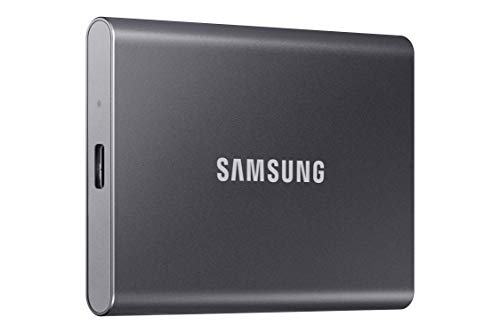
The Samsung T7 is the external SSD most people should buy. It is a 1TB pocket-sized drive that reads at up to 1,050 MB/s over USB 3.2 Gen 2, which is fast enough for photo libraries, video editing, and game storage, and it is small enough to disappear into a pocket or a camera bag. Samsung’s SSDs are the benchmark the rest of the market is measured against, and the T7 is the drive that made portable SSDs mainstream.
On paper, the headline facts are straightforward: 1TB portable SSD, Titan Gray; Up to 1,050 MB/s read speed; USB 3.2 Gen 2, USB-C; Compact, pocket-sized design; Password protection and AES encryption. None of that makes it the right pick for everyone, but it does define the audience clearly. If those headline facts match what you actually need day to day, this is a shortlist candidate rather than a curiosity. If they do not match, the rest of this section will make that obvious quickly, and you can move on to the next pick without losing anything.
What stands out
- 1TB portable SSD, Titan Gray
- Up to 1,050 MB/s read speed
- USB 3.2 Gen 2, USB-C
- Compact, pocket-sized design
- Password protection and AES encryption
The combination of speed, size, and reliability is hard to beat. At 1,050 MB/s it is roughly ten times faster than a portable hard drive, and it sustains that speed on large transfers rather than slowing down after a few gigabytes. The metal body feels solid, the drive runs cool, and Samsung’s software adds password protection and AES encryption for sensitive files. It works with Windows, Mac, Android, and consoles, and it is the drive most reviewers recommend first.
Before you buy, it is worth checking the practical details that cause most returns. Confirm that the listing shows the exact model name and configuration you expect, because similar models often share a name and differ in one specification that matters. Check the size and the connections against your setup, and make sure you know what is included in the box and what is sold separately. Read the return policy before ordering, and when the product arrives, test it with your real setup in the first few days rather than leaving it in the box. A quick check at the start saves a return later, and it is the simplest way to be sure the product you receive is the one you meant to buy.
Trade-offs to weigh
It is not the fastest drive on this list — the T9 and the SanDisk Extreme double its speed — and it is not ruggedized, so it has no water or dust rating and no drop protection beyond its metal shell. The price is no longer the cheapest either, now that newer drives have caught up. If you drop drives often or work outdoors, a rugged model is worth the extra money.
Who it fits best
Best for everyday use: backups, photo libraries, and carrying files between computers, where reliability and speed matter more than ruggedness.
Check price on Amazon: Samsung T7 Portable SSD 1TB Titan Gray, USB 3.2 Gen 2, Up to 1,050MB/s


2. SanDisk Extreme Portable SSD 1TB New Model
The SanDisk Extreme Portable SSD is the rugged option: a 1TB drive that reads at up to 2,000 MB/s and carries an IP65 rating for water and dust resistance. It is the drive for photographers, videographers, and anyone who works outdoors, because it survives rain, dust, and drops that would kill a bare drive. The new model is faster than the old one, and the carabiner loop means it clips to a bag instead of rattling around inside it.
On paper, the headline facts are straightforward: 1TB Extreme portable SSD, new model; Up to 2,000 MB/s transfer speeds; IP65 water and dust resistant; Rugged design with carabiner loop; USB-C, works with Windows and Mac. None of that makes it the right pick for everyone, but it does define the audience clearly. If those headline facts match what you actually need day to day, this is a shortlist candidate rather than a curiosity. If they do not match, the rest of this section will make that obvious quickly, and you can move on to the next pick without losing anything.
What stands out
- 1TB Extreme portable SSD, new model
- Up to 2,000 MB/s transfer speeds
- IP65 water and dust resistant
- Rugged design with carabiner loop
- USB-C, works with Windows and Mac
The speed is the headline: 2,000 MB/s is twice the T7 and fast enough to edit 4K video directly from the drive, which matters on a shoot where there is no time to copy files first. The IP65 rating and the rubberized, rugged body mean rain and dust are not a worry, and the drive is small enough to hang from a bag. SanDisk’s warranty and support are solid, and the drive works across Windows, Mac, and Android without fuss.
Before you buy, it is worth checking the practical details that cause most returns. Confirm that the listing shows the exact model name and configuration you expect, because similar models often share a name and differ in one specification that matters. Check the size and the connections against your setup, and make sure you know what is included in the box and what is sold separately. Read the return policy before ordering, and when the product arrives, test it with your real setup in the first few days rather than leaving it in the box. A quick check at the start saves a return later, and it is the simplest way to be sure the product you receive is the one you meant to buy.
Trade-offs to weigh
The rugged body is slightly larger and heavier than the bare-metal drives, and the 2,000 MB/s speed needs a USB 3.2 Gen 2×2 port to reach its peak — on a standard 10 Gbps port it runs at the same speed as the T7. The price sits a little above the cheapest drives here, though the ruggedness justifies it for field use. And the carabiner loop, while handy, is one more thing to catch on a bag zip.
Who it fits best
Best for photographers, videographers, and outdoor workers who need a fast drive that survives rain, dust, and being tossed in a bag.
Check price on Amazon: SANDISK 1TB Extreme Portable SSD, Up to 2000MB/s Transfer Speeds-New Model

3. Crucial X9 1TB Portable SSD
The Crucial X9 is the value pick: a 1TB portable SSD that reads at up to 1,050 MB/s, in a compact and lightweight body, usually at the lowest price of any major-brand drive here. Crucial is Micron’s consumer brand, which means the flash inside comes from one of the world’s largest memory makers rather than a no-name supplier. It is the drive to buy when you want a known brand at the lowest price.
On paper, the headline facts are straightforward: 1TB portable SSD, up to 1,050 MB/s; USB 3.2 USB-C connection; Compact, lightweight design; Works with Windows, Mac, and consoles; Crucial reliability and warranty. None of that makes it the right pick for everyone, but it does define the audience clearly. If those headline facts match what you actually need day to day, this is a shortlist candidate rather than a curiosity. If they do not match, the rest of this section will make that obvious quickly, and you can move on to the next pick without losing anything.
What stands out
- 1TB portable SSD, up to 1,050 MB/s
- USB 3.2 USB-C connection
- Compact, lightweight design
- Works with Windows, Mac, and consoles
- Crucial reliability and warranty
The price is the story: the X9 is frequently the cheapest 1TB SSD from a major brand, and it gives up nothing important for that price. The 1,050 MB/s speed matches the Samsung T7 on everyday transfers, the drive is light and pocketable, and it works with Windows, Mac, Android, and game consoles. Crucial’s warranty is straightforward, and the drive is a simple, no-nonsense product that does its job without software you do not need.
Before you buy, it is worth checking the practical details that cause most returns. Confirm that the listing shows the exact model name and configuration you expect, because similar models often share a name and differ in one specification that matters. Check the size and the connections against your setup, and make sure you know what is included in the box and what is sold separately. Read the return policy before ordering, and when the product arrives, test it with your real setup in the first few days rather than leaving it in the box. A quick check at the start saves a return later, and it is the simplest way to be sure the product you receive is the one you meant to buy.
Trade-offs to weigh
It is a basic drive: no rugged rating, no hardware encryption, and no bundled software beyond the essentials. The plastic body feels less premium than Samsung’s metal shell, and the speed, while good, is half the fastest drives here. If you need water resistance or 2,000 MB/s speeds, look at the SanDisk Extreme or the Samsung T9 instead.
Who it fits best
Best for buyers who want the cheapest 1TB drive from a trusted brand, for backups and everyday file carrying.
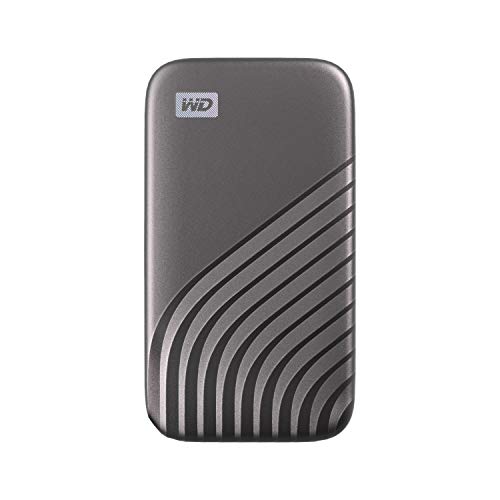
4. WD My Passport SSD 1TB
The WD My Passport SSD is Western Digital’s portable drive, and its selling point is security: it ships with password protection and hardware encryption, so the files on it stay private if the drive is lost or stolen. It is a 1TB drive in a sturdy, compact body with a distinctive ridged design that is easy to grip, and it is fast enough for backups, photo libraries, and game storage.
On paper, the headline facts are straightforward: 1TB My Passport SSD, gray; Portable external solid state drive; Password protection with hardware encryption; Sturdy, blazing fast design; USB-C, works with Windows and Mac. None of that makes it the right pick for everyone, but it does define the audience clearly. If those headline facts match what you actually need day to day, this is a shortlist candidate rather than a curiosity. If they do not match, the rest of this section will make that obvious quickly, and you can move on to the next pick without losing anything.
What stands out
- 1TB My Passport SSD, gray
- Portable external solid state drive
- Password protection with hardware encryption
- Sturdy, blazing fast design
- USB-C, works with Windows and Mac
The hardware encryption is the feature that sets it apart: set a password once, and the drive locks itself when unplugged, which is the right protection for a drive that carries work files or personal photos. The build is solid and the design is easy to hold onto, and WD’s software handles backups and drive management without fuss. It is also widely available, so replacements and support are easy to find.
Before you buy, it is worth checking the practical details that cause most returns. Confirm that the listing shows the exact model name and configuration you expect, because similar models often share a name and differ in one specification that matters. Check the size and the connections against your setup, and make sure you know what is included in the box and what is sold separately. Read the return policy before ordering, and when the product arrives, test it with your real setup in the first few days rather than leaving it in the box. A quick check at the start saves a return later, and it is the simplest way to be sure the product you receive is the one you meant to buy.
Trade-offs to weigh
The rated speed is not published as prominently as Samsung’s or SanDisk’s, and in practice it sits in the same 1,000 MB/s class as the T7 and X9 rather than the 2,000 MB/s class. It is not ruggedized, so it has no water or dust rating, and the price is usually a little above the cheapest drives here. If you do not need the encryption, the Crucial X9 gives the same storage for less.
Who it fits best
Best for anyone who carries sensitive files — work documents, client photos, personal records — and wants the drive itself to protect them.

5. Kingston XS1000 1TB Portable SSD
The Kingston XS1000 is the smallest drive on this list: a 1TB portable SSD barely bigger than a matchbox, reading at up to 1,050 MB/s over USB 3.2 Gen 2. It is the drive for people who carry storage everywhere — in a jacket pocket, a camera bag, or a laptop sleeve — and want it to disappear when it is not in use. Kingston is a long-established memory brand, and the XS1000 is its answer to the Samsung T7.
On paper, the headline facts are straightforward: 1TB portable SSD, pocket-sized; Up to 1,050 MB/s read speed; USB 3.2 Gen 2, USB-C; Model SXS1000/1000G; Smallest drive on this list. None of that makes it the right pick for everyone, but it does define the audience clearly. If those headline facts match what you actually need day to day, this is a shortlist candidate rather than a curiosity. If they do not match, the rest of this section will make that obvious quickly, and you can move on to the next pick without losing anything.
What stands out
- 1TB portable SSD, pocket-sized
- Up to 1,050 MB/s read speed
- USB 3.2 Gen 2, USB-C
- Model SXS1000/1000G
- Smallest drive on this list
The size is the attraction: it is the most pocketable 1TB SSD here, and it weighs almost nothing, so it goes everywhere a larger drive would get left behind. The 1,050 MB/s speed matches the T7 and X9 on real transfers, the USB-C connection is standard, and the price is competitive with the cheapest drives on the list. It is a simple, well-made drive with no software to get in the way.
Before you buy, it is worth checking the practical details that cause most returns. Confirm that the listing shows the exact model name and configuration you expect, because similar models often share a name and differ in one specification that matters. Check the size and the connections against your setup, and make sure you know what is included in the box and what is sold separately. Read the return policy before ordering, and when the product arrives, test it with your real setup in the first few days rather than leaving it in the box. A quick check at the start saves a return later, and it is the simplest way to be sure the product you receive is the one you meant to buy.
Trade-offs to weigh
It is small enough to lose, so keep it in a case or a bag pocket rather than loose in a jacket. There is no rugged rating and no hardware encryption, so it is a fair-weather drive rather than a field drive. And the tiny size means the USB-C cable is short, so check you have a cable that reaches comfortably from your laptop.
Who it fits best
Best for travelers and minimalists who want the smallest 1TB SSD that still runs at full speed.
Check price on Amazon: Kingston XS1000 1TB SSD

6. Samsung T9 Portable SSD 1TB
The Samsung T9 is the faster Samsung: a 1TB portable SSD that reads at up to 2,000 MB/s over USB 3.2 Gen 2×2, double the speed of the T7. It is the drive for video editors and photographers who move large files daily and do not want to wait for them. The dynamic thermal guard keeps the drive from throttling during long transfers, which is the difference between a fast drive and a fast drive that stays fast.
On paper, the headline facts are straightforward: 1TB portable SSD, USB 3.2 Gen 2×2; Up to 2,000 MB/s read speed; Fast enough for 4K video editing; Compact design with dynamic thermal guard; Works with Windows, Mac, and Android. None of that makes it the right pick for everyone, but it does define the audience clearly. If those headline facts match what you actually need day to day, this is a shortlist candidate rather than a curiosity. If they do not match, the rest of this section will make that obvious quickly, and you can move on to the next pick without losing anything.
What stands out
- 1TB portable SSD, USB 3.2 Gen 2×2
- Up to 2,000 MB/s read speed
- Fast enough for 4K video editing
- Compact design with dynamic thermal guard
- Works with Windows, Mac, and Android
The speed is real and useful: at 2,000 MB/s, copying a 100GB video project takes minutes rather than a quarter of an hour, and editing 4K footage directly from the drive is smooth. The thermal guard means sustained transfers hold their speed instead of dropping off, which is where cheaper fast drives often disappoint. The build is solid, Samsung’s software adds encryption, and the drive is still pocket-sized despite the extra speed.
Before you buy, it is worth checking the practical details that cause most returns. Confirm that the listing shows the exact model name and configuration you expect, because similar models often share a name and differ in one specification that matters. Check the size and the connections against your setup, and make sure you know what is included in the box and what is sold separately. Read the return policy before ordering, and when the product arrives, test it with your real setup in the first few days rather than leaving it in the box. A quick check at the start saves a return later, and it is the simplest way to be sure the product you receive is the one you meant to buy.
Trade-offs to weigh
The full 2,000 MB/s needs a USB 3.2 Gen 2×2 port, which many laptops do not have; on a standard 10 Gbps port it runs at the same speed as the T7, so check your ports before paying for speed you cannot use. The price is above the T7 and the X9, and it is not ruggedized. If your computer lacks a 2×2 port, the T7 is the better buy.
Who it fits best
Best for video editors and photographers with a USB 3.2 Gen 2×2 port, who move large files daily and want the fastest Samsung drive.
Check price on Amazon: Samsung T9 Portable SSD 1TB, USB 3.2 Gen 2×2 External SSD, Up to 2,000 MB/s
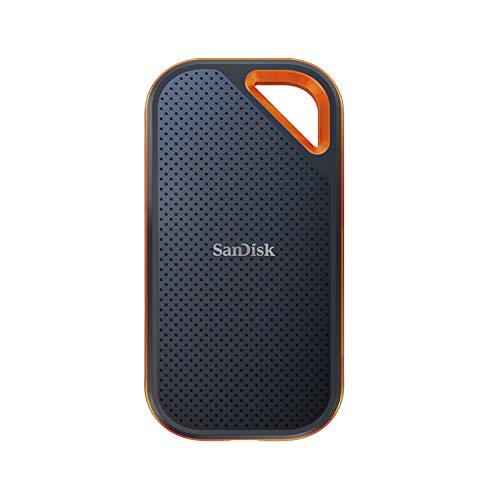
7. SanDisk Extreme Pro Portable SSD 1TB Old Model
The SanDisk Extreme Pro Portable SSD, in its older model, is the bargain hunter’s secret: a 1TB Pro drive that reads at up to 2,000 MB/s with an IP65 water and dust rating, frequently discounted now that the new model has arrived. The Pro line adds a forged aluminum body and faster sustained writes over the standard Extreme, which matters for video recording and long transfers. Buying the old model is the way to get Pro performance at a standard-model price.
On paper, the headline facts are straightforward: 1TB Extreme Pro portable SSD, old model; Up to 2,000 MB/s read speeds; IP65 water and dust resistant; Rugged aluminum body; Often discounted as the new model arrives. None of that makes it the right pick for everyone, but it does define the audience clearly. If those headline facts match what you actually need day to day, this is a shortlist candidate rather than a curiosity. If they do not match, the rest of this section will make that obvious quickly, and you can move on to the next pick without losing anything.
What stands out
- 1TB Extreme Pro portable SSD, old model
- Up to 2,000 MB/s read speeds
- IP65 water and dust resistant
- Rugged aluminum body
- Often discounted as the new model arrives
The value is the point: Pro-level speed and ruggedness at a discount, because the model is being replaced rather than because anything is wrong with it. The 2,000 MB/s speed handles 4K video editing and large file moves, the IP65 rating covers rain and dust, and the aluminum body survives drops better than plastic drives. For field work it is the toughest fast drive on this list at a bargain price.
Before you buy, it is worth checking the practical details that cause most returns. Confirm that the listing shows the exact model name and configuration you expect, because similar models often share a name and differ in one specification that matters. Check the size and the connections against your setup, and make sure you know what is included in the box and what is sold separately. Read the return policy before ordering, and when the product arrives, test it with your real setup in the first few days rather than leaving it in the box. A quick check at the start saves a return later, and it is the simplest way to be sure the product you receive is the one you meant to buy.
Trade-offs to weigh
It is the old model, so stock will run out and firmware support may end sooner than the new model. The 2,000 MB/s speed needs a USB 3.2 Gen 2×2 port to reach its peak, and on a standard port it runs at the same speed as the cheaper drives. Check that the listing is for the genuine SanDisk drive and not a marketplace copy, and confirm the warranty before buying.
Who it fits best
Best for bargain hunters who want Pro speed and ruggedness at a discount, and who check their USB ports before paying for 2,000 MB/s.
Check price on Amazon: SANDISK 1TB Extreme PRO Portable SSD, Up to 2000MB/s Read Speeds-Old Model
Buying guide
Warranties, returns, and checking your purchase
Most products in this guide come with a manufacturer warranty, and the length and coverage vary by brand, so check the warranty terms before you buy rather than after something goes wrong. Keep the packaging until you have tested the product, because a return is much easier with the original box. When the product arrives, check that the model name, the configuration, and the included accessories match the listing, and test it with your real setup in the first few days. If anything is wrong, contact the seller promptly, because return windows are limited and the first week is the time to find problems.
What speed do you actually need?
For backups and file carrying, 1,000 MB/s is more than enough — the bottleneck is usually the computer, not the drive. For 4K video editing directly from the drive, 2,000 MB/s makes a real difference, because the drive can feed the editor without stalling. For game storage on a console or PC, any SSD on this list is a huge upgrade over a hard drive, and the difference between 1,000 and 2,000 MB/s is barely noticeable in loading times. Buy the speed your work needs, not the biggest number on the box.
Check your USB port before you buy a fast drive
A 2,000 MB/s drive needs a USB 3.2 Gen 2×2 port (20 Gbps) to reach its rated speed. Most laptops have USB 3.2 Gen 2 ports (10 Gbps), which cap any drive at around 1,000 MB/s — so a T9 or an Extreme on a 10 Gbps port runs at the same speed as a T7. Check your computer’s specs: if it has no 2×2 port, save money and buy a 1,000 MB/s drive. If it does have one, the faster drives are worth it. And avoid USB 2.0 ports entirely — they cap any SSD at 40 MB/s.
Rugged or not: where will the drive live?
A drive that lives on a desk does not need a rugged rating. A drive that travels in a camera bag, a backpack, or a coat pocket does. IP65 means protection against dust and water jets; IP55 is a step down. Rubber bumpers and aluminum bodies survive drops that crack plastic. If your drive will see rain, dust, or concrete, buy a rugged model like the SanDisk Extreme; if it lives on a desk, the T7 or X9 is the better buy.
1TB is the sweet spot — but check your real needs
1TB holds roughly 250,000 photos, 250 hours of 1080p video, or a dozen large games, and it is the size where the price per gigabyte is lowest. Photographers and videographers who shoot 4K should consider 2TB, which most drives here also offer. Buyers with small needs — documents and a few apps — can save money on a 500GB model. Whatever you buy, leave 10 to 20 percent free: SSDs slow down and wear faster when they are completely full.
Backups, encryption, and the 3-2-1 rule
An external SSD is a backup only if the files exist somewhere else too. Follow the 3-2-1 rule: three copies of important files, on two different kinds of storage, with one copy off-site. Use the drive’s encryption or your operating system’s built-in encryption for sensitive files, and set a password you will remember — a locked drive with a forgotten password is a brick. Test your backup by restoring a file before you need to, because a backup you have never tested is a guess.
Frequently asked questions
Is a 1TB external SSD enough?
For most people, yes. 1TB holds hundreds of thousands of photos, hundreds of hours of video, or a dozen large games, and it is the size where the price per gigabyte is lowest. Video professionals and heavy gamers should consider 2TB. Leave 10 to 20 percent of any SSD free, because a full SSD slows down and wears faster.
What is the difference between USB 3.2 Gen 2 and Gen 2×2?
Gen 2 runs at 10 Gbps and caps a drive at around 1,000 MB/s. Gen 2×2 runs at 20 Gbps and allows up to 2,000 MB/s. A 2,000 MB/s drive on a Gen 2 port runs at 1,000 MB/s, so check your computer’s ports before paying for a faster drive.
Can I use an external SSD with a game console?
Yes. PlayStation 5 and Xbox Series X/S support external SSDs for storing and playing last-generation games, and for storing current-generation games that you move back to internal storage to play. Check your console’s storage guide for the exact rules, because they differ by platform and by game generation.
Are cheap external SSDs reliable?
The drives on this list come from Samsung, SanDisk, Crucial, WD, and Kingston — all major brands with real warranties. Avoid no-name drives with prices far below these, because they often use slower flash, fake capacity, or no warranty at all. A bargain from a known brand is safe; a bargain from an unknown brand is a gamble.
How long does an external SSD last?
A good portable SSD lasts many years of normal use, because it has no moving parts. Flash memory wears with writes, but a 1TB drive used for backups and file storage will outlive the computer it is attached to in most cases. Keep a second copy of important files regardless, because any single drive can fail.
Conclusion
The best bargain external SSD is the Samsung T7 for most people: fast, reliable, and pocket-sized at a fair price. The Crucial X9 is the cheapest way to get the same 1TB from a trusted brand, the Kingston XS1000 is the smallest, and the WD My Passport SSD adds hardware encryption for sensitive files. If you work outdoors or edit video, the SanDisk Extreme and the Samsung T9 are worth the extra money for their 2,000 MB/s speed, and the older SanDisk Extreme Pro is the discount route to the same performance.
Check your USB ports before you buy, buy 1TB unless you know you need more, and keep a second copy of anything important. A bargain SSD from a known brand is one of the best value purchases in tech — fast, silent, and small enough to forget it is in your pocket.