Disclosure: This article contains affiliate links. As an Amazon Associate, reviewstook.com earns from qualifying purchases. Amazon links may earn us a commission at no extra cost to you. Prices, stock, sellers, socket kits, and warranty terms can change; confirm the exact model and current listing before buying.
The best affordable CPU water coolers are not necessarily the models with the lowest displayed price or the most lights. A budget AIO should fit your case, include a bracket for your exact CPU socket, cool your processor without excessive fan or pump noise, and come with a warranty you can actually use. Since prices and regional bundles change, this guide does not promise a fixed dollar threshold. Instead, it explains how to compare the whole purchase and highlights a few 240mm AIO models whose verified features suit value-focused builds.
Our shortlist centers on practical two-fan coolers: Thermalright Aqua Elite 240 V3, Cooler Master Elite Liquid 240, and ID-COOLING FROSTFLOW X 240. Their Amazon product listings, ASINs, and images were verified using Amazon Creators API. That verifies the product identity and image, not a particular seller, price, stock level, test result, or warranty claim. Read the exact package details and the manufacturer’s current support terms before checkout.
Buying an AIO is optional. A decent tower air cooler can cost less, avoid pump failure as a possible failure point, and still handle many mainstream CPUs. Choose liquid cooling when the radiator format solves a case-fit problem, you value the look, or tested performance at your CPU’s power target makes sense. See our AM4 water cooler guide for the broader air-versus-liquid comparison, and our buying-guide method for how we treat product claims.
In this guide
Quick picks for an affordable CPU AIO
Best all-around value features: Thermalright Aqua Elite 240 V3. It combines a common 240mm radiator format, dual PWM fans, ARGB lighting, and broad AM4/AM5 and Intel socket support. Thermalright lists a three-year warranty for the Aqua Elite series. Confirm that the current seller’s package is the exact V3 revision and includes the correct bracket for your board.
Best recognizable brand and current socket coverage: Cooler Master Elite Liquid 240. The maker describes the 240mm model as a two-fan AIO with a dual-chamber pump and a pre-installed fan setup. Its official Elite Liquid warranty is three years, but terms vary by region and channel. Verify the precise product family name because the similarly named 240L Core and Elite Liquid are separate lines with different socket lists.
Best simpler-feature alternative: ID-COOLING FROSTFLOW X 240. The manufacturer lists AM5 and AM4 support alongside several Intel sockets, a 276 × 120 × 27mm aluminum radiator, two 120mm fans, and a 400mm tube length. The model emphasizes core cooling over an LCD screen or elaborate software. Check regional warranty and current stock, particularly if comparing an older listing against newer versions.
These are models to compare, not permanent price winners. A short sale, shipping charge, import fee, return policy, or missing bracket can change which option is the better value. If a discounted 360mm cooler costs only slightly more and your case supports it, compare it too; if it costs much more or forces a case change, a 240mm model may be the smarter budget decision.
240mm AIO models to compare
Product identity, ASIN, and image are verified through Amazon Creators API. The comparison does not assume that the item is currently the lowest-priced or best-performing cooler. Check the exact color and revision, seller, socket hardware, and return terms.

ASIN: B0CCNS5NZ9. Verify current model revision, socket bracket, seller, return terms, and warranty before ordering.

ASIN: B09463GC4H. Verify current model revision, socket bracket, seller, return terms, and warranty before ordering.

ASIN: B0BLS3372N. Verify current model revision, socket bracket, seller, return terms, and warranty before ordering.
What “affordable” should mean for a CPU water cooler
A low price is only one part of affordability. Consider the purchase cost, installation hardware, fan or lighting controller, shipping, taxes, and any accessories the exact kit requires. Then consider what you get in exchange: radiator size, pump design, fan quality, noise control, socket coverage, warranty, and customer support. A bargain becomes expensive if the cooler does not fit, lacks a required bracket, or is difficult to return.
Compare the total cost against an air cooler that can handle the same CPU. Many mainstream processors do not need liquid cooling. A tower heatsink with a good fan can be a strong low-cost choice, especially when the case allows it and RAM clearance is manageable. The AIO’s price may still make sense for a compact case with a radiator mount, for aesthetics, or for a CPU whose sustained workload benefits from a tested larger liquid cooler. Avoid paying for cooling hardware that does not solve a real need.
Define your performance requirement before shopping. A quiet gaming PC with a midrange CPU has a different cooling target from a workstation rendering for hours on a high-power processor. Check your CPU’s real power limits and independent cooler tests on a similar processor. Manufacturer TDP numbers are not standardized across brands and test setups; do not compare them as if they were measured on the same scale.
For this guide, “affordable” means a value-oriented AIO with a sensible feature set and no unnecessary premium for a display or bundled software. It does not mean every listed cooler will have the same price, nor does it imply a specific budget cap. Product prices move over time and differ by region, color, retailer, and availability. Compare the prices shown when you shop and reassess the winner on that day.
How to choose a value-focused 240mm AIO
Top pick
1. Start with case compatibility
A 240mm radiator usually takes two 120mm fans in a row, but the radiator itself is longer than the fan pattern and has end tanks. Measure the mounting area and check the case manual for radiator support at the exact position you intend to use. A case may accept two fans at the top but not a radiator because the radiator conflicts with memory, motherboard heatsinks, or the power cable. Front mounting can reduce graphics card clearance or conflict with a drive cage.
Check radiator thickness plus fan thickness, not just the “240mm” label. A standard 27mm radiator with 25mm fans occupies roughly 52mm before screws and mounting rails. Some radiators are thicker, and some fans exceed 25mm. Verify the full dimensions of the exact model. If you are building in a compact chassis, measure from the bracket to the nearest obstruction and allow room for tube bends and cables.
Consider where the radiator’s tubes leave the end tank. They need a natural curve without being pulled tight or pressed against sharp sheet metal. A front mount may fit but leave no comfortable path to the CPU socket. The pump-block should not be held in a way that strains the hoses. The case manual and cooler installation instructions should agree on a workable mounting orientation before you buy.
2. Confirm the exact CPU socket and included bracket
Socket support is specific to the product revision and included mounting hardware. AM4 and AM5 are both common AMD sockets, but the correct mounting parts still need to be in the box. Intel LGA1700 and LGA1851 are different sockets; do not assume that a cooler listing that mentions one includes the bracket for the other. Some manufacturers provide a bracket update separately, but its cost and availability affect the real value.
Match the cooler’s supported socket to the exact motherboard manual and CPU model. Marketplace listings sometimes use an old title, combine multiple color variants, or merge revisions. Look at the product number and the included hardware list, not only the first line of a search result. When the listing and manufacturer page disagree, ask the manufacturer or authorized seller to confirm compatibility in writing.
Check whether the cooler’s backplate replaces the motherboard backplate or attaches to it. Read the installation guide before removing parts. Keep the original mounting hardware if the cooler may be moved to a future build. A complete kit with clear instructions is more valuable to a first-time builder than a small discount on a package missing a screw or bracket.
3. Choose radiator size based on the CPU and chassis
A 240mm AIO gives two fans and more radiator area than a single-fan 120mm model, while fitting more cases than a 360mm cooler. It is a useful middle ground for many gaming and general-purpose builds. It is not a guarantee of low temperatures on every high-power CPU. Sustained rendering, power limits, ambient room temperature, and fan noise all change the result.
A 120mm AIO can be the right choice when a case only has one radiator position or a tower heatsink cannot fit. It is often not the cheapest or quietest route for an ordinary case because a 240mm radiator and some air coolers offer more cooling area for similar money. Our 120mm water cooler guide focuses on those compact-build tradeoffs.
A 360mm AIO uses three 120mm fans and can be useful for hotter CPUs or lower fan speeds when case support and testing justify it. The larger size can cost more, take more space, and block other components. Do not pay a premium just because the radiator is longer. Compare real testing and the complete system fit. Our 480mm cooler guide explains why extreme radiator size can introduce availability and fit problems rather than automatic value.
4. Treat the pump as a mechanical part, not a checkbox
An AIO contains a pump that circulates coolant. Pump speed, vibration, and tone can affect the sound profile even when the fans are quiet. A lower advertised decibel number does not guarantee a quiet experience if manufacturers measured differently. Look for independent tests that distinguish pump noise from fan noise. User reports can help identify patterns but should not substitute for controlled testing.
Find out whether the pump connects to a standard 3-pin or 4-pin header, a SATA-powered controller, or a proprietary hub. The motherboard manual should identify the correct header and current limits. Do not assume that an ARGB plug powers the pump: lighting and motor power are separate connections. If your board has limited headers, include a splitter or hub in the total cost and follow the manual’s current rating.
Many sealed AIOs are not intended for routine refill or pump replacement. They can run for years, but the pump is a component that can eventually fail. A warranty and accessible support therefore matter. Compare pump warranty coverage, leak-damage terms, exclusions, registration requirements, and proof-of-purchase rules. A long warranty is only valuable if the seller is authorized and the manufacturer supports your region.
5. Check the full warranty, not just the headline
Warranty periods can differ by product line, country, retailer, and type of failure. Some policies cover electrical parts but have separate limits for other damage. Some require registration within a set period or proof that the product was bought through an eligible channel. Read the current policy for the exact product family before treating warranty length as a selling point.
Thermalright publishes a three-year warranty for the Aqua Elite series, subject to its policy terms. Cooler Master lists three years for Elite Liquid and separately lists three years for the 240L Core ARGB family; the names are easy to confuse. ID-COOLING provides model support on its official site, but warranty duration should be confirmed for the region and seller where you are buying. Keep the invoice and packaging until you know the product is working reliably.
Also compare the retailer’s return window. If a pump has a bad bearing, a fan is damaged in shipping, or the unit does not fit, an easy return process can matter more than a small difference in advertised coverage. Avoid unauthorized or marketplace sellers where manufacturer warranty eligibility is unclear. A low offer from a seller with no clear return contact can be a poor value.
Model-by-model value tradeoffs
Thermalright Aqua Elite 240 V3: broad socket support and lighting
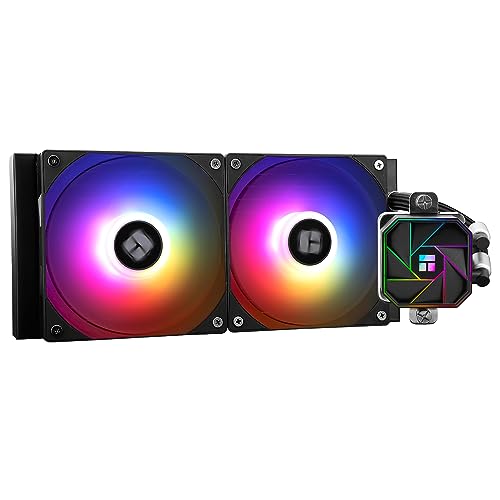
The Aqua Elite 240 V3 is a 240mm AIO with two PWM fans and ARGB lighting. Thermalright’s official Aqua Elite 240 V3 page lists AM4/AM5 and Intel LGA115X, 1200, 1700, and 1851 support for the V3 variant. It also lists an aluminum radiator and a three-year warranty. That broad compatibility can help when planning a platform upgrade, but check the exact product variant: later V5 and other Aqua Elite models have separate pages and specifications.
Its value proposition is feature density: radiator, two fans, pump-block lighting, and contemporary socket coverage in one package. The tradeoff is that ARGB requires compatible 5V three-pin headers or a controller. A motherboard with only 12V four-pin RGB does not provide the correct connector. If you do not care about lighting, a non-RGB model can reduce cabling and setup complexity if its price and included features make sense.
Use this model as a candidate when you want a straightforward 240mm configuration and can confirm the current seller’s revision and bracket set. Do not infer high-end CPU capability from the size alone or rely on a product listing’s TDP number. Look for independent testing on your class of CPU, and compare fan noise at a similar workload. If test coverage is limited, treat it as a budget-oriented option with uncertainty rather than a proven performance champion.
Cooler Master Elite Liquid 240: mainstream support and a clear warranty tier
Cooler Master’s Elite Liquid series offers 240mm and 360mm versions, with two fans on the 240 model, a dual-chamber pump, a customizable pump cover, and pre-applied thermal paste according to the manufacturer. The official CPU compatibility listing and current product bundle should be checked for the exact sockets; the Amazon listing we verified identifies AM4/AM5 and Intel LGA1700/1851 support. The official warranty policy lists three years for Elite Liquid.
This model may suit a buyer who values a familiar support channel and a more current package while still comparing 240mm options. It may not be the cheapest listing, so evaluate the current total cost against models with similar radiator size and coverage. Confirm which color and model code the Amazon seller is offering. Cooler Master has multiple similarly named liquid-cooler families, and the Elite Liquid line should not be confused with MasterLiquid 240L Core.
Its pump cover and ARGB add appearance features. Those do not improve cooling by themselves. If you prefer a lower-complexity build, use the normal fan and pump controls and skip optional lighting software unless you need it. Confirm included brackets and the correct socket chart, because bundle differences can occur by region.
ID-COOLING FROSTFLOW X 240: a simpler-feature alternative
ID-COOLING’s official FROSTFLOW X 240 page lists compatibility with AMD AM5 and AM4 and Intel LGA2066, 2011, 1700, 1200, and several older 115x sockets. It specifies a 276 × 120 × 27mm aluminum radiator, 400mm sleeved tubes, a copper cold plate, and two 120mm fans. The model uses white lighting rather than the more elaborate LCD display and software stack found on premium AIOs.
A simpler feature set can be useful when your priority is basic liquid cooling and a clean appearance rather than a screen or synchronized software ecosystem. The main tradeoff is product age and current seller condition: verify that the exact listing is new, includes the needed AM5/Intel hardware, and has a warranty in your country. A listing that omits AM5 or shows an older revision should not be assumed to match the currently posted manufacturer specifications.
Before selecting it, check current independent testing and listen for pump or fan noise feedback from credible reviews. A lower feature count does not prove that it is quieter or more reliable. If the product has limited recent test coverage, put more weight on a seller with a good return window and a warranty contact you can reach.
How to assess the real cost without fixed price claims
Prices change too frequently to make a lasting recommendation by naming a specific dollar figure. Compare these three models on the same day and record the complete checkout amount. Include shipping, tax, import duty, and return cost. A cooler that appears cheaper in a search result can cost more once delivery or an extra controller is included.
Compare like with like. Match radiator size, number of fans, socket support, lighting, warranty, and product condition. Do not compare a 240mm new AIO with a used 360mm cooler or a listing that lacks a bracket without adjusting for the differences. A used AIO carries uncertainty about pump hours, liquid evaporation, storage, and warranty transfer; it is usually not an equivalent bargain to a new sealed kit.
Consider the value of support. A manufacturer with a current compatibility list, downloadable manual, and reachable warranty process may be worth a small premium over an unknown label. Check whether warranty coverage follows the cooler or only the original buyer. Keep the order receipt and record the serial number once installed.
Recheck stock and seller identity at checkout. Amazon listings can change featured sellers and bundle details. Direct ASIN links make the product identity more specific, but the offer shown can still change. Confirm that the model code and color match the guide’s intended item, then compare the seller’s return terms and current warranty eligibility.
Affordable CPU water cooler versus air cooling
A budget AIO is not automatically better value than air cooling. A tower heatsink has no pump, usually uses a replaceable fan, and can offer strong performance for mainstream CPUs. It may also be simpler to maintain. Its disadvantages are height, memory clearance, and the appearance of a large heatsink in the center of the motherboard.
An AIO can shift heat to the case’s radiator mount and provide more open space around the CPU socket. That can help in some small-form-factor layouts, though a radiator still occupies a large panel and may interfere with a GPU or memory. The tubing and pump add installation steps. The choice depends on case compatibility rather than a generic claim that water always cools better.
For a lower-power CPU, the included stock cooler may be adequate and leaves more money for a graphics card, SSD, or quiet case fans. For a hotter CPU, check actual cooler tests before buying. If the affordable AIO performs no better than a less expensive air cooler at the same noise level, the added liquid loop may not serve your goals.
Budget planning should account for failure risk in practical terms. Pump failure is uncommon but possible; a fan failure is usually easier to replace. Air cooling also has failures, but a tower heatsink can continue transferring heat while you source a replacement fan. Choose the cooler whose support and maintenance profile you are comfortable with.
Installation and setup tips for a value AIO
Read the cooler manual and case manual before assembling the system. Install the correct socket standoffs and backplate, and remove any protective film from the cold plate. Tighten the mounting screws gradually in a cross pattern so the block sits evenly. Use the included thermal paste as directed; adding extra paste is not a substitute for correct mounting pressure.
Mount the radiator in a supported case position and keep the pump below the highest point of the loop when the design allows. This helps air remain in the radiator rather than repeatedly passing through the pump. Front mounting with tubes down can be a good layout when the case and tube length permit; a top-mounted radiator can also work. Avoid kinking or stretching the tubes and follow the manufacturer’s orientation guidance.
Connect pump power to the header specified by the cooler and motherboard manuals. Set a suitable pump speed in firmware if the manual recommends a fixed or variable mode. Connect fans to the correct header or included splitter, observing the motherboard header’s current limit. Connect 5V three-pin ARGB only to a compatible 5V ARGB header; never force it onto a 12V RGB header.
After first boot, check pump detection, fan rotation, CPU temperature at idle, and temperatures under a normal workload. A short spike is not the same as sustained overheating. If temperatures are abnormally high, stop the workload and recheck mounting pressure, protective film, pump power, and fan direction. Keep cables clear of fan blades and listen for persistent grinding or rattling.
Who should buy an affordable 240mm AIO?
A 240mm AIO can suit builders with a case that supports the radiator, a CPU whose cooling needs are covered by credible testing, and a preference for a liquid cooler’s appearance or layout. It can also make sense when a large air cooler would collide with memory or a side panel. Budget-minded buyers should favor a known exact model, included current socket hardware, clear warranty terms, and a seller with a usable return process.
It is less suitable if your case lacks a radiator mount, you are trying to minimize total cost, or you do not want a pump in the system. A capable air cooler may better fit those priorities. A 120mm AIO should be chosen for a specific compact-fit reason rather than presumed to be the cheapest way to cool a CPU. A 360mm AIO may be justified for a high-power CPU, but the larger cost and space should be validated by testing and fit.
For an office or everyday PC, quiet operation and reliability may matter more than RGB. Choose a cooler that can run fans slowly at your actual workload and whose pump tone is acceptable. For gaming, check how the case behaves when the GPU warms the interior; the radiator’s position and the case’s intake path can affect CPU and GPU temperatures together.
For an upgrade, check whether the cooler includes mounting hardware for both the current and planned platform. A model that supports AM4 and AM5, or current Intel sockets, may be easier to reuse, but future socket support is never guaranteed. Manufacturers may issue mounting kits, yet availability and cost can change.
What a budget AIO asks of your case and your patience
An affordable all-in-one cooler is a system of compromises that all land in the same place: your case. Before comparing the three models in this guide on their cooling, audit the chassis honestly. Radiator mounting is not a yes-or-no question but a geometry problem involving the radiator, its fans, the motherboard’s top edge, memory height, and the cable runs that already live where the radiator wants to go. A top mount that technically accepts a 240mm radiator may still collide with tall memory or the motherboard’s power cables, and a front mount trades the radiator’s cool intake air against warming the air the graphics card breathes. Measure the actual space with the components installed, and remember the tubes need a route that does not kink or press against a fan blade. Budget cases are where these collisions concentrate, and the cheapest cooler becomes the expensive one when it forces a case purchase to fit it.
Patience is the second budget. Value AIOs commonly ship with simpler mounting hardware, fewer cable conveniences, and fans that ask for a little more tuning in the BIOS to sit quietly at desktop loads. None of that is disqualifying — it is the shape of the saving — but it means the installation rewards a builder who works slowly, test-fits before committing, and sets fan curves deliberately afterward. If your tolerance for that process is low, the honest comparison is not between these three coolers but between the quietest of them and a good air tower, which asks almost nothing of its owner for a decade.
Noise: the specification budget builds get wrong
Cooling charts reward full-speed performance, but a PC lives at partial load, and at partial load the loudest component in a budget AIO system is usually the pump or a fan curve, not the radiator’s capacity. Pumps in this class run at a fixed or narrow speed range and produce a tonal hum that some users never notice and others cannot unhear in a quiet room; mounting the radiator so the pump sits below the radiator’s high point, with air collecting away from the pump, prevents the gurgling and ticking that get blamed on pump quality. Fan behavior is yours to fix: a curve that holds fans near-silent to a moderate temperature and ramps firmly only under real load will make any of these coolers pleasant at the desk and adequate in games, because gaming loads on most processors are bursty rather than sustained. Set the curve against the CPU temperature sensor the motherboard exposes for liquid cooling, or against a fixed reasonable ramp if it does not, and judge the result over a week of your actual use rather than a benchmark afternoon.
Longevity, warranties, and the evaporation nobody mentions
Every AIO slowly loses coolant through its tubes by permeation, and every AIO’s pump is a mechanical part with a finite life; the differences between models are of degree and of what the maker promises when the degree runs out. This is why the warranty comparison in this guide deserves more weight than a few degrees on a chart. Read what the warranty actually covers — the cooler alone, or consequential damage procedures as well — and how a claim is made from your country, because a generous term with an impractical process is worth less than a shorter term honored by a local retailer. Keep the receipt and the box’s serial record with your build documents; AIO claims, more than most components, turn on proof of purchase.
Plan the cooler’s place in the build’s life accordingly. A value AIO is a rational choice for a system with a three-to-five-year horizon at its current processor, especially where its looks or case layout matter to the owner. A system expected to migrate through two processor generations in the same case asks more of a cooler than this class promises, and that mismatch — not any single model’s failure — is the source of most disappointment with budget liquid cooling. Buy the cooler for the build’s actual plan and it will be remembered as a bargain; buy it against the plan and it will be remembered as a false economy.
Installation details that decide whether it works well
Three details separate a good budget AIO installation from a mediocre one. First, mounting pressure and paste: use the paste quantity the instructions specify, tighten the block’s fasteners in the alternating pattern they describe, and resist the urge to improve on either — uneven pressure tilts the cold plate and costs more performance than any paste upgrade returns. Second, tube routing: give the tubes a gentle arc without sharp bends, keep them clear of fan blades and hot graphics card backplates, and position the radiator so its highest point traps air away from the pump. Third, the first power-on: run the system, listen for the pump, watch temperatures through a few load cycles, and check every fitting and the block for weeping before closing the case for good. Ten attentive minutes at installation are the cheapest performance and reliability this class of cooler offers.
More questions about affordable AIO coolers
Will a budget 240mm AIO cool better than my stock air cooler?
For most processors that ship with a basic air cooler, yes — clearly, and usually more quietly under sustained load, because the radiator’s area and the fans’ working conditions beat a small fin stack sitting in case air. The margin narrows against a good aftermarket air tower, which is the real rival at this money. Choose liquid for the layout, the looks, or the specific thermal problem; choose the air tower for simplicity and longevity. Both are defensible, and pretending otherwise helps no build.
How do I know if the pump is failing?
The signs arrive in a familiar order: new noises — grinding, rattling, or a hum that changes pitch — then temperatures that climb under loads the cooler used to handle, then, sometimes, temperatures that swing oddly at idle as circulation falters. Confirm the radiator is not clogged with dust and the fans still spin before condemning the pump, because dust imitates pump failure faithfully. If the signs persist, treat the cooler as a replacement item and do not nurse a failing sealed unit along in a system you rely on.
Can I move a budget AIO to my next build?
Mechanically, often yes, provided the next socket is on its supported list and you can source the right bracket; practically, weigh its age. A cooler already years into its life carries its permeation and pump wear with it into the new build, and the saving must be set against the risk of a failure in a fresh system. Many builders reasonably move a young cooler once and retire it at the second build — a fair life for the money this class costs.
Comparing the three value models as a decision, not a contest
With the framework in this guide in place, the choice among the three coolers compared here resolves into a short sequence of questions rather than a league table. First, fit: all three are 240mm designs, but their radiator and fan dimensions, tube lengths, and block clearances differ enough that one may suit a given case and motherboard combination measurably better than the others — the one that mounts without forcing tubes or crowding memory is already ahead. Second, support: compare the warranty terms and the socket support you will actually use, including whether the bracket for your next likely platform is in the box or available, because a cooler that cannot follow a platform upgrade has a shorter useful life than its pump does. Third, character: the models differ in lighting, software expectations, and fan behavior, and the right answer is the one whose defaults you will not fight — a builder who wants set-and-forget operation should weight simple cabling and quiet stock curves; a builder who enjoys tuning can extract more from any of them. Run the three questions in that order and the contest usually settles itself, which is the mark of a mature product class: at this level, there is no bad cooler here, only mismatches between a particular unit and a particular build.
A realistic first-week checklist for a new AIO owner
In the first week, verify rather than assume. Note idle and load temperatures in the applications you actually use and keep the numbers; they are the baseline every future diagnosis will compare against, and a change from baseline is the earliest warning a sealed cooler gives. Listen to the system at night in a quiet room and adjust the fan curve once, deliberately, rather than nightly. Check the block and fittings once more after several heat cycles, because thermal expansion is when marginal seals announce themselves. Save the receipt, photograph the installed cooler and its serial label, and record which bracket and screws remain in the box for a future platform. None of this takes an hour in total, and together it converts a budget cooler from a component you hope is fine into one you know is fine — which, at this end of the market, is most of what the expensive models were selling anyway.
Budget AIOs and small-form-factor builds
Compact cases tempt builders toward liquid cooling for the same reason they punish it: there is no room for a tall air tower, but there is also barely room for a radiator, its fans, and the tube bends between them. A 240mm unit in a small case must be planned as the case’s central fact, not fitted as an afterthought — measure the radiator’s total length including its end tanks, not just the nominal fan span, confirm the tube exit direction works with the motherboard’s layout, and accept that in the tightest chassis the radiator may dictate which memory and which graphics card length the build can use. Where it fits, the payoff is real: heat exhausted directly out of a case that would otherwise bake its components in recycled air. Where it nearly fits, the honest answer is usually a low-profile air cooler and a case with better airflow, because a forced installation — tubes kinked against a panel, fans starved against a wall — delivers the temperatures of neither solution. The budget discipline of this guide applies with extra force here: the cheapest cooler is the one that fits the case you own, measured twice.
Reading temperature results without fooling yourself
Cooler comparisons live and die on test method, and budget AIO reviews are where method varies most. A result is only meaningful with its conditions attached: the processor and its power draw during the test, the ambient temperature, the case and fan configuration, and whether the fans ran at full speed or at a normalized noise level. A cooler tested on an open bench in a cool room will post numbers your closed case in summer cannot reproduce, and a cooler crowned at full fan speed may be the one you would rank last at the speeds you will actually tolerate. Use published results the way this guide uses its own comparisons: to establish the class a cooler belongs to and to spot a genuine outlier, not to adjudicate two-degree differences that method noise can manufacture. Your own first-week baseline, recorded as described earlier, is the only temperature data that describes your build — which is why the habit of recording it matters more than any chart, including the ones that sold you the cooler.
A short glossary for the budget AIO shelf
Four terms decide most misunderstandings in this class. Cold plate: the metal block that meets the processor, whose flatness and mounting pressure matter more than its styling. TDP ratings in cooler marketing describe a test condition, not a promise about your processor, and should be read as class indicators only. Static pressure is the fan characteristic that pushes air through a radiator’s dense fins; it, not raw airflow, is the number that predicts radiator performance. And permeation — the slow loss of coolant through the tube walls — is normal physics in every sealed cooler, priced into the class’s expected life rather than a defect in any single unit. A buyer who holds those four definitions clearly can read any listing in this guide’s category and see past its adjectives to the machine itself.
The budget AIO buyer’s closing thought
An affordable liquid cooler, chosen for the build it will actually serve and installed with the care this guide describes, is not a compromise to apologize for — it is a rational allocation of a build’s budget, trading a margin of longevity for looks, layout, and money spent where the owner values it more. The builders who regret budget AIOs are almost never the ones who bought this class knowingly; they are the ones who bought it accidentally, expecting a decade and a silence it never promised. Buy it knowingly, and it will be remembered as the smart line in the build’s budget.
Frequently asked questions
What is the cheapest CPU water cooler that is worth buying?
There is no permanent cheapest model because offers and availability change. Compare current, new 240mm listings from established manufacturers, then include shipping, warranty, socket hardware, and return terms. Do not choose a model solely because it is the lowest price in a search result.
Is a 240mm AIO enough for gaming?
It can be enough for many gaming CPUs, but the result depends on CPU power, game workload, ambient temperature, radiator fit, and fan noise. Check independent tests using a similar processor and fan speed. For sustained heavy rendering or high power limits, compare larger tested coolers.
Is a 120mm AIO more affordable than a 240mm AIO?
Not always. Prices vary, and a 120mm AIO has less radiator area. It is most useful when the case allows only one radiator fan or a tower cooler will not fit. Compare the full cost and performance for the exact case and CPU.
Does AM5 support mean every AM5 motherboard works?
Usually the socket mount is the relevant factor, but confirm the exact product revision and bracket. Check the CPU cooler support list and motherboard installation space, especially memory, VRM heatsinks, and radiator clearance. A listing title alone is not a compatibility guarantee.
How long is an AIO pump warranty?
It varies by model, country, and seller. Thermalright lists three years for the Aqua Elite family, and Cooler Master lists three years for Elite Liquid, subject to policy terms. Confirm the exact local policy and whether pump or leakage damage is covered before buying.
Do I need special software for an affordable AIO?
Most budget AIOs can operate through motherboard fan controls and do not require a display or dedicated control app. Lighting software may be optional if the model has ARGB. Check the included connectors and motherboard headers before ordering.
Should I buy a used AIO to save money?
Used liquid coolers can have unknown pump wear, storage conditions, missing socket hardware, and limited or nontransferable warranty. Compare the total used price with a new model and its return coverage. For many budget builds, a new air cooler may be a lower-risk way to save money.
Bottom line
For an affordable CPU water cooler, start with a 240mm model only if the case supports it and liquid cooling fits your goals. Thermalright Aqua Elite 240 V3 offers broad socket coverage and a three-year published warranty; Cooler Master Elite Liquid 240 offers a current mainstream feature set and a three-year official warranty; ID-COOLING FROSTFLOW X 240 is a simpler-feature option with AM5/AM4 support on its official specification page. Each deserves a current seller, compatibility, noise, and warranty check before purchase.
Prices are not fixed, so compare the full checkout cost on the day you buy. Include radiator fit, socket hardware, pump warranty, return coverage, and whether an air cooler would deliver better value for your CPU. The cheapest AIO is not necessarily the best affordable cooler if it costs more to install, is difficult to support, or adds cooling capacity you do not need.
Amazon disclosure: As an Amazon Associate, reviewstook.com earns from qualifying purchases. Read our affiliate disclosure. Product images and ASINs in the comparison cards were checked using Amazon Creators API; current offers and sellers may differ.
Manufacturer references: Thermalright Aqua Elite 240 V3 specifications and Thermalright warranty terms; Cooler Master Elite Liquid series details and Cooler Master warranty policy; ID-COOLING FROSTFLOW X 240 specifications.
