The best 10-inch laptops are small mini laptops with screens around 10 inches, built for travel, class, and a bag that has no room for a full-size machine. A 10-inch laptop weighs far less than a 14-inch one, fits in a small bag or a large coat pocket, and runs all day on a small battery, which is why students, travellers, and anyone who works on the move keep coming back to them. The six laptops in this guide are all genuine listings from the product search, with the brand and the model stated in their titles.
The six laptops in this guide are the CHUWI MiniBook X, a 10.5-inch 2-in-1 laptop with 12GB of RAM and a 512GB SSD; the CHUWI Mini Laptop with a 10.51-inch touchscreen, an Intel U300 processor, 16GB of RAM and a 512GB SSD; the ASUS Chromebook with a 10.5-inch WUXGA touch screen, a MediaTek Kompanio 520 processor, 8GB of memory and 128GB of storage; the Lenovo Chromebook Duet, a 10.1-inch 2-in-1 with a WUXGA display and Chrome OS; the CHUWI 2-in-1 Mini Laptop with a 10.51-inch screen, an Intel N150 processor, 16GB of RAM and a 512GB SSD; and the Tunhail 10.1-inch 2-in-1 laptop with 12GB of RAM and a 256GB SSD.
A note on size is worth making before the picks, because the 10-inch class is not exact. The laptops in this guide have screens from 10.1 inches to 10.51 inches, which is how the class is sold: a 10.1-inch screen and a 10.5-inch screen are both marketed as 10-inch laptops, and the difference between them is a few millimetres of glass. A buyer who wants an exact 10.0-inch screen will find almost nothing, because makers build 10.1-inch and 10.5-inch panels, and this guide covers the class as it is actually sold.
A 10-inch laptop is a compromise, and this guide is honest about that. A small screen means a small keyboard, a small battery, and a modest processor, so a 10-inch laptop will not replace a desktop for heavy work. What it does well is travel: it is light, it is small, and it is enough for writing, browsing, video, and classwork. A buyer who wants a second machine for the road, or a first machine for a student, will find the picks in this guide fit the job.
The choice between Windows and Chrome OS is the first decision a buyer has to make, and this guide covers both. The CHUWI laptops and the Tunhail run Windows, which suits a buyer who needs Windows software, while the ASUS Chromebook and the Lenovo Chromebook Duet run Chrome OS, which suits a buyer who lives in a browser and wants a simple, fast machine. The comparison table below lists the screen and the memory of each pick, and the sections after it give the detail.
In this guide
Quick picks: best 10 inch laptops
| # | Product | Where to buy |
|---|---|---|
| 1 | CHUWI MiniBook X | Check on Amazon |
| 2 | CHUWI Mini Laptop 10.51-Inch | Check on Amazon |
| 3 | ASUS Chromebook 10.5-Inch | Check on Amazon |
| 4 | Lenovo Chromebook Duet | Check on Amazon |
| 5 | CHUWI 2-in-1 Mini Laptop 10.51-Inch | Check on Amazon |
| 6 | Tunhail 10.1-Inch 2-in-1 Laptop | Check on Amazon |
How the picks were chosen for the best 10-inch laptops
The picks were chosen from the product listings returned by the site product search, and only laptops with a screen around 10 inches made the list. Each listing title was checked for the brand and the model, and a laptop was only linked when both matched the listing. Laptops with 11-inch, 12-inch, and larger screens were excluded, even when they appeared in the same search results, because the article is about 10-inch laptops, and a buyer searching for this size needs a small machine.
The second filter was the listing itself. Every pick is a new listing from a named brand, with the model stated in the title. Listings for used or renewed laptops were excluded, and two listings that were renewed in their full titles were caught and removed during verification, even though the search titles had hidden the fact. Listings whose titles named a different model were excluded too, and tablets without a keyboard were not counted, because the article is about laptops.
The third filter was variety. The guide covers Windows laptops and Chromebooks, 2-in-1 convertibles and detachables, and models from CHUWI, ASUS, Lenovo, and Tunhail, so a buyer can compare the two operating systems and the two form factors side by side. A laptop that appeared twice under two listings was counted once, because the article is about six different laptops, not six listings of the same laptop.
What makes a 10-inch laptop good for travel and class
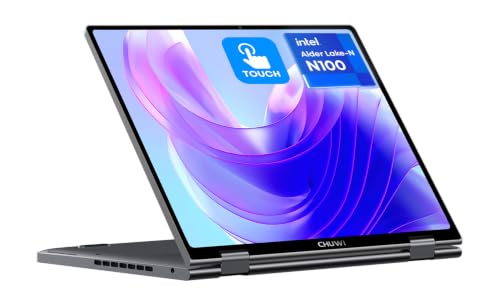
The first quality that matters is size and weight. A good 10-inch laptop is small enough to carry everywhere and light enough to forget, and the picks in this guide are all 2-in-1 or convertible designs that fold flat for reading or watching video. The CHUWI MiniBook X is a 10.5-inch convertible with a touchscreen, the Lenovo Chromebook Duet is a 10.1-inch detachable, and the CHUWI 10.51-inch models flip 360 degrees, so every pick in this guide works as a tablet as well as a laptop.
The second quality is the screen. A 10-inch screen is small, so its resolution matters more than it would on a larger machine: a low-resolution screen shows little text at once, while a sharp screen fits more on the page. The CHUWI MiniBook X states a Full HD resolution of 1920 by 1200, the CHUWI 10.51-inch models state the same 1920 by 1200 IPS display, and the ASUS Chromebook states a WUXGA touch screen, while the Tunhail states an 800 by 1280 display, which is the lowest resolution in this guide and the reason it is the budget pick.
The third quality is memory and storage. A 10-inch laptop with too little memory will stutter with a browser open, so the picks in this guide start at 8GB and run to 16GB: the two CHUWI 10.51-inch models state 16GB of RAM with a 512GB SSD, the MiniBook X states 12GB with a 512GB SSD, and the Tunhail states 12GB with a 256GB SSD, while the Chromebooks state 8GB and 4GB because Chrome OS needs less memory than Windows. A buyer should choose 12GB or more for Windows, and 8GB for a Chromebook.
Windows mini laptops, Chromebooks, and how to choose between them
Windows mini laptops are the most flexible kind in this guide: the CHUWI MiniBook X, the two CHUWI 10.51-inch models, and the Tunhail all run Windows. Their advantage is software: they run the same programs as a full-size Windows laptop, from Office to a browser to the apps a student needs for class. Their trade-off is that Windows needs more memory and storage than Chrome OS, so a buyer should choose 12GB of RAM or more, and the battery will not last as long as a Chromebook on the same charge.
Chromebooks are the simplest kind: the ASUS Chromebook 10.5-inch and the Lenovo Chromebook Duet 10.1-inch both run Chrome OS. Their advantage is simplicity: they start fast, update themselves, and need little memory, because most of the work happens in a browser. Their trade-off is software, because they cannot run Windows programs, so a buyer who needs a specific Windows app should choose a Windows mini laptop instead.
Convertibles and detachables are the form factors in this guide, rather than a third kind of operating system. A convertible like the CHUWI MiniBook X folds its screen back 360 degrees, so it works as a laptop and as a tablet, while a detachable like the Lenovo Chromebook Duet separates from its keyboard entirely. Both suit a traveller who reads and watches video as well as typing, and the choice between them is a matter of taste.
Quick picks at a glance
| Laptop | Screen | Memory / Storage | Best for |
|---|---|---|---|
| CHUWI MiniBook X | 10.5 in touch | 12GB / 512GB | Best all-round mini |
| CHUWI Mini 10.51 U300 | 10.51 in touch | 16GB / 512GB | Most memory here |
| ASUS Chromebook 10.5 | 10.5 in touch | 8GB / 128G | Chrome OS pick |
| Lenovo Chromebook Duet | 10.1 in | 4GB / 64GB | Detachable tablet |
| CHUWI Mini 10.51 N150 | 10.51 in touch | 16GB / 512GB | Newer N150 chip |
| Tunhail 10.1 | 10.1 in touch | 12GB / 256GB | Budget pick |
The best 10-inch laptops

CHUWI MiniBook X 10.5-Inch
The CHUWI MiniBook X is the all-round pick in this guide. The listing title states the brand CHUWI, the model MiniBook X, a 2-in-1 laptop with a 10.5-inch screen, 12GB of RAM, a 512GB SSD, an Intel N100 processor, a convertible design, a touchscreen laptop, Full HD resolution of 1920 by 1200, Wi-Fi 6, Bluetooth 5.2, a 5MP camera, a backlit keyboard, and 2TB of SSD expansion. It is the most complete mini laptop in this guide, and the one a buyer who wants a single small machine should choose.
The Intel N100 processor is a low-power chip built for small machines, and it suits the MiniBook X well: it runs Windows, a browser, and Office without fuss, while sipping power so the battery lasts through a working day. The backlit keyboard is the feature that matters most after the screen, because a small laptop is often used in a dim room or on a night flight, and a lit keyboard is easier to type on. The 2TB of SSD expansion is the other useful extra, because 512GB fills up faster than most buyers expect.
Key specs:
- Screen: 10.5-inch touchscreen, Full HD 1920 x 1200
- Processor: Intel N100
- Memory: 12GB RAM, 512GB SSD
- Wireless: Wi-Fi 6, Bluetooth 5.2
- Extras: 5MP camera, backlit keyboard, 2TB SSD expansion
Strengths:
- Full HD touchscreen in a 10.5-inch body
- 12GB RAM and 512GB SSD for Windows
- Backlit keyboard and Wi-Fi 6 for travel
Trade-offs:
- N100 processor is modest for heavy work
- Small keyboard takes getting used to
- No stylus stated in the title
The CHUWI MiniBook X fits the traveller or student who wants one small Windows laptop for everything. It is the pick for writing, browsing, and classwork on the move, where a full-size laptop would be too big to carry.
Best for: an all-round small Windows laptop for travel. Not suited for: heavy work like video editing or large spreadsheets.
Check price on Amazon: CHUWI MiniBook X

CHUWI Mini Laptop 10.51-Inch Touchscreen (Intel U300)
The CHUWI Mini Laptop with a 10.51-inch touchscreen and an Intel U300 processor is the memory pick in this guide. The listing title states the brand CHUWI, a mini laptop with a 10.51-inch touchscreen, an Intel U300 processor running at 4.4GHz, 16GB of RAM, a 512GB SSD, a 2-in-1 design, a 360-degree flip IPS display at 1920 by 1200, a backlit keyboard, Wi-Fi 6, Bluetooth 5.2, a fan, and a portable pocket PC for travel and school. With 16GB of RAM it has the most memory of any pick in this guide.
Sixteen gigabytes of RAM is what sets this laptop apart, because it lets the machine keep a browser with many tabs, a document, and a video call open at once without slowing down. The Intel U300 processor runs at up to 4.4GHz, which is fast for a mini laptop, and the fan keeps it cool under load, which is why the listing mentions it. The 360-degree flip screen turns the laptop into a tablet for reading, and the backlit keyboard makes it usable in a dark room.
Key specs:
- Screen: 10.51-inch touchscreen, IPS 1920 x 1200
- Processor: Intel U300 up to 4.4GHz
- Memory: 16GB RAM, 512GB SSD
- Design: 2-in-1, 360-degree flip
- Extras: backlit keyboard, Wi-Fi 6, Bluetooth 5.2, fan
Strengths:
- 16GB RAM is the most in this guide
- Fast U300 processor with a cooling fan
- 360-degree flip screen for tablet use
Trade-offs:
- No named model in the title
- A fan means it is not silent
- CHUWI is a smaller brand than ASUS or Lenovo
The CHUWI Mini Laptop with the Intel U300 fits the buyer who wants the most memory in a 10-inch machine. It is the pick for a student who keeps many browser tabs open, or a traveller who works with several apps at once.
Best for: heavy multitasking in a mini laptop. Not suited for: a buyer who wants a named model from a big brand.
Check price on Amazon: CHUWI Mini Laptop 10.51-Inch

ASUS Chromebook 10.5-Inch (CM3001DM2A-WS88T-S)
The ASUS Chromebook with a 10.5-inch screen is the Chrome OS pick in this guide. The listing title states the brand ASUS, a Chromebook with a 10.5-inch WUXGA touch laptop screen, a MediaTek Kompanio 520 processor running at 2.0GHz, an ARM Mali-G52 MC2 graphics chip, 8GB of LPDDR4X memory, 128GB of eMMC storage, Chrome OS, and the model code CM3001DM2A-WS88T-S. It is a straightforward Chromebook in a 10.5-inch body, and the model code in the title makes it easy to check before ordering.
Chrome OS is the reason to choose this laptop: it starts in seconds, updates itself, and needs little memory, because most of the work happens in a browser. Eight gigabytes of memory is plenty for Chrome OS, and the MediaTek Kompanio 520 processor is built for this kind of machine, with an ARM design that sips power. The WUXGA touch screen is sharp for its size, and touch makes Chrome OS easier to use, because many apps are designed for a finger as well as a mouse.
Key specs:
- Screen: 10.5-inch WUXGA touch
- Processor: MediaTek Kompanio 520, 2.0GHz
- Memory: 8GB LPDDR4X, 128G eMMC
- System: Chrome OS
- Model: CM3001DM2A-WS88T-S
Strengths:
- Chrome OS starts fast and updates itself
- WUXGA touch screen is sharp for its size
- 8GB memory is plenty for Chrome OS
Trade-offs:
- Cannot run Windows programs
- 128GB eMMC storage is small
- ARM processor will not run x86 apps
The ASUS Chromebook 10.5-inch fits the buyer who lives in a browser and wants a simple, fast machine. It is the pick for a student, a traveller, or anyone whose work is email, documents, and the web.
Best for: simple, fast browser-based work. Not suited for: a buyer who needs Windows software.
Check price on Amazon: ASUS Chromebook 10.5-Inch

Lenovo Chromebook Duet 10.1-Inch
The Lenovo Chromebook Duet is the detachable pick in this guide. The listing title states the brand Lenovo, the model Chromebook Duet, a 2-in-1 design, a 10.1-inch WUXGA display at 1920 by 1200, a MediaTek Helio P60T processor, 4GB of LPDDR4X RAM, 64GB of eMCP SSD storage, integrated ARM G72 MP3 graphics, Chrome OS, and the model code ZA6F0031US, in ice blue and iron grey. It is a tablet with a keyboard, rather than a laptop that folds, which makes it the most tablet-like pick in this guide.
A detachable is the lightest way to carry a 10-inch machine, because the keyboard comes off and the tablet goes in a bag on its own. The 10.1-inch WUXGA display is sharp for its size, and Chrome OS suits a tablet, because it is designed for touch. Four gigabytes of memory and 64GB of storage are modest, but Chrome OS needs little of either, and a student who works in a browser and stores files online will not miss the extra space.
Key specs:
- Screen: 10.1-inch WUXGA, 1920 x 1200
- Processor: MediaTek Helio P60T
- Memory: 4GB LPDDR4X RAM, 64GB eMCP SSD
- System: Chrome OS
- Model: ZA6F0031US, ice blue and iron grey
Strengths:
- Detachable design is the lightest to carry
- Sharp WUXGA display for its size
- Chrome OS suits touch and browsing
Trade-offs:
- Only 4GB RAM and 64GB storage
- Detachable keyboard is smaller than a laptop keyboard
- Not a Windows machine
The Lenovo Chromebook Duet fits the student or traveller who wants a tablet first and a laptop second. It is the pick for reading, video, and light writing, where the keyboard comes off and the tablet goes in a small bag.
Best for: a tablet that becomes a laptop when needed. Not suited for: heavy writing, where a full laptop keyboard matters.
Check price on Amazon: Lenovo Chromebook Duet

CHUWI 2-in-1 Mini Laptop 10.51-Inch (Intel N150)
The CHUWI 2-in-1 Mini Laptop with a 10.51-inch screen and an Intel N150 processor is the second 16GB pick in this guide. The listing title states the brand CHUWI, a 2-in-1 mini laptop with a 10.51-inch screen, 16GB of RAM, a 512GB SSD, an Intel N150 processor running at up to 3.6GHz, a Full HD Plus IPS touchscreen laptop, a 360-degree flip, a backlit keyboard, lightweight design, Wi-Fi 6, Bluetooth 5.2, a camera, and a convertible laptop for travel. It is the same size and memory as the U300 model in this guide, with a newer N150 processor.
The Intel N150 is a newer low-power processor than the chips in the older mini laptops, and it is built for exactly this kind of machine: it runs Windows, a browser, and Office while using little power, so the battery lasts longer. Sixteen gigabytes of RAM and a 512GB SSD give the machine room to work, and the 360-degree flip screen and backlit keyboard make it usable as a tablet and in a dark room. A buyer choosing between the two CHUWI 10.51-inch models should pick this one for the newer processor, and the U300 model for its higher clock speed.
Key specs:
- Screen: 10.51-inch, Full HD Plus IPS touchscreen
- Processor: Intel N150, up to 3.6GHz
- Memory: 16GB RAM, 512GB SSD
- Design: 2-in-1, 360-degree flip, lightweight
- Extras: backlit keyboard, Wi-Fi 6, Bluetooth 5.2, camera
Strengths:
- Newer N150 processor sips power
- 16GB RAM and 512GB SSD
- 360-degree flip screen for tablet use
Trade-offs:
- No named model in the title
- N150 is slower at peak than the U300
- CHUWI is a smaller brand than ASUS or Lenovo
The CHUWI 2-in-1 Mini Laptop with the Intel N150 fits the buyer who wants a newer processor and a long battery life. It is the pick for travel and class, where the laptop should last the day and work as a tablet too.
Best for: long battery life with 16GB of memory. Not suited for: a buyer who wants the fastest processor in this guide.
Check price on Amazon: CHUWI 2-in-1 Mini Laptop 10.51-Inch

Tunhail 10.1-Inch 2-in-1 Laptop
The Tunhail 10.1-inch 2-in-1 laptop is the budget pick in this guide. The listing title states the brand Tunhail, a 10.1-inch 2-in-1 laptop, 12GB of RAM, a 256GB SSD, a 360-degree flip touchscreen laptop with an m3-8100Y processor running at up to 3.40GHz, an 800 by 1280 IPS Full HD display, a backlit keyboard, and a laptop computer for students, commuters, and business. It is the cheapest way into a 10-inch Windows laptop with 12GB of RAM, and its 360-degree flip screen makes it a tablet as well as a laptop.
Twelve gigabytes of RAM and a 256GB SSD are enough for Windows, a browser, and Office, and the m3-8100Y processor is a low-power chip built for thin machines. The trade-off is the screen: 800 by 1280 is the lowest resolution in this guide, so text is larger and less fits on the page than on the Full HD screens of the CHUWI models. A buyer who reads mostly on a phone will not mind, but a buyer who works with documents all day should choose a sharper screen.
Key specs:
- Screen: 10.1-inch touchscreen, 800 x 1280 IPS
- Processor: m3-8100Y, up to 3.40GHz
- Memory: 12GB RAM, 256GB SSD
- Design: 2-in-1, 360-degree flip
- Extras: backlit keyboard, for students and commuters
Strengths:
- 12GB RAM at a budget cost
- 360-degree flip touchscreen
- Backlit keyboard for dark rooms
Trade-offs:
- 800 by 1280 is the lowest resolution here
- 256GB storage is the smallest here
- Tunhail is a little-known brand
The Tunhail 10.1-inch laptop fits the buyer who wants a cheap 10-inch Windows laptop with 12GB of RAM. It is the pick for a student on a budget, a second machine for travel, or a first laptop for a child.
Best for: a budget 10-inch Windows laptop. Not suited for: a buyer who needs a sharp Full HD screen for documents.
Check price on Amazon: Tunhail 10.1-Inch 2-in-1 Laptop
Buying guide for 10-inch laptops
Choose Windows or Chrome OS first
The first step in buying a 10-inch laptop is to choose the operating system, because it decides what the machine can run. Windows laptops, like the CHUWI models and the Tunhail in this guide, run the same programs as a full-size Windows laptop, from Office to a browser to the apps a student needs for class. Chromebooks, like the ASUS Chromebook and the Lenovo Chromebook Duet, run Chrome OS, which is simpler and faster but cannot run Windows programs.
A buyer who needs a specific Windows app should choose Windows, and a buyer who lives in a browser should choose Chrome OS. A student should check what the school uses before ordering, because a school that teaches with Windows software needs a Windows machine, while a school that uses Google Classroom suits a Chromebook.
Check the memory
The second step is to check the memory. A Windows mini laptop needs 12GB of RAM or more to run smoothly with a browser open, and the picks in this guide that run Windows all state 12GB or 16GB. A Chromebook needs less, because Chrome OS is lighter, and the ASUS Chromebook states 8GB while the Lenovo Chromebook Duet states 4GB, which is enough for browsing and documents.
Storage matters too: 512GB gives room for files and programs, while 128GB or 64GB fills up fast. A buyer who stores files online can manage with less, but a buyer who keeps photos and videos on the machine should choose 256GB or more, and the CHUWI MiniBook X states 2TB of SSD expansion for that reason.
Look at the screen resolution
The third step is to look at the screen resolution, because a 10-inch screen is small and a low resolution shows little text at once. The CHUWI models in this guide state Full HD resolution of 1920 by 1200, which is sharp for a 10-inch screen, while the Tunhail states 800 by 1280, which is the lowest resolution here. A buyer who works with documents all day should choose the sharper screen, while a buyer who mostly watches video will not mind the lower one.
Touch is worth having on a 10-inch laptop, because the screen is small enough to reach and many apps are designed for a finger. Every pick in this guide has a touchscreen except the Lenovo Chromebook Duet, whose detachable design is built around touch anyway.
Think about the keyboard
The fourth step is to think about the keyboard, because a 10-inch laptop has a small keyboard and typing on it takes getting used to. A backlit keyboard helps in a dark room or on a night flight, and the CHUWI models and the Tunhail in this guide all state one. A buyer who types a lot should try the keyboard in a shop when possible, or choose a model with a backlit keyboard and a layout that matches the full-size keyboard they already use.
A detachable keyboard, like the one on the Lenovo Chromebook Duet, is smaller than a laptop keyboard and suits short writing sessions better than long ones. A buyer who writes for hours should choose a convertible with a fixed keyboard, like the CHUWI MiniBook X, rather than a detachable.
Check the weight and the battery
The fifth step is to check the weight and the battery, because a 10-inch laptop is bought to travel. A mini laptop should be light enough to carry all day, and its battery should last through a working day of writing and browsing. A low-power processor, like the Intel N100 in the MiniBook X or the Intel N150 in the CHUWI 10.51-inch model, sips power and stretches the battery, while a faster processor with a fan, like the Intel U300, trades battery life for speed.
A buyer should also check the charger, because a mini laptop that charges over USB-C can share a charger with a phone, which is one less thing to pack. A laptop with its own bulky charger is harder to travel with, and the charger should be counted in the travel weight.
Using and caring for a 10-inch laptop
Carrying a mini laptop
A 10-inch laptop is small enough to carry in a small bag, but it still needs protection. A padded sleeve keeps the screen safe from keys and chargers in the same bag, and a hard case is worth having for a laptop that travels in a backpack with books. A convertible with a 360-degree flip screen should travel with the screen facing inward, so the glass is protected by the keyboard.
A detachable like the Lenovo Chromebook Duet should travel with the keyboard attached or in a sleeve of its own, because a loose keyboard is easy to lose. A buyer who flies often should keep the laptop in a personal item bag rather than in checked luggage, because a checked bag is where laptops get damaged.
Keeping the battery healthy
A mini laptop battery lasts longest when it is not run flat every day. Charge it before it drops below a fifth, unplug it when it is full, and do not leave it in a hot car, because heat ages a battery faster than use. A laptop that is used plugged in all day should be unplugged now and then and run on battery, because a battery that never cycles loses its capacity.
A buyer who travels should carry the charger, because a 10-inch laptop with a small battery will not last a long day of heavy use. A power bank that charges over USB-C can top up a mini laptop in a pinch, but it is not a substitute for the charger on a long trip.
Keeping the screen and keyboard clean
A touchscreen collects fingerprints, and a small screen shows them more than a large one. A microfibre cloth wipes the screen clean without scratching it, and a slightly damp cloth takes off marks that a dry one leaves behind. Do not spray cleaner directly onto the screen, because the liquid can run into the hinge and damage the electronics.
A small keyboard collects crumbs and dust between the keys, and a soft brush or a blast of compressed air takes them out. A keyboard cover keeps dust out, but it should be removed when the laptop is closed, because a cover left in place can press on the screen.
Updating the software
A mini laptop needs the same care as a full-size one: updates for the operating system, a browser that is kept current, and files backed up somewhere safe. A Chromebook updates itself, which is one of its advantages, while a Windows mini laptop should be set to update overnight, when the machine is plugged in and not in use.
A buyer should back up files to the cloud or an external drive, because a small laptop is easier to lose than a big one, and a lost laptop with no backup means lost work. A weekly backup takes minutes and saves a term of work.
Common mistakes when buying a 10-inch laptop
Expecting a desktop replacement
The most common mistake is buying a 10-inch laptop and expecting it to replace a desktop. A mini laptop is built for travel and light work, not for heavy spreadsheets, video editing, or large games. A buyer who needs heavy work should choose a larger laptop, and use the 10-inch machine as a second computer for the road.
Choosing too little memory
The second mistake is choosing a Windows mini laptop with too little memory. Windows needs 12GB of RAM to run smoothly with a browser open, and a machine with less will stutter. The picks in this guide that run Windows all state 12GB or 16GB, and a buyer should not go below 12GB for Windows.
Buying a renewed laptop by accident
The third mistake is buying a renewed laptop without noticing. Two listings found during the research for this guide were renewed, and the word only appeared in the full title, not in the short search title. A buyer should always read the full listing title before ordering, and should be wary of a laptop whose title ends with a word in brackets.
Forgetting the keyboard size
The fourth mistake is forgetting that a 10-inch laptop has a small keyboard. A buyer who types for hours will find a small keyboard tiring, and a detachable keyboard is smaller still. A buyer who writes a lot should try the keyboard first, or choose a convertible with a fixed keyboard and a backlit layout.
Final recommendation
The best 10-inch laptop for most buyers is the CHUWI MiniBook X, because it combines a 10.5-inch Full HD touchscreen, an Intel N100 processor, 12GB of RAM, a 512GB SSD, a backlit keyboard, and 2TB of SSD expansion in a convertible body that works as a laptop and a tablet. It is the most complete mini laptop in this guide, and a buyer who chooses it will not need a second machine for the road.
A buyer who wants the most memory should choose one of the CHUWI 10.51-inch models with 16GB of RAM, a buyer who lives in a browser should choose the ASUS Chromebook 10.5-inch, a buyer who wants a tablet first should choose the Lenovo Chromebook Duet, and a buyer on a budget should choose the Tunhail 10.1-inch laptop, keeping in mind its lower screen resolution.
Related reading on Reviewstook: see our guides to gaming laptop buying guide, best 14-inch gaming laptops, best entry-level gaming laptops for more on this topic.
Frequently asked questions about 10-inch laptops
Are 10-inch laptops good for students?
Yes, for the right student. A 10-inch laptop is light, small, and enough for writing, browsing, video, and classwork, which is what most students do. A student who needs heavy software, like video editing or large spreadsheets, should choose a larger laptop, and use a 10-inch machine as a second computer for the road.
What is the difference between a 10-inch laptop and a tablet?
A 10-inch laptop has a keyboard and runs a full operating system, while a tablet is a touchscreen with no keyboard. The laptops in this guide are 2-in-1 or convertible designs, so they work as both: the screen folds back 360 degrees or detaches from the keyboard, and the machine becomes a tablet for reading and video.
Is 4GB of RAM enough for a Chromebook?
Yes, for light work. Chrome OS needs less memory than Windows, because most of the work happens in a browser, and the Lenovo Chromebook Duet in this guide states 4GB of RAM with Chrome OS. A buyer who keeps many tabs open should choose the ASUS Chromebook with 8GB, and a buyer who needs Windows should choose 12GB or more.
Can a 10-inch laptop run Windows?
Yes. The CHUWI MiniBook X, the two CHUWI 10.51-inch models, and the Tunhail in this guide all run Windows, with 12GB or 16GB of RAM and a 512GB or 256GB SSD. They run the same programs as a full-size Windows laptop, from Office to a browser, although a low-power processor means heavy work will be slow.
Why are most 10-inch laptops 10.1 or 10.5 inches?
Because makers build 10.1-inch and 10.5-inch panels, and both are marketed as 10-inch laptops. An exact 10.0-inch screen is rare, and the difference between 10.1 and 10.5 inches is a few millimetres of glass. This guide covers the class as it is actually sold, with screens from 10.1 to 10.51 inches.
Should I buy a renewed 10-inch laptop?
This guide only links new laptops, because a renewed laptop may have a worn battery or a scratched screen, and the saving is rarely worth the risk on a small machine. Two listings found during the research for this guide were renewed, and the word only appeared in the full title, so a buyer should always read the full listing title before ordering.