The best quad core motherboards are the ones with a quad-core processor built onto the board, ready to run without a separate CPU to buy. A quad-core motherboard is a board with four processor cores, and the boards in this guide all have the processor soldered on, so the build is a board, memory, and storage, with no CPU shopping and no cooler to fit. The six boards here cover office work, home servers, networking, and tiny desktops, and every listing was checked in full before it was linked.
A quad-core motherboard matters because four cores are enough for the work most small computers do. A quad-core processor runs an office suite, a browser with many tabs, a media player, and a home server without strain, and it does so while using little power and making little heat. A buyer who needs more cores should look at a larger board with a socket, but a buyer who needs a small, quiet, low-power computer will find a quad-core board is the right size.
The boards in this guide fall into two groups. The desktop and office boards are the ASRock N250M/D5 and the ASRock QC7000M, and they are for small computers that sit on a desk. The server and networking boards are the Supermicro A1SAI-2550F-O, the Jetway LI1BV, the Biostar J4125NHU, and the Supermicro X10SDV-TP8F, and they are for machines that run all day as servers, routers, and network boxes.
This guide covers six best quad core motherboards: two ASRock boards, two Supermicro boards, one Jetway board, and one Biostar board. All six are sold as new listings, all six have their brand and model stated in the listing title, and all six state their processor, memory, and size. The comparison table below gives the short version, and the sections after it give the detail.
In this guide
Quick picks: best quad core motherboards
| # | Product | Where to buy |
|---|---|---|
| 1 | ASRock N250M D5 micro-ATX motherboard | Check on Amazon |
| 2 | ASRock QC7000M AMD E2-7110 quad-core motherboard | Check on Amazon |
| 3 | Supermicro A1SAI-2550F-O quad core motherboard | Check on Amazon |
| 4 | Jetway LI1BV Celeron J6412 quad core motherboard | Check on Amazon |
| 5 | Biostar J4125NHU Celeron J4125 motherboard | Check on Amazon |
| 6 | Supermicro X10SDV-TP8F server motherboard | Check on Amazon |
How the picks were chosen for the best quad core motherboards
Every board below started as a listing returned by the reviewstook.com product lookup, and every listing was checked the same way. First, the title had to name the exact brand and the exact model, including every number and letter, because an ASRock N250M/D5 is not an ASRock B550M-HDV, and a Supermicro X10SDV-TP8F is not a Supermicro A1SAI-2550F. Second, the title had to state a quad-core processor, because a board with no processor stated is a different purchase.
The boards were also checked for the details that decide real use. The processor decides speed, and the boards here use Intel N250, AMD E2-7110, Atom C2550, Celeron J6412, Celeron J4125, and Xeon D-1518 processors. Memory decides capacity, and the boards here use DDR3, DDR4, and DDR5. Size decides the case, and the boards here are micro-ATX, mini-ITX, thin mini-ITX, and Flex ATX. Networking decides server use, and the Jetway board has two 2.5GbE ports.
One more check shaped the list: the board must be a motherboard, not a processor, a combo with a different processor, or a replacement part. Listings for processors alone, for boards that merely fit a quad-core CPU, and for third-party boards that only claim to fit another board were left out, because a buyer searching for a quad core motherboard wants a board with a quad-core processor on it. The six boards below are all motherboards with quad-core processors, sold as new listings, with the brand and the model stated in the title.
What a quad core motherboard is, and who should buy one
A quad core motherboard is a motherboard with a quad-core processor, usually soldered onto the board itself. The processor has four cores, which means it can run four tasks at once, and it is paired with memory slots, storage slots, display outputs, and network ports on the same board. The boards in this guide are mostly embedded boards, which means the processor is part of the board and cannot be removed or upgraded, and the buyer adds memory, storage, and a case.
A quad core motherboard suits anyone building a small, quiet, low-power computer. It is the right choice for an office computer, a home server, a network storage box, a router, a firewall, a media player, and a kiosk computer. It is not the right choice for gaming, because games need a stronger processor and a graphics card, and it is not the right choice for a buyer who wants to upgrade the processor later, because the processor is soldered on.
The six boards in this guide cover the main uses. The ASRock boards are for desktop and office use, the Supermicro boards are for servers, the Jetway board is for networking, and the Biostar board is for tiny builds. A buyer should match the board to the job, because a server board and a desktop board are different purchases.
What makes a good quad core motherboard
The processor is the first test, and it decides what the board can do. A modern processor like the Intel N250 or the Xeon D-1518 is faster than an older one like the AMD E2-7110 or the Atom C2550, and a buyer who runs many services should pick the faster processor. The processor is soldered on, so it cannot be upgraded, and a buyer should pick the processor that covers the work for the life of the board.
Memory is the second test, because it decides how much the board can hold at once. A board with DDR5 memory is the current standard, and a board with DDR3 is an older standard that still works for basic tasks. The memory ceiling matters for servers, and the Supermicro X10SDV-TP8F with up to 128GB of DDR4 is the pick for a buyer who runs virtual machines. A buyer should check the memory type and the ceiling in the title before buying.
Size and networking are the third test. A micro-ATX board fits a standard small case, a mini-ITX board fits a tiny case, and a Flex ATX board fits a server case, so the buyer must match the board to the case. Networking matters for servers, and the Jetway board with two 2.5GbE ports is the pick for a router or a firewall. A buyer who needs fast networking should look for 2.5GbE ports, and a buyer who needs many display outputs should look for HDMI and DisplayPort.
Quick picks at a glance
| Motherboard | Processor and memory | Use | Best for |
|---|---|---|---|
| ASRock N250M/D5 | Intel Quad-Core N250, DDR5 4800 | Office, server, media | Best modern quad-core board |
| ASRock QC7000M | AMD E2-7110 quad-core APU, DDR3 | Basic PC, browsing, video | Best budget quad-core board |
| Supermicro A1SAI-2550F-O | Quad core, DDR3 1333, mini ITX | Home server, NAS, firewall | Best server-grade board |
| Jetway LI1BV J6412 | Celeron J6412 quad core, 2x 2.5GbE | Router, firewall, network | Best networking board |
| Biostar J4125NHU | Celeron J4125 on-board, mini-ITX | Tiny desktop, media, kiosk | Best compact board |
| Supermicro X10SDV-TP8F | Xeon D-1518 quad-core, up to 128GB DDR4 | Home server, virtualization | Best powerful server board |
The best quad core motherboards

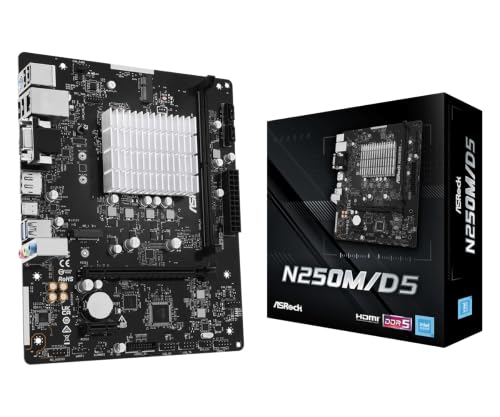
ASRock N250M/D5 Micro-ATX Motherboard
The ASRock N250M/D5 Micro-ATX Motherboard is the most modern quad core motherboard in this guide, and it is the pick for a buyer who wants a current board with a quad-core processor built in. It is an ASRock N250M/D5 micro-ATX motherboard with an Intel Quad-Core N250 processor, DDR5 4800 memory, PCIe 3.0, M.2 storage, HDMI, DisplayPort, D-Sub, and USB-C. The processor is soldered on the board, so there is no separate CPU to buy, and the DDR5 memory is the current standard.
The N250M/D5 suits a buyer building a small, quiet computer for office work, a home server, or a media machine. The micro-ATX size fits a standard small case, the M.2 slot covers fast storage, and the three display outputs cover a monitor and a television. It is the board for a buyer who wants a modern quad-core board without buying a separate processor.
Key specs:
- ASRock N250M/D5 micro-ATX motherboard
- Intel Quad-Core N250
- DDR5 4800
- PCIe 3.0, M.2
- HDMI, DisplayPort, D-Sub
- USB-C
Strengths:
- Modern quad-core processor built in, no separate CPU to buy
- DDR5 memory, the current standard
- Three display outputs cover monitor and television
Trade-offs:
- Processor cannot be upgraded, because it is soldered on
- PCIe 3.0, not the newer PCIe 4.0 or 5.0
- A basic board with no Wi-Fi stated in the title
The ASRock N250M/D5 fits a buyer building a small, quiet computer for office work, a home server, or a media machine.
Best for: a modern quad-core board with the processor built in. Not suited for: a buyer who wants to upgrade the processor later, or a gaming build.
Check price on Amazon: ASRock N250M D5 micro-ATX motherboard

ASRock QC7000M AMD E2-7110 Quad-Core APU Motherboard
The ASRock QC7000M AMD E2-7110 Quad-Core APU Motherboard is the budget pick in this guide, and it is the pick for a buyer who wants the cheapest working quad-core board. It is an ASRock QC7000M motherboard on the AMD FT3b platform with a Carrizo-L E2-7110 quad-core APU, DDR3 1600 memory, Radeon R2 graphics, HDMI, D-Sub, USB 3.2 Gen1, SATA3, Gigabit LAN, and 7.1 channel audio. The APU combines the processor and the graphics on one chip, so there is no separate graphics card to buy.
The QC7000M suits a buyer building a basic computer for browsing, documents, and video playback on the lowest budget. The Radeon R2 graphics handle a display without a separate card, the Gigabit LAN covers wired networking, and the 7.1 channel audio covers speakers and headphones. It is the board for a buyer who wants a working quad-core computer for the least money.
Key specs:
- ASRock QC7000M AMD FT3b motherboard
- Carrizo-L E2-7110 quad-core APU
- DDR3 1600
- Radeon R2 graphics
- HDMI, D-Sub
- USB 3.2 Gen1, SATA3, Gigabit LAN
- 7.1CH audio
Strengths:
- Cheapest working quad-core board in this guide
- APU graphics, so no separate card is needed
- Gigabit LAN and 7.1 channel audio included
Trade-offs:
- DDR3 memory, an older standard
- A low-power APU that is slow for heavy tasks
- An older platform with no upgrade path
The ASRock QC7000M fits a buyer building a basic computer for browsing, documents, and video on the lowest budget.
Best for: a basic quad-core computer on the lowest budget. Not suited for: heavy tasks, gaming, or a buyer who wants a modern platform.
Check price on Amazon: ASRock QC7000M AMD E2-7110 quad-core motherboard

Supermicro Mini ITX A1SAI-2550F-O Quad Core Motherboard
The Supermicro Mini ITX A1SAI-2550F-O Quad Core Motherboard is the server-grade pick in this guide, and it is the pick for a buyer who wants a board built to run all day. It is a Supermicro mini ITX motherboard and CPU combo with a quad core processor and DDR3 1333 MHz memory. The mini ITX size fits a small server case, and the Supermicro build quality is made for machines that run around the clock.
The A1SAI-2550F-O suits a buyer building a small home server, a network storage box, or a firewall that must run all day without stopping. The combo includes the processor, so there is nothing else to buy for the board itself, and the small size fits a compact case. It is the board for a buyer who wants server-grade reliability in a small box.
Key specs:
- Supermicro Mini ITX A1SAI-2550F-O
- Quad core processor
- DDR3 1333 MHz
- Motherboard and CPU combo
Strengths:
- Server-grade build made to run all day
- Mini ITX size fits a small server case
- Processor included in the combo
Trade-offs:
- DDR3 memory, an older standard
- An older processor that is slow for heavy tasks
- Few display outputs stated in the title
The Supermicro A1SAI-2550F-O fits a buyer building a small home server or network box that must run all day.
Best for: a small server that runs all day. Not suited for: a desktop PC, gaming, or a buyer who wants modern memory.
Check price on Amazon: Supermicro A1SAI-2550F-O quad core motherboard

Jetway LI1BV Elkhart Lake Celeron J6412 Quad Core Motherboard
The Jetway LI1BV Elkhart Lake Celeron J6412 Quad Core Motherboard is the networking pick in this guide, and it is the pick for a buyer who wants two fast network ports on the board itself. It is a Jetway LI1BV thin mini ITX motherboard with an Elkhart Lake Celeron J6412 quad core processor, two 2.5GbE LAN ports, model JLI1BV-0LH. The two 2.5 gigabit ports are the fastest networking in this guide, and the thin mini ITX size fits a slim case.
The LI1BV suits a buyer building a router, a firewall, or a small network server with two network connections. The J6412 quad core processor handles network traffic without strain, and the two 2.5GbE ports cover a fast internet connection and a fast local network. It is the board for a buyer who wants networking first.
Key specs:
- Jetway LI1BV Elkhart Lake motherboard
- Celeron J6412 quad core
- Thin mini ITX
- 2 x 2.5GbE LAN
- JLI1BV-0LH
Strengths:
- Two 2.5GbE LAN ports, the fastest networking here
- Thin mini ITX size fits a slim case
- Quad core processor handles network traffic well
Trade-offs:
- A thin mini ITX board that needs a slim case
- Few display outputs stated in the title
- A niche board with limited general use
The Jetway LI1BV fits a buyer building a router, a firewall, or a small network server with two fast ports.
Best for: a router or firewall with two 2.5GbE ports. Not suited for: a general desktop PC, or a buyer who needs many display outputs.
Check price on Amazon: Jetway LI1BV Celeron J6412 quad core motherboard

Biostar Intel Celeron J4125 On-Board Motherboard J4125NHU
The Biostar Intel Celeron J4125 On-Board Motherboard J4125NHU is the compact pick in this guide, and it is the pick for a buyer who wants a small board with a quad-core processor for a tiny computer. It is a Biostar mini-ITX motherboard with an Intel Celeron J4125 processor on board, model J4125NHU, in Black. The processor is soldered on the board, so the build is a board, memory, and storage, with no separate CPU or cooler to buy.
The J4125NHU suits a buyer building a tiny desktop, a media player, or a kiosk computer that sits behind a monitor. The mini-ITX size fits the smallest cases, and the J4125 quad-core processor handles browsing, video, and light office work. It is the board for a buyer who wants the smallest quad-core build here.
Key specs:
- Biostar Intel Celeron J4125 on-board motherboard
- Mini-ITX
- Model J4125NHU
- Black
Strengths:
- Mini-ITX size fits the smallest cases
- Processor on board, no separate CPU or cooler to buy
- Low power, so it runs cool and quiet
Trade-offs:
- A low-power processor that is slow for heavy tasks
- Few features stated in the title
- Processor cannot be upgraded
The Biostar J4125NHU fits a buyer building a tiny desktop, a media player, or a kiosk computer.
Best for: the smallest quad-core build in this guide. Not suited for: heavy tasks, gaming, or a buyer who wants to upgrade later.
Check price on Amazon: Biostar J4125NHU Celeron J4125 motherboard

Supermicro X10SDV-TP8F Server Motherboard
The Supermicro X10SDV-TP8F Server Motherboard is the most powerful board in this guide, and it is the pick for a buyer who wants a quad-core server processor with room for lots of memory. It is a Supermicro X10SDV-TP8F server motherboard with an Intel Xeon D-1518 quad-core processor at 2.20 GHz, in a Flex ATX size, with up to 128GB of DDR4 SDRAM, in a bulk pack. The Xeon D processor is made for servers, and the 128GB memory ceiling is the largest in this guide.
The X10SDV-TP8F suits a buyer building a serious home server, a virtualization host, or a network server that runs many services at once. The Xeon D-1518 handles server work well, and the 128GB of DDR4 gives room for virtual machines and large caches. It is the board for a buyer who wants the most capable quad-core server board here.
Key specs:
- Supermicro X10SDV-TP8F server motherboard
- Intel Xeon D-1518 quad-core, 2.20 GHz
- Flex ATX
- Up to 128GB DDR4 SDRAM
- Bulk pack
Strengths:
- Xeon D server processor, made for server work
- Up to 128GB of DDR4, the largest memory ceiling here
- Server-grade build for around-the-clock use
Trade-offs:
- A server board that needs a server case and cooling
- A bulk pack, so it may lack retail packaging
- Costs more than the other boards here
The Supermicro X10SDV-TP8F fits a buyer building a serious home server or virtualization host with lots of memory.
Best for: a serious home server with up to 128GB of memory. Not suited for: a desktop PC, a tiny build, or a buyer on a tight budget.
Check price on Amazon: Supermicro X10SDV-TP8F server motherboard
Buying guide for the best quad core motherboards
Embedded board or socketed board: know the difference
An embedded board has the processor soldered on, and a socketed board has a socket where the buyer fits a processor. The boards in this guide are embedded boards, which means the processor cannot be changed, but the build is simpler and cheaper, because there is no CPU to buy and no cooler to fit. A buyer who wants the simplest build should buy an embedded board, and a buyer who wants to upgrade the processor later should buy a socketed board instead.
The trade-off is clear. An embedded board is a finished unit, and the buyer adds memory, storage, and a case, while a socketed board is a starting point, and the buyer adds a processor, a cooler, memory, and storage. A quad-core embedded board is the right buy for a small computer with a fixed job, and the wrong buy for a gaming PC that will be upgraded.
Match the processor to the job
A modern processor like the Intel N250 suits office work and a home server, because it is fast and uses little power. An older processor like the AMD E2-7110 suits basic browsing and video, because it is slow but cheap. A server processor like the Xeon D-1518 suits a home server with many services, because it is made for server work and supports lots of memory.
The processor also decides power use and heat. A low-power processor like the Celeron J4125 runs cool and quiet, and it suits a tiny computer that sits behind a monitor. A server processor like the Xeon D-1518 uses more power and needs better cooling, and it suits a server case with fans. Match the processor to the job, and check the power and the cooling before buying.
Memory type and ceiling
Memory type decides speed, and DDR5 is the current standard, DDR4 is the previous standard, and DDR3 is the older standard. The ASRock N250M/D5 uses DDR5, the Supermicro X10SDV-TP8F uses DDR4, and the older boards use DDR3. A buyer who wants the current standard should buy DDR5, and a buyer who wants the largest memory ceiling should buy the X10SDV-TP8F with up to 128GB.
The memory ceiling matters for servers, because a home server with virtual machines needs lots of memory. A desktop board with a small ceiling is fine for office work, and a server board with a large ceiling is needed for virtualization. Check the memory type and the ceiling in the title before buying, because the memory cannot be upgraded beyond the ceiling.
Size: match the board to the case
A micro-ATX board fits a standard small case, a mini-ITX board fits a tiny case, a thin mini-ITX board fits a slim case, and a Flex ATX board fits a server case. The boards in this guide cover all four sizes, and a buyer must match the board to the case before buying. A board that does not fit the case is a return, and a case that is too big for the board wastes space.
The size also decides the features. A larger board has more slots and ports, and a smaller board has fewer. A buyer who needs many SATA ports for storage should look at a larger board, and a buyer who needs a tiny build should look at a mini-ITX board. Check the size in the title and measure the case before buying.
Networking and display outputs
Networking matters for servers and routers, and the Jetway board with two 2.5GbE ports is the pick for a buyer who needs fast networking. A board with one Gigabit port is enough for a desktop, and a board with two 2.5GbE ports is needed for a router or a firewall with two connections. Check the network ports in the title before buying, because a board with the wrong ports cannot do the job.
Display outputs matter for a desktop, and the ASRock N250M/D5 with HDMI, DisplayPort, and D-Sub covers a monitor and a television. A server board may have few display outputs, because a server is managed over the network, and a buyer who needs a display should check the outputs. A board with no display output cannot show anything on a monitor.
Using and caring for a quad core motherboard
Install the board and add memory and storage
Turn the computer off and unplug it before installing a board, then fit the board into the case with the standoffs, and screw it down. Add the memory to the slots, and make sure it clicks in, because a memory stick that is not seated will stop the board from starting. Add the storage to the M.2 or SATA slot, and connect the power and the display, then turn the computer on.
After installing, check that the board sees the memory and the storage, because a board that does not see them has a loose connection. Update the BIOS if the maker offers an update, because a new BIOS fixes bugs and adds support. A board with the latest BIOS will run better than the same board with an old one.
Keep the board cool and clean
A quad-core board uses little power and makes little heat, but it still needs airflow. Keep the case fans clean and the cables out of the airflow path, and dust the board with compressed air every few months. A board that is kept cool will last longer than one that is kept hot, and a board that overheats will shut down to protect itself.
Watch the temperatures in the first week, because a board in a case with weak airflow needs more fans or a different fan layout. A server board that runs all day needs steady airflow, and a desktop board that sits on a desk needs the vents clear. Good airflow is the cheapest upgrade a board can get.
Look after the board for the long term
A motherboard lasts for years when it is kept cool and clean, and the buyer should check it once a year. Look at the capacitors for swelling, listen for a fan that rattles, and check the temperatures under load. A capacitor that has swollen should be replaced, because it will fail and take the board with it.
Do not overclock an embedded board, because the processor is soldered on and the board is not made for it. A heavy overclock raises temperatures and shortens the life of the board, and a buyer who wants more performance should buy a stronger board, not push a weak one beyond its limits.
Common mistakes when buying a quad core motherboard
Buying a board that merely fits a quad-core CPU
The most common mistake is buying a standard board that fits a quad-core CPU and thinking it is a quad core motherboard. A board with a socket and no processor is a different purchase, because the buyer must still buy the processor and the cooler. The boards in this guide have the processor built in, and a buyer who wants that should check the title for the processor name.
The same mistake happens with third-party boards that claim to fit another board. A listing that says it fits an ASRock J3455-ITX is not the ASRock board itself, and it may not be the same quality. Buy the board with the brand and the model in the title, and skip the listing that only claims to fit another board.
Forgetting the processor cannot be upgraded
An embedded board has the processor soldered on, and it cannot be upgraded, so a buyer who buys too slow a processor is stuck with it. Pick the processor that covers the work for the life of the board, because there is no upgrade later. A buyer who wants to upgrade should buy a socketed board instead.
The same care applies to memory. A board with a small memory ceiling cannot be upgraded beyond it, and a buyer who needs more memory later will be stuck. Check the memory type and the ceiling in the title before buying, and buy a board with room to grow.
Buying the wrong size board for the case
A board that does not fit the case is a return, and a buyer who buys a Flex ATX server board for a mini-ITX case will be disappointed. Check the size in the title and measure the case before buying, because micro-ATX, mini-ITX, thin mini-ITX, and Flex ATX are different sizes. A board that fits the case will install easily, and a board that does not will not install at all.
The size also decides the features, and a buyer who needs many SATA ports should look at a larger board. A small board has fewer ports, and a buyer who needs more storage should buy a larger one. Match the size and the features to the job before buying.
Judging a board by the processor alone
The processor matters, but it is not the whole story. A board with a fast processor and slow memory will be slower than a board with a slower processor and fast memory, because the memory is the bottleneck. Check the processor, the memory type, the size, and the networking together, because all four decide how the board performs.
The model name matters too. An ASRock N250M/D5 is not an ASRock B550M-HDV, and the processor, the memory, and the features differ. Read the full model name, including every letter and number, and compare it with the requirements of the build before buying.
Our recommendation for the best quad core motherboard
The best quad core motherboard for most buyers is the ASRock N250M/D5, because it is the most modern board here, with an Intel Quad-Core N250 processor, DDR5 memory, M.2 storage, and three display outputs. It is the board for a small, quiet computer for office work, a home server, or a media machine, and it needs no separate processor. A buyer who wants a modern quad-core board should start there.
A buyer who wants a server should buy the Supermicro X10SDV-TP8F, because its Xeon D-1518 processor and up to 128GB of DDR4 give the most capability here. A buyer who wants networking should buy the Jetway LI1BV, a buyer who wants the smallest build should buy the Biostar J4125NHU, and a buyer on the lowest budget should buy the ASRock QC7000M.
Whichever board is chosen, match the processor to the job, match the size to the case, and check the memory type and ceiling before buying. A board with the processor built in is the simplest build, and a board that fits the case and covers the work will run for years. The right board is the one that fits the job the buyer already has.
Related reading on Reviewstook: see our guides to best AM5 motherboard under 100, best micro-ATX motherboard under 100, best mini-ITX motherboard for beginners under 100 for more on this topic.
Frequently asked questions about quad core motherboards
What is a quad core motherboard?
A quad core motherboard is a motherboard with a quad-core processor, usually soldered onto the board itself. The processor has four cores, which means it can run four tasks at once, and it is paired with memory slots, storage slots, display outputs, and network ports on the same board. The boards in this guide are mostly embedded boards, which means the processor is part of the board and cannot be removed.
A quad-core processor is enough for office work, browsing, media playback, and home servers, and it uses little power and makes little heat. A buyer who needs more cores should look at a larger board with a socket, but a buyer who needs a small, quiet computer will find a quad-core board is the right size.
Can I upgrade the processor on a quad core motherboard?
No, the processor on an embedded quad-core board is soldered on and cannot be upgraded. Pick the processor that covers the work for the life of the board, because there is no upgrade later. A buyer who wants to upgrade the processor should buy a socketed board instead, where the processor fits in a socket and can be changed.
The memory and the storage can be upgraded on most embedded boards, within the limits of the board. Check the memory type and the ceiling in the title before buying, and buy a board with room to grow, because the memory is the part that can be upgraded.
Are quad core motherboards good for gaming?
No, a quad-core embedded board is not good for gaming, because the processor is made for low power and the board has no graphics card slot with enough power for a gaming card. A buyer who wants to game should buy a socketed board with a stronger processor and a graphics card. A quad-core board is the right buy for office work, a home server, a router, and a media player, not for games.
The boards in this guide are made for small, quiet, low-power computers, and they do that job well. A buyer who games should look at a gaming motherboard instead, and a buyer who wants a small computer should buy a quad-core board.
What memory do quad core motherboards use?
The boards in this guide use DDR3, DDR4, and DDR5 memory, and the type is stated in the title. The ASRock N250M/D5 uses DDR5, which is the current standard, the Supermicro X10SDV-TP8F uses DDR4, and the older boards use DDR3. A buyer who wants the current standard should buy DDR5, and a buyer who wants the largest memory ceiling should buy the X10SDV-TP8F with up to 128GB.
The memory ceiling matters for servers, because a home server with virtual machines needs lots of memory. Check the memory type and the ceiling in the title before buying, because the memory cannot be upgraded beyond the ceiling.
Do quad core motherboards need a graphics card?
No, the boards in this guide have graphics built into the processor, so they can show a display without a separate card. The ASRock N250M/D5 has HDMI, DisplayPort, and D-Sub outputs, and the ASRock QC7000M has Radeon R2 graphics with HDMI and D-Sub. A buyer who needs a display should check the outputs in the title, and a buyer who needs a stronger graphics card should buy a different board.
A server board may have few display outputs, because a server is managed over the network, and a buyer who needs a display should check the outputs before buying. A board with no display output cannot show anything on a monitor.