The best Intel Gen 10 motherboards are the LGA 1200 boards built for 10th generation Intel Core processors, from the Core i3-10100 up to the Core i9-10900K. The 10th generation was the last to use the LGA 1200 socket, and its boards, mostly based on the Z490 chipset, are still the right choice for anyone building or upgrading a 10th gen system. A good Z490 board gives you fast memory support, two M.2 slots for NVMe drives, 2.5 gigabit Ethernet, and the power delivery a 10-core CPU needs, all on a platform that is now available at a good price.
Every board below is a Z490 motherboard for 10th generation Intel Core processors, and every linked model was checked against its listing title for brand and model before it was included. There is the ASUS ROG Strix Z490-E Gaming for the best all-round board, the MSI MPG Z490 Gaming Plus for a solid board at a fair price, the Gigabyte Z490 Aorus Elite for a well-connected board with RGB Fusion, the ASRock Z490 Phantom Gaming 4 for a straightforward board that just works, the ASUS Prime Z490-A for a board with Thunderbolt 3 support, and the ASUS ROG Strix Z490-A Gaming for a second ROG Strix option with strong power delivery. All six are LGA 1200 boards, and all six were verified as new listings with their full model names in the titles.
Before you buy, check three things: the socket and chipset against your CPU, the memory speed you want, and the case the board has to fit in. A 10th gen CPU needs an LGA 1200 board, and a Z490 board is the one that lets you overclock a K-series CPU and run fast memory; a board that is too big for your case will not fit at all; and a board with weak power delivery will throttle a 10-core CPU under load. The sections below walk through the choice step by step, so you can check your own CPU and case against each pick before you order.
In this guide
Quick picks: best intel gen 10 motherboards
| # | Product | Where to buy |
|---|---|---|
| 1 | ASUS ROG Strix Z490-E Gaming | Check on Amazon |
| 2 | MSI MPG Z490 Gaming Plus | Check on Amazon |
| 3 | Gigabyte Z490 Aorus Elite | Check on Amazon |
| 4 | ASRock Z490 Phantom Gaming 4 | Check on Amazon |
| 5 | ASUS Prime Z490-A | Check on Amazon |
| 6 | ASUS ROG Strix Z490-A Gaming | Check on Amazon |
How the picks were chosen for the best Intel Gen 10 motherboards
The LGA 1200 socket and Z490 chipset came first. Every board in this guide is an LGA 1200 board with the Z490 chipset, built for 10th generation Intel Core processors. Boards for other sockets were left out, because a 10th gen CPU physically will not fit in any other socket, and a board with a different chipset will not run it properly. The Z490 chipset is the one that supports overclocking and fast memory, which is what makes it the right choice for a 10th gen build, rather than the cheaper H470 or B460 chipsets, which are now hard to find as genuine new listings.
Power delivery and memory came second. A 10th gen Core i9-10900K can draw a lot of power, so the board needs strong power stages to keep it running at full speed. The ROG Strix Z490-E has 14+2 power stages, the Prime Z490-A has 14 DrMOS power stages, and the ROG Strix Z490-A has 12+2 power stages, all of which are enough for a 10-core CPU. Memory support matters too: all six boards support DDR4 at 4600MHz or similar speeds, which is fast enough for any 10th gen build, and the listings state the speeds clearly.
Finally, we checked that every pick is a complete motherboard sold as a new listing, with a brand and model that match the listing title exactly. Two boards that were considered, the ASUS TUF Gaming H470-PRO and the MSI MAG B460 Tomahawk, had no genuine new listing: the only results were used boards and boards described as fitting that model, which are not the board itself, so they were left out. Renewed listings were avoided in favour of new ones, and every pick below is a new Z490 board with its full model name in the title.
Gaming, workstation, or budget: which Z490 board fits your build
A gaming board is the right fix when you want the best features for a gaming PC. The ASUS ROG Strix Z490-E Gaming is the gaming pick here: Wi-Fi 6, 2.5 gigabit Ethernet, 14+2 power stages, DDR4 4600 support, and the ROG Strix design with Aura Sync RGB. The ASUS ROG Strix Z490-A Gaming is the other gaming pick, with 12+2 power stages and the same 2.5 gigabit Ethernet. If you game on a 10th gen CPU, either board will handle it, and the choice comes down to the power stages and the price.
A workstation board is the right fix when you want connectivity and expansion for work. The ASUS Prime Z490-A is the workstation pick here: 14 DrMOS power stages, dual M.2 slots, 2.5 gigabit Ethernet, a front-panel USB Type-C connector, and Thunderbolt 3 support, which is rare on a Z490 board and useful for fast external drives and displays. If you edit video or work with large files, the Thunderbolt support and the dual M.2 slots are the features that matter, and the Prime Z490-A is the only board here that has them both.
A budget board is the right fix when you want a solid Z490 board without paying for extras you will not use. The MSI MPG Z490 Gaming Plus is the budget pick here: an ATX board with dual M.2 slots, USB 3.2 Gen 2, 2.5G LAN, and Mystic Light RGB, at a lower price than the ROG Strix boards. The Gigabyte Z490 Aorus Elite and the ASRock Z490 Phantom Gaming 4 are the other value picks, with the same LGA 1200 socket and Z490 chipset, and enough features for a gaming or office build. If you just need a good board for a 10th gen CPU, these three are the ones to look at.
How power stages, memory, and storage change the choice
Power stages matter because a 10th gen Core i9 can draw a lot of power, and a board with weak power delivery will throttle it under load. The ROG Strix Z490-E has 14+2 power stages, the Prime Z490-A has 14 DrMOS stages, and the ROG Strix Z490-A has 12+2 stages, all of which are enough for a 10900K. The MSI, Gigabyte, and ASRock boards have fewer stages, which is fine for a Core i5 or i7, but if you run a 10900K at full load, buy one of the ASUS boards with more stages. A board that throttles the CPU wastes the money you spent on it.
Memory matters because a Z490 board lets you run DDR4 faster than the CPU's official speed, and faster memory helps in games and in work. All six boards support DDR4 at 4600MHz or similar, which is fast enough for any 10th gen build. Buy two sticks of DDR4, not one, because dual-channel memory is faster than single-channel, and buy the speed your board supports, not more, because memory faster than the board can use is wasted money.
Storage matters because a modern build needs fast NVMe drives, and a Z490 board should have two M.2 slots so you can add a second drive later. All six boards here have dual M.2 slots, which means you can install a fast NVMe drive for Windows and games now, and add a second drive later without replacing anything. Check that the M.2 slots support the drive you want: all six support PCIe NVMe drives, and some also support SATA M.2 drives, so check the manual before you buy the drive.
Matching the board to your CPU, your case, and your cooler
Your CPU is the first check. A 10th gen Intel Core processor, from the i3-10100 to the i9-10900K, needs an LGA 1200 board, and a Z490 board is the right choice if you have a K-series CPU that you want to overclock. Do this check first, because it rules out more options than any other single step: an 11th gen CPU will also work in a Z490 board, but a 12th gen CPU will not, because it uses a different socket entirely.
Your case is the second check. All six boards here are ATX boards, which are the full-size boards that fit in a mid-tower or full-tower case, but not in a small mini-ITX case. This check takes two minutes and saves a return, so do not skip it even if the listing looks right: measure the case, check that it takes an ATX board, and make sure the board will not cover a drive bay or a fan you need.
Your cooler is the third check. A 10th gen Core i9 needs a good cooler, and a big air cooler or a liquid cooler needs clearance on the board and in the case. Check that the cooler fits the board without hitting the memory or the first PCIe slot, and that the case has room for it. If any of these three checks fails, keep looking: a board that fails one of them will annoy you for as long as you own it.
Quick picks at a glance
| Product | Power and memory | Connectivity and storage | Best for |
|---|---|---|---|
| ASUS ROG Strix Z490-E Gaming | 14+2 power, DDR4 4600 | Wi-Fi 6, 2.5 GbE, dual M.2 | Best all-round Z490 |
| MSI MPG Z490 Gaming Plus | Dual M.2, DDR4 | 2.5G LAN, USB 3.2 Gen 2 | Best value Z490 |
| Gigabyte Z490 Aorus Elite | 2x M.2, DDR4 | 2.5 GbE, USB 3.2 Gen 2 | Good audio and networking |
| ASRock Z490 Phantom Gaming 4 | Socket 1200, DDR4 | Z490, ATX | Simplest Z490 |
| ASUS Prime Z490-A | 14 DrMOS power, DDR4 | Thunderbolt 3, dual M.2 | Workstation pick |
| ASUS ROG Strix Z490-A Gaming | 12+2 power, DDR4 4600 | 2.5 GbE, USB 3.2 Gen 2 | White gaming build |
The best Intel Gen 10 motherboards

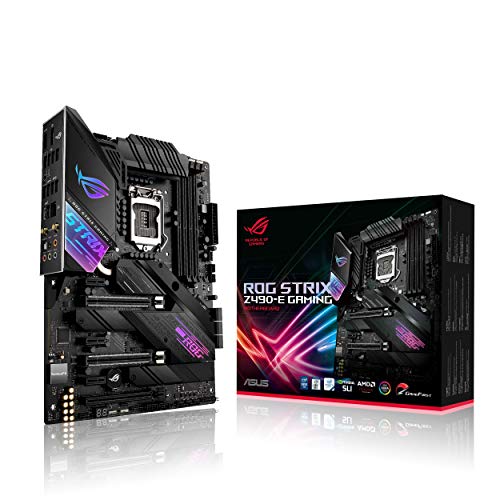
ASUS ROG Strix Z490-E Gaming Z490- WiFi 6, LGA 1200 (Intel 10th Gen) ATX Gaming Motherboard
The ASUS ROG Strix Z490-E Gaming is the best all-round board in this guide and the one to buy when you want the strongest Z490 board for a 10th gen gaming PC. The listing describes an ATX gaming motherboard with Wi-Fi 6, an LGA 1200 socket for Intel 10th generation processors, 14+2 power stages, DDR4 4600 support, and Intel 2.5 gigabit Ethernet. It is the board for a 10-core CPU, with the power delivery and the connectivity to run it at full speed.
In daily use, the Z490-E is the board for a high-end 10th gen build. The 14+2 power stages handle a 10900K without throttling, the Wi-Fi 6 and 2.5 gigabit Ethernet give fast networking, and the ROG Strix design with Aura Sync RGB looks good in a windowed case. The trade-off is the price: it is the most expensive board here, and the extra features are only useful if you have a CPU that needs them. For a 10900K gaming PC, though, it is the best board in this guide.
Key specs:
- LGA 1200, Intel 10th Gen
- Z490 chipset, ATX
- 14+2 power stages
- DDR4 4600, Wi-Fi 6
- Intel 2.5 Gb Ethernet
Strengths:
- Strongest power delivery here
- Wi-Fi 6 and 2.5 Gb Ethernet
- Handles a 10900K without throttling
Trade-offs:
- Most expensive board here
- Features wasted on a Core i3
- Large ATX, needs a mid-tower case
This board fits high-end 10th gen gaming PCs, 10900K builds, and anyone who wants the strongest Z490 board.
Best for: a high-end 10th gen gaming PC
Not suited for: budget builds, small cases, or Core i3 systems
Check price on Amazon: ASUS ROG Strix Z490-E Gaming

MSI MPG Z490 Gaming Plus Gaming Motherboard (ATX, 10th Gen Intel Core, LGA 1200 Socket, DDR4, CF, Dual M.2 Slots, USB 3.2 Gen 2, 2.5G LAN, DP/HDMI, Mystic Light RGB)
The MSI MPG Z490 Gaming Plus is the value pick in this guide and the one to buy when you want a solid Z490 board at a fair price. The listing describes an ATX gaming motherboard for 10th generation Intel Core processors, with an LGA 1200 socket, DDR4 memory, dual M.2 slots, USB 3.2 Gen 2, 2.5G LAN, DisplayPort and HDMI, and Mystic Light RGB. It is a straightforward board with the features that matter, without the premium price of the ROG Strix boards.
In daily use, the Z490 Gaming Plus is the board for a mid-range 10th gen build. The dual M.2 slots hold fast NVMe drives, the 2.5G LAN is fast enough for any home network, and the Mystic Light RGB adds a little colour to a windowed case. The trade-off is the power delivery: it is fine for a Core i5 or i7, but it is not as strong as the ASUS boards for a 10900K. For a Core i5 or i7 gaming PC, though, it is the best value board in this guide.
Key specs:
- LGA 1200, 10th Gen Intel Core
- Z490 chipset, ATX
- Dual M.2 slots
- USB 3.2 Gen 2, 2.5G LAN
- DP/HDMI, Mystic Light RGB
Strengths:
- Good value for a Z490 board
- Dual M.2 slots for NVMe drives
- 2.5G LAN and modern USB
Trade-offs:
- Weaker power delivery than ASUS boards
- Not ideal for a 10900K
- No Wi-Fi in this listing
This board fits mid-range 10th gen gaming PCs, Core i5 and i7 builds, and anyone who wants a good Z490 board at a fair price.
Best for: a mid-range 10th gen gaming PC
Not suited for: 10900K builds, or small cases
Check price on Amazon: MSI MPG Z490 Gaming Plus

GIGABYTE Z490 AORUS Elite (Intel LGA1200/Z490/ATX/2xM.2/Realtek ALC1200/SATA 6Gb/s/USB 3.2 Gen 2/2.5 GbE LAN/RGB Fusion/Gaming Motherboard)
The Gigabyte Z490 Aorus Elite is the well-connected pick in this guide and the one to buy when you want a board with good audio and good networking. The listing describes an ATX gaming motherboard with an LGA 1200 socket, the Z490 chipset, two M.2 slots, Realtek ALC1200 audio, SATA 6Gb/s, USB 3.2 Gen 2, 2.5 gigabit Ethernet LAN, and RGB Fusion lighting. It is a board with a lot of connectivity for the price, and the Realtek audio is a step up from the basic audio on cheaper boards.
In daily use, the Aorus Elite is the board for a gaming PC that also plays music and video. The two M.2 slots hold fast drives, the 2.5 gigabit LAN is fast, and the RGB Fusion lighting ties into the rest of a Gigabyte build. The trade-off is the power delivery: like the MSI board, it is fine for a Core i5 or i7, but not as strong as the ASUS boards for a 10900K. For a gaming PC with good audio and networking, though, it is a strong choice at a fair price.
Key specs:
- LGA 1200, Z490, ATX
- 2x M.2 slots
- Realtek ALC1200 audio
- USB 3.2 Gen 2, 2.5 GbE LAN
- RGB Fusion lighting
Strengths:
- Good audio with Realtek ALC1200
- Two M.2 slots and 2.5 GbE LAN
- RGB Fusion for a matching build
Trade-offs:
- Weaker power delivery than ASUS
- Not ideal for a 10900K
- No Wi-Fi in this listing
This board fits gaming PCs with good audio, Gigabyte builds, and anyone who wants strong connectivity at a fair price.
Best for: a well-connected gaming board
Not suited for: 10900K builds, or small cases
Check price on Amazon: Gigabyte Z490 Aorus Elite

ASRock Z490 Phantom Gaming 4 Supports 10 th Gen Intel Core processors (Socket 1200) motherboard
The ASRock Z490 Phantom Gaming 4 is the straightforward pick in this guide and the one to buy when you want a Z490 board that just works. The listing describes a motherboard that supports 10th generation Intel Core processors on socket 1200, with the Z490 chipset. It is the simplest board in this guide, without the extras of the ROG Strix or Aorus boards, and it is the cheapest way to get a genuine new Z490 board for a 10th gen CPU.
In daily use, the Phantom Gaming 4 is the board for a no-fuss 10th gen build. It takes a 10th gen CPU, it runs DDR4 memory, and it has the slots and ports a normal build needs, without anything you will not use. The trade-off is the feature list: it has fewer USB ports, no Wi-Fi, and simpler audio than the other boards here. For a straightforward gaming or office PC, though, it is enough, and it costs the least of the six.
Key specs:
- Socket 1200, 10th Gen Intel Core
- Z490 chipset
- ATX motherboard
- DDR4 memory support
- For gaming builds
Strengths:
- Simplest board in this guide
- Lowest price here
- Just works, no fuss
Trade-offs:
- Fewest features
- No Wi-Fi
- Simpler audio than the others
This board fits straightforward 10th gen builds, budget gaming PCs, and anyone who wants a Z490 board at the lowest price.
Best for: a simple Z490 board at the lowest price
Not suited for: 10900K builds, or anyone who wants Wi-Fi and extras
Check price on Amazon: ASRock Z490 Phantom Gaming 4
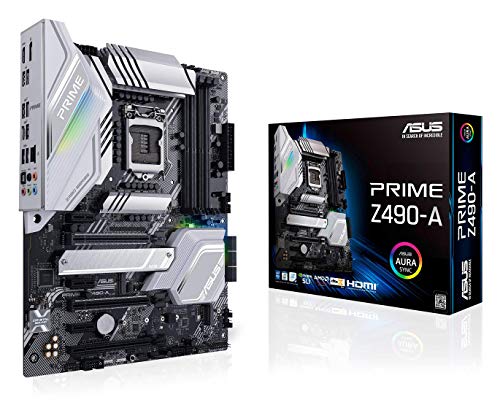
ASUS Prime Z490-A LGA 1200 (Intel 10th Gen) ATX Motherboard (14 DrMOS Power Stages,Dual M.2, Intel 2.5 Gb Ethernet, USB 3.2 Front Panel Type-C, Thunderbolt 3 Support, Aura Sync RGB)
The ASUS Prime Z490-A is the workstation pick in this guide and the one to buy when you want Thunderbolt 3 and strong power delivery for work. The listing describes an ATX motherboard for Intel 10th generation processors, with an LGA 1200 socket, 14 DrMOS power stages, dual M.2 slots, Intel 2.5 gigabit Ethernet, a USB 3.2 front-panel Type-C connector, Thunderbolt 3 support, and Aura Sync RGB. It is the only board here with Thunderbolt 3, which is useful for fast external drives and displays.
In daily use, the Prime Z490-A is the board for a work PC that also games. The 14 DrMOS power stages handle a 10-core CPU, the dual M.2 slots hold fast drives, and the Thunderbolt 3 support connects high-speed external storage and displays. The trade-off is the look: it is a Prime board, not a ROG Strix board, so it has less gaming styling and no Wi-Fi in this listing. For a workstation with a 10th gen CPU, though, it is the most capable board in this guide.
Key specs:
- LGA 1200, Intel 10th Gen
- 14 DrMOS power stages
- Dual M.2 slots
- Intel 2.5 Gb Ethernet
- USB 3.2 Type-C, Thunderbolt 3, Aura Sync
Strengths:
- Only board here with Thunderbolt 3
- Strong 14 DrMOS power delivery
- Dual M.2 and fast Ethernet
Trade-offs:
- Less gaming styling
- No Wi-Fi in this listing
- Costs more than the value boards
This board fits workstations, video editors, and anyone who needs Thunderbolt 3 with a 10th gen CPU.
Best for: a workstation with Thunderbolt 3
Not suited for: budget gaming builds, or small cases
Check price on Amazon: ASUS Prime Z490-A

ASUS ROG Strix Z490-A Gaming Z490 LGA 1200(Intel 10th Gen) ATX Gaming Motherboard- 12+2 Power Stages, DDR4 4600, Intel 2.5 Gb Ethernet, USB 3.2 Gen 2
The ASUS ROG Strix Z490-A Gaming is the second ROG Strix pick in this guide and the one to buy when you want ROG Strix features at a lower price than the Z490-E. The listing describes an ATX gaming motherboard with an LGA 1200 socket for Intel 10th generation processors, 12+2 power stages, DDR4 4600 support, Intel 2.5 gigabit Ethernet, and USB 3.2 Gen 2. It is a gaming board with strong power delivery and fast networking, in the white and silver ROG Strix design that suits a light-coloured build.
In daily use, the Z490-A is the board for a gaming PC that looks as good as it performs. The 12+2 power stages handle a Core i7 or i9, the 2.5 gigabit Ethernet is fast, and the white design stands out in a windowed case. The trade-off is that it has fewer power stages than the Z490-E, and no Wi-Fi in this listing, so a 10900K at full load is better served by the Z490-E. For a Core i7 gaming PC in a white build, though, it is the best-looking board in this guide.
Key specs:
- LGA 1200, Intel 10th Gen
- 12+2 power stages
- DDR4 4600
- Intel 2.5 Gb Ethernet
- USB 3.2 Gen 2, ATX
Strengths:
- Strong 12+2 power delivery
- White design suits light builds
- Fast 2.5 Gb Ethernet
Trade-offs:
- Fewer power stages than the Z490-E
- No Wi-Fi in this listing
- Costs more than the value boards
This board fits white gaming builds, Core i7 gaming PCs, and anyone who wants ROG Strix features at a lower price.
Best for: a white ROG Strix gaming build
Not suited for: 10900K at full load, or budget builds
Check price on Amazon: ASUS ROG Strix Z490-A Gaming
Buying guide
Check the socket and the CPU
A 10th gen Intel Core processor needs an LGA 1200 board, and a Z490 board is the right choice if you have a K-series CPU that you want to overclock. Check the CPU model against the board's support list before you buy, because a CPU that is not on the list may need a BIOS update, and a board that needs a BIOS update to run your CPU will not boot without an older CPU to update it with. All six boards here support 10th gen CPUs out of the box.
Check the power delivery
A Core i9-10900K needs strong power stages, while a Core i3-10100 will run on almost anything. Match the board to the CPU: buy a board with 14 power stages for a 10900K, and a board with fewer stages for a Core i5 or i7. A board that throttles the CPU wastes the money you spent on it, so do not buy the cheapest board for the most powerful CPU.
Check the memory
Buy two sticks of DDR4, not one, because dual-channel memory is faster than single-channel, and buy the speed your board supports. All six boards here support DDR4 at 4600MHz or similar, which is fast enough for any 10th gen build. Check the memory support list before you buy, because some memory kits are not compatible with some boards, and a kit that is not on the list may not run at its rated speed.
Check the case and the cooler
All six boards here are ATX, so they need a mid-tower or full-tower case, and a big cooler needs clearance on the board and in the case. Measure the case, check that it takes an ATX board, and make sure the cooler fits without hitting the memory or the first PCIe slot. A board that does not fit the case is a return, not a squeeze.
Update the BIOS
After you build the PC, update the BIOS to the latest version, because newer BIOS versions fix bugs and improve memory compatibility. Download the BIOS from the board maker's website, put it on a USB drive, and follow the instructions in the manual. Do not update the BIOS during a storm or a power cut, because a failed update can brick the board.
Install the drivers
After Windows is installed, install the chipset drivers, the network drivers, and the audio drivers from the board maker's website, not from Windows Update alone. The chipset driver is the most important, because it lets Windows talk to the board properly. After the drivers, check that the board is running at the right memory speed in the BIOS, and enable XMP so the memory runs at its rated speed, not at the slow default.
Setting up and everyday care
Keep the board clean and the fans working. Dust on the board and in the case raises temperatures and can cause crashes, so blow the dust out with compressed air every few months, holding the fans still while you do it. Check that the case fans are bringing in cool air and pushing hot air out, because a board can only cool itself with the air the case gives it. A board that runs hot is usually a case airflow problem, not a board problem.
Look after the BIOS and the battery. Do not update the BIOS unless you need a fix or a new CPU, because a failed update can brick the board, and keep the CMOS battery in mind: if the board forgets the time or the settings, the battery is dead and needs replacing, which is a cheap coin cell. If the board starts behaving strangely, reset the BIOS to defaults first, because a bad setting is more common than a bad board.
Common mistakes to avoid
Buying the wrong socket
A 10th gen CPU needs an LGA 1200 board, and a 12th gen CPU needs an LGA 1700 board. They are not interchangeable, and a CPU will not fit in the wrong socket. Check the socket before you buy, because a board with the wrong socket is a return.
Buying the cheapest board for a 10900K
A 10900K needs strong power stages, and a cheap board will throttle it under load. Match the board to the CPU: buy a board with 14 power stages for a 10900K, and save the cheap boards for a Core i3 or i5.
Forgetting to enable XMP
Memory runs at a slow default speed unless you enable XMP in the BIOS. After you build the PC, go into the BIOS, enable XMP, and check that the memory runs at its rated speed. A PC with XMP off is slower than it should be, for no reason.
Skipping the BIOS update
A new board may need a BIOS update to run your CPU properly, especially if the CPU is newer than the board. Check the board's support list, update the BIOS if needed, and do it before you install Windows, because a BIOS update after Windows is installed can cause problems.
Ignoring the case size
All six boards here are ATX, which need a mid-tower or full-tower case. A board that does not fit the case is a return, so measure the case before you buy, and check that the board will not cover a drive bay or a fan you need.
Our recommendation
For most 10th gen builds, the ASUS ROG Strix Z490-E Gaming is the pick: the strongest power delivery, Wi-Fi 6, and 2.5 gigabit Ethernet, with enough headroom for a 10900K. If your budget is tighter, buy the MSI MPG Z490 Gaming Plus instead, because it has the features that matter at a fair price, and it handles a Core i5 or i7 well. If you need Thunderbolt 3 for work, the ASUS Prime Z490-A is the only board here that has it.
If you want good audio and networking, the Gigabyte Z490 Aorus Elite is a strong choice, and if you want the lowest price, the ASRock Z490 Phantom Gaming 4 is the cheapest genuine new Z490 board here. The ASUS ROG Strix Z490-A Gaming suits a white build with a Core i7. Whichever you choose, check the socket, match the power delivery to your CPU, and enable XMP after you build it.
Related reading on Reviewstook: For the rest of the build, see our guides to the best gaming motherboards and the best AM5 motherboard for beginners under 100.
Frequently asked questions
What is the best Intel Gen 10 motherboard?
The ASUS ROG Strix Z490-E Gaming is the best all-round pick, with 14+2 power stages, Wi-Fi 6, and 2.5 gigabit Ethernet. The MSI MPG Z490 Gaming Plus is the best value pick, and the ASUS Prime Z490-A is the best workstation pick, with Thunderbolt 3 support.
What socket do 10th Gen Intel CPUs use?
10th generation Intel Core processors use the LGA 1200 socket, and they work on Z490, H470, B460, and H410 boards. A Z490 board is the right choice if you have a K-series CPU and want to overclock, while a B460 or H470 board is cheaper but does not support overclocking.
Can I use an 11th Gen CPU on a Z490 motherboard?
Yes. 11th generation Intel Core processors also use the LGA 1200 socket, so they work on a Z490 board, though you may need a BIOS update. A 12th generation CPU will not work, because it uses the LGA 1700 socket, which is physically different.
What is the difference between Z490 and B460?
Z490 supports overclocking and faster memory, while B460 does not support overclocking and limits memory speed. If you have a K-series CPU and want to overclock, buy a Z490 board; if you have a locked CPU and want to save money, a B460 board is enough, though genuine new B460 boards are now hard to find.
How much RAM can a Z490 motherboard take?
Most Z490 boards take up to 128GB of DDR4 memory in four slots, at speeds up to 4600MHz or higher with overclocking. For gaming, 16GB is enough, and 32GB is comfortable for work. Buy two sticks for dual-channel memory, not one, because dual-channel is faster.
Do I need Wi-Fi on a motherboard?
It depends on your setup: if your router is far from your PC, Wi-Fi is useful, and the ROG Strix Z490-E has Wi-Fi 6 built in. If your PC is next to the router, a wired connection is faster and more reliable, and a board without Wi-Fi, like the MSI Z490 Gaming Plus, is fine. You can always add a Wi-Fi card later if you need it.
What is Thunderbolt 3 on a motherboard?
Thunderbolt 3 is a fast connection for external drives, displays, and docks, running at up to 40 gigabits per second. The ASUS Prime Z490-A is the only board in this guide with Thunderbolt 3 support, and it is useful for video editing and for connecting a fast external drive. If you do not use Thunderbolt devices, you do not need it.
Is it worth buying a Z490 board in 2026?
Yes, if you already own a 10th gen CPU or you are building a budget PC with one. Z490 boards are now available at a good price, and they give you fast memory, dual M.2 slots, and 2.5 gigabit Ethernet. If you are buying a new CPU as well, a newer platform may be better, but for a 10th gen CPU, a Z490 board is the right choice.