The best PCI Express x16 graphics cards are the full-size cards that slot into the long x16 slot on a desktop motherboard and do the heavy lifting in games. The x16 slot is the wide one with 16 lanes of bandwidth, and every modern gaming graphics card is built for it, from budget 1080p cards to high-end 1440p cards. If your motherboard has a free x16 slot, a power supply with the right connectors, and a case with enough clearance, a new card is the single biggest gaming upgrade you can buy, and it is the part that decides what resolution and settings your games can run. The right choice depends on your setup, not on the marketing, so the sections below start with the fit and only then move to the individual picks.
Every card below is a full-size PCI Express x16 graphics card, and every linked model was checked against its listing title for brand and model before it was included. There is the ASUS Dual RTX 4060 OC Edition for efficient 1080p and entry-level 1440p play, the MSI RTX 4070 Ventus 2X 12G OC for smooth 1440p gaming, the XFX Speedster SWFT210 RX 7600 for budget 1080p, the Sapphire Pulse RX 7800 XT for high-refresh 1440p, the Gigabyte RTX 3060 Windforce OC 12G for a proven 12GB card, and the Intel Arc A750 for a value alternative with 8GB of memory. All six are PCIe cards that fit a standard x16 slot, and all six were verified as new listings, not renewed. Every pick below was checked against its listing title for brand and model, and the guide notes where a listing was dropped for a mismatch.
Before you buy, check three things: the length of the card against your case, the power connectors your power supply has, and the resolution of your monitor. A card that is too long for the case will not fit at all, a card that needs an 8-pin connector your power supply does not have will not run, and a card built for 1440p is wasted on a 1080p 60Hz monitor. Measure the clearance in your case, read the connector list on your power supply, and match the card to the monitor you actually own. The best PCI Express x16 graphics cards in this guide cover the whole range, so there is a pick for every common setup, and a card bought for the wrong resolution is money spent on performance you will never see. The sections below walk through the choice step by step, so you can check your own setup against each pick before you order.
In this guide
Quick picks: best pci express x16 graphics cards
| # | Product | Where to buy |
|---|---|---|
| 1 | ASUS Dual RTX 4060 OC Edition | Check on Amazon |
| 2 | MSI RTX 4070 Ventus 2X 12G OC | Check on Amazon |
| 3 | XFX Speedster SWFT210 RX 7600 | Check on Amazon |
| 4 | Sapphire Pulse RX 7800 XT | Check on Amazon |
| 5 | Gigabyte RTX 3060 Windforce OC 12G | Check on Amazon |
| 6 | Intel Arc A750 | Check on Amazon |
How the picks were chosen for the best PCI Express x16 graphics cards
The x16 slot came first. Every card in this guide is a full-size PCI Express card that uses the x16 slot, with the bandwidth a modern GPU needs. Low-profile cards, external GPU enclosures, and laptop graphics were left out, because this guide is about desktop cards for a desktop x16 slot. The cards here run on PCIe 4.0, which is the standard on current motherboards, and they are all backward compatible with older PCIe 3.0 x16 slots, so they work in older systems too, just with slightly less bandwidth headroom. This is the check that prevents the most common returns, so it is worth doing before you look at any single product.
Resolution and memory came second. A card has to match the monitor it will drive: 8GB of memory is enough for 1080p and entry-level 1440p, while 12GB and 16GB give more headroom for 1440p at high settings and for games with large textures. The RTX 4060 and RX 7600 carry 8GB and suit 1080p, the RTX 4070 and RTX 3060 carry 12GB and suit 1440p, and the RX 7800 XT carries 16GB for high-refresh 1440p. Memory size was taken from the listing titles, and no card here is a cut-down variant with less memory than its name suggests. Get this check right and the rest of the choice gets much easier, because most of the wrong options drop out on their own.
Finally, we checked that every pick is a complete graphics card sold as a new listing, with a brand and model that match the listing title exactly. One card found in the first search, an ASUS Dual RTX 4060 V2 OC, had a full listing title ending in Renewed, which the truncated search title had hidden, so it was dropped and replaced with the new ASUS Dual RTX 4060 OC Edition after its full title was verified. Renewed listings were avoided throughout, and every pick below is a new card with its full model name in the title. The last check is the listing itself, because a product with the wrong model in the title is the wrong product no matter how good the reviews look.
1080p, 1440p, or high-refresh: which card fits your monitor
A 1080p card is the right fix when your monitor is 1080p and you want high frame rates without spending too much. The XFX RX 7600 and the ASUS RTX 4060 are the 1080p picks here: both run modern games at high settings on a 1080p screen, both use modest power, and both fit in most mid-tower cases. If your monitor is 1080p at 60Hz, either card is more than enough, and the money saved can go to a better monitor later. If your monitor is 1080p at 144Hz or higher, the RTX 4060 has the edge with DLSS 3. If you are between two options here, the one that fits your existing setup is usually the better buy.
A 1440p card is the right fix when your monitor is 1440p and you want high settings without compromise. The MSI RTX 4070 Ventus 2X 12G OC and the Gigabyte RTX 3060 Windforce OC 12G are the 1440p picks here, with 12GB of memory each, and the Sapphire Pulse RX 7800 XT with 16GB is the pick for high-refresh 1440p. A 1440p monitor has about 78 percent more pixels than a 1080p monitor, so it needs a genuinely faster card, not just a newer one. If you are buying a card for a 1440p monitor, do not buy an 8GB card and hope for the best. This is the option most buyers end up with, because it covers the common case without paying for capacity they will not use.
A value alternative is the right fix when you want the most performance per dollar and you are willing to try a newer brand. The Intel Arc A750 is the value pick here: 8GB of memory, PCIe 4.0, and solid 1080p performance at a lower price than the NVIDIA and AMD cards. Its drivers have improved a lot since launch, but it still suits DirectX 12 and Vulkan games best, and older DirectX 11 games can run slower than on the competition. If you play modern games, it is a genuine bargain; if you play older titles, the RTX 4060 is safer. This option suits a smaller group, but for that group it is the right answer, so do not dismiss it just because it is less common.
How memory, power, and size change the choice
Memory matters because modern games use more of it every year. At 1080p, 8GB is still enough for high settings in most games, but at 1440p the texture load grows, and 12GB gives real headroom. The RX 7800 XT with 16GB is the most future-proof card here for 1440p, because it will not run out of memory when games get heavier. If you keep a graphics card for four or five years, buying more memory now is cheaper than replacing the card early. This is the detail buyers most often get wrong, so check it against your own setup before you order.
Power matters because the card has to run on your power supply. The RTX 4060 and RX 7600 are efficient cards that run on modest power supplies, while the RTX 4070 and RX 7800 XT need more power and a proper 8-pin connector. Check the wattage and the connectors on your power supply before you order: a card that needs two 8-pin connectors will not run on a supply with one. When in doubt, buy the more efficient card, because a power supply upgrade costs as much as the difference between two cards. The difference here is easy to miss on a listing page, but you will notice it every day once the product is in use.
Size matters because a long card will not fit a short case. The cards in this guide are mostly dual-fan designs around two slots wide, which fit most mid-tower cases, but you still need to measure. Check the length from the back of the case to the first obstruction, usually a drive cage or a front fan, and compare it with the card length in the listing. A card that is 5 mm too long is a return, not a squeeze, because the bracket has to line up exactly with the case. Measure twice and order once: a small mismatch here is the most common reason for a return.
Matching the card to the motherboard, case, and monitor
The motherboard is the first check. You need a free PCI Express x16 slot, which is the long slot, and a motherboard that supports the card's generation. PCIe 4.0 cards work in PCIe 3.0 slots, so an older board is fine, but the slot has to be physically x16: a card will not fit in an x1 or x4 slot. Check that nothing else is using the x16 slot, and that the card will not cover a slot you need for something else, like a Wi-Fi card or a capture card. Do this check first, because it rules out more options than any other single step.
The case is the second check. Measure the length, the height, and the slot width. Most cards here are two slots wide, but some take two and a half slots, which blocks the slot below. Check the clearance to the side panel too: a tall card with a big cooler can press against the glass. If your case is small, the dual-fan RTX 4060 or RX 7600 are the safest picks, because they are the shortest and slimmest cards in this guide. This check takes two minutes and saves a return, so do not skip it even if the listing looks right.
The monitor is the third check. A card should match the resolution and refresh rate of the monitor, not exceed it by a wide margin. A 1080p 60Hz monitor does not need an RTX 4070, and a 1440p 165Hz monitor deserves more than an RX 7600. Check your monitor's resolution and refresh rate before you order, and buy the card that fits it. If you plan to upgrade the monitor soon, buy the card for the monitor you will have, not the one you have now. If any of these three checks fails, keep looking: a product that fails one of them will annoy you for as long as you own it.
Quick picks at a glance
| Product | Memory and resolution | Interface and cooling | Best for |
|---|---|---|---|
| ASUS Dual RTX 4060 OC Edition | 8GB, 1080p and entry 1440p | PCIe 4.0, dual fan, 0dB | Efficient 1080p |
| MSI RTX 4070 Ventus 2X 12G OC | 12GB, 1440p high settings | PCIe, dual TORX fans | 1440p sweet spot |
| XFX Speedster SWFT210 RX 7600 | 8GB, 1080p | PCIe, HDMI + 3x DP | Budget 1080p |
| Sapphire Pulse RX 7800 XT | 16GB, high-refresh 1440p | PCIe, dual fan | 1440p high-refresh |
| Gigabyte RTX 3060 Windforce OC 12G | 12GB, 1080p and 1440p | PCIe, dual Windforce fans | Proven 12GB value |
| Intel Arc A750 | 8GB, 1080p | PCIe 4.0 | Value alternative |
The best PCI Express x16 graphics cards

ASUS Dual GeForce RTX 4060 OC Edition 8GB GDDR6
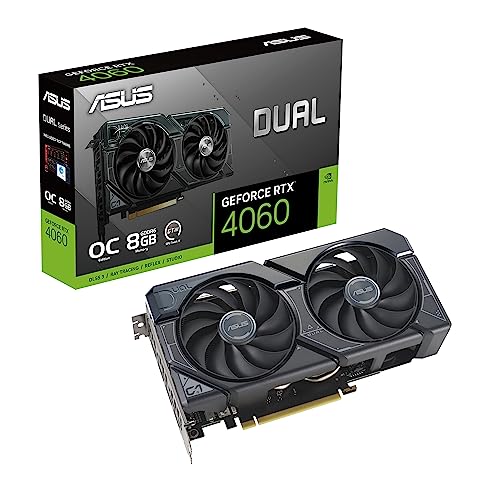
The ASUS Dual GeForce RTX 4060 OC Edition is the efficient 1080p pick in this guide and the one to buy when you want modern features without a big power supply. The listing describes a graphics card with 8GB of GDDR6 memory, PCIe 4.0, DLSS 3, HDMI 2.1a, DisplayPort 1.4a, a 2.5-slot design, an Axial-tech fan design, and 0dB technology. It is a compact dual-fan card that fits most cases, runs cool and quiet, and brings DLSS 3 frame generation to 1080p gaming, which is the feature that matters most at this price. Its place in this guide comes from the fit described above, and it is the feature to judge first when it arrives.
In daily use, the RTX 4060 is the card for players who want high settings at 1080p and solid performance at 1440p in lighter games. DLSS 3 lifts frame rates in supported games, the 0dB fans stop completely at idle so the PC stays silent on the desktop, and the modest power draw means most existing power supplies can run it. The trade-off is the 8GB of memory, which limits high-texture 1440p play, and the 128-bit memory bus, which is narrow for the price. For a 1080p monitor, though, it is the most complete card here. Give it a few days of normal use before you decide: a new product always feels strange on the first day.
Key specs:
- 8GB GDDR6 memory
- PCIe 4.0 interface
- DLSS 3 support
- HDMI 2.1a and DisplayPort 1.4a
- 2.5-slot design, Axial-tech fans, 0dB technology
Strengths:
- DLSS 3 lifts frame rates in supported games
- Efficient and quiet, with fans that stop at idle
- Compact dual-fan design fits most cases
Trade-offs:
- 8GB memory limits high-texture 1440p
- Narrow 128-bit memory bus
- Not a high-refresh 1440p card
This card fits 1080p gamers who want DLSS 3, small-case builders, and anyone upgrading on a modest power supply.
Best for: efficient 1080p gaming with DLSS 3
Not suited for: high-refresh 1440p, or games with very large textures
Check price on Amazon: ASUS Dual RTX 4060 OC Edition

MSI Gaming GeForce RTX 4070 12GB GDRR6X Graphics Card (RTX 4070 Ventus 2X 12G OC)
The MSI Gaming GeForce RTX 4070 Ventus 2X 12G OC is the smooth 1440p pick in this guide and the one to buy when your monitor is 1440p and you want high settings. The listing describes a graphics card with 12GB of GDDR6X memory, an extreme clock of 2520 MHz, a 192-bit interface, TORX Fan 4.0 cooling, and the Ada Lovelace architecture, as the RTX 4070 Ventus 2X 12G OC. It is a dual-fan card that stays compact for its class, and the 12GB of memory is the headroom that 1440p gaming needs. Its place in this guide comes from the fit described above, and it is the feature to judge first when it arrives.
In daily use, the RTX 4070 is the card for players who want 1440p at high settings without thinking about it. It runs modern games smoothly at 1440p, DLSS 3 adds frame generation in supported titles, and the dual TORX fans keep it cool without much noise. The trade-off is size and power: it needs more power than the RTX 4060 and a proper 8-pin connector, and it costs more than the budget cards. For a 1440p monitor, though, it is the sweet spot in this guide, and the 12GB of memory will last longer than an 8GB card. Give it a few days of normal use before you decide: a new product always feels strange on the first day.
Key specs:
- 12GB GDDR6X memory
- Extreme clock 2520 MHz
- 192-bit memory interface
- TORX Fan 4.0 cooling
- Ada Lovelace architecture, PCIe card
Strengths:
- 12GB memory suits 1440p at high settings
- DLSS 3 and Ada Lovelace features
- Dual-fan design stays compact for its class
Trade-offs:
- Needs more power than budget cards
- Costs more than the 1080p picks
- Dual fan, not triple, so warmer under load
This card fits 1440p gamers who want high settings, players upgrading from an older card, and anyone who wants DLSS 3 with 12GB of memory.
Best for: smooth 1440p gaming at high settings
Not suited for: 1080p 60Hz monitors, or very small cases and weak power supplies
Check price on Amazon: MSI RTX 4070 Ventus 2X 12G OC

XFX Speedster SWFT210 Radeon RX 7600 Graphics Card with 8GB GDDR6
The XFX Speedster SWFT210 Radeon RX 7600 is the budget 1080p pick in this guide and the one to buy when you want the lowest price for solid 1080p play. The listing describes a graphics card with 8GB of GDDR6 memory, HDMI and three DisplayPort outputs, AMD RDNA 3 architecture, and the model code RX-76PSWFTFY. It is a straightforward dual-fan card with no extras to pay for, and it runs modern games at high settings on a 1080p monitor without fuss. Its place in this guide comes from the fit described above, and it is the feature to judge first when it arrives.
In daily use, the RX 7600 is the card for players who want good 1080p performance and three DisplayPorts for a multi-monitor setup. It is efficient, quiet, and compact, and the RDNA 3 architecture handles modern games well. The trade-off is that it has no DLSS, so it relies on AMD FSR for upscaling, and 8GB of memory limits it at 1440p. For a 1080p monitor on a budget, though, it is the cheapest way into modern gaming in this guide, and the three DisplayPorts are genuinely useful. Give it a few days of normal use before you decide: a new product always feels strange on the first day.
Key specs:
- 8GB GDDR6 memory
- HDMI and 3x DisplayPort
- AMD RDNA 3 architecture
- Model RX-76PSWFTFY
- PCIe graphics card, dual-fan design
Strengths:
- Lowest price for solid 1080p play
- Three DisplayPorts for multi-monitor setups
- Efficient and compact
Trade-offs:
- No DLSS, relies on FSR upscaling
- 8GB memory limits 1440p
- Basic cooler, no extras
This card fits budget 1080p gamers, multi-monitor office and gaming setups, and first-time builders who want a simple card.
Best for: budget 1080p gaming with three DisplayPorts
Not suited for: 1440p high settings, or players who want DLSS
Check price on Amazon: XFX Speedster SWFT210 RX 7600

Sapphire Pulse AMD Radeon RX 7800 XT Gaming 16GB GDDR6 Dual Video Card
The Sapphire Pulse AMD Radeon RX 7800 XT is the high-refresh 1440p pick in this guide and the one to buy when your monitor is 1440p at 144Hz or higher. The listing describes a gaming video card with 16GB of GDDR6 memory and a dual-fan design. The 16GB of memory is the largest in this guide, and it is what lets this card hold high settings at 1440p in games with large textures, where 8GB cards start to struggle. Its place in this guide comes from the fit described above, and it is the feature to judge first when it arrives.
In daily use, the RX 7800 XT is the card for players who want 1440p at high refresh rates without paying for a flagship. It is fast at 1440p, the 16GB of memory gives real future-proofing, and the dual-fan Pulse cooler is quiet and well built. The trade-off is power: it draws more than the RTX 4060 and needs a solid power supply, and it has no DLSS, relying on FSR instead. For a high-refresh 1440p monitor, though, it is the best value in this guide, and the extra memory is worth having. Give it a few days of normal use before you decide: a new product always feels strange on the first day.
Key specs:
- 16GB GDDR6 memory
- Dual-fan Pulse cooling
- For 1440p gaming
- PCIe graphics card
- AMD RDNA 3 architecture
Strengths:
- 16GB memory for high-refresh 1440p
- Strong 1440p performance for the price
- Quiet dual-fan cooler
Trade-offs:
- Higher power draw than budget cards
- No DLSS, uses FSR
- Large card, check case clearance
This card fits high-refresh 1440p gamers, players with large-texture games, and anyone who wants 16GB of memory without a flagship price.
Best for: high-refresh 1440p gaming with 16GB
Not suited for: 1080p monitors, small cases, or weak power supplies
Check price on Amazon: Sapphire Pulse RX 7800 XT

GIGABYTE GeForce RTX 3060 WINDFORCE OC 12G (rev. 2.0) Graphics Card
The Gigabyte GeForce RTX 3060 Windforce OC 12G rev. 2.0 is the proven 12GB pick in this guide and the one to buy when you want a known quantity with plenty of memory. The listing describes a graphics card with two Windforce fans, 12GB of 192-bit GDDR6 memory, and the model code GV-N3060WF2OC-12GD Rev2.0. It is an older generation card, but the 12GB of memory keeps it relevant at 1440p, and its price is usually lower than the newer 12GB cards. Its place in this guide comes from the fit described above, and it is the feature to judge first when it arrives.
In daily use, the RTX 3060 is the card for players who want 12GB of memory on a budget and do not need the latest features. It runs modern games well at 1080p and respectably at 1440p, the dual Windforce fans keep it cool, and the 12GB of memory handles large textures better than any 8GB card. The trade-off is age: it is a previous-generation card, so it lacks DLSS 3 frame generation, and it uses more power than the RTX 4060 for similar performance. For a 1440p monitor on a tight budget, though, the 12GB is hard to beat. Give it a few days of normal use before you decide: a new product always feels strange on the first day.
Key specs:
- 12GB 192-bit GDDR6 memory
- 2X Windforce fans
- Model GV-N3060WF2OC-12GD Rev2.0
- PCIe graphics card
- For 1080p and 1440p gaming
Strengths:
- 12GB memory at a budget price
- Proven design with years of driver support
- Dual-fan cooler runs quietly
Trade-offs:
- Previous generation, no DLSS 3
- Uses more power than the RTX 4060
- Slower than the RTX 4070 at 1440p
This card fits budget 1440p gamers, players who want 12GB without a new-generation price, and upgraders from much older cards.
Best for: 12GB of memory on a budget
Not suited for: players who want DLSS 3, or the fastest 1440p card
Check price on Amazon: Gigabyte RTX 3060 Windforce OC 12G

Intel Arc A750 8GB PCI Express 4.0 Graphics Card
The Intel Arc A750 is the value alternative in this guide and the one to buy when you want the most performance per dollar and you play modern games. The listing describes an 8GB graphics card on PCI Express 4.0. It is Intel's entry into discrete desktop graphics, and its price is lower than the NVIDIA and AMD cards with similar performance, which makes it the bargain of this guide for the right player. Its place in this guide comes from the fit described above, and it is the feature to judge first when it arrives.
In daily use, the Arc A750 is the card for players who mostly play DirectX 12 and Vulkan games, where its modern architecture shines. It handles 1080p well, its drivers have improved a lot since launch, and the 8GB of memory is enough for its target resolution. The trade-off is older games: DirectX 11 and older titles can run slower than on the competition, and Intel's driver support is still maturing. If you play modern games, it is a genuine bargain; if your library is mostly older titles, the RTX 4060 is the safer buy. Give it a few days of normal use before you decide: a new product always feels strange on the first day.
Key specs:
- 8GB graphics memory
- PCI Express 4.0
- For 1080p gaming
- Modern DirectX 12 and Vulkan support
- PCIe x16 desktop card
Strengths:
- Lowest price for its performance level
- Strong in modern DirectX 12 games
- Good value for a new build
Trade-offs:
- Slower in older DirectX 11 games
- Driver support still maturing
- 8GB memory limits 1440p
This card fits value-focused builders, players of modern games, and anyone trying Intel graphics for the first time.
Best for: maximum value in modern games
Not suited for: players of older DirectX 11 titles, or high-refresh 1440p
Check price on Amazon: Intel Arc A750
Buying guide
Check the slot, then the length
Open the case and find the long x16 slot on the motherboard. Check that it is free, that the card will fit between the back of the case and the first obstruction, and that the card will not cover a slot you need. Measure the clearance with a tape measure and compare it with the card length in the listing. A card that is 5 mm too long is a return, not a squeeze, so take your time with this step: it is the one that prevents returns. Take your time with this step: it is the one that prevents returns.
Check the power supply and connectors
Read the wattage on your power supply and count the PCIe power connectors. The RTX 4060 and RX 7600 run on modest supplies, while the RTX 4070 and RX 7800 XT need more power and a proper 8-pin connector. If your supply does not have the right connectors, you need a new power supply, not an adapter, because adapters are the most common cause of unstable graphics cards. Fit first, specs second, and the rest follows. Take your time with this step: it is the one that prevents returns.
Match the card to the monitor
Buy the card for the monitor you own: 1080p wants the RTX 4060 or RX 7600, 1440p wants the RTX 4070, RTX 3060, or RX 7800 XT, and high-refresh 1440p wants the RX 7800 XT. A card that is too fast for the monitor wastes money, and a card that is too slow for the monitor wastes the monitor. If you plan to upgrade the monitor soon, buy the card for the monitor you will have. Take your time with this step: it is the one that prevents returns.
Install drivers cleanly
Before you install the new card, remove the old drivers with a clean uninstall, then install the latest drivers from the card maker after the card is in. Do not mix old and new drivers: leftover files cause crashes and poor performance that look like a faulty card. After installing, check the card is running at PCIe x16 in the system settings, and run a game to confirm the frame rate matches what you expect. Take your time with this step: it is the one that prevents returns.
Setting up and everyday care
Keep the card clean and cool. Dust on the fans and the heatsink raises temperatures and noise, so blow the dust out with compressed air every few months, holding the fans still while you do it. Check that the case fans are bringing in cool air and pushing hot air out: a graphics card can only cool itself with the air the case gives it. A card that runs hot is usually a case airflow problem, not a card problem, so wash the dust filters and check the fan directions before you blame the card. A few minutes of care every few months keeps the product working the way it did on the first day.
Update the drivers, but not every week. New drivers bring game fixes and performance improvements, so check for updates every month or two, and install them after a backup. Do not install beta drivers unless you need a specific fix, because they can cause new problems. If a driver update causes trouble, roll back to the previous version and wait for the next release, and keep the power connectors seated firmly, because a loose connector causes crashes that look like a driver fault. If something starts to feel wrong, check the simple causes first: most problems are a loose connection, dust, or an old driver, not a faulty product.
Common mistakes to avoid
Buying by memory size alone
More memory helps, but a 12GB card from an older generation is not automatically faster than an 8GB card from a newer one. The RTX 4060 beats the RTX 3060 in many games despite having less memory. Fit first, specs second, and the rest follows. Fit first, specs second, and the rest follows.
Forgetting the power supply
The most common failed upgrade is a card that the power supply cannot run. Check the wattage and the connectors before you order, not after the card arrives. A new power supply costs as much as the difference between two cards, so include it in the budget if you need it. Fit first, specs second, and the rest follows.
Ignoring case clearance
A long card in a short case is a return. Measure the length, the height, and the slot width before you buy, and remember that a two-and-a-half-slot card blocks the slot below it. Measure twice, order once. Fit first, specs second, and the rest follows.
Skipping the clean driver install
Old drivers cause crashes that look like a faulty card. Remove the old drivers completely before you install the new card, then install the latest drivers fresh. It takes ten minutes and saves hours of troubleshooting. Fit first, specs second, and the rest follows.
Our recommendation
For most players, the ASUS Dual RTX 4060 OC Edition is the pick: efficient, quiet, and fast enough for 1080p with DLSS 3, and it fits almost any case and power supply. If your monitor is 1440p, buy the MSI RTX 4070 Ventus 2X 12G OC instead, because its 12GB of memory is what 1440p needs, and if your monitor is 1440p at high refresh rates, the Sapphire Pulse RX 7800 XT with 16GB is the best value. All three are new listings with verified full titles, so any of them is a safe buy. Any of these picks is a safe buy once it matches your setup, so choose by fit, not by the order they appear in this guide.
If your budget is tight, the XFX RX 7600 is the cheapest way into modern 1080p gaming, the Gigabyte RTX 3060 gives you 12GB for less than a new-generation card, and the Intel Arc A750 is the best value if you play modern games. Whichever you choose, measure your case, check your power supply, and match the card to your monitor before you order. Measure first, order second, and give the new product a full week of normal use before you decide whether it fits.
Related reading on Reviewstook: For the rest of the build, see our guides to the best entry-level graphics cards, the best gaming graphics card for beginners under 1000, and the best graphics card for beginners under 1000.
Frequently asked questions
What is the best PCI Express x16 graphics card for 1080p gaming?
The ASUS Dual RTX 4060 OC Edition is the best all-round pick for 1080p, with DLSS 3, low power draw, and a compact dual-fan design. The XFX RX 7600 is the budget alternative, with solid 1080p performance and three DisplayPorts. If you are unsure, measure your case and power supply first, and compare them with the card descriptions in this guide. If you are unsure, measure your setup and compare it with the descriptions in this guide.
Do all graphics cards use the PCI Express x16 slot?
Almost all modern desktop graphics cards use the x16 slot, which is the long slot on the motherboard with 16 lanes of bandwidth. Low-profile cards for small cases also use the x16 slot, just in a shorter form. Check that your motherboard has a free x16 slot before you buy. If you are unsure, measure your setup and compare it with the descriptions in this guide.
How much memory do I need in a graphics card?
For 1080p gaming, 8GB is enough for high settings in most games. For 1440p, 12GB is the comfortable minimum, and 16GB gives the most headroom for large textures and future games. If you keep a card for four or five years, more memory now is cheaper than replacing the card early. If you are unsure, measure your setup and compare it with the descriptions in this guide.
Will a PCIe 4.0 graphics card work in a PCIe 3.0 slot?
Yes. PCIe is backward compatible, so a PCIe 4.0 card works in a PCIe 3.0 x16 slot, just with less bandwidth headroom. For most cards at 1080p and 1440p, the difference is small, and an older motherboard is not a reason to avoid a new card. If you are unsure, measure your setup and compare it with the descriptions in this guide.
What power supply do I need for a graphics card?
It depends on the card: the RTX 4060 and RX 7600 run on modest power supplies, while the RTX 4070 and RX 7800 XT need more power and a proper 8-pin connector. Check the wattage and the connectors on your power supply before you order, and do not use adapters to make up a missing connector. If you are unsure, measure your setup and compare it with the descriptions in this guide.