The best non gaming motherboards are the boards builders buy when the computer is a tool, not a showpiece. They are the boards for video editing rigs, home office machines, music production PCs, and family desktops that need to work every day without drama. They skip the aggressive styling, the rainbow lighting, and the gaming branding, and they spend the budget on the things that actually matter: solid power delivery, enough M.2 slots for fast storage, reliable networking, and a BIOS that does not need a forum thread to understand. A good non gaming board costs less than its gaming twin with the same chipset, and it often runs quieter and cooler because it is not chasing overclocking records.
The six boards below cover both major platforms and the budgets most builders actually have. There is the ASUS ProArt X870E-CREATOR WiFi for high-end AMD creator builds, the ASUS Prime B650-PLUS for affordable AMD builds with modern connectivity, the MSI PRO B650M-A WiFi for compact micro-ATX systems, the GIGABYTE B650M DS3H for the lowest sensible AMD budget, the MSI PRO Z790-A MAX WiFi for Intel builders who want a full-size board with strong connectivity, and the ASRock B650M Pro RS for AMD builders who want a straightforward board with fast memory support. Every board in this guide is a complete motherboard, not a part or an accessory, and every linked model was checked against its listing title for brand and model before it was included.
Before you buy, check three things: whether the board fits your case, whether it supports the processor and memory you already own or plan to buy, and whether it has the ports and slots your work needs. A board that is too large for your case, a processor that needs a BIOS update the board cannot do, or a missing USB-C header for your case front panel are the three most common ways a motherboard purchase goes wrong. The best non gaming motherboards in this guide were chosen for stable power delivery, sensible slot and port layouts, DDR5 memory support, and the kind of plain, durable design that looks right in an office or a studio, not just in a gaming den.
In this guide
Quick picks: best non gaming motherboards
| # | Product | Where to buy |
|---|---|---|
| 1 | ASUS ProArt X870E-CREATOR | Check on Amazon |
| 2 | ASUS Prime B650-PLUS | Check on Amazon |
| 3 | MSI PRO B650M-A WiFi | Check on Amazon |
| 4 | GIGABYTE B650M DS3H | Check on Amazon |
| 5 | MSI PRO Z790-A MAX WiFi | Check on Amazon |
| 6 | ASRock B650M Pro RS | Check on Amazon |
How the picks were chosen for the best non gaming motherboards
Chipset and platform coverage came first. A creator or productivity build in 2026 usually runs on AMD AM5 or Intel LGA 1700, so this guide covers both: four AMD boards on B650 and X870E, and two Intel boards on Z790. The AMD boards cover the budget and mid-range with B650 and the high end with X870E, while the Intel boards give 12th, 13th, and 14th generation Core buyers a full-size option with modern connectivity. A board that only fits a dead platform was excluded, because a motherboard should leave room for a processor upgrade later.
Power delivery and memory support came second, because they decide how long a board stays useful. Every board in this guide uses DDR5 memory, which is the current standard and the only sensible choice for a new build, and every board lists support for its platform's recent processor generations. The micro-ATX boards in this guide keep the same memory and storage standards as their full-size siblings, so a compact build does not mean a compromised build. We also checked that each board has at least two M.2 slots or a clear storage layout, because fast NVMe storage is now a basic requirement, not a luxury.
Finally, we checked that every pick is a complete motherboard sold as a new listing, with a brand and model that match the listing title exactly. Gaming-branded boards were excluded on purpose: this guide is for builders who do not want to pay for gaming styling, gaming software, or overclocking features they will never use. Accessories such as memory kits, coolers, and riser cables were excluded too, and renewed listings were avoided in favour of new ones. Connectivity was recorded from each listing: Wi-Fi where stated, 2.5Gb LAN where stated, and the USB and display outputs the board actually provides.
What makes a motherboard non gaming, and why it costs less
A non gaming motherboard is not a weaker board. It uses the same chipset, the same socket, and often the same power stages as the gaming board built on the same platform. The difference is where the money goes. A gaming board spends budget on reinforced PCIe slots, RGB headers and lighting, gaming-branded audio, and software features aimed at overclocking. A non gaming board spends the same budget on a cleaner layout, more USB ports, better storage options, and the kind of neutral styling that fits a home office. For a creator or productivity build, the non gaming board is usually the better value, because none of the gaming extras help a video render finish faster.
The ProArt line from ASUS is the clearest example of this idea. It is built for creators, with Thunderbolt support on some models, 10Gb networking on the highest models, and a design that fits a studio. The Prime line is ASUS's mainstream range, with solid basics and no gaming tax. MSI's PRO line and GIGABYTE's DS3H line play the same role for their brands: straightforward boards with the features a working PC needs, at a price that leaves more budget for the processor, memory, and storage that actually decide performance. ASRock's Pro RS line sits in the same space, with fast memory support and a plain layout that is easy to build in.
The practical lesson is to buy the chipset first and the branding second. A B650 board with good power delivery will run a Ryzen 9 for productivity work without complaint, while a flashy gaming board on the same chipset will not render video any faster. An Intel Z790 board from the PRO line gives a 14th generation Core processor the same PCIe 5.0 and DDR5 support as a gaming Z790 board. Check the power stages, the M.2 slots, the memory support, and the rear ports, and ignore the branding on the box. That is how the six boards in this guide were chosen, and it is how you should choose yours.
AMD or Intel: which platform for a non gaming build
AMD AM5 is the simpler choice for most non gaming builds in 2026, because the platform is still current and the boards in this guide support Ryzen 7000, 8000, and 9000 series processors. Four of the six boards in this guide are AM5, and they cover every size and budget: the ProArt X870E-CREATOR WiFi at the high end, the Prime B650-PLUS in the middle, and the PRO B650M-A WiFi and B650M DS3H in compact and budget builds. AM5 also means DDR5 memory across the board, PCIe 5.0 storage on the higher chipsets, and a socket that AMD has committed to supporting for years, which makes a future processor upgrade realistic.
Intel LGA 1700 is the right choice if you already own a 12th, 13th, or 14th generation Core processor, or if your software runs better on Intel. The two Intel boards in this guide, the MSI PRO Z790-A MAX WiFi and the ASUS Prime Z790-P WiFi family, support all three generations and give you DDR5 memory, PCIe 5.0, and M.2 storage. Intel builds also suit buyers who want Quick Sync video encoding for editing work, which is a genuine advantage in some creator software. The trade-off is that LGA 1700 is a mature platform with no new processor generations coming, so buy the processor you want now rather than planning an upgrade later.
For most buyers, the decision comes down to what you already own and what your software prefers. If you are starting fresh and want the longest upgrade path, choose AM5. If you are reusing an Intel processor or your editing software favours Quick Sync, choose LGA 1700. Either way, spend the money on the processor and memory first: a Ryzen 7 or Core i7 with 32GB of DDR5 will do more for a productivity build than any motherboard upgrade. The boards in this guide are all solid foundations, and the wrong choice is not AMD versus Intel, it is a board that does not fit your case or lacks the ports your work needs.
ATX or micro-ATX: size, slots, and case fit
ATX boards give you more of everything: more PCIe slots, more M.2 slots, more rear USB ports, and more room between components, which makes building easier and cooling better. The ProArt X870E-CREATOR WiFi, the Prime B650-PLUS, and the PRO Z790-A MAX WiFi in this guide are full-size ATX boards, and they suit builders with a mid-tower or larger case who want room to add a capture card, a second network card, or extra storage later. If your case is a standard mid-tower, ATX is the default choice, and it is the size most builders should buy.
Micro-ATX boards give you nearly the same features in a smaller footprint, and they cost less. The PRO B650M-A WiFi, the B650M DS3H, and the B650M Pro RS in this guide are micro-ATX boards, and they suit compact cases, home office machines, and builders who know they will never install more than one graphics card. A micro-ATX board still carries DDR5 memory, M.2 storage, and Wi-Fi where stated, and it fits in both micro-ATX and ATX cases, which makes it the flexible choice. The only real sacrifice is expansion slots, and most productivity builds never use more than one.
Check your case before you order, because the board size must match the case, not the other way around. A micro-ATX board fits in an ATX case, but an ATX board does not fit in a micro-ATX case, and that mistake is a return, not an upgrade. Measure the standoff positions, check the case specifications, and confirm the board size in the listing before you buy. Also check the front-panel connectors: a case with a USB-C front port needs a board with a USB-C header, and a case with many front USB ports needs enough USB headers on the board. The boards in this guide cover the common cases, but the check takes a minute and saves a rebuild.
Quick picks at a glance
| Product | Chipset and socket | Size and memory | Best for |
|---|---|---|---|
| ASUS ProArt X870E-CREATOR | X870E, AM5 | ATX, WiFi | Creator workstations |
| ASUS Prime B650-PLUS | B650, AM5 | ATX, DDR5 | Mainstream AMD builds |
| MSI PRO B650M-A WiFi | B650, AM5 | Micro-ATX, WiFi | Compact AMD builds |
| GIGABYTE B650M DS3H | B650, AM5 | Micro-ATX, 2x M.2 | Budget AMD builds |
| MSI PRO Z790-A MAX WiFi | Z790, LGA 1700 | ATX, WiFi | Intel productivity builds |
| ASRock B650M Pro RS | B650, AM5 | Micro-ATX, DDR5 7200+ | Fast-memory AMD builds |
The best non gaming motherboards

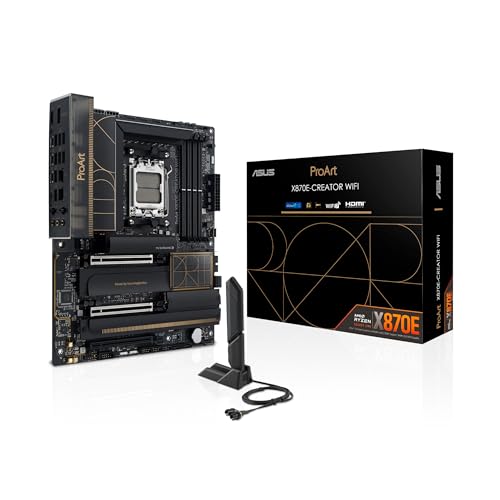
ASUS ProArt X870E-CREATOR WiFi AMD AM5 X870E ATX Motherboard
The ASUS ProArt X870E-CREATOR WiFi is the high-end creator board in this guide and the one to buy when the PC earns its keep. The listing describes an AMD AM5 motherboard on the X870E chipset, in full ATX size, with PCIe 5.0 x16 slots, full support for next-generation graphics cards, and built-in WiFi. The ProArt line is ASUS's creator range, built for video editing, 3D work, and content creation, with a clean, professional design that fits a studio instead of a gaming den. It is the board for a builder who wants the fastest AMD platform without any gaming styling.
Where the ProArt earns its premium is the combination of a top-tier chipset and a layout designed for work. The X870E chipset gives you the newest connectivity and storage options on the AM5 platform, and the PCIe 5.0 x16 slots mean a modern graphics card runs at full speed. The ATX size leaves room for expansion, and the creator-focused design means the ports and headers are placed for a working machine rather than a show build. For a video editor, a 3D artist, or a developer who compiles large projects, this is the board that gets out of the way and lets the processor do its job.
Key specs:
- AMD AM5 socket, X870E chipset
- Full-size ATX motherboard
- PCIe 5.0 x16 slots
- Built-in WiFi
- Support for next-generation graphics cards
Strengths:
- Top-tier X870E chipset with the newest AM5 connectivity
- Creator-focused design without gaming styling
- PCIe 5.0 x16 slots for full-speed graphics cards
Trade-offs:
- The most expensive board in this guide
- ATX size needs a mid-tower or larger case
- More connectivity than a basic office build will use
This board fits creators and professionals building a high-end AMD workstation for video editing, 3D work, or development, who want the fastest AM5 platform in a professional design.
Best for: high-end AMD creator builds that need X870E connectivity and a professional design
Not suited for: budget builds, compact cases, or buyers who only need basic office performance
Check price on Amazon: ASUS ProArt X870E-CREATOR

ASUS Prime B650-PLUS AMD B650 AM5 Ryzen Desktop ATX Motherboard
The ASUS Prime B650-PLUS is the sensible middle of this guide and the board most AMD builders should buy. The listing describes an AMD B650 motherboard on the AM5 socket, in full ATX size, with DDR5 memory, a PCIe 5.0 M.2 slot, 2.5Gb LAN, and DisplayPort and HDMI outputs. The Prime line is ASUS's mainstream range, built for everyday computing and productivity without gaming extras, and the B650 chipset gives you modern AMD performance at a price that leaves budget for a better processor and more memory. It is the board for a builder who wants everything a working PC needs and nothing it does not.
In daily use, the Prime B650-PLUS is the board that disappears. The 2.5Gb LAN port is faster than the gigabit ports on older boards, which matters when you move large files across a home network, and the PCIe 5.0 M.2 slot gives you the fastest storage available. The DisplayPort and HDMI outputs mean you can run a monitor from the processor's integrated graphics while you wait for a graphics card, or run a second monitor without one at all. For a home office machine, a student build, or a family desktop that also handles photo editing, this board covers the bases at a fair price.
Key specs:
- AMD AM5 socket, B650 chipset
- Full-size ATX motherboard
- DDR5 memory with PCIe 5.0 M.2
- 2.5Gb LAN
- DisplayPort and HDMI outputs
Strengths:
- Modern B650 chipset with PCIe 5.0 storage at a fair price
- 2.5Gb LAN for faster home networking
- DisplayPort and HDMI for integrated graphics use
Trade-offs:
- No built-in WiFi in the listing, so add a card or adapter if needed
- B650 lacks some high-end X870E connectivity
- Plain design will not impress anyone looking for RGB
This board fits AMD builders who want a solid, affordable ATX board for a home office, student, or family PC with modern storage and networking.
Best for: affordable AMD productivity builds that need DDR5 and fast storage
Not suited for: builders who need built-in WiFi, or high-end creator workstations
Check price on Amazon: ASUS Prime B650-PLUS

MSI PRO B650M-A WiFi ProSeries Motherboard
The MSI PRO B650M-A WiFi is the compact AMD pick in this guide and the board for builders who want a small PC without giving up modern features. The listing describes a PRO Series motherboard for AMD Ryzen 9000, 8000, and 7000 series processors, on the AM5 socket, with DDR5 memory, PCIe 4.0, M.2 storage, SATA 6Gb/s ports, and built-in Wi-Fi. The micro-ATX size fits smaller cases and still leaves room for a full-size graphics card, which makes it the right board for a compact home office machine or a small living-room PC that also handles work.
What makes this board work so well in a small build is that MSI did not cut the features that matter. The built-in Wi-Fi means you do not need a separate adapter or a cable run across the room, and the M.2 slot gives you fast NVMe storage in a compact case. Support for three generations of Ryzen processors means you can buy the processor that fits your budget today and upgrade later without changing the board. For a builder putting a quiet, compact PC on a desk or under a TV, the PRO B650M-A WiFi is the board that fits the space and the budget at the same time.
Key specs:
- AMD AM5 socket, B650 chipset
- Micro-ATX size
- DDR5 memory, PCIe 4.0, M.2 storage
- Built-in Wi-Fi
- Supports Ryzen 9000, 8000, and 7000 series
Strengths:
- Compact micro-ATX size with full modern features
- Built-in Wi-Fi, so no adapter or cable needed
- Supports three Ryzen generations for easy upgrades
Trade-offs:
- Micro-ATX size means fewer expansion slots than ATX
- PCIe 4.0 rather than PCIe 5.0 for the graphics slot
- Fewer rear USB ports than a full-size board
This board fits builders who want a compact AMD PC for a home office or living room, with Wi-Fi built in and room for a full-size graphics card.
Best for: compact AMD builds that need Wi-Fi and modern storage in a small case
Not suited for: builders who need many expansion cards, or the fastest PCIe 5.0 graphics
Check price on Amazon: MSI PRO B650M-A WiFi

GIGABYTE B650M DS3H AMD AM5 Micro-ATX Motherboard
The GIGABYTE B650M DS3H is the budget pick in this guide and the proof that a cheap board does not have to be a bad board. The listing describes an AMD AM5 micro-ATX motherboard with support for Ryzen 9000, 8000, and 7000 series processors, DDR5 memory, a 6+2+1 power phase design, two M.2 slots, and PCIe 4.0. The DS3H line is GIGABYTE's value range, built for buyers who want a modern platform at the lowest sensible price, and the two M.2 slots are the feature that sets it apart from other budget boards that only offer one.
In a budget build, the B650M DS3H earns its place by spending money where it counts. The 6+2+1 power phase design is enough for the Ryzen 5 and Ryzen 7 processors most budget builders buy, and the two M.2 slots mean you can add fast storage now and more later without replacing anything. DDR5 memory keeps the build current, and support for three Ryzen generations means the board will accept a faster processor later. For a first build, a family PC, or a home office machine on a tight budget, this is the board that leaves the most money for the processor, memory, and storage that actually decide how fast the computer feels.
Key specs:
- AMD AM5 socket, B650 chipset
- Micro-ATX size
- DDR5 memory, two M.2 slots
- 6+2+1 power phase design
- Supports Ryzen 9000, 8000, and 7000 series
Strengths:
- Lowest sensible price in this guide with two M.2 slots
- Solid 6+2+1 power design for Ryzen 5 and Ryzen 7
- DDR5 memory keeps a budget build current
Trade-offs:
- No built-in WiFi in the listing
- Micro-ATX size with limited expansion
- Basic audio and rear ports compared with higher boards
This board fits budget builders who want a modern AMD platform at the lowest sensible price, with two M.2 slots and room for a future processor upgrade.
Best for: budget AMD builds that need two M.2 slots at the lowest price
Not suited for: builders who need built-in WiFi, or high-end processors that need stronger power delivery
Check price on Amazon: GIGABYTE B650M DS3H

MSI PRO Z790-A MAX WiFi ProSeries Motherboard
The MSI PRO Z790-A MAX WiFi is the Intel pick in this guide and the board for builders who want a full-size Intel board without gaming branding. The listing describes a PRO Series motherboard that supports 12th, 13th, and 14th generation Intel processors, on the LGA 1700 socket, with DDR5 memory, PCIe 5.0, M.2 storage, and built-in WiFi. The MAX designation marks it as the updated version of MSI's PRO Z790 line, with the connectivity a modern Intel build needs, and the full ATX size gives you the expansion room that a workstation build benefits from.
For an Intel productivity build, this board covers the practical bases well. Support for three generations of Core processors means you can reuse a 12th generation chip or buy a 14th generation chip with equal confidence, and DDR5 memory with PCIe 5.0 storage keeps the system current. The built-in WiFi removes the need for an adapter, and the ATX layout leaves room for a capture card, an extra network card, or additional storage controllers later. For a video editor using Quick Sync, a developer running virtual machines, or an office that standardises on Intel, the PRO Z790-A MAX WiFi is the straightforward full-size choice.
Key specs:
- Intel LGA 1700 socket, Z790 chipset
- Full-size ATX motherboard
- DDR5 memory, PCIe 5.0, M.2 storage
- Built-in WiFi
- Supports 12th, 13th, and 14th Gen Intel processors
Strengths:
- Full-size ATX board with strong Intel connectivity
- Supports three generations of Core processors
- Built-in WiFi and PCIe 5.0 storage
Trade-offs:
- LGA 1700 is a mature platform with no new generations coming
- PRO styling is plain, with no lighting features
- ATX size needs a mid-tower or larger case
This board fits Intel builders who want a full-size, professional Z790 board for productivity, editing, or office work, with WiFi built in.
Best for: Intel productivity builds on 12th, 13th, or 14th Gen Core
Not suited for: builders who want the longest future upgrade path, or compact cases
Check price on Amazon: MSI PRO Z790-A MAX WiFi

ASRock B650M Pro RS AMD AM5 Motherboard
The ASRock B650M Pro RS is the fast-memory pick in this guide and the board for AMD builders who care about memory speed. The listing describes an AMD AM5 micro-ATX motherboard for Ryzen 7000, 8000, and 9000 series processors, with DDR5 memory support up to 7200+ MHz when overclocked, up to 256GB of memory, an M.2 Key E slot for WiFi, and SATA3 6.0 Gb/s ports. The Pro RS line is ASRock's straightforward productivity range, and the memory support is the headline: fast DDR5 makes a real difference in Ryzen systems, where memory speed feeds the processor directly.
In practice, the B650M Pro RS suits builders who want to tune their memory without paying for a gaming board. The 7200+ MHz overclock support gives headroom for fast DDR5 kits, and the 256GB maximum means the board will accept the largest memory configurations a workstation might need later. The M.2 Key E slot lets you add a WiFi module if you need wireless, and the micro-ATX size keeps the build compact. For a developer, a data worker, or a creator who runs memory-hungry software, this is the board that pairs fast memory with a sensible price.
Key specs:
- AMD AM5 socket, B650 chipset
- Micro-ATX size
- DDR5 up to 7200+ MHz (OC), up to 256GB
- M.2 Key E slot for WiFi
- SATA3 6.0 Gb/s ports
Strengths:
- Fast DDR5 support up to 7200+ MHz when overclocked
- Up to 256GB of memory for workstation use
- M.2 Key E slot for adding WiFi later
Trade-offs:
- WiFi module not included in the listing, so add one if needed
- Micro-ATX size with limited expansion
- Overclocked memory speeds need a kit rated for them
This board fits AMD builders who want fast DDR5 memory support in a compact board, for development, data work, or memory-hungry creator software.
Best for: AMD builds that prioritise fast DDR5 memory in a compact board
Not suited for: builders who need WiFi out of the box, or many expansion slots
Check price on Amazon: ASRock B650M Pro RS
Buying guide
Match the socket to your processor
The socket is the first and least flexible choice. AMD AM5 boards take Ryzen 7000, 8000, and 9000 series processors, while Intel LGA 1700 boards take 12th, 13th, and 14th generation Core processors, and the two are not interchangeable. Check the processor you own or plan to buy, then buy the board for that socket. Also check the BIOS version: some boards need an update for the newest processors, and a board with BIOS flashback can update without a processor installed, which saves a headache if you buy a new processor for an older board.
Buy the memory the board actually supports
Every board in this guide uses DDR5 memory, which is the current standard, but DDR5 kits vary in speed and capacity. Check the board's memory support list for the exact kit you plan to buy, and buy two matched sticks rather than one, because dual-channel memory is noticeably faster. For most productivity builds, 32GB is the sweet spot, and 64GB suits video editing and virtual machines. Do not buy DDR4 for a DDR5 board, and do not mix old and new kits, because mismatched memory is the most common cause of a new build that will not boot.
Count the M.2 slots and the USB ports
Storage and ports decide how pleasant a board is to live with. Two M.2 slots let you keep the operating system on one fast drive and projects on another, and a board with only one M.2 slot will force a compromise sooner. Count the rear USB ports too, and check for USB-C if your devices need it. A board with 2.5Gb LAN is worth having if your home network supports it, and built-in WiFi is worth having if the PC will sit far from the router. These small features matter every day, long after the chipset name is forgotten.
Check power delivery for your processor
Power delivery decides whether a board can run a high-end processor at full speed for hours. The 6+2+1 phase design on the budget GIGABYTE board in this guide is fine for a Ryzen 5 or Ryzen 7, but a Ryzen 9 doing long renders deserves a board with stronger delivery, such as the ProArt X870E-CREATOR WiFi. Check the power stages in the listing, match them to the processor you plan to use, and remember that a board that throttles a fast processor wastes the money spent on that processor.
Think about the case and the cooling
A full-size ATX board needs a mid-tower or larger case, while a micro-ATX board fits smaller cases and still works in an ATX case. Check the board size against your case, and check that the case has airflow over the power delivery area, because a board that runs hot will throttle. Also check the fan headers: a board with too few headers will need a splitter or a hub. Measure twice, order once, and the build will go smoothly.
Setting up and everyday care
Install the board carefully and it will serve you for years. Power down completely, switch off the power supply, and ground yourself before touching the board. Install the processor, memory, and M.2 drives before you put the board in the case, because it is far easier on a flat surface, and check that the memory clicks fully into place on both ends. Seat the board on the standoffs, secure it with the screws, and connect the front-panel cables, the power cables, and the fan headers before you close the case. A loose power cable or a missed front-panel connector is the most common cause of a new build that will not start.
Keep the board clean and its software current. Update the BIOS only when you need a new processor or a fix for a real problem, and follow the manufacturer's instructions exactly, because a failed BIOS update is the one mistake that can brick a board. Dust the case every few months, keep the fans working, and check temperatures occasionally with monitoring software. A board that runs cool and has clean power will last longer than one that runs hot, and the easiest way to keep it cool is good case airflow and a power supply with headroom.
Common mistakes to avoid
Buying the wrong socket
An AM5 processor does not fit an LGA 1700 board, and the mistake is only discovered when the parts arrive. Check the socket, the chipset, and the processor generation before you order, and confirm the board supports the exact processor model, not just the family. A minute of checking saves a return and a week of waiting.
Skimping on power delivery for a fast processor
A budget board with a high-end processor will throttle under sustained load, which means the render takes longer and the processor never reaches its rated speed. Match the power stages to the processor, and buy a stronger board when the processor is a Ryzen 9 or a Core i9 doing long, heavy work.
Forgetting the memory standard
DDR5 and DDR4 are not interchangeable, and a DDR5 board will not accept DDR4 memory. Check the memory type, buy a matched kit, and confirm the speed is one the board supports. Mismatched or unsupported memory is the most common reason a new build fails to boot on the first try.
Ignoring case fit and front-panel connectors
An ATX board does not fit a micro-ATX case, and a case with a USB-C front port needs a board with a USB-C header. Check the board size, the standoff layout, and the front-panel headers before you order, and the build will go together without surprises.
Our recommendation
If you want one board for a high-end AMD creator build, buy the ASUS ProArt X870E-CREATOR WiFi for its top-tier chipset, PCIe 5.0 slots, and professional design. If you want the best value for a mainstream AMD build, buy the ASUS Prime B650-PLUS instead, because it gives you DDR5 memory, a PCIe 5.0 M.2 slot, and 2.5Gb LAN at a fair price. Both will serve you well for years, and the choice between them comes down to whether you need the fastest platform or the best value.
If your build is compact, buy the MSI PRO B650M-A WiFi for its built-in wireless and modern features in a micro-ATX size, or the ASRock B650M Pro RS if fast DDR5 memory matters most to you. If your budget is tight, buy the GIGABYTE B650M DS3H, because its two M.2 slots and solid power design are the best value at the lowest price. If you build on Intel, buy the MSI PRO Z790-A MAX WiFi. Whichever board you choose, check the socket, the memory, and the case fit before you order.
Related reading on Reviewstook: best 32GB RAM for beginners under 100, best 32GB RAM for budget builds under 100, and best PC case for beginners under 100
Frequently asked questions
What is the best non gaming motherboard in 2026?
There is no single best board, because the right board depends on your processor and your case. For a high-end AMD creator build, the ASUS ProArt X870E-CREATOR WiFi is the strongest pick. For a mainstream AMD build, the ASUS Prime B650-PLUS is the best value. For a compact build, the MSI PRO B650M-A WiFi is the most complete micro-ATX option, and for Intel builders, the MSI PRO Z790-A MAX WiFi is the straightforward full-size choice.
Do I need a gaming motherboard for a productivity PC?
No. A gaming motherboard uses the same chipset and socket as a non gaming board on the same platform, and the gaming extras do not make video editing, office work, or development any faster. A non gaming board usually costs less and spends the budget on power delivery, storage, and ports instead of lighting and styling, which is a better deal for a working PC.
Is B650 enough for a Ryzen 9 processor?
It depends on the board. A B650 board with strong power delivery can run a Ryzen 9 for productivity work, but a budget B650 board with basic power stages may throttle under long, heavy loads. For a Ryzen 9 doing sustained rendering, choose a board with stronger delivery, such as the ProArt X870E-CREATOR WiFi in this guide, and make sure the case has good airflow.
Should I buy an ATX or micro-ATX motherboard?
Buy ATX if your case is a mid-tower or larger and you want the most expansion room. Buy micro-ATX if your case is compact or you know you will only ever install one graphics card, because a micro-ATX board keeps the same memory and storage standards at a lower price. A micro-ATX board fits in an ATX case, but an ATX board does not fit in a micro-ATX case, so check the case first.
Does a non gaming motherboard support DDR5 memory?
Yes. Every board in this guide uses DDR5 memory, which is the current standard for both AMD AM5 and Intel LGA 1700 platforms. Buy a matched DDR5 kit, check the speed against the board's support list, and buy two sticks for dual-channel performance. DDR4 memory does not fit a DDR5 board.
Do I need WiFi on my motherboard?
It depends on where the PC sits. If the PC is near the router and you can run a cable, wired networking is faster and more reliable. If the PC is far from the router, a board with built-in WiFi, such as the MSI PRO B650M-A WiFi or the MSI PRO Z790-A MAX WiFi in this guide, saves you from buying an adapter or running a long cable.