The best new graphics cards of 2026 come from two lineups that finally feel like a real generational step: NVIDIA's RTX 50 series and AMD's RX 9000 series. Both bring faster memory, wider use of AI upscaling, and PCIe 5.0 support, and both cover the same price ladder from the mid-range RTX 5060 Ti and RX 9060 XT up to the high-end RTX 5080. If your current card is three or four years old, a new card in this guide will run modern games at higher settings and higher frame rates than anything in its price class from the last generation, and it will do it while drawing power more efficiently.
The six cards below cover the full range of what a new-card buyer needs in 2026. There is the ASUS PRIME RTX 5070 for 1440p gaming, the ASUS TUF RTX 5070 Ti for high-refresh 1440p and entry-level 4K, the PNY RTX 5060 Ti 16GB for buyers who want lots of VRAM at a mid-range price, the GIGABYTE RX 9070 XT for AMD fans who want 16GB of memory and strong raster performance, the PNY RTX 5080 for high-end 4K gaming, and the ASUS Dual RX 9060 XT 16GB for 1080p and 1440p on a budget. Every card in this guide is a complete graphics card, not a part or an accessory, and every linked model was checked against its listing title for brand and model before it was included.
Before you buy, check three things: whether the card fits in your case, whether your power supply has the wattage and connectors the card needs, and whether your monitor can actually show the frame rates the card produces. A card that is too long for your case, a power supply that is too weak, or a 60Hz monitor paired with a card built for 144Hz are the three most common ways a new graphics card purchase goes wrong. The best new graphics cards in this guide were chosen for performance per dollar, VRAM capacity, cooling design, power efficiency, and the kind of driver and feature support that holds up for years, not just for launch-day benchmarks.
In this guide
Quick picks: best new graphics cards
| # | Product | Where to buy |
|---|---|---|
| 1 | ASUS PRIME RTX 5070 | Check on Amazon |
| 2 | ASUS TUF RTX 5070 Ti | Check on Amazon |
| 3 | PNY RTX 5060 Ti 16GB | Check on Amazon |
| 4 | GIGABYTE RX 9070 XT Gaming OC | Check on Amazon |
| 5 | PNY RTX 5080 | Check on Amazon |
| 6 | ASUS Dual RX 9060 XT 16GB | Check on Amazon |
How the picks were chosen for the best new graphics cards
Performance per dollar came first. Every card in this guide earns its place by delivering strong frame rates for its price, measured against the other cards at the same level rather than against flagship cards that cost twice as much. The RTX 5060 Ti and RX 9060 XT cover the mid-range, the RTX 5070 and RX 9070 XT cover the upper mid-range, and the RTX 5070 Ti and RTX 5080 cover the high end. A card that costs more must deliver proportionally more performance, and none of the six picks asks you to pay a premium for a badge alone.
VRAM capacity came second, because it decides how long a card stays useful. Games keep using more video memory for textures, and a card with too little VRAM will stutter at settings its GPU could otherwise handle. That is why five of the six picks in this guide carry 16GB of VRAM, and the sixth, the RTX 5070, carries 12GB of faster GDDR7 memory. We treated 8GB cards as a poor choice for a new purchase in 2026, even when their GPU is fast, because VRAM is the limit you cannot upgrade later.
Finally, we checked that every pick is a complete graphics card sold as a new listing, with a brand and model that match the listing title exactly. Graphics card accessories such as brackets, cables, risers, and coolers were excluded, and renewed listings were avoided in favour of new ones. Cooling design was recorded from each listing: dual-fan and triple-fan designs, slot thickness, and SFF-ready sizing where stated, so the comparison table reflects what the seller states, and buyers should confirm the current specifications, including length and power requirements, on the product page before ordering.
What is new in 2026: GDDR7, DLSS 4, and PCIe 5.0
The headline change in the RTX 50 series is GDDR7 memory, which moves data faster than the GDDR6 memory in older cards and the GDDR6 memory AMD still uses in the RX 9000 series. Faster memory helps most at high resolutions, where the card is constantly moving large textures, and it is one reason the RTX 5070 can keep up with older cards that have more memory on paper. The RX 9000 cards answer with 16GB of GDDR6 across the range, which gives them more memory capacity even if each gigabyte moves a little slower. For a buyer, the practical lesson is simple: do not compare memory types in isolation, compare the whole card, because a faster GPU with slightly slower memory can beat a slower GPU with faster memory.
AI upscaling is the second change that matters every day. NVIDIA's DLSS 4 and AMD's FSR 4 both render the game at a lower internal resolution and rebuild the image with AI, which produces higher frame rates with image quality that is close to native rendering in most games. The difference is support: DLSS works on NVIDIA cards and is supported in more games, while FSR works on both brands but is newer in its latest version. If you play games that support DLSS, an NVIDIA card gains a real advantage; if you play games that support neither, the raw raster performance of the card matters more, and AMD's RX 9070 XT is very competitive there.
PCIe 5.0 is the third change, and it is the least important for most buyers today. All six cards in this guide use a PCIe 5.0 interface, which doubles the bandwidth of PCIe 4.0, but current games rarely saturate even PCIe 4.0 at full x16 width, so the practical benefit is headroom for the future rather than speed today. What matters more is the slot width: the TUF RTX 5070 Ti in this guide is a 3.125-slot card, which needs three slots of clearance plus airflow, while the PRIME RTX 5070 is a 2.5-slot card that fits smaller cases. Check your case clearance and your motherboard slot layout before you buy, because a card that does not fit is a return, not an upgrade.
How much VRAM do you actually need
Video memory is the specification buyers misunderstand most, because more is not always better and too little is a hard wall. At 1080p, 8GB is still workable for most games at high settings, but it leaves no room for texture packs or future games, which is why none of the six cards in this guide is an 8GB model. At 1440p, 12GB is the comfortable minimum and 16GB is the safer choice, because high-resolution textures and ray tracing both consume memory quickly. At 4K, 16GB is the minimum a new card should carry in 2026, and that is why the RTX 5080, the RTX 5070 Ti, the RX 9070 XT, and the RX 9060 XT in this guide all carry 16GB.
The trap is buying VRAM instead of buying performance. A slow GPU with 16GB of memory will still be slow, because the GPU cannot process the data fast enough to use the memory. The PNY RTX 5060 Ti 16GB in this guide is the right way to think about it: the 16GB version costs a little more than the 8GB version of the same card, and it earns that premium by removing the memory limit that would otherwise hold the GPU back at 1440p. But a 16GB card with a weak GPU is still a weak card. Compare the GPU first, then check that the VRAM is enough for your resolution, and do not pay for memory on a GPU that cannot use it.
Power supply is the other half of the VRAM question, because faster cards draw more power and the new cards use the 12V-2×6 connector that older power supplies may not have. Check the recommended wattage in the listing and the connectors your power supply provides before you order, and leave headroom: a power supply running at 90 percent of its rating is loud and short-lived, while the same system on a supply with 150 watts of headroom runs quieter and lasts longer. If your power supply is more than five years old, budget for a replacement alongside the card, because a new graphics card is the worst time to discover your power supply was already at its limit.
Quick picks at a glance
| Product | GPU and VRAM | Cooling and size | Best for |
|---|---|---|---|
| ASUS PRIME RTX 5070 | RTX 5070, 12GB GDDR7 | Dual fan, 2.5-slot, SFF | 1440p gaming |
| ASUS TUF RTX 5070 Ti | RTX 5070 Ti, 16GB GDDR7 | Triple fan, 3.125-slot | 1440p high-refresh, 4K |
| PNY RTX 5060 Ti 16GB | RTX 5060 Ti, 16GB | Dual fan, SFF-ready | Value 1440p gaming |
| GIGABYTE RX 9070 XT Gaming OC | RX 9070 XT, 16GB GDDR6 | Triple fan | Raw performance value |
| PNY RTX 5080 | RTX 5080, 16GB GDDR7 | Triple fan | 4K gaming |
| ASUS Dual RX 9060 XT 16GB | RX 9060 XT, 16GB GDDR6 | Dual fan, 2.5-slot | Budget entry |
The best new graphics cards

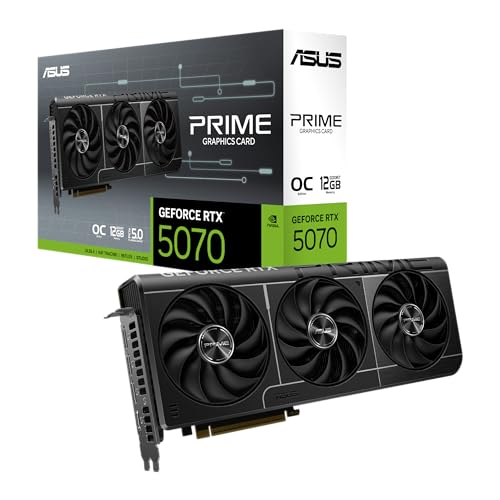
ASUS PRIME GeForce RTX 5070 12GB GDDR7 OC Edition
The ASUS PRIME RTX 5070 is the 1440p sweet spot of the new generation and the most balanced card in this guide. The listing describes an OC Edition gaming graphics card with 12GB of GDDR7 memory, an SFF-ready design, PCIe 5.0, HDMI and DisplayPort 2.1, and a 2.5-slot thickness with axial-tech fans. The PRIME line is ASUS's clean, understated range, built for small-form-factor cases as well as full towers, and the 2.5-slot design means it fits cases that reject thicker cards. GDDR7 memory is the headline: it moves data faster than the GDDR6 in older cards, which helps the 5070 punch above its memory capacity at 1440p.
In daily use, the RTX 5070 is the card for players who want high settings at 1440p without paying high-end prices. DLSS 4 gives it a second gear in supported games, raising frame rates well above what the raw hardware alone would produce, and the SFF-ready sizing means it works in compact builds where other new cards will not fit. The axial-tech fans keep the card quiet under load, and the dual BIOS and 0dB fan behaviour that ASUS builds into this line mean the fans stop entirely when the card is idle. For a buyer replacing a card from three generations ago, the 5070 is the upgrade that feels like a new computer.
Key specs:
- 12GB GDDR7 memory
- OC Edition with factory overclock
- SFF-ready, 2.5-slot design
- PCIe 5.0 with HDMI and DisplayPort 2.1
- Axial-tech fans
Strengths:
- GDDR7 memory keeps 1440p performance strong
- SFF-ready 2.5-slot design fits compact cases
- DLSS 4 adds a large frame-rate boost in supported games
Trade-offs:
- 12GB of VRAM is less than the 16GB cards in this guide
- No triple-fan cooling, so it runs warmer than larger cards
- SFF-ready design trades some cooling headroom for size
This card fits 1440p gamers who want a balanced, compact new card with fast memory and DLSS 4, especially in smaller cases.
Best for: 1440p gamers who want a compact, efficient new card with GDDR7 memory
Not suited for: 4K gamers who need 16GB of VRAM, or buyers who want the largest cooler available
Check price on Amazon: ASUS PRIME RTX 5070

ASUS TUF Gaming GeForce RTX 5070 Ti 16GB GDDR7 OC Edition
The ASUS TUF Gaming RTX 5070 Ti is the high-refresh 1440p and entry-level 4K card in this guide, and the one that pairs 16GB of GDDR7 memory with a serious cooler. The listing describes an OC Edition graphics card with 16GB of GDDR7, PCIe 5.0, HDMI and DisplayPort 2.1, a 3.125-slot thickness, and military-grade components. The TUF line is ASUS's durability range, built around a metal backplate, a large heatsink, and components rated for long service, and the 3.125-slot cooler is the price of that durability: this card needs three slots of clearance and good case airflow.
Where the 5070 Ti earns its premium over the 5070 is memory and headroom. Sixteen gigabytes of GDDR7 removes the VRAM worry at 1440p and makes 4K gaming realistic at high settings with DLSS 4, and the larger GPU behind it delivers the frame rates to match. The TUF cooler keeps temperatures and noise low even during long sessions, which matters for a card that will run at full load for hours. Buyers who keep a card for four or five years should look hard at this model, because the combination of 16GB of fast memory and a durable build is exactly what ages well.
Key specs:
- 16GB GDDR7 memory
- OC Edition with factory overclock
- 3.125-slot cooler with military-grade components
- PCIe 5.0 with HDMI and DisplayPort 2.1
- TUF Gaming durability design
Strengths:
- 16GB of GDDR7 removes VRAM worries at 1440p and 4K
- Large cooler keeps noise and temperatures low
- Military-grade components built for long service
Trade-offs:
- 3.125-slot thickness needs a roomy case
- Costs notably more than the RTX 5070
- Heavier than dual-fan cards, so check GPU support
This card fits gamers who want high-refresh 1440p or entry-level 4K with 16GB of fast memory and a durable cooler, and who have a case with room to spare.
Best for: high-refresh 1440p and entry-level 4K gamers who want 16GB GDDR7
Not suited for: small-form-factor builds, or buyers on a mid-range budget
Check price on Amazon: ASUS TUF RTX 5070 Ti


PNY NVIDIA GeForce RTX 5060 Ti 16GB OC Dual-Fan Graphics Card
The PNY RTX 5060 Ti 16GB is the value pick in this guide and the proof that VRAM matters as much as GPU speed. The listing describes an OC dual-fan graphics card with 16GB of memory, a 128-bit interface, a boost speed of 2692 MHz, and an SFF-ready design with PCIe support. The 16GB version of the 5060 Ti costs a little more than the 8GB version, and it earns every bit of that premium: at 1440p, the 8GB model hits its memory limit in modern games while the 16GB model keeps going, which is the difference between a card that lasts three years and one that feels old in eighteen months.
The dual-fan design keeps this card compact and SFF-ready, so it fits cases that reject triple-fan cards, and the 2692 MHz boost speed gives it real pace for a mid-range card. DLSS 4 is the equaliser here: in supported games, the 5060 Ti produces frame rates that belong to a higher price class, and the 16GB of memory means the upscaling has room to work without hitting a memory wall. For a buyer who wants the cheapest sensible entry into the new generation, with no VRAM regret built in, this is the card to buy.
Key specs:
- 16GB memory
- 128-bit interface
- Boost speed 2692 MHz
- OC dual-fan design, SFF-ready
- PCIe interface
Strengths:
- 16GB of VRAM at a mid-range price
- SFF-ready dual-fan design fits compact cases
- DLSS 4 lifts frame rates well above its price class
Trade-offs:
- 128-bit memory interface limits bandwidth versus wider cards
- Dual-fan cooling is adequate, not generous
- Slower than the RTX 5070 in raw performance
This card fits budget-conscious gamers who want a new card with 16GB of VRAM and DLSS 4, especially in compact cases.
Best for: mid-range buyers who want 16GB of VRAM without paying high-end prices
Not suited for: 4K gamers, or buyers who want the fastest card in this guide
Check price on Amazon: PNY RTX 5060 Ti 16GB

GIGABYTE Radeon RX 9070 XT Gaming OC 16G Graphics Card
The GIGABYTE RX 9070 XT Gaming OC is the AMD pick in this guide and the strongest raster-performance card for its price. The listing describes a graphics card with PCIe 5.0, 16GB of GDDR6 memory, and the model number GV-R9070XTGAMING OC-16GD. The RX 9070 XT is AMD's RDNA 4 flagship for the upper mid-range, and its strength is raw rendering power: in games without ray tracing or upscaling, it trades blows with cards that cost more, and its 16GB of memory means it never hits the VRAM wall that limits 8GB and 12GB cards at high settings.
GIGABYTE's Gaming OC design adds a factory overclock and a triple-fan cooler to the reference formula, which keeps the card cool and quiet under sustained load. FSR 4 is AMD's answer to DLSS, and it works across a growing list of games, though support is still catching up with NVIDIA's longer-established upscaling. For a buyer who plays a wide library and values raw performance per dollar over ray tracing features, the RX 9070 XT is the most compelling card in this guide, and the 16GB of memory means it will stay relevant as games demand more.
Key specs:
- 16GB GDDR6 memory
- PCIe 5.0 interface
- Factory overclock, Gaming OC design
- Model GV-R9070XTGAMING OC-16GD
- Triple-fan cooling
Strengths:
- Strong raw raster performance for the price
- 16GB of memory removes VRAM limits
- Factory overclock with triple-fan cooling
Trade-offs:
- Ray tracing performance trails NVIDIA cards
- FSR 4 support is newer than DLSS
- GDDR6 memory is slower per gigabyte than GDDR7
This card fits AMD fans and value-focused gamers who prioritise raw performance and 16GB of memory over ray tracing features.
Best for: gamers who want the strongest raw performance per dollar with 16GB of memory
Not suited for: buyers who play mostly ray-traced games, or who need DLSS support
Check price on Amazon: GIGABYTE RX 9070 XT Gaming OC

PNY NVIDIA GeForce RTX 5080 OC Triple-Fan Graphics Card
The PNY RTX 5080 is the high-end pick in this guide and the card for buyers who want 4K gaming without compromise. The listing describes an OC triple-fan graphics card with 16GB of GDDR7 memory, a 256-bit interface, a boost speed of 2730 MHz, and a PCIe 5.0 interface. The 5080 sits one step below the flagship 5090, but it delivers the frame rates that matter: high settings at 4K, high refresh rates at 1440p, and ray tracing with DLSS 4 that older cards cannot match. The triple-fan cooler is essential at this power level, and PNY's design keeps it quiet under sustained load.
What the 5080 buys over the 5070 Ti is headroom: more GPU power, more memory bandwidth, and a higher boost clock, which together mean the difference between 4K at high settings and 4K at ultra settings in demanding games. The 2730 MHz boost speed and 256-bit interface move data fast enough to feed the GPU at 4K, and DLSS 4 multiplies the result in supported titles. Buyers should check their power supply and case before ordering, because a card at this level needs a strong supply and a full-size case with good airflow. For a buyer who wants the best 4K experience short of the flagship, this is the card.
Key specs:
- 16GB GDDR7 memory
- 256-bit interface
- Boost speed 2730 MHz
- OC triple-fan design
- PCIe 5.0 interface
Strengths:
- True 4K gaming at high settings
- 16GB GDDR7 with a wide 256-bit interface
- Triple-fan cooler keeps a powerful card quiet
Trade-offs:
- High-end price, well above the mid-range cards
- Needs a strong power supply and a large case
- Overkill for 1080p or 60Hz monitors
This card fits high-end gamers who play at 4K or at high refresh rates at 1440p, and who have the power supply and case to support it.
Best for: 4K gamers who want high-end performance without the flagship price
Not suited for: 1080p gamers, small cases, or buyers on a mid-range budget
Check price on Amazon: PNY RTX 5080
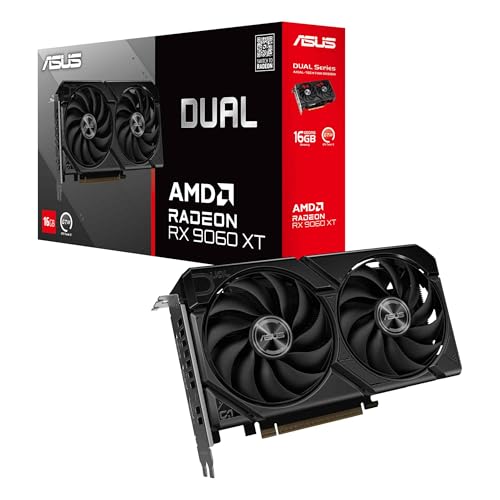
ASUS Dual Radeon RX 9060 XT 16GB GDDR6 Gaming Graphics Card
The ASUS Dual RX 9060 XT 16GB is the entry pick in this guide and the cheapest way into a new card with 16GB of memory. The listing describes a gaming graphics card with 16GB of GDDR6, PCIe 5.0, HDMI 2.1b and DisplayPort 2.1a, and a 2.5-slot design with axial-tech fans. The Dual line is ASUS's compact range, built around two fans and a short board that fits cases triple-fan cards cannot, and the 16GB of memory is the feature that makes this card a smart buy rather than a compromise: it removes the VRAM limit that holds back cheaper 8GB cards.
At 1080p, the RX 9060 XT runs modern games at high settings comfortably, and at 1440p it handles medium to high settings with FSR 4 helping in supported titles. The 2.5-slot design and axial-tech fans keep it cool and quiet, and the DisplayPort 2.1a output supports high-refresh monitors. For a buyer upgrading from an older card on a tight budget, or building a first gaming PC where the graphics card must leave room in the budget for everything else, this is the sensible entry point into the new generation.
Key specs:
- 16GB GDDR6 memory
- PCIe 5.0 interface
- HDMI 2.1b and DisplayPort 2.1a
- 2.5-slot design with axial-tech fans
- Dual-fan compact design
Strengths:
- 16GB of memory at the lowest price in this guide
- Compact 2.5-slot design fits small cases
- DisplayPort 2.1a supports high-refresh monitors
Trade-offs:
- Slower than the RX 9070 XT and RTX 5070
- Dual-fan cooling limits overclocking headroom
- Ray tracing performance is modest
This card fits budget gamers and first-time builders who want a new card with 16GB of memory for 1080p and 1440p gaming.
Best for: budget 1080p and 1440p gamers who want 16GB of memory
Not suited for: 4K gamers, or buyers who want the fastest card available
Check price on Amazon: ASUS Dual RX 9060 XT 16GB
Buying guide
Match the card to your monitor
A graphics card is only as useful as the monitor it drives. A 4K card on a 1080p 60Hz monitor wastes its power, and a mid-range card on a 4K 144Hz monitor will disappoint. Match the card to the resolution and refresh rate you actually play at: the RX 9060 XT and RTX 5060 Ti for 1080p and 1440p, the RTX 5070 and RX 9070 XT for 1440p at high refresh rates, and the RTX 5070 Ti and RTX 5080 for 4K. If you plan to upgrade the monitor later, buy the card for the monitor you will have, not the one you have now.
Check case fit and power before you buy
Measure the available length in your case from the backplate to the nearest obstruction, and compare it with the card length in the listing. Check the slot thickness too: a 3.125-slot card like the TUF RTX 5070 Ti needs three slots of clearance, while a 2.5-slot card fits tighter cases. Then check your power supply wattage and connectors, including whether it has the 12V-2×6 connector the new cards use. A card that does not fit or cannot be powered is a return, so measure twice and order once.
VRAM first, then GPU speed
At your target resolution, check that the card has enough VRAM, then compare GPU speed. Sixteen gigabytes is the safe choice for 1440p and the minimum for 4K in 2026, which is why five of the six cards in this guide carry 16GB. Do not buy a slow GPU with lots of memory, and do not buy a fast GPU with too little memory: both mistakes cost you the same way, in stuttering and short service life.
Cooling and noise
A triple-fan card runs cooler and quieter than a dual-fan card at the same power, but it is longer and thicker. A dual-fan card fits smaller cases but runs warmer and louder under sustained load. Check whether the card has a 0dB mode that stops the fans at idle, and make sure your case has intake and exhaust fans that match the card's airflow direction. A card that breathes well lasts longer and boosts higher, because modern GPUs raise their clocks when temperatures allow.
Features: upscaling, ray tracing, and drivers
Upscaling matters more than raw speed in many new games, so check which games you play support DLSS or FSR and buy the brand that supports them. Ray tracing looks best on NVIDIA cards, while AMD cards offer better raw performance per dollar in games without ray tracing. Driver support matters too: both brands update drivers regularly, but NVIDIA's longer history with DLSS gives it an edge in supported titles. Buy the features you will actually use, not the ones on the box.
Setting up and everyday care
Install the card carefully and it will reward you for years. Power down the computer, switch off the power supply, and ground yourself before touching the card. Seat the card firmly in the PCIe slot until the latch clicks, secure it with the case screws or bracket, and connect all power cables, including the 12V-2×6 connector, until they click fully into place. A connector that is not fully seated is the most common cause of a new card that will not boot or that shuts down under load. After installation, update the drivers from the manufacturer's site rather than relying on the disc or the version Windows installs automatically.
Keep the card clean and cool. Dust the fans and heatsink every few months with compressed air, holding the fans still while you blow so they do not spin freely and wear their bearings. Check temperatures occasionally with monitoring software: sustained temperatures above 85 degrees under load suggest dust, poor case airflow, or a fan problem. Keep the case filters clean, make sure intake and exhaust fans are working, and do not block the card's intake with cables. A card that runs cool boosts higher and lasts longer than one that runs hot.
Common mistakes to avoid
Buying a card your monitor cannot use
A 4K card on a 1080p 60Hz monitor is wasted money, and a mid-range card on a 4K 144Hz monitor is a disappointment. Match the card to your monitor's resolution and refresh rate, and upgrade the monitor first if the card you want needs a better display to shine.
Forgetting the power supply
A new card that draws more power than your supply can deliver will crash under load or fail to boot. Check the recommended wattage and the connectors before you order, and replace an old or weak supply alongside the card rather than after the first crash.
Choosing 8GB of VRAM in 2026
Eight gigabytes was enough two years ago, but modern games at 1440p already push past it, and the limit cannot be upgraded. Buy 16GB where you can, and treat 12GB as the minimum for a new card in this generation.
Ignoring case clearance
A card that is too long or too thick for your case is a return, not an upgrade. Measure the length, the slot thickness, and the clearance to the nearest obstruction before you order, and remember that a 3.125-slot card needs more room than a 2.5-slot card.
Our recommendation
If you want one card for 1440p gaming, buy the ASUS PRIME RTX 5070 for its balance of GDDR7 memory, DLSS 4, and compact SFF-ready design. If you want 16GB of VRAM and the strongest raw performance per dollar, buy the GIGABYTE RX 9070 XT instead. Both will serve you well for years, and the choice between them comes down to whether you value DLSS and ray tracing or raw performance and value more.
If your budget is tight, buy the PNY RTX 5060 Ti 16GB or the ASUS Dual RX 9060 XT 16GB, because both give you 16GB of memory at the lowest prices in this guide. If you play at 4K, buy the PNY RTX 5080. Whichever card you choose, measure your case, check your power supply, and confirm the current specifications on the product page before you order.
Related reading on Reviewstook: best graphics card for beginners under 1000, best gaming graphics card for budget builds under 1000, and best graphics card for compact builds under 1000
Frequently asked questions
What is the best new graphics card in 2026?
There is no single best card, because the right card depends on your monitor and budget. For 1440p gaming, the RTX 5070 and RX 9070 XT are the strongest all-round picks. For 4K, the RTX 5080 is the best choice short of the flagship. For a tight budget, the RTX 5060 Ti 16GB and RX 9060 XT 16GB give you 16GB of memory at the lowest prices.
How much VRAM do I need in a new graphics card?
Sixteen gigabytes is the safe choice for 1440p and the minimum for 4K in 2026. Twelve gigabytes is workable at 1440p but leaves less room for future games. Eight gigabytes is too little for a new card in this generation, because modern games already push past it at high settings.
Is the RTX 5070 better than the RX 9070 XT?
It depends on the game. The RTX 5070 is faster in ray-traced games and has DLSS 4 support, while the RX 9070 XT is faster in many rasterised games and has 16GB of memory versus 12GB. If you play ray-traced games, choose the 5070; if you play a wide library and value memory capacity, choose the 9070 XT.
Do I need a new power supply for a new graphics card?
Check the recommended wattage in the listing and the connectors your supply provides, including the 12V-2×6 connector the new cards use. If your supply is more than five years old or close to its rated limit, replace it alongside the card, because a new graphics card is the worst time to discover your power supply was already at its limit.
Will a new graphics card fit in my case?
Measure the available length from the backplate to the nearest obstruction and compare it with the card length in the listing, then check the slot thickness: a 3.125-slot card needs three slots of clearance, while a 2.5-slot card fits tighter cases. SFF-ready cards such as the PRIME RTX 5070 and the PNY RTX 5060 Ti fit compact cases that reject larger cards.
Is DLSS or FSR better?
DLSS works on NVIDIA cards and is supported in more games, while FSR works on both brands but is newer in its latest version. If you play games that support DLSS, an NVIDIA card gains a real advantage. If you play games that support neither, raw performance matters more, and AMD's RX 9070 XT is very competitive there.