A video doorbell looks like a simple purchase until you add up what it actually costs to own. The box has one number on it, but the real cost includes the subscription that stores your recordings, the chime if one is not included, and the wiring or the PoE cabling if you choose a wired model. Two doorbells that look similar on the shelf can cost very different amounts over two or three years, and the cheaper one at checkout is not always the cheaper one to live with.
The doorbells below cover every cost profile. There are battery models that cost nothing to install and work on any front door, wired models that need existing doorbell wiring but never need charging, and a PoE model that runs on a network cable and stores video locally with no monthly fee at all. Some brands need a subscription for video history, which is the biggest ongoing cost, while others record locally for free. The cheapest way to own a doorbell is usually a model with local storage and no subscription, while the most capable video and the smartest alerts usually come from the brands that charge a monthly plan.
Before the list, settle three cost questions. First, do you already have doorbell wiring and a transformer, or will you need an electrician, because that single fact often decides between battery and wired. Second, do you want cloud recordings, which need a subscription, or local storage, which costs nothing after the purchase. Third, check your WiFi strength at the front door, because a doorbell that cannot hold a connection wastes whatever you spend on it.
In this guide
Quick picks: best doorbell cameras with costs
| # | Product | Where to buy |
|---|---|---|
| 1 | Ring Battery Doorbell 2K Plus (newest model), Nickel Silver | Check on Amazon |
| 2 | Ring Wired Doorbell 4K Elite (newest model), Deep Silver | Check on Amazon |
| 3 | Google Nest Doorbell (Battery) – Ash | Check on Amazon |
| 4 | Arlo Essential Wired Video Doorbell – HD Video, 180 degrees View, Night Vision, 2 Way Audio, Direct to Wi-Fi No Hub Need | Check on Amazon |
| 5 | Tapo 2K Wired Smart Video Doorbell w/Chime, D130, 180° Ultra-Wide FOV | Check on Amazon |
| 6 | REOLINK Video Doorbell PoE 2K Wired Outdoor Security Camera with Chime V2 | Check on Amazon |
| 7 | Aqara Smart Doorbell Camera G410 with Chime, HomeKit Secure Video, Black | Check on Amazon |
Quick comparison
| # | Product | Best for |
|---|---|---|
| 1 | Ring Battery Doorbell 2K Plus | Battery doorbell with 2K video and 6x zoom |
| 2 | Ring Wired Doorbell 4K Elite | Wired PoE doorbell with 4K video |
| 3 | Google Nest Doorbell (Battery) | Battery Nest doorbell with HDR video |
| 4 | Arlo Essential Wired Video Doorbell | Wired Arlo doorbell with 180-degree view |
| 5 | Tapo 2K Wired Video Doorbell D130 | Wired Tapo doorbell with chime included |
| 6 | REOLINK Video Doorbell PoE | PoE doorbell with 2K video and local storage |
| 7 | Aqara Smart Doorbell Camera G410 | Smart-home doorbell with Matter hub built in |
The table above is a shortcut, not a verdict. Two products can look close on a spec line and feel very different in daily use, so use it to narrow the field to two or three candidates, then read those full sections before deciding.

1. Ring Battery Doorbell 2K Plus
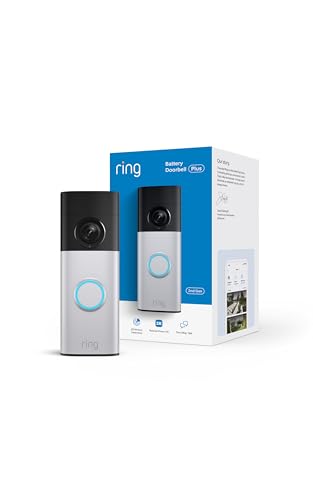
The Ring Battery Doorbell 2K Plus is the newest Ring battery doorbell, with a wider view and sharper video than the older 1080p models, and it is the straightforward choice for a home with no doorbell wiring. It runs on a rechargeable battery, so it mounts on any front door with a couple of screws and no electrician, which keeps the install cost at zero. The 2K video is noticeably sharper than 1080p when you zoom into a recording, and two-way talk lets you speak to a visitor from your phone.
On paper, the headline facts are straightforward: 2K video resolution; Battery powered, no wiring needed; Up to 6x enhanced zoom; Wide-angle video view; Night vision for dark doorways. None of that makes it the right pick for everyone, but it does define the audience clearly. If those headline facts match what you actually need day to day, this is a shortlist candidate rather than a curiosity. If they do not match, the rest of this section will make that obvious quickly, and you can move on to the next pick without losing anything.
What stands out
- 2K video resolution
- Battery powered, no wiring needed
- Up to 6x enhanced zoom
- Wide-angle video view
- Night vision for dark doorways
The battery design is the main advantage, because it fits homes that never had a wired doorbell, including rented properties and houses with a porch but no chime, and it costs nothing to install. The 2K video holds detail when you zoom, which is when resolution actually matters for identifying a visitor. Ring makes the most widely used doorbell app, with reliable alerts and Alexa integration, so the doorbell can announce visitors on an Echo or show the feed on an Echo Show. For a first video doorbell, this is the lowest-friction way in.
Before you buy, it is worth checking the practical details that cause most returns. Confirm that the listing shows the exact model name and configuration you expect, because similar models often share a name and differ in one specification that matters. Check the size and the connections against your setup, and make sure you know what is included in the box and what is sold separately. Read the return policy before ordering, and when the product arrives, test it with your real setup in the first few days rather than leaving it in the box. A quick check at the start saves a return later, and it is the simplest way to be sure the product you receive is the one you meant to buy.
Trade-offs to weigh
The battery needs recharging every few months, which means taking the doorbell off its mount, and heavy use on a busy street drains it faster. Ring cloud recording needs a Ring Protect subscription, so there is an ongoing monthly cost if you want to keep video history, and that subscription is the real long-term cost of this doorbell. If you want free local storage or you dislike subscriptions, the Reolink or Tapo picks below are better fits.
Who it fits best
Best for homes with no doorbell wiring that want a simple battery doorbell with sharp 2K video and the lowest possible install cost.
Check price on Amazon: Ring Battery Doorbell 2K Plus (newest model), Nickel Silver

2. Ring Wired Doorbell 4K Elite
The Ring Wired Doorbell 4K Elite is the most capable doorbell Ring makes, recording in 4K and drawing power and data over a single Ethernet cable. It suits a home that already has network cabling at the front door, and in return it never needs charging and never depends on WiFi at the door. The 4K video holds detail when you zoom into a recording, and the wide-angle view covers the whole doorway.
On paper, the headline facts are straightforward: 4K video resolution; Power over Ethernet, always on; Wide-angle video view; Night vision for dark doorways; Professional-grade wired install. None of that makes it the right pick for everyone, but it does define the audience clearly. If those headline facts match what you actually need day to day, this is a shortlist candidate rather than a curiosity. If they do not match, the rest of this section will make that obvious quickly, and you can move on to the next pick without losing anything.
What stands out
- 4K video resolution
- Power over Ethernet, always on
- Wide-angle video view
- Night vision for dark doorways
- Professional-grade wired install
The 4K video is the headline, because it keeps faces and details readable at a distance where 1080p turns to blur. Power over Ethernet means one cable handles power and data, so the connection is rock solid and the doorbell is always on, with no battery anxiety and no WiFi dropouts at a brick front wall.
Before you buy, it is worth checking the practical details that cause most returns. Confirm that the listing shows the exact model name and configuration you expect, because similar models often share a name and differ in one specification that matters. Check the size and the connections against your setup, and make sure you know what is included in the box and what is sold separately. Read the return policy before ordering, and when the product arrives, test it with your real setup in the first few days rather than leaving it in the box. A quick check at the start saves a return later, and it is the simplest way to be sure the product you receive is the one you meant to buy.
Trade-offs to weigh
The install is the cost to weigh, because PoE needs an Ethernet cable at the front door and a PoE switch or injector, and most homes do not have that without paying someone to run it. It is also the most expensive Ring doorbell to buy, and like other Ring doorbells it needs a subscription for video history. If your front door has no Ethernet cable, the battery Ring above is far simpler and cheaper to install.
Who it fits best
Best for homes with network cabling at the front door that want the sharpest video and a doorbell that never needs charging or WiFi.
Check price on Amazon: Ring Wired Doorbell 4K Elite (newest model), Deep Silver

3. Google Nest Doorbell (Battery)
The Google Nest Doorbell in its battery version is the doorbell for a Google Home household that does not want to deal with wiring. It runs on a rechargeable battery, mounts on any front door, and records in HD with HDR, which handles the tricky light at a front door better than a standard camera. The 6x digital zoom lets you look closer at a visitor or a parcel, night vision keeps the picture usable after dark, and it lives in the Google Home app.
On paper, the headline facts are straightforward: HD video with HDR; Battery powered, no wiring needed; 6x digital zoom; Night vision for dark doorways; Works with Google Home. None of that makes it the right pick for everyone, but it does define the audience clearly. If those headline facts match what you actually need day to day, this is a shortlist candidate rather than a curiosity. If they do not match, the rest of this section will make that obvious quickly, and you can move on to the next pick without losing anything.
What stands out
- HD video with HDR
- Battery powered, no wiring needed
- 6x digital zoom
- Night vision for dark doorways
- Works with Google Home
The HDR video is a real advantage at a front door, where the contrast between bright daylight and a dark porch defeats many cameras. The battery design means zero install cost and no electrician, and for homes already using Google Home, Nest speakers, or a Chromecast, the integration is seamless, with the feed available on a Nest Hub or a TV. The Google Home app is clean and the alerts are straightforward, which makes the doorbell easy to live with day to day.
Before you buy, it is worth checking the practical details that cause most returns. Confirm that the listing shows the exact model name and configuration you expect, because similar models often share a name and differ in one specification that matters. Check the size and the connections against your setup, and make sure you know what is included in the box and what is sold separately. Read the return policy before ordering, and when the product arrives, test it with your real setup in the first few days rather than leaving it in the box. A quick check at the start saves a return later, and it is the simplest way to be sure the product you receive is the one you meant to buy.
Trade-offs to weigh
The battery needs recharging every few months, and heavy motion shortens that interval, so a busy street means more charging. The best features, including longer video history, sit behind a Nest Aware subscription, which is the ongoing cost to budget for. And the video is HD rather than 2K, so it is less sharp than the Ring 2K picks when you zoom into a recording. If you are a Google household with wiring, the wired Nest is worth a look, but this battery version is the easy install.
Who it fits best
Best for Google Home households with no doorbell wiring that want HDR video and a doorbell that installs in minutes.
Check price on Amazon: Google Nest Doorbell (Battery) – Ash

4. Arlo Essential Wired Video Doorbell
The Arlo Essential Wired Video Doorbell is the wired Arlo for a home that already has doorbell wiring and a chime, and it trades resolution for a very wide 180-degree view. That wide view sees the whole doorway and the path, and because it is wired it runs continuously with no battery to charge. It connects directly to WiFi with no hub, and two-way audio lets you talk to visitors from your phone.
On paper, the headline facts are straightforward: HD video resolution; 180-degree wide view; Wired power, always on; Night vision for dark doorways; Two-way audio, direct to WiFi, no hub needed. None of that makes it the right pick for everyone, but it does define the audience clearly. If those headline facts match what you actually need day to day, this is a shortlist candidate rather than a curiosity. If they do not match, the rest of this section will make that obvious quickly, and you can move on to the next pick without losing anything.
What stands out
- HD video resolution
- 180-degree wide view
- Wired power, always on
- Night vision for dark doorways
- Two-way audio, direct to WiFi, no hub needed
The 180-degree view is the practical win, because it catches movement at the edges of the frame that narrower doorbells miss, and it sees parcels left to the side of the door. Being wired means it is always on and always recording motion, with no gaps while a battery charges. Arlo makes one of the better security apps, with clear video history and straightforward controls, and the wired install uses the transformer and chime you already have, so the install cost is minimal.
Before you buy, it is worth checking the practical details that cause most returns. Confirm that the listing shows the exact model name and configuration you expect, because similar models often share a name and differ in one specification that matters. Check the size and the connections against your setup, and make sure you know what is included in the box and what is sold separately. Read the return policy before ordering, and when the product arrives, test it with your real setup in the first few days rather than leaving it in the box. A quick check at the start saves a return later, and it is the simplest way to be sure the product you receive is the one you meant to buy.
Trade-offs to weigh
It needs existing doorbell wiring and a compatible transformer, so it is not an option for homes without them, and the video is HD rather than 2K, which shows when you zoom into a recording. The full feature set, including longer cloud history and advanced detection, needs an Arlo Secure subscription, so there is an ongoing cost. If you want 2K video from Arlo, the second-generation wireless model is the step up, but it costs more.
Who it fits best
Best for homes with existing doorbell wiring that want a wide 180-degree view and a doorbell that never needs charging.

5. Tapo 2K Wired Video Doorbell D130
The TP-Link Tapo D130 is the value doorbell with the widest view on this list, covering 180 degrees from a single camera, and it ships with a chime in the box, which is a cost other brands make you pay separately. It is wired, so it draws power from your existing doorbell transformer and never needs charging, and it records in 2K. Person, vehicle, and package detection keeps alerts useful, and the doorbell works with Alexa and Google Assistant.
On paper, the headline facts are straightforward: 2K video resolution; Wired power, always on; 180-degree ultra-wide view; Person, vehicle, and package detection; Chime included in the box. None of that makes it the right pick for everyone, but it does define the audience clearly. If those headline facts match what you actually need day to day, this is a shortlist candidate rather than a curiosity. If they do not match, the rest of this section will make that obvious quickly, and you can move on to the next pick without losing anything.
What stands out
- 2K video resolution
- Wired power, always on
- 180-degree ultra-wide view
- Person, vehicle, and package detection
- Chime included in the box
The included chime is a small but real saving, because a separate chime is an extra purchase with most brands, and the 180-degree view catches movement at the edges of the frame that narrower doorbells miss. The 2K video is a clear step up from 1080p, and the detection features mean you get alerts that matter instead of a buzz every time a cat walks past. For the money, the D130 packs in more than any other wired doorbell here, which is why it is the value pick.
Before you buy, it is worth checking the practical details that cause most returns. Confirm that the listing shows the exact model name and configuration you expect, because similar models often share a name and differ in one specification that matters. Check the size and the connections against your setup, and make sure you know what is included in the box and what is sold separately. Read the return policy before ordering, and when the product arrives, test it with your real setup in the first few days rather than leaving it in the box. A quick check at the start saves a return later, and it is the simplest way to be sure the product you receive is the one you meant to buy.
Trade-offs to weigh
Tapo is a newer name in doorbells than Ring or Nest, so the app and the ecosystem are less deep, and long-term support is less proven. It needs doorbell wiring, so it is not for homes without it, and cloud storage is an extra if you want it, although local storage keeps the ongoing cost at zero if you use a memory card. If you want the deepest brand ecosystem, Ring is ahead, but for value, the D130 is hard to beat.
Who it fits best
Best for budget-conscious homes with doorbell wiring that want 2K video, a wide view, and a chime in the box.
Check price on Amazon: Tapo 2K Wired Smart Video Doorbell w/Chime, D130, 180° Ultra-Wide FOV

6. REOLINK Video Doorbell PoE
The REOLINK Video Doorbell PoE is the no-subscription doorbell for a home with network cabling, recording in 2K and storing video locally with no monthly fee at all. It runs on Power over Ethernet, so one cable carries power and data, which means a rock-solid connection and a doorbell that is always on. The 4:3 wide view shows a visitor from head to toe and the parcel at their feet, AI detection tells people and packages apart, and a chime is included in the box.
On paper, the headline facts are straightforward: 2K video resolution; Power over Ethernet wired connection; Local storage, no subscription; AI detection for people and packages; Chime V2 included. None of that makes it the right pick for everyone, but it does define the audience clearly. If those headline facts match what you actually need day to day, this is a shortlist candidate rather than a curiosity. If they do not match, the rest of this section will make that obvious quickly, and you can move on to the next pick without losing anything.
What stands out
- 2K video resolution
- Power over Ethernet wired connection
- Local storage, no subscription
- AI detection for people and packages
- Chime V2 included
The local storage is the whole cost story, because the real price of this doorbell is the price you pay once, with no subscription creeping up over the years. The PoE connection is the most reliable way to connect a doorbell, with no WiFi dropouts at a brick wall and no battery to charge. For a home with Ethernet at the door, it is the cheapest doorbell to own over three years.
Before you buy, it is worth checking the practical details that cause most returns. Confirm that the listing shows the exact model name and configuration you expect, because similar models often share a name and differ in one specification that matters. Check the size and the connections against your setup, and make sure you know what is included in the box and what is sold separately. Read the return policy before ordering, and when the product arrives, test it with your real setup in the first few days rather than leaving it in the box. A quick check at the start saves a return later, and it is the simplest way to be sure the product you receive is the one you meant to buy.
Trade-offs to weigh
PoE needs an Ethernet cable at the front door and a PoE switch or injector, and most homes do not have that without paying someone to run a cable, which is the install cost to budget for. The Reolink app and ecosystem are smaller than Ring or Google, so there are fewer smart-home integrations. If your door has no Ethernet cable, the battery picks above are far easier, but if it does, the PoE Reolink is the lowest-cost doorbell here.
Who it fits best
Best for homes with network cabling that want a 2K doorbell with free local storage and no monthly subscription.
Check price on Amazon: REOLINK Video Doorbell PoE 2K Wired Outdoor Security Camera with Chime V2

7. Aqara Smart Doorbell Camera G410
The Aqara Smart Doorbell Camera G410 is the doorbell for a serious smart home, because it has a Matter hub built in, which connects your other Matter devices, and it supports HomeKit Secure Video, which stores recordings in iCloud with no separate doorbell subscription. It records in 2K with a head-to-toe view, has two-way audio, and installs wired or over PoE, with a chime included.
On paper, the headline facts are straightforward: 2K HD video; Two-way audio; Built-in Matter hub; HomeKit Secure Video support; Wired or PoE installation. None of that makes it the right pick for everyone, but it does define the audience clearly. If those headline facts match what you actually need day to day, this is a shortlist candidate rather than a curiosity. If they do not match, the rest of this section will make that obvious quickly, and you can move on to the next pick without losing anything.
What stands out
- 2K HD video
- Two-way audio
- Built-in Matter hub
- HomeKit Secure Video support
- Wired or PoE installation
The built-in Matter hub is genuinely useful, because it turns the doorbell into the hub for your other smart-home devices instead of needing a separate hub purchase, which saves money and a power socket. HomeKit Secure Video is the cheapest cloud storage in this guide for iCloud users, because it uses the iCloud plan many Apple households already pay for. The 2K head-to-toe view sees visitors and parcels together, and the wired or PoE install means it is always on.
Before you buy, it is worth checking the practical details that cause most returns. Confirm that the listing shows the exact model name and configuration you expect, because similar models often share a name and differ in one specification that matters. Check the size and the connections against your setup, and make sure you know what is included in the box and what is sold separately. Read the return policy before ordering, and when the product arrives, test it with your real setup in the first few days rather than leaving it in the box. A quick check at the start saves a return later, and it is the simplest way to be sure the product you receive is the one you meant to buy.
Trade-offs to weigh
It needs wiring or PoE, so it is not for homes without either, and the install is more involved than a battery doorbell. The smart-home features shine brightest in an Apple or Matter household, and matter less if you do not use those systems. The brand is less well known for doorbells than Ring or Nest, so the app experience is narrower. If you live in the Apple ecosystem, though, the G410 is the most capable doorbell here.
Who it fits best
Best for Apple and Matter smart homes with wiring or PoE that want 2K video and a doorbell that doubles as a hub.
Check price on Amazon: Aqara Smart Doorbell Camera G410 with Chime, HomeKit Secure Video, Black
Buying guide
Warranties, returns, and checking your purchase
Most products in this guide come with a manufacturer warranty, and the length and coverage vary by brand, so check the warranty terms before you buy rather than after something goes wrong. Keep the packaging until you have tested the product, because a return is much easier with the original box. When the product arrives, check that the model name, the configuration, and the included accessories match the listing, and test it with your real setup in the first few days. If anything is wrong, contact the seller promptly, because return windows are limited and the first week is the time to find problems.
Device cost is only the start
The number on the box is the smallest part of what a doorbell costs over its life. Add the subscription for video history, which runs every month for as long as you own the doorbell, and add the chime if one is not in the box, the transformer upgrade if your old one is too weak, and the install if you need wiring or an Ethernet cable run. A battery doorbell with a subscription can cost more over three years than a wired doorbell with local storage that cost more on day one, so compare the total, not the shelf number.
Subscription or local storage?
Ring, Nest, and Arlo doorbells need a paid plan for full cloud video history, while Reolink stores video locally for free and Tapo offers both. A subscription runs every month for as long as you own the doorbell, which adds up to a significant sum. If you hate ongoing costs, choose a local-storage doorbell. If you want cloud backup, so a stolen doorbell does not take your recordings with it, a subscription is worth it.
Battery or wired, and what install costs
Battery doorbells suit homes with no existing wiring, rented properties, and anyone who wants a quick install with zero cost. Wired doorbells suit homes with a transformer and chime already in place, and they never need charging. PoE doorbells need an Ethernet cable at the front door, which is the most expensive install if you do not already have one, but the most reliable connection once it is in. Check your transformer rating before buying a wired model.
Resolution: is 2K enough?
For a front door, 2K is the sweet spot. It is sharp enough to read a face or a parcel label, and it does not use as much bandwidth or storage as 4K. 4K is better if you need to zoom into a recording to identify someone at a distance, but it needs a strong connection and more storage. 1080p is still usable, but it struggles when you zoom, which is when you need the detail most. Match the resolution to how much you zoom, not to the number on the box.
WiFi strength at the front door
A video doorbell lives or dies by its connection. Brick walls, a metal front door, and distance from the router all weaken WiFi, and a doorbell that drops its connection misses the visitor you bought it to see. Before buying, stand at your front door with your phone and check the signal. If it is weak, add a mesh node or an access point near the front of the house. PoE doorbells avoid this entirely, which is part of what you pay for with the cabling.
Chimes, transformers, and hidden extras
Check whether a chime is included, because some brands sell it separately, and check your transformer rating, because an old transformer may be too weak for a video doorbell. Battery models avoid both questions. Also check what storage is included: some doorbells ship with built-in storage, others need a memory card, and cloud plans start with a free tier that may be too short to be useful. These extras are small individually, but together they can add a noticeable amount to the first-year cost.
What about parcels?
Parcel detection is one of the most useful doorbell features, because it alerts you when a delivery is left on the step. Doorbells with a head-to-toe view or a wide 180-degree angle see parcels best. If parcels are your main concern, prioritise a wide or tall view over raw resolution, and set up a safe place instruction with your usual couriers so parcels are left where the camera can see them.
Frequently asked questions
How much does a video doorbell cost per month?
The device itself is a one-off purchase, and the monthly cost depends on the brand. Ring, Nest, and Arlo need a subscription for full cloud video history, while Reolink stores video locally for free. If you want to avoid a monthly cost entirely, choose a doorbell with local storage.
Do I need a subscription for a video doorbell?
It depends on the brand. Ring, Nest, and Arlo need a paid plan for full cloud video history, while Reolink stores recordings locally for free. Tapo and Blink offer both options. If you want to avoid a monthly cost, choose a doorbell with local storage.
Can I install a video doorbell myself?
Battery doorbells are a DIY job for most people: two screws, a mount, and the app. Wired doorbells are also DIY if you already have wiring, but turn off the power at the consumer unit first, and if you are not confident with electrics, hire an electrician. PoE doorbells need a network cable, so they usually need a professional install unless the cable is already there. Never work on live wiring.
How long does a battery doorbell last between charges?
It depends on how busy your front door is. A quiet door may go for several months, while a busy street with constant motion can drain a battery in weeks. Motion zones and sensitivity settings help a lot: narrow the detection zone to your path and doorway, and the battery lasts much longer.
Will a video doorbell work with Alexa or Google Home?
Most of them will. Ring, Blink, and Arlo work with Alexa, Nest works with Google Home, and Tapo works with both. The Aqara G410 works with HomeKit and Matter. Check the exact integration before buying, because some features, like showing the feed on a smart display, depend on the specific combination of doorbell and display.
Conclusion
For most homes, the Ring Battery Doorbell 2K Plus is the safest pick: it needs no wiring, records in sharp 2K, and works with the most widely used doorbell app. If you hate subscriptions, the REOLINK PoE doorbell gives you 2K video and free local storage, and its total cost over three years is the lowest here. And if your home already has network cabling and you want the sharpest picture, the Ring Wired Doorbell 4K Elite is the most capable doorbell on the list.
Add up the whole cost before you buy: the device, the subscription if the brand needs one, the chime if it is not included, and the install if you need wiring or a cable run. The cheapest doorbell at checkout is not always the cheapest to own.