This site may earn an affiliate commission when you buy through links on this page, at no extra cost to you. That support keeps our antenna testing and guides free to read, and it never changes which models we recommend or how we rank them.
Cutting the cable cord sounds simple until you stand in front of your television holding a flat plastic rectangle and wondering why half your local channels pixelate. A digital TV antenna is still the cheapest way to watch local news, live sports, weather alerts and the big networks in crisp high definition, because over-the-air broadcasts are free and uncompressed. The catch is that “digital antenna” is a marketing label, not a technology: every antenna on this page is a carefully shaped piece of metal tuned to the same UHF and VHF frequencies televisions have used for decades. What separates a great indoor antenna from a frustrating one is how honestly it is designed for the band your local stations actually use, how forgiving it is about placement, and whether its amplifier helps or hurts.
This guide focuses on indoor antennas, the kind that live on a wall, a window or a shelf near the television. If your home sits forty or more miles from the broadcast towers, or your stations are scattered in several directions, you will want our separate advice on long-range outdoor and rural setups instead. Here, the assumption is a city or suburban home within roughly fifty miles of the transmitters, where the real challenge is the stuff between you and the towers: brick walls, metal siding, low-E window coatings and apartment buildings.
We picked six antennas that cover the realistic indoor scenarios. There is a slim amplified leaf for people who want the antenna to disappear, a mast-mounted design for mixed-band markets, a window-friendly model with a detachable amplifier, a thin amplified panel that hides on a wall, a budget sheet that costs less than a month of cable, and a dual-band model from a company that has built antennas since before cable existed. None of them can repeal physics. All of them can pull in a clean picture when matched to the right home, and the sections after the reviews explain how to tell which situation is yours before you spend anything.

In this guide
Quick picks: best digital tv antennas
| # | Product | Where to buy |
|---|---|---|
| 1 | Mohu Leaf 50 | Check on Amazon |
| 2 | ClearStream 2V | Check on Amazon |
| 3 | Winegard FlatWave FL5500A Amplified | Check on Amazon |
| 4 | ClearStream Flex | Check on Amazon |
| 5 | GE Ultra Edge | Check on Amazon |
| 6 | Channel Master FLATenna | Check on Amazon |
What to look for in a digital TV antenna
Your distance to the broadcast towers decides almost everything
Before you look at a single product, look up where your local transmitters are. Free tower-locator tools from the FCC and antenna-mapping sites will show you the distance and compass direction to each network’s tower. Most major-network towers cluster together, which is convenient: one antenna pointed one way can catch nearly everything. If your stations sit within about twenty miles, almost any indoor antenna on this page will work, and you should buy for looks and price rather than range. Between twenty and forty miles, placement starts to matter and a modest amplifier may help. Beyond forty miles indoors, you are fighting physics, and an attic or outdoor antenna becomes the honest recommendation.
UHF and VHF: the detail most buyers miss
Digital television channels are confusing because the number on your screen is not the frequency carrying the signal. A station that brands itself as channel 5 may actually broadcast on UHF channel 30, or it may still broadcast on its old VHF frequency. Most stations moved to UHF, which flat leaf antennas receive well. But in many markets at least one major network still transmits on high-VHF (channels 7 through 13), and a few remain on low-VHF (channels 2 through 6). Flat antennas are physically too small to receive VHF efficiently, because VHF wavelengths are long and want long elements, the classic rabbit ears.
This single fact explains most one-star antenna reviews. A buyer in a market with a VHF network hangs a leaf antenna, gets every channel except the one they watch most, and concludes the antenna is junk. It is mismatched. Check your tower report for the real broadcast channels (often labeled RF channel) of the stations you care about. If any must-have station is on VHF, favor a design with extended elements or dipoles. Several picks below handle high-VHF better than a plain leaf.
Amplified or passive: when a booster helps and when it hurts
An amplifier strengthens the signal after the antenna captures it. That sounds universally good, but amplification only helps when the problem is a weak-but-clean signal traveling through a long cable or a splitter to several TVs. Amplifiers cannot create signal that the antenna never received, and they amplify noise along with the picture. Worse, if you live close to the towers, a strong signal plus an amplifier can overload your TV’s tuner — overdriving — which produces the same pixelation and dropouts as a weak signal. Many frustrated owners are actually too close to the towers for their amplified antenna.
The practical rules are simple. Within about fifteen miles of the towers, start with the amplifier unplugged or removed; many models let you bypass or detach it. Between fifteen and forty miles, try it both ways and compare channel counts after a fresh scan each time. If you run one antenna to two or more televisions, or your cable run is long, amplification usually earns its keep. Detachable amplifiers are genuinely useful because they turn one purchase into both configurations. Amplifiers need power, usually from a USB port on the TV or a wall adapter, and if the power dies, some antennas pass almost no signal at all, which can look like a sudden total failure.
Placement beats price
Moving an indoor antenna six feet can matter more than spending three times as much on a fancier model. Height helps, because signals pass over furniture and through fewer walls. Exterior walls and windows facing the towers help more, though modern low-E glass contains a metallic coating that can block signals, so a plain wall sometimes outperforms a window. Keep the antenna away from large metal objects, LED bulbs, and other electronics that generate interference, and orient a flat antenna so its broad face points toward the towers. Run the coaxial cable as directly as you can; every splitter and barrel connector costs a little signal. The honest workflow is unglamorous: mount temporarily with painter’s tape, scan, count channels, move, scan again.
Cable, connectors and your TV’s tuner
Most indoor antennas include a built-in coaxial cable, and its length quietly constrains your placement options. A ten-foot cable tethers the antenna near the TV; a sixteen-foot cable lets you reach the good window across the room. Some models use detachable cables, which is better for upgrades and replacements. Your television also needs a built-in digital tuner, which nearly every TV sold in the last fifteen years has; an older set or a projector needs a separate converter box. Finally, remember that your TV only finds channels when you run a channel scan from its menu, and it forgets nothing and learns nothing until you scan again.
Quick comparison
| Antenna | Style | Amplifier | Best for | Watch out for |
|---|---|---|---|---|
| Mohu Leaf 50 | Flat leaf, wall or window | Yes, in-line USB | Clean looks at moderate distance | VHF reception is modest |
| ClearStream 2V | Double loop and reflector, mast mount | No | Mixed UHF and VHF markets | Needs a mast or attic spot; coax sold separately |
| Winegard FlatWave Amped (FL5500A) | Flat leaf, window friendly | Yes, detachable | Trying amplified and passive in one buy | Needs USB power to work well |
| ClearStream Flex | Thin panel, reversible black and white | Yes, Jolt Switch 18 dB | Discreet indoor UHF and VHF | Indoor only; needs aiming |
| GE Ultra Edge | Thin budget sheet | No | Close-in stations on a tight budget | Short range and light build |
| Channel Master FLATenna | Flat leaf, dual band | No | Passive reliability near the towers | No amplifier for fringe homes |
The table compresses a lot of judgment into a few words, so treat it as a map rather than a verdict. The reviews below explain the reasoning pick by pick, including where each antenna is the wrong choice.
How we picked these six
Hundreds of indoor antennas are on sale at any given moment, and most of them are variations on the same two designs: the flat sheet and the loop. We narrowed the field by insisting on established manufacturers with published specifications and real warranty support. That filter removes the anonymous antennas whose specifications are invented and whose sellers vanish between seasons. We then chose deliberately across the scenarios real buyers face: the style-first living room, the mixed-band market, the uncertain distance, the design-sensitive apartment, the tight budget and the close-in VHF puzzle.
We also weighted honesty. Models whose makers publish gain figures by band, admit their antennas are passive, or design a genuinely detachable booster earned their places over rivals with louder boxes. Reception itself was judged the way owners experience it: not by the channel count on one good evening, but by stability across weather, time of day and the small insults of daily life. An antenna that holds a major network through all of that is worth more than one that finds three extra shopping channels. The reviews that follow say plainly where each pick’s limits are, because in a category this dependent on your address, the most useful sentence is the one that tells you not to buy.
The best digital TV antennas, reviewed
Mohu Leaf 50
The Leaf is the antenna that made flat antennas mainstream, and the Leaf 50 is its amplified, longer-reach form. It is a thin, paintable sheet, roughly the size of a piece of notebook paper, that pins or tapes to a wall or window and all but disappears, especially if you match it to your wall color. Inside the sheet is a UHF-focused element. The reason to buy this model is the combination of a genuinely discreet form and an in-line USB amplifier that adds useful gain for homes in that tricky middle band, too far for a bare leaf to be reliable, not far enough to justify an outdoor installation.
In practice the Leaf 50 suits the suburban viewer sitting twenty to forty miles from the towers in a market where the major networks all broadcast on UHF. The amplifier, powered from a USB port on the TV or the included adapter, does its best work on a longer cable run or a split. Setup is the familiar ritual: hang it high, run a scan, then nudge. Because the sheet is so light, painter’s tape holds it fine during the experimental phase, and the included pins and hook-and-loop tabs handle the permanent mount. The cable is reasonably long, which matters more than most buyers expect: the wall behind the TV and the window two meters left are often four channels apart.
Strengths
- Nearly invisible once mounted, and the surface can be painted to match a wall.
- In-line amplifier adds real help for mid-distance homes and split setups.
- Long, flexible placement thanks to a generous cable and featherweight body.
Trade-offs
- VHF reception is the weak point; a must-have station on high-VHF may come and go.
- Close to the towers, the amplifier can overdrive the tuner and must be bypassed.
Who it suits: style-conscious cord-cutters in UHF markets at moderate distance, especially in living rooms where a visible antenna would be vetoed. If your tower report shows every station you care about on UHF, this is the easy recommendation. You can check price on Amazon.
Check price on Amazon: Mohu Leaf 50

ClearStream 2V
The 2V looks nothing like a leaf, and that is precisely its appeal. Antennas Direct built it around a double-loop UHF element with a reflector grid and, crucially, a dedicated high-VHF element, so it addresses the band problem that defeats flat sheets. It is rated for indoor, attic or outdoor use and ships with a 20-inch mast on a pivoting base, so it mounts on a vertical or horizontal surface wherever the signal is best. That makes it the pick for buyers whose tower report shows a mixed market, some networks on UHF and one or two stubbornly on high-VHF.
There is no amplifier, which we count as a feature in strong and moderate signal areas: nothing to power, nothing to overdrive, nothing to fail silently. In weaker areas the 2V’s honest gain figures and reflector, which rejects signals bouncing in from behind, produce a steadier picture than its paper specs might suggest. It is also the most forgiving pick here for multi-directional markets, because the loop pattern picks up stations across a 70-degree arc without rotation. The cost of all this is size and setup: it is a visible piece of hardware on a mast, and the coaxial cable to the TV is sold separately, so budget for the run as well as the antenna.
Strengths
- Dedicated VHF element handles the high-VHF stations that flat antennas miss.
- Indoor, attic or outdoor mounting on the included 20-inch mast with pivoting base.
- Reflector improves stability by rejecting multipath interference from behind.
Trade-offs
- Noticeably bulky; it will not disappear into a tidy room.
- Coaxial cable to the TV is sold separately, and the mast needs a real mounting surface.
Who it suits: viewers in mixed UHF/VHF markets who can mount an antenna in an attic or outdoors. If a favorite network sits on VHF, start here rather than with any flat sheet. You can check price on Amazon.
Check price on Amazon: ClearStream 2V
Winegard FlatWave Amped (FL5500A)
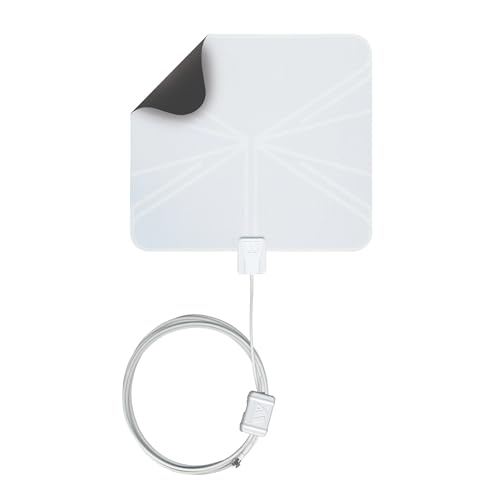
Winegard has manufactured antennas in Iowa since the 1950s, and the FlatWave Amped applies that experience to the flat format. Its distinguishing feature is a detachable low-noise amplifier, which sounds like a small thing and is actually the most practical idea in this roundup. Because the amplifier unclips, one purchase covers both experiments every indoor viewer should run: amplified and passive. Near the towers you remove it and avoid overload; at the edge of suburbia you clip it in and take the gain. The antenna itself is a dual-band design with more honest VHF intent than most leaves, though it still will not match a true dipole.
The FlatWave is also unusually window-friendly. It is thin, light and reversible in tone, and its cable is long enough to reach the good glass in most rooms. The amplifier draws USB power, and Winegard’s version is quieter, in the electrical sense, than the no-name boosters bundled with bargain antennas. Setup follows the same scan-and-move ritual, but the detachable amplifier adds one more variable to test, so budget an extra scan cycle. That small effort is exactly why we recommend this model to methodical buyers: it turns guesswork about amplification into a five-minute experiment with a clear answer.
Strengths
- Detachable amplifier lets you test both configurations with one purchase.
- Low-noise amplification preserves weak channels better than bargain boosters.
- Better high-VHF effort than most flat competitors.
Trade-offs
- Reception still depends on USB power when the amplifier is in the chain.
- VHF remains a compromise compared with a dedicated dipole design.
Who it suits: buyers at uncertain distances, especially anyone between ten and forty miles out who does not know whether they need amplification. It is also a sensible pick for a second TV in a bedroom. You can check price on Amazon.
Check price on Amazon: Winegard FlatWave FL5500A Amplified

ClearStream Flex
The Flex answers a specific complaint: every antenna looks like a piece of lab equipment or a paperback book taped to the wall. Antennas Direct built it as a thin rectangular panel — 12 by 16 inches and a fraction of an inch thick — finished in reversible black and white with a surface that can be painted, so it can sit flat against a wall or behind a television without announcing itself as hardware. Inside the panel is the maker’s patented loop paired with a high-VHF element, which separates it from the UHF-only flat antennas: it is documented for both bands, UHF 470–608 MHz and high-VHF 174–216 MHz. A loop pattern tends to be forgiving about direction, which suits rooms where precise aiming is not an option.
Performance is honest mid-pack reception with real VHF ability, and the included Jolt Switch amplifier is the Flex’s most practical idea: an 18 dB in-line booster with a simple on/off switch, so you add gain only when a channel needs it and switch it off near the towers to avoid overload. The 12-foot coaxial cable is generous for an indoor panel, and the included hook-and-loop tabs and push pins make mounting renter-friendly. Within its territory it is one of the easiest antennas to live with: the panel survives being moved during cleaning without creasing, and guests genuinely do not notice it.
Strengths
- Thin panel, reversible black and white and paintable.
- Loop plus high-VHF element covers both bands from one panel.
- Jolt Switch amplifier adds gain only when needed, with an off switch against overload.
Trade-offs
- Indoor only; it cannot graduate to an attic or a mast.
- Still needs aiming — the 70-degree pattern is forgiving, not omnidirectional.
Who it suits: apartment and condo viewers whose first requirement is that the antenna not look like an antenna. If your room is difficult and your distance is uncertain, the Flex’s switchable amplifier answers both questions in one purchase. You can check price on Amazon.
Check price on Amazon: ClearStream Flex

GE Ultra Edge
Every roundup needs the honest budget option, and the Ultra Edge earns the slot by being adequate at the one job most buyers actually have: pulling in strong local channels in a city or close suburb without spending real money. It is a thin, passive sheet with a modest built-in cable, sold under GE branding by a licensee. There is no amplifier, no detachable anything and no pretense of fringe performance. What you get is a light antenna that tapes to the wall behind the TV in two minutes and, within its range, delivers the same free HD picture as models costing several times more, because digital reception is famously cliff-like.
The limits arrive exactly where you would predict. The range is short, so this is a within-fifteen-miles product, and even then a brick exterior wall on the wrong side of the building can defeat it. VHF performance is minimal, the cable is short enough to dictate placement rather than enable it, and the build is light in a way that suggests careful handling rather than decades of service. None of that makes it a bad purchase. It makes it a correctly scoped one, ideal as a first antenna, a spare for a guest room or kitchen TV, or a dorm-room antenna. Many households should start here, discover they need nothing more, and stop shopping.
Strengths
- Lowest-cost credible way to test over-the-air reception at home.
- Passive design means no power, no overload and instant setup.
- Thin and light enough for dorms, kitchens and temporary housing.
Trade-offs
- Short real-world range; unsuitable beyond close suburbs.
- Weak VHF reception rules it out for VHF-network markets.
Who it suits: urban viewers close to the towers, students, and anyone who wants to learn what their home can receive before committing to a better antenna. You can check price on Amazon.
Check price on Amazon: GE Ultra Edge
Channel Master FLATenna
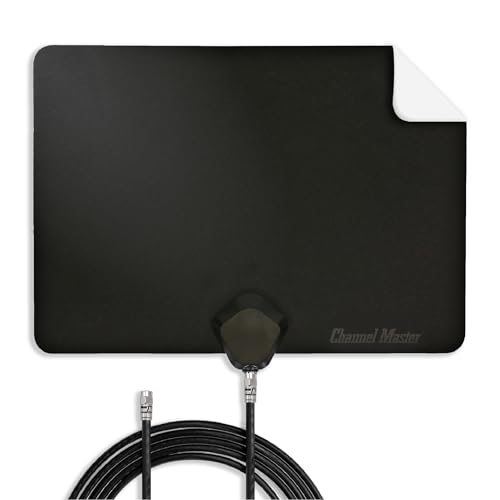
Channel Master has sold antennas and signal equipment since 1949, and the FLATenna reflects that heritage: it is a passive, dual-band flat antenna engineered and specified conservatively, with published numbers the company is willing to stand behind. The design makes a more serious attempt at high-VHF than most sheets, which makes it interesting for the large group of viewers who live close to the towers but have one network stranded on VHF. If that is your situation and your distance is short, a well-made passive antenna like this one often beats an amplified leaf, because your problem was never signal strength, only band coverage.
The FLATenna is also the pick for people who dislike powered accessories. No USB cable, no wall wart, no amplifier to overload or fail: the antenna connects to the TV and works, which suits secondary rooms and anyone whose home sits in a strong-signal zone where amplification only causes trouble. The cable is detachable, a quiet advantage that lets you swap in a longer run to reach a better wall. There is no amplifier to rescue a fringe address, and the flat form still cannot equal a real dipole on VHF, so distant VHF stations remain out of reach. Within its intended territory, it is the most set-and-forget product in this guide.
Strengths
- Honest specifications from a long-established antenna specialist.
- Stronger high-VHF attempt than most flat designs, for close-in VHF markets.
- Detachable cable allows a longer run for better placement.
Trade-offs
- No amplifier option for homes near the edge of coverage.
- VHF ability, while better than most sheets, still trails a dipole design.
Who it suits: close-in viewers, especially those whose only problem is one VHF network, plus anyone who wants a passive antenna they can install and forget. You can check price on Amazon.
Check price on Amazon: Channel Master FLATenna
Setup: scanning, rescanning and splitting the signal
Every antenna in this guide follows the same installation ritual, and the ritual matters more than the hardware. Connect the coaxial cable to the antenna input, set the TV’s source to its built-in tuner, and run the channel scan from the settings menu. The scan takes several minutes. When it finishes, write down how many channels it found. Then move the antenna, and scan again. Owners skip the rescan constantly and then blame the antenna, so treat “move, then rescan” as a single indivisible action.
Rescanning is also a recurring chore, not a one-time event. Stations occasionally change their broadcast frequencies, and a channel that vanishes overnight has usually moved rather than died. A monthly rescan, or one whenever a familiar channel disappears, keeps your lineup current. Weather matters too, so judge your setup by its worst week, not its best evening.
Splitting one antenna to several televisions is where amplification stops being optional. Every split divides the signal, so homes feeding three or four sets often need an amplified antenna or a separate distribution amplifier. Keep total cable length in mind as well; signal bleeds away along long runs of cheap coax. If one TV receives a channel and another does not, the difference is almost always the length and splitting of the cable between them, not the televisions.
Indoor limits, and when to stop buying indoor antennas
Honesty requires a section on what no product in this guide can do. An indoor antenna cannot fix a home in a valley shadowed by a ridge, a basement apartment, or an address fifty miles out with VHF stations. Building materials are the silent variable: foil-backed insulation, metal roofing, stucco lath and energy-efficient window coatings all attenuate signals, sometimes severely, and two identical houses on the same street can behave differently. If you have tried two positions, both amplifier modes and a full rescan and a major network still breaks up, the answer is elevation, not another leaf: an attic installation often transforms results, and an outdoor mast does better still.
One tool softens those limits: the signal meter hidden in most televisions. Buried in the settings menu, often under signal information or antenna strength, it reports the strength and quality of the channel you are watching in real time. With that screen open, placement stops being guesswork. You can watch the meter respond as you raise the antenna, rotate it a few degrees or move it away from a metal bookcase, and stop where your weakest must-have channel sits comfortably above the breakup threshold. Phone apps that map towers and compass headings pair well with the meter, giving you a direction to start from and a number to optimize.
How to read a tower report like an installer
The single most valuable step in this entire process costs nothing: a tower report for your address. The FCC’s reception maps and independent antenna sites will list every station you can plausibly receive, with its real broadcast channel, its distance and its compass heading. Start with the network affiliates you actually watch. If they cluster within about thirty degrees of each other, one antenna orientation serves them all. If they spread across ninety degrees or more, you are in a multi-directional market, and a forgiving loop design or two antennas become the realistic answers.
Next, check the band column for each must-have station and write down any that fall between broadcast channels 7 and 13, the high-VHF range, or worse, between 2 and 6. Those entries dictate your shortlist more than any other data. Then look at distance with honest eyes. Stations under twenty miles are easy. Stations between twenty and forty miles are the contested zone where placement and modest amplification decide outcomes. Anything beyond fifty miles should be treated as an outdoor-antenna conversation. Finally, note the terrain flags some tools provide: a report that assumes clear line of sight is optimistic if a ridge sits between you and the mast.
A room-by-room placement playbook
Because placement dominates results, think like a signal rather than like a decorator. Signals arrive from the direction of the towers, weaken through each wall, and reflect off metal. In a living room, the winning spot is usually high on the tower-facing wall or in the upper corner. Run the cable along the baseboard or behind furniture and accept a visible cable run as the price of extra channels. If the tower-facing wall is interior, try the perpendicular wall nearest the towers’ side of the building; signals entering through a side wall often beat signals forced through the whole depth of the house.
Bedrooms and second TVs deserve their own experiments rather than a copy of the living room’s answer, because one floor up or one room over can change everything. Height is your friend in bedrooms: the top of a wardrobe facing the right direction is a classic winning location. In apartments, remember that your building itself is the obstruction for half the compass; the wall shared with the corridor may be freer of metal than the exterior wall. Kitchens, with their refrigerators, microwaves and metal cabinets, are the hardest rooms in the house; expect to compromise, and consider whether the kitchen TV can share the living room antenna through a splitter.
Antenna myths worth retiring
Myth one: a “4K” or “HD” antenna receives a better picture. Antennas capture radio waves; they neither know nor influence resolution. A decades-old antenna in good condition receives today’s broadcasts exactly as well as a new model of equivalent design. Buy antennas for band coverage, build and placement flexibility, never for resolution badges.
Myth two: bigger range numbers mean a better antenna. Range claims in this category are unregulated and routinely absurd. A claim of several hundred miles describes reception that the curvature of the Earth forbids. What actually differs between models is gain pattern, band coverage and amplifier quality. Treat any antenna advertising triple-digit range as a warning about the seller’s honesty rather than a promise about performance.
Myth three: if one amplifier helps, two will help more. Stacking amplifiers, or adding a distribution amplifier to an already amplified antenna, usually overloads the tuner or amplifies noise into visible interference. One well-chosen amplifier, placed close to the antenna, is the ceiling of useful. If reception is still poor after that, the fix is position or elevation.
Apartment and condo realities
Apartment dwellers face a specific geometry problem: you control only your own rooms, and the building decides which directions are open to you. If your unit faces away from the towers, the signal must cross the entire building before it reaches your wall. In that situation the best indoor antenna is the one placed nearest the tower-facing side of your unit, even if that means the television and the antenna live in different rooms connected by a longer cable run, or a network tuner that streams the antenna feed over your home Wi-Fi. Hallway-side walls sometimes outperform exterior walls in modern buildings, because exterior assemblies increasingly include foil-backed insulation and coated glass.
Lease rules shape the solution too. Most prohibit anything mounted outside, which is exactly why this guide sticks to indoor models, but they rarely restrict what you tape inside a window or pin above a bookcase. Removable adhesive strips and the light weight of flat antennas make the whole category renter-safe. If your building offers a shared rooftop antenna feed, ask the management before buying anything; some older buildings maintain one, and a dusty wall outlet behind the TV may already carry every local channel for free.
Frequently asked questions
Do digital TV antennas really work, or is this a gimmick?
They genuinely work, because “digital antenna” is simply an antenna sized for the frequencies digital television uses. Broadcasters transmit local channels free over the air in high definition, and any antenna that can capture UHF and, where needed, VHF signals will deliver them. The gimmickry lives only in marketing claims about impossible ranges. Match the antenna to your distance and bands, and place it patiently.
Why do I get every channel except one network?
Almost always because that network broadcasts on a different band, usually high-VHF, while the rest use UHF. Flat antennas receive VHF poorly, so the UHF stations arrive perfectly and the VHF station drops out. Check your station’s real broadcast channel in a tower report. If it is VHF, choose a design with a VHF element or dipoles and rescan after every move. Distance and amplifier overload are the next most likely culprits if the band is not the issue.
Should I buy an amplified antenna to be safe?
Not automatically. Amplification helps weak-but-clean signals, long cable runs and multi-TV splits, but it harms reception near the towers by overloading the tuner, and it cannot recover a signal the antenna never captured. If you live within about fifteen miles of the transmitters, start passive. If you are unsure, buy a model with a detachable amplifier so you can test both modes, and compare channel counts with a fresh scan after each change.
How many channels should I expect?
It depends entirely on your market, not your antenna. Large metro areas may offer forty or more channels and subchannels, while smaller markets may offer a dozen. Every antenna in this guide receives the same universe of signals available at your address; the differences are which of the weaker or VHF signals each design captures reliably. A tower-locator report for your address gives a realistic expectation before you buy.
Will these antennas work with the new ATSC 3.0 broadcasts?
Yes, at the antenna level there is nothing to change. ATSC 3.0, marketed as NextGen TV, uses the same UHF and VHF frequencies, so the antenna neither knows nor cares which standard carries the signal. What you may eventually need is a television or external tuner that can decode ATSC 3.0. Buying any antenna here today does not lock you out of the new standard tomorrow.
In the end, the best digital TV antenna is the one matched to your towers, your bands and your walls, so run the tower report, pick the design that fits your situation, and let a patient weekend of scanning turn free airwaves into the clearest picture in the house.


